

Introduction
Taranac is a free, self-hosted network access control (NAC) and device-administration platform. It unifies TACACS+, RADIUS and 802.1X behind a single admin UI, a single identity store and a single set of access policies — covering the same ground as commercial products like Cisco ISE, without the per-device or per-endpoint licensing.
Where a typical network stacks a separate TACACS+ server, a RADIUS server, a guest-portal appliance and a certificate authority, Taranac runs them as one product. You define users, network devices and policy once; the platform compiles that into live TACACS+ and RADIUS service configuration and keeps the two engines in sync. On the same core it also versions and diffs your device configurations (Configuration tracker), learns what every endpoint actually is (Discovery & profiling) and reports over everything it records (Reports).
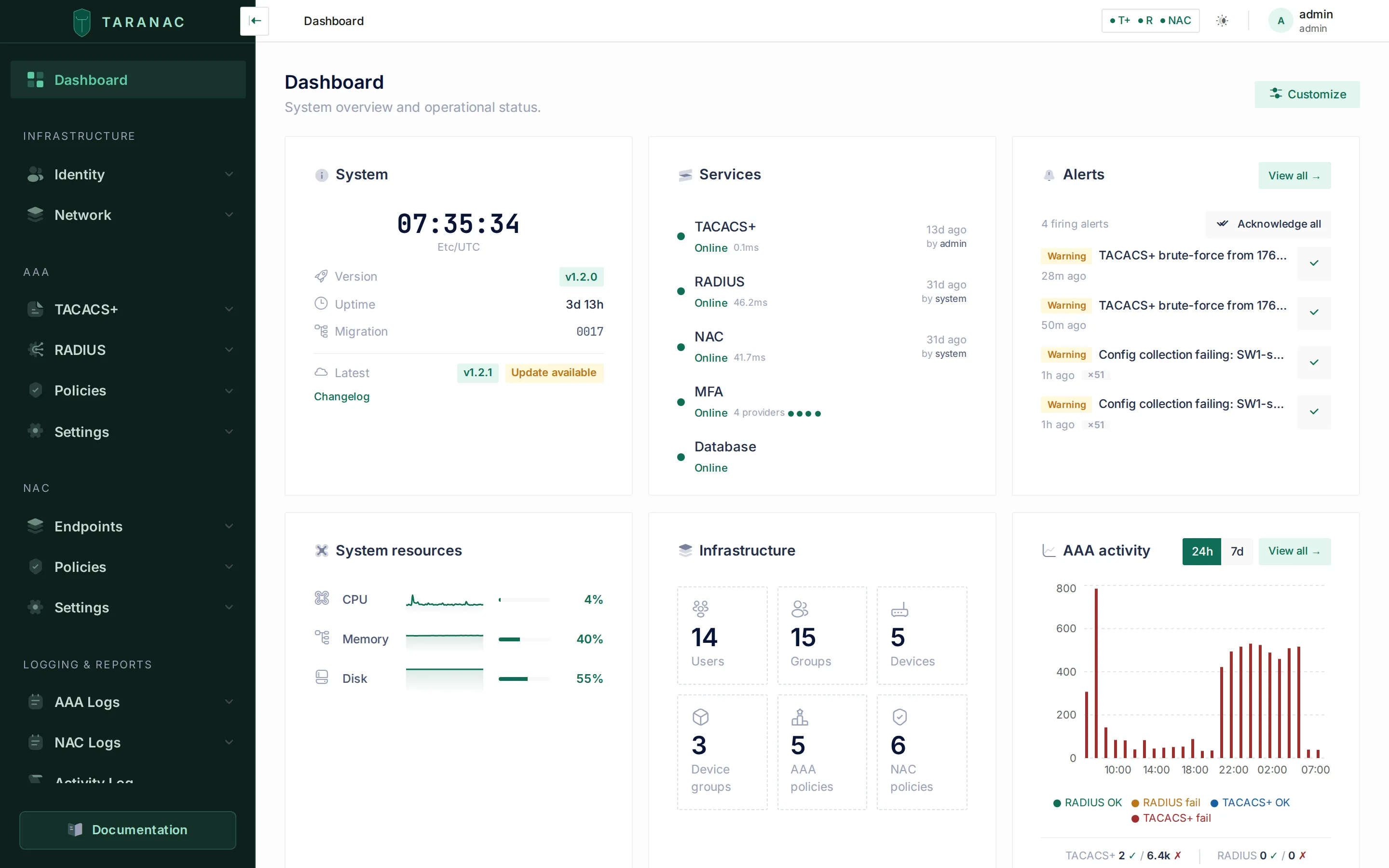 The dashboard is an operational overview built from widgets you can choose and rearrange — entity counts, live TACACS+/RADIUS/NAC service health (with a badge when configuration changes are waiting to be deployed), authentication activity and firing alerts, plus license/edition, backup status, collector and configuration-drift widgets and, on an HA deployment, cluster health.
What Taranac does
Section titled “What Taranac does”Taranac is organised around two products that share one core:
| Product | Purpose | Protocols |
|---|---|---|
| AAA | Control administrative access to network devices (who can log into a switch, what commands they may run, session accounting) | TACACS+, RADIUS |
| NAC | Control device access to the network (port-level authentication, endpoint identity, VLAN/ACL assignment, guest onboarding) | 802.1X over RADIUS |
Both products draw on the same identity, network-device inventory, logging and PKI subsystems, so an operator configures one platform rather than wiring several appliances together. Three more subsystems sit on that same core:
| Subsystem | Purpose | Docs |
|---|---|---|
| Configuration tracker | Collect, version and diff the running configuration of every device, over SSH, Telnet, SCP/SFTP or HTTP(S) — with just-in-time logins and change attribution resolved from TACACS+/RADIUS accounting | Configuration tracker |
| Discovery & profiling | Learn what each endpoint is from what it says about itself — DHCP requests, the browser at the captive portal, the directory, a scanner on a collector, SNMP on the switches, your own script — and name it from a profile tree that endpoint groups and NAC policy can act on | Discovery & profiling |
| Reports | Prepared queries over AAA, NAC, configuration and audit data — saved datasets, multi-page reports, scheduled e-mail delivery, CSV/XLSX/PDF export | Reports |
Beyond a single host, Taranac also grows sideways: modules — a remote collector or a DMZ captive portal — are attached to the core with one command, and a cluster of Taranac nodes with automatic failover is built with three (see High availability).
How Taranac is licensed and distributed
Section titled “How Taranac is licensed and distributed”Taranac is not an open-source project. The source is not published; what is published is the finished product:
- Container images, from the public registry
ghcr.io/taranaclabs/taranac. - A thin install bundle — a Compose file, an installer and a
taranacoperations wrapper — from the public repository TaranacLabs/taranac. You build nothing; the installer pulls the images. See Installation, or the virtual appliance if you would rather import a ready-made VM.
Both are covered by the Elastic License 2.0: free to use, including commercially and in production, but you may not offer Taranac to others as a hosted or managed service, and you may not move, change, disable or circumvent its license-key functionality.
There is one set of images and one bundle for everyone — there is no separate “Pro build”, and everything high availability needs ships in what you already downloaded. The Community edition is the complete AAA and NAC platform with no usage caps and no metering: unlimited devices, users, groups and policies. Pro is a feature switch, unlocked by an offline, signed license file that Taranac verifies locally — no phone-home, no activation. It gates exactly one capability, high availability, plus the size cap on an HA cluster; everything else is in Community. See Licensing & editions for the detail.
Support is a separate, commercial thing — free to start, see Support — and a support window that lapses never disables a feature.
Who it is for
Section titled “Who it is for”Taranac is built for the network or security engineer who operates the
infrastructure — the person who today runs tac_plus, a FreeRADIUS instance, an
LDAP bind and a guest portal as separate moving parts. If you administer
switches, routers, firewalls and wireless controllers, and you need centralised
AAA plus standards-based port control, Taranac is the single control plane for
that work.
This documentation is written for that operator/administrator audience. It explains how to configure and reason about Taranac through its admin UI, not how the internals are implemented.
Key concepts
Section titled “Key concepts”These are the terms as the admin UI uses them. Each maps to a section in the sidebar of the Taranac console.
| Term | What it means |
|---|---|
| Device administration (AAA) | Authenticating and authorising humans who log into network devices, and accounting their sessions, over TACACS+ and RADIUS. |
| Network access control (NAC) | Authenticating endpoints (laptops, phones, IoT) at the switch port via 802.1X, then assigning network access (VLAN, ACL). |
| Identity | The people and machines Taranac authenticates: local Users and Groups, plus directory identities synced from an LDAP directory. A directory has a type — Active Directory, OpenLDAP, FreeIPA, Google Workspace or generic — chosen once when it is created. |
| Network device | A switch, router, firewall or controller that talks TACACS+/RADIUS to Taranac. Each device carries its shared secret and which protocols it uses. |
| Profile | The reusable authorisation result Taranac returns — a TACACS+/RADIUS profile (privilege level, attributes) or a NAC authorization profile (VLAN, ACL). |
| Policy | An ordered, top-down rule table that maps a request (who, from where, under what conditions) to a profile. AAA and NAC each have their own policy table. |
| Endpoint | A device seen on the network, identified by MAC/OUI and classified into endpoint groups for NAC policy. |
| Device profile | What an endpoint is — a node in a profile tree such as Any device › Computer › Windows › Laptop — concluded by Device Profiling from the evidence its discovery sources collected. |
| PKI | The internal certificate authority and trusted CAs used for EAP-TLS and the platform’s own certificates, including EST and SCEP enrollment for clients and network devices that ask for a certificate themselves. The internal CA can also run under your corporate root as a subordinate CA. |
| RBAC | Role-based access control governing what each Taranac admin may see and change in the console. Separately, a group’s console access decides whether its members may sign in to the console at all — synced directory users are policy subjects, not operators. |
| Tracked config | A device whose running configuration the configuration tracker collects on a schedule, storing each capture as a versioned snapshot you can diff against a baseline. |
| Collector | The component that works from inside the network — collecting configurations, polling SNMP, running Web Probe, listening for DHCP and scanning. Embedded by default, or a standalone collector deployed into a segmented network that dials out to the core. |
How the platform is organised
Section titled “How the platform is organised”The admin console groups everything into a fixed set of sections. The documentation mirrors that structure, so what you see in the sidebar maps directly to a docs section.
| Console section | What lives there | Docs |
|---|---|---|
| Dashboard | Operational overview: entity counts, TACACS+/RADIUS health, auth activity, alerts | This page |
| Infrastructure → Identity | Users, Groups, RBAC | Identity & access |
| Infrastructure → Network | Devices, Device Groups, Network Objects, Time Ranges | Network devices |
| AAA | TACACS+ Profiles/Command Sets/Templates, RADIUS Profiles/Templates, Policies (incl. Policy Tester and Log Exclusions), Settings | Device administration |
| NAC | Endpoints, Endpoint Groups, Classification Tester, Captive Portals, Authorization Profiles, Policies, Vendor Dictionary, and — under NAC → Settings — PKI and Trusted CAs | Network access control |
| NAC → Discovery Sources | DHCP Probe, Web Probe, SNMP, Scanner, Device Profiling, OUI Database | Discovery & profiling |
| Logging & Reports | AAA logs (authentication/authorization/accounting), NAC sessions, guest sessions, auth log and scanner journal, Activity log, Alerts, Reporting (Reports, Datasets, Scheduler) | Operations · Reports |
| Configuration Tracker | Configs, Collection Runs, and its own Settings (Sources, Credentials, Recipes, Scrub Sets) | Configuration tracker |
| Settings | System (General, Workers, Alerts, Collectors, Log Rotation, Backup, Licensing, Cluster, Authentication & Sessions), Integrations (LDAP, Email, MFA, SMS, Syslog) | Reference |
A typical first path through Taranac
Section titled “A typical first path through Taranac”A new deployment is usually brought up in roughly this order:
- Sign in and meet the dashboard. It confirms the TACACS+ and RADIUS engines are reachable and shows whether any configuration changes are pending deployment.
- Add identity. Create local users and groups, or connect a directory under Settings → Integrations → LDAP. Optionally enable MFA.
- Register network devices. Under Infrastructure → Network → Devices, add each switch/router with its shared secret and the protocols it will use.
- Build authorization profiles for the access you want to grant — TACACS+ privilege levels and command sets for device admins, or NAC profiles (VLAN/ACL) for endpoints.
- Write a policy. Order rules top-down so that a request resolves to the right profile. Use the Policy Tester to dry-run a request before relying on it.
- Watch the logs. Authentication, authorization and accounting logs (and NAC sessions) show exactly what each rule decided and why.
Once AAA is answering, the usual next steps are pointing the configuration tracker at the same devices, scheduling a report, and — if the deployment has to survive a node — building a cluster. The Quick start walks the whole first path end to end with concrete values.
When to use what: AAA vs NAC
Section titled “When to use what: AAA vs NAC”Taranac’s two products solve different problems. Use this to decide which part of the console a given task belongs to.
| You want to… | Use | Section |
|---|---|---|
| Let engineers log into switches with role-based command control | AAA (TACACS+) | AAA → TACACS+ |
| Authenticate admins to devices via RADIUS (e.g. firewalls, WLCs) | AAA (RADIUS) | AAA → RADIUS |
| Authenticate laptops/phones at the switch port and assign a VLAN | NAC (802.1X) | NAC → Policies |
| Allow unmanaged devices by MAC address (printers, IoT) | NAC (MAB) | NAC → Endpoints |
| Issue client certificates for certificate-based 802.1X | NAC (EAP-TLS + PKI) | NAC → Settings → PKI / Certificates |
| Find out what a device is, and give it a VLAN by what it is | Discovery & profiling | NAC → Discovery Sources |
| Onboard guests through a web portal | NAC (Captive Portal) | NAC → Endpoints → Captive Portals |
| Decide who can administer Taranac itself | Identity (RBAC + console access) | Infrastructure → Identity |
| Keep versioned backups of device configurations and see what drifted | Configuration tracker | Configuration Tracker → Configs |
| Hand an auditor a document instead of a screen | Discovery & profiling | Learn what each endpoint is from what it says about itself — DHCP requests, the browser at the captive portal, the directory, a scanner on a collector, SNMP on the switches, your own script — and name it from a profile tree that endpoint groups and NAC policy can act on |
| Reports | Logging & Reports → Reporting |
Related
Section titled “Related”- Architecture — how the components fit together
- Installation — deploying Taranac
- Quick start — first configuration end to end
- Device administration overview — TACACS+, RADIUS and AAA policy
- Network access control overview — 802.1X, endpoints and NAC policy
- Identity & access — users, groups, LDAP directories, RBAC and MFA
- Discovery & profiling — discovery sources, device profiling and the profile tree
- Configuration tracker — versioned device configs, diffs and drift
- Reports — datasets, reports, scheduling and exports
- Licensing & editions — Community vs Pro, and the offline license file
- Roadmap — what has shipped so far, and where the platform is heading
- Install bundle on GitHub — the public deployment bundle (the product’s source is not published)