

High availability
High availability (HA) runs Taranac as a cluster of nodes — as many as your HA license’s max_nodes allows — so that authentication keeps serving even when a node fails. Every node runs the full Taranac stack — UI, API, and the TACACS+/RADIUS/NAC daemons — on top of a replicated PostgreSQL database: one node is the read-write primary, the others are read-only replicas that continuously stream the primary’s data. The cluster is managed for you by Patroni (which supervises Postgres on each node) and etcd (the agreement layer that decides who is primary); you never operate those directly — ./taranac cluster init, add-witness and add-node are the whole interface, and each prints the single command to run on the machine being added.
HA is a Pro feature, unlocked by an HA license that both allows ha and sets how many nodes you may run (max_nodes). The single most important property: because each daemon answers AAA/NAC requests from its own node-local database replica and in-memory cache, the authentication data plane never depends on the primary being up — point your network devices at every node as AAA servers and they ride straight through a failover, with only configuration writes pausing for a few seconds during promotion.
This page is the operator guide: what HA gives you and when to use it, the architecture in plain terms, prerequisites, how to enable it, how to prove it survives a node loss with cluster verify --rehearse, the security you must apply, day-2 operations, rolling upgrades, and diagnostics. The distribution bundle also carries the full operator runbook HA.md with the exact long CLI transcripts; everything you need to decide and drive an HA deployment is on this page.
What HA gives you, and when to use it
Section titled “What HA gives you, and when to use it”Use HA when an authentication outage is not acceptable — when a switch, VPN or firewall that authenticates against Taranac must keep working even if one Taranac host goes down for a reboot, a failure, or maintenance. A single-node install is perfectly fine for many deployments; HA is the answer when you need the AAA/NAC service to survive the loss of a node.
- Two or more nodes (up to your license’s
max_nodes), each running the complete stack (UI, API, daemons, database). - One primary (read-write), the rest read-only replicas streaming the primary’s data continuously.
- Authentication keeps serving on every node, including during a failover. The daemons answer from node-local data plus their caches, so the AAA/NAC data plane does not depend on the primary. Configure your NAS devices with every node as an AAA server.
- Automatic failover. If the primary dies, the most up-to-date replica is promoted and the cluster keeps running. Only configuration writes (UI edits, new accounting rows) pause for a few seconds during promotion, then resume on the new primary.
Architecture in operator terms
Section titled “Architecture in operator terms”There are two kinds of host in a cluster:
- DB nodes each run the full Taranac stack: the api, the three daemons (radius / tacacs / nac), one etcd voting member with its etcd-agent (which renews that member’s etcd certificate — see etcd certificates and the etcd CA), and the database container — Patroni supervising PostgreSQL 16. Exactly one DB node is the primary at any time.
- A witness host (for 2-node clusters — see below) runs only an etcd member and its etcd-agent. No Postgres, no Taranac stack.
Roles. Exactly one node is the primary (read-write); the rest are read-only replicas streaming the primary’s write-ahead log. The agreement on “who is primary” lives in etcd; Patroni reads it to elect a leader and to fail over. In Taranac the rule is simply leader == Postgres primary.
Read/write routing. Writes are tagged target_session_attrs=read-write and tried against every database node, so they always land on whichever node is currently primary, wherever it is. The list of nodes to try comes from the replicated node roster — the cluster’s own table of members, of which every node holds a copy. The api and every ./taranac cluster command read it directly; the TACACS+, RADIUS and NAC daemons and taranac-mfa read a small routing file the api rewrites from it every 15 seconds. So a node that finishes joining is a write target on every member within seconds, with nothing restarted. DB_HOSTS in .env is only the bootstrap list — what a process uses before it has read the roster. Daemon reads stay node-local — each daemon reads its own node’s replica and serves AAA from that plus in-memory caches. That is precisely why authentication never depends on the primary: a replica keeps answering TACACS+/RADIUS/NAC from local data even mid-failover, and only writes briefly pause.
Quorum and split-brain. etcd needs a majority of its members to act. Two DB nodes are an even split, so a network partition between them would deadlock — that is what the witness (a third voting member) is for. A partitioned old-primary that can no longer reach a majority self-demotes to read-only on its own, so two writers can never coexist. Three or four DB nodes already have a natural majority and do not need a dedicated witness.
The failover window. Patroni’s DCS timings are the stock production-sane set: ttl 30 s, loop_wait 10 s, retry_timeout 10 s. A hard loss of the primary therefore takes roughly the TTL to be noticed and acted on; a planned switchover is near-instant, because the leader hands over rather than expiring. use_pg_rewind is on, so a returning old primary re-attaches without a full re-clone.
The witness — mandatory for a 2-node cluster
Section titled “The witness — mandatory for a 2-node cluster”A 2-node cluster cannot safely fail over on its own. If the network splits the two nodes, neither can tell whether the other is dead or merely unreachable, so neither may safely become primary — this is split-brain. The tiebreaker is a third etcd voting member, the witness, running on a separate failure domain — a different host or VM, ideally a different rack or site.
- The witness runs only etcd and the small
etcd-agent(docker-compose.witness.yml) — no Postgres, no Taranac stack. It is tiny; a management VM with ~200 MB and Docker is fine. It pulls the agent fromghcr.io/taranaclabs/taranac/etcd-agent:<version>; an air-gapped witness names its mirror withETCD_AGENT_IMAGE_PREFIX=<registry>/<path>in its.env(the same kind of value as a database node’sIMAGE_PREFIX), filled with a digest-preserving copy. - It holds no database, no
MASTER_KEYand no application credential — but it does hold the cluster’s etcd CA key, inconfig/etcd-ca(0600), because it renews its own etcd certificate. Whoever holds its disk holds that key: protect the witness like a database node. - It must be a separate host.
witness-join.shrefuses to run on any machine that already has ataranac-dbortaranac-apicontainer: an arbiter co-located with a node it arbitrates is not a smaller deployment, it is a broken one. - The tooling refuses a deploy whose declared etcd ring lists fewer than 3 members — both
cluster init’s preflight andha-convert.shcheckETCD_INITIAL_CLUSTERand stop. This is not optional. - For three or more DB nodes a dedicated witness is not required — you already have a majority — but you still list every node’s etcd member. A cluster that grew to three database nodes can let its witness go: see Remove the witness.
See Living with the witness for what the witness host can and cannot do day to day.
Prerequisites
Section titled “Prerequisites”Before you convert:
- A running single node, installed normally, that already holds your data. It becomes node-1, the seed/primary.
initrefuses a host with notaranac_pg_datavolume — the conversion adopts an existing, populated data directory; a fresh machine should be a join, not a convert. - The HA license uploaded on node-1 while it is still single-node (Settings → System → Licensing). Nodes inherit the license when they join; you never upload it per node.
- All nodes on the same version, the witness included. Check with
./taranac versionon each host. A machine joins on the cluster’s version — itstaranacscripts as well as its images — and the join refuses before it changes anything otherwise: a host installed from an older bundle is told to run./taranac update --version <cluster version>first and then the same join command again (the primary keeps waiting); a host installed from a newer bundle is told to bring the cluster forward first, or to install from the cluster’s own bundle.add-witnessrefuses a witness on another bundle version before anything changes on either side; the cure it names is./taranac update --version <cluster version> --no-restarton the witness, then the samewitness-join.shcommand again. - The full topology decided up front — every node’s address, plus a witness host for a 2-node cluster.
cluster initasks for all of it once and declares it for the whole cluster: the etcd ring must be complete before the conversion, because a member missing from it gets no certificate and can never join. - A private network between the nodes. Replication, etcd and Patroni traffic must travel a trusted, firewalled interconnect — never the public internet. A host firewall must also let each node reach itself from its Docker network: see The node’s own Docker network.
- SSH to each machine you are adding, to paste one command per node. Nothing else travels by hand — no TLS files, no master key (see Cluster secrets).
- The same protocol ports on every node.
TACACS_PORT,TACACS_TLS_PORT,RADIUS_AUTH_PORT,RADIUS_ACCT_PORT,NAC_AUTH_PORTandNAC_ACCT_PORTcome from each node’s own.env; a device that fails over to a node listening on another port fails. See Changing a protocol port. - Device-facing TLS certificates are per node. Each node generates its own TACACS+ over TLS and EST gateway certificates and signs them with its own Infrastructure CA; joining does not copy it. A device that fails over between nodes must trust every node’s CA, or you deploy a certificate of your own, from a CA your devices already trust, on every node — see TACACS+ over TLS and the EST gateway’s certificate.
Enable HA
Section titled “Enable HA”Three commands, run on the node that already holds your data. The order is enforced by the mechanism, not by this page:
./taranac cluster init # declare the cluster, prepare the conversion./taranac cluster add-witness --address <addr> # the etcd arbiter — REQUIRED before nodes./taranac cluster add-node --address <addr> # once per additional nodeEach command says what it is about to do, checks that it actually happened, and names the step when it does not. Take a backup from the in-app Backup & Recovery tools first anyway: the conversion adopts your existing database in place.
1. cluster init — declare the topology
Section titled “1. cluster init — declare the topology”init asks for the whole cluster at once, because the etcd ring has to be
declared complete before anything converts:
Cluster name (identical on every node): taranacThis node's address, as the OTHER nodes route to it: 10.20.0.40Witness address (the 3rd etcd arbiter, a SEPARATE host): 10.20.0.41Another node — <address>, or <address>=<name> to choose its name (blank when done): 10.20.0.42 PG_ALLOW_CIDR derived from the declared addresses: 10.20.0.0/24It then shows the plan and waits for a y before writing anything. What it does:
writes config/cluster.yml, writes the cluster block into .env — you do not
hand-edit either — generates the etcd CA and a certificate for every declared
member, and stops.
Names are chosen here or not at all. Omit =<name> and one is derived
(<cluster>-node-N, from the first free number, not from position). There is no
rename afterwards: the name is written into the etcd ring, the certificates, the
roster row and every node’s .env, so changing it means rebuilding that machine.
The wizard says so before you accept a name it invented, and it refuses two nodes
that would answer to the same name.
The conversion is deliberately not done at this point, and nothing has failed.
Securing etcd is a chicken-and-egg: the witness must be a live etcd member before
the ring can be pruned, but its certificate can only be signed by the CA that was
created a moment ago. init does the half that can be done alone. Your database is
still standalone and still serving.
2. add-witness — and the conversion completes
Section titled “2. add-witness — and the conversion completes”./taranac cluster add-witness --address 10.20.0.41This opens a one-shot join channel on port 9443 and prints the exact command to run on the witness host — with the broker’s own certificate fingerprint, so the witness verifies what it is talking to rather than trusting it on first sight:
./witness-join.sh --broker 10.20.0.40:9443 --token 6b9ef07396… --pin sha256:2fac71aa7c…The address in that command is visible and editable — correct it if the witness reaches the primary by a different name or port. On the witness host the script checks the host is suitable, verifies the pin, takes the ring topology from the broker, generates its own private key and sends only a request for a certificate, then starts etcd and waits for the rest of the ring.
Back on the primary, the conversion then runs by itself: it forms quorum with the witness, drops the members that have not started yet, swaps the database to the Patroni image — which adopts your data in place, no re-initialisation — and comes up as the primary. Then it verifies both halves: that Postgres reports itself primary, and that the witness is a live voting member.
3. add-node — once per node
Section titled “3. add-node — once per node”./taranac cluster add-node --address 10.20.0.42Before anything grows, add-node runs a preflight against every existing member
and prints what each one says about itself:
  Every member of this cluster, as IT reported itself (replicated heartbeat):
    NODE                     REPORTED     TOPOLOGY    PG_ALLOW_CIDR covers 10.20.0.42    taranac-node-1           6s ago       reference   yes (10.20.0.0/24)
  etcd: 2 voting member(s) now, 3 after this add; 2 of 2 endpoint(s) healthy.
A member that has not reported inside the freshness window stops the add rather than being assumed healthy, and a member that does not yet know a node which already joined is named along with the command that fixes it. Nothing is rewritten on a live member during someone else’s join.
The preflight also looks at the etcd member lists the nodes were started with.
add-node hands this node’s list to the machine being added, and etcd refuses to
start a member whose declared list differs from the live ring (member count is unequal) — so add-node first brings this node’s own DB_HOSTS, ETCD_HOSTS and
ETCD_INITIAL_CLUSTER up to what the roster and the live ring report, without
recreating anything, and stops only when the ring cannot be read. On the other
members the same values are reported when they are out of date but do not stop the
add: a running etcd takes its ring from Raft and writes follow the roster, so nothing
reads them until that member restarts, and its next ./taranac update rewrites them
right before it does.
Two things do stop it: a member that does not route writes to every node (its
copy of the roster is behind, or it runs an older release that routes by DB_HOSTS —
update it), and a member whose PG_ALLOW_CIDR does not cover the new address.
Then it prints the command for the machine being added, the same shape as the witness one:
./ha-join.sh --broker 10.20.0.40:9443 --token KHzBlVCWRZ… --pin sha256:e581f5e57c…On the joining node, ha-join.sh is explicit about the one destructive thing it
does. It counts what that node currently holds and says so before touching it:
  This node already holds a database of its own:
      devices                0      administrators         0   (beyond the default account)      AAA / NAC log records  0
  Joining DISCARDS all of it. A replica is cloned from the cluster's primary by  Patroni; two separately seeded databases cannot be merged, so no variant of  this operation keeps the local copy.
It then takes a backup of that node first and tells you where it is, unwraps the cluster’s key material, discards the local data directory so Patroni can clone, and brings the stack up on the HA overlay. Only when Patroni reports the node actually streaming does it redeem the token and report success to the primary.
When a step stops half-way
Section titled “When a step stops half-way”A conversion or a join that stops part-way always has a way forward and a way back, and the message that stops it prints both.
-
Checked before anything changes.
cluster init,add-witnessandha-join.shfirst make every connection they will need — thereplicatorlogin to the seed or leader, Patroni, etcd on every ring member, and this node’s own2379and8008from its Docker network — and refuse with one cure per failure. A replication password that differs fromPOSTGRES_REPLICATION_PASSWORDin.envis caught here. A refusedadd-witnessleaves the standalone stack serving and prints the firewall rule when a host firewall drops that traffic. -
The images are read before they run.
cluster init,add-witness,add-node, a node’s join andwitness-join.shread the files of every image the step runs against the image’s layers. A damaged copy — an etcd binary cut short fails withexec format error— is replaced when a replacement is in hand; otherwise the step stops with nothing changed, names the file and prints the cure. See Damaged images. -
A conversion that stopped before Patroni took the data. Run
add-witnessagain — it starts the standalone stack the conversion left down — or go back with./ha-deconvert.sh --abandon, which works even after etcd has run on the node, as long as Patroni has not. -
A conversion that failed after Patroni took the data. The node is marked HA first, so
./taranac up -d(forward) and./ha-deconvert.sh(back) both work. -
A join that stopped after the clone (a dropped SSH session). The node streams but the roster cannot name it. On that node, before its token expires:
Terminal window ./taranac up -d # its api starts and registers the node./taranac update --version <v> # writes its version record, restarts nothingha-join.sh,add-node,remove-nodeanddiagnose --haall print these lines with the expiry. After the token has expired, issue a new one for the same name and address on the primary (./taranac cluster join-token --name <n> --address <a>), then run the same two lines on the node — no re-clone.add-node --reinstallis the last resort after that. -
An
add-witnessinterrupted after the witness joined is finished by running it again.
Verify
Section titled “Verify”./taranac cluster statusHealthy — any one machine (taranac-node-1, taranac-node-2, taranac-node-3, witness) can be lost and writes continue.
You are on: taranac-node-1 (leader). Leader: taranac-node-1.Cluster: 3 database node(s) / max 8 — Pro (HA)Worst replica lag: 0.0sPromotion bar: 1.0 MB of WAL (read from Patroni)
NAME ROLE SYNC LAG BEHIND ETCD VERSION ADDRESStaranac-node-1 leader in_sync - - healthy 1.3.2 10.20.0.40taranac-node-2 replica in_sync 0.0s 0 B healthy 1.3.2 10.20.0.42taranac-node-3 replica in_sync 0.0s 0 B healthy 1.3.2 10.20.0.43witness witness — — — healthy 1.3.2 10.20.0.41
Write routing: every member routes writes to every nodeThe verdict comes first, in words, and it is about machines — the witness is one of them: “if a machine dies, do I keep working?” is the question people arrive with. Everything below the headline is the evidence. The line under it says which node you are on and which one leads.
The same picture is in the UI under Settings → System → Cluster — every machine as a row of one table, the witness included — with the edition, the leader, worst replica lag, and any pending join tokens (including their expiry):
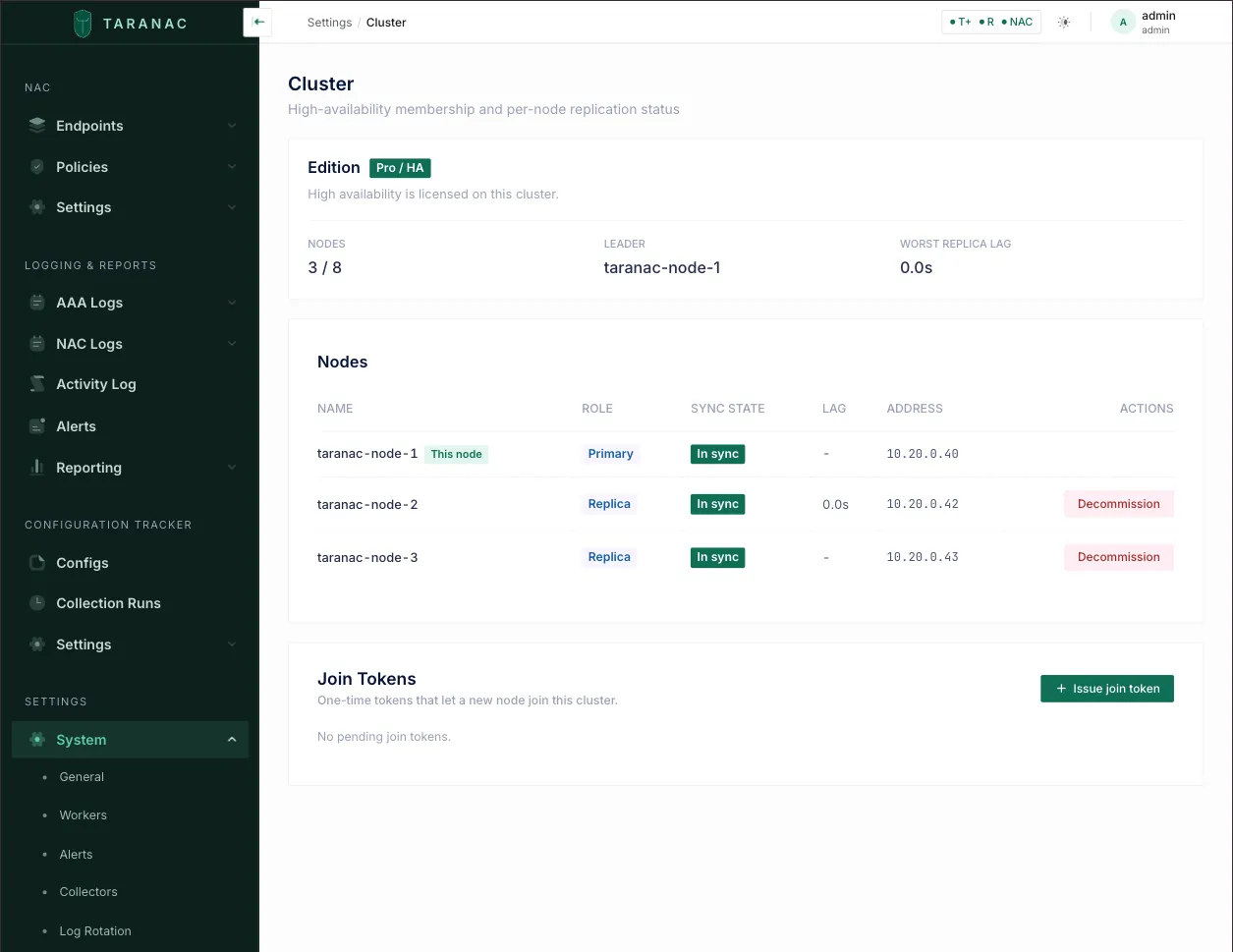
The dashboard’s cluster widget lists the witness too. The UI shows the machines,
roles, sync state, etcd state, versions and lag. The promotion bar, the
per-node connection ceiling and the failover rehearsal are CLI-only — they
are in cluster status and cluster verify.
status tells you what the cluster believes. Two commands go further, and both are
worth running on a cluster you have just built:
./taranac cluster connectivity— proves every node can actually log in to every other../taranac cluster verify --rehearse— makes a failover actually happen, and puts the cluster back.
Security — you must do this
Section titled “Security — you must do this”The HA control plane carries the cluster’s control state and its database. It is encrypted by default (the convert secures etcd), and Patroni’s control API is authenticated unconditionally — but the firewall is the always-on baseline; TLS is not a substitute. Keep the cluster on a private, firewalled interconnect and apply these:
-
Firewall the cluster ports to the private interconnect only — never expose them publicly:
Port What it carries etcd 2379/2380(client + peer)Cluster control state Postgres 5432The database itself Patroni REST 8008Cluster control — leadership, restart, reload 9443The join channel, open only while a join is running 9443is opened on the primary byadd-node/add-witness, must be reachable from the machine being added, and closes when that join finishes or times out. Nothing listens on it between joins. -
Narrow
PG_ALLOW_CIDRfrom any wide default to the cluster’s private subnet (e.g.10.0.0.0/24). The wizard derives it from the addresses you declare and refuses a topology where a declared node falls outside it — check the derived value and tighten it if your addresses are spread wider than you wantpg_hbato reach. An unsetPG_ALLOW_CIDRmeans0.0.0.0/0. -
The only ports that should face users and devices are the same as a single-node install: 443 (UI) and the AAA/NAC service ports you use.
-
IPv6 does not change these rules. The cluster ports (
5432,8008,2379) belong to containers kept off IPv6, so IPv6 to them still passes the host’sINPUTchain and ufw. Only the user- and device-facing ports are forwarded into their containers for IPv6 and bypassINPUT— filter those inDOCKER-USER(IPv6 → The host firewall).
The node’s own Docker network
Section titled “The node’s own Docker network”Two things on a database node dial the node’s own LAN address from inside a container: Patroni and the api reach etcd at every member’s address on 2379, this node’s included, and Patroni asks its own REST API at <this node>:8008 whenever a switchover names this node as the candidate. That traffic comes from the stack’s Docker network, not from the LAN. A host firewall that admits only the LAN cuts the node off from its own etcd and makes Patroni refuse it as a candidate (no good candidates have been found), so leadership can be handed away from it but never back. One rule per database node covers both — with ufw:
sudo ufw allow proto tcp from 10.255.255.240/28 to <this node's address> port 2379,8008The stack’s network, taranac_default, is 10.255.255.224/27. The containers that never dial the node’s own address have fixed addresses in its lower half; Docker hands out every other address from 10.255.255.240/28, which is why the rule names only the /28. The api reaches its own database over the container network and needs no rule. cluster init, add-witness, ha-join.sh and ./taranac diagnose --ha test both ports from the Docker network before they change anything and print this rule with the address filled in.
TLS on the control plane
Section titled “TLS on the control plane”TLS is on by default and provisioned by the tooling — you do not hand-edit it. The default convert encrypts both etcd channels: the peer channel (2380, cross-host Raft) via auto-TLS, and the client channel (2379, Patroni↔etcd) via a shared CA — one-way, meaning etcd presents a CA-signed cert that clients verify, with no client certs. The CA and its key are held by every member, the witness included (delivered wrapped over the join channel), so losing the machine that created it does not leave a cluster that is unable to admit or replace a node. Each member’s certificate renews itself; see etcd certificates and the etcd CA.
Patroni’s REST API is authenticated, unconditionally. Port 8008 accepts POST /switchover, /failover, /restart and /reload — full control of leadership — and is published to the host. Every node therefore refuses to start without PATRONI_REST_PASSWORD; there is no flag and no fallback. The value is cluster-wide (a joining node adopts the cluster’s over its own), and PATRONI_REST_USERNAME defaults to patroni. Reads (GET /cluster, /patroni, /health) stay open on purpose — the backend’s topology polling, the slot reaper and the container healthcheck depend on them.
Cluster secrets, and how they travel
Section titled “Cluster secrets, and how they travel”Several secrets are cluster-wide and must be identical on every node. A wrong or missing one fails silently — undecryptable stored secrets, MFA 401s, or invalid login sessions on that node. None of them is carried by hand:
| Secret | What it protects | How it reaches a joiner |
|---|---|---|
MASTER_KEY | The KEK for every stored secret, and the daemons’ KEK | Wrapped over the join channel — never in plaintext at any layer, never in the database |
mfa.enckey | taranac-mfa’s Push/TOTP token crypto | Wrapped over the join channel, so a Push token enrolled on any node decrypts on all of them |
| The etcd CA | Signing every member’s etcd certificate | Wrapped over the join channel, and stored on every member, the witness included — so losing the machine that created it does not leave a cluster that can never admit a node again |
PATRONI_REST_PASSWORD | Patroni’s control API on 8008 | Derived from MASTER_KEY, so every node computes the same value with no coordination and nothing extra on the wire |
SECRET_KEY | Signs the app’s JWTs (login, MFA-setup links, invites) | Served with the cluster configuration |
POSTGRES_PASSWORD / POSTGRES_REPLICATION_PASSWORD | App + streaming-replication creds | Served with the cluster configuration |
How the join channel is protected. The join token authenticates and encrypts under two separately derived keys, so the token itself never crosses the wire and the material it protects is never in plaintext at any layer. The joining machine pins the channel by a fingerprint printed on the primary’s console — you compare it there before pasting. That is not trust-on-first-use: an attacker who could answer on the broker’s address still cannot present the right certificate.
A witness’s join token opens less. The join channel gives a witness the etcd CA key and nothing else — no master key, no MFA key, no database credentials.
The one thing that never travels at all is a private key. Each machine generates
its own and sends a certificate request; the answer is a signed certificate. That is
what removed the scp of TLS material for database nodes and the witness alike.
etcd certificates and the etcd CA
Section titled “etcd certificates and the etcd CA”Every etcd member — each database node and the witness — serves a certificate on
the client port 2379, signed by the cluster’s etcd CA. Neither needs a calendar
reminder.
Every member renews its own certificate
Section titled “Every member renews its own certificate”A member’s certificate is valid for 825 days. The etcd-agent container on each
member renews its own certificate 45 days before it ends, with the CA key on
that machine’s disk. The renewed certificate keeps the member’s key and exactly the
addresses the old one named, and replaces the file in one atomic step. etcd presents
it on the next connection: nothing is restarted — not etcd, not Patroni, not
Postgres. A certificate that has already expired (a machine that was off for months)
is renewed the same way. What the agent did is in its log:
./taranac logs etcd-agent on that host.
To renew now rather than wait:
./taranac cluster renew-cert # this member, now — works on the witness too./taranac cluster renew-cert --all # every member renews its own; run it on any member--all shows one line per member — the old and the new end date — until every
member has answered or two minutes have passed (--timeout <s> waits longer), then
checks which certificate each member actually serves. A member that cannot take part
is named rather than waited for: one on an older release, or one whose agent does not
answer. It exits non-zero unless every member renewed; fix what the table says on
those hosts and run it again.
Both commands run in the host’s etcd-agent container. Without a running agent they
refuse, change nothing, and print how to start it
(./taranac up -d --no-deps etcd-agent) or update the host.
Replacing the etcd CA: rotate-ca
Section titled “Replacing the etcd CA: rotate-ca”The CA lives ten years, and a member’s certificate cannot outlive it. It is replaced, with the cluster serving throughout:
./taranac cluster rotate-ca # asks once, [y/N]./taranac cluster rotate-ca --yes # without the question (needed without a terminal)It makes a new CA and moves every member onto it, the witness first and then one
member at a time, re-issuing each certificate on the key the member already has.
Nothing is restarted: etcd, Patroni and the api take the new files on their next
connection. A table (MEMBER / KIND / STEP / STATUS) follows four steps — trust,
serve, settle, verify — and the run ends with
✓ etcd CA rotated: <old> → <new> and Nothing was restarted. Backups taken from
then on carry the new CA. Exit 0 done, 1 refused with nothing changed, 3
stopped part way. --timeout <seconds> (default 90) waits longer for each member’s
answer — for a witness behind a slow link.
When to run it. Every member keeps a copy of the CA key, so a machine that left
the cluster without being wiped — or one of its backups — still holds it.
remove-node, remove-witness and detach say so and name this command. Run it
after such a removal, when the key may have leaked (a lost disk, an archive in the
wrong hands), and before the CA ends: cluster:etcd_ca_expiring opens 180 days
ahead.
Before you start. Every member must be up, answering and on the same release
— finish a rolling update first. A member that does not answer, or runs another
release, is named with what to do there, and nothing is changed. A member that is gone
for good is taken out first (remove-node, remove-witness): a rotation never skips
a member. Run it on any member; a database node is the better choice, because that is
where ./taranac cluster status shows the result.
If it stops part way — a member stops answering, the console is interrupted — it says what stopped it and what state it left the cluster in. The cluster works in every state a rotation passes through. Fix what it names, then run the same command again: it first puts every member back on one CA — undoing an attempt that had not yet passed the point of no return, finishing one that had — and then rotates if the attempt was undone. There is no separate resume or abort.
What waits for it. While a run is in progress, ./taranac update, add-node,
add-witness, remove-node, remove-witness and renew-cert --all are refused. After a
run that stopped, add-node and add-witness are refused until a re-run completes it
— a node joined then could not verify the members on the other CA — and
./taranac update warns. ./taranac cluster status lists each CA as in use or
not in use and shows an unfinished rotation with the command that finishes it;
./taranac diagnose --ha reports it as [CA ROTATION].
What it does not protect against. A rotation makes the old key worthless to
whoever holds it offline. Someone who holds the old key and reaches the cluster’s
etcd on 2379 while the rotation runs can pass for a member. If a machine you no
longer control may still be on the interconnect, remove it and shut it out at the
firewall first. The CA protects etcd alone: a removed database node also held
MASTER_KEY, the database passwords and a copy of the data.
Once the CA has expired, rotate-ca can no longer replace it — it needs members
that still verify each other. The new CA is then put in place by hand on every member
with ha-etcd-ca.sh, as the bundle’s HA.md describes (“expired etcd CA”). The
180-day alert exists so that never happens.
What you see in the console and the alerts
Section titled “What you see in the console and the alerts”Settings → System → Cluster shows each member’s etcd cert until date and an etcd certificate authorities card: every CA the api trusts, its end date, and whether it is in use — only a CA that signs a certificate a member serves stops the ring when it expires. Two alerts watch the dates (HA alerts):
cluster:etcd_cert_expiring:<member>opens 30 days before a member’s certificate ends — fifteen days after its agent should have renewed it, so it means the automatic renewal did not happen. Remedy:./taranac cluster renew-certon that host.cluster:etcd_ca_expiringopens 180 days before the CA ends. Remedy:./taranac cluster rotate-ca.
Restoring under an earlier etcd CA
Section titled “Restoring under an earlier etcd CA”An archive taken before a rotation carries the old CA. ./taranac restore does not
put it back over the one the cluster runs on: it keeps config/etcd-ca as it is,
sets the archive’s copy aside in config/etcd-ca.restored-<time> and says so. That
directory holds a CA private key — delete it once you are sure the restore went to
the right cluster. See Restoring (disaster recovery).
Prove it by doing it: cluster verify
Section titled “Prove it by doing it: cluster verify”status describes how the cluster is built. connectivity proves the legs that
would matter after a failover. Neither has ever made one happen. verify is the
command that does:
./taranac cluster verify # a read — never disruptive./taranac cluster verify --rehearse # …and actually hand leadership over, and back./taranac cluster verify --rehearse --to taranac-node-3 # …to this replicaWithout a flag it is a read. It prints the survivability verdict, the roles, the
lag, the connectivity matrix and the max_connections each node is actually running
with, and it exits non-zero if anything is not ready. On a standalone
installation it exits 0 and says there is no cluster here to verify — a
standalone install is not a broken cluster, and reporting a failure would imply a
repair exists.
With --rehearse it hands leadership to a healthy replica — the one rehearsed
longest ago, so repeated runs prove every replica in turn; --to NAME picks one — writes a real
audited row on the new leader and times how long that took, waits for the old
leader to come back as a streaming replica, hands leadership back, and waits for the
replicas it started with to stream again before it judges the cluster — then says in
words what happened and where it left the cluster:
The cluster survived losing its leader. Writes resumed 6.9s after the handover began. taranac-node-1 left, came back, and took the lead again. You can lose any one DATABASE node and keep working.It is a planned handover, never a kill. Patroni waits for the target to catch up,
so nothing is lost. A kill proves less and costs more. The rehearsal’s own row lands
in the audit trail (CLUSTER_FAILOVER_REHEARSED) on purpose — “we rehearsed a
failover at 14:02 and writes came back in 7 s” is exactly what an audit trail is for.
When it refuses, and what gets past it.
- Not healthy → refused outright. There is nothing to learn from removing the leader of a cluster that has nothing to take over, and no flag makes a missing replica promotable.
- A ring older than 24 hours → refused, with
--even-if-servingas the way past. Age is a proxy for “somebody may be depending on this”, never a traffic measurement, and the refusal says so. The ring’s formation moment is stamped into.envbycluster initand adopted by every node that joins, so a cluster rebuilt on an existing database is dated from the rebuild, not from the roster row the surviving node keeps. A cluster whose.envcarries no such stamp is dated from its oldest roster row instead, and the refusal says plainly that this is what it measured. - Nothing ever answers with a Python traceback. A refusal is a sentence, a
non-zero exit and, where one exists, the command that fixes it. Because the
rehearsal moves leadership, an interruption also says which machine it left
leading and how to put it back. When leadership cannot be handed back, it prints
./taranac cluster switchover --to <original>, to be run on the node that leads now.
Run it once, on the cluster you have just built, before it carries traffic. Two leader changes are a few seconds without writes each.
The survivability verdict is decided in bytes
Section titled “The survivability verdict is decided in bytes”cluster status opens with whether losing any one database node keeps writes. Patroni
promotes on WAL bytes against maximum_lag_on_failover, so that is what the verdict
is judged on too — not on replay lag in seconds, which is zero on an idle cluster and
under real writing says nothing about whether a replica is inside Patroni’s bar. The
threshold is read from Patroni’s live configuration rather than copied — so raising Patroni’s setting is respected
instead of being fought by a second, hidden number. status prints the bar it used:
Promotion bar: 1.0 MB of WAL (read from Patroni)If Patroni’s threshold cannot be read, the verdict is unknown and says which
question it failed to answer. A survivability line computed against an assumed number
looks exactly like a real one, which is worse than none.
The LAG column still shows seconds, because that is what a person reads; nothing is
concluded from it. The BEHIND column is the byte figure — the one that says what a
forced promotion would actually throw away.
Raise the connection ceiling
Section titled “Raise the connection ceiling”./taranac cluster verify tells you whether this applies to you. If it does not,
skip it — the cluster was built with the ceiling it needs.
Why it is not simply raised for you. Under HA every node’s writes route to
the one primary, so the primary carries the write side of the whole cluster on top of
its own local reads. That needs max_connections = 300 (three API engines alone ask
for 90 of Postgres’ default 100, before a single daemon connects). New clusters get
it from the bundled Patroni configuration — but that is bootstrap config, which
Patroni applies only when a cluster is first built, and max_connections is one
of the parameters Patroni accepts only from the DCS, so a local override is
ignored. An existing cluster therefore keeps 100 until somebody raises it
deliberately, and upgrading does not do it.
What running out looks like: the daemons answer authentications with an error, a
plain local psql is refused with FATAL: sorry, too many clients already — and
cluster status goes on printing Healthy throughout, because nothing about
replication is wrong.
verify asks each node what it is running with — over that node’s own
connection, not read from any configuration file, because after edit-config the DCS
already says 300 while every node keeps serving on 100 until it is restarted:
NAME ROLE max_connectionstaranac-node-1 primary 100taranac-node-2 replica 100taranac-node-3 replica 100A node that is short makes verify exit non-zero and prints the procedure. It
does not block a rehearsal: a cluster on the old ceiling can still lose a node
and keep working, and that is a different question from whether the ceiling is the
one this version budgets for. When the rehearsal passes and the ceiling is short,
verify says so explicitly — “Exit 1 is for the connection ceiling above, not for
the rehearsal — that passed.”
The procedure. Replicas first, the leader last — a standby whose
max_connections is below the primary’s cannot start hot standby and stops
replaying, so raising the leader first breaks replication until you catch up.
# 1 — raise it once, cluster-wide. On ANY DB node:docker exec taranac-db patronictl -c /tmp/patroni.yml edit-config --force -p max_connections=300
# 2 — see who is waiting for a restart. Patroni marks the REPLICAS "Pending restart"#     and leaves the leader unflagged until they are done, so this gives you the order:docker exec taranac-db patronictl -c /tmp/patroni.yml list
# 3 — restart every REPLICA, one at a time:docker exec taranac-db patronictl -c /tmp/patroni.yml restart <cluster> <replica> --force
# 4 — and only then the leader:docker exec taranac-db patronictl -c /tmp/patroni.yml restart <cluster> <leader> --force
Each restart is a few seconds of that node’s Postgres; authentication keeps serving
throughout from the daemons’ caches. Re-run ./taranac cluster verify when you are
done — it is useful during the procedure too, because it names the nodes still to
go and repeats the order.
Keep etcd’s store from growing without bound
Section titled “Keep etcd’s store from growing without bound”etcd keeps every revision it has ever written unless told not to, and nothing
tells it by default. Patroni rewrites the leader key every ten seconds or so, so on a
default configuration the store grows forever — about 13 MB a day on an otherwise
idle cluster, holding history nothing ever reads, until fsync latency starts
costing leader elections. Measured on a customer’s cluster at 127 MB, at which
point their leader was demoting itself and re-promoting every few minutes; and on our
own lab at 27 MB two days after a clean rebuild. It is universal rather than a
symptom of scale, which is why the default is not good enough to ship.
New clusters need nothing here. Both compose files that start an etcd —
docker-compose.ha.yml on a DB node and docker-compose.witness.yml on the witness —
ask it to compact (ETCD_AUTO_COMPACTION_MODE=revision,
ETCD_AUTO_COMPACTION_RETENTION=1000, roughly half an hour of history), which holds a
genuinely busy cluster’s store around half a megabyte.
This is for three other cases: a cluster older than that setting, a cluster whose leader keeps flapping, and a store that has already grown.
# Check what each machine is actually carrying — ask each one separately:docker exec taranac-etcd etcdctl endpoint status -w table # on each DB nodedocker exec taranac-witness-etcd etcdctl endpoint status -w table # on the witness-
Make sure the setting is present.
./taranac updaterefreshes the compose files, so it arrives with any update — but it takes effect only in an etcd container created from them. Check what each member actually runs with (taranac-witness-etcdon the witness):Terminal window docker inspect taranac-etcd --format '{{range .Config.Env}}{{println .}}{{end}}' | grep COMPACTIONA member without it is recreated with
./taranac up -d --force-recreate --no-deps etcd. Recreating an etcd member is a quorum event: one machine at a time, waiting foretcdctl endpoint health --clusterto be healthy in between. -
Throw the old history away. Compaction bounds only new growth. Discard the rest once, from any one member — it is cluster-wide:
etcdctl endpoint status --write-out=fields | grep Revision, thenetcdctl compact <that revision>. -
Give the disk back, on every machine separately. Compaction frees space inside etcd’s file; defragmentation shrinks the file. On every DB node, one at a time, and then on the witness:
Terminal window docker exec taranac-etcd etcdctl defrag # on each DB nodedocker exec taranac-witness-etcd etcdctl defrag # on the witness
Day-2 operations
Section titled “Day-2 operations”The tooling is HA-aware: once a node is converted (its .env carries TARANAC_HA=1, or DB_HOSTS is set), ./taranac and ./taranac update auto-detect HA and merge the Patroni overlay for you — so ps, logs, restart, down, up and update all act on the Patroni-managed database correctly. You do not pass compose files by hand. If the overlay file is ever missing on an HA node, a container-starting command refuses loudly rather than silently start a second writable Postgres — restore it with ./taranac update.
One topology change at a time. add-node, add-witness, remove-node,
remove-witness and ha-deconvert.sh take the same cluster-wide lock in etcd as
./taranac update (see One update at a time). A second one —
on any node, or during a node’s update — is refused with the name of the node and
the command that holds it.
Commands that refuse, and why
Section titled “Commands that refuse, and why”A cluster member can be broken by commands that are perfectly ordinary on a single server. These are refused before they do anything, and each refusal names what to run instead:
| You run | It refuses when | What to do instead |
|---|---|---|
./taranac down -v | on a cluster node or the witness — -v deletes the database, the etcd state, the backups and the master key | ./taranac down stops the node and keeps its data; ./taranac cluster remove-node takes a node out. On a standalone install down -v needs --confirm=DELETE-ALL-DATA. |
./taranac up / restart | NODE_ADDRESS in .env is not an address of this host — a copied .env, a cloned VM, a changed IP | Give the host its old address back. To move a member, take it out and add it again (remove-node, then add-node --address <new address>; switch the leader over first). A node reached through NAT carries ADDRESS_NOT_LOCAL_OK=1 in .env — cluster init, ha-join.sh, witness-join.sh and ./taranac update write it for such a node. A hostname that resolves only to loopback is not taken for a mismatch. |
./taranac up / restart | another machine already runs in the cluster under this node’s name | If that machine is the real member, this .env is a copy: do not start it. Otherwise remove the old member and add this one. |
./taranac up / restart | between cluster init and add-witness, or after a ha-join.sh that never finished | The next command is printed: add-witness on the seed, add-node --address <this node> on the primary for a joiner — or ./ha-deconvert.sh --abandon to go back to standalone. |
./taranac up / restart | TARANAC_VERSION in .env was edited by hand to another version than the bundle’s | ./taranac update --version <version>. |
./taranac up / restart | on a replica waiting for the leader’s schema | Nothing: its update finisher starts the rest by itself. Update the leader next. |
./install.sh, ./taranac up | the host still holds a cluster member’s database and etcd state, but .env is missing or has its HA lines removed — starting it standalone would fork the data | Put the old .env (or its HA lines) back, or take the node out properly. |
./install.sh | on a cluster node or the witness | ./taranac update — it keeps the cluster’s order and lock. |
cluster add-node | the address is the witness’s | Check the address. A broken witness is rebuilt with add-witness --address <addr> --reinstall. |
cluster add-node --reinstall --name <new> | the name differs from the member’s | A reinstall keeps the name. Under a new one: remove-node, then add-node --address <addr> --name <new>. |
./taranac down on the leader is not refused, but it says first that this node
leads and that ./taranac cluster switchover hands leadership over without a
failover.
Check status
Section titled “Check status”./taranac cluster status # verdict, every machine, roles, replication lag/health./taranac ps # local container health on this nodecluster status opens with the survivability verdict in words, then which node you
are on and which one leads, the edition (Pro (HA) vs Community), the number of
database nodes against max_nodes, the worst replica lag, the promotion bar, and one
table of every machine — NAME / ROLE / SYNC / LAG / BEHIND / ETCD / VERSION /
ADDRESS. Roles read leader, replica and witness; the witness’s database
columns read — because it has none. On a replica, its own row shows its own lag
(0.0s when caught up); on the leader, an idle replica that is caught up reads 0.0s too. Read the SYNC column:
in_sync— streaming and within Patroni’s promotion bar (maximum_lag_on_failover, 1 MB by default). Healthy; this node could take over.behind— streaming or converging, but past the bar in bytes, so Patroni would not promote it. That much redundancy is already gone.unreachable— an active roster node that is neither streaming here nor tracked by Patroni: broken replication, or a down node.
A replica that fell off entirely has no pg_stat_replication row, so it cannot be
the worst in a MAX over one. The line names those replicas instead of skipping them,
so a disconnected replica never reads as Worst replica lag: 0.0s:
Worst replica lag: UNKNOWN — taranac-node-3 is not streaming, so it has no lag to read (worst among the replicas that could be measured: 0.2s)When a machine is down the verdict says so and what one more loss would cost —
Degraded — witness is down. One more loss stops writes. Under the table, lines
marked ⚠ name what the table cannot say in a cell, each with the command that ends
it: a member whose etcd does not answer; a roster row that is only a name, with no
Patroni or etcd member behind it (listed with its decommission command, never
counted as a database node that is “behind”); a member added to the ring but never
started; a removed witness that still runs, from the moment remove-witness has run
until --leave has run on that host (see
Remove the witness); and any member that does not route
writes to every node:
Write routing: ⚠ taranac-node-3 routes writes to 10.20.0.40, 10.20.0.42, 10.20.0.43 — missing taranac-node-4 (10.20.0.44)Such a member has a copy of the roster that is behind (its replication is broken) or
runs a version that still routes by DB_HOSTS — update it. Three database nodes with
no witness (after remove-witness) is a normal, healthy cluster: no witness row and
no warning. If the api cannot read the etcd ring, the verdict stays with “any one
database node” and says why.
The cluster also raises alerts when a role changes, a node falls out of sync or a machine of the etcd ring stops answering — you do not have to poll. See HA alerts.
Automatic failover
Section titled “Automatic failover”- With a witness (or 3+ nodes): failover is automatic. When the primary stops renewing its etcd lease (the DCS TTL, 30 s), the most up-to-date replica is promoted, the other replicas re-point to it, and the api reconnects to the new primary.
- Authentication keeps serving on every node throughout the window. Only writes pause briefly (config edits, accounting) and then resume on the new primary — at Taranac’s volume that is a handful of buffered records, retried automatically, not lost.
- The old node rejoins automatically as a replica when it comes back (Patroni uses
pg_rewind, so it is fast — no full re-clone). You do nothing. - A 2-node cluster without a witness has no automatic failover — promotion is manual. This is exactly why the witness is mandatory.
Prove the cluster by logging in
Section titled “Prove the cluster by logging in”status tells you what each node believes. connectivity proves it:
./taranac cluster connectivity./taranac cluster connectivity --format tsv # one line per ordered pair, for scriptsSOURCE \ TARGET taranac-node-1 taranac-node-2 taranac-node-3taranac-node-1 * — ok oktaranac-node-2 ok — oktaranac-node-3 ok ok —
All 6 ordered pair(s) proven by a fresh replicator login.Every node attempts a real replication login to every other and publishes the
result. A port that answers is not proof — a refusal arrives only after the
handshake, so only a completed login counts. A verdict older than the freshness
window shows as stale and never counts as proof; unknown means that node never
published one. The command exits non-zero unless every ordered pair is proven by a
fresh login, so ./taranac cluster connectivity || echo "NOT fully verified" is a
usable gate.
Run it after any firewall change, and before you trust a cluster you have just built. The join itself does not wait on this matrix — it proves the new node is replicating from the current primary, which is the leg that must work today; the matrix proves the legs that matter after a failover.
Add a node later
Section titled “Add a node later”One command on any node currently holding the primary role, within your license’s
max_nodes — the same add-node you used to build the cluster:
./taranac cluster add-node --address <the new node's address>Nothing needs recreating afterwards, on any member: writes follow the replicated
roster, so every member routes to the new node within seconds of its join, and a
switchover to it straight away does not stop writes on the members that were already there. Each
member’s bootstrap lists in .env (DB_HOSTS, ETCD_HOSTS, ETCD_INITIAL_CLUSTER)
are rewritten from the roster and the live ring by its next ./taranac update, right
before that update restarts anything — the only moment they are read again. The
machine being added must run the cluster’s version; if it does not, the join refuses
before it changes anything and prints the ./taranac update --version … to run there
first.
For an address that is already a member — it died, it was rebuilt, its join never
finished — --reinstall evicts and re-adds it from scratch:
./taranac cluster add-node --address <addr> --reinstallIt is destructive on that node: it is evicted, its database is discarded, and
Patroni clones it again, so the cluster runs one replica short until that
finishes. What happens is decided from what the node is doing right now, asked of
Patroni: the current leader is refused (switch over first); a healthy
streaming replica is refused unless you pass --reinstall; a member that is
not streaming — the case the flag exists for — asks you to confirm, and
--reinstall skips the question. Before it evicts anything, a reinstall checks the
HA license and runs the preflight, because the re-add needs a join token — a node
evicted on a cluster that then cannot issue one would stay out. add-witness accepts
--reinstall too, and an add-witness interrupted after the witness joined is
finished by running it again.
Bring a node back in step
Section titled “Bring a node back in step”Writes follow the roster and each update refreshes a node’s bootstrap lists, so a
node needs nothing after a join. cluster sync is the explicit “do it now” for one
node, run on that node:
./taranac cluster syncIt works out what the cluster actually looks like — the node list from the
replicated roster, the etcd endpoints and the declared ring from the live ring —
shows you each value it would change in this node’s .env, asks once, and writes
only this machine’s .env. It recreates no container: these values are read
at the next start, and recreating postgres on the leader is a failover. An
out-of-date etcd member list matters at that next start: it stops a rebuilt member
from starting at all and produces joins that cannot succeed. sync also takes the
cluster’s copy of config/cluster.yml (below).
The cluster manifest
Section titled “The cluster manifest”config/cluster.yml is the declared topology — the nodes: block the wizard writes,
and a skip: section you may edit by hand to mark an expected divergence (the
preflight still prints it, with your reason). It is published into the cluster,
and every command that changes the topology (init, add-witness, add-node,
remove-node, remove-witness) publishes its change before it makes it — and
stops with nothing changed when it cannot. A node whose own copy differs, or that has
none (one that joined later), takes the cluster’s copy whole and keeps its own beside
it as config/cluster.yml.<time>.bak; the command says so and carries on. Nothing is
merged: a skip: entry you wrote into one node’s file only is not part of the
cluster’s copy until you publish it, from that node:
./taranac cluster manifest-publish < config/cluster.ymlIf no node holds a manifest and none is published, the next ./taranac update on a
database node rebuilds it from the roster and the live ring and publishes it.
Hand leadership over on purpose
Section titled “Hand leadership over on purpose”./taranac cluster switchover # planned; Patroni picks the target./taranac cluster switchover --to <name> # planned, to a named node./taranac cluster switchover --to <name> --force --confirm FAILOVER # when the leader is goneA plain switchover is a planned handover — Patroni waits for the target to catch
up, so nothing is lost. It is refused if the leader is unreachable (use --force
then) or if the named candidate is not streaming — and the refusal names the
candidate’s actual state, because “it is behind” would send you off waiting for a
catch-up that is not happening.
Before it hands over, a switchover makes sure every member will route its writes to
the target — otherwise the member that misses it would stop writing the moment the
target leads. Right after an add-node the members learn the new node within a
heartbeat or two, so the command waits up to a minute for that, printing who it
is waiting for, and then refuses — naming the node, the address and what it routes
to — if one still does not.
--force is a Patroni failover: it promotes a node that may not have replayed
everything, and it discards whatever that node is missing. Patroni’s
/failover needs a named candidate, and so does Taranac for a second reason — a
promotion that throws writes away must name the node it is throwing them away for —
so --force requires --to and the typed --confirm FAILOVER. It states
the cost concretely first: how many bytes of WAL the target is behind, and that
those writes will be lost. If the leader is alive and the target is caught up it is
refused outright, because a plain switchover would do the job at no cost.
The candidate check uses the same bar Patroni does (maximum_lag_on_failover,
1 MB by default), so Taranac’s refusal predicts Patroni’s rather than arguing with
it — and raising Patroni’s setting is not fought by a second, hidden threshold.
Remove a node
Section titled “Remove a node”Removal is two decisions, and they are separate commands on separate machines.
Step 1 — evict it from the cluster. On a surviving DB node (conventionally the primary):
./taranac cluster remove-node --node taranac-node-2 # or --address <addr>It removes the node from the cluster manifest and publishes that first — if it
cannot, it stops with nothing changed — then removes the etcd member, decommissions
the roster row, cleans up the replication slot, and prunes the node from this
machine’s .env. Both safety questions are answered from the running cluster —
the live etcd member list and Patroni’s own view of who leads — never from this
node’s .env, which is exactly the thing that can be out of date. It takes the
cluster’s topology lock, so it is refused while another topology command or an
update runs. Given the witness’s name or address it hands over to
remove-witness. Without a terminal it needs --yes.
You do not repeat this on the other survivors. Membership is in etcd, write routing follows the replicated roster and the manifest was published — each changed once, cluster-wide.
It refuses only one thing outright: evicting the current leader — hand leadership over first. Dropping below three etcd voters is not refused; it is described and you are asked, because the two shapes are different hazards:
- one DB node left, plus the witness — not split-brain (there is nothing to
split). It is a 2-member ring that needs both for quorum, so if the witness then
goes down the surviving database node is demoted to read-only — worse than not
running HA at all. If the goal is a single server, finish with
./ha-deconvert.sh. - two DB nodes left with no arbiter — the classic split-brain shape: on a partition neither side holds a majority, so neither may promote and failover stops working.
Step 2 — decide what that machine becomes. It is still running, and it still holds
a full copy of everything, the etcd CA key included — remove-node says so. If the
machine, or a backup of it, is kept rather than wiped, run
./taranac cluster rotate-ca afterwards. Two honest options: wipe it, or keep it as an independent
install — on that machine:
./taranac cluster detach --confirm FORK-MY-DATAdetach refuses while that machine is still a cluster member — Step 1 has to
happen first, or the detached node’s etcd keeps trying to rejoin the ring and its
Postgres stays a follower of a primary that still counts on it. If no member of the
cluster answers from that machine, so membership cannot be checked, it needs
--confirm NOT-A-MEMBER as well. It takes a backup,
stops the HA stack, clears the HA markers from .env, brings the node up on the base
compose so the standalone Postgres adopts the data directory in place, and waits
until the database actually accepts writes before reporting success.
Until a removed node is wiped or detached it may still show as a
cluster:phantom_node alert — that is the cue the physical half is still pending.
Once its stack is stopped, Patroni expires its membership and the leader auto-drops
its replication slot; never drop a replication slot by hand.
Removing a node that is dead (won’t come back). Run Step 1 on a survivor —
./taranac cluster remove-node --node <name> does the etcd removal and the roster
soft-delete, and no other machine needs anything. You simply cannot do Step 2 on a
machine that is gone. If that dead node ever returns, wipe its pg_data and
etcd_data volumes before joining it again — or just run
./taranac cluster add-node --address <addr> --reinstall against it, which handles
both.
The lower-level path
Section titled “The lower-level path”remove-node is the command to use. The pieces underneath are still first-class
subcommands, because they are cures the tooling prints and a cure you cannot run is
not a cure:
./taranac cluster decommission --id <node-id> # soft-delete the roster row by id./taranac cluster decommission --name <node-name> # or by name (active nodes only)This marks a roster row decommissioned (its id is retained forever so old records
still resolve), and nothing else. It is for a row that is only a name — no etcd
member and no Patroni member behind it — which is how cluster status lists such a
row, with this command. A row that is a live machine — the leader, an etcd member
or a running Patroni member — is refused, in the CLI and in the UI (whose
Decommission button is disabled for it, with the reason): dropping only the
roster row of a live node takes it out of every member’s write routing while it keeps
voting and replicating, and for the leader it sends every write of the cluster to
replicas. The refusal prints the ./taranac cluster remove-node --node <name> to use
instead.
./ha-deconvert.sh --decommission-dead --node-name <name> is the other route for
a dead node. It takes the ring member out first and refuses a node that still
answers — a node that answers is not dead.
Remove the witness
Section titled “Remove the witness”A cluster of three or more database nodes does not need its witness: three database voters keep a majority through any single loss on their own. On any database node:
./taranac cluster remove-witness # add --yes when there is no terminalIt reads the live etcd ring to find the witness — the member with no row in the node roster — and refuses, with nothing changed, while the cluster still needs it:
- two database nodes — a 2-node cluster needs its witness; add a third database
node first (
./taranac cluster add-node --address …); - one database node — the witness is half its quorum; to go back to a single
server use
./ha-deconvert.shinstead (below); - a member is down — the voters left must still hold a majority, or the ring could not elect a leader.
Otherwise it removes the witness from the cluster manifest and publishes that first,
takes the witness out of the ring, records the departure for the leader, and drops
the witness from this node’s ETCD_HOSTS / ETCD_INITIAL_CLUSTER. No container is
restarted. It takes the cluster’s topology lock like remove-node, and
remove-node given the witness’s name or address hands over to it. Running it again
is safe: it finds the witness gone and only cleans a manifest entry if one was left.
It ends with the one command for the witness host:
./witness-join.sh --leaveOn the witness, --leave asks a database node’s etcd whether this host is still in
the ring and refuses if it is. Otherwise it takes the witness etcd down with its
state, deletes this host’s etcd certificate and key and its copy of the etcd CA
key, and keeps .env as .env.left-<time>. Last it removes the witness’s images —
etcd and every etcd-agent version kept — leaving any image another container still
uses, and names what it could not remove. A witness never held the cluster’s data,
so nothing else is left on it; ./taranac update and ./taranac there then treat the host as no
longer a witness. If no database node answers from that host (the cluster is gone, or
unreachable for good), it refuses unless you confirm it:
./witness-join.sh --leave --confirm NOT-A-MEMBER.
If the witness was already down when it was removed, the run says there is
nothing to do on that host. If it was running, its etcd keeps restarting and being
turned away until --leave runs there — no vote and no risk to the cluster, but the
leader reports it: the cluster:departed_witness_running alert and a line in
cluster status, both naming the command for that host. If that machine is gone for
good and will never run it, let it go from any database node:
./taranac cluster remove-witness --forget <address>A witness that is not wiped and never runs --leave still holds the etcd CA key;
remove-witness says so and names rotate-ca.
Shrink back to a single node (remove HA)
Section titled “Shrink back to a single node (remove HA)”To go all the way back to a plain standalone install, on the surviving primary, after the other nodes are removed and torn down:
./ha-deconvert.sh # back up first; add --yes to skip the promptIt stops the HA overlay, strips the HA markers from .env, and brings the stack up on the base compose so the standalone Postgres image adopts the data dir in place (the reverse of the conversion), drops the orphan replication slots, and removes the orphan etcd volume.
It refuses to run on a replica, and while the live etcd ring or the node
roster still has any other database node — a stopped replica included. That is the
split-brain this guard exists for: a replica that was merely stopped would come back,
find the witness, hold two votes of three and promote itself next to this node. The
refusal lists each such node with its ./taranac cluster remove-node --node <name>.
The witness may stay. If neither the ring nor the roster can be read at all, it
refuses unless you state that every other machine is gone:
./ha-deconvert.sh --confirm NO-OTHER-NODES. Like every topology command it takes
the cluster’s lock first.
The last survivor of a cluster whose other machines are gone for good has no quorum left, so Patroni has demoted it and it does not look like the primary. On that machine the whole command is:
./ha-deconvert.sh --force --confirm NO-OTHER-NODES--force only gets past “not the primary”; it never skips the check for other
database nodes.
Afterwards the witness host is no longer needed. The ring it belonged to is gone, so
on that host retire it with an explicit confirmation:
./witness-join.sh --leave --confirm NOT-A-MEMBER.
Background jobs under HA
Section titled “Background jobs under HA”Taranac’s scheduled jobs each declare where they may run: leader-only (once per cluster) or per-node (on every node). The scheduler evaluates leadership live at each tick, so a leader-only job follows a failover without a restart, and the declaration is inert on a single node. Settings → System → Workers names the node you are looking at and its role, and marks a leader-only job “Leader-only — idle” when you open the page on a replica.
The LDAP directory sync runs on the leader only, so an N-node cluster binds against your directory once per interval, writes one audit row, and raises one alert per failed run rather than N. The NCM collection sweep, the update feed, the OUI refresh and the cluster reconciles are leader-only for the same reason, and so is Device Profiling: the queue that re-derives device profiles is drained on the leader alone, a batch at a time. The queue lives in the shared database, so a failover loses nothing — the new leader picks up where the old one stopped — and the profile history, the rule-set exchange with taranac.pro (one contribution per installation) and the periodic recompute request are leader-only as well.
Two jobs run on every node, and it is worth knowing what that means for you:
- Audit-log retention (
cleanup_audit_logs, daily 03:00) runs on every node. The delete itself is harmless — writes route to the leader, so the second node finds nothing left to remove — but each node writes its ownAUDIT_RETENTION_PURGErow, so an N-node cluster records N purge events a night, of which typically one carries a non-zero count. If you have enabled archive before delete, the JSONL file is written to a node-local path, so the nightly archive lands on whichever node won the race and the others write nothing — the archive set ends up split across hosts with nothing recording which host holds which night. If you archive, collect from every node, or turn archiving off and rely on syslog forwarding for long-term retention. - The syslog forwarder (
syslog_forward, every 20 s) runs on every node, and each node forwards the TACACS+, RADIUS and NAC records of the requests it served itself, from a cursor of its own. The leader also forwards the records that belong to no current node. A SIEM bound to the cluster therefore receives each record once, and the syslog HOSTNAME names the node that sent it (TARANAC_NODE_NAME).
Upgrades under HA
Section titled “Upgrades under HA”Docker Engine 28.0 or newer on every database node before you update the first one.
Check each with docker version --format '{{.Server.Version}}'. The update checks it on
each database node and refuses there with nothing changed, but by then the members updated
before it run the new release, and the rollout stops half-way until that node’s Docker is
updated. The witness runs no stack network, so its Docker is not checked. See
IPv6 → What the host needs.
Keep every machine on the same version. Take a backup from the in-app Backup &
Recovery tools, then run ./taranac update on one machine at a time, in this
order: every replica, then the leader, then the witness. Schema migrations run
once, on the leader, automatically. You do not have to work the order out yourself —
the updater does, from the cluster’s live state, on every run.
- 1node-2replica1.3.1 · waits 1.3.2 · awaiting schema 1.3.2 · updated ✓holds the lock
- 2node-3replica1.3.1 · waits 1.3.2 · awaiting schema 1.3.2 · updated ✓holds the lock
- 3node-1leader1.3.1 · waits 1.3.2 · updated ✓holds the lock ✗ refused · not next
- 4witnesswitness1.3.1 · waits 1.3.2 · updated ✓holds the lock
- node-1 ✗ not next · Start here: node-2
- node-2 ✓ awaiting schema · Next: node-3
- node-3 ✓ awaiting schema · Next: the leader, node-1
- node-1 ✓ schema migrated · Next: witness
- witness ✓ Next: nothing · every member on 1.3.2
Run it anywhere: it names the next node
Section titled “Run it anywhere: it names the next node”Run ./taranac update on any member:
- If it is the right machine, it updates it.
- If it is not, it refuses before it writes anything — no backup, no file swap, no version pin, no download — and tells you where to start:
✗ NOT updating: this is a cluster, and taranac-node-1 is not the next member to update. The order is every replica, then the leader, then the witness — so that no node ever runs code older than the schema, and the arbiter's vote is never lost together with a database node. Nothing was changed here. Start here: taranac-node-2 (10.20.0.42) → ./taranac update --version 1.3.2Replicas may go in any order among themselves; the leader is next once every replica is on the new version, and the witness once every database node has finished. The order is recomputed on every run from the version each member recorded in etcd, the etcd member list, the cluster manifest (which member is the witness) and Patroni’s current leader — so a failover in the middle of an upgrade simply changes which node is next.
Every run ends with the cluster’s table — after an update, a refusal, or “already on this version” — with the one line that matters above it. Here, the end of the first replica’s update:
Next: update the next node now: taranac-node-3 (10.20.0.43) → ./taranac update --version 1.3.2! AAA (tacacs/radius/nac) and the UI on this node are down until the leader is updated.
  NODE                   ROLE            VERSION      STATE            NEXT  taranac-node-1         leader          1.3.1*       reported         waits  witness                witness         ?            no record        waits  taranac-node-2         replica (this)  1.3.2        awaiting-schema  finishes by itself once its api is healthy  taranac-node-3         replica         1.3.1*       reported         ← update now  target 1.3.2; * = from the heartbeat (no record yet); ! = written with --allow-out-of-order
Each member’s updater records the version it reached in etcd at the end of its run;
a member that has written no record yet is read from its api’s last report, marked
*. Copy the commands as printed. Every “Next” and “Start here” line, and every
hint the updater prints — error paths included — carries --version <target>. A bare
./taranac update means “the latest stable release”, which is not the same thing
when you are installing a release candidate or a pinned version: in the middle of a
rollout to a version newer than the latest stable one, a bare ./taranac update is
refused, with the rollout’s own command to continue it.
One update at a time
Section titled “One update at a time”Before it changes anything, a run takes the cluster’s single update lock in etcd,
in one atomic step — two members started in the same second cannot both get it. A
run on any other member is refused straight away, with nothing changed, naming the
node being updated and the command to run once that run ends. The topology commands
— add-node, add-witness, remove-node, remove-witness and ha-deconvert.sh —
take the same lock, so a topology change during an update, or two of them at
once, is refused the same way.
The lock is freed when the run ends, however it ends. A run that dies (a reboot,
kill -9) frees it by itself within two minutes. A run that loses it while it
waits — etcd without quorum for longer than that — stops before it restarts
anything, because restarting now could take this node down together with the member
that holds it. When etcd cannot answer at all (no quorum, or a Patroni leader
election that lasts longer than half a minute) the update refuses with that reason
and changes nothing; ./taranac diagnose --ha shows what is wrong with the ring.
What a replica’s update looks like
Section titled “What a replica’s update looks like”A database node’s update recreates every container on the new images, starts the database and the api first, and waits up to two minutes for the api:
- If the api turns healthy in that time — a release without a schema change, or the leader, which migrates the schema itself — the rest of the stack starts and the node is updated.
- Otherwise the node is awaiting-schema: its api waits for the leader to migrate.
The update still returns within minutes, and says what that means — the
!line in the example above: AAA and the UI on this node are down until the leader is updated.
So once the replicas are done, update the leader right away. You do not run
anything a second time on the replica: a small helper container,
taranac-update-finisher, stays behind and, as soon as the api is healthy, starts
the services that are not running yet, records updated and removes itself. It
never starts, restarts or recreates the etcd, database or api containers, so
finishers on several replicas can never take etcd voters down
together. It survives a logout and a reboot of the host; if it cannot finish within
24 hours it records failed with the reason, which every member’s table then
shows. Its trail is .taranac-update.log in the bundle directory. It never overrides
you either: if you roll the node back, or it is no longer configured for HA, it stops
without starting anything. ./taranac down, ./taranac cluster detach and
ha-deconvert.sh remove a pending finisher first and say so.
The leader is accepted as soon as every replica is on the new version — replicas
still awaiting their schema included, which is the normal state at that point.
Recreating the leader’s database triggers a failover, which is why it goes after the
replicas; its api then migrates the schema and the waiting replicas finish by
themselves. Each update also rewrites that node’s bootstrap lists (DB_HOSTS,
ETCD_HOSTS, ETCD_INITIAL_CLUSTER) from the roster and the live ring right before
the restart, so a member added since the node last started is in them.
The witness goes last: see Living with the witness.
Running it again, repairs and downgrades
Section titled “Running it again, repairs and downgrades”- On a node already on the target,
./taranac update --version <it>(or--fromthe same bundle) answersAlready on <version> — … Nothing to do.with the table: no backup, no file swap, nothing recreated. It only starts containers that are stopped or only Created — under the same lock. On a node still awaiting its schema it makes sure the finisher is running instead. -yonly answers the prompt. To re-apply the version a node already runs (a new backup, the files swapped, the stack recreated), use./taranac update --version <version> --repair.--allow-out-of-orderis for repairing a cluster, never for a normal upgrade — the documented order never needs it. It asks you to typeOUT-OF-ORDER(without a terminal:--confirm OUT-OF-ORDER), turns the order refusal into a warning, marks this node’s record (!in the table) and logs it in.taranac-update.log. It never skips the one-member-at-a-time lock.- A downgrade (
--version <older>) on a cluster member asks you to typeDOWNGRADE. The schema is never migrated backwards: if the newer release migrated it, the older api cannot start and waits, with AAA and the UI down on that node. Downgrade only to a release with the same schema; otherwise restore the backup taken before the update.
./taranac version never offers a downgrade: on a pre-release, or on a version newer
than the latest stable release, it says so, and a plain ./taranac update leaves such
a node as it is.
Each node pulls and verifies its images before it writes anything, so a node whose pull fails stays entirely on the old version and simply runs the same command again. An update that changes the etcd image also recreates that node’s etcd member briefly — harmless one machine at a time, which is one more reason the order and the lock are enforced. If an update stops half-way it names the phase it stopped in and what was and was not changed, so a node that did not actually move never ends on a success line.
Living with the witness
Section titled “Living with the witness”The witness unpacks the same bundle as a Taranac node — that is how it gets
witness-join.sh — so the wrapper and the updater are both present on it. Both know
what kind of host they are on.
./taranac update on the witness is how it stays in step, and it goes last.
Before it changes anything it checks that every database node finished its update,
waiting (with progress, up to 15 minutes) for finishers still at work, and refuses —
naming the node and what to do there — while a database node is not on the new
version, has failed, or has a finisher that stopped reporting. It then refreshes the
witness’s own files (witness-join.sh, the witness compose file, diagnose.sh, the
HA runbook), pulls its etcd-agent at the new version — checked against the
release’s IMAGES.lock like a database node’s images — and recreates only that
container; it starts no Taranac service. An air-gapped witness takes the agent from
the mirror named by ETCD_AGENT_IMAGE_PREFIX in its .env; the tag follows the
version by itself. Of the witness .env the update writes exactly one line,
TARANAC_VERSION=<version>, in place; nothing else in that file is read or
changed. That line is what makes a second run a no-op and lets the cluster table show
the witness’s version.
If a release changes docker-compose.witness.yml, the update applies it itself —
only after etcdctl endpoint health --cluster shows the ring healthy (otherwise it
refuses before writing anything), and only on the witness, which by then is the one
member left to update, so the arbiter’s vote is never lost together with a database
node. It then waits for the witness etcd to be healthy again. There is nothing to run
by hand.
What works on a witness host:
./taranac ps # the arbiter's etcd, not a product stack./taranac logs -f etcd./taranac up -d # bring the arbiter back./taranac update --version <v> # last, after every database node./taranac diagnose --ha # snapshot for support./taranac cluster renew-cert # renew the witness's etcd certificate now./taranac logs etcd-agent # what the agent diddocker exec taranac-witness-etcd etcdctl endpoint health./witness-join.sh --leave # retire it, after remove-witnessWhat does not, and why: every cluster … subcommand except renew-cert and
rotate-ca (which run in the witness’s own etcd-agent), plus unlock,
reset-password, create-admin, installation-id and reset. A witness has no
database and no API, so those commands have nothing to act on — the wrapper says
exactly that and lists what you can run there. ./install.sh refuses too and names
./taranac update. ./taranac down, stop and kill do work, and warn you first
that stopping the arbiter costs the cluster a vote; ./taranac down -v is refused,
because the ring would still count a member whose state was deleted.
A witness is recognised from the .env that witness-join.sh writes, which carries an
explicit TARANAC_ROLE=witness line — keep it if you ever hand-edit that file.
Diagnostics and alerts
Section titled “Diagnostics and alerts”Start at ./taranac cluster status; most issues are visible there and in ./taranac ps. When status looks wrong, Patroni’s own view is authoritative:
docker exec taranac-db patronictl -c /tmp/patroni.yml list# role (Leader/Replica), state (running/streaming), and lag per memberA few quick checks:
- Which node is primary:
docker exec taranac-db psql -U taranac -d taranac -tAc "select not pg_is_in_recovery()"—t= this node is the primary,f= replica. - Replication health (run on the primary):
select application_name, state, sync_state, replay_lag from pg_stat_replication;— one row per streaming replica. - etcd / quorum:
docker exec taranac-etcd etcdctl endpoint healthandetcdctl member list. - “Config won’t apply on a node”: grep the api log for
Readiness gate BLOCKED— that node is out of sync and its daemon-config reloads are frozen on the last-good version while it catches up (auth keeps serving from caches throughout).
For anything you cannot resolve from one machine, collect the HA bundle on every node, the witness included, and send all of them:
./taranac diagnose --haIt opens with the same machine-level verdict as cluster status and the one next
command — on the witness too, which has no api to run cluster status on. Most HA
faults are disagreements between nodes, and a disagreement cannot be seen from one
side of it. It is safe on a node that will not start. See
Diagnostic bundles.
HA alerts
Section titled “HA alerts”Taranac raises these stateful alerts in the UI and through every alert channel you
have set up; they auto-resolve when the condition clears. Under HA each node sends
the notifications of the alerts about itself (its daemons, its backups),
and the leader sends the cluster-wide ones, so each alert is notified once. The
cluster:* alerts are evaluated by the leader — the ring and connection checks every
minute. See Alerts for how the alert lifecycle and the
notification channels work.
| Alert | Severity | What it means | What to do |
|---|---|---|---|
cluster:readiness | warning | A replica is too far behind (replay lag past 45 s); its daemon-config reloads are frozen on the last-good version. Auth still serves from caches. The freeze is immediate; the alert waits out a further 60 s grace so a blip does not flap. | Find why streaming stalled; it auto-clears on catch-up. |
cluster:readiness_blind | error | The DB role can see pg_stat_replication rows but the columns read NULL — it lacks pg_read_all_stats. | Only on a hardened, non-superuser DB: GRANT pg_read_all_stats to the app role. The bundled image is unaffected. |
cluster:replication_grant | error | Under HA the app role lacks the REPLICATION attribute, so the orphan-slot reaper cannot drop slots. | ALTER ROLE <app role> REPLICATION. Bundled image unaffected. |
cluster:phantom_node | warning | A node is streaming under a name matching no active roster entry — a name mismatch, or a removed node still physically running. | Fix the name, or finish the physical teardown of the removed node. |
cluster:node_down | warning | An active roster node that Patroni reports as not running or not tracked — the mirror image of a phantom. | Bring it back, or remove it from the cluster. |
cluster:replica_lag | warning | A streaming replica’s replay lag is past the operator threshold (60 s by default) — the leader-observed “a peer is falling behind” signal, distinct from the per-node readiness gate that freezes a node’s own config. | Find why streaming stalled. |
cluster:max_nodes | error | Active nodes exceed the license max_nodes, or you are multi-node without an HA license. | Remove a node, or upload a license granting ha / a higher max_nodes. |
cluster:orphan_slots | warning | Replication slot(s) match no active node and were not auto-dropped. | Confirm the node is truly gone, then it is reaped; never drop slots by hand. |
cluster:slot_invalid | error | A replication slot’s WAL was discarded (wal_status unreserved/lost) — the disk backstop fired. That slot’s replica must re-sync. | Re-clone that replica (add-node --reinstall) once you know why it fell so far behind. |
cluster:etcd_member_down | warning / error / critical | A member of the etcd ring — a database node, the witness, a node removed from the roster but still a voting member, or a member left by an interrupted add — has failed two checks in a row (one to two minutes). A single missed check (an election, a quick restart) is never reported. Warning while the ring still tolerates another loss; error when exactly a majority answers, so the next loss stops writes; critical below a majority. On a 2-node cluster with a witness, and on 3 database nodes, any one machine down is an error — a dead database node raises it together with cluster:node_down, and a planned reboot longer than one to two minutes raises it too. A member being added is not reported. | Bring the member back — the alert clears on the first check it answers. If it is gone for good, remove it (Remove a node, Remove the witness): a voting member never leaves on its own and keeps counting against quorum. |
cluster:etcd_unreachable | warning | For two checks in a row the leader could not read the etcd ring at all — no endpoint answered, the etcd CA could not be loaded, or the node has no ETCD_HOSTS. Until it clears, no etcd alert is cleared. | The alert names the cause. Check this node’s etcd and that port 2379 is reachable; ./taranac diagnose --ha shows the ring from every machine. |
cluster:etcd_cert_expiring:<member> | warning / error | The etcd certificate a member — a database node or the witness — serves on 2379 ends within 30 days (error once it has expired, when clients refuse that member and it counts as down). Every member renews its own 45 days ahead, so this means the automatic renewal did not happen on that member. Checked every minute against what the member actually serves. | On that host: ./taranac cluster renew-cert (or renew-cert --all on any member). If it does not renew, ./taranac logs etcd-agent there says why. No restart needed; the alert clears within a minute. |
cluster:etcd_ca_expiring | warning / error | The cluster’s etcd CA ends within 180 days (error once it has expired, when no member’s certificate verifies). A CA that is trusted but signs nothing a member serves does not raise it. | On a database node: ./taranac cluster rotate-ca (Replacing the etcd CA). It needs every member answering and on the same release. Once the CA has expired, follow “expired etcd CA” in the bundle’s HA.md. |
cluster:etcd_agent_outdated:<member> | warning | That member — usually the witness, which is updated last — runs a release with no etcd-agent, so nothing will renew its certificate. Raised only once no member’s update record has moved for an hour, so a rolling update in progress does not raise it. | ./taranac update on that host (the witness last). |
cluster:departed_witness_running | warning | A witness was taken out with remove-witness while its etcd was running, and that host has not run ./witness-join.sh --leave. It has no vote and no data, so the cluster is not at risk, but the host is still set up as a witness and keeps restarting its etcd. Also shown in cluster status. | On that host: ./witness-join.sh --leave. If the machine is gone for good: ./taranac cluster remove-witness --forget <address> on any database node. |
cluster:connection_ceiling | warning / error | A database node runs with a max_connections below the 300 this version budgets for (warning), or a replica runs below the primary (error — such a standby pauses recovery and has stopped replicating). The same reading as cluster verify; a node that cannot be reached is counted neither way, so it neither raises nor clears the alert. A cluster built with the old default shows this warning until the ceiling is raised. | Raise the connection ceiling — replicas first, the leader last. It clears within a minute of the last restart. |
cluster:pg_allow_cidr | error | A member’s PG_ALLOW_CIDR (rendered into its pg_hba when its database starts) does not admit another member’s address. Nothing shows while that node is a replica nobody dials; at the failover that makes it the leader, the member it refuses can neither replicate from it nor write to it. | On the node it names: add the missing address (or its subnet) to PG_ALLOW_CIDR in .env, then ./taranac up -d --no-deps postgres. On the current leader, hand leadership away first (./taranac cluster switchover) — restarting its database is a failover. |
cluster:sync_degraded | warning | Synchronous replication is configured but has no in-sync partner right now, so commits may be blocking. No-op on an async cluster. | Get a replica back in sync. |
service:{tacacs,radius,nac}_backend | critical (per node) | That daemon is up but not authenticating — running, its port accepting, and refusing every request because it has no database connection. A plain TCP port check stays green throughout. | Get that node’s database back. It resolves on its own; requests refused during the window are replayed into the AAA log as failures rather than leaving a gap. |
license:validation | error | The stored Pro license cannot be honoured (bad signature / wrong installation / expired). Surfaces only — disables nothing. | Upload a valid license at Settings → System → Licensing. |
Two things are worth knowing behind that last daemon alert. A daemon that lost its
database keeps retrying it and says so in its log, while its container stays healthy,
its port answers and cluster status may print Healthy — which is why the alert
exists. And an ordinary restart does not page anyone: a daemon that has just come up
refuses while its caches load (7–20 s on a loaded node), so the alert waits out a
30 s grace. A real outage lasts longer than the
grace and still alerts at once.
Scheduled-backup alerts are per node, too — a backup fails because this node ran out of space or lost a mount, so a successful backup on the node that took leadership never clears the alert of a node whose disk is still full.
Command reference
Section titled “Command reference”Everything ./taranac cluster accepts, and where it runs. ./taranac cluster with no
arguments prints the same list; each subcommand takes --help. On a witness every
one of them except renew-cert and rotate-ca is refused, with the reason; on a
standalone collector host, all of them.
Building the cluster — host-side, on a node holding the primary role (they rewrite
that host’s .env and recreate containers):
| Command | Options |
|---|---|
init | --cluster NAME · --address ADDR · --name NAME · --witness ADDR[=NAME] · --node ADDR[=NAME] (repeatable) · --pg-allow-cidr LIST · --force (recreate config/cluster.yml, discards skip:) · --yes |
add-witness | --address ADDR (required) · --name NAME · --port N (default 9443) · --timeout N (default 1800) · --wait-seconds N (default 120) · --reinstall · --yes |
add-node | --address ADDR (required) · --name NAME · --port N (default 9443) · --timeout N (default 1800) · --ttl-minutes N (default 60) · --wait-seconds N (default 120) · --reinstall · --yes |
sync | --yes — run it on the node that is behind |
remove-node | --node NAME or --address ADDR · --yes — given the witness, hands over to remove-witness |
remove-witness | --address ADDR (the witness to remove, by name or address) · --forget ADDR (let a departed witness that will never run --leave go) · --yes — on any database node; refused on 1 or 2 database nodes or without a majority |
detach | --confirm FORK-MY-DATA · --yes — run it on the machine being detached |
Operating it — inside the node’s api container, so RBAC and the audit log apply;
any DB node will do:
| Command | Options |
|---|---|
status | — |
verify | --rehearse · --to NAME (with --rehearse: the replica to hand over to; default the one rehearsed longest ago) · --even-if-serving |
connectivity | --format text|tsv |
switchover | --to NAME · --force · --confirm FAILOVER |
join-token | --name N (required) · --address A (required) · --ttl-minutes N (default 60) |
register | --token SECRET |
revoke | --id ID — revokes a pending token, not a node |
decommission | --id ID or --name NAME — a roster row that is only a name; a live member (leader, etcd member, running Patroni) is refused |
license-check | — exit 0 when the HA license allows join tokens, 3 when it does not (for scripts) |
manifest-publish | reads config/cluster.yml on stdin |
manifest-fetch | prints the cluster’s copy (exit 5 if none published) |
manifest-info | when it was published, how big, its digest |
The etcd certificates — in the host’s etcd-agent container, on any member,
the witness included:
| Command | Options |
|---|---|
renew-cert | --all (every member renews its own; shows old and new end dates) · --timeout N (for --all, default 120) |
rotate-ca | --yes (no question; needed without a terminal) · --timeout N (seconds per member answer, default 90) |
Two scripts sit outside the cluster family and are still the right tool for their
jobs:
| Script | Options |
|---|---|
./ha-deconvert.sh — shrink this node back to standalone | --yes · --confirm NO-OTHER-NODES (only when neither the ring nor the roster can be read) · --force (the last survivor, which no longer looks like the primary) · --abandon (an init, conversion or join that never finished — refused on a member and once Patroni has run on this data) · --decommission-dead --node-name NAME (take out a dead node) |
./witness-join.sh / ./ha-join.sh | You never type the join form yourself — the primary prints it, complete with token and pin, for the machine being added. On the witness host, ./witness-join.sh --leave retires it after remove-witness (--confirm NOT-A-MEMBER when no database node answers). |
Under the hood
Section titled “Under the hood”You do not operate Patroni and etcd directly, but knowing the moving parts makes diagnostics obvious. The self-contained operator runbook — with the exact long CLI transcripts, the TLS-scheme migrations, the durable gotchas and a summary of the failover internals, quorum reasoning and replication-slot lifecycle — ships in every distribution bundle as HA.md, beside the taranac wrapper.
Related
Section titled “Related”- Licensing — the Pro license that unlocks HA and sets
max_nodes - Backup & upgrades — take a backup before converting or upgrading; backups complement HA, they do not replace it
- Alerts — how the
cluster:*,service:*andlicense:*alerts fire and resolve - Audit & syslog — where cluster events surface for your SIEM
- Diagnostic bundles —
./taranac diagnose --ha, the other half of an HA investigation - Installation — deploy the single node that becomes node-1
- Taranac on GitHub