

Settings
Settings are where you tune Taranac’s behaviour after it is deployed. They live under the Settings group in the admin sidebar, plus a few per-subsystem settings pages reached from AAA, NAC and Configuration Tracker. Everything is stored in one key/value store, so a value set in its home page and the same value seen in the catch-all “all settings” view are the same record — there is one source of truth per setting.
This page maps the settings surface: what each section controls, where the global defaults live, how a handful of those defaults feed inheritance for the AAA/NAC subsystems — and, for the keys where getting it wrong costs you, what the shipped default actually is. It is a map, not a dump: with a few hundred keys in the store, the reliable way to find one is the fallback list described below.
- User inherit
- Group inherit
- Profile inherit
- Global login_password
tacacs.global_enable_mode (login_password).How settings are stored
Section titled “How settings are stored”Every setting is a typed key in dot-notation (smtp.host, tacacs.global_enable_mode, nac.coa_secret). Each carries a value type (string, int, bool, or json) and two flags that change how it behaves in the UI:
| Property | Effect |
|---|---|
| Encrypted | Secrets (RADIUS/TACACS+ shared keys, LDAP bind passwords, SMTP password, CoA secret) are stored Fernet-encrypted. The API never returns the value — it returns *** — and the UI shows a masked placeholder, so a form only sends a new value when you actually change it. The audit entry masks it too. |
| Internal | Machine-managed keys. They are excluded from GET /settings and rejected by PUT /settings/{key}, so they are invisible in the UI and unreachable through the settings API — daemon config paths (tacacs.config_path, radius.config_path, nac.config_path), the listener ports (tacacs.port, tacacs.tls_port, radius.auth_port, radius.acct_port), the CAPTCHA secret, ldap._configs, update_feed.last_result and system.timezone. |
Most settings pages are self-saving: toggles and selects commit immediately, and text/number fields save on Enter or blur. Document-style pages (SMTP, SMS, LDAP, Backup, Authentication & Sessions) use a normal form with a Save button that sends only the fields you changed.
The settings surface
Section titled “The settings surface”The Settings group is organised into a few areas. The table below is the map; each section is detailed afterwards.
| Area | Page | Route | What it controls |
|---|---|---|---|
| System | General | /settings/general | Four curated global parameters, the update-check group, and a hidden “all settings” fallback |
| System | Workers | /settings/workers | Background scheduler jobs: enable/disable, intervals, run-now |
| System | Alerts | /settings/alerts | Resource/health alert engine and its email notifications |
| System | Collectors | /settings/collectors | Collectors: configuration collection, SNMP polling, Web Probe, DHCP listening and scanning at your sites |
| System | Log Rotation | /settings/log-rotation | Retention for AAA, NAC and audit logs; the daemon log files and the forensic archive |
| System | Backup | /settings/backup | KEK-encrypted config archives, schedule, retention |
| System | Licensing | /settings/license | Edition/entitlements, installation ID, upload a Pro .lic |
| System | Cluster | /settings/cluster | High-availability cluster status, nodes, join tokens (Pro) |
| System | Authentication & Sessions | /settings/authentication | Password policy, session idle timeout and maximum length, anti-automation, console access |
| Integrations | LDAP | /settings/ldap | Directories (AD, OpenLDAP, FreeIPA, …), sync, EAP-TLS trust |
| Integrations | /settings/email | SMTP transport, layout, templates, notification toggles | |
| Integrations | MFA | /settings/mfa | Global MFA mode, providers, enrollment by group |
| Integrations | SMS · Syslog | /settings/sms, /settings/syslog | Guest-code SMS provider; syslog forwarding |
| AAA → Settings | TACACS+ / RADIUS | /aaa/settings/tacacs, /aaa/settings/radius | Per-subsystem daemon and protocol settings |
| NAC → Settings | NAC, PKI Settings | /nac/settings, /nac/settings/pki-settings | Endpoint lifecycle, CoA defaults, EST/PKI |
| NAC → Discovery Sources | DHCP Probe, Web Probe, SNMP, Scanner, Device Profiling, OUI Database | /nac/discovery/… | Each source’s own Settings tab; see Discovery sources and profiling |
| Configuration Tracker → Settings | Sources, Credentials, Recipes, Scrub Sets | /ncm/settings/… | Collection targets, the credential vault, capture recipes, scrubbing |
General
Section titled “General”General holds the genuinely global parameters that have no other natural home — things that affect the whole platform rather than one subsystem. The curated card is deliberately short: exactly four keys.
| Setting | Default | Notes |
|---|---|---|
system.default_locale | en | Default UI language for new users and for system emails sent without a user context (login screen, invites). Must be one of the offered locales, which is a deployment knob rather than a setting: SUPPORTED_LOCALES ships as en,de,es,fr,pt. ru and uk are fully translated and bundled but not offered until a deployment opts in (SUPPORTED_LOCALES=en,ru). |
system.datetime_format | auto | Display format preset: auto (by locale), iso, dmy, mdy. Affects display only; storage stays UTC. |
monitoring.collect_interval_seconds | 60 | How often system/AAA metrics are sampled. |
monitoring.history_max_points | 1440 | Metric history buffer size (1440 = 24h at 60s). |
system.timezone is not among them: it is internal and read-only (see the caution above).
Update checks
Section titled “Update checks”General has a dedicated Update checks group with a Check now button, backed by three keys (a leftover system.check_updates_enabled key, if an old installation still carries one, is read by nothing):
| Setting | Default | Notes |
|---|---|---|
update_feed.enabled | false | Opt-in. Off out of the box: nothing leaves the installation until you turn it on. |
update_feed.interval_hours | 24 | Cadence of the scheduled check (minimum 1 hour). |
update_feed.base_url | https://taranac.pro/api/v1/update-feed | Where the signed manifest is fetched from ({base}/{edition}.json). Point it at a local stub or an on-prem mirror. Not shown in the Update checks card — edit it through the fallback list or the API. Overridden at boot by the TARANAC_UPDATE_FEED_URL environment variable. |
What the check sends: the edition and the version you are on. A Pro installation also sends its installation identifier as ?iid= — that is how a Pro feed can answer for a specific install. Community sends nothing identifying. The manifest is signature-verified offline, and a check that fails for any reason (unreachable, tampered, wrong edition) degrades to an “unreachable” status rather than an error. update_feed.last_result is internal machine state and is cleared at every boot, so the widget only ever shows a check made in the current run.
Workers
Section titled “Workers”Workers is the control panel for Taranac’s background scheduler (APScheduler). It lists every job, grouped by category (Config, Monitoring, Maintenance, Notifications, Identity, NAC, Captive Portal, PKI), and shows whether the scheduler is running.
Per job you get:
- Status — Active / Paused / Disabled.
- Pause / Resume — runtime only; resets on restart.
- Run Now — fire the job immediately.
- Enable / Disable — persisted, survives restart. Only available for toggleable jobs (those backed by an enable key). Always-on jobs (metric collection, token cleanup, log partitioning, PKI maintenance) have no toggle.
- Interval editor — inline edit for interval jobs (seconds/minutes/hours), respecting each job’s minimum. Cron jobs show their schedule as read-only text.
Only a job that declares an enable key can be switched off persistently, and one key can gate several jobs at once. These are all of them:
| Enable key | Default | Gates |
|---|---|---|
alerts.enabled | true | Alert Evaluation, Resolved Alert Cleanup, Alert Queue Cleanup — three jobs on one switch |
backup.schedule_enabled | true | Scheduled backups. On out of the box (see Backup) |
update_feed.enabled | false | The scheduled update check |
tacacs.auto_reload_enabled · radius.auto_reload_enabled · nac.auto_reload_enabled | true | Each daemon’s config auto-reload |
nac.session_verify_enabled | true | NAC Session Finalize. Not seeded — the row is written the first time you switch it off |
nac.oui_auto_update | true | OUI database refresh |
email.password_expiry_warning_enabled | true | The daily password-expiry warning mail |
Everything else is always-on (metric collection, token cleanup, log partitioning, audit cleanup, PKI maintenance, the cluster and Configuration Tracker sweeps) and offers Pause / Run Now only. LDAP sync jobs are a further exception — they are enabled from the LDAP configuration, not here.
Alerts
Section titled “Alerts”Alerts configures the engine that watches resource and service health and opens/closes stateful alerts. It also drives the email notifications for those alerts. Settings split into three groups.
Engine
| Setting | Default | Meaning |
|---|---|---|
alerts.enabled | true | Master on/off for the whole engine. |
alerts.eval_interval_seconds | 60 | How often thresholds are evaluated (min 10s). |
alerts.sustained_minutes | 2 | A breach must persist this long before an alert opens (debounce). |
alerts.resolved_retention_days | 30 | Delete resolved alerts after N days; 0 = keep forever. |
alerts.event_ttl_minutes | 60 | Event-type alerts auto-resolve after this idle period. |
Resource thresholds — warning and critical percentages for disk, CPU, memory and swap (0–100; 0 disables that threshold). Shipped: disk 80/90, memory 85/95, CPU 90/0, swap 0/0. The zeros are deliberate, not omissions — a CPU pinned at 100% is normal on a busy AAA node, and swap usage on its own says nothing — so those thresholds are off until you decide what they should be for your estate.
Notifications
| Setting | Meaning |
|---|---|
alerts.notify_email_enabled | Send alert emails at all. Default true — but nothing is sent until SMTP is configured. |
alerts.notify_recipients | One address per line. Empty by default. |
alerts.notify_min_severity | Minimum severity to notify on: info / warning / error / critical. Default warning. |
alerts.notify_on_resolve | Also notify when an alert resolves — by email and on the syslog channel alike. Default true. |
alerts.email_failure_threshold | Open an alert after N consecutive SMTP failures. Default 3. |
alerts.repeat_*_minutes | Re-notify cadence for unacknowledged alerts (0 = off): critical 60, error 360, warning 1440. |
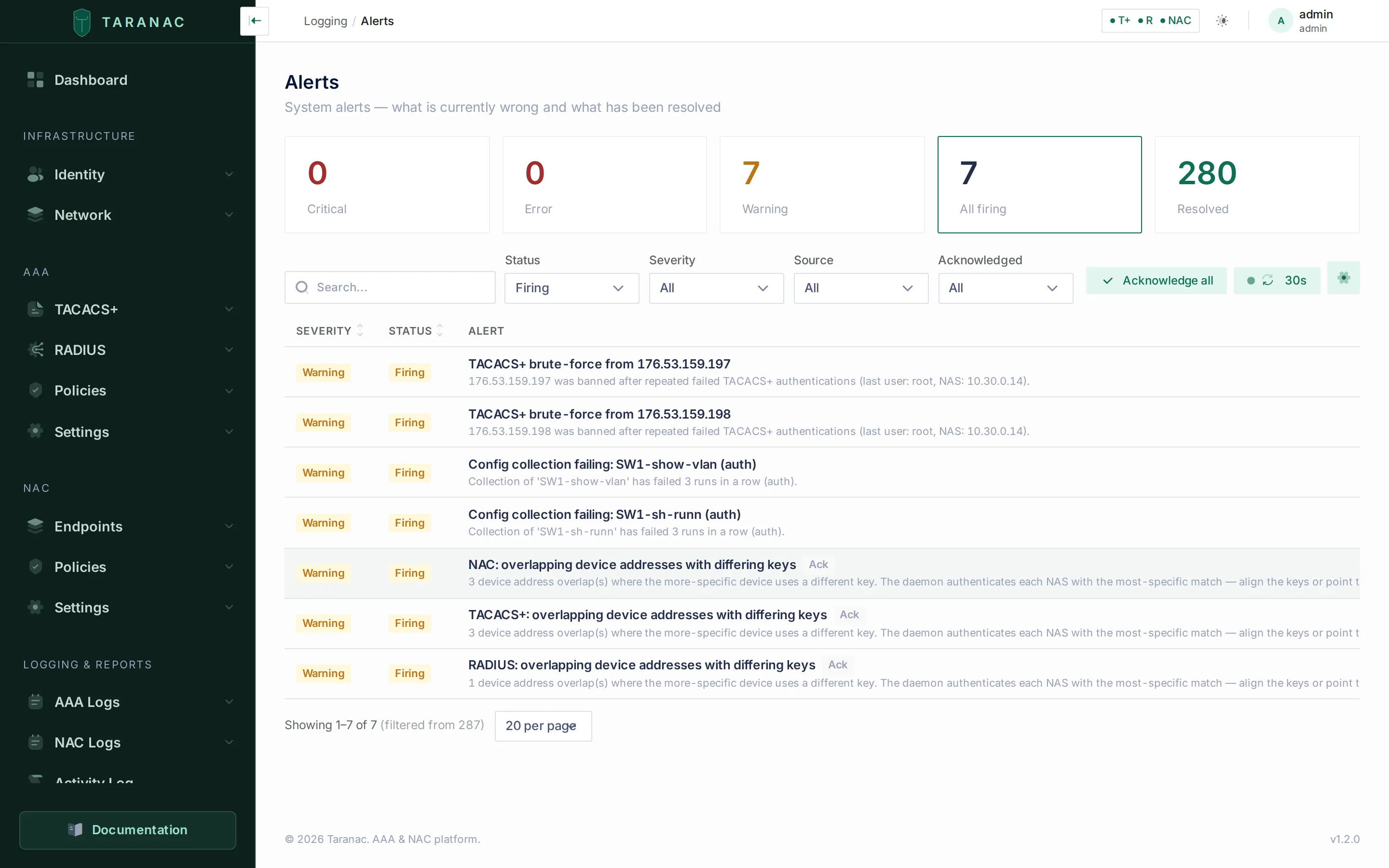 The Alerts engine: thresholds, debounce and email notification settings on one page.
Log Rotation
Section titled “Log Rotation”Log Rotation manages retention for the high-volume AAA logs and the audit log. Tables are grouped by domain (TACACS+, RADIUS, NAC, Captive Portal, Security, Identity, NCM). Two mechanisms are used:
- Partition — PostgreSQL monthly table partitioning (shows partition count, oldest/newest month, and what will be dropped next run).
- Row delete — approximate row count and oldest record.
Click a retention value to edit it inline; 0 means “keep forever”. Header actions let you Run partition job (pre-create upcoming monthly partitions) and Run cleanup (drop partitions/rows past retention) on demand.
The page carries three more cards beyond the retention tables:
- Audit log archive —
audit_log.archive_enabled(default off) andaudit_log.archive_path. Audit rows are deleted by date, not by partition, and archiving exports them to JSONL first.audit_log.retention_daysdefaults to 365; the purge itself runs daily at 03:00 and is recorded in the audit log asAUDIT_RETENTION_PURGE. - Daemon log line cap —
log_rotation.daemon_max_lines(default 5000), the number of lines kept in each daemon’s top-level*.logfile.0disables trimming. - Live daemon logs and Forensic archive — the files the TACACS+/RADIUS/NAC daemons are writing now, and the per-month AAA buckets kept for the retention window, both downloadable.
The per-subsystem AAA retentions live in their own keys and default to 365 days each: tacacs.log_retention_days, radius.log_retention_days, nac.log_retention_days, nac.session_history_retention_days. The rest are shorter: nac.guest_session_retention_days (90), ldap.sync_log_retention_days (90), web_probe.run_retention_days (90, Web Probe run history), profiling.history_retention_days (180, each device’s profile change history) and ncm.run_retention_days (90).
Backup
Section titled “Backup”Backup creates KEK-encrypted configuration archives. By design there is no restore button in the UI: recovery is CLI-only and destructive, and the page instead shows a step-by-step recovery guide.
All six keys are backup.*, and all six are on or set out of the box — an install that has to be visited before it protects itself spends its first weeks unprotected, and nobody discovers that until the disaster.
| Setting | Default | Meaning |
|---|---|---|
backup.schedule_enabled | true | Master toggle for automatic backups. On by default. |
backup.interval_hours | 24 | Hours between scheduled backups (only when scheduling is on). Floored at 1. |
backup.retention_count | 5 | Maximum archives kept on disk; older ones are pruned. Applies to manual backups too. Floored at 1. |
backup.include_certs | true | Pack the TLS certificate volume into the archive. |
backup.include_daemon_configs | true | Pack the generated TACACS+/RADIUS/NAC daemon config files. |
backup.include_host_files | true | Pack .env, the Docker Compose file, and the operator’s own config/ files (TLS, Firebase, the cluster’s etcd CA). |
The storage and host paths (backup.storage_path, backup.certs_path, backup.host_*_path) are internal — the API rejects an attempt to set them.
The database dump is always included. Each archive records its app_version and the key fingerprint used to encrypt it, and a report of what it could not archive: the archive list shows a not archived badge and a per-item reason when a declared component was missing or unreadable. Read it. An archive that silently carried less than it claimed is worse than no archive.
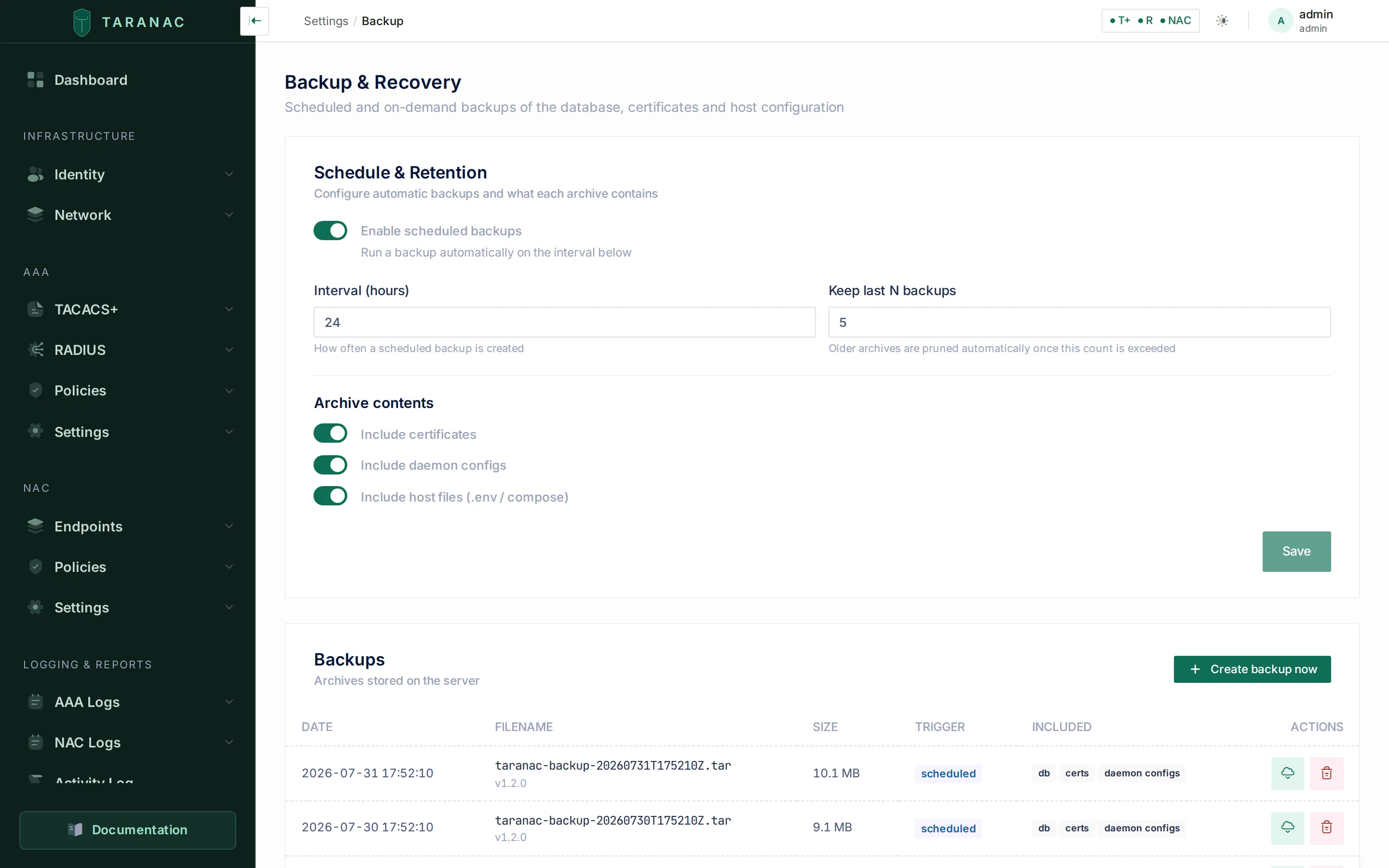 Backup & Recovery: schedule and retention, the archive list, and a CLI-only recovery guide.
Authentication & Sessions
Section titled “Authentication & Sessions”One form, five sections, and every value on it is a plain password_policy.*, auth.* or session.* key. The password policy is backend-driven — the same rules the API enforces are the ones the browser shows, so a policy change takes effect on the next password without a rebuild.
| Setting | Default | Section |
|---|---|---|
password_policy.min_length | 12 | Complexity |
password_policy.require_uppercase · require_lowercase · require_digit · require_special | all true | Complexity |
password_policy.max_age_days | 90 | Expiration (0 disables expiry) |
password_policy.history_count | 5 | Expiration — previous passwords that may not be reused |
password_policy.expiry_warning_days | 14 | Expiration — how early the warning email goes out |
session.idle_timeout_minutes | 30 | Session — Idle Timeout (0 disables auto-logout) |
session.warn_before_timeout_seconds | 60 | Session (0 = no warning) |
session.max_lifetime_hours | 0 | Session — Maximum Session Length, 0–720 (0 = no limit) |
auth.captcha_enabled | true | Anti-automation |
auth.captcha_threshold | 3 | Anti-automation — failed attempts before the CAPTCHA appears |
auth.honeypot_enabled | true | Anti-automation |
auth.web_login_default | allow | Console access |
How a web session ends
Section titled “How a web session ends”A console session is a short-lived access token (15 minutes) that the browser renews with a refresh token. The server decides whether a renewal is allowed, so the limits below hold even for a browser that was closed and reopened.
- Idle Timeout. The browser logs out after this many minutes without mouse, keyboard or scroll activity, across all its tabs. The last activity is kept in the browser, so a page reopened after the timeout logs out at once. The server enforces it as well: it refuses to renew a session that has made no renewal for longer than the idle timeout plus one access-token lifetime.
- Maximum Session Length. Ends every session this many hours after login, active or not. There is no warning, and unsaved changes are lost. The cut comes at the next renewal, so within one access-token lifetime of the limit.
- Sign-out. Signing out from the user menu, or by the idle timeout, revokes the refresh token on the server, so the session cannot be renewed from a copy of it. An access token already issued stays valid until it expires.
Console access
Section titled “Console access”auth.web_login_default answers one question: may members of a group that has not decided for itself open the management console? A group carries a three-state mode — inherit, allow, deny — and inherit is what every untouched group already holds, which is what makes this setting retroactive: flipping it to deny closes a directory’s worth of synced groups without a single write to groups, and covers every group the next sync creates.
Resolution order, deliberately in this order:
- Any
is_adminsgroup → allowed. An administrator can never be shut out, which keeps this from locking the last operator out of their own installation. - Any explicit
deny→ denied. Explicit beats inherited, and among non-admin groups deny beats allow. - Any explicit
allow→ allowed. This is the exception in a deny-by-default installation. - Nobody spoke → this setting.
The shipped default is allow, so an upgrade changes nothing about who can log in. The value is coerced on read: anything that is not exactly deny is treated as allow, so a missing or corrupted row cannot lock everyone out.
This closes the console, not the account. Password reset, the certificate-download link and MFA setup keep working, and the BYOD captive portal is untouched — taking someone’s console away must not take their network with it. It is also not is_active = false, which the TACACS+ user cache reads too and which therefore removes the person from AAA as well.
LDAP configures the directories used for authentication and for synchronising users, groups and computers — Active Directory, OpenLDAP, FreeIPA, Google Workspace Secure LDAP or any other LDAP server. Each directory is a separate configuration card with Edit / Delete / Test Connection actions. Creating one starts with picking its type, which is permanent and decides both which tabs the configuration has and which authentication methods it can offer.
A config’s edit view spans up to five tabs:
- Users & Groups — servers, bind DN/password, search filters, sync schedule and behaviour (create users, disable missing, remove stale), priority for multi-domain ordering, and the RBAC model assigned to synced users (with optional per-group mapping).
- Computers — computer sync filters and attribute mapping, including the LDAP attribute holding the MAC address, and the optional import of each machine’s directory group membership. Available on every type except Google Workspace, whose Secure LDAP does not serve devices.
- MS-CHAPv2 — present wherever MS-CHAPv2 is possible at all, which is two mechanisms. On Active Directory it is domain membership: this node joins the forest and a domain controller verifies the response — exclusive per installation, since one winbind is one machine account is one forest. On FreeIPA the directory hands out the NT hash itself, so verification happens in Taranac’s own code with no join and no winbind — stateless, so any number of FreeIPA configurations can use it at once alongside the one joined domain. Which mechanism a directory gets is decided by its type, not by a setting.
- EAP-TLS — client-certificate validation for this directory: CA certificate, identity matching, and CRL/OCSP revocation checking.
- Sync History — past sync runs with counters and status.
Operations available inline: Test Connection, Sync Preview (a categorised diff before committing), and Trigger Sync.
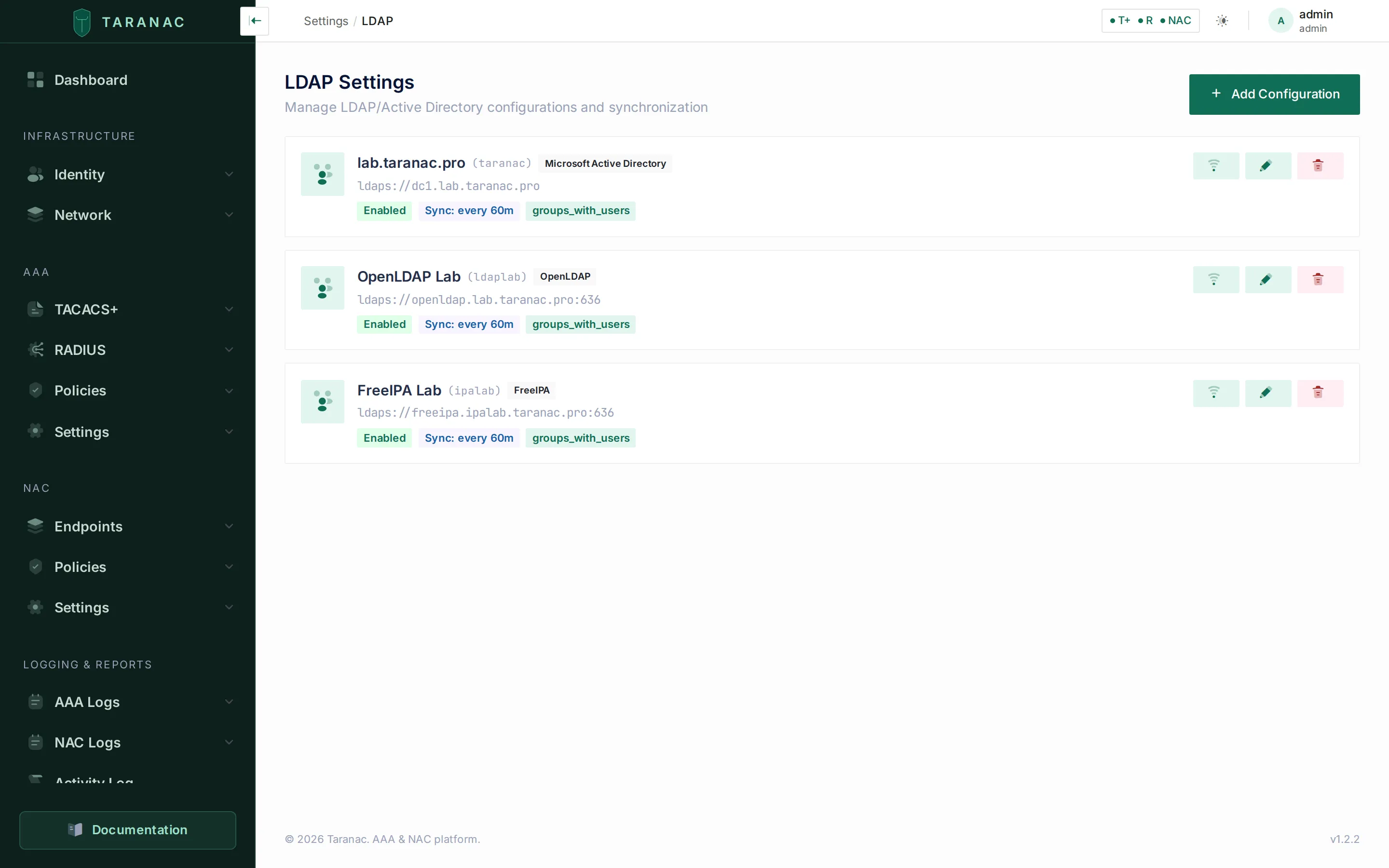 The directory configurations on one installation — Active Directory, OpenLDAP and FreeIPA, each tagged with its type.
Email is a three-tab page plus the notification toggles.
- SMTP — transport: host/port, optional auth, encryption (None / STARTTLS / SSL-TLS), from-address and name, timeout. Two test actions verify a connection and send a test message.
- Header & Footer — a subject prefix (e.g.
[Taranac]) and HTML header/footer wrapped around every template, with{{ app_name }}/{{ current_year }}variables and a live preview. - Templates — per-type, per-language subject and HTML body, with preview and “reset to default”.
- Notifications — toggles for each kind of system email (
email.welcome_enabled,email.password_reset_enabled,email.mfa_setup_link_enabled, the certificate-download email, and so on). These gate whether Taranac sends each notification at all.
Templates run in a sandbox
Section titled “Templates run in a sandbox”The header and footer, the email templates and the SMS templates (message text, HTTP body and HTTP headers on Integrations → SMS) are Jinja templates you write, and they are rendered in a restricted sandbox: no file access, and no reaching into Python objects. Each one is checked when you save it, whether through its page or through PUT /settings/{key}. A template that does not compile, or that touches something the sandbox forbids, is refused with a message naming the field (and, for a syntax error, the line). A stored template that the sandbox refuses at send time makes that email or SMS fail until you correct it.
Previewing the saved layout needs settings.view. Previewing a header and footer you have typed but not saved renders your own text, so it needs settings.edit.
Per-subsystem settings and the global defaults
Section titled “Per-subsystem settings and the global defaults”The AAA (TACACS+, RADIUS) and NAC subsystems have their own settings pages. Most of those keys are protocol/daemon tuning, but a few act as global defaults that feed inheritance — the value used when a more specific level (User, Group, Profile, or Device) says “inherit”.
TACACS+ global enable mode
Section titled “TACACS+ global enable mode”tacacs.global_enable_mode is the end of the enable-password inheritance chain. When a User, Group or Profile is set to inherit, the effective enable behaviour falls through to this global value.
| Mode | Behaviour |
|---|---|
login_password (default) | Use the user’s login credentials for enable. |
custom | Use a separate password — tacacs.global_enable_password (encrypted), only consulted in this mode. |
deny | Block enable outright. |
Other global AAA defaults include the shared secrets (tacacs.global_key, radius.global_secret, both auto-generated on first start) used when a device does not define its own, brute-force protection, and per-subsystem log retention. tacacs.global_key is the fallback key of inventoried devices only: TACACS+ refuses every address outside the inventory, and the catch-all for those addresses has a key of its own that no device is given (see Only inventoried devices log in). TACACS+ has no global Single Connection or IPv6 switch: Single Connection is set per device, and the listeners always serve IPv4 and IPv6. The listener ports are not among them: tacacs.port, tacacs.tls_port, radius.auth_port and radius.acct_port are internal, sourced from the environment, and shown read-only.
Two pairs of cache settings are worth knowing apart, because they are easy to confuse:
| Setting | Default | What it caches |
|---|---|---|
tacacs.auth_cache_ttl | 60 s | The MAVIS handler’s auth result cache — success and failure both — so the same credentials are not re-hashed on every packet. 0 disables it. |
radius.auth_cache_ttl | 30 s | The same idea on the RADIUS side. |
tacacs.cache_refresh_interval · radius.cache_refresh_interval | 30 s | Background reload of the daemon’s snapshot of users, devices, policies and exclusions. This is the lag between saving a policy and the daemon acting on it. |
tacacs.auto_reload_interval · radius.auto_reload_interval · nac.auto_reload_interval | 30 s | How often the backend checks whether the generated config files need regenerating and the daemon reloading. |
Two RADIUS settings on AAA → Settings → RADIUS decide when an answer goes out:
| Setting | Default | Notes |
|---|---|---|
radius.reject_delay | 1 s | Reject Delay, 0–10. Every Access-Reject waits this long, which slows password guessing; 0 answers at once. |
radius.max_request_time | 30 s | Max Request Time, 5–120. FreeRADIUS stops answering a request after this; a push MFA is answered at most this minus 3 s after the request arrived. See Push MFA over RADIUS. |
NAC CoA defaults
Section titled “NAC CoA defaults”For NAC, the global Change-of-Authorization (CoA) defaults define how Taranac sends disconnect/re-auth requests to network devices when a device has no per-device override.
| Setting | Default | Notes |
|---|---|---|
nac.coa_port | 3799 | The fleet-wide CoA port, and the last level asked: a port on the device, then on its oldest device group that carries one, then the port declared by the device’s pinned vendor dictionary entry (Cisco IOS / IOS-XE declares 1700) all come first. See Network devices. |
nac.coa_secret | auto-generated | Default CoA shared secret (encrypted), generated on first start. Override per device via the device’s coa_secret. |
These follow the same inheritance idea: set sensible global defaults once, then override only on the specific devices that differ.
MAB over EAP-MD5
Section titled “MAB over EAP-MD5”| Setting | Default | Notes |
|---|---|---|
nac.mab_over_eap_md5 | true | Accept MAB over EAP-MD5, on NAC → Settings → NAC under MAC Authentication Bypass. Stored as the text true / false. On: an EAP-MD5 response whose identity is the endpoint’s own MAC is verified as MAB (TP-Link with EAP, Cisco mab eap). Off: such a request is refused as eap_md5_mab_disabled. Read by the NAC daemon on its regular settings refresh, no restart. While on, MAB rules are reachable over EAP-MD5 on 802.1X-only wired ports too — see MAB carried as EAP-MD5. |
CRL checking and EST
Section titled “CRL checking and EST”| Setting | Default | Where | Notes |
|---|---|---|---|
nac.crl_check_enable | true on a new installation (a missing key reads as false) | NAC → Settings → NAC, CRL Control (Enable CRL Check) | The one switch for EAP-TLS CRL checking. While it is on, a client certificate is checked when some CA of its chain has a CRL configured (an Internal CA always; a Trusted CA or LDAP EAP-TLS CA with a CRL URL or an uploaded CRL), against the CRL of its issuing CA. OCSP does not depend on it. See Certificate revocation. |
nac.crl_fetch_interval_minutes | 15 | Workers (External CRL Fetch) | Minimum 5. See Workers. |
nac.est_allowed_auth | basic,tls | PKI Settings → EST Enrollment | basic = first enrollment by password, tls = renewal by the current certificate. A certificate never authenticates a first enrollment. |
nac.est_allowed_san_networks | [] | PKI Settings → EST Enrollment (Allowed networks for IP SANs) | CIDR list, up to 256 entries, read for certificates of Device accounts only. An IP SAN outside the list refuses the enrollment. Empty = no restriction. |
nac.est_device_account_ids | [] | PKI Settings → EST Enrollment (Device accounts) | Local accounts whose EST certificates take their name and SANs from the device’s request. Every other account gets a certificate in its own name. |
nac.est_allowed_source_networks | [] | PKI Settings → EST Enrollment (Networks devices may request certificates from) | CIDR list. Empty = any address. A request from elsewhere is refused before its password is checked. |
nac.est_request_ttl_days | 30 | PKI Settings → EST Enrollment | 1–365. How long an undecided approval request lives. |
nac.est_approval_link_ttl_days | 7 | PKI Settings → EST Enrollment (Approval link lifetime) | 1–90. How long the one-time links in an approval email stay usable. |
nac.est_mtls_proxy_secret | (empty) | PKI Settings → EST Enrollment | Only for a client-certificate TLS terminator of your own. The bundled EST gateway proves itself with EST_PROXY_KEY from .env instead. Allowed characters A–Z a–z 0–9 . _ ~ + / = -. |
The EST settings are explained on EST enrollment. SCEP has its own set under nac.scep_* (scep_enabled, scep_ca_id, scep_cert_validity_days, scep_require_approval, scep_approval_group_id, scep_request_ttl_days, scep_approval_link_ttl_days, scep_allowed_san_networks, scep_allowed_source_networks, and the encrypted scep_challenge), with the same defaults and bounds, on PKI Settings → SCEP Enrollment. Neither protocol reads the other’s keys. See SCEP enrollment.
TACACS+ prompts and banners
Section titled “TACACS+ prompts and banners”Four string settings that change what a person actually sees at a switch prompt. All four live on AAA → Settings → TACACS+. The two prompts are in play only while MFA is on: with tacacs.mfa_mode set to disabled the generated config carries no prompt line at all, so the daemon falls back to its own. Both are invisible to PAP logins, which never see an interactive prompt, and the MFA password prompt is not shown on enable.
| Setting | Default | Notes |
|---|---|---|
tacacs.mfa_prompt | Password: | The Default password prompt field. The trailing space is significant and is deliberately not stripped. 1–256 characters: the form will not accept an empty value, so restore the stock prompt by typing it back rather than by clearing the field. |
tacacs.mfa_password_prompt | Password+MFA: | The MFA password prompt field. Shown instead of the default prompt on an ASCII login whose matching policy rule requires MFA (and is not a deny), so the user knows a code is expected. 0–256 characters. Empty turns it off, and those logins get the default prompt. The prompt is chosen before the password is typed, so it tells whoever sees it that the name falls under an MFA rule. If you exempt accounts from an MFA rule that covers everyone (break-glass accounts, say), leave it empty: the plain prompt would give those accounts away. See Password prompts and MFA. |
tacacs.welcome_banner | (empty) | Pre-login banner, carried in the authentication reply — seen by anyone who can open a session, before they prove anything. |
tacacs.motd_banner | (empty) | Post-login message of the day — seen only by someone who authenticated. |
The two banners resolve device → oldest device group → global, the same chain the TACACS+ key uses, and they inherit independently of each other: a device may override the welcome banner and inherit the MOTD. NULL at a level means “inherit”; an empty string is a deliberate “show nothing here”. Up to 4096 characters each. A % in a banner is shown as typed.
A TACACS+ profile can carry a MOTD of its own. It replaces the device, group or global MOTD for logins whose policy rule assigns that profile, and an empty one inherits. Like every MOTD it is shown only on an ASCII login. See Profile MOTD. The welcome banner cannot vary per profile: it is sent before the policy has chosen anything.
TACACS+ over TLS
Section titled “TACACS+ over TLS”| Setting | Default | Notes |
|---|---|---|
tacacs.tls_enabled | true | Enable TLS Listener on AAA → Settings → TACACS+. The port is TACACS_TLS_PORT (6049), set in .env. |
tacacs.tls_client_trust_mode | all | The TLS Client Trust card. all: a client certificate from any enabled, active Internal CA is accepted, the Infrastructure CA included, and imported Trusted CAs never are. selected: only the CAs in the two lists below. With both lists empty, no TLS client can authenticate. |
tacacs.tls_client_internal_ca_ids · tacacs.tls_client_trusted_ca_ids | [] | The Internal CAs and imported Trusted CAs chosen on the card, up to 100 each. Read only in selected mode, and kept while the mode is all. |
Trust changes apply without a restart. What a client certificate needs and how a TLS session finds its device are on TACACS+ over TLS.
Tolerate Malformed AV-Pairs
Section titled “Tolerate Malformed AV-Pairs”tacacs.tolerate_malformed_av_pairs — default on. Some clients send an authorization AV-pair with no = or * separator; strictly read, that is a malformed request and the whole thing is rejected. With this on, the daemon ignores the offending pair and answers the rest, by setting bit 0x100 of tac_plus-ng’s bug compatibility mask. Turn it off only if you want those requests to fail loudly.
Custom attribute dictionaries
Section titled “Custom attribute dictionaries”nac.custom_dictionary and radius.custom_dictionary hold operator-supplied FreeRADIUS dictionary text — vendor attributes the shipped dictionaries do not know. They are separate keys because the NAC and AAA daemons have separate config volumes.
- Capped at 64 KB. An oversized paste is refused at the edge.
- The text is parsed on save and rejected with the line number if it does not parse. This is not fussiness:
radiusdreads dictionaries before the config, so a bad one makes the container’s own-XCgate refuse every later reload —clients.confincluded — with nothing in the UI saying why. - Dictionaries are read once, at process start. That is how every configuration is applied anyway: a new FreeRADIUS process starts beside the running one and takes over its ports, so saving a dictionary loses no request (see Applying a configuration).
NAC session ageing — the window you can see, and the one you cannot
Section titled “NAC session ageing — the window you can see, and the one you cannot”Two settings decide when a session leaves the active list, and they cover opposite cases. The one operators can find in the UI is the one that applies to the misconfigured switch; the one that governs every well-behaved switch has no control at all.
| Setting | Default | UI | Applies to |
|---|---|---|---|
nac.session_max_duration_hours | 120 (5 days) | Max Session Duration on NAC → Settings → NAC | Sessions that only ever produced an Accounting-Start. Nothing can be read from their silence — a NAS without periodic interim accounting leaves every healthy session here for its whole life — so archiving one is a statement about age only. 0 disables ageing entirely. |
nac.session_stale_threshold_minutes | 1440 (24 h) | none — raw settings API or the General fallback | Sessions whose NAS does send Interim-Updates. Here a gap means something, and 24 h is deliberately generous next to an interim interval measured in minutes. |
nac.session_cleanup_interval_hours | 1 | Workers (interval editor) | How often the ageing job runs. |
nac.session_verify_interval_minutes | 10 | Workers (interval editor) | Cadence of the finalize job that closes sessions whose terminating CoA never got its Acct-Stop. |
nac.admin_disconnect_grace_seconds | 30 | none | How long that job waits for the switch’s Acct-Stop — and its final counters — after an admin disconnect or guest revoke. |
Neither job sends anything to a switch. Liveness is judged from the age of the accounting stream, because RFC 5176 defines no read-only packet: an “identification-only” CoA-Request is answered CoA-ACK and strips the RADIUS-assigned VLAN from the very sessions it was checking.
Discovery sources and profiling
Section titled “Discovery sources and profiling”Each discovery source keeps its settings on its own Settings tab under NAC → Discovery Sources, and they are stored as ordinary keys. What a socket binds to is not among them: a listening address belongs to one machine, so the DHCP Probe’s listener is configured per node in .env (DHCP_PROBE_ENABLED, DHCP_PROBE_LISTEN_ADDRESS, DHCP_PROBE_LISTEN_PORT) and per collector in collector.env (COLLECTOR_DHCP_PROBE_ENABLED, off by default) — see DHCP Probe.
| Setting | Default | Where | What it does |
|---|---|---|---|
nac.dhcp_probe_allowed_sources | (empty — any relay) | DHCP Probe → Settings (Accept relays from) | Addresses or CIDR ranges whose relayed copies are accepted. Reaches every node and collector within one cycle. |
nac.dhcp_probe_keep_per_device | 20 | DHCP Probe → Settings (Messages kept per device) | Newest messages kept per device and signature. 0 turns the limit off. |
nac.dhcp_probe_max_age_days | 90 | DHCP Probe → Settings (Also delete after) | Age limit on top of the per-device one. 0 turns it off. |
scanner.rescan_interval_s | 3600 | Scanner → Settings | How long before an already-scanned device is scanned again by the active methods. |
scanner.report_interval_s | 5 | Scanner → Settings | How long a site collects sightings before sending a batch. |
scanner.finding_retention_days | 30 | Scanner → Settings (Forget a wire after) | A finding whose device has not been seen for this long is deleted. 0 = never. |
scanner.identify_ports | 22, 80, 135, 443, 445, 3389, 8080, 8443, 515, 9100, 161 | Scanner → Settings | The ports the Identify method checks, up to 32. |
scanner.deep_intensity | 5 | Scanner → Settings | nmap’s --version-intensity for the Deep method, 2–7. |
snmp.default_profile_id | the shipped v2c example profile on a new installation | SNMP → Settings | The profile a device uses when neither it nor its groups name one. It can be changed, not cleared, and is not writable through PUT /settings/{key}. |
web_probe.run_retention_days | 90 | Log Rotation | Web Probe run history. |
profiling.os_hint_min_confidence | 50 | Device Profiling → Settings | The confidence at which a verdict stops being a reading on the card and becomes a value the classifier acts on — and therefore a group, and a VLAN. 0–100. |
profiling.source_trust | the shipped trust order | Device Profiling → Settings | Which source may overrule which when they write an endpoint’s OS. |
profiling.profiles.recompute_interval_hours | 24 | Workers | The full re-derivation of every device’s profile. A backstop: sources and edits already queue the devices they affect. Minimum 5 minutes. |
profiling.history_retention_days | 180 | Log Rotation | Each device’s profile change history. 0 disables deletion. |
profiling.exchange.mode | off | Device Profiling → Contribute (Exchange) | off, manual or daily. With the exchange off, no rule-set updates arrive. |
profiling.exchange.send_data | true | Device Profiling → Contribute (Send my data) | Whether an exchange sends the contribution. Only a paid installation can switch it off. |
profiling.exchange.full_names | false | Device Profiling → Contribute | Send host, domain and mDNS names in full rather than reduced to their product words. |
profiling.ruleset_feed.url | https://contribute.taranac.pro/api/v1/profiling/ruleset.json | none | Where the signed rule set is fetched from; point it at an on-premises mirror. TARANAC_DHCP_RULESET_URL overrides it at boot. The package is verified against a pinned key wherever it comes from. |
nac.oui_auto_update | true | OUI Database, Workers | The scheduled refresh of the IEEE registries. |
captive_portal.embedded_enabled | false | Captive Portals (Embedded portal) | Whether the core’s own portal container serves portals. Switched only through its card, which also writes the portal’s configuration. |
What each of these changes is explained on the source’s own page: DHCP Probe, Scanner, SNMP, Web Probe, Device profiling, Rule-set updates and OUI database.
The MFA mode that does nothing
Section titled “The MFA mode that does nothing”mfa.mode is labelled System MFA Mode on Settings → MFA, and the page says setting it to disabled means “existing enrollments are preserved but not checked during login”. No login path reads it. Its only readers are:
- the auto-send of an MFA setup link on user creation (local and LDAP), and
- the AAA policy tester, which reports “MFA enforced” from it.
Because the daemons read tacacs.mfa_mode and radius.mfa_mode instead, the tester and the live daemons can disagree: switch mfa.mode to disabled and the tester says MFA is not enforced while TACACS+ and RADIUS keep enforcing it. To actually turn MFA off for AAA, set the per-subsystem keys.
| Setting | Default | Where |
|---|---|---|
mfa.mode | enabled | Settings → MFA. See above — it does not gate login. |
tacacs.mfa_mode | enabled | AAA → Settings → TACACS+. enabled | disabled. This one is real. |
radius.mfa_mode | append | AAA → Settings → RADIUS. This one is real. |
mfa.send_setup_link_on_create | false | Settings → MFA (Send MFA setup link on user creation). Also needs SMTP enabled. |
mfa.challenge.ttl | 120 s | Settings → MFA (Push Challenge Timeout, 30–600). |
mfa.email_push.ttl | 300 s | Provider card on Settings → MFA. |
mfa.internal.challenge_ttl · mfa.taranac_mfa.challenge_ttl | 120 s | Provider cards. |
Keys with no dedicated control
Section titled “Keys with no dedicated control”These are settings an operator has real reason to change and which no page offers a field for. Edit them through General → Show all settings or PUT /settings/{key}, and read the bounds here because the raw editor will not enforce them for you.
| Setting | Default | What it does |
|---|---|---|
nac.session_stale_threshold_minutes | 1440 | See above — the ageing window that applies to well-behaved switches. |
nac.admin_disconnect_grace_seconds | 30 | Wait for the Acct-Stop after a terminating CoA. |
syslog.forward_max_rows_per_run | 5000 | Row ceiling per stream per forwarding pass. Clamped at read time to [100, 100000], so a mis-set value can neither stall the forwarder nor make it unbounded. |
notifications.retention_days | 30 | How long processed rows stay in the alert_queue bridge table. (This one is on the Alerts page — listed here because it is easy to confuse with alerts.resolved_retention_days.) |
ncm.text_store_max_bytes | 8 MiB | Configuration Tracker: scrubbed configuration text larger than this is tracked by content hash only — the version is still recorded, but the body is not stored and cannot be diffed or viewed. 0 disables the threshold. Range [0, 64 MiB]. |
ncm.text_buffer_max_bytes | 64 MiB | The most captured text held in memory at once. A capture past this fails and names the setting. Range [64 KiB, 512 MiB]. |
ncm.binary_max_bytes | 2 GiB | Largest binary artifact (firmware, say) a collector will read. Bounds collection time, not memory — binary is hashed and discarded. 0 = unlimited. Range [0, 64 GiB]. |
ncm.scrub_max_lines | 200,000 | Lines of a captured configuration the collector processes before scrubbing. Lines past it are not stored or shown but are hashed into the version, so a change there still cuts one; the capture raises an alert naming this setting. Range [1,000, 5,000,000]. |
ncm.scrub_max_line_length | 32,768 | Characters of one configuration line the collector processes; a longer line is cut and marked, and the capture raises an alert. The protection against a catastrophically backtracking scrub rule. Range [1,024, 1,048,576]. |
ncm.notify_digest_window_minutes | 15 | How long drift notifications are batched before a digest is sent. |
update_feed.base_url | https://taranac.pro/api/v1/update-feed | Where the update manifest is fetched from. |
radius.auto_reload_enabled · radius.auto_reload_interval | true, 30 s | RADIUS config auto-reload. Unlike TACACS+, these have no field on the RADIUS settings page — the interval is editable from Workers, the toggle from the fallback list. |
When to use which page
Section titled “When to use which page”| You want to… | Go to |
|---|---|
| Change a value that has a named home | That subsystem’s page (Email, MFA, Alerts, AAA, NAC) — not the General “all settings” list |
| Change a value that has no named home | General → Show all settings, or PUT /settings/{key} |
| Tune how often a background job runs | Workers |
| Stop/start a recurring job permanently | Workers (enable/disable toggle) |
| Keep logs longer or shorter | Log Rotation |
| Set the org-wide enable-password fallback | AAA → Settings → TACACS+ (tacacs.global_enable_mode) |
| Decide who may open the management console | System → Authentication & Sessions (auth.web_login_default) |
| Cap how long a console session may last | System → Authentication & Sessions (session.max_lifetime_hours) |
| Set a default CoA secret for all NAC devices | NAC settings (nac.coa_secret) |
| Change the UI default language | General (system.default_locale) |
| Rotate the encryption master key | The console — ./taranac rotate-key (there is no UI, and the API answers 501) |
| Protect the configuration before a risky change | Backup → Create backup now |
Related
Section titled “Related”- Alerts — the alert engine and notifications in depth
- Backup & upgrades — archives and the recovery procedure
- TACACS+ and RADIUS — protocol settings and enable-mode inheritance
- NAC overview — endpoint lifecycle and CoA
- Discovery & profiling — the sources whose settings are listed above
- LDAP directories — directory integration and sync
- Licensing & editions — Community vs Pro, the installation ID and
.licupload - High availability — the multi-node cluster the Cluster page manages
- Get Taranac on GitHub