

RADIUS
Taranac authenticates and authorizes device administration over RADIUS in addition to TACACS+. Use RADIUS when a network device — or a platform that only speaks RADIUS for admin login — needs to authenticate operators against Taranac and receive an authorization result (a privilege level, a role, a group name) in the Access-Accept reply.
Unlike TACACS+, where the whole policy ruleset is compiled into the tac_plus-ng daemon, all RADIUS policy evaluation runs inside Taranac’s own handler. A RADIUS Access-Request is matched against the same shared AAA policy table you use for TACACS+, then — depending on the matched rule — answered with an Access-Reject, a bare Access-Accept, or an Access-Accept carrying the reply attributes rendered from a RADIUS profile. There is no per-command authorization in RADIUS, and the protocol has no enable exchange at all; authorization is what the device does with the attributes it receives at login. Devices that escalate privilege through the vendor $enab<N>$ convention are answered separately — see Privilege escalation (enable).
- Service-TypeLogin-User
- Session-Timeout7200
- Idle-Timeout600
- Cisco-AVPairshell:priv-lvl=15
Key concepts
Section titled “Key concepts”| Term | What it is |
|---|---|
| Template | A per-vendor schema: which attributes exist, their data types, and how compound values are assembled. Carries defaults but no per-user values. Identified by an immutable slug. |
| Profile | The runtime values returned on a match — privilege level, role, timeouts, reply message. References exactly one template. |
| Vendor ID | The IANA Private Enterprise Number (PEN) of the vendor, e.g. Cisco = 9, Juniper = 2636. 0 means generic / no VSAs. |
| VSA | Vendor-Specific Attribute. The template names the attribute (e.g. Cisco-AVPair); the FreeRADIUS dictionary maps the name to vendor_id + sub-type on the wire. |
| Static field | A structured sub-value inside a compound attribute, built from a pattern such as shell:priv-lvl={level} and one or more typed inputs. |
| Raw attribute | A freeform attribute added directly to a profile, outside the template schema, as a name/value pair. |
| Profile mode | What a matched policy rule does for RADIUS: none, deny, auth_only, or profile. |
Templates vs profiles
Section titled “Templates vs profiles”A template answers “what can this vendor accept?”; a profile answers “what do we grant this operator?”. Templates are reusable across many profiles. A profile that references a template cannot be orphaned — the template is protected from deletion while any profile points at it.
Each template defines:
defaults— optionalservice_type,session_timeout,idle_timeout, andreply_messageapplied when a profile leaves the field blank.attributes— a list of attribute definitions, each with aname, optionalvsa_type,data_type(string/integer/enum/boolean/ip), and optionalstaticsub-fields for compound values.
Built-in templates and profiles
Section titled “Built-in templates and profiles”A fresh install ships with fifteen templates covering the common device-administration platforms:
| Template | Vendor ID | Key attribute | Notes |
|---|---|---|---|
| Cisco IOS / IOS-XE | 9 | Cisco-AVPair (VSA 1) | shell:priv-lvl={level}, level 0–15 |
| Cisco NX-OS | 9 | Cisco-AVPair (VSA 1) | shell:roles="{role}", multi-value |
| Juniper JunOS | 2636 | Juniper-Local-User-Name (VSA 1) | Maps to a local user template on the device |
| Fortinet FortiGate | 12356 | Fortinet-Group-Name (VSA 1) | Must match a user group on the FortiGate |
| Palo Alto PAN-OS | 25461 | PaloAlto-Admin-Role (VSA 3) | superuser / superreader / deviceadmin; plus PaloAlto-Admin-Access-Domain (VSA 4) for Panorama |
| HPE/Aruba Switch | 11 | HP-Privilege-Level (VSA 2) | Integer; Manager = 15, Operator = 1 |
| Huawei VRP | 2011 | Huawei-Exec-Privilege (VSA 29) | 15 = management, 3 = monitoring, 1 = visit |
| MikroTik RouterOS | 14988 | Mikrotik-Group (VSA 3) | RouterOS user group — full / write / read, or a custom group |
| Arista EOS | 30065 | Arista-AVPair (VSA 1) | Cisco-style shell:priv-lvl={level} and shell:roles={role} |
| Aruba CX (AOS-CX) | 14823 | Aruba-Admin-Role (VSA 4) | administrators / operators / auditors, or a custom role |
| Nokia SR OS | 6527 | Timetra-Access (VSA 1) | Plus Timetra-Default-Action (VSA 5) and the optional Timetra-Profile (VSA 4) |
| H3C / HPE Comware | 25506 | H3C-Exec-Privilege (VSA 29) | 3 = Manage, 2 = System, 1 = Monitor, 0 = Visit |
| Ruckus ICX / Brocade (Foundry) | 1991 | Foundry-Privilege-Level (VSA 1) | Inverted scale: 0 = super-user, 4 = port-config, 5 = read-only |
| Extreme EXOS | 1916 | Extreme-Security-Profile (VSA 212) | Admin level rides on Service-Type (default Administrative-User); Extreme-CLI-Authorization (VSA 201) toggles per-command authz |
| Generic RADIUS | 0 | — | No VSAs; use raw attributes for standard/arbitrary attributes |
On first install Taranac also seeds ready-to-use profiles — typically a full-access and a read-only variant per vendor (Cisco priv 15/1, NX-OS network-admin/operator, Juniper super-user/operator, FortiGate admin, Palo Alto superuser/superreader, HPE/Aruba 15/1, Huawei 15/3).
Working with profiles in the admin UI
Section titled “Working with profiles in the admin UI”Profiles live under AAA → RADIUS → Profiles.
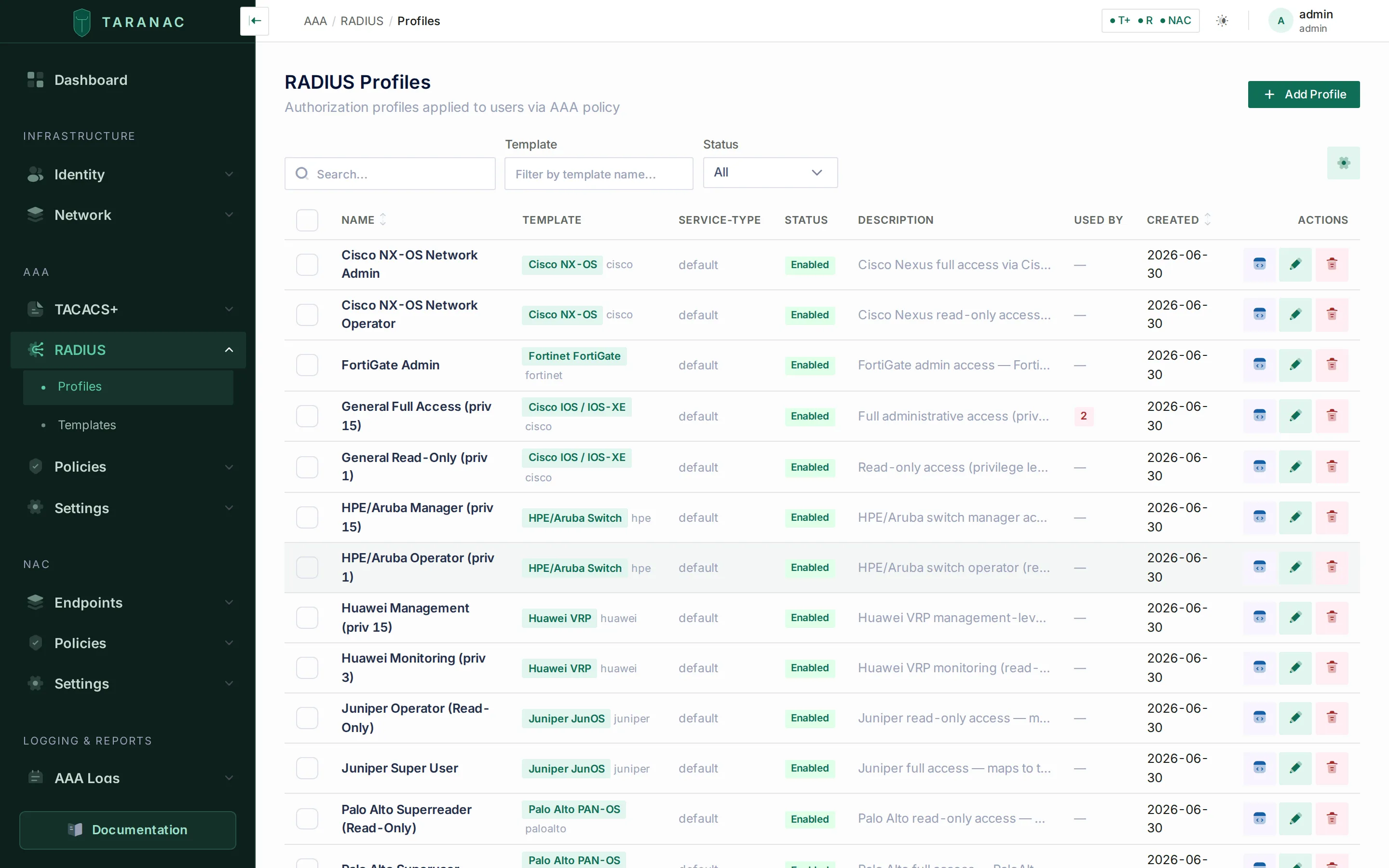
The RADIUS Profiles list — each profile references one vendor template.
A profile form has two columns. The left column holds identity and protocol-level fields:
| Field | Behaviour |
|---|---|
| Name | Required, unique. |
| Description | Optional. |
| Template | The vendor schema this profile fills in. Selected from a list. |
| Service-Type | Login-User, Administrative-User, or NAS-Prompt-User; blank inherits the template default. |
| Session-Timeout | Seconds; overrides the template default. 0 is a valid explicit value (no timeout). |
| Idle-Timeout | Seconds; overrides the template default. 0 is valid. |
| Reply-Message | Text sent in the Access-Accept. Max 253 bytes. |
| Enabled | A disabled profile is excluded from policy evaluation. |
The right column shows one card per attribute defined in the chosen template. The input widget follows the attribute’s data_type: text for string/ip, a number field for integer, a toggle for boolean. Compound attributes (static fields) render one input per {placeholder} in the pattern — for example a single Privilege Level input that produces shell:priv-lvl=15.
A static field with no placeholders is not a parameter but one alternative in a menu — PAN-OS hangs superuser, superreader and deviceadmin off a single attribute. Where the template does not mark that attribute multi-valued, the alternatives render as a radio group, and a profile carrying more than one of them is refused on save: three conflicting roles in one Access-Accept is nothing a device can act on.
A raw attributes editor at the bottom lets you append attributes that are not part of the template — each is a name plus value (with optional vendor_id and vsa_type), value capped at 253 characters. This is how you add standard attributes such as Filter-Id on top of a vendor profile, or build a complete reply on the Generic template. An entry may be identified by name or by numbers alone: a numbered one is sent as Attr-26.<vendor_id>.<vsa_type> for a VSA and Attr-<vsa_type> for a standard attribute, which is how FreeRADIUS addresses an attribute it knows by number. An entry with neither a name nor a number cannot be addressed at all and is skipped with a warning in the RADIUS service log.
Defining a template
Section titled “Defining a template”Templates are created through a four-step wizard (Basic info → Defaults → Attributes → Review). Step one fixes the slug (immutable after creation; locked when editing, suffixed -copy when duplicating), the display name, the vendor string, and the integer vendor_id (0–99999). Step two sets the optional defaults. Step three builds the attribute list, including static fields with their patterns and typed sub-fields. Step four reviews the result as YAML/JSON. In most cases the fifteen built-in templates are enough — define a new one only for a vendor or attribute layout Taranac doesn’t ship.
Custom attribute dictionary
Section titled “Custom attribute dictionary”A profile can only send an attribute the RADIUS service can name, and the FreeRADIUS distribution dictionaries — around 8500 attributes across 195 vendors — do not carry everything a vendor defines. Settings → RADIUS has an Attribute dictionary card for the rest: paste the vendor’s own dictionary text into it, verbatim.
VENDOR Example 32473BEGIN-VENDOR ExampleATTRIBUTE Example-Policy-Id 1 stringEND-VENDOR ExampleOnce saved, the name can be used like any other attribute — as a raw attribute on a RADIUS profile — and it goes out in the Access-Accept. VALUE lines work too, so an attribute can have named values instead of bare numbers. The card lists back what your text declares.
- The text is stored as you typed it, so it stays comparable line for line with the vendor’s file. A mistake is refused on save and named with its line number in your own text, not in the file the service reads.
- What already exists, beside the editor, opens a searchable list of the vendors and attributes the service already ships — filterable by attribute name or vendor. A name that already exists is refused on save; a new name that reuses a number already in use is accepted and then quietly takes the original’s place in what the service reports.
- Saving applies it automatically. FreeRADIUS reads dictionaries only when a process starts, so it is applied the way every configuration is: a new process starts beside the running one and takes over, with no request lost (see Applying a configuration).
- The dictionary is capped at 64 KB, and each RADIUS service keeps its own: device administration (Settings → RADIUS) and 802.1X (Settings → NAC) do not share one.
How a request finds its device
Section titled “How a request finds its device”A RADIUS request belongs to the registered device whose address it is sent from. FreeRADIUS picks the shared secret by the packet’s source address, so the source is the one identity the secret proves. Taranac looks that address up among the RADIUS-enabled devices (IPv4 or IPv6); when a host entry and a subnet entry both cover it, the more specific one wins. The same address decides the rule’s WHERE match, the device shown in the logs, and the device an accounting record belongs to.
NAS-IP-Address decides nothing. It is whatever the device writes into the request, so it is kept only in the raw request in the log’s detail drawer. When it differs from the source, which is normal behind NAT or on a router with several interfaces, the RADIUS service log notes it once per source address.
What follows from that:
- Register the address the device sends from, not the one you think of as its management IP. Pin it on the device where the platform allows it (
ip radius source-interfaceon Cisco IOS), so a routing change cannot move it. A packet from an address no RADIUS-enabled device covers is dropped before policy: the device times out and nothing is logged. - Devices behind one NAT address are one device. They share one device entry, one secret and the same WHERE matches. To tell them apart, they need distinct addresses on the path to Taranac.
- They can also share a brute-force ban. The guard keys on the
Calling-Station-Idwhen the request carries one (Failure Threshold, 10 by default). Without it, the key is the source address, with the higher NAS-Wide Threshold (50 by default). So failures from any device behind one NAT address that sends noCalling-Station-Idcount together, and a ban blocks all of them for the Ban Window (15 minutes by default). A push that was denied, not confirmed in time or replaced by a newer login counts only against aCalling-Station-Id, never against a whole NAS; an MFA check that could not be made at all never counts (see Push MFA over RADIUS). These settings are on AAA → Settings → RADIUS.
How a RADIUS result is produced
Section titled “How a RADIUS result is produced”When an Access-Request arrives from a registered device, Taranac:
- Looks up the user and checks eligibility (exists, active, not locked). A failure here is an immediate Access-Reject with a fixed message (
User not found,Account disabled,Account locked). - Evaluates the AAA policy table — first matching enabled rule wins across the WHO, WHERE, SOURCE, and WHEN dimensions. Rules whose RADIUS action is
noneare skipped. Policy evaluation happens before the password is checked, so the matched rule can declare whether MFA is required. - Verifies the credential — how depends on what the device sent; see Credential transports — optionally challenging for MFA.
- Acts on the matched rule’s RADIUS mode.
A privilege-escalation request is recognised before step 1 and takes none of these steps — see Privilege escalation (enable).
| RADIUS mode | Result |
|---|---|
deny | Access-Reject. Reply-Message comes from the rule’s radius_message, defaulting to Access denied by policy. |
auth_only | Access-Accept with no authorization attributes (just an optional Reply-Message). The device applies its own default privileges. |
profile | Access-Accept carrying the attributes rendered from the rule’s RADIUS profile. |
none | Rule is ignored for RADIUS. |
If no rule matches, the request is implicitly rejected (No matching policy). A default catch-all rule (high order, WHO = any) guarantees every request gets an explicit answer.
Credential transports
Section titled “Credential transports”There is nothing to choose here: the branch is picked from what the device actually sent.
| Transport | What Taranac does |
|---|---|
| PAP | The default path. The password is verified against the local argon2id hash, or by binding to the user’s directory. |
| MS-CHAPv2 | Verified from the account’s NT hash — see below. Devices that offer nothing else (MikroTik RouterOS sends only MS-CHAPv2 for an administrator login) work over this path. |
| CHAP | Not supported, and rejected with its own reason (chap_unsupported) rather than as a bad password: CHAP needs the cleartext password on the server, and Taranac stores hashes. Configure the device for PAP or MS-CHAPv2. |
| MS-CHAPv1 | Not supported; rejected with mschapv1_unsupported. |
Neither of the two unsupported transports counts towards the brute-force guard — a protocol mismatch says nothing about anyone’s password, and one misconfigured NAS must not be able to lock every administrator off a device.
Which NT hash MS-CHAPv2 uses is decided by the user’s own account, never by an installation-wide switch:
- Local accounts — Taranac keeps the NT hash alongside the argon2id one. An account with no NT hash on record is rejected with
mschap_no_nt_hash; saving its password again stores one. - Active Directory —
unicodePwdis write-only and readable by nobody, so the response can only be verified by a domain controller, through the machine account this installation holds. The node must be joined and MS-CHAPv2 enabled on that LDAP configuration; at most one configuration may own the domain. - A directory that publishes the hash — FreeIPA creates
ipaNTHashfor every user, so verification is a search plus the same arithmetic used for local accounts: no domain join, no winbind, and no exclusivity. A node can hold a domain join and any number of hash-readable directories at once, and neither borrows the other’s verifier. MS-CHAPv2 is switched on for such a directory the moment its configuration is created. One operator action is still required —ipaNTHashsits in an explicit exclusion list even in the administrator’s own ACI, so the bind account needs an ACI granting it read access. Setting that up, and the Check directory button that reports whether the hash is readable, are on the LDAP / Active Directory page. A missing ACI is reported as exactly that, never as a wrong password, and never counts towards the brute-force guard.
The hash is read on each login and cached nowhere.
Push MFA over RADIUS
Section titled “Push MFA over RADIUS”Whether a login needs a second factor is decided by the matched policy rule; how it
is asked for over RADIUS is MFA Mode on AAA → Settings → RADIUS
(radius.mfa_mode): append (the default — a code typed after the password, or a
push), challenge (an Access-Challenge asks for the code in a second round) or
disabled. A missing setting reads as append, and so does a value the service does
not recognise, so MFA a rule requires is never skipped by a gap in the settings.
A push is waited for inside the one RADIUS request — there is no second packet to answer later — and the node goes on serving every other request meanwhile: a waiting push occupies one worker thread and nothing else.
- The answer goes out at most Max Request Time minus 3 seconds after the
request arrived — 27 seconds with the default of 30. The push itself is waited
for until 2 seconds before that, which leaves time to cancel it. A push not
approved by then is rejected (
mfa_timeout, MFA push not confirmed in time) and cancelled, so a tap on the phone after that is recorded as expired, never as a login the NAS did not receive. - The NAS must wait at least that long: its RADIUS timeout × (retransmits + 1) must be at least Max Request Time minus 3 seconds. To give users longer, raise Max Request Time (5–120 s) together with the NAS timeout. A request the NAS retransmits while the push waits does not send a second push.
- At most 16 pushes wait at once per node. Beyond that a login is refused at once
(
mfa_busy) rather than tying up the node. - One pending push per user. Logging in again replaces the previous push, which is
cancelled (
mfa_superseded), so an approval always confirms the attempt the user is looking at. - What counts toward brute-force protection. A denied, unconfirmed or replaced
push counts against the
Calling-Station-Idonly, never against a whole NAS. Repeated logins that keep replacing each other’s push are push bombing, and the source is banned like any other. A check that could not be made — the MFA service did not answer (mfa_unavailable), the node was full (mfa_busy), the service was restarting (mfa_aborted), the request had no time left (mfa_late) — is not an attempt and never counts.
The reasons are listed in AAA logging. 802.1X waits for a push the same way; its limits are on 802.1X authentication.
Privilege escalation (enable)
Section titled “Privilege escalation (enable)”RADIUS has no protocol form for privilege escalation, but a family of platforms — Cisco IOS / IOS-XE, Cisco Business, H3C Comware 7, Eltex ESR — sends one anyway, as an ordinary Access-Request whose User-Name is the synthetic $enab<N>$. It names no person, so there is no account to look up, no group, no policy rule and nothing for MFA to apply to.
Taranac recognises that name and answers it against a global enable password on Settings → RADIUS, beside the shared secret and behaving the same way: revealed on request with the reveal recorded in the audit log, copied, regenerated, saved only when changed. It is generated at first boot, so the feature is never live with a blank password — change it before handing it out. One password serves every privilege level, because the level is carried by the username and the request identifies nobody else. A successful escalation is answered with a bare Access-Accept — no reply attributes, since a login profile’s timeouts mean nothing for an escalation.
Escalations appear in the authentication log as themselves: an enable → 15 badge beside the synthetic name, with the request type and requested level in the detail panel. A request that arrives with no enable password configured is rejected as enable_not_configured, not as a wrong password.
Equipment that sends the operator’s real name for an escalation (Aruba AOS-S, Cisco ASA, AOS-CX 10.15 and later) is answered as an ordinary login, which is what it is — and granting the privilege level at login, where the user is known, remains the stronger arrangement.
What goes into the Access-Accept
Section titled “What goes into the Access-Accept”For profile mode, Taranac renders the profile’s attributes in this fixed order, resolving each value as profile value → template default → omit:
Service-TypeSession-TimeoutIdle-TimeoutReply-Message- Template attributes — compiled static fields, then any per-attribute raw values, then simple values
- Raw attributes not tied to the template
Resolution detail worth knowing:
- A timeout of
0is sent (it explicitly disables the timeout); a blank field falls back to the template default, and only a value that is absent at both levels is omitted. - An empty Reply-Message is treated as “not set” and is not sent.
- A static field whose required inputs are all blank is skipped; a multi-value static field (e.g. NX-OS roles) emits one attribute instance per value.
A worked example — a Cisco IOS profile with privilege 15, a 7200-second session timeout, and a raw Filter-Id, against a template whose defaults are Login-User / 3600 / 600 — yields:
Service-Type = Login-User # blank profile field → template defaultSession-Timeout = 7200 # profile overrideIdle-Timeout = 600 # blank profile field → template defaultReply-Message = Welcome, admin # profile valueCisco-AVPair = shell:priv-lvl=15Filter-Id = ADMIN_ACL # raw attributeBinding profiles into the policy table
Section titled “Binding profiles into the policy table”RADIUS and TACACS+ share one ordered policy table (AAA → Policies). Each rule carries an independent action per protocol: a single rule can, for example, grant a TACACS+ profile and a RADIUS profile, or apply to only one of them.
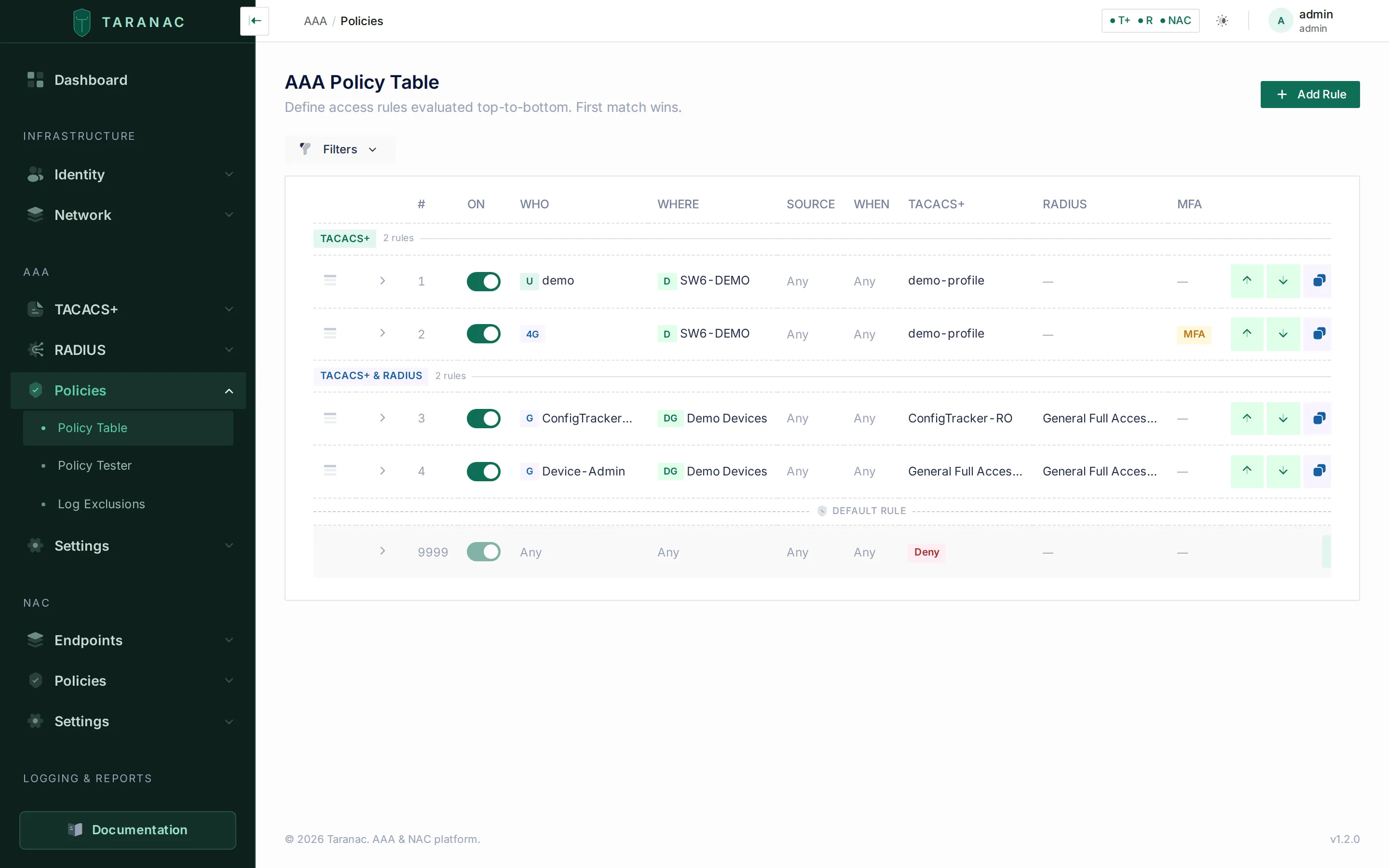
One ordered policy table drives both protocols; each rule has independent RADIUS and TACACS+ actions.
The matching dimensions are shared:
- WHO — users and/or groups (or “any”).
- WHERE — devices and/or device groups (or “any”), matched on the address the request is sent from.
- SOURCE — the calling station’s network. RADIUS does not support the console-only source option; that is a TACACS+ concept and such a rule never matches a RADIUS request.
- WHEN — always, or a time range (overnight ranges supported).
To grant RADIUS access, set a rule’s RADIUS action to profile and pick the profile; use auth_only to authenticate without sending attributes, or deny to refuse the matched population.
Use the Policy tester to dry-run a hypothetical login (user, device, source, time) and see which rule wins and which RADIUS profile it would apply, without sending real traffic.
Common scenarios
Section titled “Common scenarios”- Cisco IOS admin vs read-only. Two profiles on the Cisco IOS template (
priv-lvl=15andpriv-lvl=1), bound to two rules whose WHO targets your admin and operator groups. - Juniper role mapping. A profile returning
Juniper-Local-User-Name = remote-su(super-user) orremote(operator); the named local user template must already exist on the JunOS device. - Mixed estate, one rule. A single rule with WHERE = a device group, granting a TACACS+ profile to Cisco gear and a RADIUS profile to the RADIUS-only platforms in the same group.
- Authenticate without authorizing. A rule in
auth_onlymode for appliances that handle their own role mapping but still want central credential checks. - Standard-attribute-only device. Build the reply on the Generic template using raw attributes (e.g.
Service-Type,Session-Timeout,Filter-Id).
Server settings
Section titled “Server settings”Besides the shared secret, the global enable password and MFA, the Network & Daemon and Dynamic Clients sections of AAA → Settings → RADIUS hold the settings that shape every answer:
| Setting | Default | What it does |
|---|---|---|
| Reject Delay | 1 s | Every Access-Reject is answered this many seconds late (0–10), which slows down password guessing. 0 answers at once. |
| Max Request Time | 30 s | How long FreeRADIUS works on one request before it stops answering it (5–120). Bounds the push wait: see Push MFA over RADIUS. |
| Status-Server | on | Answer RADIUS Status-Server probes. A probe goes through Taranac’s handler, so a node whose handler has not started (its database unreachable, say) fails it instead of answering OK. The node’s own health check does the same. |
| Dynamic Client Networks / Dynamic Client Lifetime | empty / 300 s | Host NAS devices inside these networks become dynamic clients: a new one is accepted from its first packet, and a changed secret or a removal takes effect within the lifetime. Editing one device leaves the others alone. Empty keeps every client static. |
Applying a configuration
Section titled “Applying a configuration”Every change that reaches the RADIUS service’s configuration — a device, a setting, the attribute dictionary — is applied without a restart and without losing a request. The same holds for the NAC (802.1X) service. A new FreeRADIUS process starts beside the running one, on the same ports. Once it is ready, new requests go to it; the previous process finishes the requests it already has, then exits. While that happens, two processes run for up to about a minute: allow memory for one more FreeRADIUS process per container.
- A configuration that cannot start is not applied. If the new process does not come up — its database unreachable, a listener on a port the container does not publish — the previous one keeps serving, and the alert RADIUS configuration not applied (or NAC configuration not applied) gives the reason.
- A process that fails after taking over is rolled back. Traffic goes back to the previous process, and the configuration is retried at once, then after 30 seconds, doubling up to 5 minutes.
- Every restart the container makes on its own raises an alert naming why — a crashed process, a crash loop, a rollback — with how often it happened in the last 24 hours.
./taranac diagnose --protocol radius(or--protocol nac) collects the traces of those events.
RADIUS vs TACACS+ — when to use which
Section titled “RADIUS vs TACACS+ — when to use which”| Capability | TACACS+ | RADIUS |
|---|---|---|
| Per-command authorization | Yes (command sets) | No |
| Enable / privilege escalation | Yes (inheritance chain) | Vendor convention only — $enab<N>$ against one global password, no user, no policy, no MFA |
| Console-only source matching | Yes | No (ignored) |
| Authorization granularity | Login + per-command | Login only (attributes in Accept) |
| Where policy is evaluated | In the tac_plus-ng config | In the Taranac handler |
| Typical use | Router/switch CLI with command logging | Devices/platforms that only do RADIUS admin login |
Prefer TACACS+ for network gear where you want per-command accounting and authorization or an enable workflow. Use RADIUS for devices and platforms that authenticate administration only over RADIUS (many firewalls, controllers, and appliances), or where a simple privilege/role attribute at login is all that’s needed.
Reference
Section titled “Reference”Profile fields
| Field | Type | Notes |
|---|---|---|
name | string | Required, unique |
template_id | reference | The vendor template; protected from deletion while referenced |
service_type | string | Login-User / Administrative-User / NAS-Prompt-User; blank = template default |
session_timeout | integer | Seconds; 0 = no timeout; blank = template default |
idle_timeout | integer | Seconds; 0 = no timeout; blank = template default |
reply_message | string | ≤ 253 bytes; empty = not sent |
attribute_values | structured | Per-attribute static / simple / raw values |
raw_attributes | list | Freeform {name, value, vendor_id?, vsa_type?}; identified by name or by vsa_type (+ vendor_id for a VSA) |
is_enabled | boolean | Disabled profiles are excluded from policy |
Per-protocol policy fields
| Field | Applies to | Notes |
|---|---|---|
radius_profile_mode | RADIUS | none / deny / auth_only / profile |
radius_profile_id | RADIUS | Profile applied in profile mode |
radius_message | RADIUS | Reply-Message for deny / auth_only; ≤ 253 bytes |
tacacs_message | TACACS+ | Terminal message; no length limit |
Related
Section titled “Related”- AAA overview
- TACACS+ profiles
- AAA policies
- Network devices
- LDAP / Active Directory — directory setup, including what MS-CHAPv2 needs from a directory
- Multi-factor (MFA) — providers, enrollment, and which paths can push
- AAA logging — the RADIUS reject reasons
- Deployment bundle: github.com/TaranacLabs/taranac