

Users & groups
Users and groups are the identity layer of Taranac. A user is an account; a group bundles users together and carries the policy-relevant attributes. Together they answer the WHO dimension of every AAA decision: when a TACACS+ or RADIUS request arrives, Taranac matches the authenticated identity (and the groups it belongs to) against your AAA policy rules. The same accounts and groups also govern who can sign in to the Taranac admin UI, and what they are allowed to do there.
Identities come from one of two sources. Local users live entirely in Taranac and are managed on these pages. Directory users (auth_source = ldap) are mirrored in from a directory — Active Directory, OpenLDAP, FreeIPA or another LDAP server — by the sync engine; they appear in the same lists but are largely read-only here. This page covers local accounts and group membership; for directory-sourced identities see LDAP directories.
- Network Admins RBAC
- NOC RBAC MFA
- Auditors admin group
Key concepts
Section titled “Key concepts”| Term | What it means |
|---|---|
| User | An individual account. Has a username (one name, one account — case-insensitively, so Admin and admin collide; see One username, one account), an email, optional name/phone, and — for local users — a password. |
| Group | A named collection of users. Carries the attributes that actually drive access: an RBAC model, an admin flag, an MFA requirement, a web-console access mode, and a TACACS+ enable policy. |
| Membership | The many-to-many link between users and groups. A user can be in any number of groups; a group can hold any number of users. |
| Auth source | local (managed here) or ldap (synced from a directory, read-only here). |
| Web console access | Per-group, three-state control (system default / allow / deny) over whether members may sign in to the Taranac management UI at all. See Web console access. |
| Enable mode | Per-user / per-group control over the TACACS+ enable (privilege-escalation) password. |
| Validity period | Optional start/end dates that make a local account valid only within a window. |
A user has no role of its own. Permissions, admin rights, and MFA enforcement are all derived from the groups the user belongs to. An account in no groups can still authenticate to network devices through AAA policy, but has no access to the admin UI.
Managing users
Section titled “Managing users”Open Infrastructure → Identity → Users. (To create or update many accounts at once from a spreadsheet, see Bulk import & export; an import goes through the same checks as the form.) The list is searchable, filterable, and sortable, with columns for username, email, name, groups, status, locked state, source, validity, last login, and Used by (how many objects reference the account — see Deleting). Filters cover status (active/inactive), locked, source (local/ldap), validity (valid / expired / pending) and group — the direct members of one user group, LDAP-synced groups included. The group filter lists groups, so it appears only to operators who may view them (groups.view). A chosen group is remembered for the browser session. Search matches a substring, case-insensitively, across username, email and names.
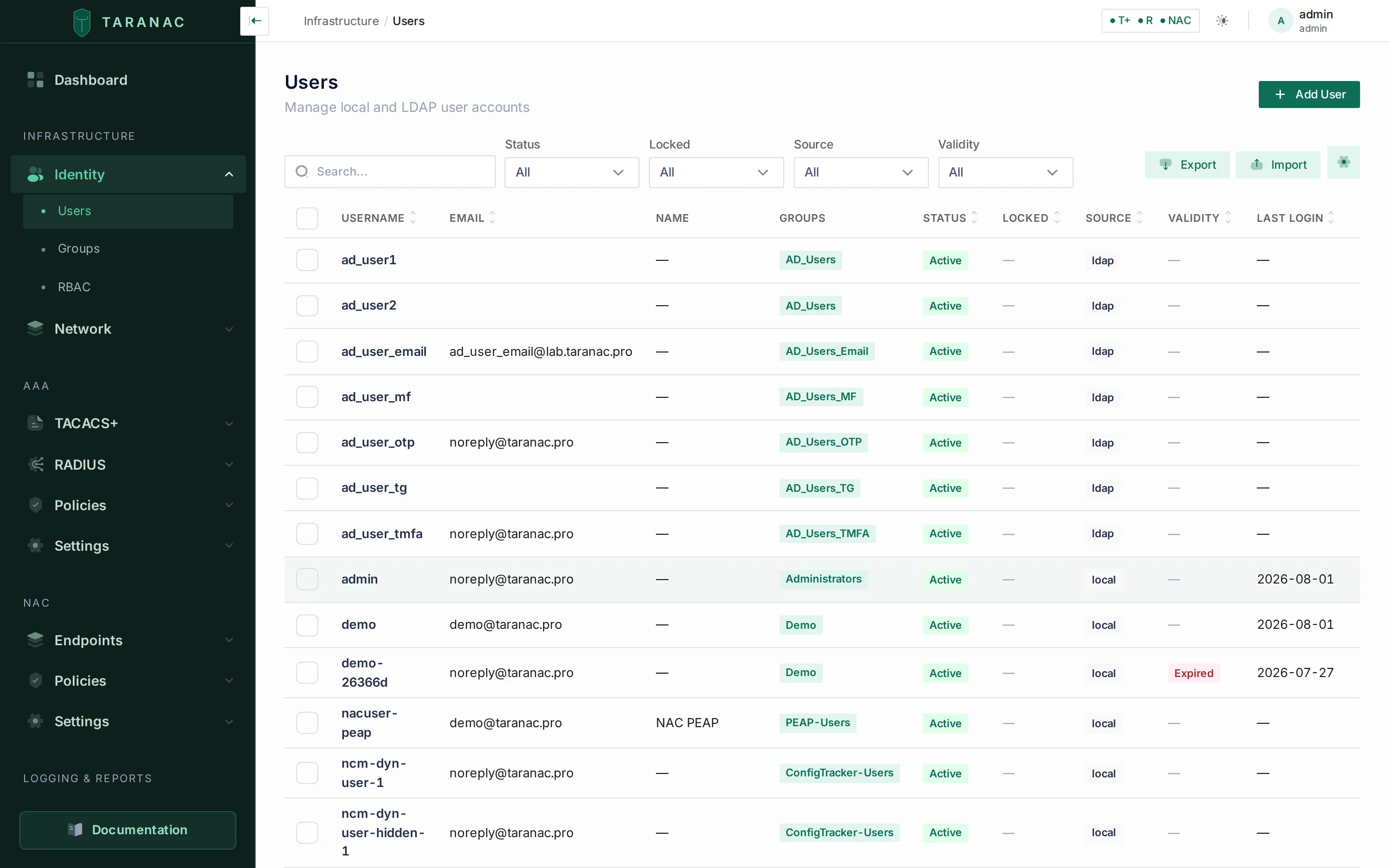 The Users list — group badges, status, source and validity at a glance.
Creating a user
Section titled “Creating a user”Click New and fill in the form:
| Field | Notes |
|---|---|
| Username | Required, immutable after creation. Max 150 characters. Must not be held by any other account — local or directory, enabled or disabled — compared case-insensitively: creating Admin when admin already exists is rejected. |
| Required. Not unique — several accounts may share an address. Used for the welcome email and password links. | |
| First / last name, phone | Optional. |
| Password | Pre-filled with a policy-compliant 16-character generated value, shown in plain text with Copy and Generate buttons. Copy it before saving if you intend to hand it over in person. |
| Language | UI language for this user (default en). |
| Active | On by default. |
| Must change password | On by default — forces a change at first login. It is enforced on the data plane too: a local account carrying the flag is denied TACACS+, RADIUS and NAC sign-in until the password is changed, not only blocked in the web UI. (Directory accounts are unaffected — their password state belongs to the directory.) |
| Enable password | TACACS+ privilege escalation; see Enable password. |
| Account validity | Optional start/end window; see Validity periods. |
| Groups | Add the user to one or more groups inline. |
Passwords are validated against the password policy, hashed with argon2id, and recorded in password history. The policy lives in the backend and is applied identically everywhere a password is set or changed — the admin form, the welcome/reset links, and every login path. You edit it under System → Authentication & Sessions; it ships as minimum 12 characters requiring an upper-case letter, a lower-case letter, a digit and a special character, with password expiry at 90 days, the last 5 passwords remembered, and an expiry warning 14 days ahead. A rejected password comes back with every rule it violated, listed individually.
For local users Taranac also derives an NT password hash, which is what RADIUS MS-CHAP / PEAP MSCHAPv2 authentication needs — so a local user can be used for 802.1X without any extra step. Directory users have no NT hash stored in Taranac; the MS-CHAPv2 verifier for them comes from the directory itself (a domain controller for Active Directory, or ipaNTHash read at login for FreeIPA — see LDAP directories).
Editing, locking, deleting
Section titled “Editing, locking, deleting”In edit mode the page shows the form alongside read-only metadata, MFA status, and linked PKI certificates.
- Change password is a collapsible section — leave it empty to keep the current password.
- Lock / Unlock is independent of the active flag: a locked account fails authentication even while active. Unlocking also resets the failed-login counter. Repeated automatic failures can auto-lock an account until a timeout passes; a manual lock stays until an admin unlocks it.
- Who you may change. Every change to another account — editing any field, locking, deleting, revealing its enable password, resending its welcome email, resetting its MFA — needs, besides the action’s permission, every console permission that account holds. Only an administrator changes an administrator. An account whose groups carry no RBAC model (a network-only account) is open to anyone with the action’s permission, and your own account is always yours to edit. A refusal names the permissions you lack. The full rule set is in Who may change whom.
- Delete is blocked for your own account and for directory users. It is also blocked while the account is referenced — by an AAA policy rule, an NCM just-in-time credential, an active lease — and the refusal itemises what is holding it rather than cascading silently (see References — “where used”). Once it goes through, deleting a user automatically revokes their active PKI user certificates and detaches any device certificates that were linked to them.
Managing groups
Section titled “Managing groups”Open Infrastructure → Identity → Groups. Columns show name, source, the Admin and MFA flags, Web login (the resolved console-access answer — see Web console access), the member count (click it to preview members), Used by, and the creation date.
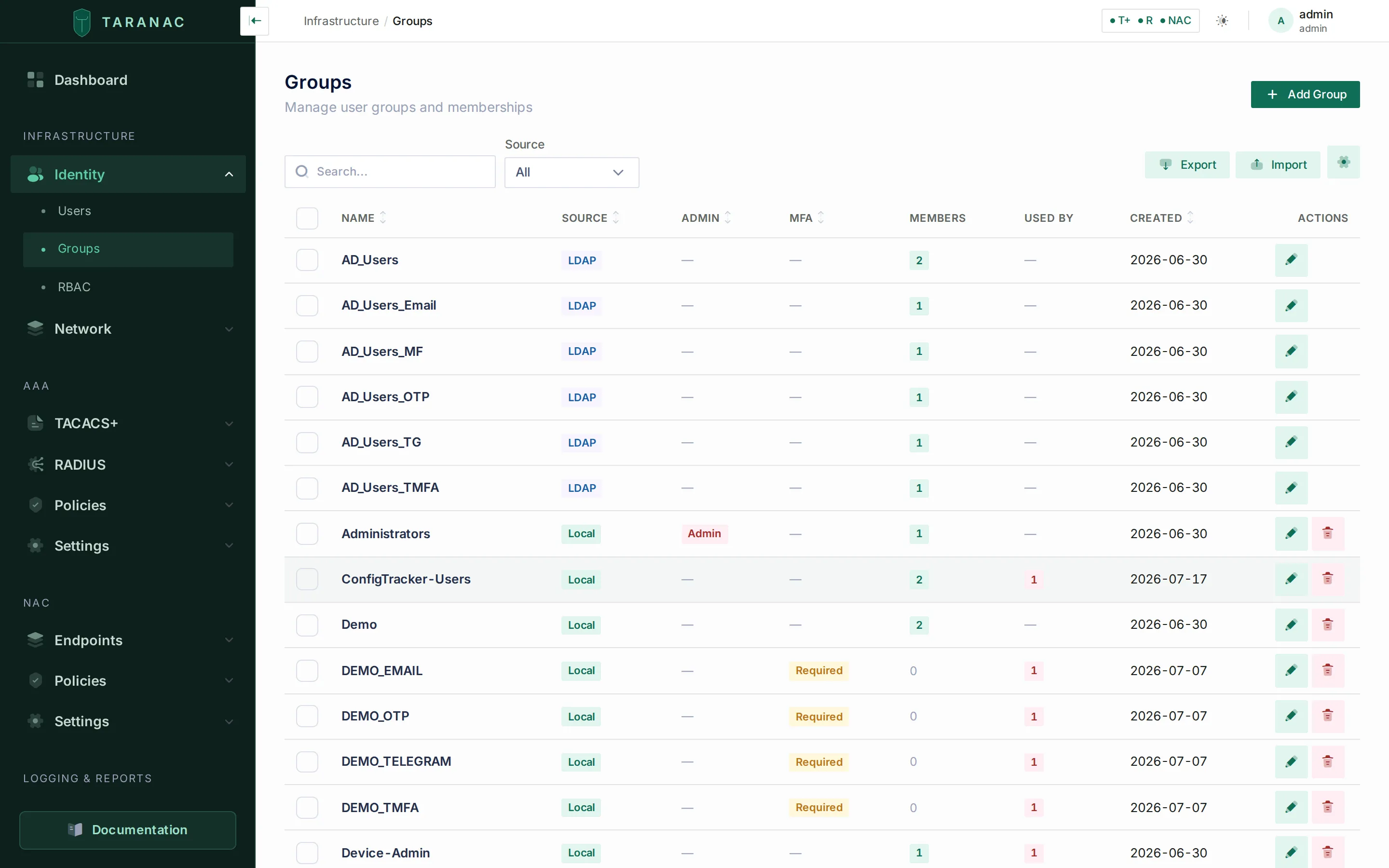 The Groups list — admin and MFA flags are the levers that matter.
When you create or edit a group you set:
| Field | Effect |
|---|---|
| Name | Required, unique. Disabled for directory groups. |
| Description | Free text. Disabled for directory groups. |
| RBAC model | The permission set granted to every member for the admin UI / API. Blank = no permissions. See Roles & permissions. |
| Admin group | When on, members bypass all RBAC checks and get full system access. Flipping it — in either direction — requires administrator rights. |
| Require MFA | When on, every member must complete MFA at login, overriding their personal and the system-default MFA setting. See Multi-factor (MFA). |
| Web console access | System default / Allow / Deny — whether members may sign in to the Taranac management UI. Administrator-only, in either direction. See Web console access. |
| Enable password | Group-level TACACS+ enable policy that members can inherit; see below. |
Three of those fields are administrator-only on every group, not merely groups.edit: the RBAC model, the admin flag, and web console access. Each rewrites what every member of the group can reach, so a plain edit permission must not confer them — otherwise anyone who could edit groups could point their own group at a privileged RBAC model and simply log in again.
An admin group goes further: everything about it is administrator-only — every field (its enable password and MFA requirement included), deleting it, revealing its enable password, and adding or removing members. Whatever its members inherit from the group, they all inherit at once, so a change to it is a change to every administrator.
The Members panel lets you add and remove users (changes are saved together with the form). Adding someone to a group — yourself included — needs every permission the group’s RBAC model grants; otherwise group membership would be a way to hand out a richer role than your own. Adding or removing a member also counts as a change to that member, so the who-may-change-whom rule applies to them as well. The same two checks apply when you set a user’s groups on the user form. You can also create a brand-new user inline while building a group. Deleting a group is refused while anything still references it, with the references listed (see References — “where used”).
One username, one account
Section titled “One username, one account”A username names exactly one account across the whole installation — local accounts and the accounts of every directory together, compared case-insensitively. Taranac refuses to create a second holder: the user form and an import report the conflict, and a directory sync will not take over a name a local account or another directory configuration already holds (see LDAP directories). A name held by a disabled account counts as taken.
An installation can still end up with a name that several accounts hold — carried over from an older release, brought back by restoring a backup, or left by two directory syncs that once ran side by side. Picking one of them would check the password against one account and authorize the session with the groups of another, so such a name is refused everywhere, and none of its holders is picked:
| Where the name is used | What happens |
|---|---|
| TACACS+, RADIUS and NAC sign-in | Refused exactly like an unknown user. The daemon logs an error naming the username. |
| Web console login, password reset, EST enrollment | The same answer as for an unknown name, so the forms do not reveal that the name exists twice. The audit log records the failed login or reset with reason = ambiguous_username. |
| AAA and NAC policy testers | Report that the name is held by several accounts and that TACACS+, RADIUS and NAC refuse it. |
| Creating a user, importing a user row | Refused: Username “bob” is held by 2 accounts. Remove or rename the extra accounts first… |
| Directory sync | The entry is skipped and listed among the run’s errors; the rest of the run goes on. Sync Preview shows it as a conflict. |
Console recovery (./taranac reset-password, unlock, create-admin) | Print every account that holds the name, change nothing, and exit with an error. See Admin recovery from the console. |
For signing in, only enabled accounts count. One enabled account among disabled namesakes is simply that account; two enabled ones are refused. If none is enabled, a single disabled account gets the usual account disabled answer. Enabling a disabled namesake makes the name ambiguous again from that moment — the refusal returns rather than the login silently switching accounts.
A directory login typed as user@domain or DOMAIN\user never opens a local account of the same name: a password the directory accepts only opens an account the directory owns.
While any name is shared, the alert Usernames shared by several accounts (users:duplicate_usernames, severity error) lists them, with how many accounts hold each. It is re-checked after every directory user sync, and resolves on the first sync that finds none. To clear it, delete the extra accounts (or rename them at their source — a directory account in its directory), then run a sync.
How identity feeds the rest of Taranac
Section titled “How identity feeds the rest of Taranac”Web console access
Section titled “Web console access”A directory synced for the sake of NAC and AAA policy brings in policy subjects, not console operators. An AD Domain Users mirror is thousands of accounts, and none of them should become a valid credential pair against the management interface just by being synced. is_active = false is not the lever for that — it is not a console switch at all: the TACACS+ user cache reads the same column (it loads WHERE is_active = true), so switching it off removes the person from AAA as well, from precisely what the directory was synced for.
The console decision is made once, for the whole installation. A group carries a three-state Web console access mode (web_login_mode), resolved against an installation-wide default:
| Group mode | Meaning |
|---|---|
System default (inherit) | The group does not decide — the installation default does. Every group nobody has touched is already here. |
Allow (allow) | Members reach the console whatever the default says. |
Deny (deny) | Members are refused whatever the default says. |
The default is the setting auth.web_login_default, edited under System → Authentication & Sessions (/settings/authentication) in the Web Console Access section. It ships as allow, so an upgrade changes nothing about who can log in.
inherit is what makes that default retroactive. Because every untouched group already sits in it, flipping the setting to deny closes the hundred groups already synced and every group the directory creates tomorrow — without a single write to the groups table. A per-group flag could never do that: sync assigns policy only to groups it creates, so a default chosen today would never reach the ninety already there.
Precedence
Section titled “Precedence”Resolved across all of a person’s groups, in this order:
- Any admin group (
is_admins) → allowed. An administrator can never be shut out — otherwise the mode would be a way to lose access to your own installation. - Otherwise any group set to Deny → denied. Explicit beats inherited, and among non-admin groups deny beats allow: membership in one permissive group must not undo a deny inherited from another.
- Otherwise any group set to Allow → allowed. This is what carries the exception in a deny-by-default installation — mark the handful of groups that need the console and never touch the rest.
- Nobody decided → the installation default.
A missing or unreadable setting reads as allow: failing closed would turn a lost settings row into “nobody can sign in”, with no console left to fix it from.
The check runs before the password is verified, and that ordering is the security property rather than an optimisation. Verifying first would still issue the LDAP bind — which is what turns the login form into a password-spraying front end for your directory, with wrong guesses reaching the DC and feeding its lockout counters. The refusal is the ordinary vague invalid credentials, so the gate cannot be used to ask “does this account exist, and may it use the UI”; the real reason goes to the audit log as USER_LOGIN_FAILED with reason = web_login_denied. The gate is re-checked at the MFA step too, so closing a group takes effect on someone already standing at the factor prompt.
What it closes — and what it does not
Section titled “What it closes — and what it does not”It closes the console, not the account:
- Password reset by email keeps working. It must: the same password authenticates the person over TACACS+ / RADIUS / NAC, and a reset recomputes the NT hash used by PEAP MSCHAPv2 — closing it would take away a denied group’s only way to change its network password. It is not a way in either: a reset issues no session and revokes every refresh token.
- The certificate download link and the MFA setup link keep working — both are public, one-time-token endpoints that never go through login.
- AAA and NAC are unaffected either way. In particular the BYOD captive portal deliberately does not inherit the gate: it shares the same authentication core, and taking someone’s console away must not take their network with it. See Captive portal.
In the UI
Section titled “In the UI”- The Groups list’s Web login column reports the resolved answer, not the stored one, and marks which groups merely inherited it: Allowed for an explicit allow, Denied for a group that chose it, Denied (default) for one sitting on a deny-by-default installation’s setting, and a dash where the group resolves to allow without having said so.
- Moving a group off System default requires administrator rights in either direction — in a deny-by-default installation Allow opens the console just as decisively as Deny closes it.
web_login_modeis deliberately one of the few fields you may set on a directory-synced group. That population is the reason the mode exists.- A group cannot be both an admin group and Deny.
is_adminswins at login, so such a group would say one thing and do another; the combination is refused on save instead of being resolved silently. Allow alongside the admin flag is merely redundant, and is accepted. - On a group set to Deny, the RBAC model picker goes read-only — assigning a role to a group that cannot reach the console is meaningless. The existing assignment stays visible: nothing was deleted, and that has to be something you can see. Switch the access back and the role applies again. A group left on System default keeps its picker editable, since it has not decided anything yet.
Admin UI access (RBAC)
Section titled “Admin UI access (RBAC)”A user’s effective UI/API permissions are resolved through their groups:
User → Groups → Group.rbac_model → permissionsIf the user belongs to any group flagged as an admin group, they get full access and all permission checks are skipped. Otherwise their permissions are the union of every group’s RBAC model. A user with no group — or whose groups have no RBAC model and no admin flag — cannot use the admin UI. MFA enforcement follows the same logic: if any of the user’s groups requires MFA, MFA is mandatory at login.
Permissions are only the second question. Web console access is asked first, before the password is even verified: a user whose groups resolve to deny never reaches the point where an RBAC model would matter.
Network access (AAA — the WHO dimension)
Section titled “Network access (AAA — the WHO dimension)”AAA policy rules match on WHO (users and/or groups), WHERE (devices/device groups), and WHEN. A rule can target specific users, one or more groups, or any identity. At request time Taranac evaluates the authenticated user together with all the groups it belongs to, so adding a user to the right group is usually all it takes to grant device access — no rule edit required. See AAA policy.
Enable password
Section titled “Enable password”For TACACS+ device administration, the enable (privilege escalation) password is resolved through an inheritance chain, with the first explicit (non-inherit) setting winning:
User → Group → TACACS+ profile → Global defaultEach enable_mode can be:
| Mode | Behaviour |
|---|---|
inherit | Fall through to the next level in the chain (the default). |
login_password | Reuse the user’s login password for enable. |
custom | Use a distinct, encrypted enable password set on this object. |
deny | Always refuse enable access. |
If a user is in several groups that each define an enable mode, the most recently updated group wins. Custom enable passwords are stored encrypted; revealing one in the UI is audit-logged.
Validity periods
Section titled “Validity periods”Local accounts can carry an optional valid-from / valid-until window. Outside the window the account is rejected at login, at token refresh, and on every API request — a soft but consistently enforced expiry. Leave a bound empty for “no restriction”. These fields apply to local users only; directory users have no validity window in Taranac.
References — “where used”
Section titled “References — “where used””Users and groups are protected by referential integrity rather than by a silent cascade. Both lists carry a Used by column, and both delete flows open a drawer listing exactly what still points at the object — an AAA or NAC policy rule, a credential, a lease. The delete is refused with that itemised list instead of failing opaquely or quietly stripping the reference. Unassign or repoint the references first, then delete.
Common scenarios
Section titled “Common scenarios”- A new network engineer. Create a local user, add them to a “Network Admins” group that has an RBAC model (or the admin flag) plus a TACACS+-friendly enable mode. They can now log in to the UI and administer devices governed by AAA rules that target that group.
- A contractor with an end date. Create a local user and set valid-until to the contract end date. Access stops automatically — no cleanup reminder needed.
- Granting AD users access without recreating them. Let LDAP sync import the AD security group, then set its RBAC model / admin flag here. AD members gain Taranac access on their next login; you never manage their passwords.
- A 802.1X service/user account. A local user automatically has the NT hash needed for MS-CHAP / PEAP, so it can be referenced by NAC and RADIUS flows with no extra configuration.
- Forcing step-up auth for sensitive staff. Turn on Require MFA on the group rather than per user — it overrides individual settings for everyone in it.
- A directory synced only for NAC/AAA policy. Set the installation default under System → Authentication & Sessions to Deny, then set Web console access = Allow on the two or three groups that actually operate Taranac. Every synced group — including the ones the directory creates next month — is closed to the management UI, while TACACS+, RADIUS, NAC and the BYOD portal carry on exactly as before. See Web console access.
When to use what
Section titled “When to use what”| You need… | Use |
|---|---|
| An account managed entirely in Taranac (service accounts, lab, no directory) | Local user |
| Centrally-managed staff identities, single source of truth | Directory (LDAP/AD) users + LDAP sync |
| To grant admin-UI permissions | Assign an RBAC model to a group, or the admin flag for full access |
| To keep a synced directory out of the admin UI without touching AAA | Web console access — the installation default, plus per-group Allow exceptions |
| To grant device (AAA) access | Put the user/group in a matching AAA policy rule’s WHO |
| Privilege escalation on switches/routers | Set enable mode on the user, group, or TACACS+ profile |
| Time-boxed access | Validity period on the local user |
| Mandatory MFA for a team | Require MFA on the group |
Reference — user fields
Section titled “Reference — user fields”| Field | Meaning |
|---|---|
username | Login name; immutable; max 150 characters. Compared case-insensitively (on lower(username)), and held by one account only — local and directory accounts share one namespace; a name several accounts hold is refused (see One username, one account). The stored value keeps its original casing for display. |
email | Notification/recovery address; not unique. |
first_name / last_name / display_name / phone | Profile fields; mapped from givenName / sn / displayName / telephoneNumber on directory sync. display_name empty ⇒ the UI composes it from first + last. |
is_active / is_locked | Active flag and lockout state; locking always blocks login. is_active is not a console switch — the TACACS+ user cache reads it too, so clearing it removes the account from AAA as well. To close only the management UI, use Web console access. |
locked_until | When an automatic lockout expires (the next login then auto-unlocks). NULL on a manual lock — permanent until an admin unlocks. |
failed_login_count | Consecutive failures; reset on unlock and on a successful login. Deliberately not incremented by a failed directory bind, since is_locked also gates the AAA data plane. |
must_change_password | Forces a password change at next login — and, for local accounts, denies TACACS+/RADIUS/NAC until it happens. |
lang | Per-user UI language (default en). |
auth_source | local or ldap. |
enable_mode / enable_password | TACACS+ enable behaviour (inherit / login_password / custom / deny). |
valid_from / valid_until | Optional account validity window (local only). |
has_nt_password | Whether an NT hash exists for RADIUS MS-CHAP (local only). |
Reference — group fields
Section titled “Reference — group fields”| Field | Meaning |
|---|---|
name | Unique group name. |
source | local or ldap. |
is_admins | Members bypass all RBAC checks (full access), and are never refused the web console. |
mfa_required | All members must complete MFA at login. |
web_login_mode | Web console access: inherit (resolve against auth.web_login_default), allow, deny. Overridden by is_admins. The API also returns web_login_effective — the resolved answer the group table shows. |
rbac_model | Permission set granted to members for the UI/API. |
enable_mode / enable_password | Group-level TACACS+ enable policy for inheriting members. |
Related
Section titled “Related”- LDAP directories — sync directory users and groups.
- Roles & permissions — what RBAC models actually grant, and who may change whom.
- Bulk import & export — users and groups from a spreadsheet.
- Multi-factor (MFA) — enrollment and enforcement.
- AAA policy — how users and groups feed the WHO dimension.
- Captive portal — the BYOD flow that a console deny deliberately leaves open.
- TACACS+ — enable handling and shell profiles.
- Project repository