

Roles & permissions
Taranac’s RBAC (role-based access control) governs who may do what inside the admin console — view the dashboard, edit a RADIUS profile, delete a network device, export logs, and so on. It is the control plane for your own operators, not for the endpoints and users that authenticate through Taranac.
- view
- create
- edit
- delete
- export
- view
- create
- edit
- delete
- export
How it fits together
Section titled “How it fits together”Permissions in Taranac flow through three objects:
- Permission model (also called an RBAC model or role) — a named set of allowed actions, e.g. auditor.
- Group — users are organised into groups; a group is linked to one permission model.
- User — an administrator inherits the permissions of every group they belong to.
A user is never assigned a role directly. You assign a permission model to a group, then put users in that group. This is the same group object used for TACACS+/RADIUS authorisation, so one group can carry both an admin role and network-access settings.
Permission model ──assigned to──▶ Group ──contains──▶ User (administrator)When a user logs in, Taranac computes their effective permissions by merging the models of all their groups (see Permission resolution).
The permission model
Section titled “The permission model”A permission model is a matrix of sections and actions:
- A section is a feature area —
users,devices,tacacs_profiles,nac_endpoints,audit_logs, and so on. - An action is something you can do within that section — typically
view,create,edit,delete, plus section-specific ones such asexport,manage_members,lock_unlock,revoke, orrotate_key.
Each action is simply on or off. A model that grants devices.view and devices.edit but not devices.delete lets its members open and modify network devices but not remove them.
Sections are grouped into categories for display:
| Category | Sections it covers |
|---|---|
| General | dashboard |
| Identity | users, groups, ldap, domain (the Active Directory machine account used for MS-CHAPv2) |
| Network | devices, device_groups, network_objects |
| AAA | tacacs_profiles, tacacs_templates, tacacs_settings, radius_profiles, radius_templates, radius_settings, command_sets, aaa_policy, aaa_logs_view, log_exclusions |
| NAC | nac_endpoints, nac_endpoint_groups, nac_auth_profiles, nac_policy, nac_pki, nac_sessions, nac_settings, captive_portals, captive_portal_sessions, nac_logs_view |
| NCM | Config Tracker: ncm_devices, ncm_sources, ncm_recipes, ncm_scrub_sets, ncm_tracked_configs, ncm_credentials, ncm_jobs |
| Security | rbac, mfa, audit_logs, backup, crypto |
| System | settings, email, monitoring, syslog, alerts, collectors, reports, update_feed, license (licensing), cluster (HA cluster) |
Administrators bypass RBAC
Section titled “Administrators bypass RBAC”A group can be flagged as an admin group (is_admins). Members of an admin group have full, unconditional access to everything; their permission model, if any, is ignored. The initial admin account created on first boot belongs to such a group.
Everything about an admin group is the administrators’ business: changing any of its fields (its enable password and MFA requirement included), deleting it, revealing its enable password, and adding or removing its members are all refused to anyone who is not an administrator, whatever their role grants. Whether the person making the change is an administrator is read from the database at that moment, not from their session — an administrator who has just been removed from the admin group cannot use the session they still hold to put themselves back.
Built-in roles
Section titled “Built-in roles”Taranac seeds three ready-made permission models on first start. They are convenience templates — fully editable and deletable like any model you create yourself.
| Role | What it grants |
|---|---|
| operator | Day-to-day management across all operational sections: view, create, edit and most actions. Denied: delete, key rotation, and certificate revocation everywhere. Security/system sections (RBAC, settings, crypto, backup, email) are view-only. |
| auditor | Full read-only access to every section, plus every export action. No create/edit/delete. |
| demo | Full read-only access to the entire system — every view, plus reports.run so a report can be previewed on screen. Nothing else, and no exports. Useful for read-only demos and screen-shares. |
All three are generated from the live permission registry at seed time rather than written out by hand, so they cover every module’s sections — including modules added after the installation was built.
Managing roles in the console
Section titled “Managing roles in the console”Open Infrastructure → Identity → RBAC.
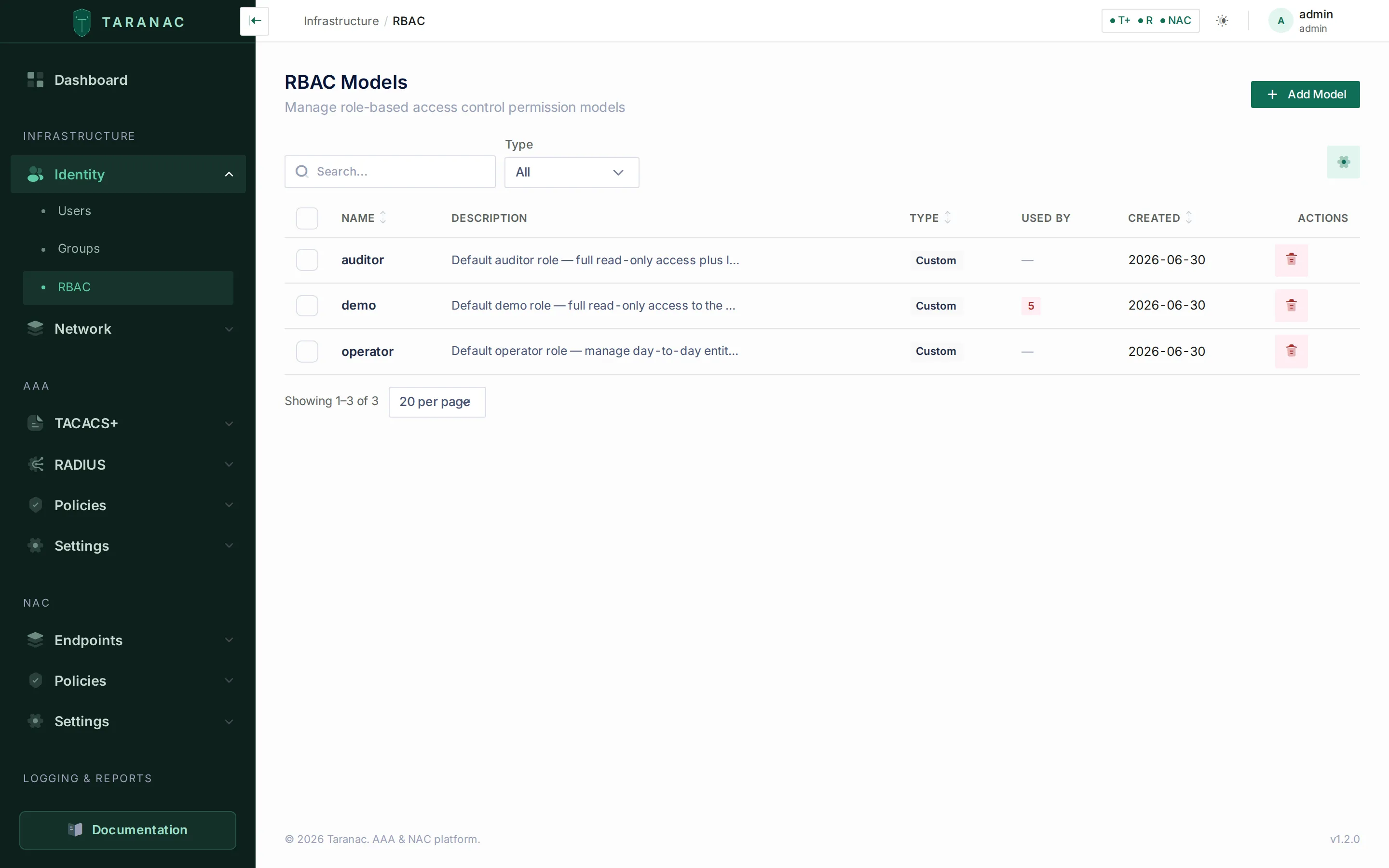
The RBAC Models screen — the three seeded roles on a fresh installation.
The list carries Name, Description, Used by and Created, is searchable across name and description, sorts on name and creation date, and lets you hide columns from the ⚙ toggle. Click a row to open the model; Add Model creates a new one. Opening a model gives you the editor directly if you hold rbac.manage — with only rbac.view the same page opens read-only.
Where a model is used, and deleting one
Section titled “Where a model is used, and deleting one”Every model carries a Used by count, and clicking it opens the where-used drawer listing exactly what points at the model:
- Groups that have the model assigned. This is a
RESTRICTforeign key: a model assigned to any group cannot be deleted out from under it. - LDAP configurations that name the model as their default role or in a per-group override. These live in settings rather than in a foreign key, and the where-used view reads them too, so the model cannot be deleted while a configuration still names it.
Both are blocking references. The delete is refused with the holders itemised by name — unassign or repoint them first, then delete.
The permissions editor
Section titled “The permissions editor”A model has a Name (required, unique, up to 100 characters) and an optional Description, followed by the permissions matrix. The matrix is organised by category; each section is a collapsible card — all collapsed to start with — badged with how many of its actions are granted out of how many exist (grey for none, yellow for some, green for all), with:
- an All toggle that grants or revokes every action in the section at once, and
- a switch per action, labelled and described by the backend rather than by the UI.
Tick exactly the actions the role should allow, then Save.
Assigning a role to administrators
Section titled “Assigning a role to administrators”Roles take effect only once attached to a group:
- Create or edit the permission model under Infrastructure → Identity → RBAC.
- Go to Infrastructure → Identity → Groups, open the relevant group, and set its RBAC model.
- Add the administrators to that group under Groups → members.
Changes apply at the user’s next login, because effective permissions are computed during authentication.
Opening a group whose own Web console access is set to Deny shows the RBAC model picker read-only, hinting “Kept, but not applied while this group denies the console.” A role granted to people who cannot reach the console grants nothing, but the assignment stays visible — nothing is deleted, and that has to be something you can see. Switch the access back and the role applies again. This follows the group’s own mode, not the resolved one: a group left on System default has decided nothing yet, so its picker stays editable — you may well be preparing a role before opening the console to it. The mode itself is documented under Web console access.
Permission resolution
Section titled “Permission resolution”When a non-admin administrator logs in, Taranac:
- Loads every group the user belongs to.
- If any group is an admin group → grants full access (RBAC bypassed).
- Otherwise merges the permission models of all their groups using a logical OR: an action is allowed if any group grants it.
- If the user is in no groups — or in groups that have no permission model — they have no permissions and cannot use the console.
You can inspect any user’s merged result; the console exposes their effective permissions, which is the quickest way to answer “why can this person do X?”.
Who may change whom
Section titled “Who may change whom”A permission such as users.edit says which kind of change you may make. It does not, on its own, say to whom. Without a second check, users.edit would be enough to take over a richer account: change its email, resend the welcome link to that address, set a password, and act as that person. Group membership and role editing would be ladders in the same way. So every change to identities is judged twice — by the permission the action needs, and by the rules below. Administrators (members of an admin group) pass all of them.
| You want to… | Besides the action’s own permission, you need… |
|---|---|
| Change another user — any field, delete, lock or unlock, reveal their enable password, resend their welcome email, reset or remove their MFA, regenerate their backup codes, add them to or remove them from a group, or update them from an import file | Every web permission that user holds. An administrator holds everything, so only an administrator changes an administrator. |
| Change a user who holds no web permissions (a network-only account: their groups carry no RBAC model) | Nothing more — the action’s permission is enough. |
| Change yourself | Nothing more. Self-service is always allowed; you never exceed yourself. |
| Add a user — yourself included — to a group | Every permission that group’s RBAC model grants. This applies in the user form, the group’s member list and an import alike. Only the groups being added are judged; keeping a membership someone else granted is not an escalation. |
| Touch an admin group — edit any field, delete it, reveal its enable password, add or remove members | Administrator rights. |
| Create or edit a permission model | To add only permissions you hold yourself. Removing a permission you lack, or leaving it in place, is allowed — a narrower operator can still trim a role it could not have built. |
| Edit or delete a permission model that an admin group uses | Administrator rights. |
| Write an LDAP configuration — its default role and per-group role mapping, and the configuration as a whole | See LDAP configurations below. |
The comparison is made between sets of section.action permissions read from the database at the moment of the change: what the target holds through all of their groups, against what you hold through all of yours. A permission that a stored model still lists but that no module declares any more counts for nobody. Nothing here depends on session tokens, so a demotion takes effect on the very next change the demoted person attempts.
A refusal names what is missing, so the fix is visible from the message:
| Refusal | Meaning |
|---|---|
| You cannot change the user ‘alice’: they hold permissions you do not (…) | The target holds the listed permissions and you don’t. |
| Only an administrator can change, lock, delete or reset the credentials of an administrator account | The target is in an admin group. |
| You cannot add users to the group ‘NetOps’: its role grants permissions you do not hold (…) | Membership dominance — the listed permissions are what the group would hand out beyond your own. |
| You cannot grant permissions you do not hold yourself: … | A role edit adds permissions you lack. |
| Only an administrator can change a role assigned to an administrator group | The model is bound to an admin group. |
| Only an administrator can change or delete an administrator group or reveal its enable password | The group is an admin group. |
When a group’s MFA setup links are sent with Reset and resend to all, a member you may not change is skipped and the rest of the group still gets its links; the confirmation counts how many were sent out of how many members.
LDAP configurations
Section titled “LDAP configurations”A directory configuration decides who lands in which group on the next sync and with which role, and its sync can deactivate or delete the accounts it owns. Writing one is therefore judged like all of those writes at once:
- The default role and every role in the per-group role mapping must be roles you fully hold — the same test as adding a member to a group. A role that an admin group uses can only be named by an administrator.
- Creating, editing or deleting the configuration needs every permission of every group it can populate (its own directory groups, plus orphaned directory groups left behind by a deleted configuration), and every web permission of every account it owns or could adopt.
- A configuration that feeds an admin group is administrator-only to edit or delete.
See LDAP directories.
Common scenarios
Section titled “Common scenarios”Read-only auditor. Compliance staff who must see everything but change nothing. Assign the auditor role (read-only everywhere, plus log/audit export) to their group. They can review configuration, sessions and logs and pull exports for evidence, but every create/edit/delete button is rejected.
NAC operator. A team that runs day-to-day network access — onboarding endpoints, adjusting endpoint groups, watching sessions — but should not touch AAA policy or system settings. Create a custom model granting view/create/edit on nac_endpoints and nac_auth_profiles, the same plus manage_members on nac_endpoint_groups, view/manage on nac_sessions, and view on the AAA and Network sections — leaving Security and System off.
Full administrator. Platform owners. Put them in the admin group (is_admins) — they bypass RBAC and hold every permission implicitly. Keep this group small.
Help-desk / limited operator. Front-line staff who reset and unlock accounts but never delete them. Start from operator (which already excludes deletion) or build a model granting users.view, users.edit, users.lock_unlock and little else. Such a role manages network-only accounts and anyone holding no more than it does; an account with richer console rights — and any administrator — is refused to it (see Who may change whom). Add mfa.manage if the desk also handles lost phones.
When to use what
Section titled “When to use what”| You want someone to… | Use |
|---|---|
| Do everything, no restrictions | Admin group (is_admins) — not a model |
| See everything, change nothing | auditor role |
| See everything for a demo, no exports | demo role |
| Run daily operations without deleting or touching system config | operator role |
| Operate one area only (e.g. NAC, or users) | Custom model scoped to that category |
| Be blocked entirely | Remove from all groups, or use a group with no model |
Reference: common actions
Section titled “Reference: common actions”The four CRUD verbs carry most of the matrix; the rest are section-specific.
| Action key | Meaning | Where |
|---|---|---|
view | Read/list the section’s records | Almost every section |
create / edit / delete | Add, modify and remove records | Most record-holding sections |
manage | Manage a configuration area as a whole. On mfa it also covers every administrative act on another user’s second factor: reset, setup links, backup codes, removing an enrollment | mfa, rbac, aaa_policy, nac_policy, alerts, backup, license, cluster, update_feed, domain, nac_sessions, captive_portal_sessions |
export | Export data to XLSX/CSV; without it the Export button is hidden and the download refused | aaa_logs_view, audit_logs, nac_logs_view, reports |
test / reload | Validate a configuration, or reload a live policy | aaa_policy, nac_policy, syslog (test) |
manage_members | Add/remove members | groups, device_groups, nac_endpoint_groups |
lock_unlock | Lock or unlock user accounts | users |
acknowledge | Acknowledge an alert | alerts |
manage_configs / run_sync / test_connection / browse_directory | Edit an LDAP configuration, run a sync, test the connection, browse the directory tree | ldap |
join | Join this node to the Active Directory domain — split from manage because a join needs a privileged AD credential and writes an object into AD | domain |
manage_templates / send_test | Edit email templates, send a test message | email |
download | Download a backup archive | backup |
revoke | Revoke an issued certificate | nac_pki |
run / build / schedule | Run a report, author datasets and templates, manage scheduled deliveries | reports |
reveal / reveal_raw | Reveal a stored credential secret, or a snapshot’s raw unmasked configuration — high-privilege and separately audited, deliberately not implied by view | ncm_credentials, ncm_tracked_configs |
rotate_key | Master-key rotation. The permission and its endpoint still exist, but the endpoint always answers 501: rotation rewrites encrypted columns across ~20 tables plus the key material on every node, so it is a console/CLI operation, not an API call. For the same reason there is no crypto page in the console. | crypto |
Available actions vary per section; the permissions editor always shows the exact set each section supports, with the label and description the owning module declared.
Related
Section titled “Related”- Users & groups — create groups, manage membership, and attach a permission model
- LDAP directories — map directory groups, where only the admin flag, MFA requirement and permission model are editable on synced groups
- Multi-factor authentication — enforce MFA per group at login
- AAA policy and NAC overview — network-access policy, which is distinct from console RBAC
- Config Tracker credentials — where the separately-audited
revealpermission applies - Reports — the
run/build/schedule/exportsplit on thereportssection - Licensing — the License section (
view/manage) gates who can see and replace the Pro license - High availability — the Cluster section (
view/manage) gates cluster status, join tokens and node decommission - Taranac on GitHub