

LDAP directories
Taranac can connect to one or more directories — Active Directory, OpenLDAP, FreeIPA, Google Workspace Secure LDAP or any other LDAP server — and use them as a source of truth for identities. A directory connection does two things: it synchronises users, groups and computer objects into Taranac, and it acts as an authentication backend so directory accounts can sign in by binding against the server. Synced groups become first-class Taranac groups, so directory membership flows straight into RBAC, AAA and NAC policy.
You configure directories under Settings → Integrations → LDAP. Most deployments need only one connection; several are only required for genuinely separate directories — as here, where one installation holds an Active Directory domain, an OpenLDAP server and a FreeIPA realm side by side.
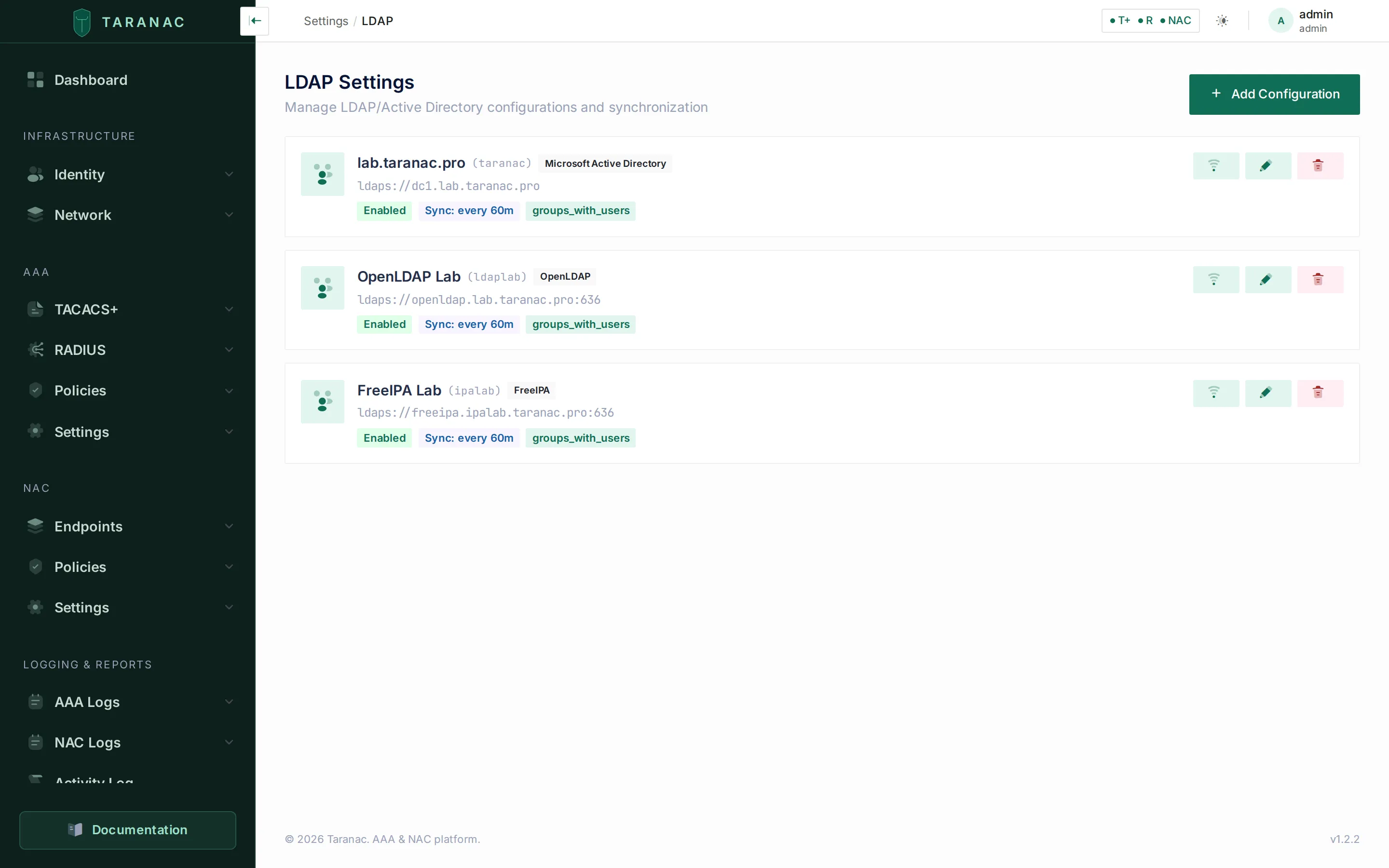 The LDAP settings page: each card is one directory connection, tagged with its type, with inline Test, Edit and Delete actions.
Directory types
Section titled “Directory types”A connection has a type, chosen as the first step of creating it. The answer is not cosmetic: an integration built only for Active Directory binds by UPN, looks accounts up by sAMAccountName, tracks them by objectGUID and filters on userAccountControl — every one of which is false for OpenLDAP and FreeIPA. The type decides both what the directory can do and what the form is prefilled with.
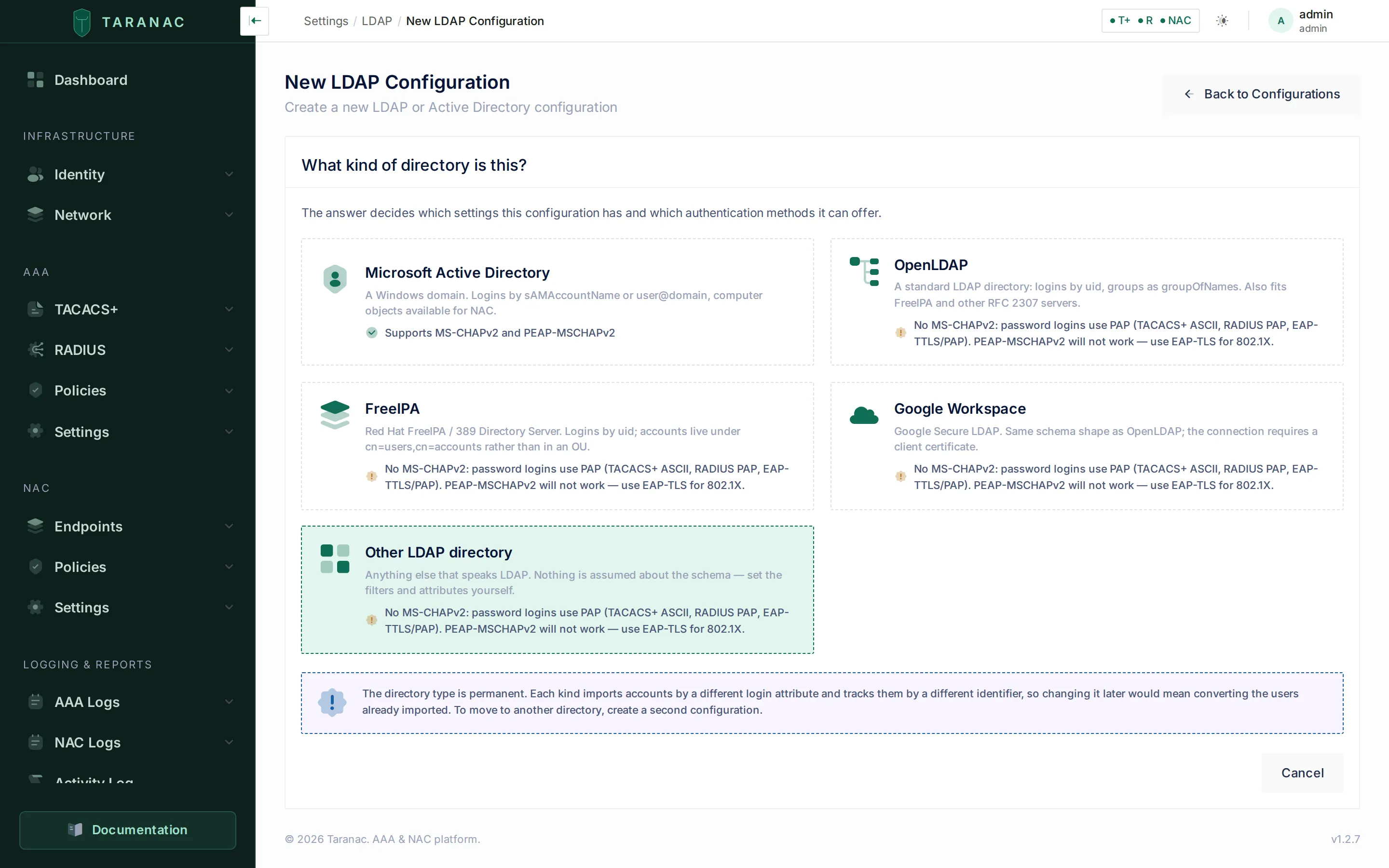 The type picker, the first step of Add Configuration. Each card states up front whether the directory can serve MS-CHAPv2 — worth knowing before the configuration exists, not after the first 802.1X login fails.
| Type | MS-CHAPv2 / PEAP | Computer sync | domain_suffix | netbios_name | Schema defaults |
|---|---|---|---|---|---|
| Microsoft Active Directory | ✅ via a domain join | ✅ | required | required | sAMAccountName, objectClass=user / group |
| OpenLDAP | ❌ | ✅ | optional | — | RFC 2307: uid, posixAccount, groupOfNames |
| FreeIPA | ✅ via ipaNTHash | ✅ | optional | — | RFC 2307 (same as OpenLDAP) |
| Google Workspace | ❌ | ❌ | optional | — | RFC 2307; the connection also requires a client certificate |
| Other LDAP directory | ❌ | ✅ | optional | — | RFC 2307 |
The columns are different in kind, and the difference matters:
- Capabilities — facts about the protocol you cannot override. The test is whether any configuration would make the directory answer. Holding a machine account is one: joining means a computer object, a secure channel and
winbindd, and nothing an operator types gives OpenLDAP or Google Workspace one. Computer sync is one only on Google Workspace, whose Secure LDAP serves users and groups while devices sit behind the Admin SDK — no filter reaches them. The UI hides a tab the type cannot serve, and the API refuses the call independently (ldap.computer_sync_not_supported,domain.mschapv2_not_possible) — a hidden tab is a courtesy, not the control. - Defaults — guesses about a schema you can always override. Filters, attribute maps and the example values under each field are prefilled per type; being slightly wrong about your tree costs you one edit. An empty attribute map means the type’s own map, not Active Directory’s literals — there is no silent fallback to
sAMAccountName.
MS-CHAPv2 is not one column but two mechanisms, which is why the table names which one each type gets. Active Directory’s unicodePwd cannot be read back by anyone, so a challenge there has to go to a domain controller — hence the join. What MS-CHAPv2 actually needs is the account’s NT hash, and FreeIPA publishes it as an ordinary attribute. See MS-CHAPv2 for directory accounts.
A configuration has five tabs: Users & Groups, Computers, EAP-TLS, MS-CHAPv2 and Sync History. Computers and MS-CHAPv2 are absent — not disabled — where the type cannot serve them; EAP-TLS is available for every type.
Identity anchor
Section titled “Identity anchor”Every synced user and group is tracked by an immutable identifier rather than by name or DN, so renaming or moving an object updates the existing Taranac record instead of creating a duplicate. Which attribute that is depends on the directory: objectGUID on Active Directory, entryUUID (RFC 4530) on OpenLDAP, Google Workspace and the generic type, and ipaUniqueID on FreeIPA.
How a password is verified
Section titled “How a password is verified”Active Directory accepts user@domain and resolves it internally, so Taranac binds directly as the user. Everything else takes a distinguished name and answers a bare login with invalidDNSyntax — so for those types Taranac first resolves the DN with the service account, using the configuration’s own user_search_filter and user_search_bases, then binds as that DN.
That has a useful side effect: on OpenLDAP and FreeIPA, sign-in is scoped to the search bases you configured, which the direct UPN bind on Active Directory cannot be. If a login matches more than one entry the attempt is refused rather than guessed at, and an empty password is rejected outright (an empty simple bind is an anonymous bind, which most directories accept).
OpenLDAP
Section titled “OpenLDAP”A standard RFC 2307 / inetOrgPerson tree: the login attribute is uid, groups are groupOfNames, and membership is a DN in member. The bind account is a full DN (cn=svc-taranac,ou=Services,…) — there is no UPN to type.
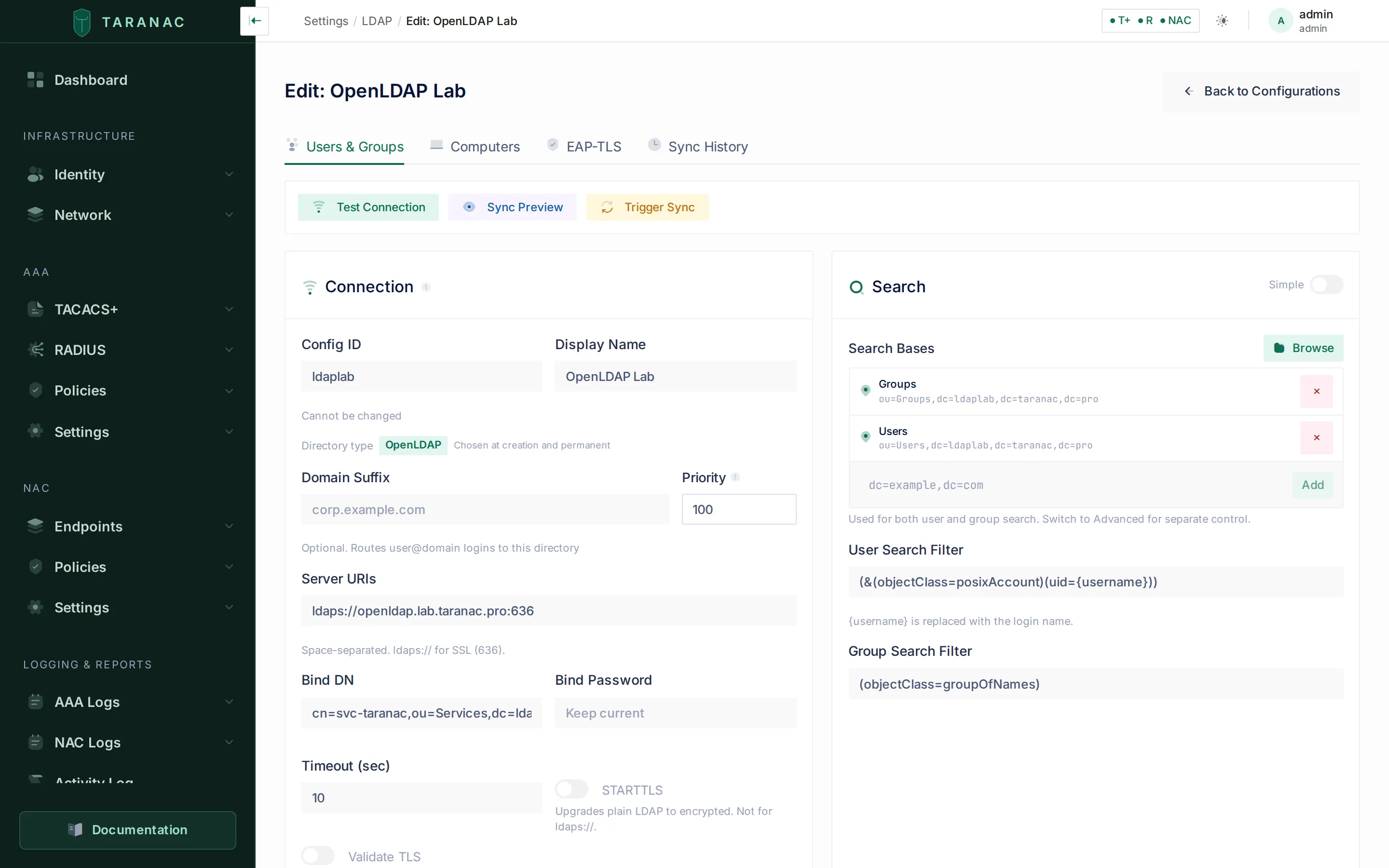 An OpenLDAP connection. The type is shown next to the config ID and cannot be changed, and the search filters are prefilled for the RFC 2307 schema. There is a Computers tab but no MS-CHAPv2 one — machines are an ordinary search, but this type publishes no NT hash. Samba’s
 sambaNTPassword is the same idea in the RFC 2307 world; it exists only on a tree where somebody installed the Samba schema, so Taranac does not claim it — naming an attribute nobody has would turn a fixable permission problem into an unfixable schema one, and both would read as the same silence.
Defaults prefilled for this type:
| Field | Default |
|---|---|
user_search_filter | (&(objectClass=posixAccount)(uid={username})) |
group_search_filter | (objectClass=groupOfNames) |
sync_user_filter | (objectClass=posixAccount) |
sync_group_filter | (objectClass=groupOfNames) |
| user attributes | uid, mail, givenName, sn, displayName, telephoneNumber |
| group attributes | cn, description, members from member (DN values) |
The same defaults serve Google Workspace Secure LDAP and the generic type. Google additionally requires a client certificate on the connection.
FreeIPA
Section titled “FreeIPA”FreeIPA (Red Hat’s identity manager, backed by 389 Directory Server) publishes the same schema shape as OpenLDAP — uid + posixAccount + inetOrgPerson for users, groupOfNames + posixGroup for groups — so its filters are identical. What differs is the layout: accounts do not live in an OU but under cn=users,cn=accounts,$SUFFIX, with groups under cn=groups,cn=accounts,$SUFFIX. That is what you actually type, which is why FreeIPA is its own type: the example values in every field follow the IPA tree.
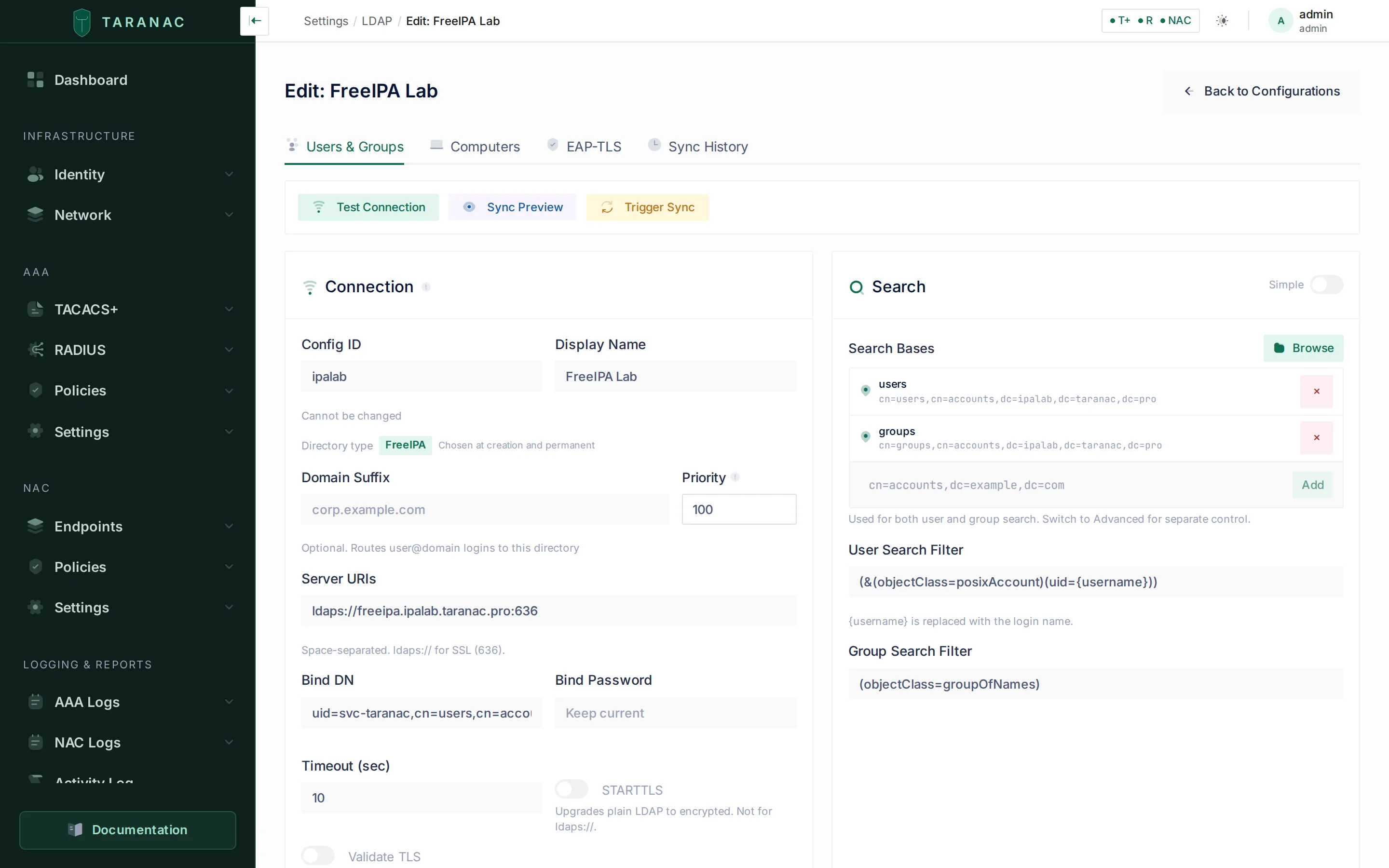 A FreeIPA connection. Same filters as OpenLDAP, different containers: the bind account is
 uid=svc-taranac,cn=users,cn=accounts,… and the search bases sit under cn=accounts.
FreeIPA installs its own CA, independent of anything Active Directory signs. Each connection carries its own trust anchor, so an installation can hold directories with two different CAs at once — paste each server’s CA into tls_ca_cert on its own connection.
FreeIPA is also the one non-AD type that can serve MS-CHAPv2, because it publishes the NT hash as an ordinary attribute — see MS-CHAPv2 for directory accounts.
Key concepts
Section titled “Key concepts”- Connection (config). One directory you connect to, identified by a short, immutable
config_id. It holds the type, the servers, the bind account, search bases and filters, and all sync options. - Bind account. A service account Taranac uses to read the directory during sync and browsing (and, on non-AD types, to resolve a user’s DN at sign-in). Its credentials (
bind_dn+bind_password) are stored encrypted. - Search base / filter. The subtree and LDAP filter that scope what sync and the directory browser see. Scoping here is how you decide which accounts and groups become Taranac objects.
auth_source. Synced users carryauth_source = ldap. They have no local password in Taranac; they authenticate against the directory. Locally created accounts areauth_source = local.- Domain suffix / NetBIOS name / priority. Identifiers used to route a login to the right connection:
domain_suffix(e.g.corp.example.com) matchesuser@corp.example.comlogins,netbios_namematchesCORP\user(Active Directory only), andpriorityorders connections when the login is a bare username. - Domain suffix and EAP-TLS. The domain suffix also ties EAP-TLS certificates to this directory. A certificate names one of its accounts only through a UPN or CN in this domain (
alice@corp.example.com), or through the account’s own email address. On every type except Active Directory the field is optional, and an empty suffix means EAP-TLS matches that directory’s users by email only. Fill it in on OpenLDAP and FreeIPA. A hint under the field says the same. See 802.1X authentication.
Connecting a directory
Section titled “Connecting a directory”Open Settings → Integrations → LDAP → Add Configuration, pick the directory type, then fill in the connection form. Creating a configuration is a two-step flow — the type picker first, then the Connection and Search cards; the other tabs appear once the configuration exists. The essential fields:
| Field | Purpose |
|---|---|
config_id | Short slug (lowercase, digits, -/_). Immutable once created. |
display_name | Friendly name shown in the UI. |
servers | One or more LDAP URIs, space- or newline-separated (e.g. ldaps://dc1.corp.example.com). |
bind_dn / bind_password | Service-account credentials for read access — a UPN on Active Directory, a full DN elsewhere. Password is stored encrypted. |
domain_suffix | Required on Active Directory, optional elsewhere: routes user@domain logins to this connection, and binds EAP-TLS certificates to it (see Key concepts). A DNS name: letters, digits, dots and hyphens only. On Active Directory it is also the realm the domain join writes into the Samba and Kerberos configuration. |
netbios_name | Short domain name (1–15 chars), e.g. CORP. Active Directory only; routes DOMAIN\user logins. |
priority | 1–999. Lower numbers are tried first for bare-username logins. |
use_start_tls / tls_validate / tls_ca_cert | Transport security: StartTLS, certificate validation, and — labelled Directory server CA certificate — the CA (PEM, pasted into the form) that signs the directory server’s certificate. Empty means the container’s system trust store. |
connection_timeout | Per-server connect timeout in seconds. Default 10; the form accepts 1–120, the API up to 300. |
pool_strategy / pool_active / pool_exhaust | How several servers are used: Round Robin (default), First Available or Random; active probing; and how long an exhausted pool waits (default 5 s). |
When the connection details are saved, use the operations bar at the top of the Users & Groups tab:
- Test Connection reports per-server reachability and latency, whether the bind succeeded, and a count for each search base — run this first. It names the stage that failed, so a name that does not resolve is reported as such rather than as a certificate problem, and a CA certificate that will not parse is described instead of returning a server error. An unreachable directory fails the test rather than hanging. A failure is said in a few words: the connection timed out, the host name could not be resolved, the connection was refused, the TLS handshake failed, the server rejected the bind DN or password, or the directory’s own result code (
insufficientAccessRights, say). The full transport error goes to the server log. - Sync Preview performs a dry run and shows exactly what would be created, updated, disabled or deleted, plus any conflicts. Nothing is written. It previews the values currently in the form, not the saved configuration — so an edited filter can be answered for before it is committed.
- Trigger Sync runs the sync for real.
The Computers tab carries its own pair, Computer Preview and Trigger Computer Sync.
An edited configuration reaches the daemons on their own schedule — no restart is needed. TACACS+ and RADIUS both re-read the LDAP settings periodically, so a correction made in the interface (a CA certificate, say) takes effect for authentication without touching a container.
Search bases and filters
Section titled “Search bases and filters”Scope is everything. Restrict the search bases to the subtrees you actually want in Taranac — point user search at an “Employees” OU (or cn=users,cn=accounts on FreeIPA) so service and disabled accounts never sync.
There are four filters, and they answer two different questions. Getting the pair confused is the commonest way to conclude that “the filter does not work”:
| Field | Card | Question it answers |
|---|---|---|
user_search_filter | Search | Finds one account at login. {username} is replaced with the login name. Not used by synchronisation. |
group_search_filter | Search | Group lookup outside a sync run — it is the filter Test Connection’s group probe uses. Not used by synchronisation. |
sync_user_filter | Synchronization | Decides which accounts a sync run imports. The Active Directory default excludes disabled accounts. |
sync_group_filter | Synchronization | Decides which groups a sync run imports. |
The two sync filters live in the Synchronization card, visible in every search mode. The Search card’s Simple/Advanced toggle controls only whether users and groups get separate base lists or share one.
Browse opens the directory tree so you can pick bases instead of typing them. The browser understands non-AD schemas — group, groupOfNames, groupOfUniqueNames, posixGroup, ipaUserGroup for groups, user / person / inetOrgPerson / posixAccount for users, and the container objects FreeIPA nests its accounts in. It is also what fills Selective Group Sync and the computer search bases, with its own apply button for each, and picking groups by hand works on every type.
It holds a large directory. Levels are indented; leaves are capped at 200 per level, with what was left out counted and said out loud, while containers are never cut, because cutting one makes everything below it unreachable while looking exactly like a container that is empty. The group-members preview is paged, and every shortened DN carries its full value on hover. The preview is not offered on an LDAP-group classification rule: it answers “which users would this group bring in”, and such a rule matches machines.
User and group sync
Section titled “User and group sync”Sync runs in one of three modes:
| Mode | Label in the form | Behaviour |
|---|---|---|
groups_with_users | Groups → Users | Walk the configured groups, resolve their members, and create/update those users. Users outside a synced group are ignored. Use this when group membership defines who belongs. |
groups_and_users | Groups + All Users | The above, and then additionally import every user matching the sync user filter — even those in no group. |
users_only | Users Only | Create/update users from the user search base alone. Groups and memberships are not touched. |
The form hides what a mode does not use rather than leaving it to look effective: the sync user filter disappears in Groups → Users, and the group filter, Selective Group Sync, nested groups and the RBAC block disappear in Users Only — each replaced by a line saying so. A per-run mode can also be passed to POST /ldap/{config_id}/sync; an unknown value is refused, naming the modes that exist. computer_sync is told which route it actually wants — it is a real operation, on the Computers tab, not a sync mode.
The lifecycle for each object is create → update → deactivate → delete, governed by these options:
| Option | Effect |
|---|---|
sync_create_users | Create a Taranac account for each directory user found. When off, sync only updates accounts that already exist. |
sync_disable_missing | Set users no longer present in the directory to inactive (is_active = false) instead of leaving them enabled. |
sync_remove_stale_users | Permanently delete users that have disappeared from the directory. |
sync_remove_stale_groups | Permanently delete groups that have disappeared from the directory. |
sync_nested_groups (Follow nested groups) | Import the members of groups nested inside a selected group. On by default. |
sync_primary_group (Import primary group members) | Import accounts whose primary group is a selected group. Off by default — see Primary group. |
sync_group_dns (Selective Group Sync) | Pick specific groups instead of relying on the sync group filter. Overrides the filter when set. |
sync_enabled / sync_interval_minutes | Run the sync automatically on a schedule. Default 60 minutes; the API accepts 5 minutes to 7 days. |
Synced users are created with auth_source = ldap and no local password — authentication is delegated to the directory. Their group membership in Taranac mirrors the directory, and every action (created/updated/deactivated/deleted, per user and per group) is written to the audit log.
On a cluster the sync runs on the leader only. It is entirely shared-database work — bind, then upsert rows every node reads from the same primary — so running it per node would mean N concurrent binds against your directory every interval, N audit rows, racing upserts on the same users and N copies of every report.
One sync per configuration at a time. A configuration runs one user/group sync and one computer sync at most. Trigger Sync (or Trigger Computer Sync) pressed while the same sync of that configuration is running is refused with Another LDAP synchronization is running. Try again when it has finished. A scheduled run that comes due meanwhile is skipped, and the next one does its work. A refused trigger leaves no entry in Sync History. Syncs of different configurations run side by side. Two of them never create two accounts under one name: each new name is held while one configuration checks and creates it, and the other then finds it taken.
A sync commits as it goes. Each account, each group, each group’s membership and each computer is written and committed on its own, and a record the directory reports unchanged is not rewritten. A lock conflict on one record is retried, and a record that still fails costs that record, not the run. So directory users can sign in while their configuration syncs, and the network scanner and collectors keep writing endpoints while computers sync.
Nested groups
Section titled “Nested groups”Directories express a role as a group containing other groups far more often than as one flat list — it is the ordinary shape of an Active Directory tree, and FreeIPA has a dedicated object class for it. The members of a nested group are imported and become members of the group you selected, however deep the nesting goes.
- The nested group itself is not created in Taranac. Only the groups you actually selected are, because a group here carries a permission model and inventing one you never chose would be inventing permissions.
- A nested group living outside your search bases is followed correctly: members are read one entry at a time rather than searched for inside those bases.
- A loop — two groups containing each other — ends that branch instead of the run. Directories accept such loops, and one of them must not stop everyone else from synchronising.
- Turn it off (Synchronization → Follow nested groups) and a nested group is named in the sync log rather than passed over in silence.
- The number of nested groups a run went through is recorded in the audit log, so a sync that suddenly brings in far more people than expected can be explained without opening the directory.
A group object is never imported as if it were a person, even though in an Active Directory domain a group carries a login-style attribute. Objects that are not people — groups, OUs, containers — are refused, and the sync log says which was which.
Where a group’s members come from
Section titled “Where a group’s members come from”A directory can name a group’s members in three ways, and only the first is written in the group entry as DNs:
| Shape | Where the membership lives | How Taranac reads it |
|---|---|---|
| Members by DN | The group’s member attribute (member by default; uniqueMember on some trees) | Read directly — from anywhere in the tree. |
Login names (RFC 2307 memberUid) | The group entry, but as bare login names, the posixGroup style | Always read. Each name is looked up as an account and imported; there is nothing to switch on. Not used on Active Directory, which has no such attribute. |
Primary group (RFC 2307 gidNumber, Active Directory primaryGroupID) | The account, never the group entry | Read only when Import primary group members is on. |
Login names and primary groups are resolved by searching, so they are found only within the configured user search bases and user filter. Members named by DN are read directly and are imported wherever they sit. A login name that matches no account is not dropped silently — it is reported (see below).
Primary group
Section titled “Primary group”A primary group is recorded on the account — gidNumber in RFC 2307, primaryGroupID (a RID) in Active Directory — and never in the group entry at all. That is why Domain Users and the usual Unix users group look empty to an ordinary member lookup.
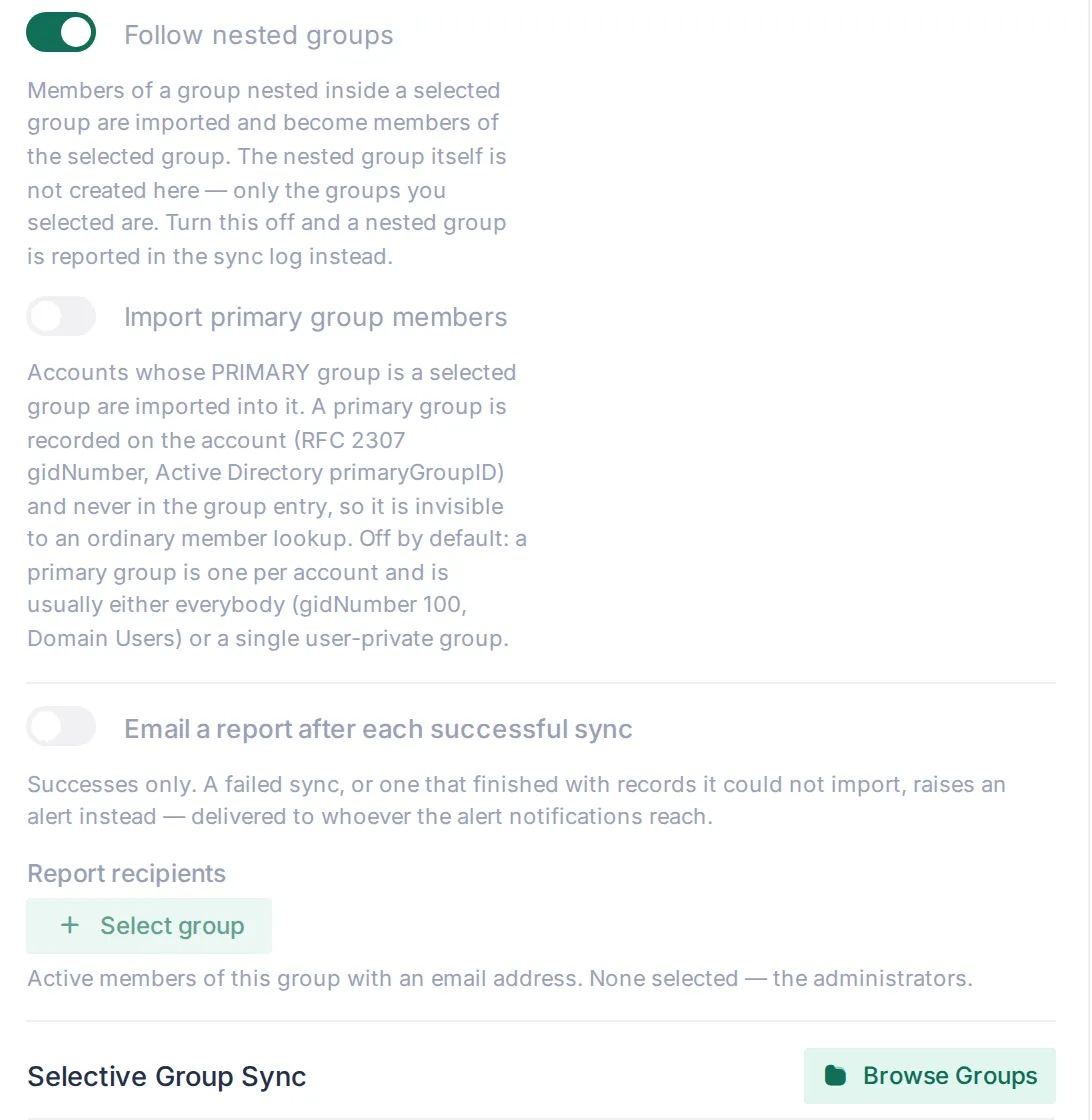 Part of the Synchronization card: nested groups followed, primary-group members not imported (the default), and the per-directory success report with no recipient group chosen — so it would go to the administrators.
Import primary group members (Synchronization card, per directory) brings those accounts into the group. It is off by default, and the reason is what the answer is worth rather than whether it is true: a primary group is one per account, and in practice it is either everybody (gidNumber 100, Domain Users) or a single user-private group holding one person. Neither is a role, and roles are what groups are imported for. Switching it on can also widen a group that already carries permissions — an imported Domain Users with an RBAC model on it would hand that model to everyone on the next sync. Turn it on deliberately, and check the next run’s breakdown (below).
When a group brings in nobody
Section titled “When a group brings in nobody”An empty group stays silent — empty is an answer. A group that comes back empty for a reason says which:
- The members are DNs under a different attribute.
memberis empty but the entry lists them inuniqueMember. The message names the attribute to set as the group member attribute for this directory. This is a configuration fix. - Login names that match no account. The group lists
memberUidvalues, but none of them was found by the user search — the names are counted, and the fix is the user search bases or filter, not the directory. - A primary group with the setting off. The group is somebody’s primary group and Import primary group members is off for this directory; the message names the setting.
- The entry could not be read at all is reported as such rather than as “group not found” for a group plainly sitting in the tree.
The same explanations appear in three places: the group picker in the directory browser (Selective Group Sync), Sync Preview under Groups that will bring nobody — before a run rather than after it — and the run’s own sync log.
What a run reports
Section titled “What a run reports”Every sync writes a run to Sync History and an audit record. Where new members came from is part of it:
- the run’s audit record counts how many members came by login name and how many by primary group, next to the number of nested groups it went through;
- each group that grew gets one audit record with the members added, the new total and the same breakdown — one record per group, not one per account. Each removal is audited individually, because it is a person losing what the group grants.
So the first run after someone switches on Import primary group members shows the widening it caused, rather than a run shaped like any other.
The run’s error list also carries the entries it would not take — an account a local user or another configuration holds, a username several accounts share, and a group imported beside a namesake under <name> (<config_id>). See Which accounts and groups a sync may take.
Success report. Each LDAP configuration can mail a report after a successful sync — Email a report after each successful sync on the Synchronization card, off by default. Report recipients picks a user group whose active members with an email address receive it; with no group chosen, the report goes to the administrators. SMTP must be configured.
A failed sync is an alert, not an email. Taranac raises one alert per configuration and phase — user/group sync and computer sync are separate, so a clean computer sync never hides failing user imports and vice versa:
| Run outcome | Alert |
|---|---|
| The run failed | Error — LDAP user/group sync failed (or computer sync failed), with the error text |
| The run finished, but some records could not be imported | Warning — … completed with errors, with how many and the first few |
| The next clean run of the same phase | Resolves the alert |
The alert reaches whoever the alert notifications reach, and repeats while nobody reacts — which is why failures do not have a mail of their own. A failed scheduled run also keeps its sync-log row and its audit record, and a failing computer sync never rolls back a user import that already finished.
Membership is whatever the directory says
Section titled “Membership is whatever the directory says”The membership of an imported group is decided by the directory — hand-editing it is refused. Membership is simply what the directory reports: whoever the directory does not name is removed from the group, a local account included, and each removal is written to the audit log. This removes a membership, never an account.
When the answer cannot be trusted
Section titled “When the answer cannot be trusted”“Missing” means “not in this run’s answer”, so a sync must first be sure the answer is complete. Two checks stand between a bad answer and the accounts, groups and machines it would take away.
An answer the server cut short fails the run. Many LDAP servers cap how many entries one search may return, even across pages. OpenLDAP’s default limit is 500 entries. A search that ends in sizeLimitExceeded, timeLimitExceeded or a referral makes the sync fail, with that result in the error. Nothing is disabled, deleted or removed on a partial list. The fix is on the directory: raise the size limit for the bind account (on OpenLDAP, an olcLimits entry for the bind DN). This applies to user, group and computer searches alike.
An implausible answer holds the clean-up back. A run whose answer is complete but suspicious imports and updates what it found, then takes nothing away:
| The answer | User/group sync | Computer sync |
|---|---|---|
| Empty, while the configuration holds objects of that kind | Held back | Held back |
| Missing more than half of what the configuration holds, when it holds 20 or more | Held back | Held back |
| Some group’s members could not be read in full (an unreadable member or selected group, a login name or primary group that could not be resolved) | Held back | — |
A bind account that lost read rights, an emptied OU or a filter that stopped matching all look like this, and acting on them would disable or delete everything at once. A held-back run completes with an entry (safety guard) at the top of its error list, which says what was wrong and what to check. That entry keeps the sync’s completed with errors alert open until a run gets a plausible answer. An incomplete membership read clears itself on the next complete run. If the departures behind an empty or half-empty answer are real, every run holds back the same way, so disable or delete those objects by hand.
Directory groups in RBAC, AAA and NAC
Section titled “Directory groups in RBAC, AAA and NAC”Because synced groups are ordinary Taranac groups, they work everywhere groups work:
- Admin RBAC. When a sync imports a directory group, it gives the new group an RBAC model: the one
group_rbac_mappingnames for that group (matched by DN, then by name), otherwise the configuration’sdefault_rbac_model_id. This happens when the group is created; after that, the group’s model is yours to change on the group, and later syncs leave it alone. Which roles you may put in these two fields is limited — see Who may edit a configuration. - AAA policy. Reference directory groups as conditions in TACACS+/RADIUS policy to grant device-admin privilege levels, command sets or RADIUS attributes by group — see AAA policy.
- NAC policy. Use the same groups as conditions in 802.1X/MAB authorization to assign VLANs, ACLs or captive-portal flows — see NAC authentication.
This is the main reason to sync groups even when you do not need local admin accounts: it lets policy decisions key off directory membership without re-modelling your org chart inside Taranac.
Which accounts and groups a sync may take
Section titled “Which accounts and groups a sync may take”A sync rewrites the membership of every group it matches and can deactivate or delete the accounts it owns. Whoever runs the directory server decides what names, GUIDs and DNs it reports, so a sync is only allowed to touch what belongs to its own configuration:
- Groups. A directory group is matched by its identifier, then by DN, then by name — but only among this configuration’s own directory groups and orphaned directory groups (left behind when a configuration was deleted without its groups). An orphan is adopted by the first configuration that finds it again — unless it is an admin group, which is never adopted. A local group or another configuration’s group is never taken over, whatever matches.
- Accounts. A local account, or an account belonging to another configuration, is never taken over either. The entry is listed among the run’s errors (Username already taken by local user, or …by LDAP user from config ‘corp’), and Sync Preview shows it as a conflict.
- Shared usernames. A directory entry whose username several accounts already hold is skipped — adopting one would be a guess, creating another would add one more holder. The run lists it as Username is held by N accounts …; skipped until the duplicates are resolved, and Preview shows it as a conflict. See One username, one account.
When a directory group’s name is already held by a group this configuration may not take, the group is imported beside it under the name <name> (<config_id>) — Network Admins (corp), say — or <name> (<config_id>) 2, 3 … if that is taken too. The run reports it among its errors:
Group name 'Network Admins' belongs to a group this configuration does not sync (a local group,an administrator group or another configuration's); imported as 'Network Admins (corp)'.AAA and NAC rules meant for this directory group must name 'Network Admins (corp)'.The message matters for policy: an AAA or NAC rule that names Network Admins still names the local group, not the directory one. Point the rule at the imported group if that is what you meant. The note appears once, on the run that made the choice; later runs keep the name without repeating it. The same applies when a group renamed in the directory lands on a name another group holds.
Two configurations over the same directory group — two connections to one AD, for example — each get their own group: the first under the plain name, the second as <name> (<config_id>). Each sync maintains only its own.
Who may edit a configuration
Section titled “Who may edit a configuration”A configuration decides who lands in which group with which role on its next sync, so writing one is judged as if you were making all of those changes yourself. Administrators pass; for anyone else holding ldap.manage_configs:
- The roles you name.
default_rbac_model_idand every role ingroup_rbac_mappingmust be roles whose every permission you hold yourself. A role that an admin group uses can only be named by an administrator. - The groups and accounts it reaches. Creating, editing or deleting the configuration needs every permission of every group it can populate — its own directory groups and any orphaned ones — and every console permission of every account it owns or could adopt.
- Admin groups. Once a configuration feeds an admin group (someone set the admin flag on one of its directory groups), only an administrator can edit or delete it. An orphaned directory admin group (one a deleted configuration left behind) makes every configuration administrator-only in the same way. The refusal reads: Only an administrator can change or delete a directory configuration that feeds an administrator group.
The full rule set behind these checks is in Who may change whom.
Computers (NAC endpoint enrichment)
Section titled “Computers (NAC endpoint enrichment)”The Computers tab imports the directory’s computer objects as NAC endpoints, enriching them with hostname, OS and the machine’s place in the tree. Turn on computer_sync_enabled, then configure computer_search_bases (required), computer_search_filter, the attribute holding the MAC (computer_mac_attr) and an attribute map, and preview and run it like user sync. Browse Computers opens the same tree the endpoint classification rules pick their locations from. A missing computer search base is reported as the missing setting it is, not as a connection failure.
The lifecycle switches are separate from the user ones and default differently: computer_sync_create and computer_sync_update are on, computer_sync_deactivate_missing and computer_sync_delete_missing are off.
Computer sync is not Active Directory’s alone. It runs on Active Directory, OpenLDAP, FreeIPA and the generic type; the one directory that cannot serve it is Google Workspace. It is an ordinary LDAP search whose every input is a field on this form, where the difference between directories is one filter.
| Type | Computer filter | MAC attribute | Name / hostname from |
|---|---|---|---|
| Active Directory | (objectClass=computer) | (none — empty) | cn, dNSHostName |
| FreeIPA | (objectClass=ipaHost) | macAddress | fqdn |
| OpenLDAP / other | (objectClass=ieee802Device) | macAddress | cn |
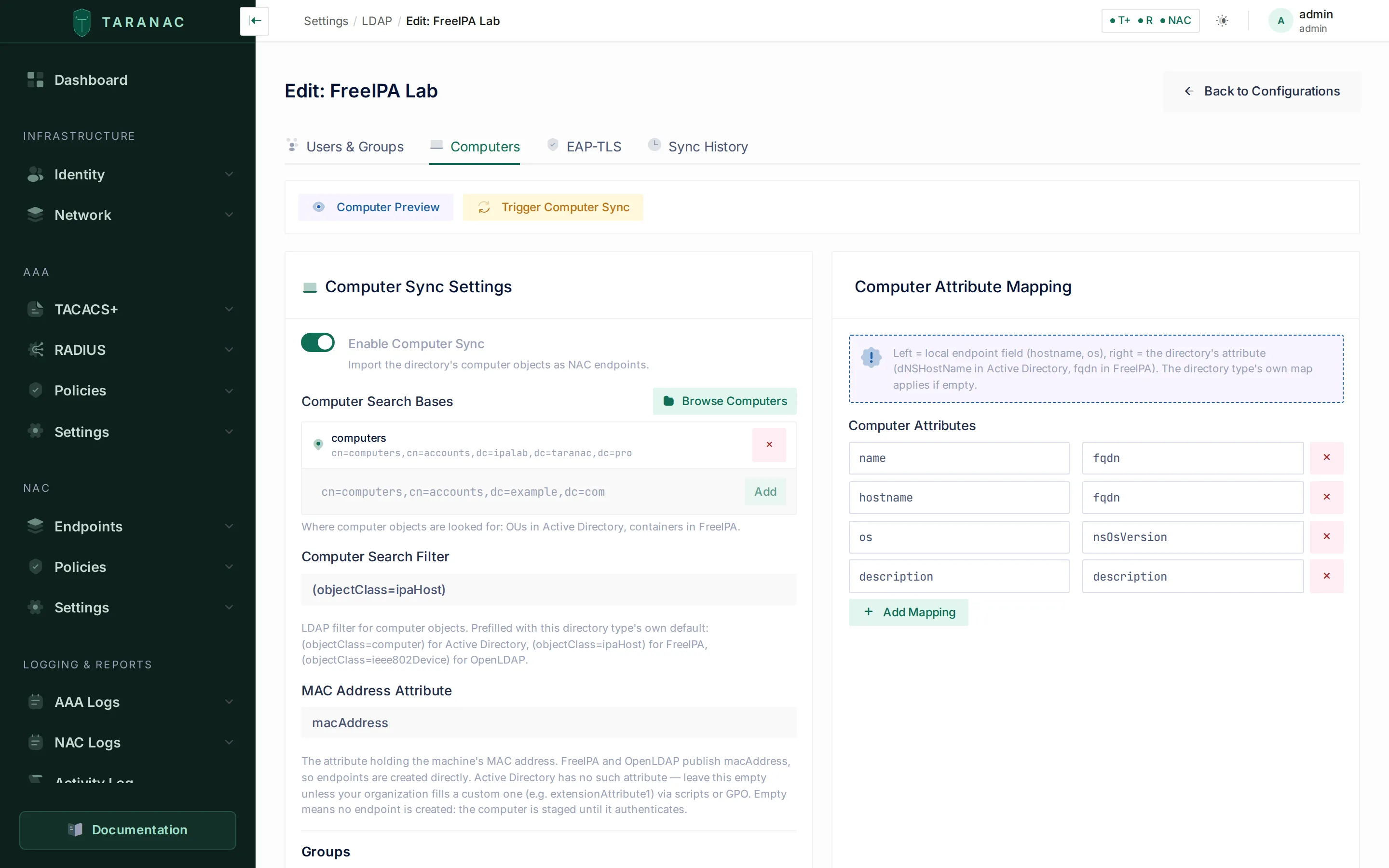 The Computers tab on FreeIPA. Every field is prefilled from the directory type:
 (objectClass=ipaHost), macAddress, and a map pointing name and hostname at fqdn. On Active Directory the same tab opens with (objectClass=computer), an empty MAC attribute and dNSHostName.
Three cells are less obvious than they look, and each was measured rather than read off a schema:
ipaHost, notieee802Device, on FreeIPA. IPA adds theieee802deviceclass to a host only once that host has a MAC, so filtering on the class would silently skip every machine without one — exactly the machines staging exists for, including the IPA master’s own object.managedByis deliberately unmapped on FreeIPA. It is present on every host and points at the host itself for anything self-managed, so mapping it would fill the field on every endpoint with its own DN. On Active Directory the same attribute names a person.- OpenLDAP has no operating-system attribute, so none is mapped. The stock schema set (
core,cosine,nis,inetOrgPerson) defines none at all; a site that records an OS invented the attribute and only that site can name it — which is what the attribute map is for.
A direct endpoint, or a pending computer
Section titled “A direct endpoint, or a pending computer”- Computers that have a MAC attribute become NAC endpoints directly (match source
mac_address). - Computers without one are held as pending computers (shown in a table on the tab). When that machine later authenticates by certificate (EAP-TLS), Taranac matches it by DNS hostname and binds the directory data to the resulting endpoint (match source
dns_hostname).
Which of the two is the normal path is a property of the directory, and it is the practical difference an operator feels. Active Directory has no standard attribute for a MAC — that is the whole reason the pending table exists — so there staging is the rule and the direct path needs an attribute your organisation fills itself. FreeIPA (macAddress via ieee802device) and OpenLDAP (ieee802Device from nis.schema) publish one, so a machine there becomes an endpoint on the first sync, before it has ever authenticated, and staging is the exception.
An empty MAC attribute is a choice, not a blank. Everywhere else on this form empty means “use the type’s default”; in this one field it means “extract no MAC, stage the computer”. That is Active Directory’s own honest answer, and on FreeIPA or OpenLDAP it is how you turn the direct path off — so it is the one computer field where an empty value is stored rather than refilled.
Deactivate and delete missing
Section titled “Deactivate and delete missing”computer_sync_deactivate_missing and computer_sync_delete_missing act on the machines this configuration holds that the directory no longer returns. A machine counts as returned when the answer contains its directory identifier (objectGUID, entryUUID or ipaUniqueID) or its MAC. A machine that was staged without a MAC and later bound to an endpoint by EAP-TLS counts as returned through its staging record, so it is not taken for missing. Either switch also removes staging rows the directory no longer returns.
Before either switch acts, the run passes the checks in When the answer cannot be trusted: an answer cut short fails the run, and an empty answer, or one that would remove more than half of a configuration holding 20 or more machines, holds the clean-up back and keeps the sync alert open. Every machine deactivated or deleted gets its own audit entry (LDAP_ENDPOINT_DEACTIVATED or LDAP_ENDPOINT_DELETED) with its MAC, DN, configuration and reason not_found_in_ldap.
Computer Preview works out what is missing with the same rule as the real run. It lists what each clean-up switch would take, whether or not the switch is on, and labels each list Switch on — the next sync does this or Switch off — what it would do if enabled. When the safety check would hold the clean-up back, the preview says so at the top, with the counts. Run it before switching either option on.
When the directory stops knowing a machine
Section titled “When the directory stops knowing a machine”The directory owns the host name and OS it writes on an endpoint: while it does, DHCP or a certificate cannot overwrite them. That claim ends with the directory object:
- A computer object deleted from the directory (not found by a later sync) stops protecting the host name and OS it wrote. The values stay — they did not become false — but the next source of any rank may correct them. If the machine reappears in the directory, the sync claims them back. This happens on every sync, independently of the deactivate/delete switches.
- Deleting the LDAP configuration clears each of its endpoints’ pointers into the directory (configuration, DN and object identifier) and its directory-group memberships, releases the host name and OS the same way, and then re-judges those endpoints’ group memberships — so an
ldap_dnorldap_groupclassification rule scoped to that directory stops holding them in groups. The endpoints themselves are never deleted; the deletion’s audit record reports how many were released and how many changed group.
Group membership
Section titled “Group membership”The computer sync can also import which directory groups each machine belongs to. That is the data behind the ldap_group classification rule, and nothing else reads it. It is its own switch (Group membership, off by default): it costs extra directory reads, and buys nothing until such a rule exists.
Membership arrives in a registry of directory groups plus a machine-to-group mapping, both written only by this sync. This is not the ordinary group table — those are user groups, carrying RBAC models, MFA requirements and enable passwords. View collected groups on the tab lists the registry: each group’s name and DN, and how many machines are in it.
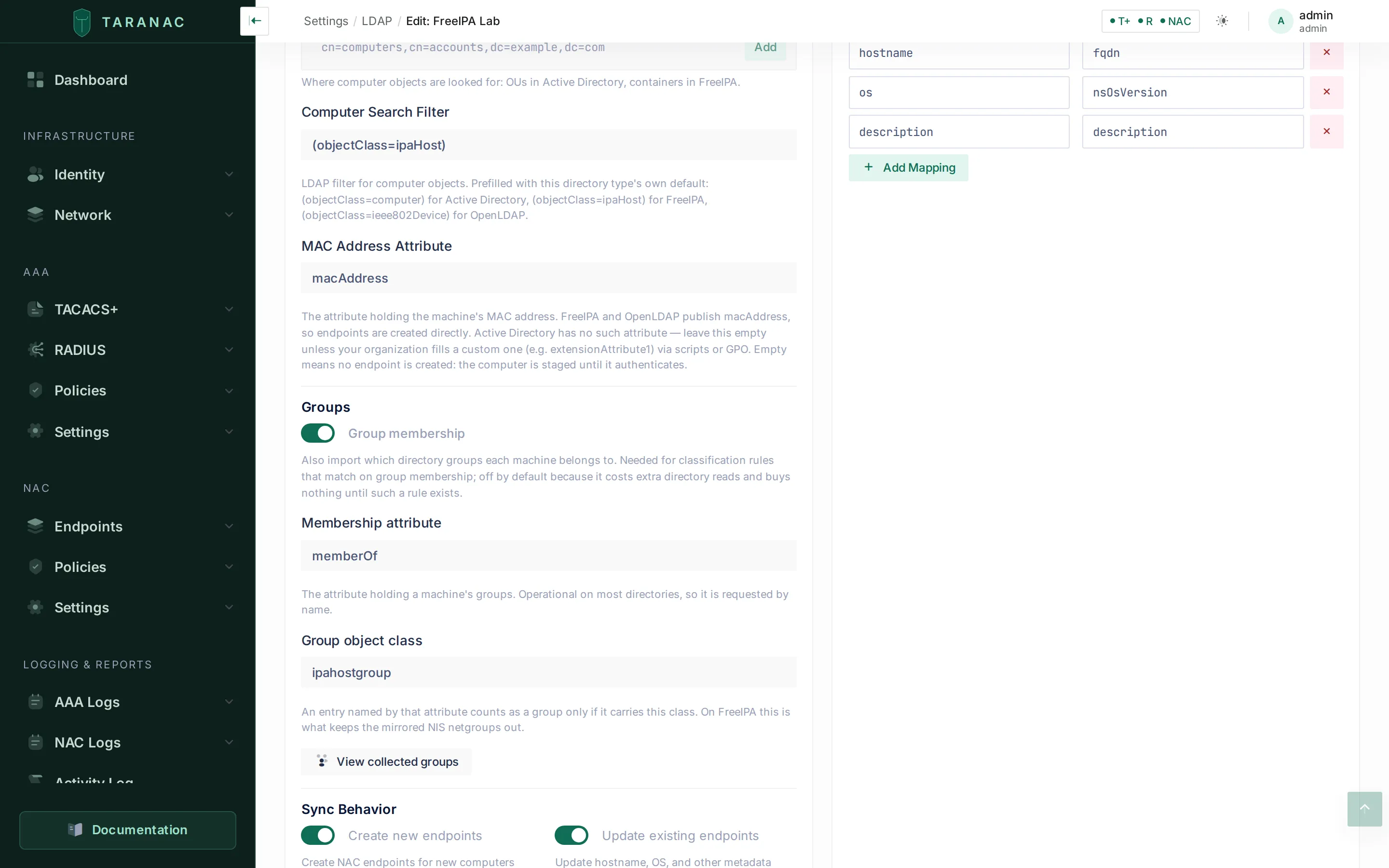 The Groups block of the same tab. The membership attribute and the group class come from the directory type —
 ipahostgroup here is what keeps FreeIPA’s mirrored NIS netgroups out of the picker.
Three directories answer “which groups is this machine in?” three different ways, and the type knows which:
| Active Directory | FreeIPA | OpenLDAP | |
|---|---|---|---|
| Group object class | group | ipahostgroup | groupOfNames |
memberOf on a machine | direct only | transitive | direct only |
| Nesting resolved by | walking memberOf upward | the directory itself | walking memberOf upward |
| Primary group | primaryGroupID | no such concept | no such concept |
- Nesting is resolved at import, not while matching. The endpoint ends up holding a flat set of groups, so a rule written against an outer group matches a machine that is only a direct member of an inner one. 389 Directory Server expands the chain itself; OpenLDAP’s
memberofoverlay publishes direct membership only, so the chain is climbed by re-reading each group’s ownmemberOf. Active Directory behaves like OpenLDAP — itsLDAP_MATCHING_RULE_IN_CHAINwould resolve the chain server-side, but that costs one search per machine against one read per distinct group, and it misses the primary group either way. - The group class is not decoration. FreeIPA mirrors every host group as a NIS netgroup carrying the same
cnand a different identifier. One host in one group reported four entries on the test stand; without the class filter the registry doubles and the picker offers two identical names, one of them an artefact. - A machine’s primary group is invisible. In Active Directory the primary group (
Domain Computersby default) is stored as a RID inprimaryGroupIDand is absent frommemberOfby design. A rule written againstDomain Computerswill appear in the picker and match nothing.
Turning the switch off stops the collection; it does not delete what was already collected. Those rows stay and simply stop being refreshed — the switch does not promise a deletion, so it does not perform one.
The connection also stores the EAP-TLS settings used to validate machine and user certificates for that directory (CA certificate, identity matching, CRL/OCSP revocation checks) on the EAP-TLS tab — that tab is available for every type. See NAC PKI / EAP-TLS for the certificate side.
On the EAP-TLS tab:
- CA Certificate (PEM) may hold the whole chain, root and issuing CA together. Clients of every CA in it are accepted, and a change reaches the NAC service at once, without a restart.
- Certificate Revocation List (CRL). A CRL Distribution URL or an uploaded CRL file makes the domain’s clients checked against a CRL while Enable CRL Check is on in NAC Settings; with neither, they are not checked. Saving a URL downloads the CRL, and a URL whose CRL cannot be downloaded or verified is refused at the field. Clearing the URL removes its CRL; Delete CRL removes both. The CRL that counts is the one of the CA that issued the client certificates: on a two-tier AD CS, the issuing CA’s, not the root’s.
- Check revocation with OCSP asks an OCSP responder about every client certificate of this CA and its sub-CAs, and refuses the client when the check cannot be made. OCSP responder URL (
http://only) overrides the address in the certificates; when set, the responder is asked before the save is accepted.
The rules, the refusal reasons and the Microsoft Online Responder settings are on Certificate revocation: CRL and OCSP.
Authentication backend
Section titled “Authentication backend”A directory connection can authenticate sign-ins — the web admin UI, and TACACS+ / RADIUS / 802.1X through the daemons. The flow for admin login:
- Taranac looks up the username among local users first.
- On a miss, it falls back to multi-domain LDAP discovery: it picks the matching connection(s) and tries to authenticate. (For AAA and NAC the connection is not discovered — it is the one the synced user record already belongs to.)
- The password is verified by binding as the user: directly as
user@domainon Active Directory, or as the DN resolved by the service account on every other type.
Login routing depends on the format the user types:
| Login format | Routed to |
|---|---|
user@corp.example.com (UPN) | The connection whose domain_suffix matches the domain. |
CORP\user (NetBIOS) | The connection whose netbios_name matches — Active Directory only. |
user (bare) | All enabled connections, tried in priority order. |
On Active Directory, a bare or unqualified username is qualified to username@<domain_suffix> before binding (falling back to the domain parsed from a UPN-style bind_dn if no suffix is set).
Usernames are matched case-insensitively, mirroring how AD treats sAMAccountName/UPN binds — so CORP\jsmith and CORP\JSmith resolve to the same account. The original casing from the directory is preserved for display.
A failed sign-in says which failure it was. Active Directory answers a whole family of account states with the same LDAP result 49 (invalidCredentials) and distinguishes them only by a hex sub-code in the bind diagnostic. Taranac reads it, so the log records user not found, wrong username or password, not permitted to log on at this time, not permitted to log on at this workstation, password expired, account disabled, account expired, must change password before next logon or account locked out — each with the AD code — instead of a generic “invalid credentials”.
Directory users cannot change or reset their Taranac password — those operations are local-only and return an error for auth_source = ldap accounts. Password changes happen in the directory. (MFA enrollment, however, still applies to directory users; newly synced users can be auto-sent a setup link.)
Which authentication methods work where
Section titled “Which authentication methods work where”Password verification by bind covers everything that hands Taranac the password itself. MS-CHAPv2 does not: it never sends the password, only a challenge/response over the account’s NT hash — MD4(UTF-16LE(password)) — so it needs either a party that will compare the hash for you (a domain controller) or the hash itself.
| Method | Active Directory | FreeIPA | OpenLDAP / Google / other |
|---|---|---|---|
| TACACS+ ASCII login | ✅ | ✅ | ✅ |
| RADIUS PAP | ✅ | ✅ | ✅ |
| 802.1X — EAP-TTLS/PAP | ✅ | ✅ | ✅ |
| 802.1X — EAP-TLS | ✅ | ✅ | ✅ (no password involved) |
| 802.1X — PEAP-MSCHAPv2 | ✅ (node must be domain-joined) | ✅ (an ACI must grant the read) | ❌ |
| RADIUS MS-CHAPv2 (e.g. MikroTik admin login) | ✅ (node must be domain-joined) | ✅ (an ACI must grant the read) | ❌ |
A PEAP attempt against a directory that cannot serve MS-CHAPv2 is refused by name rather than as a wrong password, and the refusal is not counted as a credential attempt — a rebooting domain controller does not look like password guessing. For those directories use EAP-TTLS/PAP or EAP-TLS for 802.1X; see EAP-TTLS with a directory.
MikroTik RouterOS proves an empty password before every interactive login. That probe is recognised, refused by name (empty_password_probe) and deliberately not counted as a credential attempt, so a RouterOS estate does not arm the brute-force guard by existing.
MS-CHAPv2 for directory accounts
Section titled “MS-CHAPv2 for directory accounts”Some devices offer nothing else — a MikroTik RouterOS administrator login sends only MS-CHAPv2, has no PAP and no TACACS+ client — and 802.1X supplicants default to PEAP-MSCHAPv2 on Windows. Both take the same branch, and which branch a login takes is decided by the user’s own directory, from the configuration that account was synced from. Nothing is switched on by what the device sends: a device that sends PAP never enters it.
There are two mechanisms, and they have nothing in common beyond the answer they produce. Both are configured on the MS-CHAPv2 tab of the LDAP configuration, which is present only for a type that can serve one.
| Active Directory | FreeIPA | |
|---|---|---|
| Mechanism | The node holds a machine account and asks a domain controller | Taranac reads ipaNTHash from the directory and verifies the response itself |
| Why | unicodePwd is write-only and readable by nobody, Domain Admin included | ipaNTHash is an ordinary attribute, generated for every user by the password plugin |
| Exclusive? | Yes — one winbindd is one machine account is one joined forest, so at most one configuration may own it | No — verification is a stateless read, so as many configurations as you configure may have it on at once, alongside the one domain |
| Operator action | Join the domain | Add one ACI granting the bind account the read |
| Ships with | The winbind service, in every installation | Nothing — no sidecar, no join, nothing delivered |
A node may therefore hold a domain join and any number of hash-readable directories at the same time, and neither borrows the other’s verifier.
Active Directory: the domain join
Section titled “Active Directory: the domain join”Add an LDAP configuration with the MS-CHAPv2 settings and the installation becomes a domain member using the account it already binds with — no computer object created by hand, no delegation requested from an AD administrator (a domain’s default machine-account quota is what makes this possible). The machine account name is derived so that a node re-joins its own object, and checked against the directory so two installations in one domain cannot overwrite each other. The automatic join happens once and never repeats.
- Membership is reported per node. Each node holds its own machine account, so in a cluster every node joins separately; the status card lists one row per node with its machine account, whether
winbindis running, and when it last reported. - The realm and the NetBIOS name are not entered twice. They are shown read-only, taken from
domain_suffixandnetbios_nameon the Users & Groups tab — the directory and the domain are the same thing. - These values cannot add lines to the Samba or Kerberos configuration. The realm, the NetBIOS name (workgroup), the machine account name and any domain controller are refused if they contain a line break or another control character,
#or;. The machine account name is at most 15 characters. - Join dialog. It asks the directory about the credentials and the target OU before spending them, so the commonest failures (wrong password, a mis-ordered OU path) are named in under a second instead of coming back as
net ads join’s own diagnostics. The OU is written top-down —OU=Servers,OU=Taranac,DC=lab,DC=taranac,DC=prois typedTaranac/Servers. Join credentials are used once, written to a temporary file the winbind service deletes before the join starts, and never written to the audit log. - Switching MS-CHAPv2 off does not leave the domain. The trust stays alive and its password keeps rotating, so switching it back on is instant.
- A twelfth service,
winbind, ships with every installation. Without a domain configured it starts, reports “not joined” and does nothing — a service you must first install is a service nobody enables, and MS-CHAPv2 is needed exactly by the administrators who discover the need at the moment their login fails. - An alert fires when the domain trust breaks — narrowly: MS-CHAPv2 is switched on and this node can no longer verify a domain password. A member with the feature deliberately switched off never pages anyone, and “never joined” is reported as an incomplete setup rather than a broken trust.
- Failures are diagnosed, not guessed. Twenty-four NT_STATUS codes and nine join failures each map to a cause and a next action — expired account, logon-hours policy, a dead controller, NTLM disabled by policy, clock skew, a broken machine-account trust — and each carries whether it counts as a credential attempt.
Run checks on the tab answers what Taranac can answer itself: settings complete, configuration delivered to the winbind service, Kerberos configuration delivered, configuration delivered to RADIUS and to NAC, winbind reporting and running, the machine account working, MS-CHAPv2 switched on. Whether a domain controller is reachable is checked inside the winbind service, where the domain DNS lives.
FreeIPA: the readable hash
Section titled “FreeIPA: the readable hash”FreeIPA’s ipaNTHash is created for every user by the password plugin, byte for byte MD4(UTF-16LE(password)) — even where ipa-adtrust-install was never run. Whoever can read it can verify an MS-CHAPv2 response, so no domain, no machine account and no winbindd are involved. The tab shows two read-only facts instead of a realm: the Hash attribute (from the directory type) and Read by (the account this configuration already binds with).
The hash is read on each login and stored nowhere. Caching it would put a password-equivalent in a daemon’s memory and go stale the moment the person changes their password.
One operator action is always required. ipaNTHash sits in an explicit exclusion list even in the administrator’s own ACI — no bind can read it by default, admin included — so an ACI granting the bind account the read has to be added on the directory server. The tab generates the LDIF with your bind DN and search base already filled in, ready to copy:
dn: <your user search base>changetype: modifyadd: aciaci: (targetattr = "ipaNTHash")(version 3.0; acl "Taranac MS-CHAPv2"; allow (read,search,compare) userdn = "ldap:///<your bind DN>";)Apply it, then press Check the directory. Readability is established with a (ipaNTHash=*) search asking for 1.1 — LDAP’s “no attributes” — so what comes back is a DN and a count and not a single hash value crosses the wire. 389 Directory Server applies the ACI to the filter as well as to the result, which is what makes that possible.
MS-CHAPv2 is switched on automatically when you create a configuration of a hash-publishing type, for the same reason it is for the first Active Directory: the branch only runs when a NAS actually sends MS-CHAP attributes, so “on” costs an installation that never receives one nothing, while “off by default” costs every installation that does an unfindable switch. It never re-asserts itself — switching it off and re-saving is respected. The domain slot, by contrast, is claimed only for Active Directory and only when no other configuration already owns it; a second AD domain added later stays off and you choose.
When to use a directory vs local users
Section titled “When to use a directory vs local users”| Use… | When |
|---|---|
| A directory | You already run AD, OpenLDAP or FreeIPA and want a single source of truth; you want device-admin and NAC policy to follow directory group membership; you want joiners/leavers handled by directory lifecycle, not by hand. |
| Local users | Break-glass and bootstrap accounts (so you can still log in if the directory is unreachable); service or automation identities that should not live in the directory; small deployments with no directory at all. |
A common pattern: keep one or two local break-glass admins, drive everyone else from the directory, and map directory groups to RBAC models and policy conditions. See Users & groups and RBAC.
Common scenarios
Section titled “Common scenarios”- Device-admin by directory group. Sync the “Network Admins” group, map its DN to an RBAC model and reference it in TACACS+ policy to grant privilege 15 and a command set. Removing a person from the group removes their access at the next sync.
- 802.1X with machine certificates. Run computer sync to seed endpoints and pending computers, enable EAP-TLS on the connection with your CA certificate, and authorize by directory computer group in NAC authentication — either through an endpoint group filled by an
ldap_dnorldap_grouprule, or by certificate identity. - 802.1X against a Linux directory. Point the connection at OpenLDAP or FreeIPA, sync the groups you authorize on, and run EAP-TTLS/PAP (or EAP-TLS) — no domain, no Samba. On FreeIPA you can also run the Windows default, PEAP-MSCHAPv2, by granting the bind account a read on
ipaNTHash— still no domain and no Samba. - Mixed estate. Add one connection per directory — an AD domain, an OpenLDAP server and a FreeIPA realm can coexist, each with its own type, trust anchor and search bases.
priorityorders bare-username logins across them.
Reference: deletion options
Section titled “Reference: deletion options”Deleting a connection offers three cascade choices for the accounts it created:
| Option | Result |
|---|---|
| Refuse if users exist | Deletion is blocked while synced users remain. |
| Disable users | Synced users are deactivated but kept. |
| Delete users and groups | Synced users and groups are removed. |
Whatever the option, endpoints bound to the directory are released and re-judged, never deleted — see When the directory stops knowing a machine.