

Credentials & the vault
A source authenticates to its device with a credential from the tracker’s vault. Credentials come in two flavours: stored secrets, encrypted at rest, and just-in-time logins — where Taranac doesn’t store a password at all, because it mints and rotates one itself.
Credentials live under Configuration Tracker → Settings → Credentials.
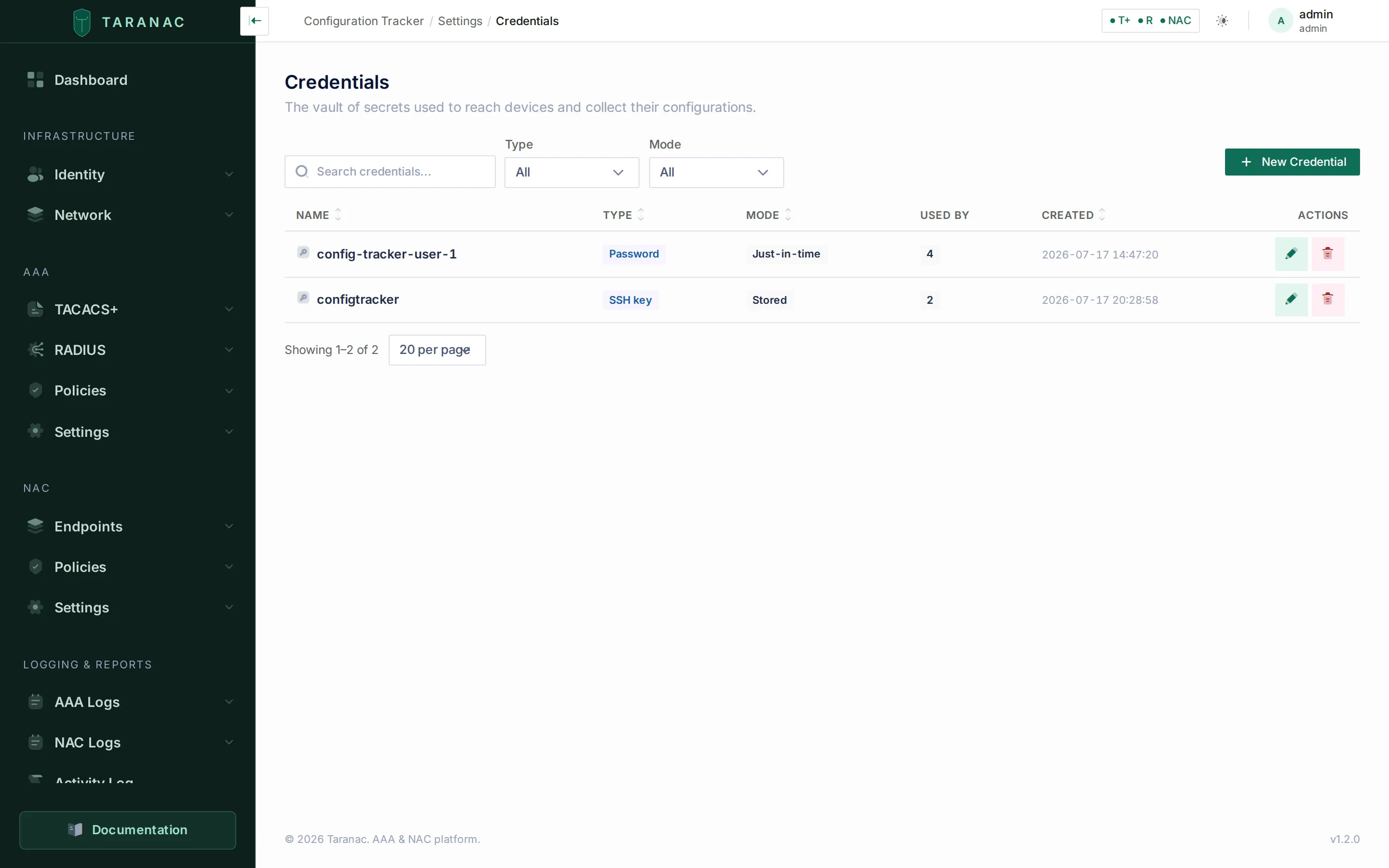 The vault: a just-in-time password credential and a stored SSH key. The list carries
Name · Type · Mode · Used by · Created, filters on type and mode, and never shows a
secret.
The vault: a just-in-time password credential and a stored SSH key. The list carries
Name · Type · Mode · Used by · Created, filters on type and mode, and never shows a
secret.
Stored credentials — the vault
Section titled “Stored credentials — the vault”A stored credential holds secret material, encrypted at rest. The type fixes what fields it carries:
| Type | Holds |
|---|---|
| Password | Username + password. |
| SSH key | Username + private key (+ optional passphrase). |
| SSH certificate | Username + certificate + private key (+ optional passphrase). |
| API token | A bearer token (for HTTP recipes, injected via {{cred.token}}). |
| Enable secret | An enable/privileged-mode secret. A login credential links to it — see privileged mode below. |
| Secret bag | An arbitrary key→value map, handed to the driver as-is. |
The type is fixed at creation and cannot be changed afterwards — it is what decides
which fields exist. A seventh value, TLS certificate (tls_cert, client mTLS for an
HTTPS source), exists in the data model but the backend refuses to create one: no
HTTP driver consumes it yet, and offering it would let you save a credential that
silently never authenticates. Like external, it still appears in the list’s Type
filter, where it matches nothing.
A recipe reaches a credential’s fields through {{cred.<field>}} placeholders, and the
valid field names are derived from the typed payloads above: username, password,
private_key, passphrase, certificate, token, secret. A secret bag’s own
keys are therefore not placeholder-addressable — the bag is for material a driver reads
directly. In an HTTP recipe only {{cred.username}} may appear in the request path;
secrets belong in a header or the body, and a placeholder that resolves to nothing fails
the collection before the transport is touched. See
Recipes & scrub sets.
Privileged mode (enable)
Section titled “Privileged mode (enable)”Some devices seat a login below privileged mode, where show running-config answers
% Invalid input. For those, link the login credential to an Enable secret credential.
The link is validated when you save: the target must be type=enable, never the credential
itself, and an enable credential cannot carry a link of its own.
At collection time the enable secret travels with the login to the collector, which enters privileged mode right after logging in, before the source’s paging command and the recipe’s commands. A session that already lands privileged (the usual TACACS+ privilege-15 case) sends nothing extra. If the device refuses the secret, the collection fails as an authentication failure (The device refused to enter privileged mode (enable)) and is not retried, because retrying a wrong secret is how a device locks the collector out.
The link works the same for a stored and a just-in-time
login. A credential that carries its own secret field (a Secret bag can) uses that one,
and the link only fills the gap when it does not.
How the vault protects secrets
Section titled “How the vault protects secrets”- Fernet, per value, at rest. Every secret field is individually Fernet-encrypted with the deployment’s master key before it touches the database. The master key is loaded at startup (from an environment variable, a file, or an interactive prompt) and is never written to the database.
- Never returned by the ordinary API. Listing or viewing a credential shows secret
fields as a masked sentinel —
••••••••, eight bullets — never the ciphertext and never the plaintext. The one exception isusername, treated as non-secret: it comes back in the clear (it already appears on sources, in logs and in audit) and is always saved verbatim, so you never have to reveal a credential just to fix a typo in the account name. - Saving is judged field by field. The edit form submits every field of the type, and each is handled on its own: the sentinel keeps the stored ciphertext untouched (no needless re-encryption), an empty value clears that field, anything else is re-encrypted. So re-saving a form you didn’t touch leaves every stored secret exactly as it was. Typing the sentinel yourself changes nothing either — the form normalises any all-bullet input back to “keep”. (There is no sentinel on create, so on a new credential a literal row of bullets would be stored as the secret itself.)
- Reveal is a separate, audited action. Seeing a stored secret in the clear requires
the dedicated
ncm_credentials.revealpermission, and it is not implied byview— one of only two Config Tracker actions that aren’t (the other isncm_tracked_configs.reveal_raw). Every reveal writes an audit event with the operator, IP and user agent. See Roles & permissions for the full inventory. - Backups carry the vault; the key travels separately. A configuration backup holds the vault inside its encrypted database dump, sealed with the same master key — which is deliberately not in the archive. Rotating the master key re-encrypts every stored secret, the vault included. See Backup, restore & upgrades.
Just-in-time credentials — the password nobody sees
Section titled “Just-in-time credentials — the password nobody sees”The vault isn’t the interesting part. The interesting part is not storing a password at
all — and this is where being the AAA server changes the game. A just-in-time (jit)
credential doesn’t carry a secret. Instead it points at a managed local Taranac
account, and at collection time Taranac:
- Mints a strong, 32-character random password on that local account.
- Logs the collector into the device with it — and because the device authenticates its admin logins against Taranac (Taranac is its AAA server), the login is validated live, against the just-minted password. There is no device-local password to store.
- Rotates it away once the collection work drains.
Follow what that removes. The service account an automated system uses to reach your fleet is the classic soft target — a shared password in a config file, reused for months, one leak from a fleet-wide compromise. A JIT account has none of those handles:
- Nobody has ever seen it. The password is machine-generated and never displayed — not in the UI, not in logs, not over the API. (Revealing a JIT credential returns an empty payload, because there is no stored secret to show.)
- It’s genuinely strong. 32 random characters, not a memorable string a person picked.
- It’s already gone. It rotates as the work drains, so a password sniffed off the wire is dead before it’s useful — and the next one doesn’t exist yet.
The warm lease — concurrency without a stored secret
Section titled “The warm lease — concurrency without a stored secret”Pointing one JIT credential at a rack of devices means several collections hit the same account at once. Rather than mint a fresh password per run (which would race), the mint is an account-scoped “warm” lease:
- The first collection mints the password and takes a lease on the account.
- Every concurrent collection on that account borrows the same live password and logs in in parallel.
- The password is rotated once the lease goes idle (all borrowers have drained) — never yanked out from under an in-flight login.
If the password was ever handed to a standalone collector (it touched an edge), it’s rotated immediately on drain rather than kept warm — within milliseconds of the last collector releasing it, without waiting for a sweep. Otherwise two windows bound how long a minted password can live: it rotates once the lease has been idle for 30 minutes (default), and an absolute ceiling of 2 hours (default) forces a rotation regardless. Neither ever fires while a holder is still logged in. A leader-only rotation job sweeps every 60 seconds as the backstop.
What binding does to the account
Section titled “What binding does to the account”Binding a JIT credential flips aaa_live_auth on the target account, and that flag
changes how the AAA daemons authenticate it. Normally TACACS+ and RADIUS answer from a
user snapshot refreshed roughly every 30 seconds — but a minted password is newer than
that by construction, so for a flagged account the daemons bypass the cache and re-read
the password hash live from the primary database on every authentication. That is what
makes a password minted seconds ago work on the very next login. The flag is cleared
again when the last JIT credential stops pointing at the account.
Two consequences worth knowing before you wire this up:
- A JIT account is MFA-exempt by design. If policy enforces MFA for it, the live-read path is skipped and the login fails at the MFA step — a JIT account has no factor enrolled. Keep MFA policy off the collection account.
- TACACS+ only:
Mavis Cache Timeoutmust be0— which is its default. A non-zero value caches the authentication result, so the daemon never sees the freshly rotated password and every JIT login is rejected. RADIUS is unaffected. The credential form reads the live setting and warns you when it isn’t zero.
The reverse direction is guarded: a local account cannot be deleted while a JIT credential points at it — the delete is refused, naming the credential.
Credential bindings — brute-lockout safety
Section titled “Credential bindings — brute-lockout safety”Separately from which credential a source uses, the tracker remembers which credential last authenticated successfully at a given address. This “auto-bind” memory means discovery and probing won’t re-spray every credential at an address that already has a known-good one — avoiding the account lockouts that credential-spraying triggers on real gear. Deleting a credential drops its bindings automatically.
Deleting a credential
Section titled “Deleting a credential”Deleting a credential is never blocked, however much is using it. Every reference to a credential is self-clearing, so the delete drawer’s “where used” list is there to tell you what will change, not to stop you:
- Sources using it are detached, not deleted. The source’s credential field is emptied and it keeps existing — but it can no longer authenticate until you point it at another credential.
- Credentials that linked to it as their enable reference lose that link. The audit entry for the delete names each one, so the trail explains why they suddenly have none.
- Address bindings cascade away with it.
- A live just-in-time lease is rotated first, before anything is dropped — so a minted password is never left valid on the account after the credential that minted it is gone.
The one blocking edge points the other way: a local user account cannot be deleted while a JIT credential references it.
Common scenarios
Section titled “Common scenarios”Read every switch config without a stored service password. Create one local Taranac account for config collection, make a just-in-time credential pointing at it, and reference that credential from your SSH sources. No device-reachable password is ever stored or reused.
Track an API platform. Store an API token credential and reference it from the
HTTP recipe’s header (Authorization: Bearer {{cred.token}}). The token is encrypted at
rest and injected only at collection time.
Privileged-mode (enable) access. Store the enable password once as an Enable secret and link every login credential that lands unprivileged to it. The collector escalates after login; a device that already grants privilege-15 is unaffected.
When to use what — stored vs just-in-time
Section titled “When to use what — stored vs just-in-time”| Choose just-in-time when… | Choose stored when… |
|---|---|
| The device does its admin AAA through Taranac (so Taranac can validate a minted password). | The device authenticates locally or against another system. |
| You want zero long-lived, reusable service passwords. | You must present a specific existing account (e.g. a vendor API token, an SSH key). |
| Collection is CLI over SSH/Telnet on a managed local account. | The credential is an SSH key, certificate, or API token. |
Reference
Section titled “Reference”| Field | Notes |
|---|---|
| Name | Required, unique, up to 128 characters. |
| Type | password · ssh_key · ssh_cert · token · enable · bag. Immutable after create. tls_cert exists but is refused. |
| Mode | stored (default) or jit. external is rejected. |
| Secret fields | Per type; each value Fernet-encrypted at rest; masked in list/view (username excepted — returned in the clear); revealed only via ncm_credentials.reveal. |
| Local account | Required for jit: the managed local Taranac user the password is minted on. Forces type password. |
| Enable reference | Optional link to an enable-type credential. Its secret is handed to the collector with the login and used to enter privileged mode; a refused secret is an auth failure. A credential’s own secret field takes precedence. An enable credential may not carry one. |
The list shows Name · Type · Mode · Used by · Created; every column but Used by is sortable, and the toolbar filters on type and mode.
Related
Section titled “Related”- Tracked configs & transports — where a source picks its credential.
- Recipes & scrub sets —
{{cred.*}}injection in HTTP recipes. - Collectors — how a credential reaches a standalone collector, and why that shortens a minted password’s life.
- Audit & syslog — where credential reveals are recorded.
- Backup, restore & upgrades — the archive that carries the vault, and master-key rotation.
- Roles & permissions — the
ncm_credentialspermissions, includingreveal.