

Overview
Network Access Control (NAC) is the part of Taranac that decides who and what is allowed onto your network and with which access. When a laptop, phone, printer, or camera connects to a switch port or wireless SSID, the switch (the authenticator) asks Taranac over RADIUS whether to admit the device and on what terms — which VLAN, which ACL, for how long. This is the same role Cisco ISE plays: 802.1X / MAB access control with endpoint classification and an authorization policy.
NAC runs alongside Taranac’s device-admin AAA but is a separate subsystem with its own RADIUS service, its own policy engine, and its own admin pages. Everything below describes how you configure and reason about it in the Taranac admin UI.
- 1 Authenticate MAB · MAC identity
- 2 Classify group: Printers
- 3 Authorize first match wins
- 4 Result VLAN 30 · ACL
- 5 CoA change live session
NAC vs. device-admin AAA
Section titled “NAC vs. device-admin AAA”Taranac does two different jobs that both speak RADIUS, and it is easy to confuse them. AAA controls administrators logging into network gear (TACACS+ / RADIUS device administration). NAC controls endpoints getting onto the network (802.1X / MAB). They share the database and the admin UI but nothing else — separate RADIUS containers, separate ports, separate policies.
| Aspect | Device-admin AAA | NAC |
|---|---|---|
| Goal | Access to a device’s CLI/management | Access to a network port or SSID |
| Protocol | TACACS+ and RADIUS | RADIUS only (802.1X, MAB) |
| Who/what authenticates | An administrator (username/password) | An endpoint or its user (EAP, certificate, MAC) |
| Result | Shell, privilege level, allowed commands | VLAN, ACL, session timeout, redirect |
| Engine | AAA policy rules | NAC policy rules |
The access flow
Section titled “The access flow”Every NAC decision follows the same pipeline. Understanding it makes the rest of the configuration obvious:
- Authenticate — the endpoint proves identity. With 802.1X a supplicant runs EAP (PEAP, EAP-TLS, or EAP-TTLS). If there is no supplicant, the switch falls back to MAB (MAC Authentication Bypass), where the MAC address itself is the identity.
- Classify the endpoint — Taranac looks up (or auto-discovers) the endpoint by MAC, and places it in one or more endpoint groups by classification rules. The rules read what is known about the device: its manufacturer (from the IEEE OUI database), certificate, host name and directory record, and its device profile — the name Device Profiling gives it from what discovery sources have heard it say (DHCP, the scanner, SNMP, Web Probe, the portal, RADIUS itself).
- Authorization policy — the NAC policy engine evaluates ordered rules (first match wins) against the request: the authentication method, the user’s groups, the endpoint’s groups, the NAS device’s groups and wireless network, and the time of day.
- Result — the matched rule yields either Reject or an authorization profile (VLAN, ACL, session timeout, optional web redirect). Taranac renders that intent into the correct vendor-specific RADIUS attributes and returns Access-Accept.
- CoA (Change of Authorization) — after the session is live, an admin can push a change — re-authenticate, bounce the port, change VLAN, or disconnect — without the endpoint reconnecting on its own.
Building blocks
Section titled “Building blocks”Each concept below maps to a page in the NAC section of the admin UI.
| Building block | What it is | Where in the UI |
|---|---|---|
| Endpoints | The inventory of devices, keyed by MAC. Each has a status, a persistence type, a manufacturer, a device profile and group memberships. | Endpoints |
| Discovery & profiling | The sources that describe a device beyond its MAC (DHCP Probe, Scanner, SNMP, Web Probe, OUI database), and Device Profiling, which turns their evidence into a name such as Computer › Windows › Laptop. | Discovery Sources |
| Endpoint groups | Categories used in policy (Printers, Corporate Devices, Guest…). Membership is automatic via classification rules or manual. | Endpoints → Endpoint Groups |
| Authentication methods | How an endpoint proves identity: PEAP, EAP-TLS, EAP-TTLS (802.1X) or MAB. | (configured per policy rule) |
| Authorization profiles | Vendor-agnostic intent: VLAN, ACL, session timeout, redirect. | Policies → Authorization Profiles |
| NAC policy | The ordered rule table that maps requests to a profile or Reject. | Policies → Policy Table |
| Sessions | Live 802.1X / MAB sessions — what CoA acts on, aged out by their own accounting stream. | Logging & Reports → NAC Logs → Sessions |
| Captive portal | Guest / BYOD / self-registration / AUP web flows for unknown devices. | Endpoints → Captive Portals |
| PKI & trust | Server certificate for EAP, internal CA, trusted CAs for client certificates. | Settings → PKI / Certificates |
Endpoints
Section titled “Endpoints”An endpoint is a network device identified by its MAC address. It can be added manually, imported from CSV, synced from a directory’s computer objects (Active Directory, FreeIPA, OpenLDAP or generic LDAP), or auto-discovered the first time it authenticates. Each endpoint carries:
- a status:
known,unknown,blocked, orinactive; - a persistence type:
static(manual/LDAP/pinned — never auto-removed),dynamic(discovered via RADIUS — subject to lifecycle cleanup), orguest(created by the captive portal — removed after inactivity); - enrichment data: manufacturer (resolved from the OUI prefix), host name, IP, certificate identity when EAP-TLS is used, and a device profile from Discovery & profiling.
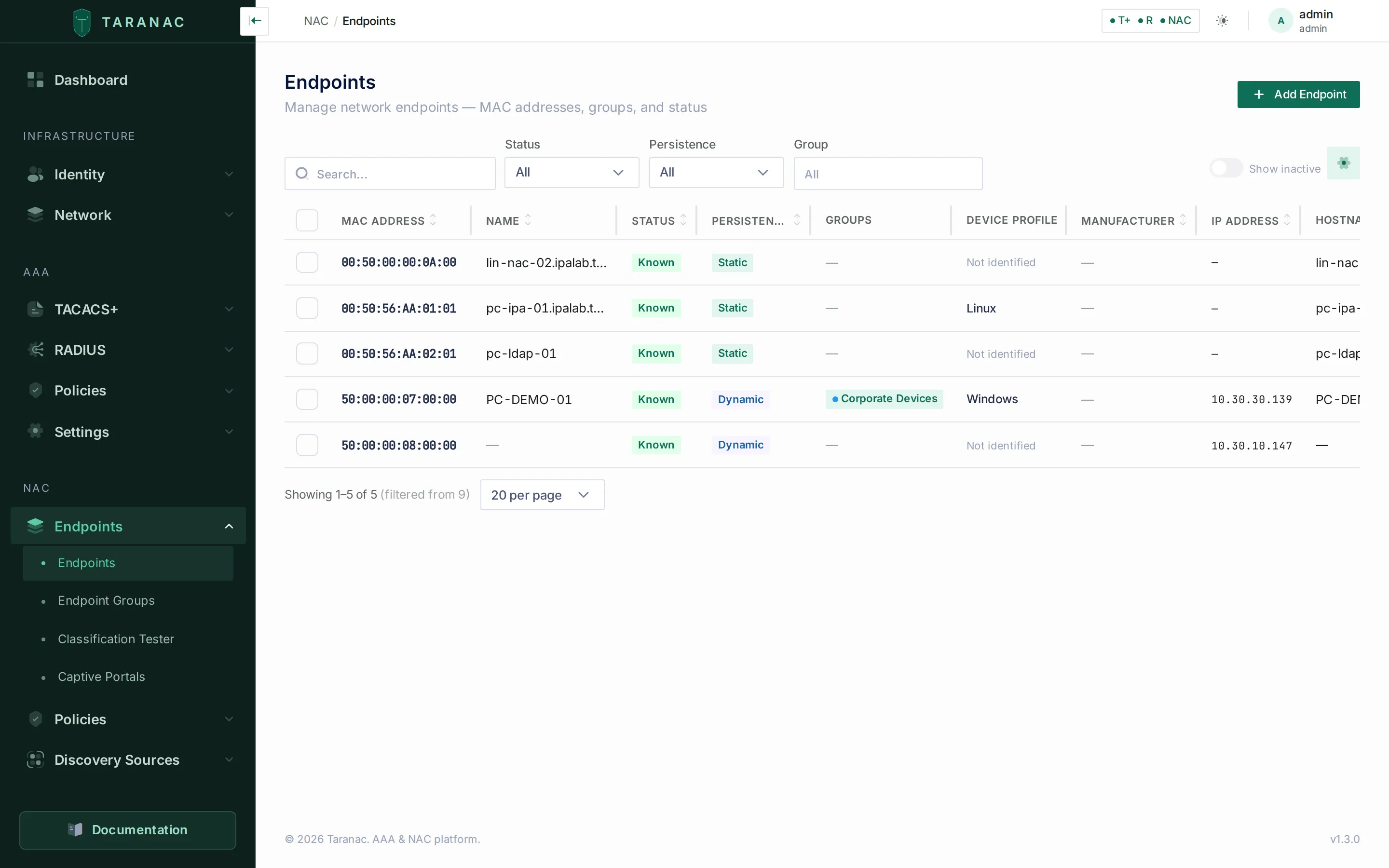 The Endpoints page: every device by MAC, with status, persistence, group membership, device profile and manufacturer.
Endpoint groups and classification
Section titled “Endpoint groups and classification”Groups are how endpoints enter the policy. Rather than listing MACs in rules, you put devices into groups and write rules about groups. A group can have classification rules that assign endpoints automatically. Matching is all-matches — every enabled rule whose conditions hold adds the endpoint to its group, so a device can belong to several groups at once. Devices that match nothing are in no group and show as “Unclassified”.
A rule is a list of conditions joined by and — the device profile is Computer › Windows and the manufacturer is Dell — over the MAC and its manufacturer, the host name, the certificate, the directory, the device profile and Web Probe answers. The condition types and when each is re-judged are on Endpoints.
Authentication methods
Section titled “Authentication methods”| Method | How it works | Typical use |
|---|---|---|
| PEAP (MSCHAPv2) | TLS tunnel, inner username/password against local users or LDAP | Domain users with password-based 802.1X |
| EAP-TLS | Mutual TLS with a client certificate; identity from the cert (UPN/CN/SAN) | Corporate machines and users with certificates |
| EAP-TTLS (PAP) | TLS tunnel, inner PAP verified by LDAP bind | LDAP/AD users on Linux supplicants |
| MAB | No supplicant — the MAC address is the identity | Printers, IP phones, cameras, IoT |
See 802.1X authentication for supplicant configuration and the full EAP details.
Authorization profiles and policy
Section titled “Authorization profiles and policy”An authorization profile describes what the network should do in vendor-neutral terms — assign VLAN 100, apply ACL PRINTERS-ONLY, set a session timeout — without knowing which vendor’s switch is involved. At runtime the Vendor Dictionary translates that intent into the right RADIUS attributes for the actual NAS — Cisco IOS/IOS-XE and NX-OS, Arista EOS, Juniper, Huawei VRP, H3C/Comware, Aruba (AOS-CX / Controllers), HPE ProCurve/ArubaOS-Switch, Fortinet, Dell, Extreme EXOS, Ruckus ICX, MikroTik RouterOS and more, plus a generic RFC-standard entry for anything else. One profile therefore works across a mixed-vendor estate.
The NAC policy is a single flat, ordered rule list — first match wins. Each rule combines up to five conditions (all dimensions ANDed; values within a dimension ORed):
- HOW — authentication method (PEAP / EAP-TLS / EAP-TTLS / MAB / Any)
- WHO — user groups (relevant for 802.1X)
- WHAT — endpoint groups
- WHERE — NAS device groups, optionally narrowed to one wireless network (SSID)
- WHEN — always, or a time range
A rule can also carry a validity period — valid from, valid until — outside which it is skipped as if switched off. A rule’s action is either Permit (with an authorization profile) or Reject. The default catch-all rule rejects anything unmatched.
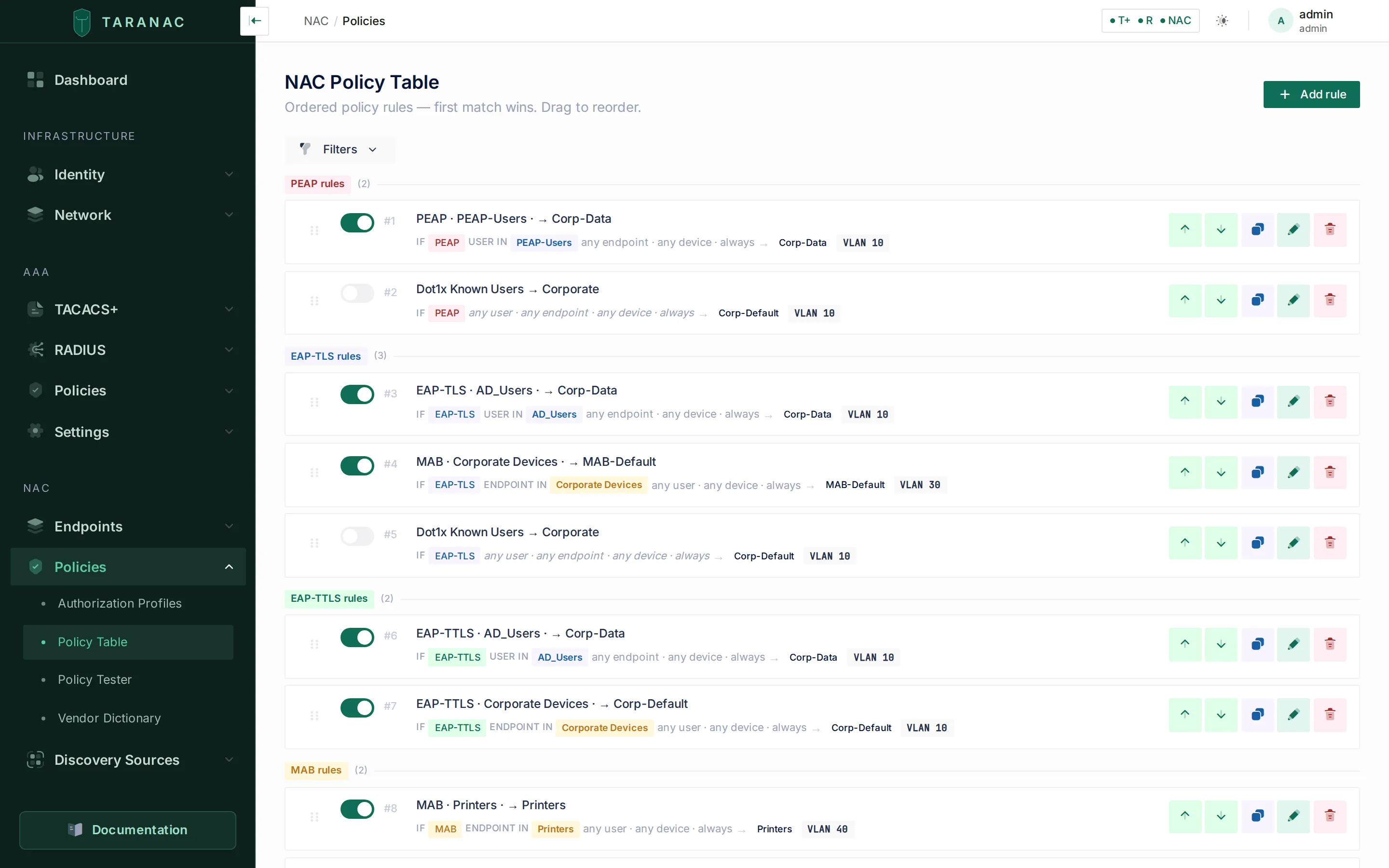 The NAC policy table: ordered rules grouped by authentication method, each rendered as a readable sentence ending in a profile or Reject.
Sessions
Section titled “Sessions”A permitted authentication becomes a session — one endpoint, live on one port — listed under Logging & Reports → NAC Logs → Sessions (tabs Active, Closed and All). That page is the surface CoA acts on, and a session records the VLAN Taranac assigned and the VLAN the switch reported as two separate values; a disagreement between them is flagged, because that is where the port actually settled after authorization. Its detail drawer shows the port as the NAS described it (Interface, NAS-Port-Id, NAS Port, NAS Port Type — see what the log records about the port), the Wireless network (SSID) on an access point, and a timeline of the session’s events. A magnifier beside the MAC opens the endpoint in a drawer without leaving the page.
A session is identified by its NAS and its Acct-Session-Id together. RFC 2866 asks a NAS to keep the id unique only among its own sessions, and some switches number from zero on every unit and again after every reboot, so two switches can hold the same id at the same time. Taranac keeps them apart: a Start, an Interim-Update and a Stop only ever touch the session of the NAS that sent them.
Starts and Stops are applied in the order they arrived. Access points built on hostapd reuse one Acct-Session-Id across re-associations: a station that reconnects seconds after its Stop comes back with the id that Stop just closed. That Start is recorded as the new session it is, so the device stays visible and can be disconnected. Only a Start that was already waiting when its own Stop was applied is discarded as a leftover.
When a NAS restarts
Section titled “When a NAS restarts”A NAS that reboots, or restarts its accounting service, announces it with Accounting-On (or Accounting-Off on the way down). Per RFC 2866 that means every session it held is gone, and no Stop will ever arrive for them. Taranac closes all of that NAS’s sessions at once, with the close reason NAS restart, so the console never shows users who are no longer on the network or offers disconnects aimed at sessions that no longer exist. The NAC Auth Log gets one NAS restart row for the event, and each closed session ends its timeline with NAS restarted. Their final traffic counters are the last ones reported, since the announcement carries none. Sessions a captive portal admitted itself (below) are not touched: no NAS stands behind them.
Sessions a portal admitted
Section titled “Sessions a portal admitted”A standalone captive portal that opens the network itself admits guests in its own datapath, without any RADIUS exchange. Those sessions are listed with the others, marked Portal, with the portal’s address in the Device column; the drawer names the Portal and the portal instance it was Reported by, and shows Admitted where a RADIUS session shows its Accounting-Start. They close with Portal released when the portal stops reporting the client (it left, or its grant lapsed) and Portal offline when the whole portal host went quiet.
When a session ends
Section titled “When a session ends”Taranac learns that a session is over from its accounting stream, and never by asking the switch. There is no way to ask: RFC 5176 defines no read-only packet, and an identification-only CoA-Request is answered CoA-ACK while removing the RADIUS-assigned VLAN from a live session on any NAS with replace semantics — measured on Huawei VRP, where the user stays authenticated and drops to the port PVID. Nothing in Taranac closes a session on the strength of a NAS’s answer, so besides a Stop and a NAS restart, silence is read in two windows:
- a session whose switch does send Accounting Interim-Updates ends after silence past the stale threshold (
nac.session_stale_threshold_minutes, 1440 minutes — 24 hours — by default); - a session where only the Accounting-Start ever arrived cannot be judged by silence at all — on a switch without periodic interim accounting that is the normal state of a perfectly healthy session — so it is held by age alone: Max Session Duration on Settings → NAC, 120 hours by default. Archiving one is logged as a warning naming the cure, which is enabling periodic interim accounting on that switch.
The Close reason on a closed session says which of these happened:
| Close reason | Meaning |
|---|---|
| NAS stop | The NAS sent an Accounting-Stop. Its own Terminate cause (Acct-Terminate-Cause) is shown beside it. |
| NAS restart | The NAS announced Accounting-On or Accounting-Off. |
| Admin disconnect | An operator disconnected the session, and the Stop followed. |
| Guest revoked / Guest expired | A captive-portal grant was revoked or ran out. |
| Stale cleanup | Closed by the silence rules above. |
| Portal released / Portal offline | A portal-admitted session, as described above. |
Captive portal and PKI
Section titled “Captive portal and PKI”For devices that have no supplicant and no known MAC, a policy rule can redirect them to a captive portal for guest access, BYOD onboarding, employee self-registration, or acceptance-of-use. Once they register, Taranac issues a CoA to move them into the right VLAN. A portal runs either embedded in the Taranac stack (switched on with the Embedded portal card) or standalone on its own host, where it serves its own DHCP and DNS and can open access for the guest itself instead of sending a CoA. See Captive portal.
EAP needs certificates. Taranac includes an internal PKI: a server certificate that FreeRADIUS presents during every EAP handshake, an internal CA hierarchy to issue user/device certificates, trusted CAs to validate client certificates from outside domains, plus revocation checking per CA by CRL and OCSP, and automated enrollment of network equipment over EST and SCEP. The internal CA can also run under your corporate root, so devices that already trust that root trust what Taranac issues. See PKI & trust and Taranac under your corporate root.
Common scenarios
Section titled “Common scenarios”| Scenario | Method | Outcome |
|---|---|---|
| Corporate laptop, domain user | PEAP or EAP-TLS → WHO=corporate group | Permit → corporate VLAN, full access |
| Domain machine, no logged-in user | EAP-TLS (machine cert) → WHAT=corporate computers | Permit → machine VLAN |
| Contractor’s own laptop | EAP-TLS against a Trusted CA → WHO=contractors | Permit → restricted VLAN |
| Printer / IP phone / camera | MAB → WHAT=Printers / IP Phones | Permit → device VLAN with restrictive ACL |
| Unknown device | MAB miss → no match | Reject, or redirect to captive portal |
When to use what
Section titled “When to use what”| If you want to… | Use |
|---|---|
| Authenticate users with AD passwords | PEAP (local NT-hash) or EAP-TTLS (LDAP bind) |
| Authenticate by certificate (strongest) | EAP-TLS with the internal PKI or a Trusted CA |
| Admit devices that cannot run a supplicant | MAB plus a tight endpoint group + ACL profile |
| Onboard guests / personal devices | A captive portal flow + redirect profile |
| Apply one policy across mixed switch vendors | Vendor-agnostic authorization profiles + Vendor Dictionary |
| Move a live device to a new VLAN immediately | CoA from the endpoint’s quick actions, or from Logging & Reports → NAC Logs → Sessions |
Related
Section titled “Related”- Endpoints — inventory, classification, lifecycle
- 802.1X authentication — PEAP, EAP-TLS, EAP-TTLS, MAB
- NAC policy — authorization profiles, rules, the Vendor Dictionary
- Captive portal — guest, BYOD, self-registration, AUP
- PKI & trust — server cert, internal CA, trusted CAs
- Taranac under your corporate root — an internal CA signed by your corporate PKI
- Certificate revocation: CRL and OCSP — which client certificates are checked, and how
- EST enrollment and SCEP enrollment — certificates for network equipment, enrolled and renewed automatically
- Taranac on GitHub