

Alerts
Taranac watches itself and the boxes it runs on, and turns “something is wrong” into a small, stable list of alerts you can work through. An alert is a condition — disk filling up, RADIUS unreachable, an identity being brute-forced — not a stream of events. It opens (fires) when the condition appears and resolves when it clears, so a problem that lasts ten minutes is one row, not six hundred log lines.
This page covers where alerts come from, how severity is assigned, how operators acknowledge and clear them in the admin UI, and how notifications reach you — by email, by syslog to your SIEM, or both — so you hear about the things that matter without being buried.
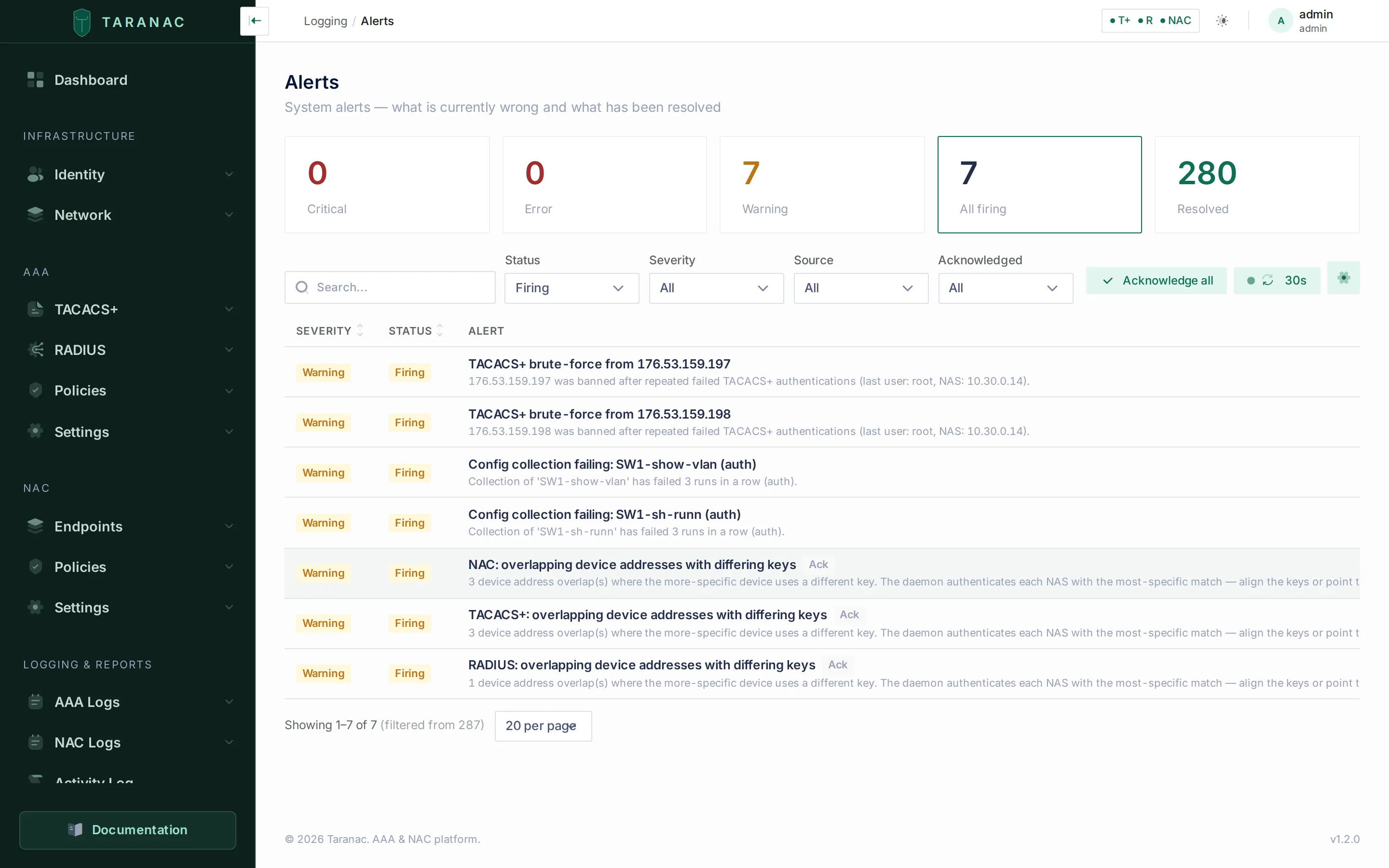 The Alerts page: severity-sorted firing conditions with acknowledge and resolve actions. This is a standalone install; on a cluster a Node column and a node filter join the toolbar.
- firing · disk > 80% warning
- recurs · same fingerprint count++
- acknowledged · still firing repeats off
- escalates · disk > 90% critical · ack cleared
- resolved · auto, on recovery all clear
Key concepts
Section titled “Key concepts”Alert — a single condition with a lifecycle. It carries a severity, a title and message, the originating source, an occurrence count, and timestamps for first-seen, last-seen and (once cleared) resolved.
Status — firing / resolved. This is the machine-driven axis. The system opens an alert when it detects the condition and resolves it automatically when the condition goes away. You normally do not set this by hand.
Acknowledged. This is the operator axis, completely separate from status. Acknowledging an alert means “I have seen this and I am on it.” It does not close the alert — the condition is still firing — but it silences repeat notifications so you stop getting reminded about something you are already handling.
Source. The subsystem that raised the alert. The producers that exist today are monitoring (host resources and daemon health), tacacs / radius / nac (AAA anomalies and NAC OCSP failures bridged from the protocol daemons), the three config builders (tacacs_config, radius_config, nac_config — validation failures, inheritance advisories, TACACS+ TLS revocation and the NAC daemon’s revocation-policy support), email (the email channel’s own delivery self-check), alerts (no notification channel configured at all), mfa (provider reachability, and TOTP enrollments left on old parameters), domain (the MS-CHAPv2 machine-account trust), ldap_sync (failed directory syncs), users (one username held by several accounts), nac_crl (certificate revocation lists), nac_pki (the NAC CA bundle), nac_ca_expiry (Internal CA chains), nac_enrollment (EST and SCEP enrollment blocks), backup, license, the Configuration Tracker’s three (ncm_collection, ncm_collector, ncm_drift), collectors (a collector that needs an update), and — only when running clustered — cluster_license (node count or edition against the licence) and cluster_sync (HA health). Every one of them is enumerated under Alert sources below.
Fingerprint. A stable internal identity for the condition (for example disk:/var or nac:brute_force:peap:jdoe). It is what keeps a recurring problem collapsed into one alert: while a condition keeps recurring, Taranac bumps the existing alert’s occurrence count rather than opening duplicates. Once an alert resolves, a fresh occurrence later opens a new one — so you get clean history, not endless churn.
Node. On an HA cluster every alert also records the node that observed and opened it, stamped once on open and kept stable across recurrences. For per-node conditions the fingerprint is additionally scoped to that node (an @<node> suffix), so a healthy peer can never resolve another node’s firing alert — each node keeps its own row. Everything a node observes about itself is scoped that way: host resources, daemon reachability and the daemon-not-authenticating checks, RADIUS and NAC configuration applies and radiusd restarts, config validation, the NAC daemon’s revocation-policy support, the NAC CA bundle, TACACS+ TLS revocation sync, NAC OCSP failures, MFA provider reachability, the domain machine-account trust, both backup alerts, CRL download failures, and the config-apply readiness gate. Conditions that are a function of replicated data, or that only the leader can observe, stay a single alert per cluster, stable across failover: the licence checks, the cluster_sync reconciles, the email self-check, the delivery check, the directory-sync and shared-username alerts, CRL expiry, Internal CA chain expiry, EST and SCEP enrollment blocks, a revoked CA in the TACACS+ TLS trust, the Configuration Tracker and collector-update alerts, and the key/banner inheritance advisories. On a standalone install there is one node and the scoping is inert — the fingerprint is left untouched.
Severity scale
Section titled “Severity scale”Severity is assigned by the producer, not by the operator. The four levels follow a deliberate rubric:
| Severity | Meaning | Examples |
|---|---|---|
info | Nothing broken, informational only. The level exists and can be filtered on, but no producer uses it today. | — |
warning | Not broken yet — a deadline or trend approaching. | Disk at 80%; brute-force detected; unknown device seen. |
error | Something has failed, but core AAA still works. | Config validation failed; email delivery failing; a scheduled backup failed; an MFA provider degraded. |
critical | Active authentication outage or security condition. | RADIUS / TACACS+ unreachable, or up and refusing every request. |
Two boundary rules make this easy to reason about:
warningvserror— “about to happen” versus “already happened.”errorvscritical— is authentication itself impacted, or just a peripheral function?
If a condition gets worse while already firing (for example disk crosses from warning into critical), the alert escalates: its severity is raised, any acknowledgement is cleared, and it becomes eligible to notify again — so an escalation always gets your attention even if you had silenced the milder version.
Alert sources
Section titled “Alert sources”Everything below is the complete catalogue: every condition the product can raise today, with its fingerprint, severity and scope. Unless a row says otherwise, an alert auto-resolves on the next healthy observation of the same condition — you never have to close it by hand.
Host resources and service health (monitoring)
Section titled “Host resources and service health (monitoring)”The evaluator reads live host metrics every cycle and compares them against configurable percentage thresholds. All of these are per node — they are read from this machine’s psutil:
| Condition | Fingerprint | Default warning | Default critical |
|---|---|---|---|
| Disk usage (per mount) | disk:<mount> | 80% | 90% |
| CPU usage | cpu:load | 90% | disabled |
| Memory usage | memory:usage | 85% | 95% |
| Swap usage | swap:usage | disabled | disabled |
A threshold breach must persist for alerts.sustained_minutes (default 2) before the alert opens — this debounce stops a momentary CPU spike from paging you. Recovery clears the alert immediately, no debounce. Setting a level’s threshold to 0 disables it.
Disk alerts cover the mounts that can fill up. Read-only image mounts — a snap package (SquashFS), an installer or cloud-init seed (ISO 9660, UDF), an EROFS or CramFS image — are always exactly as full as their content, so they are not checked at all. A mount that disappears (unmounted, or its device removed) has its disk:<mount> alert resolved on the next cycle rather than left firing for a disk that is no longer there.
Daemon health is checked with no debounce — an AAA outage should surface at once. Two different questions are asked, and the second exists because the first is not enough:
| Condition | Fingerprint | Severity | Opens |
|---|---|---|---|
| TACACS+ health check fails | service:tacacs | critical | immediately |
| RADIUS health check fails | service:radius | critical | immediately |
| TACACS+ is up but not authenticating | service:tacacs_backend | critical | after a 30 s stall |
| RADIUS is up but not authenticating | service:radius_backend | critical | after a 30 s stall |
| NAC is up but not authenticating | service:nac_backend | critical | after a 30 s stall |
All five are node-scoped: the node that lost its database is the one that is degraded, and a healthy peer must not clear its alert.
The service:*_backend trio states the condition the port check misses. Under load on the stand, TACACS+ refused 163 of 180 logins while the container stayed healthy, port 49 answered and cluster status printed Healthy — a daemon that has lost its database says a cheerful yes to “is your port open?” and refuses every authentication it receives. These alerts are reported by the daemon itself, not inferred.
The 30 seconds is a grace, not a debounce. A daemon that has just come up refuses while its workers load their caches — 7 to 20 seconds on a loaded node — so without the grace a routine docker compose up -d would land a critical alert and an email that resolved a minute later. A real outage lasts until the database comes back, so it clears the grace on its first evaluation and alerts at once, exactly as service:tacacs / service:radius do.
There is no service:nac port check — the NAC daemon’s liveness is covered by service:nac_backend alone.
The radius and nac containers run radiusd under a supervisor that applies every configuration by starting a new radiusd beside the running one (Applying a configuration). What it reports becomes two node-scoped families under the same source:
| Fingerprint | Severity | Title | Condition |
|---|---|---|---|
service:radius_config_apply, service:nac_config_apply | error | RADIUS configuration not applied / NAC configuration not applied | The new radiusd did not start (the previous one keeps serving with the previous configuration, and the apply is retried after 30 s, doubling up to 5 minutes); the supervisor reports an anomaly (requests may not reach the active radiusd); or a configuration requested more than 300 s ago has had no answer. Resolves on the next good apply. |
service:radius_restart:<reason>, service:nac_restart:<reason> | error; critical for crash_loop | RADIUS: radiusd crashed and was restarted (crash), …: new radiusd crashed, traffic rolled back (rollback), …: container restarted to recover traffic (misroute), …: radiusd supervisor failed (supervisor_crash), …: radiusd is in a crash loop (crash_loop); NAC: … likewise | A restart the supervisor caused on its own. Each new restart is a notice of its own, except crash_loop, which bumps one alert. The message gives the restarts of that reason in the last 24 hours, the trace file and ./taranac diagnose --protocol radius|nac, which collects the traces. Event-type: closes after alerts.event_ttl_minutes without another restart of that reason. |
Configuration validation and inheritance advisories
Section titled “Configuration validation and inheritance advisories”When you change AAA configuration, the config jobs re-render and validate it against the daemon’s own binary. They also re-run the device-key and banner inheritance analysis while they are there, and surface anything ambiguous as an advisory:
| Fingerprint | Severity | Scope | Condition |
|---|---|---|---|
tacacs_config:validation, radius_config:validation, nac_config:validation | error | per node | The rendered config failed the daemon’s validator. A subsequent successful reload resolves it — from either the background auto-reload or a manual reload. |
<source>:key_overlap (all three) | warning | cluster-wide | Device addresses overlap and the more-specific device uses a different key. |
<source>:group_inheritance (all three) | warning | cluster-wide | A device with no key of its own inherits from the oldest of several groups whose keys disagree. |
tacacs_config:banner_inheritance | warning | cluster-wide | The same case for a login banner — raised when a device has no own value and two or more of its groups disagree. Each affected device/banner-field pair is listed in the alert’s details; the welcome banner and the MOTD inherit independently, so they are counted separately. TACACS+ only. |
tacacs_revocation_sync_failed | error | per node | TACACS+ TLS revocations not applied. The 30-second revocation sync could not write the CRL files TACACS+ over TLS checks client certificates against on this node, or a CRL could not be applied. Resolves on the next good sync. See Revocation. |
tacacs_tls_bundle_ca_revoked | warning | cluster-wide | TACACS+ TLS trusts a revoked CA. A CA in the TLS client trust has been revoked by its own issuer; a device that sends only its own certificate is still accepted under it until you disable or remove the CA. Checked once per configuration revision. |
nac_daemon:ca_policy_unsupported (source nac_config) | error | per node | NAC daemon does not understand the per-CA revocation policy. This node’s nac image is older than the api. A configuration with CRL checking only is still deployed (it is stricter); one that uses OCSP is not. Update the node’s images. |
Validation is node-scoped because it runs this node’s binary against this node’s rendered files — a local render fault, or a lagging replica’s data, can fail on one node while a peer’s succeeds. The three advisories are a deterministic function of the replicated configuration, identical everywhere, so they stay cluster-wide.
The banner advisory has its own fingerprint deliberately: a banner ambiguity and a key ambiguity are different faults with different fixes, and sharing one fingerprint would let whichever synced last clear the other’s alert.
Email delivery self-check (email)
Section titled “Email delivery self-check (email)”Email is one of the alert engine’s own notification channels, which makes a broken SMTP a blind spot — alert mail would silently never arrive. Taranac watches its own outgoing-mail audit trail (EMAIL_SENT / EMAIL_FAILED) and opens an error alert (email:delivery) after alerts.email_failure_threshold failures since the last success (default 3). It resolves on the next successful send, or once the failures age out of a 24-hour lookback window. Set the threshold to 0 to turn the self-check off.
The audit trail is replicated, so this reads identically on every node. It is therefore reconciled on the leader only and stays cluster-wide — node-scoping would report one broken mail server once per node.
Alerts that reach nobody (alerts)
Section titled “Alerts that reach nobody (alerts)”The quieter blind spot is having no channel at all. With no email recipients and no syslog destination bound to alerts, every alert — a dead replica included — lands in a list nobody is told to look at. So the engine raises one warning, Alert delivery is not configured (alerts:delivery_unconfigured), whenever no notification channel has anywhere to send:
- email counts as configured when Email notifications is on, SMTP is enabled, and at least one recipient is set;
- syslog counts when at least one enabled destination carries a System / alerts binding (see Notification channel: syslog).
“Configured” is read from exactly the targets the next notification pass would use, so the alert resolves on the first cycle after either channel has one. It cannot be delivered by definition — it exists to be seen, on the Alerts page and the dashboard, and its message says where delivery is set up. A fresh install shows it until you configure one of the two. It says nothing about whether delivery works: a configured but failing mail server is the email:delivery alert above, and a syslog destination that does not accept the notices shows in its own delivery counters.
Turning the alert engine off (alerts.enabled = false) resolves this alert: a switched-off engine is a decision, not a missing setup. It is reconciled on the leader only and stays cluster-wide — the settings and bindings it reads are replicated.
AAA and NAC anomaly alerting (tacacs, radius, nac)
Section titled “AAA and NAC anomaly alerting (tacacs, radius, nac)”The protocol daemons cannot call the alert service directly, so they write to a bridge table that the evaluator drains each cycle and promotes into stateful alerts. Each protocol’s condition is tracked independently:
| Fingerprint | Severity | Condition |
|---|---|---|
tacacs:brute_force:<subject>, radius:brute_force:<subject> | warning | A source the daemon’s own ban guard banned after repeated failed authentications. The subject is the client address (RADIUS uses a prefixed key — csi:<calling-station>, or nas:<address> with the address the request came from when there is no Calling-Station-Id). |
nac:brute_force:<method>:<identity> | warning | Repeated failed credential authentications for one identity over 802.1X, keyed by the inner username being guessed — e.g. nac:brute_force:peap:jdoe. |
tacacs:unknown_device:<address> | warning | Unknown TACACS+ device. A connection from an address no enabled device with TACACS+ covers was refused — classic TACACS+ (“…was refused: not in the inventory — add the device”) or TACACS+ over TLS (“…over TLS connection … was refused … Add the device to let it log in over TLS”). Raised once per address per parser process, for at most 20 new addresses a minute per process, IPv4 and IPv6 alike. Never for an address Docker rewrote to the gateway’s. See Refused TACACS+ connections. |
radius:unknown_device:<address>, nac:unknown_device:<address> | warning | A request reached the daemon from an address no device in the inventory covers — possible when a broad-admit setting let it in (the global key, a dynamic-client network). |
nac_ocsp:responder_unreachable:<url>[@<node>] (source nac) | error | OCSP responder not usable: <url>. The NAC daemon on that node refused a client because the responder could not be reached, sent no usable answer, or its answer did not verify. |
nac_ocsp:config:<hash of the issuer>[@<node>] (source nac) | error | OCSP check impossible for clients of <issuer>. OCSP is on for a CA but no check can be made, for example the CA has no responder address at all. |
NAC brute-force detection counts once per authentication attempt — an EAP attempt is many packets, and Taranac counts the logical outcome, not each round-trip. Defaults: enabled, threshold 10 failures, window 15 minutes (nac.bruteforce_*). The RADIUS and NAC unknown-device alert is throttled at the daemon: at most one bridge row per address per 10 minutes, so a chatty unknown switch cannot flood the queue.
These are event-type alerts: the daemons have no way to report “the condition stopped”, so they auto-resolve after alerts.event_ttl_minutes (default 60) with no fresh occurrence, rather than on an all-clear signal. The two OCSP alerts have their own period: they close after 60 minutes without another such refusal whatever alerts.event_ttl_minutes says, and send no resolution notice, also when closed by hand — the daemon reports no success, so silence does not prove the responder works again. See Certificate revocation → Alerts.
MFA provider health (mfa)
Section titled “MFA provider health (mfa)”A degraded MFA provider silently breaks login for everyone enrolled in it, so a watchdog polls each enabled provider’s health every 90 seconds and reconciles an mfa:<provider> alert (error) from the result. A disabled provider never alerts, and each check has a 10-second ceiling so one slow provider cannot stall the others.
The alert is node-scoped, because reachability is: one node may reach the push service or the SMS gateway while its peer cannot, and a healthy peer must not clear the node that is broken. See Multi-factor authentication.
The same source carries one more, cluster-wide warning: TOTP enrollments predate the current settings (mfa:totp_params_drift:<algorithm>/<digits>/<interval>). Changing the TOTP algorithm, digit count or interval never breaks existing enrollments — each keeps the parameters it was issued with — and this alert lists the accounts still on older ones. It resolves once the last of them is re-enrolled. The current parameters are part of the fingerprint, so acknowledging it covers that divergence only; changing the settings again opens a fresh one. See TOTP code parameters belong to the enrollment.
Directory sync and usernames (ldap_sync, users)
Section titled “Directory sync and usernames (ldap_sync, users)”| Fingerprint | Severity | Condition |
|---|---|---|
ldap_sync:<config-id>:users, ldap_sync:<config-id>:computers | error / warning | A directory configuration’s user/group sync or computer sync failed (error — including a directory answer cut short by a size or time limit or a referral), or completed with records it could not synchronize (warning). A run whose clean-up the safety guard held back — an empty answer, or one that would remove more than half of a directory of 20 or more entries — is reported the same way, with a (safety guard) entry first in its errors, and stays open until a run with a plausible answer. One per configuration and phase; the next clean run of that phase resolves it, and deleting the configuration resolves its alerts. See What a run reports and When the answer cannot be trusted. |
users:duplicate_usernames | error | Usernames shared by several accounts. One username, compared without regard to case, is held by more than one account — a local and a directory account, or two directory accounts — and such a name is refused for every login (web, TACACS+, RADIUS, NAC) until the extras are removed or renamed. The alert names the usernames and how many accounts hold each. Only a directory sync can create such a pair, so it is re-checked after every user sync and resolves on the first sync that finds none. See One username, one account. |
Both are cluster-wide: the directory sync runs on the leader, and what they describe is replicated data.
Certificates and revocation (nac_crl, nac_pki, nac_ca_expiry, nac_enrollment)
Section titled “Certificates and revocation (nac_crl, nac_pki, nac_ca_expiry, nac_enrollment)”With CRL checking on, an expired CRL makes the NAC service reject every client certificate of that CA, so the CRLs it checks against are watched:
| Fingerprint | Severity | Scope | Condition |
|---|---|---|---|
nac_crl_expiry:<kind>:<id> | warning / critical | cluster | A CRL — internal_ca, trusted_ca, ldap or ca_chain — is about to reach its next-update time (warning once less than 4 hours or 5 % of its validity is left, whichever is shorter), or has passed it: critical while CRL checking is on, warning while it is off. A CRL without a next-update time never raises it. |
nac_crl_fetch:<kind>:<id> | warning / critical | per node | CRL download failing for a trusted_ca, ldap or ca_chain source on this node. With a CRL already stored: after three failed downloads in a row, warning — the stored CRL stays in use. For a URL with no CRL stored yet: on the first failure, critical while CRL checking is on (every client of that CA is refused until a CRL arrives), warning while it is off. One successful download resolves it. |
The ca_chain kind is the CRL of a certificate in the issuing chain above an Internal CA signed by your corporate PKI (Upper-chain CRLs). Both its alerts are always warning: FreeRADIUS never uses that CRL, and TACACS+ over TLS, which does, rejects nobody over a stale one — it only misses the revocations published since. A CA with no CRL source is simply not checked, which is no alert. A source that is deleted, disabled or loses its URL has its alert resolved. See CRL checking.
| Fingerprint | Severity | Scope | Condition |
|---|---|---|---|
nac_ca_bundle:unreadable (source nac_pki) | error | per node | NAC CA bundle not updated: a trusted CA cannot be used. A Trusted CA’s certificate does not decrypt, cannot be parsed while CRL or OCSP needs it, or its stored OCSP responder URL cannot be used. The node keeps its CA bundle and EAP configuration as they were until the CA is fixed. |
nac_ca_expiry:<ca_id> (source nac_ca_expiry) | warning / critical | cluster | Internal CA chain expires soon: <name> / Internal CA chain expired: <name>. The daily PKI expiry check found that the earliest-expiring certificate of an Internal CA’s chain — the CA itself or a certificate above it — ends within 90 days (warning), within 30 days or already (critical), and names that certificate. See Expiry. |
nac_enrollment:blocked:<protocol>:<address> (source nac_enrollment) | warning | cluster | Certificate enrollment blocked for <address> (<EST|SCEP>). Five wrong EST passwords or SCEP challenges from one address within 15 minutes blocked it from that protocol for 15 minutes; the message says the other protocol is not affected. An IPv6 source is blocked by its /64. Event-type: closes after alerts.event_ttl_minutes; a new block while it is open bumps its count. The block is also audited (NAC_PKI_ENROLLMENT_SOURCE_BLOCKED). See The enrollment guard. |
Domain trust (domain)
Section titled “Domain trust (domain)”One error alert, domain:membership, node-scoped — each node holds its own machine account. The condition is deliberately narrow: MS-CHAPv2 is switched on, and this node can no longer verify a domain password. It covers two causes, distinguished in the message and the details:
- the
taranac-winbindsidecar is not reporting its status at all, so domain accounts cannot be authenticated here; - the node holds a machine account but the domain controller no longer accepts it — a stale machine password (restored from a backup, or a second node joined under the same name) or a computer object deleted in AD.
A member with MS-CHAPv2 deliberately switched off never pages anyone, and “never joined” is not an alert — that is a state the MS-CHAPv2 tab shows plainly, and it is the state every installation starts in. The bad state must persist for 5 minutes before the alert opens, so a controller reboot does not page anyone; recovery is not delayed and clears it on the first healthy observation.
Backups (backup)
Section titled “Backups (backup)”| Fingerprint | Severity | Condition |
|---|---|---|
backup:scheduled | error | The scheduled backup run failed. Cleared by the next successful run. |
backup:incomplete | error | The archive was created but does not hold everything it declares — a component that did not materialise, or a file that exists and could not be read. |
Both are node-scoped. The scheduled backup is a leader-only job, but what fails is node-local: this node ran out of space, lost a mount, or cannot read its own config/etcd-ca. A shared identity would let a failover launder the fault — a node with a full disk would have its alert cleared by a successful backup on the node that took leadership, while nothing about it had changed.
The stated cost of that: a node that raised the alert and then stopped being leader keeps a firing row nothing clears automatically, because it never runs the job again to report success. Close that row by hand, once. A cluster upgraded from an older release may also carry one old unscoped row — see Upgrading from an older release.
Configuration Tracker (ncm_collection, ncm_collector, ncm_drift)
Section titled “Configuration Tracker (ncm_collection, ncm_collector, ncm_drift)”All cluster-wide, all reconciled on the leader:
| Fingerprint | Severity | Condition |
|---|---|---|
ncm_collection_failed:<config-id> | warning | The last 3 scheduled collections of one tracked config all failed (ncm.retry.escalate_after). Cleared by the next good collection. |
ncm_collection:sweep_behind | warning | The embedded collector cannot finish a full sweep within the configured interval, so ticks are being deferred — the cue to move to a standalone collector or lengthen the interval. |
ncm_collector_offline:<collector-id> | warning | A standalone collector’s last heartbeat is older than 15 minutes. One alert per collector, not per config — the blast radius is rolled up as an affected-config count in the details. Scanned every 5 minutes. |
ncm_drift:<config-id> | warning | A collected config diverged from its baseline, detected at ingest. Gated on ncm.drift_system_alert_enabled (default on); turning that off resolves whatever was already firing. |
ncm:capture_truncated:lines:<config-id> / …:line_length:<config-id> | error / warning | A capture ran past ncm.scrub_max_lines and its tail was discarded before it was stored (error — the tracker no longer holds the whole configuration), or lines longer than ncm.scrub_max_line_length were cut (warning). Source ncm_collector. Cleared by the next capture that fits. See Configuration Tracker alerts. |
A collector that has never heartbeated reads unknown, not offline, and never alerts; an embedded collector is the leader and never alerts either.
A collector on another release than its core keeps polling and stays online: the core withholds only the work whose contract no longer matches. That is the next alert, not this one.
Collector version (collectors)
Section titled “Collector version (collectors)”| Fingerprint | Severity | Condition |
|---|---|---|
collector:update:<collector-id> | warning | Collector … requires an update. The collector runs a release whose contract for a job — configuration collection (NCM, previews included) — does not match the core’s, so that job is paused on it; its SNMP and Web Probe work continues. The message names the collector’s release and each paused job, and the collectors list shows a Requires update badge. A collector newer than its core gets the same alert, naming the core as the one to update. |
Cluster-wide, evaluated on the leader every 60 seconds. It resolves when the collector reports matching versions (./collector-join.sh --update moves it to the version its core runs) or is deleted. See Version compatibility.
Cluster / HA and licensing (license, cluster_license, cluster_sync)
Section titled “Cluster / HA and licensing (license, cluster_license, cluster_sync)”license:validation (error, cluster-wide) fires on any install — not just clustered ones — when a stored Pro licence cannot be honoured: a signature that does not verify, or one issued for a different installation. It only surfaces the problem; it disables nothing.
The rest exist only on an HA deployment. cluster_license carries one fingerprint; cluster_sync is a family sharing one source:
| Fingerprint | Severity | Scope | Condition |
|---|---|---|---|
cluster:max_nodes | error | cluster | Active nodes exceed the licence’s max_nodes, or you are multi-node without an HA licence. |
cluster:node_down | warning | cluster | An active roster node Patroni reports as not running or not tracked. |
cluster:phantom_node | warning | cluster | A replica is streaming under a name matching no active roster entry — a name drift, or a decommissioned node still physically running. |
cluster:replica_lag | warning | cluster | A streaming replica’s replay lag is past the operator threshold (60 s by default). Leader-observed, and distinct from the readiness gate below. |
cluster:slot_invalid | error | cluster | A replication slot’s wal_status is unreserved or lost — the disk backstop fired and that replica must re-sync from a fresh basebackup. |
cluster:sync_degraded | warning | cluster | Synchronous replication is configured but has no in-sync partner right now, so commits may block. No-op on an async cluster. |
cluster:orphan_slots | warning | cluster | Replication slots match no active node and the reaper declined to auto-drop them (ambiguous, or still streaming). |
cluster:readiness | warning | per node | This node is too far behind (replay lag past 45 s, or no streaming at all), so its daemon-config reloads are frozen on the last-good version. Authentication keeps serving from the daemon caches. |
cluster:readiness_blind | error | cluster | The app role cannot read pg_stat_replication’s progress columns — it needs pg_read_all_stats. The readiness gate and cluster-status health are running blind. |
cluster:replication_grant | error | cluster | The app role lacks the REPLICATION attribute, so the orphan-slot reaper cannot drop slots. |
cluster:nac_session_drop:<node> | error | per node | The NAC daemon on that node permanently dropped session-accounting writes after exhausting retries against the primary during a prolonged failover. Event-type: auto-resolves on the TTL. |
cluster:etcd_member_down | warning / error / critical | cluster | A member of the etcd ring — a database node, the witness, or a voter nobody removed — failed two checks in a row. Severity follows quorum: warning while the ring tolerates another loss, error when exactly a majority answers, critical below a majority. On two database nodes plus a witness, and on three database nodes, any one machine down is already an error. |
cluster:etcd_unreachable | warning | cluster | The leader could not list the etcd ring at all for two checks in a row, so no etcd alert is raised or cleared until it can. |
cluster:etcd_cert_expiring:<member> | warning / error | cluster | The etcd certificate that member serves ends within 30 days (error once expired). Members renew their own 45 days ahead, so this means the automatic renewal did not happen — remedy ./taranac cluster renew-cert on that host. |
cluster:etcd_ca_expiring | warning / error | cluster | The cluster’s etcd CA ends within 180 days (error once expired) — remedy ./taranac cluster rotate-ca. |
cluster:etcd_agent_outdated:<member> | warning | cluster | That member runs a release without the etcd-agent, so nothing renews its certificate. Raised only when no member’s update has moved for an hour. |
cluster:departed_witness_running | warning | cluster | A witness taken out with remove-witness still runs its etcd, because that host never ran ./witness-join.sh --leave. |
cluster:connection_ceiling | warning / error | cluster | A database node runs with max_connections below the 300 this version budgets for (warning), or a replica runs below its primary (error — such a standby has stopped replicating). |
cluster:pg_allow_cidr | error | cluster | A member’s PG_ALLOW_CIDR does not admit another member’s address — harmless until a failover makes that node the leader, when the member it refuses can neither replicate from it nor write to it. |
The freeze behind cluster:readiness is immediate; the alert waits out a further 60-second grace so a blip does not flap it. The health reconciles — the etcd ring, the connection ceiling and the PG_ALLOW_CIDR cross-check included — run every 60 seconds on the leader, the licence and phantom/grant reconciles hourly, and the slot reaper every 10 minutes. The etcd and PG_ALLOW_CIDR alerts need the fault on two consecutive checks, so one missed check during an election or a quick restart is never reported.
What each of these means and what to do about it is in HA alerts; see High availability for the cluster architecture behind all of them.
Notifications
Section titled “Notifications”Notifications are sent on transitions and on repeats — never on every evaluation cycle. An alert is notified when:
- it fires (newly opened, or just escalated) and its severity is at or above
alerts.notify_min_severity; - it is still firing, unacknowledged, and its per-severity repeat interval has elapsed (a reminder);
- it resolves after having been notified (the “all clear”), if
alerts.notify_on_resolveis on.
Acknowledging an alert stops the repeat reminders for it — that is the primary noise-control lever. Repeat cadence is set per severity, so critical conditions nag often and warnings rarely.
That policy is shared by every channel: the minimum severity, the repeat intervals and the all-clear switch under Settings → System → Alerts apply to email and syslog alike. There are two channels, and you can use either or both:
| Channel | Set up under | Delivery target |
|---|---|---|
| Settings → System → Alerts (recipients) plus SMTP under Settings → Integrations → Email | The recipient list, as one target | |
| Syslog | A System / alerts binding on a destination under Settings → Integrations → Syslog | Each bound destination, as its own target |
The notification pass runs at the end of each evaluation cycle, from stored state — so it also covers alerts opened by producers outside the evaluator (backups, MFA, the directory sync, the cluster reconciles, the Configuration Tracker). Delivery is tracked per alert and per target: a notice a target did not accept is offered to that target again on the next pass, and a target that works never resends because another one is down. A target added later receives the alerts that are firing at that moment as fresh notices, and a resolution only goes to targets that were told about the firing. A failed send is logged and never breaks evaluation. With no target at all, alerts:delivery_unconfigured says so.
Who sends what on a cluster
Section titled “Who sends what on a cluster”On a standalone install the one node sends everything. Under HA each alert is sent once per target, by one node: a node sends the notifications of its own per-node alerts (only it can vouch for its disk, its daemons, its config), and the leader sends the cluster-wide ones — plus any per-node alert whose node is no longer an active member, which nobody else would send. Each target is handled under a cluster-wide lock, so a leadership change in the middle of a pass cannot send one notice twice.
Notification channel: email
Section titled “Notification channel: email”Recipients are edited one address per line under Settings → System → Alerts and stored as a comma-separated list. The channel stays off entirely unless alerts.notify_email_enabled is on, SMTP is enabled, and at least one recipient is configured. A notice counts as delivered when at least one recipient accepted it; a broken mail server also surfaces as the email self-check alert.
Alert notification emails are rendered in English regardless of the interface language.
Notification channel: syslog
Section titled “Notification channel: syslog”To send alerts to a SIEM or syslog server, add a binding with module System and log type alerts to a destination under Settings → Integrations → Syslog (see Audit & syslog). Every enabled destination with that binding is a target of its own and receives the firing, repeat and resolved notices under the shared policy above. A destination’s format, facility and ident apply, and the binding may override the facility or severity like any other.
Each notice is one line in the destination’s format — RFC 3164, RFC 5424 or CEF. The message ID (RFC 5424) or CEF signature ID is ALERT_FIRING, ALERT_REPEAT or ALERT_RESOLVED, and the header HOSTNAME is the name of the node that sent it:
<PRI>1 2026-10-11T08:15:02.114502Z taranac-node-1 taranac - ALERT_FIRING [taranac alertId="…" fingerprint="disk:/var" event="firing" severity="warning" source="monitoring" title="Disk usage high: /var" occurrenceCount="1" firstSeen="…" lastSeen="…" node="taranac-node-1" acknowledged="false"] ALERT_FIRING severity=warning source=monitoring fingerprint=disk:/var Disk usage high: /var: Filesystem /var is at 83% used.| RFC 3164 | RFC 5424 | CEF | |
|---|---|---|---|
| Carries | One line: event, alert severity, source, fingerprint, title and message | The same line, plus a [taranac …] structured-data block: alertId, fingerprint, event, severity, source, title, occurrenceCount, firstSeen, lastSeen, resolvedAt, node, acknowledged | cat=alert, act (firing / repeat / resolved), externalId (the alert id), msg, cnt (occurrences), start / end (first seen / resolved, epoch ms), dvchost (the node), and labelled fingerprint, source, acknowledged, alertSeverity |
| Timestamp | The send time | The send time; the alert’s own times are in the structured data | rt is the send time; start / end are the alert’s |
Syslog severity follows the alert’s: critical → crit, error → err, warning → warning, info → info; every resolved notice is sent as notice. A binding’s severity override replaces that mapping. A multi-line alert message is folded onto one line, so a newline-framed receiver never splits a notice.
Unlike the AAA log forwarding, this path retries. A destination is sent its notices one after another, and the first one it does not accept ends that destination’s turn; the rest are offered again on the next pass, about a minute later. Each send waits at most 3 seconds, so a dead receiver cannot stall the rest of the pass. Over TCP or TLS “accepted” means the receiver took the message; over UDP it only means the datagram left the host, so a UDP notice that never arrived is not resent. A failing destination shows in its consecutive_failure_count and last_delivered_at, which the alert channel updates exactly as the AAA forwarder does — but a notice that is retried is not counted in dropped_record_count. Alert notices are never written to the audit log, so they never feed back into a system:audit stream.
Working alerts in the admin UI
Section titled “Working alerts in the admin UI”Logging & Reports → Alerts lists conditions most-severe-first, then most recent, opening on the firing view. Summary tiles across the top count critical / error / warning / all-firing / resolved, and clicking one applies it as a filter. From there:
- Filter by status (firing / resolved), severity, source, acknowledgement, or a text search across title, message, source and fingerprint. On an HA cluster the list also shows a Node column and a node filter, so you can see and narrow to which node raised each alert. The Source dropdown offers the monitoring and config-validation sources; for the rest (
tacacs/radius/nac,alerts,email,backup,mfa,domain,ldap_sync,users,nac_*,license,cluster_*,ncm_*) use the search box, which matches the source and fingerprint text. - Acknowledge a single alert (or Acknowledge all firing ones) to silence its repeat notifications while you work it. The alert stays firing; the system records who acknowledged and when.
- Resolve an alert manually when you have decided it is handled. If the underlying condition is still bad, the next detection simply opens a fresh alert — so manual resolve is safe, not a way to hide a live problem.
Access is governed by RBAC under the alerts section: view to see the list and stats, acknowledge to acknowledge, and manage to manually resolve. The built-in operator role has all three; auditor is view-only. Alerts cannot be created through the UI or API — only the background producers listed above open them.
Common scenarios
Section titled “Common scenarios”A disk is filling up. /var crosses 80%, persists past the debounce, and a warning opens (disk:/var). You get a firing email. It keeps climbing past 90%, the alert escalates to critical, your earlier acknowledgement is cleared, and you are notified again. You free space; on the next cycle the metric drops and the alert auto-resolves with an “all clear” mail.
RADIUS goes down. The health check fails and a critical alert fires immediately (no debounce), since authentication is impacted. You acknowledge to stop the repeats while you investigate, fix the daemon, and the alert resolves on the next reachable check.
A daemon is up but refusing everything. A node loses its database. The port still answers, so service:tacacs stays quiet — but the daemon reports that it is refusing, and after 30 seconds service:tacacs_backend opens as critical on that node only. Requests refused during the window are recorded and replayed into the AAA log once the database is reachable, so the gap is visible afterwards rather than lost. A routine container recreate never reaches that alert: the daemon’s cache warm-up is over inside the grace.
A password-spray against a user. Failed PEAP logins for jdoe cross the NAC threshold inside the window; a warning fires (nac:brute_force:peap:jdoe). The device is not banned — the alert tells you to investigate and, if warranted, block the endpoint manually. When the spray stops, the alert ages out and auto-resolves.
A switch you forgot to onboard. A NAS not in inventory hits the NAC path; a throttled unknown_device warning fires for that NAS IP. You add it under Network devices, and the alert clears once the requests stop.
A router logs in over TACACS+ before it is in the inventory. The connection is refused, the Authentication Log shows a Not in the inventory row, and Unknown TACACS+ device <address> fires once. You add the device; its next login is answered, and the alert ages out.
Bad config push. A TACACS+ profile change fails validation; an error opens (tacacs_config:validation). You correct the profile, the reload validates cleanly, and the alert resolves.
When to use which control
Section titled “When to use which control”| Goal | Use |
|---|---|
| Stop being reminded about something you are already handling | Acknowledge the alert (keeps it firing, silences repeats) |
| Mark a condition handled and clear it from the active list | Resolve it manually (a live condition just reopens) |
| Hear about more / fewer alerts (email and syslog) | alerts.notify_min_severity (e.g. error to mute warnings) |
| Reduce reminder frequency | alerts.repeat_*_minutes (set 0 to disable repeats for a severity) |
| Stop nuisance resource alerts on a busy box | Raise the relevant *_warning_percent / *_critical_percent, or set 0 to disable a level |
| Tame momentary spikes | Increase alerts.sustained_minutes (the debounce) |
| Stop all alert notifications | alerts.enabled = false — see the caveat below |
Settings reference
Section titled “Settings reference”All alert settings live under alerts.* and are edited under Settings → System → Alerts. Resource thresholds are percentages where 0 disables that level; repeat intervals are in minutes where 0 disables repeats for that severity.
| Key | Default | Purpose |
|---|---|---|
alerts.enabled | true | Master switch for evaluation, lifecycle and notifications |
alerts.eval_interval_seconds | 60 | How often conditions are evaluated |
alerts.sustained_minutes | 2 | Debounce — how long a resource breach must persist before opening |
alerts.resolved_retention_days | 30 | Days to keep resolved alerts (0 = keep forever) |
alerts.event_ttl_minutes | 60 | Idle period after which event-type alerts (brute-force, unknown device, dropped NAC session writes, radiusd restarts, enrollment blocks) auto-resolve. The NAC OCSP alerts keep their own 60 minutes |
alerts.disk_warning_percent / _critical_percent | 80 / 90 | Disk usage thresholds |
alerts.cpu_warning_percent / _critical_percent | 90 / 0 | CPU usage thresholds |
alerts.mem_warning_percent / _critical_percent | 85 / 95 | Memory usage thresholds |
alerts.swap_warning_percent / _critical_percent | 0 / 0 | Swap usage thresholds (off by default) |
alerts.email_failure_threshold | 3 | Email-delivery self-check trip point (0 disables) |
alerts.notify_email_enabled | true | Email notification channel on/off |
alerts.notify_recipients | (empty) | Recipient addresses — one per line in the form, stored comma-separated |
alerts.notify_min_severity | warning | Minimum severity that is notified, on every channel |
alerts.notify_on_resolve | true | Send the “all clear” on resolve, on every channel |
alerts.repeat_critical_minutes | 60 | Reminder cadence for unacknowledged firing critical |
alerts.repeat_error_minutes | 360 | Reminder cadence for unacknowledged firing error |
alerts.repeat_warning_minutes | 1440 | Reminder cadence for unacknowledged firing warning |
The same page also carries one key from outside the alerts.* namespace:
| Key | Default | Purpose |
|---|---|---|
notifications.retention_days | 30 | Days to keep processed rows in the daemon→backend alert bridge table before they are rotated out (0 disables the rotation) |
NAC brute-force detection is tuned separately under nac.*:
| Key | Default | Purpose |
|---|---|---|
nac.bruteforce_enabled | true | Enable NAC (802.1X) brute-force detection — alert-only, never bans |
nac.bruteforce_threshold | 10 | Failed credential auths per identity within the window before alerting |
nac.bruteforce_window_minutes | 15 | Detection window per identity |
Related
Section titled “Related”- Audit & syslog — syslog destinations and the System / alerts binding, and the event trail behind delivery self-checks and operator actions
- Authentication logs — the per-request log that brute-force counters draw from
- Network devices — onboard a NAS to clear unknown-device alerts, and the inheritance chain behind the key/banner advisories
- Endpoints & profiling — the block lifecycle that NAC enforcement actually uses
- High availability — the
cluster:*andservice:*_backendalerts in their operational context - Backups & upgrades — the
backup:scheduledandbackup:incompletealerts - Multi-factor authentication — the provider health checks behind
mfa:<provider> - Users & groups — the shared usernames behind
users:duplicate_usernames - Settings reference — SMTP configuration for the email channel
- Taranac on GitHub