

Versioning & releases
Taranac is shipped as a small set of containers that run as one stack. To keep upgrades predictable, the project versions software along deployment boundaries, not along source directories. As an operator you deal with one number — the platform version — and everything you deploy carries it, including the remote collectors and captive portals that attach from other networks. This page explains what that version covers, where every version string you can see comes from, what actually guarantees compatibility, and how the product tells you a newer release exists.
- v1.1.0
- v1.2.0
- v1.2.8 migration → head
- v1.0.0
separate lines — not expected to match
The two version lines
Section titled “The two version lines”There are two version lines. They are not expected to match each other, and only one of them is something you deploy.
| Line | What it covers | Why these ship together |
|---|---|---|
| Platform | Backend, admin UI (frontend), captive portal, the public edge proxy, the report renderer, the domain sidecar, the push-MFA service image, and the TACACS+, RADIUS and NAC daemons | They roll out as one stack from one docker-compose, under one Git tag — every image in it is pulled as <registry>/<service>:${TARANAC_VERSION}. The daemons consume configuration generated by the backend, and the captive portal is configured by the backend — so the config format is contract-bound to the backend version and cannot be released separately. |
| taranac-mfa (push-MFA) | The number the push-authentication service reports on its own /healthz and to the mobile app | It tracks the HTTP API contract with the mobile app, not a deployment: in the shipped stack the service runs from an image tagged with the platform version like everything else. It moves only when that contract does, and has stayed at 1.0.0 across every platform release since the lines were separated. |
The platform line is at 1.3.4, released 2026-10-30. What each release changed is recorded in the project’s own changelog, published as the GitHub release notes — this page describes the policy, not the history. Both lines follow a MAJOR.MINOR.PATCH (semantic-versioning) shape, but see What versions don’t tell you below — for an operator the contracts matter more than the number.
The platform version has a single source of truth: the VERSION file shipped in the deployment bundle (deploy/dist/VERSION), the one number a release raises by hand. Everything else is derived from it — it is baked into the container images at build time (APP_VERSION for the backend, VITE_APP_VERSION for the admin UI, COLLECTOR_VERSION for the collector), and the backend reads that baked file in preference to any APP_VERSION in its environment. So there is no display version to set: the image is authoritative for the version it reports.
The one version knob an operator has is TARANAC_VERSION in .env, and it is the image tag the stack pulls — bumped for you by ./taranac update, never a value you keep in step by hand.
What a platform version covers
Section titled “What a platform version covers”A single platform version pins the whole AAA/NAC stack together: the admin UI you log into, the AAA engines that answer device requests, the captive-portal frontend, and — crucially — the database schema that backs all of it. When you move from one platform version to another, all of these move as a set. You should not run a backend of one version against a frontend or a daemon configuration of another; that combination is untested and unsupported.
Remote modules belong to that set too, even though they run on other hosts. A standalone collector or a DMZ captive portal runs the release its core runs — which is not the newest published release while you are upgrading hosts one at a time. Each is moved by its own tool (./collector-join.sh --update, or ./taranac captive-portal update on a portal host), and ./taranac update on a module host deliberately refreshes only the bundle’s files and leaves the module’s container alone. The module learns which version to move to from the core itself: the core returns its own release in an X-Taranac-Core-Version header on every authenticated answer, so a box in a DMZ that cannot reach a release feed can always reach the one thing it needs to.
Database migrations
Section titled “Database migrations”The platform stores its configuration and logs in a relational database. Each platform release that changes the schema ships one or more migrations — ordered, numbered scripts that bring an existing database forward to the new layout.
Migrations are applied automatically: on container startup the backend runs the pending migrations up to the latest (“head”) before the application begins serving. In practice this means an upgrade is pull the new images, restart the stack — the schema is brought current for you. You do not run migrations by hand in normal operation. Migrations are forward-only and idempotent, so a jump across several releases lands every intervening migration in one pass.
On a cluster the same step is leader-gated: only the node whose local database is the primary migrates, and a replica — whose local database is read-only — waits for the leader’s schema head to arrive by streaming replication before its API starts serving. That is why the upgrade order on a cluster is every replica, then the leader, then the witness, and why a replica that reports itself as waiting for a schema head is telling you the leader has not been upgraded yet. You do not keep that order yourself: ./taranac update works it out from the cluster’s live state, refuses on the wrong machine before it changes anything, and names the node to run next. See Upgrades under HA.
The migration cadence follows the release cadence: a release that needs a schema change includes the migration for it, so the applied migration on a healthy system corresponds to the platform version that introduced it.
Reading the version and migration in the admin UI
Section titled “Reading the version and migration in the admin UI”The dashboard’s System widget is the operator-facing place to read what is actually running. It shows:
| Field | Meaning |
|---|---|
| Version | The running platform version (the backend’s reported version). |
| Migration | The currently applied database schema revision (the Alembic migration “head”), shown as a short identifier. |
| Uptime | How long the backend process has been running. |
| Timezone / clock | The system timezone and a live server clock. |
| Latest | Only when update checks are enabled and you may view them: the newest release the signed feed reported, whether it differs from the one you are running, and a link to its release notes. |
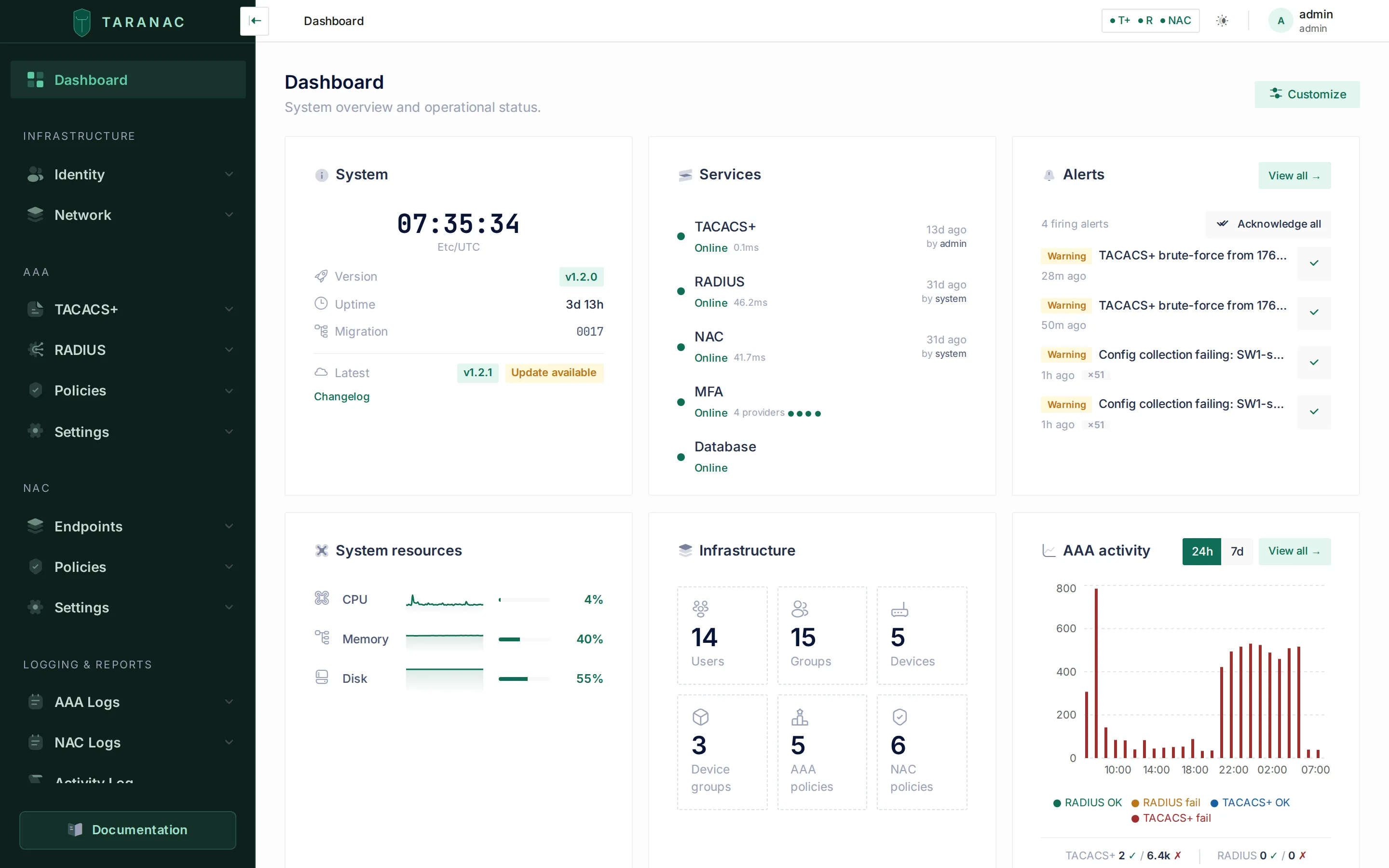 The dashboard System widget reports the running platform version and the applied schema migration. (The capture shows an earlier release; the fields are the same.)
The platform version is also shown in the admin-UI footer (as v<version>) and on error pages, so it is visible even when you are not on the dashboard.
For automation and health checks, the backend exposes HTTP probes:
GET /healthz → { "status": "ok" } # liveness onlyGET /ready → { "status": "healthy", "version": "1.3.4", "uptime_seconds": 1234, "checks": { "database": "ok", "master_key": "loaded" } }/healthz is a bare liveness probe and returns no version. The version, uptime and component health live on /ready — use that endpoint if you want to read the running version programmatically. status is healthy only when the database is reachable and the master key is loaded; otherwise it reports degraded.
Every place a version string appears
Section titled “Every place a version string appears”When these surfaces seem to disagree, it is worth knowing what each one reads:
| Surface | Where the number comes from |
|---|---|
Dashboard System widget (GET /dashboard/system-info) | The backend’s own installed package metadata, falling back to the image-baked version. Kept in lockstep with VERSION by the release tooling. |
GET /ready | The image-baked version. |
API metadata (OpenAPI / Swagger version) | The image-baked version. |
Admin-UI footer (v<version>), login screen, error pages | VITE_APP_VERSION, baked into the frontend bundle at build. |
Backup archive manifest.json (app_version) | The image-baked version, recorded when the archive is written — a restore checks it against the running one. |
| Collector / captive-portal heartbeats | The core’s version, returned to the module in X-Taranac-Core-Version. Attached only after the caller’s signature verifies, so an unauthenticated caller learns nothing. |
./taranac version on the host | The bundle’s own VERSION file on disk — not .env. It also reads the TARANAC_VERSION image pin, and reports both when they differ. |
IMAGES.lock in the bundle | The content digest of every image the release runs, the third-party PostgreSQL and etcd images included (the shipped compose files pin those two by digest). Covered by the bundle’s checksum; ./taranac update compares every pulled image with it before it pins the version. |
taranac-mfa’s /healthz and its answer to the mobile app | The push-MFA service’s own __version__. |
./taranac version reading two numbers is deliberate. The bundle’s VERSION says what scripts and compose files are on disk; TARANAC_VERSION says which image tag the stack pulls, and an upgrade writes the files first and the pin last — so the two agree only when the last upgrade ran to the end. Where they differ you get both numbers and the command that finishes the job. The comparison ignores surrounding quotes and trailing carriage returns, so an .env edited on Windows does not offer you an update to the release you are already running. It also checks what the containers actually run, so a node whose files and pin both say the new version while its containers still run the old one is reported too. And it never offers a downgrade: on a pre-release, or on a version newer than the latest stable release, it says so, and ./taranac update without --version leaves such a node as it is. On a cluster in the middle of a rollout to a version newer than the latest stable one (a release candidate), a bare ./taranac update is refused with the rollout’s own ./taranac update --version <version>. The full behaviour is in Backups & upgrades.
Update notifications
Section titled “Update notifications”Taranac can ask taranac.pro whether a newer release has been published. It is off out of the box and stays off until you enable it: nothing leaves the installation until you do. The check is pull-only, and a failed check is never an error — an air-gapped installation degrades to an “unreachable” status rather than an alarm.
What the answer is: a static JSON manifest, signed offline with an Ed25519 key at release time and verified on the appliance against a shipped trusted-key map. No signing key is ever online, and a manifest that is malformed, tampered with, signed by an unknown key, or answering for the wrong edition is discarded — the previous known-good result is kept.
What the request carries — stated plainly, because “it only checks for updates” is not a complete answer:
- Your edition (Community or Pro) and the version you are on, as query parameters.
- A Pro installation additionally sends its installation identifier as
?iid=— that is how a Pro feed can answer for a specific install. - A Community installation sends nothing identifying beyond the above.
- A
User-Agentoftaranac/<version>.
The manifest also carries a min_supported field. It is transported and available on the API, but nothing is enforced by it and it is not currently shown in the UI — treat it as advisory, not as a gate.
Cadence, endpoint and the permission that governs who may see the result are in the settings reference (update_feed.*). The “Check now” button is an explicit per-click pull and works even with the scheduled check turned off.
What versions don’t tell you
Section titled “What versions don’t tell you”A version number does not, by itself, guarantee that two components will interoperate. Real compatibility lives in contracts:
- Backend ↔ TACACS+/RADIUS/NAC daemons — the format of the configuration the backend generates for the daemons.
- Backend ↔ taranac-mfa — the HTTP API between them.
- Core ↔ standalone collector — one contract per job. For configuration collection it is the snapshot identity (the scrub rules, content-hash and secret-fingerprint algorithms by which a captured configuration is identified) together with the job contract (what each job tells the collector to enforce, such as the device’s SSH host key and the capture limits).
Bumping a number does not protect against a broken contract, and matching numbers across the two version lines do not imply compatibility. This is why the platform components are versioned and released as one unit: it removes the question of “which backend goes with which daemon” entirely. For push-MFA, keep the mobile app on a release that shares the same API contract.
The collector contracts are the one place where the product versions a contract explicitly, and they are worth understanding because you can see them take effect. Each job a collector runs (configuration collection, SNMP polling, Web Probe) carries its own contract version, separate from any release number and deliberately opaque: it has no ordering, so any difference is a mismatch, a downgrade included. On a mismatch the core pauses that job on that collector: it offers it none of that job’s work and refuses any result posted under the other version. For configuration collection that matters most, because a skewed collector would compute different hashes for the same device configuration, or skip a check the core believes is in force, and quietly corrupt the version history. An idle job is the safer failure. The collector’s other jobs carry on, and the paused one resumes by itself once the collector is moved onto its core’s release.
Upgrading: what to check
Section titled “Upgrading: what to check”When you upgrade the platform:
- Back up first (configuration and database) — see Backups & upgrades.
- Run
./taranac update. It pulls the new images and checks them against the release’s digest list, then replaces the bundle’s files, pins the newTARANAC_VERSIONand restarts the stack. Pending migrations apply automatically on startup. On a cluster, every replica, then the leader, then the witness — run it on any member and it names the next one. - Confirm the result in the System widget: the Version should reflect the new release and Migration should advance to the new head.
/readyshould reporthealthy. - Check
./taranac versionagrees with itself. If it warns that the bundle on disk and the.envimage pin differ, the previous update stopped part-way — it names the command that finishes it. - Move any standalone collectors and DMZ captive portals onto the same release, in the same window. They follow the core, not the newest publication.
The push-MFA service needs no separate upgrade step — its image ships in the stack under the same tag. Its own number is the API contract it holds with the mobile app; what matters there is that the app in use speaks the same contract.
Reference: version summary
Section titled “Reference: version summary”| Aspect | Platform line | taranac-mfa line |
|---|---|---|
| Covers | Backend, admin UI, captive portal, edge proxy, report renderer, domain sidecar, TACACS+/RADIUS/NAC daemons, database schema — and the release a remote collector or portal must run | The push-MFA service’s API contract with the mobile app |
| Released as | One Git tag, one stack, one image tag for every service in it | Not released separately — the service ships in the stack under the platform tag |
| Where shown to operators | System widget, UI footer, /ready, ./taranac version, backup manifest | The service’s own /healthz and its answer to the mobile app |
| Compatibility guaranteed by | Generated-config contract; shipped as one set; an explicit contract version per job for standalone collectors | HTTP API contract with the mobile app |
| Current value | 1.3.4 (2026-10-30) | 1.0.0 |
Related
Section titled “Related”- Backups & upgrades — the recommended backup-then-upgrade procedure, the update CLI and the cluster upgrade order.
- Architecture — how the platform components and daemons fit together.
- Settings reference — configuration surface of the platform, including the
update_feed.*keys. - CLI reference —
./taranac version,./taranac updateand./collector-join.sh --update. - Release notes — the changelog of every published version.
- Taranac on GitHub — the deployment bundle, releases and tags.