

Logging & accounting
Every authentication, authorization and accounting (AAA) event that Taranac processes is recorded twice: as a structured, searchable record in the database (what you browse in the admin UI), and as a raw line in a forensic file log on disk. This page explains what each log type captures, how Taranac turns daemon output into records, where to view and export logs, how retention works, and how to walk through a real investigation.
The log views are read-only. You cannot edit or delete individual records from the UI — logs are immutable. They are removed only when their retention window expires.
- 1 write file log never suppressed
- 2 check exclusions per channel
- 3 re-evaluate policy matched rule
- 4 insert into database enriched
- 5 raise alerts · forward syslog if applicable
The five AAA log streams
Section titled “The five AAA log streams”Taranac keeps five separate log streams, three for TACACS+ and two for RADIUS. RADIUS has no separate authorization stream — under RADIUS, authorization happens inside the same Access-Request that authenticates the session.
| Stream | Protocol | What it captures |
|---|---|---|
| Authentication | TACACS+ | Login attempts: who tried to log in, from where, success or failure — and connections the daemon refused before a login could be tried |
| Authorization | TACACS+ | Command / service authorization: each command a device sent for a permit/deny decision |
| Accounting | TACACS+ | Session and command accounting: starts, stops, watchdogs, elapsed time |
| Authentication | RADIUS | Access-Request outcomes: Accept / Reject, the credential transport, the reject reason, MFA result |
| Accounting | RADIUS | Session accounting: Start / Interim-Update / Stop, bytes transferred, framed IP |
In the admin UI these surface as three pages under Logging & Reports → AAA Logs: Authentication Log (TACACS+ and RADIUS on two tabs), Authorization Log (TACACS+ only), and Accounting Log (TACACS+ and RADIUS on two tabs).
Key concepts
Section titled “Key concepts”Enrichment snapshot. Every log record stores a snapshot of related display values at the moment it was written: device name, device groups, the network object the NAS belongs to (and its type — host / subnet / range), the user’s display name, and the user’s groups. Because these are snapshots, a log row keeps the device and user names it had at write time even if you later rename or delete those objects. The underlying device_id / user_id links are set to null on deletion, but the log survives.
Node (cluster attribution). Every log record also stores the cluster node that processed it (node_id, resolved to a display node_name). On a single-node install this is simply your one node; under high availability it tells you which node handled a given authentication — useful when tracing a failover or an uneven load. All five AAA log streams carry it, and it surfaces as a Node column and a “filter by node” control. On single-node deployments the node filter is hidden (there is only one node to pick), so the column is informative but the filter only appears once a cluster has more than one node.
Matched rule. Every authentication and authorization record shows which policy rule decided the outcome. TACACS+ records name it by rule_name (e.g. policy_1 or policy_default) plus the rule’s description as rule_label; RADIUS records carry the rule’s order number and the same label. Taranac determines the TACACS+ rule by re-evaluating the policy against the event, so the rule shown always reflects the policy as Taranac understands it. Accounting records do not carry a matched rule — accounting is not a policy decision.
All three of those streams also store the matched rule’s UUID alongside its name, shown in the detail panel as a stable identifier for correlation. It is deliberately stored without a foreign key: it is a forensic key and survives the rule being deleted, so a log row can still be tied to the rule that decided it long after that rule is gone.
Status. TACACS+ authentication is success / failure; authorization is permit / deny; RADIUS authentication is accept / reject. A RADIUS MFA round-trip does not produce a record of its own — one row is written at the final outcome, with the MFA result recorded beside it (mfa_enforced, mfa_status).
Credential transport (RADIUS). A RADIUS authentication record stores the transport the device actually used to present the password — PAP, MS-CHAPv2, MS-CHAP (v1, which Taranac refuses) or CHAP (likewise refused) — read from the attributes in the Access-Request itself. There is nothing to configure: the transport is a fact of the request, not a setting. See Credential transports for what each path can and cannot do.
File log (forensic backup). In parallel with the database, every AAA event is also appended to a file on disk. The file log is a safety net: it is written first, before any exclusion or filtering is applied, so it captures events even for users you have deliberately excluded from database logging.
How a daemon event becomes a record
Section titled “How a daemon event becomes a record”Understanding the pipeline helps when a log looks wrong or a field is empty.
TACACS+
Section titled “TACACS+”The TACACS+ daemon (tac_plus-ng) streams every authentication, authorization and accounting event to Taranac’s parser. For each event the parser, in order:
- Writes the raw line to the file log (never suppressed).
- Checks the log-exclusion rules to decide whether to suppress this record in the database, in syslog forwarding, and/or in alerts — each channel independently.
- For authentication and authorization, re-evaluates the policy to fill in the matched rule and label.
- Inserts the enriched record into the database.
- Raises alerts where applicable (for example an auth failure, or an unknown device).
- Forwards to any configured syslog receivers.
A couple of field-mapping details worth knowing when reading TACACS+ logs:
- The TACACS+ daemon also reports every connection it refuses before a login can be tried — a key that does not match, an address outside the inventory, a failed TLS handshake. The parser turns each into an authentication row with a reason; see Refused TACACS+ connections.
- Line (the NAS port/line, e.g.
tty2) and Remote Address (the remote client IP) are both captured. Either can be empty depending on the device. Remote Address is a table column; Line is shown in the detail drawer and in exports. - TACACS+ accounting command data comes in two shapes. Command accounting stores the literal command (a trailing Cisco
<cr>marker is stripped). Exec/session accounting stores key/value pairs (task_id,service,priv-lvl, elapsed time, start/stop time, disconnect cause, etc.), which Taranac parses into structured fields. Anything it does not recognise is preserved under “Unknown Fields”.
Database inserts are batched rather than written one row at a time, and how a failed batch is handled depends on why it failed. A transient failure — the primary unreachable, or demoted mid-failover — re-queues the batch behind a short backoff, so the records land on the new primary instead of being lost; the buffer is capped so a long outage drops the oldest entries rather than growing without limit. A failure caused by the data itself (a value too long for its column, a malformed literal, a reference to a row that no longer exists) can never succeed on a retry, so that one batch is dropped once, loudly, with a sample of the offending raw line in the service log — and its records are still in the file log below. One bad batch therefore never holds up the events queued behind it.
RADIUS
Section titled “RADIUS”The RADIUS handler (inside FreeRADIUS) runs the full policy evaluation in-process for every Access-Request — WHO, WHERE, source, and time-of-day matching, first match wins. It logs the authentication outcome (with the matched rule order, profile name, MFA status, whether the password came from cache, the credential transport read off the packet, the reject reason on a refusal, and the auth duration in milliseconds), and queues accounting records as they arrive. The duration counts from when the request arrived, so time a request spent waiting before it was worked on is part of it. An accounting record carries the time its packet arrived.
A privilege escalation is logged as itself rather than as a login by a user who does not exist: the record carries an enable context and the privilege level the device asked for, which the log shows as an enable → 15 badge beside the synthetic $enab<N>$ name, with the request type and the requested level in the detail panel. The mechanism behind those requests is described under Privilege escalation (enable).
RADIUS records store the request attributes as structured data, with sensitive attributes (User-Password, CHAP-Password, MS-CHAP-*, EAP-Message) stripped before they are saved.
The RADIUS writer batches its inserts too, and it guards against the same hazard one step finer: a single row the database can never accept is dropped on its own — named in the service log by NAS, username and session — so the rest of the batch, and everything queued behind it, still lands.
Viewing logs in the admin UI
Section titled “Viewing logs in the admin UI”Open Logging & Reports → AAA Logs and pick Authentication Log, Authorization Log, or Accounting Log. Each page shows a paginated, sortable table with a consistent layout.
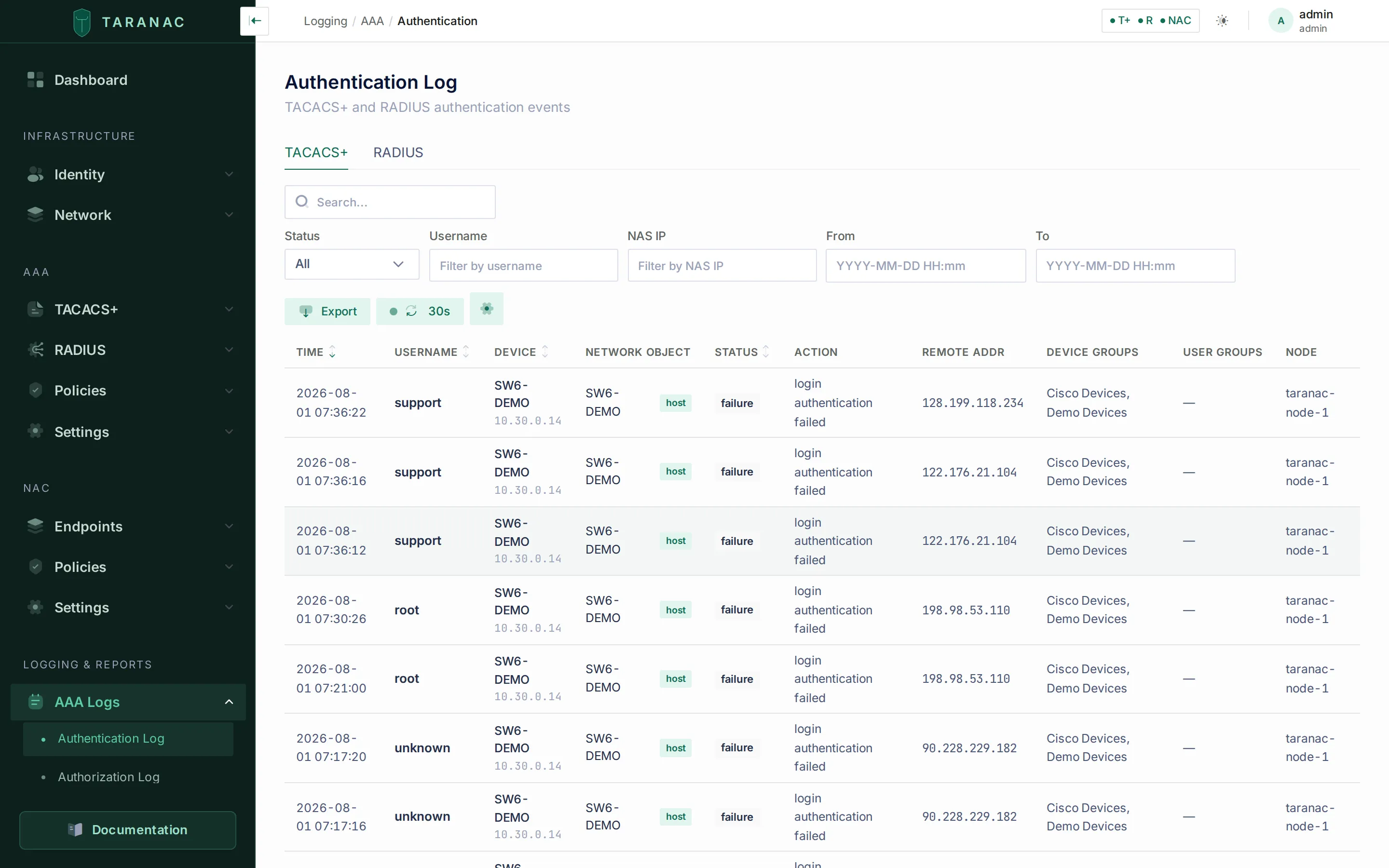 The Authentication Log: protocol tabs (TACACS+ / RADIUS), filters, column toggles, and a row-click detail drawer.
Each of the five tables starts from the same four identity columns — Time, Username, Device, Network Object — and ends with Device Groups, User Groups and Node. What differs is the middle:
| Table | Columns between identity and the group columns |
|---|---|
| Authentication → TACACS+ | Status · Action · Reject Reason · Remote Addr |
| Authentication → RADIUS | Status · Auth Type · Calling Station · Reject Reason |
| Authorization (TACACS+) | Action · Command |
| Accounting → TACACS+ | Action · Service · Command · Task ID |
| Accounting → RADIUS | Status · Session ID · Duration · Terminate Cause |
Every column is visible out of the box and every one can be toggled off — nothing is hidden by default. Fields that are captured but not shown in the table (the TACACS+ line, server and unknown fields, and for a refused connection its Reject Details, Refused connections and First seen; the RADIUS service type, reply message, MFA state, auth duration and cache hit) live in the detail drawer.
Common UI behaviour across all log tables:
- Timestamps are shown in your system-configured timezone, not raw UTC.
- Username shows the login name in bold with the user’s display name beneath it; Device shows the device name (falling back to the NAS IP) with the IP in monospace below.
- NAS IP — the address under the device name, the drawer field and the filter of that name — is the address the request was sent from, for both protocols: the TCP peer for TACACS+, the packet source for RADIUS. The
NAS-IP-Addressattribute a RADIUS device writes into the request is not this value; it appears only in the raw request in the detail drawer. Devices behind one NAT address therefore show the same NAS IP. - Node shows the cluster node that processed the record (blank on records written before the node was recorded). The column is always available to toggle on; the matching node filter appears only on a multi-node cluster and only to an operator who may read the cluster roster (
cluster.view). - Auto-refresh can be set to Off, 10s, 15s, 30s, or 1m from the toolbar, and defaults to 30s. A green pulsing dot indicates it is active; refresh pauses automatically when the browser tab is hidden. On the tabbed pages only the tab you are looking at fetches — switching tabs does not leave a second poller running.
- Column widths can be dragged from the divider on the right of each header. Each table measures its own columns once real rows are on screen and then holds them, so narrowing one can pull an overflowing table back inside its container and take the horizontal scrollbar with it; the last column is elastic and always reaches the right edge. Double-click a divider to drop the layout and start over, or nudge a focused border with the arrow keys. Text a column is too narrow to show is clipped at the real column border and readable in full on hover. Widths are stored per table in your browser, in pixels; when a table’s set of columns changes, it starts from a fresh measurement rather than restoring a layout built for a different column set.
- Column visibility is adjustable per table and remembered for the browser session (widths outlive it; visibility does not).
- A failed request says so. If the list request fails the table shows an error with a Retry button, never the “no records” empty state — an empty authentication log during an incident is the worst possible thing to read wrongly. If an auto-refresh fails over rows that are already on screen, the rows stay and a banner says they are the last data loaded successfully.
- Row click opens a read-only detail drawer with every captured field, plus the raw daemon line (TACACS+) or raw RADIUS request/attributes at the bottom.
Filtering and searching
Section titled “Filtering and searching”Each table offers a small set of column filters plus a free-text search. They behave differently, and choosing the right one matters:
| Control | Behaviour | Use it for |
|---|---|---|
| Username filter | Case-insensitive substring match | Finding an account without guessing the form the NAS sent it in — ad_user1, LAB\ad_user1 and ad_user1@lab.example.com all match ad_user1. % and _ are treated as literal characters, not wildcards |
| NAS IP filter | Exact match on the address the request was sent from | Narrowing to one network device |
| Status filter | A dropdown, per stream: success/failure (TACACS+ authentication), accept/reject (RADIUS authentication), Start/Stop/Interim-Update (RADIUS accounting) | Isolating failures or rejects |
| Action filter | A typed value on the two TACACS+ streams that use it — permit/deny on Authorization, start/stop/watchdog on Accounting — matched exactly | Isolating denied commands, or session stops |
| Auth Type filter | RADIUS authentication only: PAP, MS-CHAPv2, CHAP, MS-CHAPv1 | Seeing where a credential transport is actually in use |
| From / To | Date and time pickers, entered in your system timezone and sent to the API as UTC. Each has an explicit Apply, so you can dial the time in before the table refetches | Bounding an investigation to a window |
| Node filter | Select a cluster node | Narrowing to one node on a high-availability cluster — only shown when more than one node exists |
| Search box | Partial match across username, NAS IP, device name, and user display name | You only remember part of a name, or want device-name matches |
Whenever a filter is set, a Clear filters button appears in the toolbar and the footer reports both totals: how many rows match the filters, and how many the table holds altogether.
Default sort is newest first (timestamp descending). The headers you can click to re-sort are Time, Username, Device (which sorts by NAS IP) and the stream’s Status or Action column. The API’s sort allow-list is wider than that — it also accepts device name, user display name, and per stream the matched rule, profile, service, credential transport or reject reason — so a sort the table does not offer is still reachable from the API.
Exporting
Section titled “Exporting”Each log page has an Export action that produces an XLSX (default) or CSV file. Choose the scope:
- Current view — exports exactly what you are looking at: the current page, with all active filters, search, and sort applied. The drawer shows the active filters as badges so there is no doubt what is being exported.
- All entries — exports the complete log, capped at 10,000 rows. Only the sort carries over: pagination, filters and the search box are deliberately not applied, so this is the whole table and not a wider slice of your current view. Narrow first with “Current view” if that is what you want.
Exports include all the enrichment snapshot columns, so an exported row is self-contained even months later. They also carry fields the table does not show — the TACACS+ line, rule name and rule label, the RADIUS reject reason and MFA state — and the record and device/user IDs. On the TACACS+ accounting export, Privilege Level and Elapsed Time are numbers. Every export has a Node column naming the node that handled the request.
How the file is written:
- Headers are in your interface language.
- Times are in the system time zone the UI shows: ISO 8601 with the offset in CSV, real date-time cells in XLSX.
- Text cells are formula-safe. Log text comes from outside — the username of a failed login, a port name the NAS sent — so a cell that begins with
=,+,-,@, a tab or a line break is written with a leading apostrophe, and a spreadsheet shows it as text instead of running it. - A cut is reported. When an export reaches 10,000 rows, the drawer stays open with a warning saying how many rows the file holds out of how many matched, instead of a success message. Through the API the same signal is the
X-Taranac-Export-Truncated: trueheader, besideX-Taranac-Export-RowsandX-Taranac-Export-Total; an API call withoutpage/per_pageexports every row matching its filters, up to that cap. - Every export is audited as a
DATA_EXPORTEDentry with the format, the scope, the filters and the row count — see Audit & syslog.
Viewing logs requires the aaa_logs_view view permission; exporting them requires its separate export permission. Without it the Export button is not shown and the export endpoints refuse the download. The built-in auditor and operator roles hold it, the read-only demo role does not — see Roles & permissions. The NAC logs have the same pair under nac_logs_view.
Refused TACACS+ connections
Section titled “Refused TACACS+ connections”TACACS+ accepts only devices in the inventory. A connection the daemon refuses before a login can be tried — a key that does not decode the packets, an address outside the inventory, a failed TACACS+ over TLS handshake — is still a row on the TACACS+ tab of the Authentication Log:
- Status
failure, no Username (no packet was read that named one), ActionConnection(classic TACACS+) orTLS handshake(port 6049). - Device and Network Object filled in when the address belongs to an inventoried device, as for any other row.
- Reject Reason in plain words (the table below); Reject Details in the drawer holds what the daemon reported:
key mismatchorunobfuscated packetfor a classic connection, OpenSSL’s error and, for a device certificate that failed verification, the reason it failed (for examplecertificate verify failed — certificate has expired (10)). - The raw connection-log record is the drawer’s raw line, and it is written to the TACACS+ authentication file log like every other record.
Repeats are folded. A device with a wrong key retries for every login, command and accounting record. The first refusal from an address for a given reason is written at once; further refusals from that address for that reason within the next minute are counted, and one summary row is written when the minute closes, with a ×N badge beside the reason. Hover the badge, or open the row, for Refused connections (how many connections the row stands for) and First seen; the row’s own time is the close of that minute. An attack that goes on is one row per minute. The sum of Refused connections over the rows is the number of refused connections.
They are not login attempts. These rows are not counted in the dashboard’s failure widgets or in the reports’ failure figures, and they do not feed the TACACS+ brute-force guard. Log exclusion rules apply to them as to other rows (by device or address; they carry no user). Syslog forwarding sends them with reason=, refused_connections= and, for a summary row, first_seen= (reason and cnt in CEF).
An address outside the inventory also raises an alert. Not in the inventory and TLS: the address is not in the device inventory raise a warning titled Unknown TACACS+ device followed by the address (fingerprint tacacs:unknown_device:<address>), once per address, for IPv4 and IPv6 alike. A rewritten source address raises none. See Alerts.
| Reject Reason (as shown) | Transport | What it means |
|---|---|---|
| Key mismatch: the device’s packets do not match its TACACS+ key (own, group or global) — the details say whether the key was wrong or none was used | Classic | The address is inventoried, but no key it resolves to decodes the packets. Reject Details reads key mismatch (a wrong key) or unobfuscated packet (the device sent its packets in the clear: no key configured on it). |
| Not in the inventory: TACACS+ is accepted only from enabled devices in the inventory — add the device to the inventory or enable it | Classic | No enabled device with TACACS+ covers the address. Refused whatever key it used. |
| The source address was rewritten by Docker (userland proxy or source NAT); the real device is unknown. Do not add this address to the inventory: it would admit every proxied client | Classic | The address is a gateway of the stack’s own Docker networks: Docker’s userland proxy or source NAT (for example IPv6 with Docker’s ip6tables off) replaced the device’s address. No alert. |
| TLS: the address is not in the device inventory; TACACS+ over TLS is accepted only from inventoried devices | TLS | As Not in the inventory, over TLS: refused whatever certificate it presented. |
| TLS: the source address was rewritten by Docker (userland proxy or source NAT); the real device is unknown. Do not add this address to the inventory: it would admit every proxied client | TLS | As above, over TLS. |
| TLS: the device does not trust the CA that issued the server certificate — give the device that CA, or deploy a server certificate from a CA it trusts | TLS | The device rejected Taranac’s server certificate with unknown CA. |
| TLS: the device rejected the server certificate as expired | TLS | The device found Taranac’s server certificate expired. |
| TLS: the device rejected the server certificate — check its issuer and IP SAN against what the device expects | TLS | The device rejected the server certificate for another reason: an address missing from its SANs, an unsupported certificate, a revoked one. |
| TLS: the device presented no client certificate | TLS | The device has no TLS client identity configured. |
| TLS: the device’s certificate is not issued by a CA in TLS Client Trust | TLS | No trusted CA signed the device’s certificate (or it is self-signed). |
| TLS: the device’s certificate has expired | TLS | The device’s certificate is past its end date. |
| TLS: the device’s certificate is not yet valid (its start date is in the future) | TLS | The device’s certificate starts later — often a clock that is behind. |
| TLS: the device’s certificate is revoked | TLS | Its serial, or a CA certificate it sent, is on a CRL. See Revocation. |
| TLS: the server rejected the device’s certificate — the details give OpenSSL’s reason | TLS | Any other verification failure, for example a certificate without the client-authentication purpose. |
| TLS: the device and the server have no cipher in common | TLS | No shared cipher suite. |
| TLS: the device and the server have no TLS version in common | TLS | The device offers neither TLS 1.2 nor TLS 1.3. |
| TLS: the device did not speak TLS — classic TACACS+ sent to the TLS port? | TLS | A plain TACACS+ client, or something else, on port 6049. |
| TLS: the device closed the connection during the handshake | TLS | The device hung up mid-handshake, usually having refused something it did not report. |
| TLS handshake failed | TLS | A handshake failure none of the above describes; Reject Details has OpenSSL’s text. |
The reason is chosen from the codes the daemon reports, not from its wording, and Reject Details stays in English as the daemon wrote it. From an address outside the inventory, a refused client certificate is always shown as TLS: the address is not in the device inventory, because no certificate is verified there; a failure of the handshake itself (TLS version, cipher, the server certificate) keeps its own reason.
Common scenarios
Section titled “Common scenarios”Investigate a failed device login (TACACS+)
Section titled “Investigate a failed device login (TACACS+)”A network engineer reports they cannot log in to a switch.
- Open Authentication Log → TACACS+ tab.
- Set the Status filter to
failureand put the engineer’s account in the Username filter (or type a fragment into Search). - Click the failing row. The detail drawer shows the NAS IP and device name, the line and remote address, the action message from the device, and crucially the matched rule — for example
policy_default: Default catch-all, which tells you no specific rule matched and the request fell through to the default. - If there is no row with the engineer’s name, look for a row from the switch’s address with no username and a Reject Reason: the connection was refused before any login — Not in the inventory, Key mismatch or a TLS reason. See Refused TACACS+ connections.
Trace what a user actually did on a device (TACACS+)
Section titled “Trace what a user actually did on a device (TACACS+)”- Open Authorization Log, filter by Username and NAS IP.
- The Command column shows each command the device sent for a permit/deny decision; the Action column shows whether it was permitted or denied.
- For session timing and disconnect reasons, switch to Accounting Log → TACACS+ and look at the elapsed time, start/stop times, and disconnect cause in the detail drawer.
Diagnose a RADIUS reject
Section titled “Diagnose a RADIUS reject”- Open Authentication Log → RADIUS tab, set Status to
Reject. - The Reject Reason column tells you the stage and cause. It is written by the service as a short token and rendered in your own language; every reason is translated in every bundled language. A reason from a service newer than the interface falls through to the raw token rather than leaving the cell blank, so an unfamiliar-looking value is a version skew, not a bug.
Reading them by stage:
| Stage | Reasons you will see |
|---|---|
| The account | user_not_found, inactive (disabled), locked, not_yet_valid, expired, password_expired, must_change_password |
| The password | bad_password; empty_password_probe (see below) |
| The policy | no_policy_match (nothing matched — implicit reject), policy_deny (a rule refuses explicitly) |
| MFA | mfa_failed, mfa_not_configured (required but the user has enrolled nothing), mfa_provider_unsupported (the rule requires MFA but the user’s provider cannot push, and MS-CHAPv2 has nowhere to put an OTP) |
| A push MFA | mfa_denied (the user denied it), mfa_timeout (not confirmed before the request’s time limit), mfa_superseded (replaced by a newer login of the same user); and four that are not the person’s doing: mfa_busy (too many pushes already waiting on the node), mfa_unavailable (the MFA service did not answer), mfa_aborted (the RADIUS service was restarting), mfa_late (the request had no time left to send a push) |
| The transport | chap_unsupported, mschapv1_unsupported, mschap_malformed |
| The NT hash behind MS-CHAPv2 | mschap_no_nt_hash (local account whose password predates NT hashes), mschap_bad_nt_hash, mschap_domain_not_joined, mschap_live_read_failed, mschap_dictionary_missing |
| The directory / domain | domain_unreachable, domain_auth_unavailable, domain_access_denied, domain_trust_broken, domain_time_skew, domain_not_configured, ntlm_blocked |
| The account’s Windows restrictions | account_restriction, logon_hours_denied, workstation_denied, smartcard_required |
| Privilege escalation | enable_not_configured (no global enable password is set), enable_bad_password |
The transport and NT-hash reasons are explained in Credential transports; the two enable reasons in Privilege escalation (enable); the push reasons in Push MFA over RADIUS. The four push reasons that are not the person’s doing never count toward the brute-force guard, and mfa_denied, mfa_timeout and mfa_superseded count only against a Calling-Station-Id, never against a whole NAS. The NAC Auth Log uses the same mfa_* reasons for 802.1X.
- Open the row to see the credential transport, the service type, MFA status, whether the result came from the auth cache, the matched rule and its UUID, and the raw (sanitised) RADIUS request.
Confirm a session and its data usage (RADIUS)
Section titled “Confirm a session and its data usage (RADIUS)”Open Accounting Log → RADIUS. The Status column shows Start / Interim-Update / Stop; the detail drawer shows session duration, input/output bytes, framed IP, calling/called station, and terminate cause. A session with a Start but no Stop is still open (or the Stop was lost).
When to use which log
Section titled “When to use which log”| Question you’re asking | Go to |
|---|---|
| Did this admin successfully log in to a device? | Authentication Log → TACACS+ |
| Why does a device get no TACACS+ answer at all? | Authentication Log → TACACS+, the device’s address, Reject Reason column |
| What commands did this admin run, and were they allowed? | Authorization Log |
| How long was this device session, and how did it end? | Accounting Log → TACACS+ |
| Was this network user/host granted or denied access? | Authentication Log → RADIUS |
| How much data did this session move, and from what framed IP? | Accounting Log → RADIUS |
| Did MFA fail, and at which step? | Authentication Log → RADIUS (reject reason mfa_failed / mfa_not_configured / mfa_provider_unsupported, or a push reason such as mfa_timeout / mfa_denied) |
| Which credential transport did this device actually use? | Authentication Log → RADIUS, Auth Type column or filter |
| Which interface, which wireless network or which VLAN did an endpoint land on? | NAC logs — the AAA logs record none of them |
| An event is missing from the UI logs | Check log exclusions, then the on-disk file log |
NAC logs
Section titled “NAC logs”Network access control keeps its own journals, under Logging & Reports → NAC Logs. They follow the same conventions as the AAA tables above — filters, auto-refresh, column widths, a read-only detail drawer, export — and add what an endpoint needs:
| Page | What it records | Where it is explained |
|---|---|---|
| Sessions | Live and closed 802.1X / MAB sessions, portal-admitted sessions, their close reasons, and the CoA actions | Sessions |
| Guest Sessions | Every captive-portal registration, and who holds the guest’s access | Captive portal |
| Auth Log | Every 802.1X and MAB accept and reject — with how MAB carried the MAC (PAP, CHAP, EAP-MD5 or no credential) and EAP rejects named in words — plus the accounting events that end sessions (Session Stop, NAS restart) | What the log records |
| Scanner | What the collectors’ scanners found on the wires they watch, grouped by device, each scanner a separate witness | Scanner |
In the first three, a magnifier beside the MAC opens everything known about the endpoint in a drawer over the journal — see the MAC magnifier.
The Auth Log export (CSV or XLSX, with the same Current view / All entries scopes) has one column per port attribute, each named after the attribute it holds: Interface (the readable name derived from NAS-Port-Id), NAS-Port-Id (the raw value), NAS Port (the number from attribute 5) and NAS Port Type. Those are the English headers; like every export header they follow the interface language, so a script that reads the export by header name should run its exports in English. Beside Auth Method and Reject Reason the export also carries Inner Method and Reject Message.
The Auth Log’s Auth Method filter also offers 802.1X (dot1x): EAP requests refused before any method succeeded — a Nak, an EAP-MD5 that is not MAB, an EAP timeout. See EAP rejects with a reason and How the MAC arrives.
File log on disk (forensic backup)
Section titled “File log on disk (forensic backup)”The file log is independent of the database and of exclusion rules. It is the authoritative forensic record.
Each daemon writes into its own log volume, so the protocol separation is the volume rather than a directory level. Inside a volume the archive is organised by log type and month, one file per day:
{daemon log volume}/{log_type}/{YYYYMM}/{YYYY-MM-DD}.logInside the TACACS+ or RADIUS container that volume is mounted at /var/log/taranac, so a TACACS+ authorization record for 24 June 2026 lands in /var/log/taranac/authorization/202606/2026-06-24.log. The backend mounts all of them side by side — /app/logs/tacacs, /app/logs/radius (and /app/logs/nac for the NAC daemon) — which is how one screen can show all three archives at once. All the paths are environment-overridable, and file logging is on by default.
- TACACS+ files contain the raw lines from the daemon, one record per line, saved as-is.
- RADIUS files are JSON-lines — one JSON object per line:
{"timestamp":"2026-06-24T12:34:56+00:00","username":"admin","nas_ip":"10.0.0.1","status":"accept","reason":null,"auth_type":"PAP","device_name":"sw-core-01","rule_label":"Network admins","profile_name":"Cisco IOS priv 15","calling_station_id":null,"auth_duration_ms":18,"mfa_enforced":false,"mfa_status":null,"auth_context":"login","requested_priv_level":null}The file archive is rotated on the same retention window as the database, by the same nightly job (see below): whole YYYYMM directories are removed once the entire month has aged past the retention days for that protocol. The current month is never touched — the daemon is writing into it. Because these files are local to the node that wrote them, each node in a cluster prunes its own archive.
You can also inspect and prune the archive by hand from Settings → System → Log Rotation: it lists each daemon’s months with the file count, the size, and the date auto-cleanup will become eligible; expanding a month lists its files for download; and a past month can be deleted outright, even inside the retention window. The current month is refused.
Retention & rotation
Section titled “Retention & rotation”Database logs are pruned automatically by retention windows you control under Settings → System → Log Rotation. Editing a retention value goes through the standard settings API and requires the settings.edit permission.
| Setting | Default (days) | Applies to |
|---|---|---|
tacacs.log_retention_days | 365 | The three TACACS+ logs and their file archive |
radius.log_retention_days | 365 | The two RADIUS logs and their file archive |
How pruning works: each of the five tables is range-partitioned by month in PostgreSQL. A daily maintenance job pre-creates upcoming monthly partitions, and a daily cleanup job drops whole monthly partitions once the entire month has aged past the retention window. Because expired data is removed by dropping a partition rather than deleting rows, cleanup is effectively instant and does not bloat the database. The same cleanup run then applies the same test to the on-disk file archive, so files and partitions age out in lock step. Partial (still-current) months are never dropped, and setting a retention value of 0 or less disables deletion entirely.
The same Log Rotation screen shows, per table, how it is partitioned, the oldest and newest months held, how far ahead partitions are pre-created, which month the next cleanup will drop, and how much disk each one occupies. It also offers buttons to run the partition and cleanup jobs on demand.
Related
Section titled “Related”- AAA policies — how the rules that decide permit/deny (and which log exclusions suppress records) are configured.
- Network devices — registering NAS devices; TACACS+ answers only inventoried devices.
- TACACS+ over TLS — the TLS listener whose refused handshakes these logs explain.
- RBAC — the
aaa_logs_viewpermission that gates these views and exports. - Audit & syslog — forwarding these events to a SIEM, and the administrative audit trail.
- High availability — clustering, and the Node column that records which cluster node processed each row.
- NAC authentication — endpoint (802.1X / MAB) authentication logging.
- Scanner — the scanner journal under NAC Logs.
- Get Taranac on GitHub