

802.1X authentication
802.1X authentication is the who and how of network access control: before a switch or access point opens a port, the device — or its user — has to prove an identity. Taranac runs a dedicated FreeRADIUS instance for NAC (separate from the AAA RADIUS used for device administration) that terminates the EAP exchange, checks credentials or certificates against your identity stores, and hands the result to the NAC policy engine, which decides what access to grant (VLAN, ACL, redirect).
This page covers the four methods Taranac supports — EAP-TLS, PEAP, EAP-TTLS and MAB — how each behaves, which identity store and certificates each needs, and when to pick which. Authorization (profiles and rules) lives on the NAC policy page.
- marker peap → peap
- marker ttls → eap_ttls
- EAP + client cert → eap_tls
- EAP-MD5 · identity = MAC → mab
- Nak · other EAP-MD5 → dot1x
- no EAP → mab
- port Ethernet, not Wireless-* else reject · eap_md5_wireless
- Accept MAB over EAP-MD5 on else reject · eap_md5_mab_disabled
- MD5 checked vs User-Name else reject · mab_md5_mismatch
The four methods at a glance
Section titled “The four methods at a glance”| Method | Proves identity with | Inner method | Works for directory users | Needs client cert | Needs NT-hash |
|---|---|---|---|---|---|
| EAP-TLS | Client X.509 certificate | — (cert only, in the TLS handshake) | Yes | Yes | No |
| PEAP | Username + password | EAP-MSCHAPv2 | A directory that can prove an MS-CHAPv2 response — Active Directory (domain join) or FreeIPA (ipaNTHash) | No | Yes — stored for local users, read live for FreeIPA, never seen for AD |
| EAP-TTLS | Username + password | PAP, MSCHAPv2, or EAP-MSCHAPv2 — all three | Yes — any directory type (over PAP) | No | Only on the MSCHAPv2 inner methods, where it behaves exactly like PEAP |
| MAB | MAC address only | — (the switch delivers the MAC as PAP, CHAP, EAP-MD5 or bare) | n/a | No | No |
A single Taranac NAC server offers all four at once. The supplicant on the
endpoint chooses the EAP method; MAB is the fallback when no supplicant answers.
Each request is tagged with its detected method (eap_tls, peap, eap_ttls,
mab), and policy rules match on that tag. An EAP exchange that never agreed on
a method is recorded as dot1x (shown as 802.1X) and rejected before policy
is consulted — see How a request is classified.
Key concepts
Section titled “Key concepts”- Supplicant — the 802.1X client on the endpoint (Windows native client,
wpa_supplicanton Linux, the macOS/iOS/Android built-in client). It selects the EAP method and presents the credential or certificate. - Authenticator — the switch or access point (a NAS) that brokers EAP between the endpoint and Taranac over RADIUS, and enforces the result on the port.
- Identity store — where Taranac verifies the credential: the local user directory, or an external LDAP directory — Active Directory, OpenLDAP, FreeIPA or another LDAP server.
- EAP tunnel — PEAP and EAP-TTLS first build a TLS tunnel (the endpoint validates Taranac’s server certificate), then carry the password inside it. EAP-TLS has no inner tunnel: the certificate exchange in the TLS handshake is the authentication.
- Qualified identities — a supplicant may send the login as
DOMAIN\aliceoralice@domain.example. Taranac tries the name exactly as sent first, and a qualified name may then only ever resolve to a directory account, soANY_PREFIX\aliceis never an alias for the localalice. The log records the string the client sent, because for MS-CHAPv2 that string is part of the cryptogram; the account it resolved to is what policy uses. Applies to PEAP and EAP-TTLS alike. - MAB (MAC Authentication Bypass) — for devices with no supplicant. The switch sends the endpoint’s MAC address as the username; Taranac looks it up in the endpoint inventory instead of checking a credential. Some switches wrap the same MAC in EAP-MD5; Taranac treats that as MAB too (MAB carried as EAP-MD5).
EAP-TLS — certificate-based
Section titled “EAP-TLS — certificate-based”EAP-TLS authenticates with a client certificate during the TLS handshake itself. There is no password and no inner tunnel: the endpoint presents an X.509 certificate, FreeRADIUS validates it against the trusted-CA bundle, and Taranac extracts the identity from the certificate.
This is the strongest method and the recommended one for managed corporate devices. It works for both user certificates and machine certificates (a domain computer authenticating before anyone logs in).
Identity extraction. After a successful handshake, Taranac takes the user from the certificate, and from nothing else. It reads the first of these fields the certificate carries:
- SAN UPN (
user@domain.local) - SAN email
- Common Name (CN)
The User-Name the supplicant sends plays no part: in EAP-TLS nothing protects
it, and the client can write anything there. A certificate that carries none of
the three fields (a machine certificate with only a DNS name, say) is a machine
session with no user, whatever User-Name says.
The value found is looked up among active accounts, and what it may match depends on the account:
| Account | Matches when |
|---|---|
| Local | The identity equals the username. Otherwise the part before the last @ equals it, whatever the domain. |
| Directory | The identity is the account’s own email address (its mail). Or the identity is a UPN or CN that names the account and whose domain equals the LDAP configuration’s domain suffix (case-insensitive). |
A certificate that names a directory account without matching it is rejected before policy, not treated as a machine. The NAC Auth Log row carries the reason and the identity the certificate named:
| Reason | When |
|---|---|
tls_identity_domain_mismatch | The domain is not the account’s directory’s suffix, or the SAN email is not the account’s own address. The detail says what was expected. |
tls_identity_no_domain | The identity has no domain at all (a bare CN such as alice), so it cannot be tied to a directory. |
So a certificate from one directory cannot sign in as a same-named user of another. A SAN email counts only as the account’s own address, because a mail domain says nothing about which directory holds the account. On every directory type except Active Directory, OpenLDAP and FreeIPA included, the domain suffix is optional: leave it empty and EAP-TLS matches that directory’s users by email only (see LDAP directories).
A user certificate resolves to a user (and that user’s groups) for policy
evaluation. A certificate whose identity matches no account at all is treated as
a machine-cert flow: the user is empty and the endpoint itself carries the
identity. The log’s Username is always whom the session was decided for: the
account, else the name in the certificate (UPN, email or CN, then the SAN
dNSName). The supplicant’s User-Name stays in the raw request only. A successful
EAP-TLS login clears the brute-force history of that account only, never of a
name the client claimed.
The endpoint’s identity is read the other way round: SAN dNSName
first, then the CN, and that value becomes both the endpoint’s certificate
identity and its hostname, which the cert_identity_pattern and
hostname_pattern classification rules then match on.
Trust. Taranac does not run its own CA by default for trust decisions — it validates client certificates against a CA bundle assembled from three sources: an internal CA hierarchy, uploaded Trusted CAs (for contractors, BYOD, or partner organisations), and per-domain CA certificates attached to an LDAP/AD configuration. Issuer trust and the server certificate that FreeRADIUS presents are managed on the PKI & trust page; revocation checking, by CRL and by OCSP, is decided per CA and described on Certificate revocation.
A trusted CA record may hold a chain, a root and its issuing sub-CA: clients of every CA in it are accepted. A CA uploaded as the root alone also accepts clients that send their issuing CA’s certificate along with their own. A change to the set of trusted CAs takes effect at once, without a restart.
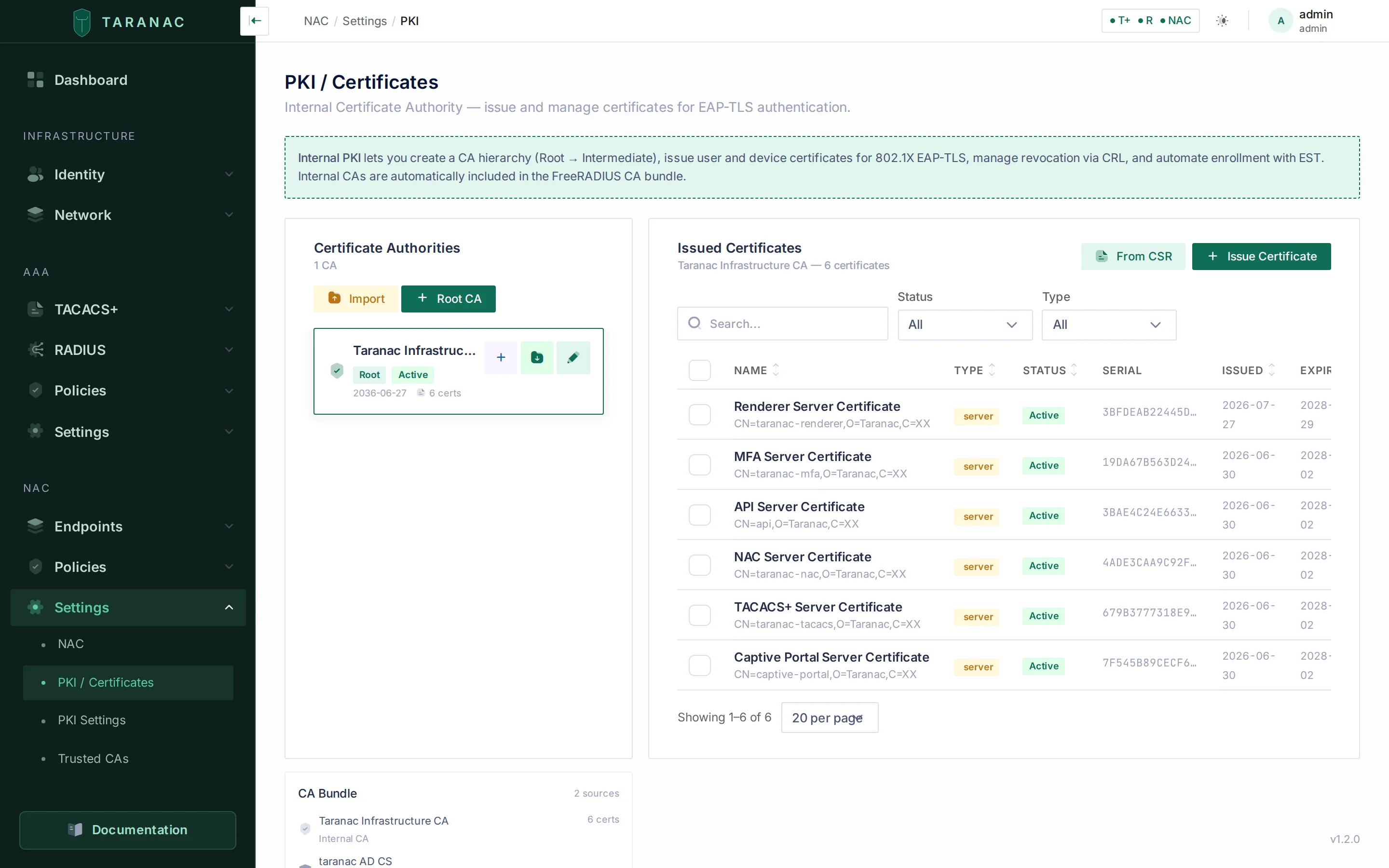 PKI & trust — the CA bundle EAP-TLS validates client certificates against.
PEAP — password inside a TLS tunnel
Section titled “PEAP — password inside a TLS tunnel”PEAP (Protected EAP) builds a TLS tunnel using Taranac’s server certificate, then runs EAP-MSCHAPv2 inside it to verify a username and password. It is the default method on Windows and the most common password-based choice.
The catch: MSCHAPv2 is a challenge-response protocol, so the password’s NT-hash is needed to verify it. Taranac has three ways to get one, and which one a login takes is decided by the user’s own directory, never by the installation:
- Local Taranac users — the hash is stored beside the account and checked locally. An account whose password was set before NT-hashes were kept has none; re-saving the password generates it.
- Active Directory accounts — the hash is unreadable by design (
unicodePwdis write-only), so a domain controller has to prove the response. That needs the node to hold a machine account, which is why Active Directory requires the domain join on the MS-CHAPv2 tab of the LDAP configuration. Onewinbindd, one join, one domain: at most one configuration can own it. - Directories that publish the hash as an ordinary attribute — FreeIPA
generates
ipaNTHashfor every user, byte for byteMD4(UTF-16LE(password)), even whereipa-adtrust-installwas never run. Taranac reads it and verifies the response itself: no domain, no join, no winbind. The hash is read per login and stored nowhere. Unlike the domain, this mechanism is not exclusive — any number of such directories can serve PEAP at once, alongside a joined domain.
FreeIPA needs one action on the directory side: ipaNTHash sits in an explicit
exclusion list even in the administrator’s own ACI, so an ACI granting the bind
account read access has to be added. The MS-CHAPv2 tab generates the LDIF with
your bind DN and search base filled in, and Check the directory reports
whether the hash is readable. A missing ACI is reported as exactly that, never as
a wrong password — FreeIPA answers without the attribute rather than refusing, and
counting that as a bad password would feed the brute-force guard.
Directories that publish no hash and cannot hold a machine account still cannot
serve PEAP — OpenLDAP, Google Workspace and generic LDAP. Such an attempt is
refused by name (mschap_domain_not_joined) rather than as a wrong password, and
is not counted as a credential attempt; route those users to EAP-TTLS or
EAP-TLS instead. See LDAP directories, which carries
the directory-side mechanics, and RADIUS
for the same branches on the device-administration side.
Windows PEAP supplicant settings that matter
Section titled “Windows PEAP supplicant settings that matter”PEAP has been tested end-to-end with the native Windows 10/11 supplicant against Taranac. A few client-side settings are load-bearing:
| Setting | Recommended | Why |
|---|---|---|
| Verify server certificate | On | Protects against a rogue RADIUS server. Requires importing Taranac’s server CA into the Local Machine trust store (the supplicant runs as SYSTEM and cannot see the user store). |
| Connect to these servers | Fill in the server cert CN | Pins the expected RADIUS identity. |
| Trusted Root CAs | Select Taranac’s CA explicitly | With server verification on, an unselected CA fails the check. |
| Inner method | EAP-MSCHAPv2 | The only inner method Taranac supports for PEAP. |
| Automatically use Windows logon name | Off for a local Taranac account | When on, Windows sends a qualified name (COMPUTER\user), and a qualified name may only ever resolve to a directory account — so it does not find the local one. For a domain account on a domain PC it is fine. |
| Cryptobinding TLV | Off | FreeRADIUS does not implement the Microsoft PEAPv0 cryptobinding extension; with it on, Windows will not connect. |
EAP-TTLS — password for directory users
Section titled “EAP-TTLS — password for directory users”EAP-TTLS also builds a TLS tunnel with the server certificate, and Taranac accepts all three of the inner methods a supplicant may choose inside it. They are told apart by what the tunnel actually carries, not by anything you configure:
| What arrives inside the tunnel | Inner method | How the password is checked |
|---|---|---|
User-Password, no EAP | PAP | Taranac holds the plaintext, so it verifies directly (below) |
MS-CHAP2-Response, no EAP | MSCHAPv2 (native, non-EAP) | Exactly the PEAP path: NT-hash, domain, or hash-reading directory |
EAP-Message | EAP-MSCHAPv2 | The same PEAP path again |
The inner method is recorded on the log row and shown beside the Auth Method badge for EAP-TTLS (and, as the MAC’s transport, for MAB), not for PEAP, because PEAP always tunnels EAP-MSCHAPv2 and repeating it would be noise — while inner PAP means the password crossed the tunnel in the clear, which is worth seeing at a glance.
With PAP — the usual choice, and the one that reaches every directory type — Taranac receives the actual password and verifies it directly:
- Directory users — Taranac performs an LDAP bind as the user. On Active
Directory that is a direct bind as
user@domain; on OpenLDAP, FreeIPA and other types the account’s DN is resolved first (inside the configured search bases) and the bind uses that DN. The directory checks the password; nothing is stored locally. This is the password-based 802.1X method that works for every directory type, whatever it can or cannot do about NT-hashes. - Local users — the password is checked with argon2id against the stored hash (no NT-hash needed).
A failed bind spends the account’s lockout budget in the directory exactly as an MS-CHAPv2 check does, so Taranac holds further binds for an identity after repeated failures rather than letting a looping supplicant lock the account out. That hold is shared with the PEAP path, because the directory counts both against one account.
EAP-TTLS is native on Linux (wpa_supplicant default), macOS, iOS and Android.
On Windows it is supported but not the default, so it usually requires GPO or
manual supplicant configuration.
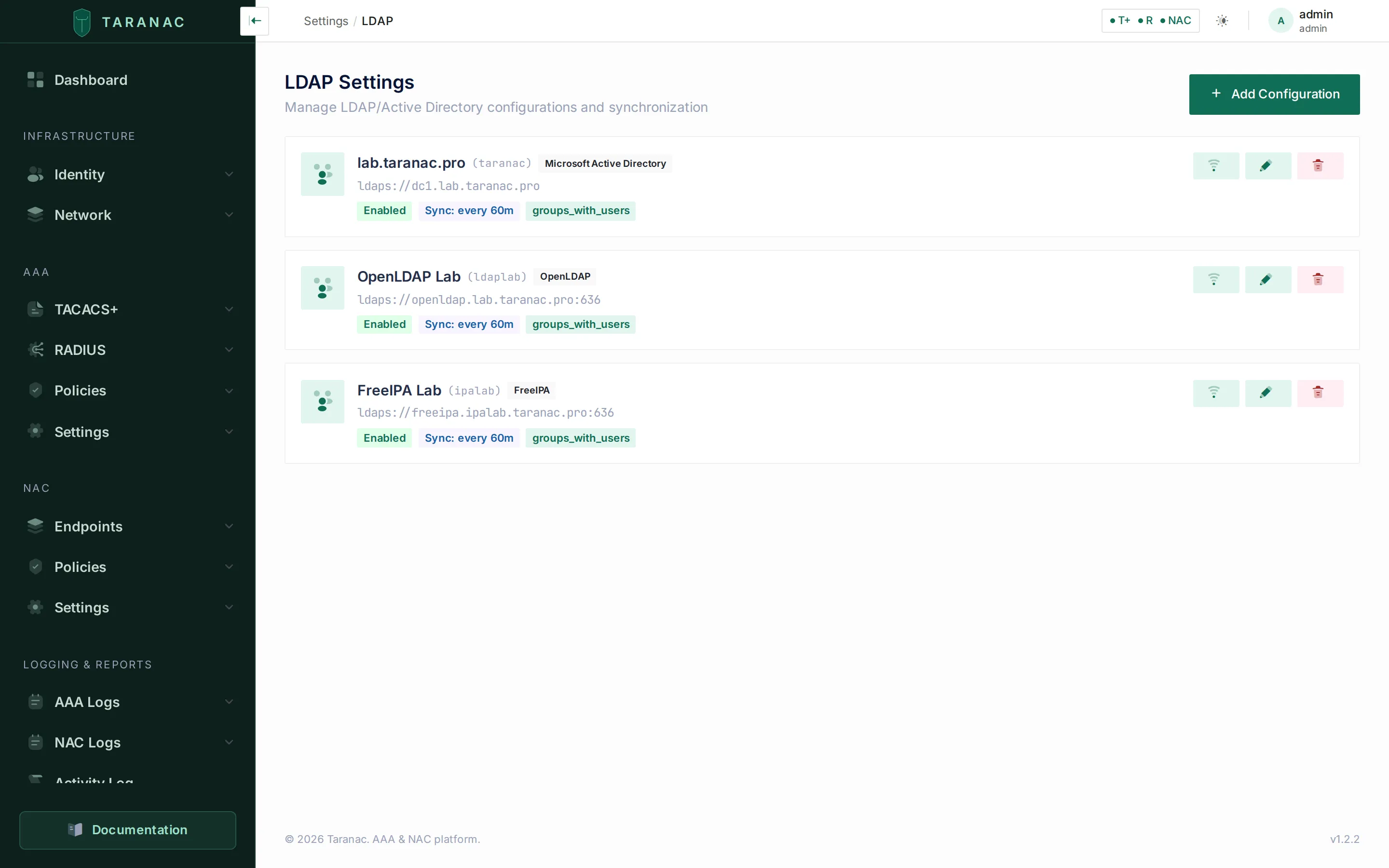 Directory configurations — the identity stores EAP-TTLS binds against. Any type works here: this installation carries Active Directory, OpenLDAP and FreeIPA at once.
MAB — for devices with no supplicant
Section titled “MAB — for devices with no supplicant”Printers, IP phones, cameras and most IoT devices have no 802.1X supplicant. When the switch’s EAP exchange times out, it falls back to MAC Authentication Bypass: it sends the device’s MAC address as the username. Taranac does not check a credential — it looks the MAC up in the endpoint inventory, and if the endpoint exists and is not blocked, the request proceeds to policy evaluation. Unknown MACs can be auto-discovered, classified, and (via policy) redirected to a captive portal. What a MAB device is — printer, phone, camera — comes from Discovery & profiling, not from the request: MAB carries nothing but the address.
MAB proves possession of a MAC address, nothing more — a MAC is easily spoofed. Treat it as device identification, not authentication, and scope MAB rules to restricted VLANs and ACLs.
How the MAC arrives
Section titled “How the MAC arrives”Switches package the MAC differently, and all of these are the same MAB to
policy: tagged mab, matched by How = MAB rules, never asked for a second
factor. Only the log tells them apart, as the MAB row’s transport:
| What the switch sends | Transport in the log |
|---|---|
User-Name = MAC and User-Password (PAP) | PAP |
User-Name = MAC and CHAP-Password | CHAP |
| An EAP-MD5 response whose identity is the MAC | EAP-MD5 |
| The MAC and no credential at all (Call-Check style) | no credential |
For PAP, CHAP and the bare form the MAC is looked up, not verified against a password. EAP-MD5 is the exception, described next.
MAB carried as EAP-MD5
Section titled “MAB carried as EAP-MD5”Some switches run MAB as EAP-MD5 instead of a plain RADIUS request: TP-Link
with EAP chosen as the global authentication protocol, Cisco IOS with mab eap on
the port. The switch sends the endpoint’s MAC as the EAP identity and answers the
MD5 challenge with the MAC as the password. Taranac accepts this as MAB when all
of the following hold:
- The identity is the endpoint’s MAC. It is compared, normalised, with
Calling-Station-Id, so001ae839cbf8matches00-1A-E8-39-CB-F8. A request withoutCalling-Station-Idis judged as plain MAB judges it: an identity that is a MAC names the endpoint. - The port is not wireless. On a
NAS-Port-TypeofWireless-*, EAP-MD5 is refused (eap_md5_wireless): it derives no encryption keys, so the access point could never complete the WPA handshake and an accept would leave the client associated and stuck. Wireless headless devices use ordinary MAB, which this does not touch. - The setting is on. Accept MAB over EAP-MD5 (
nac.mab_over_eap_md5), on NAC → Settings → NAC under MAC Authentication Bypass, on by default. Off, every such request is refused (eap_md5_mab_disabled). - The MD5 response matches. The password Taranac checks against is the
User-Nameexactly as the switch spelled it. A switch configured with a different MAB password, or one that hashes a different MAC spelling from the one it sends, fails here (mab_md5_mismatch): check the switch’s MAB password and MAC format.
An accepted request is logged as MAB with transport EAP-MD5, auto-discovers
an unknown MAC and is refused for a blocked endpoint exactly like any other MAB.
EAP-MD5 is accepted only as MAB: an EAP-MD5 response with any other identity
— a person’s username, say — is refused (eap_md5_not_mab) and logged as
802.1X. Inside a PEAP or EAP-TTLS tunnel, EAP-MD5 is refused by name
(eap_method_unsupported), so it can never stand in for a user’s password check.
The NAC daemon picks up a change to the setting on its regular settings refresh (about every 30 seconds), with no restart.
How a request is classified
Section titled “How a request is classified”Every request lands in policy evaluation tagged with one method. Taranac decides the tag from the RADIUS attributes FreeRADIUS provides:
| Signal, most reliable first | Detected as |
|---|---|
Inner-tunnel marker ttls — the inner tunnel ran to completion | eap_ttls |
Inner-tunnel marker peap — likewise | peap |
| EAP present and any client-certificate attribute (serial, issuer, subject, or any SAN — not the CN alone) | eap_tls |
| EAP present, the client’s last message is an EAP-MD5 response whose identity is the endpoint’s MAC | mab (transport EAP-MD5) |
| EAP present, the client’s last message is an EAP-MD5 response with any other identity, or a Nak (the client turned down the offered method) | dot1x |
| EAP present, no client cert, no marker, but the daemon’s failure message names the EAP type | that type (13 → eap_tls, 21 → eap_ttls, 25 → peap) |
| EAP present, nothing identifies the method | peap, as a last-resort guess |
| No EAP at all | mab |
Policy rules then match on this tag — for example IF [EAP-TLS] user in [Domain Users], or IF [MAB] endpoint in [Printers]. A rule with method Any
matches regardless. See NAC policy for how the who/what/where/when
conditions combine.
dot1x (802.1X in the log) is not a policy method. It names an EAP request
that was refused before any method succeeded: a Nak, an EAP-MD5 response that is
not MAB, an EAP exchange that timed out (eap_timeout), a TLS handshake that
failed, an endpoint blocked before the handshake. Such a request never reaches
the rules, so no rule can match it; the Auth Log’s Auth Method filter offers
802.1X to find them.
EAP rejects with a reason
Section titled “EAP rejects with a reason”When the client asks for something Taranac does not do, the log says so instead of recording a wrong password:
| Reason | Shown as | What to check |
|---|---|---|
eap_method_unsupported | Client requested LEAP (17) — not offered by Taranac | The supplicant’s EAP method. The methods come from the client’s Nak, named after the IANA EAP registry with the type number beside the name (the number is what a capture and the supplicant’s log show). “Not offered” rather than “not supported”: a client asking for EAP-TLS (13) on a server with no client CA bundle gets this too. Also logged for EAP-MD5 attempted inside a PEAP or EAP-TTLS tunnel. |
eap_md5_not_mab | EAP-MD5 is accepted only as MAB: the identity must be this endpoint’s MAC | A supplicant configured for EAP-MD5 with a user identity. Move it to PEAP, EAP-TTLS or EAP-TLS. |
eap_md5_wireless | EAP-MD5 on a wireless port derives no encryption keys — WPA-Enterprise cannot complete | Use plain MAB on the SSID, or a key-deriving EAP method. |
eap_md5_mab_disabled | MAB over EAP-MD5 is turned off in NAC Settings | The Accept MAB over EAP-MD5 setting, or the switch’s MAB mode. |
mab_md5_mismatch | MAB over EAP-MD5: the switch’s MAB password differs from the MAC in User-Name … | The switch’s MAB password and MAC format. |
None of these counts toward NAC brute-force detection, and neither does any other
dot1x or mab reject. A supplicant’s method choice or a switch’s MAB password is
configuration, not someone guessing a password, and a phone retrying every few
seconds would otherwise raise a false brute-force alert against its own MAC.
How long a push may take. The push is waited for inside the RADIUS request, and
other requests go on being served while it waits. The answer goes out at most
27 seconds after the request arrived (the NAC service’s 30-second request limit
minus 3); a push not approved by then is rejected as mfa_timeout and cancelled, so
a later tap on the phone is recorded as expired, not as a login. At most 8 pushes
wait at once per node; beyond that a login is refused at once (mfa_busy). One user
has one pending push: a newer login replaces the older one (mfa_superseded). The
switch must keep waiting at least 27 seconds — its RADIUS timeout × (retransmits + 1).
The reasons are listed under
Diagnose a RADIUS reject; none of them
counts toward NAC brute-force detection.
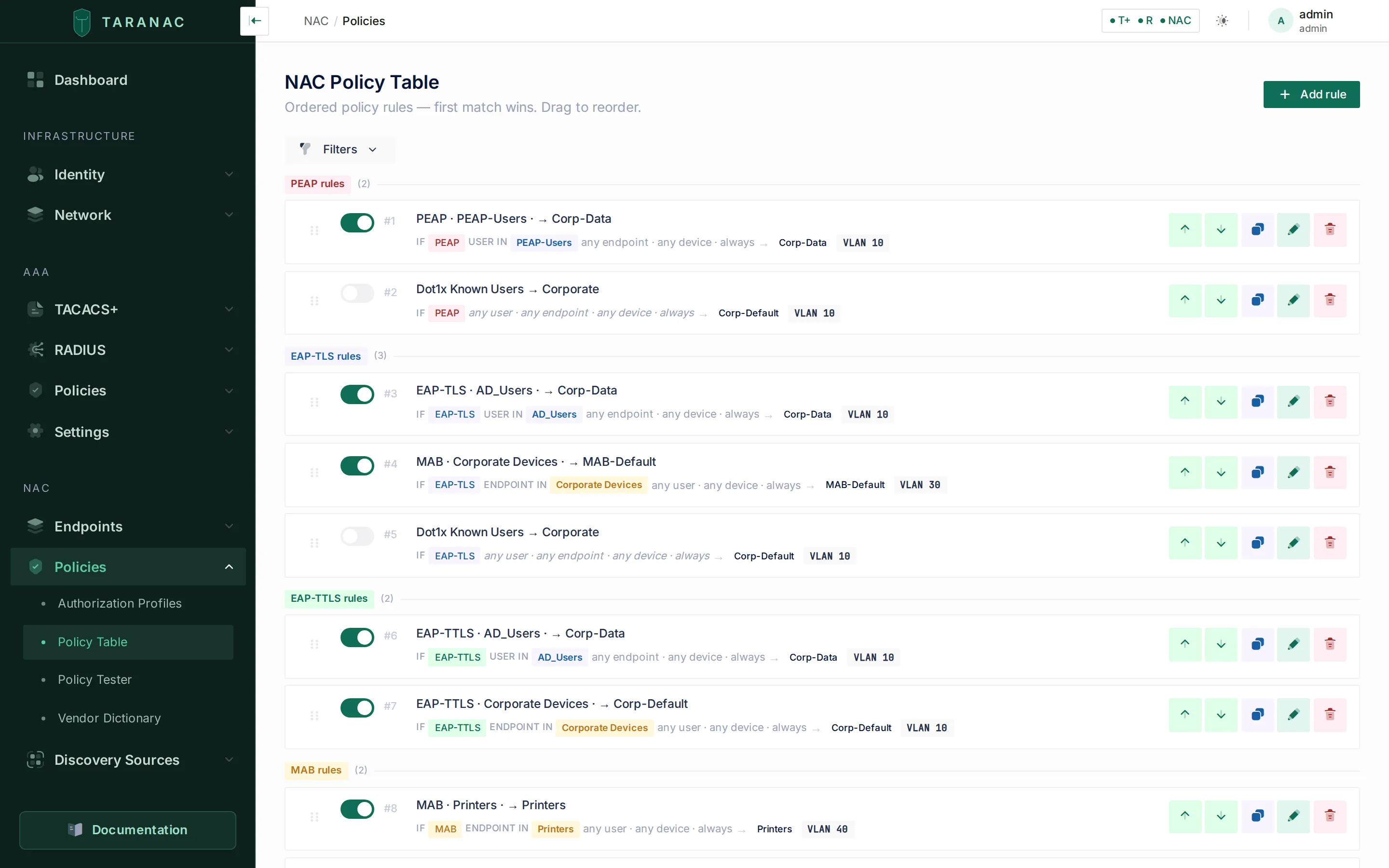 NAC policy — rules are grouped by the authentication method they match.
Wireless 802.1X: the keys the access point needs
Section titled “Wireless 802.1X: the keys the access point needs”A successful EAP method (EAP-TLS, PEAP, EAP-TTLS) produces a shared key on both
ends, the EAP MSK. Taranac returns it to the NAS in the Access-Accept as the
MS-MPPE-Send-Key and MS-MPPE-Recv-Key attributes, encrypted with the RADIUS
shared secret. On a wired port the switch has no use for them. On Wi-Fi they are
essential: the access point derives the key for the WPA 4-way handshake from
them, and a station whose access point receives no keys is dropped right after
EAP-Success even though the policy accepted it. An IKEv2 VPN gateway that
authenticates peers over EAP-RADIUS (strongSwan, for example) verifies the peer
with the same keys.
So if a wireless client is accepted in the Auth Log and still never gets on the
network, look at the access point side of the exchange: it must be configured
with the same shared secret as the device in Taranac (the keys are decrypted with
it), and nothing between the two may strip vendor-specific attributes. MAB
produces no keys; a MAB-authenticated SSID is open or pre-shared-key by
definition. For the same reason EAP-MD5, which derives no keys either, is refused
on wireless ports (eap_md5_wireless).
What the log records about the port, the network and the VLAN
Section titled “What the log records about the port, the network and the VLAN”Every 802.1X and MAB authentication lands in Logging & Reports → NAC Logs → Auth Log. It answers questions the AAA logs deliberately do not: which port did this endpoint authenticate on, which wireless network did it join, and which VLAN was it in.
The port. A NAS can describe the port in three RADIUS attributes, and Taranac stores each one separately on the authentication record and on the session:
| Attribute | Stored as | What it carries |
|---|---|---|
NAS-Port-Id (87) | NAS-Port-Id, plus a readable Interface derived from it | The port as text, in the vendor’s own shape |
NAS-Port (5) | NAS Port | A number. What it means — a port index, an ifIndex, a packed word — is the vendor’s business, so it is kept as the number the NAS sent. Some switches (TP-Link and similar) send only this one. |
NAS-Port-Type (61) | NAS Port Type | The kind of port: Ethernet, Wireless-802.11, Virtual and so on |
The table’s Port column shows the best answer available: the readable
interface when the NAS sent NAS-Port-Id, otherwise the number from NAS-Port.
Hovering shows the raw NAS-Port-Id. The detail drawer lists Interface,
NAS-Port-Id, NAS Port and NAS Port Type as separate fields. Free-text
search matches the interface and the raw NAS-Port-Id by substring, and the port
number exactly — a search for 1 finds port 1, not ports 12 and 21.
The readable interface comes from NAS-Port-Id. Cisco says GigabitEthernet0/3
and MikroTik says ether2, and those pass through unchanged. Huawei and
H3C/Comware encode the port, and both encodings are decoded — by shape, not by
detected vendor, because a reject path has no resolved vendor and H3C inherited
the same formats:
What the NAS sends in NAS-Port-Id | What the Interface shows |
|---|---|
GigabitEthernet0/3, ether2 — already readable | the value itself |
slot=0;subslot=0;port=18;vlanid=121;interfaceName=GigabitEthernet0/0/18 | GigabitEthernet0/0/18 — the vendor’s own interfaceName always wins |
the same key=value form with no interfaceName (or unit= on a Comware stack) | the composed path slot/subslot/port — no media type is knowable, so none is invented |
0000018000000121 — the 16-digit form, slot(2) + subslot(2) + port(3) + vlanid(9) | the same path, but only when every field lands inside the range the vendor documents; otherwise the raw string stands, because a confident wrong answer is worse |
The same interface appears in the detail panel of both the auth log and
sessions, in endpoint discovery, in CSV and XLSX exports, and in both NAC report
templates. The export has one column per attribute, named after the attribute it
holds: Interface, NAS-Port-Id, NAS Port and NAS Port Type.
NAS-Port-Type is also what Device Profiling reads to tell a laptop from a
desktop — see Device profiling.
The wireless network. An access point reports the network in
Called-Station-Id, usually as AP-MAC:SSID. The auth log, NAC sessions and
guest sessions show it as Wireless network (SSID) in the detail drawer,
derived from the stored attribute, next to the raw Called Station ID. A wired
switch names no network, and the field stays empty. A policy rule can match on
the same value — see Wireless network (SSID).
The VLAN. An authentication row carries two numbers with two meanings: the
VLAN the matched profile assigned, and the VLAN the NAS reported — read
from a Cisco vlan-id AV-pair, from vlanid= inside NAS-Port-Id, or from
Tunnel-Private-Group-ID, in that order. A disagreement between them is not
flagged here, deliberately: on an authentication record the reported VLAN is the
one the frame arrived in before any assignment was applied, so flagging it would
light an icon on every ordinary dynamic-VLAN authentication. On a live session
the same disagreement is flagged, because that is where the port settled after
authorization — see Sessions.
A MAB’d IP phone tags its own voice VLAN, so there is nothing for a profile to
assign and the VLAN appears only inside NAS-Port-Id. An empty assigned VLAN on
such a row is a deliberate configuration, not a gap.
Rows that are not authentications. The log also records the two accounting events an operator needs beside the authentications: Session Stop, when a session ends, and NAS restart, when a NAS announces with Accounting-On or Accounting-Off that its accounting service started or stopped. The second is one row for the NAS, not one per session; what it closes is described under Sessions. Both are values of the Status filter, and both show Accounting as the method.
How the request was carried. The Auth Method badge has the inner method beside it where that adds information: for EAP-TTLS (PAP, MSCHAPv2 or EAP-MSCHAPv2) and for MAB (PAP, CHAP, EAP-MD5 or no credential). The detail drawer shows it as Credential transport. A reject carries its reason in words, as in EAP rejects with a reason. CSV and XLSX exports carry the inner method and the raw reject message as their own columns, Inner Method and Reject Message, next to Auth Method and Reject Reason.
From a row to the device. A magnifier beside the MAC — in the Auth Log, in NAC Sessions and in Guest Sessions — opens everything known about the endpoint in a drawer over the journal: its device profile, why it is in each of its groups, what discovery has heard from it and which switch port it is plugged into. Your filters and page stay where they were. See the MAC magnifier.
When to use which
Section titled “When to use which”| Your situation | Use | Notes |
|---|---|---|
| Managed corporate laptops/desktops | EAP-TLS | Strongest. Needs cert provisioning (e.g. AD CS auto-enrollment) and the issuing CA trusted in Taranac. |
| Domain computers authenticating before login | EAP-TLS (machine cert) | Machine identity; classify into a “Domain Computers” endpoint group. |
| Contractors / BYOD / partner devices with certs | EAP-TLS (Trusted CA) | Upload the partner CA as a Trusted CA; resolve to a local user or leave as endpoint identity. |
| LDAP/AD users with passwords | EAP-TTLS | Works against every directory type, whatever it can do about NT-hashes — verified by an LDAP bind. |
| Directory users on Windows’s default supplicant | PEAP | Needs a directory that can prove MS-CHAPv2: Active Directory on a domain-joined node, or FreeIPA with ipaNTHash readable. |
| Local Taranac users with passwords, Windows default | PEAP | Requires the account’s NT-hash to be stored. |
| Printers, phones, cameras, IoT (no supplicant) | MAB | Identification, not authentication. Scope to restricted access. |
A switch that sends MAB as EAP-MD5 (TP-Link with EAP, Cisco mab eap) | MAB over EAP-MD5 | Works with the default setting. Wired ports only. Turn the setting off if no switch needs it and MAB rules must stay unreachable on 802.1X-only ports. |
| Unknown device, no supplicant, unknown MAC | MAB → captive portal | Policy redirects to a portal for guest/BYOD/AUP onboarding. |
A practical layered design: EAP-TLS for everything that can hold a certificate, EAP-TTLS for directory users who authenticate with a password, PEAP where the supplicant leaves you no choice and the directory can prove an MS-CHAPv2 response, and MAB (scoped tight) for the headless devices that have no other option.
Common scenarios
Section titled “Common scenarios”- Corporate employee (EAP-TLS, user cert). Laptop presents a user certificate; Taranac extracts the UPN from the SAN, resolves the user and their groups, and policy assigns the corporate VLAN.
- Domain computer (EAP-TLS, machine cert). Machine authenticates before login with a computer certificate; no user matches, so the endpoint carries the identity (hostname enriched from the cert) and policy places it in a machine VLAN.
- Linux workstation, directory user (EAP-TTLS).
wpa_supplicantsends the password over PAP inside TLS; Taranac binds to the directory as that user —user@domainon AD, the resolved DN on OpenLDAP or FreeIPA; on success, policy applies the user’s group rules. - Local admin account on Windows (PEAP). Username/password verified via MSCHAPv2 against the stored NT-hash.
- FreeIPA user on Windows (PEAP). The supplicant offers nothing but
PEAP-MSCHAPv2; Taranac reads
ipaNTHashfrom the directory for that login, verifies the response itself, and stores nothing. No domain join is involved, and a joined Active Directory on the same node is untouched by it. - Network printer (MAB). No supplicant, so the switch sends the MAC; Taranac finds it in the “Printers” endpoint group and policy assigns the printer VLAN.
- Camera behind a TP-Link switch (MAB over EAP-MD5). The switch runs EAP
globally, so it sends the camera’s MAC as an EAP-MD5 identity and password.
Taranac checks the identity against
Calling-Station-Id, verifies the MD5 response, and the camera matches the same How = MAB rule a Cisco-attached camera matches. The log row reads MAB · EAP-MD5.
Related
Section titled “Related”- NAC overview — how NAC fits together and differs from AAA.
- NAC policy — authorization profiles and rules (the what).
- Endpoints — endpoint inventory, groups and classification.
- PKI & trust — server certificate, internal CA, trusted CAs, CRL/OCSP.
- Certificate revocation: CRL and OCSP — which CAs are checked and why a client is refused.
- Captive portal — onboarding for unknown devices.
- Taranac on GitHub