

Endpoints
An endpoint is a single network device tracked by Taranac, keyed on its MAC address. Endpoints are the central objects of network access control: they are discovered (or added by hand), classified into one or more endpoint groups, and those groups become the conditions your NAC policies match on. A printer that lands in the Printers group can be put on the printer VLAN; a personal phone in BYOD can be given restricted access; an unrecognised device that no group holds falls through to a rule below them and can be denied or quarantined.
- Windows laptopsholdsthe device profile is Computer › Windows (or anything under it)andthe manufacturer is Dell or Lenovo
- Lab machinesdoes not holdthe host name matches LAB-*andthe directory object sits under OU=Lab
- Printersdoes not holdthe device profile is Printer (or anything under it)
- AV healthyholdsthe Web Probe condition holds: av-console · agent healthy
This page covers how endpoints appear, how classification rules sort them into groups, how to see why a device is in a group, where a device is plugged in, and the day-to-day admin actions. What a device is (its Device profile) is worked out by Device Profiling, described in Discovery & profiling.
Key concepts
Section titled “Key concepts”| Term | What it means |
|---|---|
| Endpoint | A device identified by a unique, normalised MAC address (AA:BB:CC:DD:EE:FF). Carries a manufacturer, host name, IP address, device profile, last-seen time, certificate identity and more. |
| Endpoint group | A named collection of endpoints (e.g. Printers, Corporate Devices). Used as the What condition of a NAC policy rule. An endpoint can be in several groups at once. |
| Classification rule | A rule on a group: a list of conditions that must all hold. An endpoint for which every condition holds joins the group. |
| Condition | One test, such as the manufacturer is Dell or the device profile is Computer › Windows (or anything under it). A condition can hold several values; any one of them is enough. |
| Device profile | The name Device Profiling gives the device, a node in a tree such as Computer › Windows › Laptop. See Device profiling. |
| Manufacturer | Who built the network card, from the OUI database. (In NAC, vendor means the maker of the network equipment, not of the endpoint.) |
| Status | Lifecycle state: known, unknown, blocked, inactive. |
| Persistence type | static (pinned, never auto-removed), dynamic (auto-discovered, subject to cleanup), or guest (from a captive portal). |
Status and persistence
Section titled “Status and persistence”status reflects where the endpoint sits in its lifecycle:
known— recognised: it authenticated, a directory holds it, or a person added it.unknown— seen on the network but not vouched for. A device only the Scanner or a Web Probe has reported starts here, because hearing a device proves it is there and nothing more.blocked— denied by an administrator (authentication is rejected).inactive— not seen for a long time; hidden from lists unless Show inactive is on.
persistence_type decides whether automatic cleanup may ever remove the endpoint:
static— added manually, imported by LDAP computer sync, or pinned. Never auto-deleted.dynamic— discovered automatically. Eligible for cleanup once inactive.guest— created through a guest captive portal. Cleaned up after the guest session expires.
How endpoints are discovered
Section titled “How endpoints are discovered”Every source that has seen a device is recorded as a separate discovery record under the endpoint (the Discovery & Authentication card), so you can tell how the device is known and what each source said about it. Only some sources may create an endpoint; the others add evidence to one that exists.
| Source | Creates endpoints? | What it contributes |
|---|---|---|
| RADIUS | Yes, dynamic | The MAC on its first 802.1X or MAB authentication, the NAS and port, the auth method, and from accounting the IP address and whether the port is wired or wireless. |
| Certificate (EAP-TLS) | Enriches | CN / DNS SAN, issuer, serial and whether it is a machine or a user certificate. |
| LDAP computer sync | Yes, static | Directory computer objects from Active Directory, FreeIPA, OpenLDAP or a generic LDAP tree. FreeIPA and OpenLDAP publish a machine’s MAC, so a computer becomes an endpoint on its first sync. Active Directory has no standard MAC attribute, so its computers wait as Pending Computers until they can be bound to a real endpoint (see below). |
| Captive portal | Yes, guest | The registration, the browser’s User-Agent and Client Hints, and, from a portal that serves DHCP, the lease it granted. |
| Scanner | Yes, unknown | Addresses, open ports, banners and self-announcements heard or asked on a collector’s zones. |
| Web Probe | Only if the source is allowed to | Whatever your script answers about the device. |
| DHCP Probe | No | Host name, vendor class, request list, relay and option 82. A sender chooses its own MAC and name, so a packet is not enough to create an endpoint. |
| SNMP | No | Switch forwarding and neighbour tables, read to say where the device is plugged in. |
| Manual | Yes, static | Devices you add by hand. |
The Discovery value on an endpoint says what the device is known by, and it only ever moves up: a device the Scanner overheard and that later authenticates reads radius, not scanner. From weakest to strongest: scanner; dhcp, snmp, web; ldap; radius; manual.
The OUI prefix is derived from the MAC when the endpoint is created, and the MAC is immutable afterwards: it is the endpoint’s identity, which is why no form offers to edit it. The manufacturer is looked up in the OUI database from the MAC.
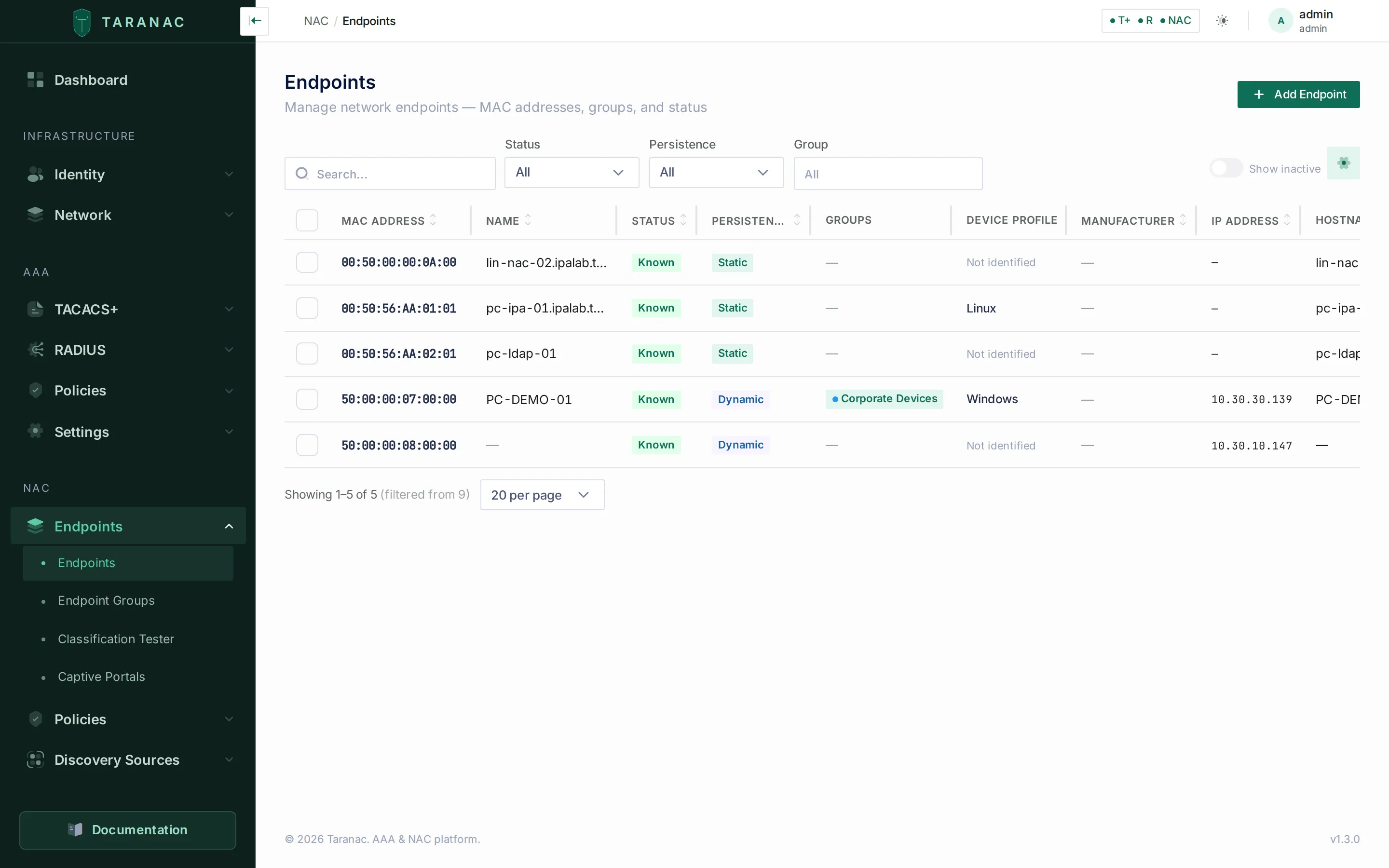 The endpoints list. Device profile is the name Device Profiling gave the device; Not identified means no rule explains it yet. Columns can be hidden and their borders dragged; every list remembers its own widths in the browser.
Used by on an endpoint is informational: it lists the groups the device is in, and deleting the endpoint simply removes those memberships. On an endpoint group the same column can block a delete; see deleting a group.
Host name, OS and IP address
Section titled “Host name, OS and IP address”Several sources can fill the same field, and they are not equally trustworthy. Each field records who wrote it (shown as a small badge such as from directory in Endpoint Info), and a source may not overwrite a more trusted one. The trust order is on Discovery & profiling.
Two behaviours are worth knowing:
- A user certificate does not rename the endpoint. A domain machine presents its own certificate at boot and its user’s at logon. Only a machine certificate may write the host name; a user certificate fills the certificate identity and issuer only while they are still empty. The machine keeps its name, and its groups, whoever logs on.
- The IP address is the newest first-hand report. RADIUS accounting (
Framed-IP-Address), a DHCP lease that was actually granted (for example by a captive portal that serves DHCP), and a collector’s sighting all write it, and the most recent one wins. That is how a device authenticated by MAB, which gives the switch no address, still gets one.
Endpoint groups
Section titled “Endpoint groups”Groups are how you organise endpoints into policy-relevant buckets. Taranac ships with a set of default groups so the system is useful on day one: Corporate Devices, BYOD, Printers, IP Phones, IoT / Sensors, Security Cameras, and Guest Devices, with eleven classification rules by manufacturer. Each carries a colour and icon for the UI, and you can create your own (for example, a per-location Building A group).
Every group is an ordinary group: it can be renamed, edited and deleted. The defaults are created once, on first start; a default group or rule you delete stays deleted.
An endpoint that no group holds is shown as Unclassified, which is a state, not a group. Blocking an endpoint is its Blocked status, which refuses it before policy runs, not a group membership. Where an installation has groups named Unclassified or Blocked, they are ordinary groups like any other and mean nothing special.
Because an endpoint can belong to multiple groups at once, you can classify along several independent axes (device type and location and access tier) without the groups fighting each other.
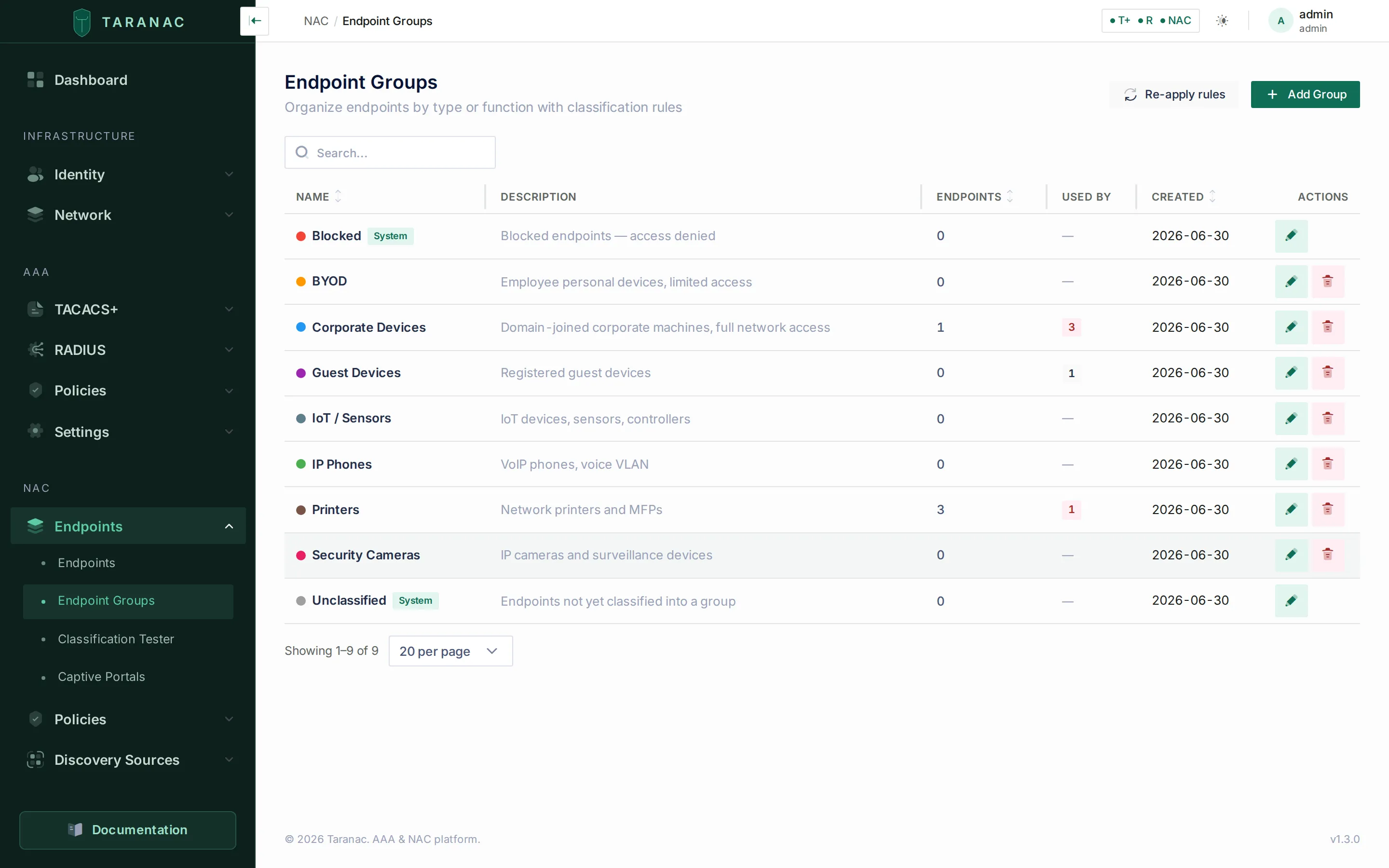 Endpoint groups, each with a member count and a Used by count. Re-apply rules runs classification over every endpoint.
A group can also say Do not scan anything in this group actively: the Scanner keeps listening but never sends to its members, including devices classification puts there later. The setting stays as saved when the group is edited for anything else.
Deleting a group
Section titled “Deleting a group”A group is not deleted out from under the things that name it. Two checks run before the row goes:
- It must be empty. A group that still has members is refused, and the message says how many. Empty it from the group’s own Members panel first. If the members are there because a rule put them there, delete the rule too, or the next classification pass puts them straight back.
- Nothing may depend on it. The Used by column shows where the group is referenced, and a group used as the What condition of a NAC policy rule cannot be deleted at all: the refusal names the rules. A captive portal that assigns endpoints to the group is listed too, but does not block; deleting the group just clears the portal’s target.
Classification rules
Section titled “Classification rules”A classification rule lives on a group and says: an endpoint for which all of these conditions hold belongs in this group. The grammar has three levels and no parentheses:
| Level | Joined by | Example |
|---|---|---|
| Values inside one condition | or | the manufacturer is Dell or Lenovo |
| Conditions inside one rule | and | the device profile is Computer › Windows and the manufacturer is Dell or Lenovo |
| Rules (on one group or on several) | or: every rule that holds fires | A device matched by two rules of two groups joins both groups. |
There is no priority and no “first match wins”. Every enabled rule that holds fires, and the endpoint joins every group so reached. If nothing holds, it is in no group and shows as Unclassified. You never have to reason about a global order of all rules across all groups to predict where a device lands.
“Windows and Dell” is one rule. Written as two rules it would mean “Windows or Dell” and put the device in the group for either reason. The same match type used twice in one rule keeps meaning and: in directory group A and in directory group B are two conditions, and a machine must be in both.
A rule holds up to 16 conditions, and a condition up to 32 values.
Condition types
Section titled “Condition types”The Match Type list in the rule drawer offers these types. The second column is how the drawer reads a condition back.
| Match type | Reads as | Matches against | Notes |
|---|---|---|---|
| Exact MAC | the MAC address is | The full MAC | Case-insensitive exact match. |
| OUI Prefix | the manufacturer prefix is | First 3 bytes of the MAC | Picked from the OUI database, e.g. DC:A6:32. |
| MAC Pattern | the MAC address starts with | Start of the MAC | Case-insensitive “starts with”, any length. Wildcards are matched literally. |
| Manufacturer name | the manufacturer is | The manufacturer from the OUI database | Glob when * ? [ are present, otherwise any part of the name. The drawer previews which manufacturers and how many prefixes a value covers. |
| Certificate Issuer | the certificate was issued by | The endpoint’s certificate issuer | A CA picked from a list (Trusted, Internal and LDAP CAs). |
| Certificate Identity | the certificate identity matches | Certificate CN / DNS SAN | Glob or any part, as above. Cryptographically backed. |
| Hostname Pattern | the host name matches | The endpoint’s host name | Glob or any part, as above. Convenient but spoofable. |
| LDAP Distinguished Name | the directory object sits under | Where the machine’s object sits in the directory | A container picked from the tree, and everything below it. See directory-based classification. |
| LDAP Group Membership | the machine is in the directory group | Directory groups the machine belongs to, nested included | A group picked from the directory. |
| Device profile | the device profile is | The profile Device Profiling gave the device | A node, exactly or with everything under it. See below. |
| Web Probe | the Web Probe condition holds: | A named condition declared in a Web Probe source | See below. |
A condition whose value points at something that no longer exists (a deleted CA, a withdrawn profile node, a removed Web Probe condition, a directory group not seen in a sync) matches nothing. The drawer names such values rather than letting the rule look idle.
Device profile conditions
Section titled “Device profile conditions”A Device profile condition classifies on what the device is, as worked out by Device Profiling. Pick one or more nodes from the tree (the picker shows how many devices sit on each node and below it) and choose How far it reaches:
- This profile and everything under it (the default): Computer › Windows also catches Computer › Windows › Laptop.
- Exactly this profile: only devices whose chain stops on that node.
The rule stores the node’s key, not its path, so a node the shipped tree moves keeps matching. A device no pass has named yet is under no node and matches no profile condition.
Web Probe conditions
Section titled “Web Probe conditions”A Web Probe source declares named conditions over the attributes your script answers, such as agent healthy. A Web Probe condition picks one of them (Web Probe source, then Rule), and the drawer shows how many of the answered endpoints it matches right now and how many are excluded as stale. An answer that has gone stale does not satisfy the condition, so a device whose script stops answering leaves the group.
Which rules authentication can judge
Section titled “Which rules authentication can judge”The RADIUS service classifies too, on every authentication, from its own cached copy of the rules. It can judge every condition type except Device profile and Web Probe: those read data only the core holds. So:
- A rule containing a Device profile or Web Probe condition is judged only by the core: when the profile changes, when the source finishes a pass or its answers go stale, and on Re-apply rules.
- A group that has such a rule is never emptied by an authentication. “I could not judge this rule” is not a reason to take a group, and its VLAN, away from a device.
- Every other rule is judged at authentication as well as by the core.
The classification tester and the endpoint card say which of the two will remove a membership (see below).
When membership is re-judged
Section titled “When membership is re-judged”Classification is not only an authentication event. Membership is re-judged:
| When | Which devices |
|---|---|
| The device authenticates (802.1X or MAB) | That device. The request itself is decided on the groups it held when it arrived; a change applies from the next request. A brand-new endpoint is classified on its MAC and manufacturer as it is created. |
| A device’s profile name changes | Only the devices whose name actually moved, and only if some enabled rule reads a Device profile. |
| A Web Probe pass finishes | The devices the source answered about, for the groups that classify on it. |
| A Web Probe answer goes stale | Those devices. A device leaving a group because its data went stale is logged. |
| The DHCP Probe learns a host name | Those devices, if some enabled rule reads a host name. |
| An LDAP computer sync runs | The machines of that directory. |
| An AD computer is bound to its endpoint | That endpoint, with the DN just written, so a directory-location rule fires on the machine’s first authentication. |
| An LDAP configuration is deleted | Its endpoints, after their directory identifiers are cleared. |
| You edit or delete a rule | The members that group already has: a narrowed or deleted rule lets its members go at once. |
| Re-apply rules | Every endpoint against every enabled rule. |
A re-judgement changes only memberships a rule made. Groups you assigned by hand, by import or through a captive portal are left alone, and rule hit counters are not touched.
Writing a rule
Section titled “Writing a rule”Open a group under NAC → Endpoints → Endpoint Groups and click Add Rule. With one condition the drawer is a single Match Type and its values. Add condition adds another, with and printed between them; there is no combinator to choose. Conditions can be dragged, but that is display order only: a reordered rule is the same rule. A free-text value is added as a chip with Add; types with a picker (CA, OUI prefix, directory location or group, profile node, Web Probe rule) append what you choose.
Before anything is saved, the drawer shows two things:
- Reads as — the rule read back as a sentence, e.g. Devices join Corporate Devices if the host name matches
PC-*and the certificate identity matches*.lab.taranac.pro. - The preview — what saving would do, counted over the installation’s endpoints with the same matching code the classifier uses:
- Matches now, and what it was before your last edit;
- how many would join, how many would leave, and how many are already here;
- Of those matched, already in: the other groups those devices sit in, which is where all-matches surprises people: a device that also sits in another group may reach a different policy rule;
- a warning when another rule of this group asks exactly the same thing, or when a value names something that no longer exists.
For large estates the preview looks at the group’s own members first and then at up to 5,000 endpoints in total, and says how many it looked at.
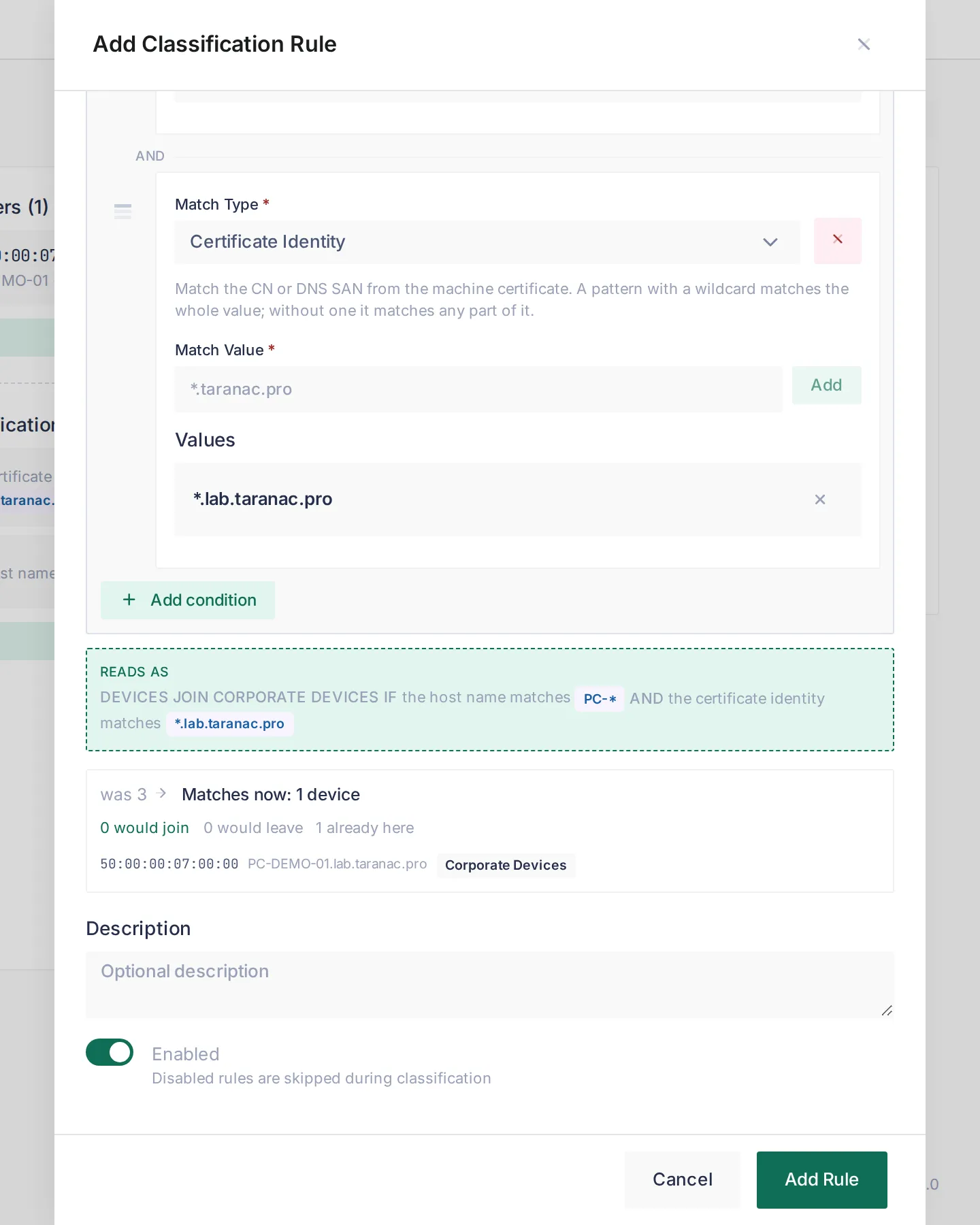 A second condition narrowed the rule from 3 devices to 1, the one already in the group. Nothing is written until the group’s Save Changes.
The drawer only edits the group’s draft; rules are written when you press Save Changes on the group.
Seed rules
Section titled “Seed rules”Out of the box Taranac seeds manufacturer rules so common devices classify themselves:
| Group | Manufacturer name values |
|---|---|
| Printers | Hewlett Packard*, Hewlett-Packard*, Canon*, Epson*, Xerox*, Brother* |
| IP Phones | Polycom* |
| Security Cameras | Hikvision*, Dahua* |
| IoT / Sensors | Raspberry Pi*, Espressif* |
Certificate-based classification
Section titled “Certificate-based classification”When a device authenticates with EAP-TLS, the certificate’s identity and issuer are written to the endpoint, and every authentication re-judges its groups. A machine certificate describes the device, so for that session its own identity and issuer are used. With a user certificate, PEAP or MAB, the classifier uses what the endpoint is already known to be, so a device does not change groups between the machine at boot and the person at logon.
For Certificate Issuer conditions, the CA you selected is resolved to the subject DN of every certificate it holds and compared to the endpoint’s issuer with DN normalisation. A Trusted CA or LDAP CA uploaded as a chain (a root and its issuing CA) therefore matches the clients of its issuing sub-CA too. The DN comparison is order-free, so the OpenSSL one-line form (/DC=pro/DC=taranac/CN=Root CA) and the RFC 2253 form (CN=Root CA,DC=taranac,DC=pro) compare equal. If the CA is later disabled or deleted, the condition stops matching.
Directory-based classification
Section titled “Directory-based classification”Two condition types read the directory rather than the wire: LDAP Distinguished Name asks where the machine’s object sits, LDAP Group Membership asks which groups it is in. Between them they replace the hand-maintained list: “every machine under OU=Workstations gets this profile”.
Both need the machine’s endpoint to be linked to a directory object, which is what computer sync does. On Active Directory the link is made when the machine authenticates, matched by the name from its certificate or the name it announced over DHCP. LDAP Group Membership additionally needs Group membership switched on for that connection; a directory that does not collect it can never satisfy such a condition, and the drawer says so.
Every directory condition names its directory. With more than one forest joined, the same DN exists in several of them, and an unscoped condition is how a machine from one domain lands in a group written for another. The drawer’s Directory list offers the connections that have computer sync enabled, and it comes before the value because it decides which tree the picker walks. Conditions of one rule cannot name two different directories: an endpoint belongs to one, so such a rule could never match, and it is refused on save.
Matching on the machine’s location
Section titled “Matching on the machine’s location”The value is a container, chosen from the directory tree, and the condition covers that container and its whole subtree. Matching compares DN components, not characters: OU=Computers does not also capture OU=Computers-Test. Spacing and letter case in the DN do not matter.
The picker offers containers only, never an individual computer:
- A container with thousands of machines makes an unusable tree to pick one from.
- A DN naming a machine stops matching the moment that machine is renamed or moved, silently. Exact MAC says the same thing and never breaks.
- Only the first network card to authenticate is bound to the directory object, so a per-machine DN would miss a laptop’s second interface.
Matching on group membership
Section titled “Matching on group membership”The condition stores the group’s immutable identifier, not its name and not its DN, so renaming or moving the group in the directory does not break it. You never see or type that identifier: the picker browses the directory and shows DNs.
The picker browses the directory live rather than listing the groups already collected, so you can write a rule for a group no machine has joined yet. A group not yet seen in a sync is shown as exactly that.
Nesting is resolved when membership is imported: the endpoint holds a flat set of groups, so a condition on an outer group matches a machine that is only a direct member of an inner one. How each directory type answers the membership question is covered in LDAP directories.
To see what the directory reports for a machine, open the endpoint and expand its LDAP discovery record: Directory groups lists every group, not only the ones some rule names, and Bound by says how the machine was linked to its object. An empty list means the machine is in no group, or membership collection is off for that directory.
Why a device is in its groups
Section titled “Why a device is in its groups”The endpoint page has a card Why it is in these groups. Every group the device is in is listed with how it got there:
| Label | Meaning |
|---|---|
| by rule | A rule of this group holds for this device. The rule is shown as its sentence, every condition of it, since a rule holds only when all of them hold. |
| by hand | An operator put the device here. No rule decides the membership, so no classification pass takes it away. |
| by the captive portal | A captive portal put the device here when a guest registered: the group its flow grants. It goes away when that guest session ends, or when an operator removes it. |
| about to leave | A rule put it here and no rule of this group holds any more. The card says who removes it: the next authentication, or (for a group with a Device profile or Web Probe rule) only a core pass or Re-apply rules. |
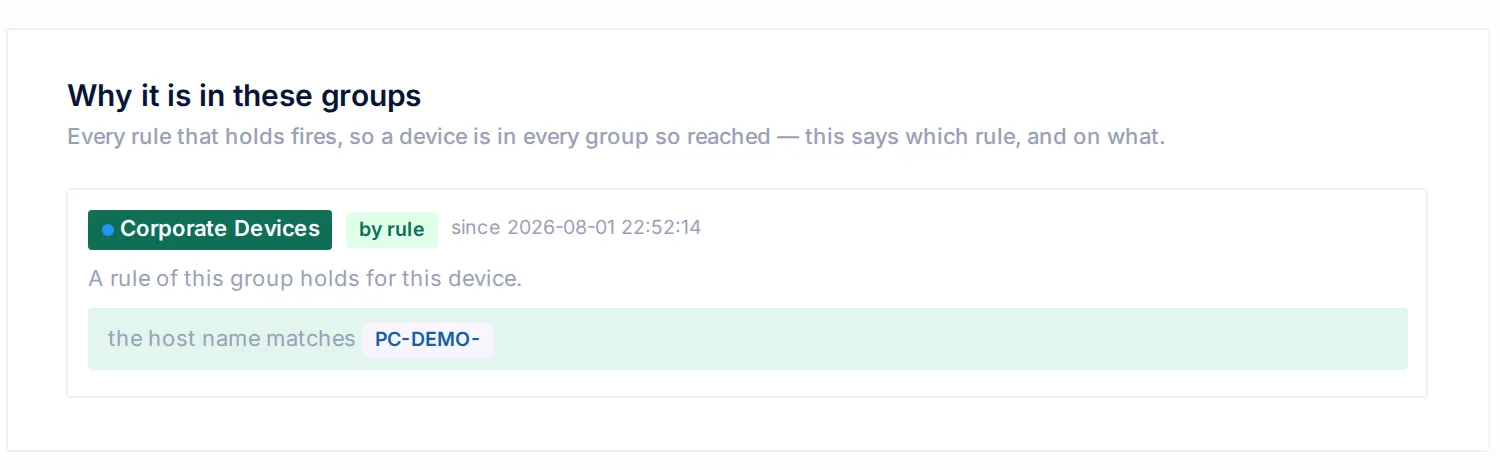 The card on a directory-bound Windows machine: one group, one rule, and the date the membership was made.
The classification tester
Section titled “The classification tester”NAC → Endpoints → Classification Tester answers the same question for any MAC, and adds a what if. Type a MAC and press Explain. The server reads every fact from the stored endpoint, including the ones nobody can type (directory groups, what a Web Probe source last answered, the device profile), and reports each group with one of these states:
| State | Meaning |
|---|---|
| In the group | A rule still puts the endpoint here. |
| Will be removed | The membership was made by a rule, and no rule matches any more. The result says whether the next authentication removes it or only the core does. |
| Will be added | A rule matches, but the membership is not written yet. |
| Not from a rule | Assigned by a person, an import or a captive portal, so no rule will ever take it away. |
| Only with the conditions | Nothing stored reaches this group, only the conditions you typed. |
Additional conditions lets you lay a hypothesis over the stored facts: a certificate identity, a certificate issuer DN, a host name, a directory DN. They are tried on top of what is known and never replace it. There is no manufacturer field, because the manufacturer comes from the MAC; and a typed DN belongs to the endpoint’s own directory.
Facts behind the verdict lists every fact the verdict stood on and where it came from: from the endpoint, typed in, from the OUI database, or nobody has it. A rule that reads a fact nobody has cannot be judged at all, which is not the same as not matching. For a MAC with no endpoint yet, the tester shows what would happen on the device’s first authentication.
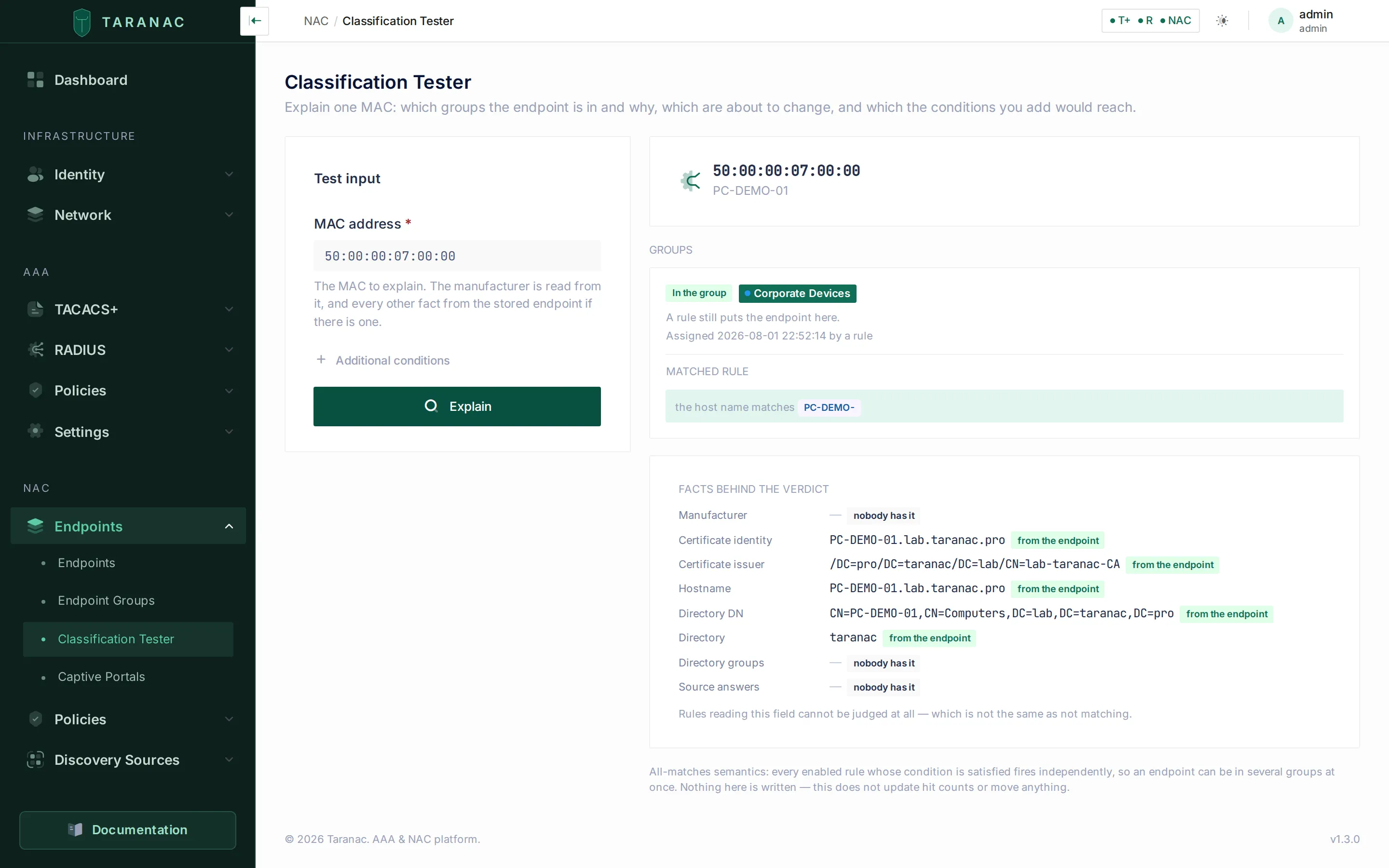 The tester writes nothing: it moves no device and does not update hit counts.
Where it is plugged in
Section titled “Where it is plugged in”Every switch between a device and the core reports its MAC in a forwarding table, so “which port” has as many answers as there are hops. The card Where it is plugged in lists every port whose forwarding table holds the MAC, plus the port of a live NAC session, and marks at most one as Attached here, each row with its reason in words.
- acc-3 · Gi1/0/14 Attached here The switch authenticated this device on this port.
- acc-2 · Gi1/0/9 from the NAC session Possibly here Authenticated here, but the forwarding tables have since seen it elsewhere: the session outlived the connection.
- dist-2 · Gi1/0/24 Uplink This port leads to acc-3, a device you manage that sees it too.
- core-1 · Te1/0/1 Uplink This port leads to dist-2, a device you manage that sees it too.
The port marked Attached here is chosen in this order:
- The switch authenticated it on this port: an active NAC session names the port. The switch said so itself, so nothing inferred outranks it.
- The device announces itself on this port over LLDP or CDP, as phones, access points and servers do.
- The least crowded access port: the only port left that does not lead to another switch, or the one with strictly fewer devices on it than every other.
A port is an Uplink, never the attachment, when it is a link aggregation or when it leads to a device you manage that also sees the MAC. “Has a neighbour” alone does not make a port an uplink: a PC behind a desk phone really is behind the phone’s port.
Where the evidence does not support a choice, the card does not make one. A lone port with several devices on it and nothing to explain them is Possibly here (the nearest port we know: an unmanaged switch or hub is probably in between). Ports are not compared by device count when a switch’s table was read only in part, is older than the others, or names the port only by ifIndex.
A NAC session lives until its Stop arrives. When the forwarding tables contradict it (its own switch’s table was collected after the session last spoke and no longer holds the MAC, or the MAC arrived on another switch since), the session’s port is shown as Possibly here with the reason the session outlived the connection. That catches a lost Accounting-Stop and a device that moved.
The card is computed when you open it, from the forwarding and neighbour tables SNMP collects, and it creates nothing: a MAC in a forwarding table is not a reason to add an endpoint. With no table collected yet, the card says so.
The endpoint page
Section titled “The endpoint page”Clicking an endpoint opens its page. Editing an endpoint happens here and nowhere else. From top to bottom:
- The form: name, description, status, notes, Do not scan this device actively, the endpoint groups, and Endpoint Info (OUI, host name, IP, OS, persistence, discovery), each value with a badge naming the source that wrote it.
- Device profile: the chain of names, one confidence word, and why the chain stopped. See reading the device card.
- Where it is plugged in (above).
- Why it is in these groups (above).
- Discovery & Authentication: one record per source with its own snapshot.
- Details and Quick Actions on the side.
The MAC magnifier in the journals
Section titled “The MAC magnifier in the journals”In NAC Sessions, the NAC Auth Log and Guest Sessions (and the Scanner journal), a magnifier beside a MAC opens the endpoint in a drawer over the journal, without losing your filters or page. It shows the same cards as the endpoint page (profile, switch port, group reasons, discovery) read-only; the pin and block quick actions work there, and Edit endpoint goes to the endpoint page.
The OUI database
Section titled “The OUI database”The manufacturer on every endpoint, and the pickers behind Manufacturer name and OUI Prefix conditions, come from the local copy of the IEEE MAC registries. What it contains, how it matches and how it is kept current is on its own page: OUI database.
Common scenarios
Section titled “Common scenarios”Windows laptops of one make. On a Corporate laptops group, one rule: Device profile Computer › Windows › Laptop and Manufacturer name Dell, Lenovo. One rule, two conditions; a Dell desktop or a Lenovo Chromebook stays out.
Printers by what they are. Keep the seed Printers manufacturer rules and add a rule with a Device profile condition on the printer node. The profile catches printers from makers no seed rule names, since Device Profiling reads their DHCP, banners and self-announcements.
Corporate machines by certificate. Issue machine certificates from your internal CA and add a Certificate Issuer rule on Corporate Devices selecting that CA. Every domain machine that authenticates with EAP-TLS lands there, which is far stronger than matching by MAC.
Only healthy machines on the corporate VLAN. A rule Certificate Issuer corp CA and Web Probe av-console · agent healthy. A machine whose antivirus console stops vouching for it leaves the group once the answer goes stale, and its next authentication lands on whatever rule sits below.
Machines by where they live in the directory. An LDAP Distinguished Name rule on Corporate Devices pointing at OU=Workstations classifies every machine below it, including machines moved there later, after the next computer sync or Re-apply rules. A second rule for OU=Kiosks on a locked-down group keeps the two apart without a single MAC typed.
Location plus type. A Building A group with its own rule, and the type-based groups too. A camera in Building A ends up in both Security Cameras and Building A; match either or both in policy.
When to use which condition type
Section titled “When to use which condition type”| Goal | Best match type | Why |
|---|---|---|
| What the device is (OS, form factor, printer, phone) | Device profile | Built from every source at once; survives manufacturer and MAC churn. |
| What your MDM, inventory or antivirus says | Web Probe | Follows your system of record; a stale answer takes the device out. |
| Trustworthy corporate identity | Certificate Issuer | Cryptographic; cannot be spoofed by changing a MAC. |
| Per-machine / per-domain certificate identity | Certificate Identity | Glob on the certificate CN/SAN; cryptographic. |
| Every machine in an OU or container | LDAP Distinguished Name | Follows the directory’s structure; moving an object moves the endpoint with it. |
| Machines your directory already groups | LDAP Group Membership | Reuses membership you maintain anyway, nested included, and survives renames. |
| All devices from a manufacturer | Manufacturer name | One value covers every prefix the manufacturer owns. |
| One hardware family / model run | OUI Prefix | A single 3-byte prefix. |
| A custom MAC range you assign | MAC Pattern | Flexible-length “starts with”. |
| One known device | Exact MAC | Pins a single, important device to a group. |
| Devices with no certificate | Hostname Pattern | Last resort; convenient but spoofable. |
Managing endpoints
Section titled “Managing endpoints”Adding endpoints by hand
Section titled “Adding endpoints by hand”Add Endpoint creates an endpoint from its MAC, an optional name and description, and the groups it should join. Manually created endpoints are static, so they are never cleaned up automatically. Manual creation assigns only the groups you choose; it does not run classification rules.
Quick actions
Section titled “Quick actions”| Action | Effect |
|---|---|
| Block Endpoint | Sets status to blocked; the device is rejected on its next authentication, and its live sessions are torn down via CoA where supported. |
| Unblock Endpoint | Returns status to known. |
| Pin (make Static) | Promotes dynamic → static so cleanup never removes it. |
| Unpin (make Dynamic) | Returns static → dynamic. |
| Assign Groups | Changes the endpoint’s groups on its form; saved with Save Changes. The list you save becomes the complete membership, and the change is audited. |
The list page offers bulk delete and bulk block over a selection.
Reference: endpoint fields
Section titled “Reference: endpoint fields”| Field | Meaning |
|---|---|
mac_address | Unique device identity, normalised to upper-case AA:BB:CC:DD:EE:FF. |
name / description / notes | Optional admin-supplied labels. |
status | known, unknown, blocked, inactive. |
persistence_type | static, dynamic, guest. |
discovery_type | What the device is known by, raised and never lowered: scanner, dhcp, snmp, web, ldap, radius, manual. |
vendor / oui_prefix | Manufacturer and 3-byte prefix, from the OUI database. |
hostname | Written by a person, the directory, a machine certificate or DHCP, in that order of trust. |
ip_address | The newest first-hand report: RADIUS accounting, a granted DHCP lease, or a collector’s sighting. |
os_hint | The operating system, from the most trusted source that reported one. |
| Device profile | The node Device Profiling gave the device; read by Device profile conditions. |
cert_identity / cert_issuer | CN/DNS SAN and issuer DN from the machine certificate (from a user certificate only while empty). |
auth_type_last | Last authentication method: eap_tls, peap, eap_ttls, mab. |
ldap_dn / ldap_guid / ldap_config_id | The directory object this machine is bound to, its immutable identifier, and which connection it came from. Read by LDAP Distinguished Name conditions. |
| Directory groups | The groups the machine belongs to, transitively, imported when Group membership is on for its connection. Read by LDAP Group Membership conditions. |
scan_excluded | Do not scan this device actively. |
last_seen_at | Last activity; drives the inactive lifecycle. |
Related
Section titled “Related”- Discovery & profiling — the sources that describe a device and how it gets its name.
- Device profiling — the tree behind Device profile conditions.
- Web Probe — the named conditions behind Web Probe conditions.
- SNMP — the forwarding and neighbour tables behind Where it is plugged in.
- NAC policy — using endpoint groups as authorisation conditions.
- 802.1X authentication — the 802.1X / MAB / EAP-TLS flows that discover endpoints.
- Captive portal — guest and BYOD registration that creates endpoints.
- Internal PKI — the CAs referenced by Certificate Issuer conditions.
- LDAP directories — computer sync and group membership.