

Overview
AAA — Authentication, Authorization, Accounting — is the core of Taranac. It is how a switch, router, firewall, or VPN asks Taranac “is this person allowed, and what are they allowed to do?”, and how every such request is recorded. Taranac speaks two AAA protocols: TACACS+ for administrative access to network devices, and RADIUS for network-access control. Both draw from the same identity store, point at the same network devices, and are driven by one shared policy table.
This page orients you. Each linked sub-page goes deep on one piece.
log into the device
- per-command authz
- enable / privilege
- console rules
access through the network
- reply attributes
- VLAN / service type
- VSAs
The three A’s
Section titled “The three A’s”| What it answers | Where you see it | |
|---|---|---|
| Authentication | Who is this? (verify the password / credential) | Login attempts in Authentication logs |
| Authorization | What are they allowed to do? (privilege level, command set, reply attributes) | The profile assigned by a policy rule |
| Accounting | What did they actually do? (commands run, sessions opened/closed) | Session logs |
Taranac verifies credentials against the identity store (a local password or a directory), then evaluates the policy to decide authorization, then records the outcome and any subsequent activity as accounting.
Two protocols, two jobs
Section titled “Two protocols, two jobs”Taranac runs TACACS+ and RADIUS as separate engines, because they solve different problems.
| TACACS+ | RADIUS | |
|---|---|---|
| Use it for | Logging into the device itself (CLI / management) | Granting a user or endpoint access through the network |
| Typical client | Switch, router, firewall management plane | VPN concentrator, wireless controller, switch port |
| Authorization granularity | Per-command (command authorization) and per-session privilege | Reply attributes (VLAN, privilege, service type) at access time |
| Enable / privileged mode | Yes — full enable-password inheritance chain | Vendor convention only — a $enab<N>$ request answered against one global enable password |
| Console-only rules | Yes (console access type) | No (ignored) |
| Default ports | TCP 49 | UDP 1812 (auth) / 1813 (accounting) |
A single network device can use both at once — for example a switch that authenticates admins over TACACS+ and authenticates VPN or 802.1X users over RADIUS. Each device declares which protocols it participates in (see Network devices).
The shared pieces
Section titled “The shared pieces”Everything in AAA is assembled from four kinds of building block. The same blocks feed both protocols.
Identity store — who can authenticate
Section titled “Identity store — who can authenticate”Users and groups are the WHO. A user is either local (password stored and hashed in Taranac) or directory-synced (provisioned from an LDAP directory, with attributes such as name, email, and group membership mapped on sync). A directory is not required to be Active Directory: each configuration is created with a type — Active Directory, OpenLDAP, FreeIPA, Google Workspace, or generic — and the type supplies both the schema defaults and what the protocol can do there. Group membership is the usual way you target policy — you rarely match individual users.
Which credential transports a directory account can use follows from that type. An Active Directory password is verified by a domain controller, because the hash is unreadable by design; a directory that publishes the hash instead (FreeIPA’s ipaNTHash) is verified in Taranac, with no domain join. See RADIUS for what that means per transport.
See Users & groups and LDAP directories under Identity.
Network devices — where requests come from
Section titled “Network devices — where requests come from”A network device (NAS) is any switch, router, firewall, controller, or VPN that sends Taranac AAA requests. Each device has:
- an address — the one it sends its requests from: a single IP, or a subnet for fleets that share a configuration,
- a TACACS+ shared key and/or RADIUS shared secret (each can inherit from the device’s group or a global default),
- protocol flags stating whether TACACS+, RADIUS, and NAC are enabled for it.
Devices can be grouped (device groups), and both the shared secret and policy targeting can act on the whole group. See Network devices.
TACACS+ answers only devices in this inventory: a connection from any other address is refused, whatever key or certificate it uses, logged with the reason Not in the inventory and raised as an Unknown TACACS+ device alert. The global TACACS+ key is the fallback of inventoried devices, not a way in for unregistered ones. See Only inventoried devices log in.
Profiles — what a user gets
Section titled “Profiles — what a user gets”A profile is the authorization payload. It is what Taranac hands back when access is granted.
- A TACACS+ profile (TACACS+) sets the privilege level and service attributes, can attach a command set (per-command permit/deny rules), and can configure enable behaviour and session/idle timeouts. Login banners are not a profile field: a banner rides in the authentication reply while a profile is chosen during authorization, so the welcome banner and the message of the day are set on the device, on a device group, or globally, and resolve down that chain.
- A RADIUS profile (RADIUS) builds the reply attributes — vendor-specific attributes (VSAs), service type, session/idle timeouts, and a reply message.
Both profile types are built from templates — vendor-shaped structures describing which attributes a platform accepts — so you fill in values rather than memorising attribute names. A fresh install ships 18 TACACS+ templates and 15 RADIUS templates, covering Cisco (IOS/IOS-XE, NX-OS, ASA, IOS-XR, SD-WAN), Juniper, Arista, Huawei, Fortinet, Palo Alto, HPE/Aruba, H3C/Comware, Nokia, Ruckus/Brocade, Extreme and more; the two sets are not identical, because not every platform speaks both protocols. Taranac also seeds ready-to-use profiles: four for TACACS+ (including General Full Access (priv 15) and General Read-Only (priv 1)), and a full-access / read-only pair per common vendor for RADIUS.
Policy — the rules that bind it together
Section titled “Policy — the rules that bind it together”The AAA policy is one ordered, first-match-wins table that ties WHO + WHERE to a TACACS+ action and a RADIUS action. This is the subject of its own page; the overview is below.
The single AAA policy table
Section titled “The single AAA policy table”There is exactly one AAA policy. Taranac evaluates its rules top to bottom and stops at the first match — order matters. Each rule matches on up to four dimensions and then assigns an action per protocol.
The four match dimensions:
| Dimension | Matches on | Notes |
|---|---|---|
| WHO | Users and/or groups (or any) | Usually groups |
| WHERE | Devices and/or device groups (or any) | Subnet/range devices match by IP containment |
| SOURCE | Client source networks, or console (or any) | console is TACACS+ only |
| WHEN | Always, or a named time range | E.g. business hours only |
A matched rule can also require MFA (off or required) for that login.
For each protocol, the rule’s action is one of:
| Action mode | Meaning |
|---|---|
none | This rule says nothing about this protocol — move on / no opinion |
deny | Reject (with an optional message) |
auth_only | Authenticate the user but assign no authorization profile |
profile | Grant access using the named TACACS+ / RADIUS profile |
Because the action is split per protocol, a single rule can, for example, grant a network-admin group a full-access TACACS+ profile and a matching RADIUS profile, while a different rule denies contractors after hours.
The last rule is a default catch-all (is_default) pinned to the very end. It cannot be deleted, disabled, reordered, or narrowed — it exists so that any request reaching the bottom has a defined outcome (the seeded default denies). If you create no other rules, everything is denied.
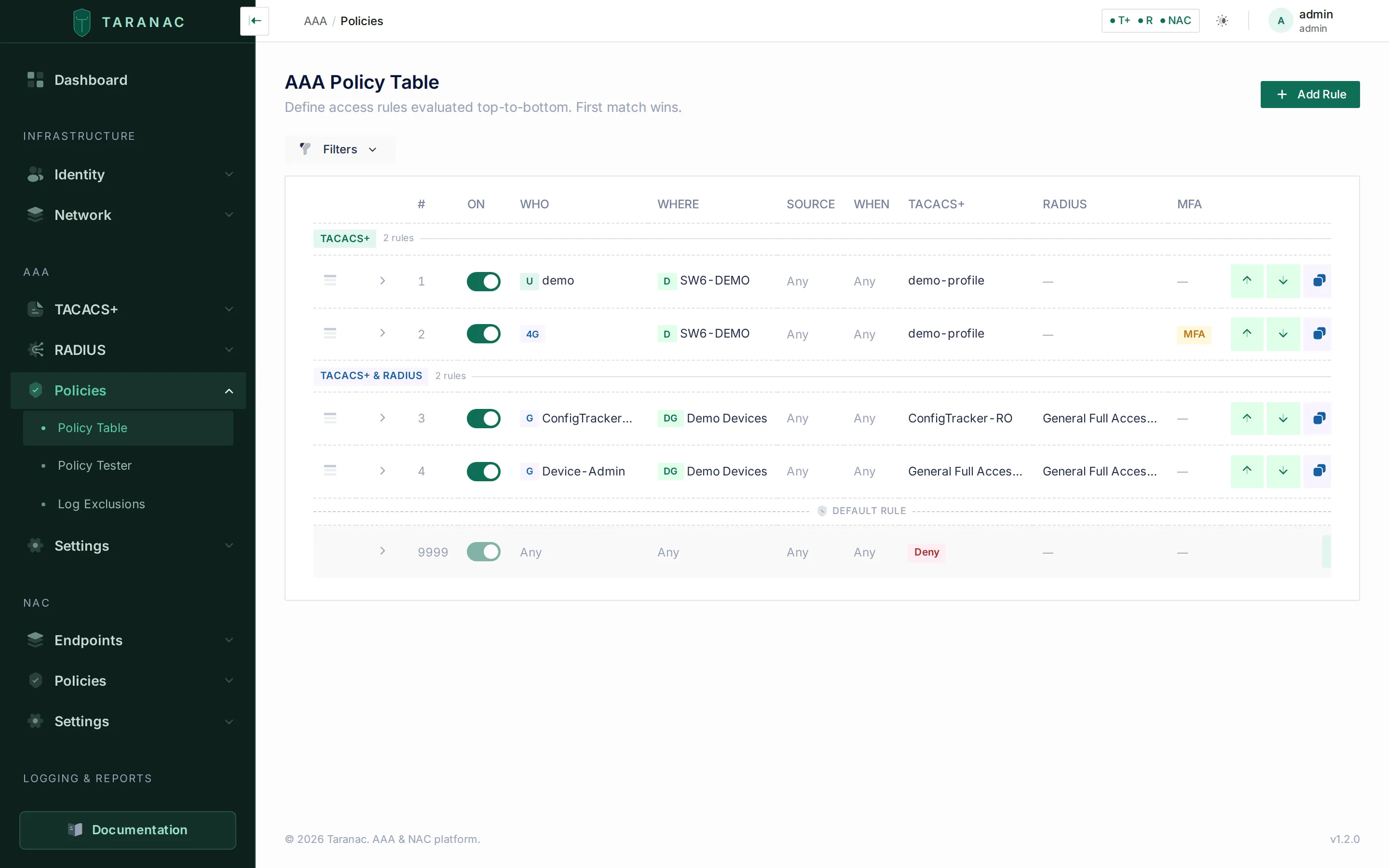 The AAA policy table: each row is a rule; columns show the match dimensions and the TACACS+ / RADIUS action; the pinned default sits last.
Test before you trust
Section titled “Test before you trust”Building the rule order by hand is error-prone, so Taranac includes a policy tester. You give it a simulated request — protocol, username, device IP (the address the device sends from), source IP, access type (remote/console), and an optional timestamp — and it shows which rule matched, why, and the resulting action and profile.
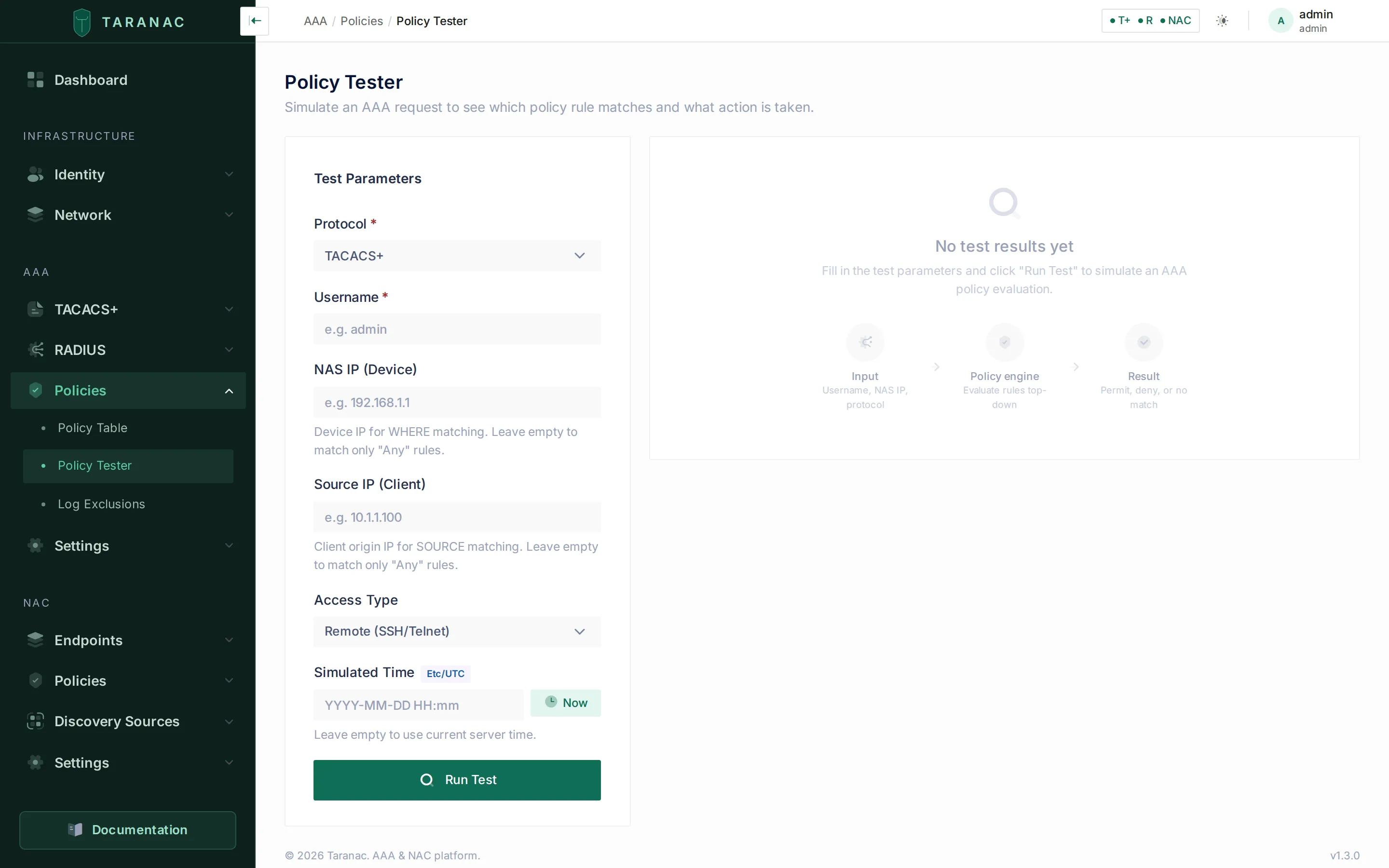 The policy tester replays a simulated request through the live table and reports the first matching rule.
Putting it together: a request’s life
Section titled “Putting it together: a request’s life”- A network device sends an AAA request to Taranac (TACACS+ over TCP 49, or RADIUS over UDP 1812).
- Taranac authenticates the user against the identity store (local hash or LDAP).
- Taranac evaluates the policy top-down; the first rule whose WHO/WHERE/SOURCE/WHEN all match wins, and may require MFA.
- The winning rule’s per-protocol action decides the outcome: deny, authenticate-only, or assign a profile.
- The result — and any later commands or session activity — is recorded as accounting in the logs.
For TACACS+, step 1 has a gate in front of it: the connection must come from an inventoried device and decode with its key (or complete the TLS handshake). A connection refused there never reaches authentication; it is a row with its reason in the authentication log.
Common scenarios
Section titled “Common scenarios”- Network admins, full CLI access. Match WHO = “Network Admins” group, WHERE = any (or a device group), TACACS+ action = profile “General Full Access (priv 15)”. Add a RADIUS profile too if those admins also reach devices over RADIUS.
- Read-only NOC / helpdesk. Match the NOC group → TACACS+ profile “General Read-Only (priv 1)” with a read-only command set.
- Console fallback during outages. A TACACS+ rule with SOURCE = console, granting a break-glass group elevated access only from a physical console port.
- Contractors, business hours only. WHO = contractors, WHEN = a “Business hours” time range, MFA = required; a later/broader rule (or the default) denies them outside that window.
- Lab fleet by subnet. Define a device whose address is a subnet, target it in WHERE, and a single rule covers every NAS in that range.
When to use what
Section titled “When to use what”| You want to… | Use |
|---|---|
| Control who can log into a switch/router CLI | TACACS+ profile + policy rule |
| Restrict which commands an admin may run | TACACS+ profile with a command set |
| Allow break-glass only from the physical console | Policy rule with SOURCE = console (TACACS+) |
| Escalate privilege on a device that only speaks RADIUS | The global RADIUS enable password — see RADIUS |
| Authenticate VPN / wireless / 802.1X-style network access | RADIUS profile + policy rule |
| Return a VLAN or vendor attribute on access | RADIUS profile (VSAs) |
| Require a second factor for a sensitive group | Policy rule with MFA = required |
| Limit a rule to certain hours | Policy rule with WHEN = time range |
| Apply one config to a whole rack/site | Device group, or a subnet-addressed device, in WHERE |
Related
Section titled “Related”- TACACS+ — templates, profiles, command sets, enable inheritance
- RADIUS — templates, profiles, reply attributes
- AAA policy — the rule table, ordering, MFA, and the tester
- Network devices — devices, device groups, shared secrets, protocol flags
- Logging — authentication, authorization, and accounting records
- Taranac on GitHub