

Scanner
Every other discovery source waits for something to come to it: the DHCP Probe waits for a request, the Web Probe asks a system you own, and SNMP asks the switch. The Scanner is present on the wire itself. It hears what devices announce and, where you allow it, asks them what they are. It covers what the other sources miss: the printer, the camera, the server with a static address, and the laptop that has not asked for a lease since Monday.
Presence only works from inside the broadcast domain, so a scanner is always a site collector and never the core. The Scanner is found under NAC → Discovery Sources → Scanner, and what it finds is in the journal under NAC Logs → Scanner.
Key concepts
Section titled “Key concepts”| Term | What it means |
|---|---|
| Scanner | A connected collector, which reports every interface of its host. Every standalone collector is a scanner. Nothing is switched on at install time. |
| Interface | A physical port, a VLAN sub-interface or virtual plumbing, as the collector’s kernel reports it. Every interface can listen. An interface with an IPv4 address can also scan. |
| Zone | One rule: a scanner, one or more of its interfaces, and the methods to use there. It has a name that is unique across the installation. A zone with an active method is the consent to send. |
| Method | Listen, Discover, Identify or Deep. These are four independent choices, not steps on a ladder. |
| Finding | One device on one wire, as one scanner knows it: one row per scanner, interface and MAC, updated on every sighting. It records current state, not a stream of events. |
| Exclusion | A device, or an endpoint group, marked not to be scanned actively. The device can still be heard, but no active method sends it anything. |
How it works
Section titled “How it works”1. The collector reports its machine
Section titled “1. The collector reports its machine”A connected collector describes every interface of its host: the name, what the kernel says it is (Physical, VLAN or Virtual), whether the link is up, its MAC, its first IPv4 address, and for a sub-interface the VLAN tag and the parent it runs on. It also reports whether nmap is installed and which version.
- The list of interfaces is read once, when the collector starts. A container host creates and removes
vethpairs all day, and a list that followed them would change on your screen constantly. An interface you add appears after you restart the collector. Link state and addresses are read again on every report. - An interface that disappears is shown as down until the collector restarts. Running
netplan applyrecreates VLAN sub-interfaces, and this rule keeps that from wiping the zones built on them. After a restart, an interface that is really gone is removed from every zone that used it, a zone left with no interface is deleted, and each change is written to the audit log. - The VLANs seen on a trunk are reported too. The collector samples the 802.1Q tags that arrive on each physical interface, and the scanner’s card lists them as VLANs in traffic. A VLAN that already has a sub-interface on this machine is shown muted. A VLAN that has none is highlighted, and Sub-interfaces for N VLAN(s)… opens a ready netplan file for exactly those VLANs (see Scanning a trunk). The list covers recent traffic only: a VLAN stays on it for an hour after it was last heard. A VLAN missing from the list does not prove the trunk doesn’t carry it.
The one thing you state per interface is its VLAN (Scanners tab → the scanner). A sub-interface’s tag is filled in automatically. An access port’s frames carry no tag, so only the person who patched the port knows its VLAN. Type it in, and it labels everything found on that wire. Every change is audited.
2. You build zones in the core
Section titled “2. You build zones in the core”On the Zones tab, Add zone asks for a Zone name, a Scanner and its Interfaces, and What to do: the methods. Two rules follow from the machine rather than from the form:
- An interface with no IPv4 address can only listen. Nothing can be sent from it, so the other methods are shown disabled. That is how you learn that the missing address is the reason. A trunk’s parent usually has no address: listen on it, and scan from its VLAN sub-interfaces.
- Deep needs nmap on that scanner. Without it, the method stays visible and disabled.
Two zones on one scanner may not name the same interface. Zone is active pauses a zone without losing its settings. A zone stays on the scanner it was created with. To move it, create it on the other scanner and remove the old one.
Saving a zone is the permission to send packets, and it is audited: the audit log records who created, changed or removed the zone and with which methods. A saved change reaches the site within seconds, and stopping a zone stops its socket there. The collector listens only on interfaces a zone names. Capturing traffic on a wire nobody chose would be wrong even though nothing is sent.
3. The methods
Section titled “3. The methods”A zone performs every method you tick, on every interface in it. The methods are independent. Listen + Deep, for example, means: hear who announces themselves, then look closely at exactly those hosts, without ever sweeping the subnet.
| Method | What goes on the wire | What it learns |
|---|---|---|
| Listen | Nothing. A raw socket reads the frames that arrive on the interface. | IP and MAC of every host that speaks ARP, which is nearly all of them. Names, models and service types from mDNS. The SERVER line and model from SSDP/UPnP announcements. The Windows name and workgroup from NetBIOS. The switch and port a host is attached to, and a device’s own self-description, from LLDP and CDP. |
| Discover | For each address in the interface’s subnet, one empty UDP datagram to the discard port (9), paced in small batches. This makes the collector’s kernel resolve the address over ARP. The replies are read by the listening socket. Then one reverse DNS lookup per host, against the collector’s own resolvers. | Every host that is switched on, including ones that never speak, with MAC, manufacturer (from the OUI database) and a DNS name where the site keeps records. |
| Identify | Per host found: TCP connections to a short port list (by default 22, 80, 135, 443, 445, 3389, 8080, 8443, 515, 9100, 161), opened and closed cleanly. Reads of the greeting on those ports. Three unicast questions: a NetBIOS node-status query (UDP 137), a unicast mDNS / DNS-SD query (UDP 5353) and an SSDP M-SEARCH (UDP 1900). | Which common ports are open. The SSH banner, the HTTP Server header and the names in a TLS certificate. The names a quiet laptop or phone gives when asked directly, filed exactly as if it had announced them. |
| Deep | nmap, run only against hosts already found and never as a sweep: -sV -O --top-ports 200 -T3, with version intensity from Settings (default 5). No scripting engine and no vulnerability probes. At most 5 minutes per host. | The product and version behind each open port, and an OS guess with nmap’s own confidence. |
A few details matter in practice:
- Discover also listens. A leg with Discover opens the listening socket, because that is where the sweep’s replies arrive, so a Discover zone also records what the leg hears.
- Identify and Deep aim at hosts the scanner has already met on that interface, whether by listening or by Discover. Ticked alone, on a quiet leg, they have little to work on.
- A device seen for the first time is scanned at once. Otherwise it waits out the re-scan interval (one hour by default), and the wait is remembered on disk, so a restart does not rescan the whole estate. A device that appears while a long pass is running is picked up on the next tick, without waiting for the pass to finish.
- The load is limited per device. Identify works on up to 32 hosts at a time with 1.5-second timeouts. Deep runs 4 to 8 nmap processes, depending on the collector’s CPU. Discover refuses a subnet larger than a /16.
- An nmap that may not fingerprint (missing
cap_net_raw) still runs the service scan without-O, and the transcript says why the OS guess is absent.
4. Exclusions
Section titled “4. Exclusions”Some equipment does not survive being probed: old printers, PLCs, medical devices. Mark it on the endpoint (Do not scan this device actively) or on an endpoint group (Do not scan anything in this group actively). If either the device or any group it belongs to says no, the no wins.
- An excluded device’s address is left out of the Discover sweep, and Identify and Deep never target it, including when someone presses Scan this zone now.
- Listening continues, because listening puts nothing on the wire. The device still appears in the journal with what it announced.
- A group exclusion is a policy, not a note about one machine. It applies to equipment nobody has met yet as soon as classification places it in the group.
- An exclusion reaches the site within seconds, just like a zone change.
- The one deliberate exception is a person scanning that single device on demand from the journal. That is allowed because someone asked. The transcript records this device is marked as not to be scanned — running anyway, because you asked, and the request is audited.
Exclusion is by MAC, and a site is told only about the excluded devices it has already met. A device a scanner has never seen cannot be recognised as excluded yet, so on the very first Discover pass of a new zone it receives the single sweep datagram like every other address. Keep equipment that must never receive a packet in a zone that only listens.
5. What reaches the rest of Taranac
Section titled “5. What reaches the rest of Taranac”Hearing a device makes sure it has an endpoint. A MAC no endpoint has is created with status unknown, which is the honest status: the device was heard and nothing more. Surfacing such devices is the whole point of the journal. Each sighting also marks the device for Device Profiling, so its profile follows within seconds.
The scanner supplies evidence only and never states an answer. The rules decide what a banner means. The signals it gives the profiler are: open ports, the banners on them, the nmap OS guess and service lines, UPnP SERVER lines, mDNS service types, names and model identifiers, the NetBIOS workgroup, and LLDP/CDP self-descriptions. For each method, the newest reading is used. A port list from a month ago on another wire is not treated as a second witness. The shipped rules can name a Windows machine from ports 135 and 445 and its banners, with no DHCP relay, portal or directory involved. See Profiling rules for writing your own.
The Scanner page
Section titled “The Scanner page”Zones: every zone with its Scanner, Interfaces, Methods, Enabled state and Activity: Idle, Queued, or the method and interface in progress with a count and a percentage. A zone whose interface is down or has lost its address is flagged (Down, Address lost). With the scan permission, Scan this zone now re-runs the zone’s active methods over every host its scanner knows. It can be pressed at most once a minute per zone, and every request is audited. What does each method do? in the zone drawer explains each method’s packets, findings, cost and requirements.
Scanners: every connected collector with its Status, nmap (installed / not installed), Zones and Interfaces, and a note when one is busy (identify running). The scanner’s card lists its interfaces with their kind, Address, what the interface Can do (Listen and scan or Listen only), the zones that use it and its VLAN. Virtual interfaces are folded away by default.
Settings: four values that apply to every scanner. They reach the sites with the next report, and nothing needs restarting.
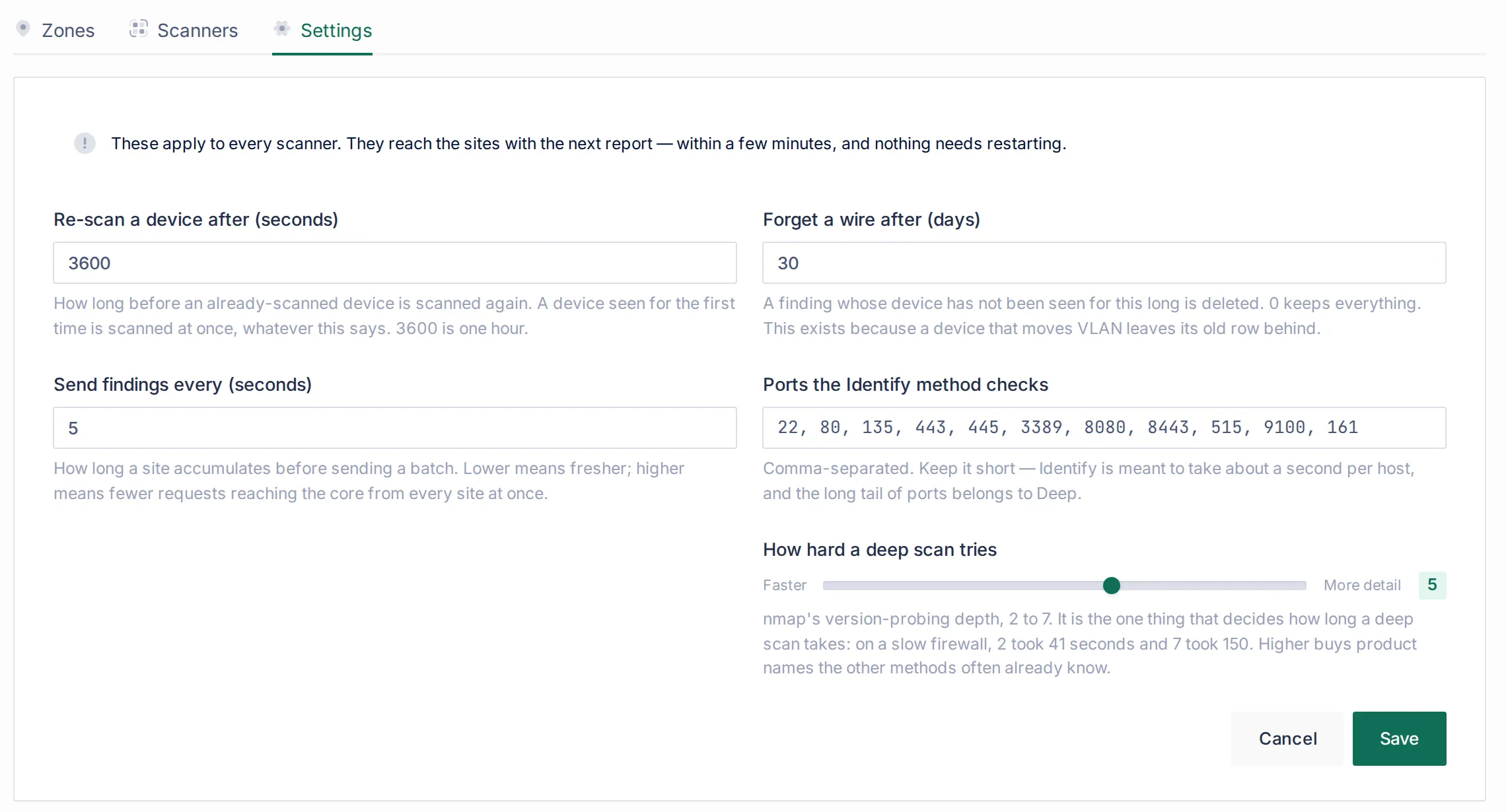
| Setting | Default | Range | Meaning |
|---|---|---|---|
| Re-scan a device after (seconds) | 3600 | 60 – 604800 | How long before an already-scanned device is scanned again by the active methods. A new device is scanned at once, whatever this says. |
| Send findings every (seconds) | 5 | 1 – 300 | How long a site collects sightings before sending a batch. Sightings are de-duplicated within the batch. |
| Forget a wire after (days) | 30 | 0 = never | A finding whose device has not been seen for this long is deleted. This exists because a device that moves VLAN leaves its old row behind. |
| Ports the Identify method checks | 22, 80, 135, 443, 445, 3389, 8080, 8443, 515, 9100, 161 | up to 32 ports | Keep it short: Identify should take about a second per host. Add the ports your estate cares about, for example 104 for DICOM or 102 and 44818 for industrial controllers. |
| How hard a deep scan tries | 5 | 2 – 7 | nmap’s --version-intensity. It is what decides how long Deep takes: against one slow firewall, 2 took 41 seconds and 7 took 150. |
Viewing needs the Network Scanner view permission. Creating and changing zones needs Manage zones. Pressing a scan button needs Run a scan, which is kept separate on purpose, because a person pressing it puts packets on the network right away.
The journal: NAC Logs → Scanner
Section titled “The journal: NAC Logs → Scanner”The journal answers “what is on that wire, and when did I last see it”. There is one row per device, and paging counts devices:
| Column | What it shows |
|---|---|
| MAC address | With a link to the device. |
| Authorisation | Unknown: no endpoint, or an endpoint nothing has vouched for. Known: NAC knows it and it is not blocked. Blocked: explicitly forbidden, and on the wire anyway. This is worked out when you view it, so blocking a device changes its row at once. |
| IP address, VLAN, Last seen | From the newest sighting. |
Filter by Authorisation and Zone, or search by MAC, address or scanner. Arriving from a zone narrows the journal to that zone’s wires.
Opening a device shows:
- Where it was seen: every scanner and interface that heard it. Each scanner is a separate witness with its own row, seen by 2 scanners, and the VLAN it was heard in. A frame heard tagged on a port is labelled Heard tagged on this port — it carries more than one VLAN, and an untagged one is labelled on this port’s own VLAN. Opened from a zone, the drawer notes how many other places the device was heard, outside this zone.
- What the scanner learned, method by method (Found by), in plain words (the Windows name it registered, the Cisco neighbour it is plugged into).
- A method that ran and found nothing says so. For example: Ran — nmap found nothing open, Ran — none of the ports it knocks on answered, and the device did not answer when asked its name, or Ran — the site’s DNS has no name for this address. If the latest run found nothing, the drawer says so and still shows what the run before it found, because a device that was off during a scan has not changed. A method that has never run on the device is marked never run.
- Scan buttons per method (with Run a scan): Identify again, Deep again, and so on. The request is queued, the collector checks for it every few seconds, and you can watch the full transcript: what was sent, which resolvers were asked, and what came back. The same device can be scanned at most once every 5 seconds, and a request not answered within 10 minutes stops being shown as in progress.
Installing nmap for Deep
Section titled “Installing nmap for Deep”Taranac does not ship nmap. Commercial redistribution requires a licence from its authors that Taranac does not hold, so the collector image never contains it. Instead, the collector host builds its own image from its own package mirrors:
./collector-join.sh --core <url> --enrollment-token <token> --with-nmapWith --with-nmap, or by answering y when the script asks install nmap on this scanner? in a terminal, collector-join.sh:
- builds a derived image
…-nmapfromDockerfile.nmap, which ships beside the script, on top of the collector image the install uses. nmap comes from the host’s own distribution mirrors, and the binary is givencap_net_rawandcap_net_bind_service, the capabilities the OS fingerprint needs. - checks that nmap actually runs in that image as the unprivileged collector user (
nmap --version), and stops with an explanation if it does not. A successful build alone does not prove that nmap runs. - records the image as
COLLECTOR_IMAGEin.env.collector, so later updates keep using it.
To do it by hand, build the image with docker build --build-arg BASE_IMAGE=<collector image> -t <image>-nmap -f Dockerfile.nmap . and set COLLECTOR_IMAGE in .env.collector. The collector finds nmap on PATH and offers Deep on its next report. Without nmap, a scanner offers Listen, Discover and Identify.
Collector networking
Section titled “Collector networking”The collector’s compose file uses the host’s network by default (COLLECTOR_NETWORK_MODE=host). This is what lets the scanner see the host’s real interfaces, VLAN sub-interfaces and trunk tags, and it is also what makes the collector reachable as a DHCP listening point. A collector has no inbound service and publishes no port, so Docker’s network isolation adds little.
COLLECTOR_NETWORK_MODE=bridge gives the container its own isolated network, at a cost. Inside a bridge network the container sees only its own Docker interface, not the site’s wires, so there is nothing useful to build a zone on, and the DHCP listening point cannot be reached.
Scanning a trunk
Section titled “Scanning a trunk”A trunk can be used in three ways, and they can be mixed on one machine:
| The trunk interface… | What you get |
|---|---|
| as it is, with no address | Listen only, but it hears every VLAN on the trunk, and each finding is labelled with the tag of the frame it arrived in. |
| plus a VLAN sub-interface with an address, per VLAN | Active scanning of that VLAN, from its sub-interface. |
| itself carrying an address in the native VLAN | Scans the native VLAN and still hears and labels the tagged VLANs. |
Sub-interfaces are needed only for the VLANs you want to scan actively. On the scanner’s card, Sub-interfaces for N VLAN(s)… generates a netplan file for the VLANs it has seen but cannot scan. Give each sub-interface a free static address from its VLAN, outside any DHCP range, with no gateway and no DHCP. A second default route would take the collector’s path to the core away from its management interface. Apply the file with sudo netplan apply, then restart the collector (docker restart taranac-collector) so it reads the new interfaces.
Which method, where
Section titled “Which method, where”Listening is safe everywhere. Everything else is a decision about a particular network, and the zone is where you make it.
| Network | Suggested methods | Why |
|---|---|---|
| Any segment you want visibility into | Listen | Sends nothing. Nearly every host speaks ARP, and many announce far more. |
| User and office VLANs | Listen + Discover + Identify | Finds silent laptops and phones and gets them to name themselves, at a few dozen packets per host. |
| Server and infrastructure VLANs you own | + Deep | Service versions and an OS guess where software inventory matters. Tell the server team, because Deep is noisy in IDS logs. |
| Printer, camera and IoT VLANs | Listen + Identify, Deep only after a trial | Identify’s port list covers printing (515, 9100) and web interfaces. Some embedded devices stall under a version scan. |
| Industrial (OT), medical, building control | Listen only, plus exclusions | Some controllers are known to stall under a version scan, and not every device tolerates even a connection attempt. Exclude the fragile groups, and use a listen-only zone for anything that must never receive a packet. |
| A guest or untrusted VLAN | Listen, optionally Discover | You learn what is there without interacting with devices you do not own. |
| Someone else’s network (a tenant, a partner) | None without their consent | A zone with active methods is your organisation’s consent to send, and the audit log records who gave it. |
Before enabling active methods on a segment for the first time, tell the people who watch its IDS. Discover sends about 250 datagrams for a /24 over a few seconds, Identify a few dozen packets per host, and Deep thousands.
Reference
Section titled “Reference”| Item | Value |
|---|---|
| Menus | NAC → Discovery Sources → Scanner (Zones, Scanners, Settings); NAC Logs → Scanner |
| Runs on | Standalone collectors only |
| Listen protocols | ARP, mDNS, SSDP, NetBIOS, LLDP, CDP (receive only) |
| Discover | Empty UDP datagram to port 9 per address; reverse DNS; subnets up to /16 |
| Identify | TCP connect to the configured ports (max 32), banners, TLS names; unicast NetBIOS (UDP 137), mDNS (UDP 5353), SSDP (UDP 1900) |
| Deep | nmap --privileged -sV -O --top-ports 200 -T3 --version-intensity <2–7> (without -O where not permitted); 5 minutes per host |
| On-demand limits | 5 seconds per device; 60 seconds per zone; in progress for at most 10 minutes |
| Permissions | Network Scanner: View scanners, Manage zones, Run a scan |
| Retention | Findings: 30 days since last seen (job Scanner Finding Retention) |
| Collector networking | COLLECTOR_NETWORK_MODE = host (default) or bridge |
| nmap | Not shipped; collector-join.sh --with-nmap or Dockerfile.nmap |
Related
Section titled “Related”- Discovery & profiling: where the scanner fits among the sources.
- DHCP Probe: the passive source for everything that takes an address.
- SNMP: switch neighbour and forwarding tables, the other way to learn where a device is plugged in.
- Device profiling and Profiling rules: what the scanner’s evidence becomes.
- Endpoints: the per-device and per-group exclusion.
- Collectors and Deploying a collector.