

EAP-TTLS for directory users
EAP-TTLS is the answer to a problem the other methods leave open: authenticating a directory user with their existing password, with no certificate on the device, no domain join, and nothing password-equivalent stored on the NAC server.
PEAP can authenticate a directory user too, but only
where something can answer for the account’s NT hash: Active Directory needs
this installation to hold a machine account, and FreeIPA needs an ACI granting a
read on ipaNTHash. EAP-TLS can as well, and it
costs a PKI and a certificate on every device. EAP-TTLS asks for neither: the
user types the password they already have, and Taranac verifies it by binding
to the directory as that user.
That makes it the natural fit for the population that fits neither of the others — contractors on unmanaged laptops, staff on devices that will never be domain-joined, anything where certificate enrollment is more work than the access is worth. And for OpenLDAP, Google Workspace and generic LDAP it is the only password method there is: those directories publish no NT hash by any route, so MS-CHAPv2 — inside PEAP or inside EAP-TTLS — cannot work against them at all. FreeIPA is the one directory type that publishes a readable hash, and Active Directory the one that will verify one for you. Which mechanism applies is decided by the user’s own directory, never by the installation; see MS-CHAPv2 for directory accounts.
How the password is actually checked
Section titled “How the password is actually checked”EAP-TTLS carries three inner methods, and Taranac accepts all
three. Which one runs is decided by what the tunnel actually carries, not by
anything you configure on the server: User-Password is PAP,
MS-CHAP2-Response is native MSCHAPv2, and an EAP-Message is
EAP-MSCHAPv2. FreeRADIUS is configured to propose pap as the TTLS default,
and the two MSCHAPv2 inners take exactly the PEAP path — same NT hash, same
directory rules, same limits.
This guide is about the PAP one, because it is the inner method that reaches every directory type. Its password crosses the tunnel in the clear. That sounds alarming and is in fact the more conservative choice — the reason is worth understanding before you configure anything.
-
The client builds a TLS tunnel to Taranac, validating the NAC server’s certificate exactly as it does for PEAP. Nothing sensitive has crossed the wire yet.
-
Inside that tunnel the client sends the username and password as PAP. It is plaintext within TLS — the same protection your browser gives a password on a login form.
-
Taranac takes that password and, for a directory account, performs an LDAP bind as that user against the directory the account came from — a direct bind as
user@domainon Active Directory, or a bind as the account’s distinguished name (resolved inside the configured search bases) on OpenLDAP, FreeIPA and the other types. The directory decides. Taranac never sees a hash, never stores one, and never needs to. -
For a local Taranac account the same request is verified against the stored argon2id password hash instead. One method, both identity sources.
Step 1 — Confirm the directory side
Section titled “Step 1 — Confirm the directory side”EAP-TTLS leans entirely on your LDAP configuration, so check it before touching a client.
- The directory is configured and reachable under Settings → Integrations →
LDAP, and users are synced — the account must exist in Taranac with
source
ldap(Infrastructure → Identity → Users). A bind cannot be attempted for a user Taranac does not know. - The account is in a group you can name in policy.
- Bind verification fails closed: an unreachable directory means
Access-Reject, never an accept. Plan for that when the directory is the single point of failure for network access. It uses that configuration’s own Connection timeout (default 10 seconds), and each server in the pool is tried once rather than retried forever — the library’s default would hold a RADIUS worker thread for good against a directory that never answers. - An outage and a wrong password are not the same answer. The verdict comes
from what the directory itself said — an
invalidCredentialsresult, or Active Directory’sdata NNNcode inside it — so a refusal is reported asbad_passwordand an outage asdomain_unreachable. Only the first spends the account’s lockout budget; see 802.1X authentication.
Step 2 — Add the policy rule
Section titled “Step 2 — Add the policy rule”-
Open NAC → Policies → Policy Table (
/nac/policies) and look at what is already there. A fresh install ships three rules:# Rule Matches 1 Dot1x Known Users → CorporatePEAP · any user · any endpoint · any device · always → Corp-Default(VLAN 100)2 MAB Known Endpoints → RestrictedMAB · any → MAB-Default(VLAN 300)— Default — Rejecteverything else Both names say Known and both match on any condition — but the method is compared exactly, and neither of them names
eap_ttls. So on a fresh install an EAP-TTLS login is rejected: the password is verified inside the tunnel, the tunnel completes, and policy then falls through toDefault — Reject. The log row readspolicy_rejectand names that rule. That is the expected first result, and it is not a credentials problem. -
Add your rule:
Field Value Rule name EAP-TTLS → Corp-DataMethod EAP-TTLS (802.1X) Action Permit (assign profile) Who your directory group What Any endpoint Where Any device — or restrict to your lab switch When Always Authorization profile e.g. Corp-DataBecause nothing above matches
eap_ttls, the plain Add rule button is safe here: it appends after the last non-default rule and beforeDefault — Reject, so the new rule is reached. That stops being true the moment something broader sits above it — anAnymethod rule, or a second EAP-TTLS rule with wider conditions. Then use the row’s ↑ Insert rule above control instead; Add rule always appends. -
Confirm the order. Evaluation is first match wins, top-down by rule number, with
Default — Rejectalways last. NAC → Policies → Policy Tester (/nac/policies/tester) simulates one request — authentication method EAP-TTLS (802.1X), the username, your switch’s NAS IP — and answers with the rule that matched plus a trace of every rule it walked past. Thirty seconds here beats a port bounce and a puzzled log reading.
If you also run EAP-TLS for the same population, the two rules coexist without interfering: the method condition keeps them apart.
Step 3 — Configure the Windows supplicant
Section titled “Step 3 — Configure the Windows supplicant”Windows 10 and 11 support EAP-TTLS natively — no supplicant to install.
Dialog 1 — the Authentication tab
Section titled “Dialog 1 — the Authentication tab”Set the method to Microsoft: EAP-TTLS, and leave Remember my credentials on: with PAP there is no other way to avoid a prompt (see below).
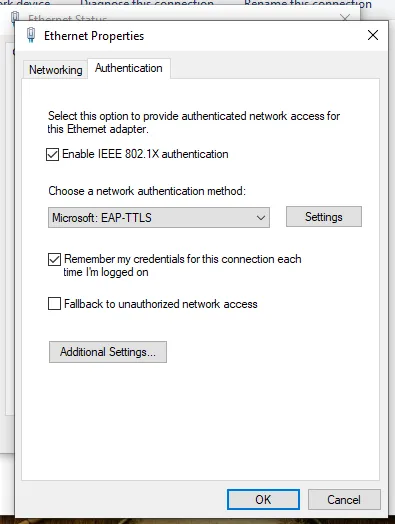 Windows 10 and 11 ship EAP-TTLS natively — the method is simply in the list.
Dialog 2 — EAP-TTLS Properties
Section titled “Dialog 2 — EAP-TTLS Properties”| Setting | Value | Why |
|---|---|---|
| Enable identity privacy | ✅ On, with anonymous | The outer identity travels before the tunnel exists, in the clear. This replaces it with a placeholder and reveals the real username only inside TLS |
| Verify the server’s identity by validating the certificate | ✅ On | The tunnel is the entire security model here — see the tip above |
| Connect to these servers | Leave it empty | Not a typo, and not what you do for PEAP — see the caution below |
| Trusted Root Certification Authorities | The CA that signed the server certificate | Not your client-certificate CA — a different anchor entirely. With the field above empty, this selection is the trust decision |
| Client authentication → Non-EAP method | Unencrypted password (PAP) | The inner method that works against every directory type |
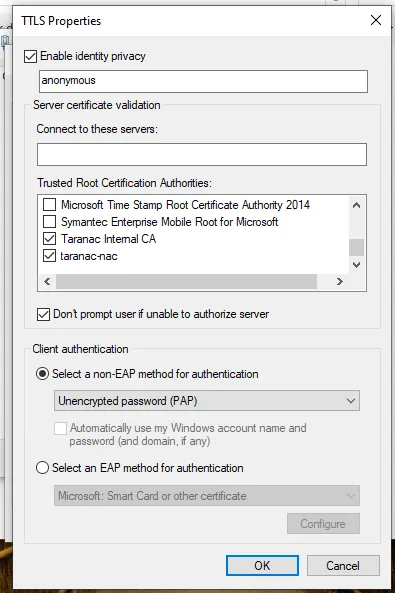 Identity privacy set to
 anonymous, Connect to these servers deliberately empty, the server’s CA trusted, and PAP chosen under non-EAP methods. Note the option directly beneath PAP — greyed out; that is the subject of the next section.
Taranac handles identity privacy properly on an accept: it carries the inner
identity out of the tunnel and evaluates policy against the real username, so the
placeholder costs you nothing in policy matching or in an accepted log row. A
reject is different — the tunnelled reply is not copied out, so a failed
attempt is logged under the outer identity, i.e. anonymous. Worth knowing
before you go looking for a failed login by username.
Dialog 3 — Advanced settings
Section titled “Dialog 3 — Advanced settings”Specify authentication mode → User authentication, with credentials saved. The four modes do not behave the same way under TTLS:
| Mode | Result |
|---|---|
| User authentication | ✅ Works — and the only mode that enables the Save credentials button |
| Computer authentication | ⛔ Windows blocks it in the UI for TTLS; the setting does not save |
| User or computer authentication | ✅ Works, but as pure user authentication — there is no machine phase |
| Guest authentication | ⛔ “Some of the requested changes could not be made”, then a fallback to PEAP with cached credentials, or to MAB |
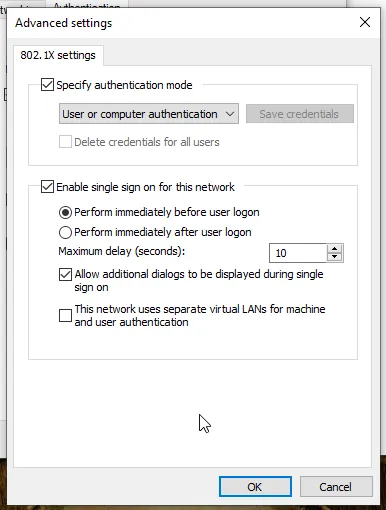 Note that Save credentials is greyed out here — it becomes available once the mode is User authentication rather than User or computer.
Step 4 — Watch it authenticate
Section titled “Step 4 — Watch it authenticate”Bounce the port and open Logging & Reports → NAC Logs → Auth Log. An accept shows EAP_TTLS in the Auth Method column with PAP printed beside it: the inner method is displayed for EAP-TTLS only, because PEAP always tunnels EAP-MSCHAPv2 and repeating it would be noise, while inner PAP means the password crossed the tunnel in the clear and is worth seeing at a glance. Filter on it and “who is still on PAP” becomes a query rather than a guess.
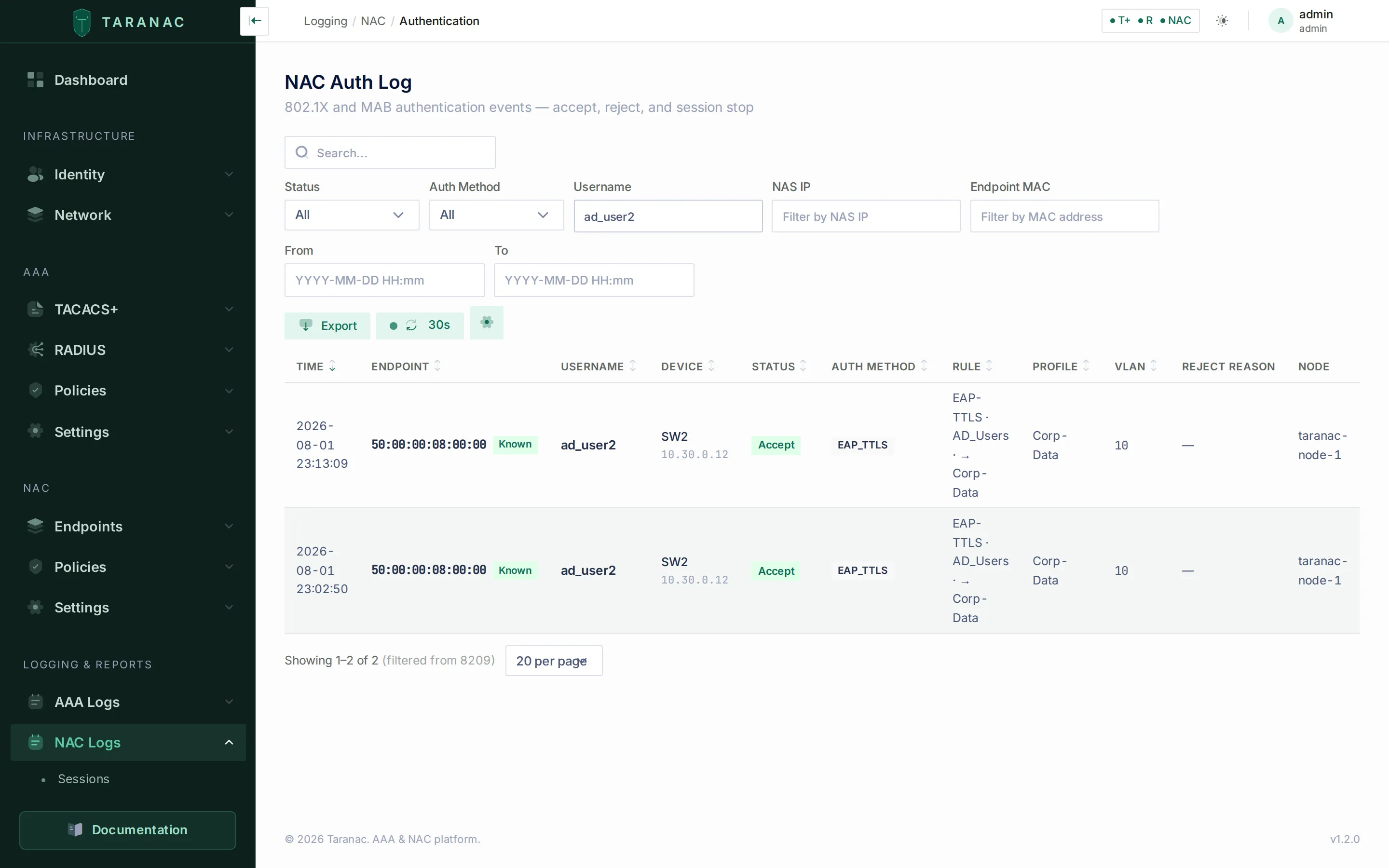 An EAP-TTLS accept for a directory account: the rule that matched (
EAP-TTLS · AD_Users → Corp-Data) and VLAN 10. The username is the real one — identity privacy sent anonymous on the wire, and Taranac resolved the inner identity behind it.
If it fails, the handler names each gate it applies — but the naming lands in two different places, and knowing which is which saves the most time here.
What the NAS is told is a RADIUS Reply-Message. Some switches surface it to
the user; most do not.
| Reply message | What it means |
|---|---|
User not found | No Taranac account matches the inner username — the directory user is not synced |
Account disabled / Account locked | The account exists but its Taranac state blocks it |
Account not yet active / Account expired | Outside the account’s validity period |
Password change required | A local account flagged must change password. Deliberate: the flag gates 802.1X exactly as it gates the web login, so it cannot be side-stepped. Directory accounts delegate this to the directory |
Password required | The inner request carried no password — usually the inner method is not PAP |
LDAP config not found for user | The account is marked ldap but carries no directory reference; re-sync it |
No password configured / Invalid password | A local account with no hash, or the wrong password |
Authentication failed. | The bind was attempted and the directory refused it — a wrong password, or a directory-side restriction |
Domain authentication is temporarily unavailable. | The directory could not be asked at all |
Too many failed attempts; try again later. | Taranac is holding further binds for this identity so the directory does not lock the account out |
Authentication method not supported | The supplicant chose CHAP or MS-CHAPv1 |
What the log shows is a machine token in the Reject Reason column. The NAC Auth Log translates only its own short list of reasons (unsupported EAP methods, EAP-TLS certificate, CRL and OCSP refusals, push MFA); every reason below is printed verbatim. Expect to read tokens here, not sentences.
| Reject Reason | Meaning |
|---|---|
bad_password | The directory refused the bind. Counts against the identity’s hold |
domain_unreachable | The directory could not be asked. Costs no lockout budget and is not treated as a credential attempt |
domain_auth_held | Too many recent failures for this identity — further binds are held so the directory account is not locked out |
chap_unsupported / mschapv1_unsupported | The supplicant chose an inner method Taranac refuses by name, before the account is looked up |
policy_reject | The password was fine. No rule you wrote matched, so Default — Reject did — see Step 2 |
tls_server_cert_rejected | The client refused our server certificate; no password was ever checked |
auth_failed | The catch-all, and where every account-state gate lands: not found, disabled, locked, outside the validity window, must-change-password, no password in the request, or an ldap account with no directory attached |
The distinction that saves the most time is between auth_failed and
bad_password: the first is a Taranac-side gate — most often an account that
never synced — while the second means the request reached the directory and the
directory said no. They send you to completely different places, and the
Reply-Message in the row’s detail tells you which gate produced an
auth_failed.
Troubleshooting
Section titled “Troubleshooting”| Symptom | Cause | Fix |
|---|---|---|
Rejected, reason policy_reject, rule Default — Reject | The password was verified and then no rule matched — the seeded rules cover PEAP and MAB, not eap_ttls | Add the EAP-TTLS rule from Step 2 and re-check with the Policy Tester |
Rejected, auth_failed, reply User not found | The directory user is not synced into Taranac | Check Infrastructure → Identity → Users for the account with source ldap; run a sync |
Rejected, bad_password, password is definitely right | The bind is failing for a directory-side reason, or the wrong directory is attached to the user | Test the same credentials against the directory directly; check the user’s LDAP configuration |
All users fail at once, having worked yesterday, reason domain_unreachable | The directory is unreachable — bind verification fails closed | Check connectivity to the directory before touching anything client-side. This reason spends no lockout budget |
Rejected with domain_auth_held after a few bad attempts | The hold is protecting the directory account from a looping supplicant; it is shared with the PEAP path, because the directory counts both against one account | Fix the stored credential on the client and wait the hold out |
Rejected, reply Password required | The inner request carried no password — the inner method is not PAP | Set Unencrypted password (PAP) in the client’s non-EAP methods |
Local test account rejected, reply Password change required | Must change password is set on it | Clear the flag, or change the password through the portal |
| Windows never sends anything; nothing appears in the log at all | Connect to these servers is filled in — a TTLS-only trap | Empty the field; trust comes from the Trusted Root CA selection |
Connection fails before any log entry, or reason tls_server_cert_rejected | Server certificate rejected by the client — TLS never completes | Same CA fix as PEAP: the right CA, in the Local Machine store, ticked under Trusted Root CAs — but with Connect to these servers left empty |
When to use what
Section titled “When to use what”| Situation | Reach for |
|---|---|
| Directory users, no PKI, unmanaged or mixed devices | EAP-TTLS/PAP — existing passwords, nothing stored server-side, no domain join |
| Users in OpenLDAP, Google Workspace or generic LDAP | EAP-TTLS/PAP — the only password method those directories can serve |
| Directory users on managed domain machines | EAP-TLS — no passwords at all, and pre-logon machine authentication |
| Active Directory users, and this node is domain-joined | PEAP — the Windows default, and the password never leaves the domain |
FreeIPA users, with an ACI granting a read on ipaNTHash | PEAP — same, with no domain and no Samba |
| Local Taranac accounts, simplest possible setup | PEAP — but accept that an NT hash is stored, or use EAP-TTLS/PAP against the argon2id hash |
| Devices with no user at all | MAB with endpoint classification |
Related
Section titled “Related”- 802.1X authentication — the four methods compared
- LDAP directories — directory configuration and sync
- NAC policy — conditions and results
- 802.1X with PEAP — server certificate trust in detail