

Collectors
A collector does work on the core’s behalf where the devices are. It collects device configurations for the Configuration Tracker, polls devices over SNMP, runs Web Probe passes, can be a DHCP Probe listening point, and runs the Scanner. Every installation has one built into the core; you add standalone collectors at sites the core cannot reach, or should not have to wait on.
Collectors are a platform primitive rather than part of any one feature, so they live under Settings → System → Collectors and carry their own permission section.
Key concepts
Section titled “Key concepts”| Term | Meaning |
|---|---|
| Embedded collector | The collector built into the core, named default and shown as Local (built-in). Runs on whichever node holds the leader role. Always present, always the default, cannot be deleted. |
| Standalone collector | A container at a site, installed with collector-join.sh or the appliance’s module installer. Dials out to the core; listens on no port the core would use. |
| Enrolment token | A reveal-once secret that lets one standalone collector attach to the core the first time. Single-use, with a lifetime you choose. |
| Identity | An Ed25519 key the collector generates for itself. The core pins its public key at enrolment and checks a signature on every request. |
| Outbox | The collector’s on-disk queue of results the core has not acknowledged yet. The only data a collector keeps. |
| Snapshot contract | How a configuration is scrubbed, hashed and fingerprinted. Collector and core must agree on it, or configuration collection stops for that collector. |
What a collector does
Section titled “What a collector does”- Config collection sw-core-1 · ssh
- SNMP polling ap-floor2 · udp/161
- DHCP listening relay → udp/67
- Scanner zone ens19.20
| Job | Who picks the collector | Standalone | Embedded |
|---|---|---|---|
| Configuration collection | Each source and tracked-config address names its collector. | Yes | Yes |
| SNMP polling | The SNMP profile names who polls: the core or a specific collector. There is no fallback from one to the other. | Yes | The core polls itself |
| Web Probe | Each Web Probe source runs on one collector, the built-in one or a site’s. | Yes | Yes |
| DHCP listening point | Switched on per machine in the collector’s environment (COLLECTOR_DHCP_PROBE_ENABLED, off by default). See DHCP Probe. | Yes | The core’s nodes listen as nodes |
| Scanner | Zones are built in the core from the interfaces the collector reports. See Scanner. | Every standalone collector is a scanner | No |
A collector decides none of this itself. It reports what it can do and what its machine has, and the core hands it work. A standalone collector holds no database: once the core acknowledges a result, it is gone from the site.
Why a standalone collector
Section titled “Why a standalone collector”Reach. A collector inside a segment reaches devices the core cannot route to: a branch behind NAT, a DMZ, an OT network. Scanning and hearing broadcast DHCP only work from inside the broadcast domain at all.
Taking the waiting off the core. Collecting a fleet is hundreds of small, slow sessions. Each one opens, sends commands and then waits: on a CLI to echo back, on a slow WAN link, on a device that takes thirty seconds to answer. A standalone collector does that waiting at the site and hands the core the finished result. The work is I/O-bound, so what the core is spared is mainly the fan-out of long-lived, mostly idle sessions and the retries around them.
Nothing left behind. Scrubbing happens at the site, so raw configuration bodies are never written down there, and device credentials are never stored there. See Security posture.
Where it lives and who may manage it
Section titled “Where it lives and who may manage it”Settings → System → Collectors lists every collector. Access is governed by the Collectors permission section in the System category of RBAC, separate from the Configuration Tracker’s sections: running collectors is a different trust from curating a device inventory.
| Action | Permission |
|---|---|
| See the list and a collector’s page | collectors → view |
| Create a standalone collector | collectors → create |
| Rename it, issue an enrolment token, re-enrol, revoke its identity | collectors → edit |
| Delete it | collectors → delete |
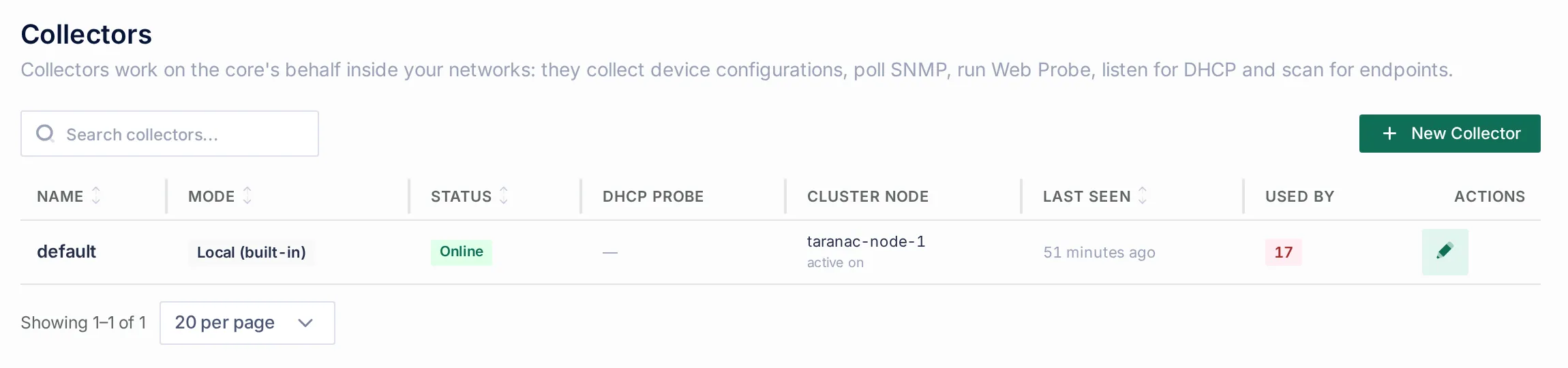 The Collectors list. The page’s own description names the jobs a collector does. DHCP Probe says which sites listen for DHCP; Cluster node says which node a collector is connected to (standalone) or active on (embedded); Used by counts what references the collector.
The list
Section titled “The list”| Column | What it shows |
|---|---|
| Name | Unique. The built-in collector is default. |
| Mode | Local (built-in) or Standalone. |
| Status | Online, Offline or Unknown. See Health. |
| DHCP Probe | Listening with the bound address and port, Not listening with the reason (for example, the port is taken), or — for a collector that has never reported a DHCP listening point. — does not mean “off”: the core cannot tell an off probe from a collector that never mentioned one. |
| Cluster node | A standalone collector is connected to the node that served its last poll. Under HA the nodes share no client-facing address and each collector talks to one node, so this tells you whose outage explains a quiet collector. The embedded collector is active on the current leader and moves with it at failover. |
| Last seen | The last poll of a standalone collector, the liveness signal. |
| Used by | How many objects reference the collector. |
A collector’s page
Section titled “A collector’s page”The General card holds the name and Site / Location, a free-text note of where the collector runs (not a URL: the core never calls a collector). The Identity card has Issue enrollment token (Re-enroll once it has an identity) and Revoke identity.
The Details rail shows mode, status, the connected node, last seen with the address it dialled in from, Version as core vX · collector vY with a compatibility badge, the identity state, fingerprint and issue time, whether nmap is installed (it enables the scanner’s Deep method), and the DHCP Probe state with its socket. The Interfaces card lists what the collector’s machine has, as the collector reported it when it started: each interface’s type (Physical, VLAN, Virtual), state, address, VLAN and MAC, and whether a scanner zone can Listen only or Listen and scan there.
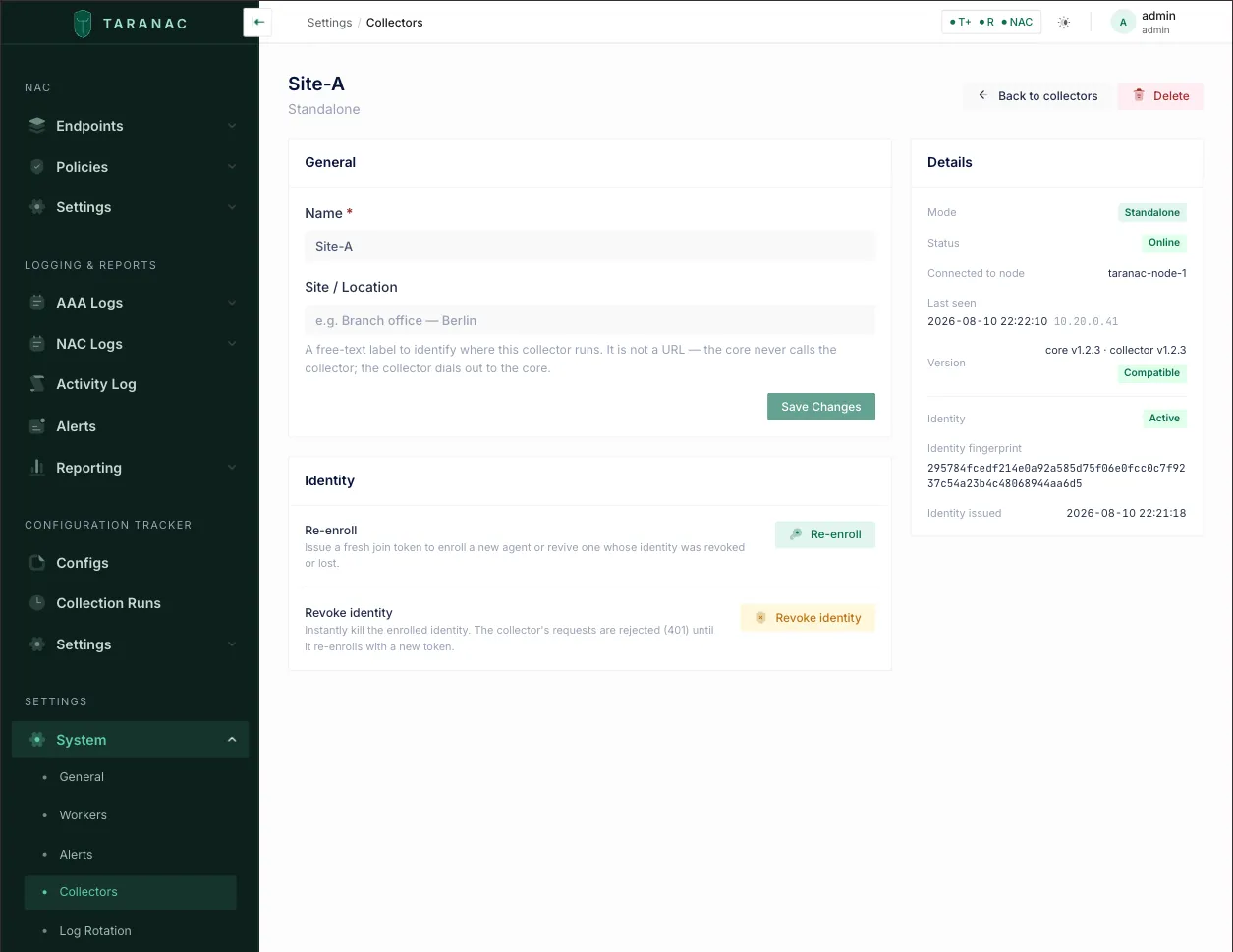 A standalone collector’s page once it has enrolled. The Details rail on the right is where a deployment shows it worked.
How a standalone collector attaches
Section titled “How a standalone collector attaches”- You create the collector under Settings → System → Collectors → New Collector. It reads Unknown until it first reports.
- On its page, Issue enrollment token opens one drawer: the Core URL the collector
should dial, the Token lifetime (minutes) (default 60, at most 7 days), and
Build nmap on the collector host, which adds
--with-nmapto the command. Issue token then shows, once, the join command with the address and token filled in. - On the site host,
collector-join.shchecks the address and the token against the core before it installs anything, then starts the container and waits until the collector has attached. - On first start the collector generates its Ed25519 key, redeems the token, and the core pins the key as its identity. From then on every request is signed.
The full walkthrough, every flag and the environment switches are in Deploy a standalone collector.
Security posture
Section titled “Security posture”A standalone collector adds as little attack surface as possible to the segment it sits in:
- Dial-out only. The collector opens every connection. It long-polls the core for work and posts results back; the core never connects to it. Nothing needs opening inbound to the site or the core. The one listener it can have is the optional DHCP listening point, and that faces the site’s relays, not the core.
- An identity it made itself. It enrols with a one-time token, then signs every request with a key it generated and never sends. Each request carries a timestamp accepted within a five-minute window; a verbatim repeat inside that window is rejected.
- Credentials only for the job at hand. Device credentials arrive in the poll response for that work, are used in memory, and are never persisted, including just-in-time passwords, which rotate once the collector’s work drains.
- Trust in the core is pinned. The collector accepts the certificate the core presents on first contact and only that one afterwards. A CA bundle is the stricter alternative.
- A durable outbox, nothing else. Results wait on disk until the core acknowledges them and are delivered idempotently, so a restart or a link outage neither loses nor duplicates a capture. A stolen collector volume yields its own identity and already-scrubbed results, nothing that opens a device.
Health
Section titled “Health”Status is derived when the page is read, from the last time a collector reported in. A standalone collector’s job poll is its heartbeat.
| Status | Standalone | Embedded |
|---|---|---|
| Online | Reported within the last 15 minutes. | A writable primary is observed (always, on a single node). |
| Offline | No report for 15 minutes: many missed polls, a deliberately coarse signal. | No node is sweeping: a failover window or a quorum loss. |
| Unknown | Has never reported: created, not yet enrolled or started. | The cluster could not be reached at all. |
A standalone collector that goes Offline raises one
ncm_collector_offline alert, one per collector, carrying the
number of tracked configs it serves. The check runs every 5 minutes. It never fires for the
embedded collector, or for a collector that has never reported. Discovery sources name the
same condition in their own terms: a Web Probe pass or an SNMP result reads Collector
silent when the collector that should have done the work is not reporting in, which
points at the collector rather than the device.
Version compatibility
Section titled “Version compatibility”A standalone collector reports its release version and what it can do on every poll.
- The snapshot contract gates the collector. If the collector’s contract differs from
the core’s, in either direction, the core fail-closes: it hands that collector no work and accepts nothing from it until the two agree. A collector writing
history the core would hash differently is worse than one that collects nothing. A refused
poll is not a heartbeat, so within 15 minutes the collector reads Offline and raises the
offline alert, and its log says
version mismatch (409). It recovers by itself once its image matches the core again; nothing needs re-enrolling. - Every other job is negotiated separately. A collector declares which jobs it can run and at which version. The core offers it only those, so a collector image older than its core keeps collecting configurations while jobs its image does not know (SNMP polling, for example) are simply not given to it. The scanner and the DHCP listening point need the collector image that matches the core.
- The release version is cosmetic. It only drives the badge’s nudge.
| Badge | Meaning |
|---|---|
| Compatible | Contracts match. |
| Update recommended | Contracts match; the core runs a newer release. Upgrade when convenient. |
| Update required | Contracts differ. The collector gets no work until you update it. |
The embedded collector has no badge: it is the core. A release that moves the snapshot contract says so in its release notes; plan the collector updates into the same maintenance window as the core. Moving a collector to its core’s version is one command, see Keep the collector in step.
Deleting a collector
Section titled “Deleting a collector”Deleting a collector on the core and removing it from its host are independent, on purpose: a host being decommissioned often cannot reach the core any more.
- On the core, the delete drawer lists what references the collector. Configuration Tracker sources and tracked-config addresses, Web Probe sources and SNMP profiles that name it must be moved or removed first. A device assigned to it is simply unassigned.
- On the host,
collector-join.sh --uninstall(orsudo taranac-module collector --uninstallon an appliance) removes the container, its state and its configuration. It refuses while the outbox holds results the core has not accepted, because they exist nowhere else;--forceaccepts the loss.
Common scenarios
Section titled “Common scenarios”One flat site. Nothing to deploy. The built-in collector collects configurations, runs Web Probe sources, and the core polls SNMP itself.
A branch behind NAT. Deploy a standalone collector at the branch and point that branch’s sources, SNMP profile and Web Probe source at it. Nothing is opened inbound anywhere.
A branch with its own DHCP relay. Switch the DHCP listening point on for the branch’s collector and add its address as an extra helper on the branch router. The relayed copy never leaves the site; the core receives only what was parsed out of it.
Finding what is on a wire. Install the collector on a host with a leg (or a trunk) in the segments you care about, then build scanner zones on its interfaces in the core.
When to use what
Section titled “When to use what”| Situation | Collector |
|---|---|
| The core reaches the devices directly and is not waiting on them | Embedded |
| Devices in a segment the core cannot route to | Standalone in that segment |
| A site behind NAT, or with no inbound path | Standalone (it dials out) |
| You need to hear broadcast DHCP or scan a segment | Standalone with an interface in that segment |
| The core spends its time waiting on hundreds of slow device sessions | One standalone per site |
| Raw configurations must never be written down at the site | Standalone (only scrubbed bodies leave it) |
Reference
Section titled “Reference”| Field | Notes |
|---|---|
| Name | Unique. The built-in one is default. |
| Mode | embedded (Local (built-in): exactly one, always the default, undeletable) or standalone. Only standalone collectors can be created. |
| Site / Location | Free text, standalone only. Not a URL. |
| Status | online · offline · unknown, derived when read. Standalone: 15-minute heartbeat staleness. Embedded: whether a writable primary exists. |
| Cluster node | Standalone: the node that served its last poll. Embedded: the current leader. — when it cannot be resolved. |
| Version | Release version pair and the compatibility badge (compatible · update_recommended · update_required), derived from the snapshot contract. None for embedded. |
| Identity | Standalone only: Ed25519 key pinned at enrolment; active or revoked. |
| Enrolment token | Reveal-once; lifetime 1 minute to 7 days (default 60 minutes); issuing a new one revokes any earlier one for that collector. |
| DHCP Probe | Reported by the collector, never configured from the core: listening (address and port), not listening (reason), or nothing reported. |
| Interfaces, nmap | Reported by the collector when it starts. |
| Permissions | collectors: view · create · edit · delete (System category). |
| Offline alert | ncm_collector_offline, one per standalone collector, after 15 minutes, checked every 5. |
Related
Section titled “Related”- Deploy a standalone collector: the install, the flags, the environment and the upkeep.
- Collectors in the Configuration Tracker: assigning configurations to collectors, runs and capture bounds.
- DHCP Probe, Scanner, SNMP, Web Probe: the discovery jobs a collector runs.
- RBAC: the
collectorspermission section. - Alerts: the collector-offline alert.