

Web Probe
Some of what you know about a device is in a system Taranac cannot read: an antivirus console knows whether the agent is running, an MDM knows the machine is a company laptop, an inventory knows its asset tag. The Web Probe asks that system. Taranac POSTs batches of endpoints it already knows to a URL you own, your script answers what it knows about each one, and the answer is filed on the endpoint as a discovery source of its own.
It is found under NAC → Discovery Sources → Web Probe. The answers can put devices into endpoint groups, and four reserved attribute names let a script state a device’s OS, type or manufacturer directly to Device Profiling.
av_status is missing) decides membership of a group that classifies on it.Key concepts
Section titled “Key concepts”| Term | What it means |
|---|---|
| Source | One URL, how to authenticate to it, which endpoint fields to send, how often, and who performs the request (the core or a site collector). |
| Declaration | The attributes the source promises to return, each with a key, a title and a type. It is the contract: nothing undeclared is stored. |
| Pass | One walk over every endpoint, in batches, writing what comes back. Recorded in the Journal with counts, never with the bodies. |
| Probe | One exchange with a handful of real endpoints, shown in full and stored nowhere. The tool for wiring a script up. |
| Stale | An answer older than three of the source’s intervals (at least one hour). It stays on the endpoint card, marked, and stops counting for groups and profiling. |
| Rule | A named condition over the source’s own attributes, such as Antivirus missing. Endpoint groups classify on rules. |
| Reserved attribute | profile_os_family, profile_os_version, profile_device_type, profile_vendor. Declared, their answers become assertions in Device Profiling. |
How it works
Section titled “How it works”1. What Taranac sends
Section titled “1. What Taranac sends”Every request is an HTTP POST with a JSON body. There is no GET option: a batch in a query string would put every MAC address and host name into the access log of every proxy on the way, and truncate it.
{ "source": "Antivirus console", "sent_at": "2026-09-27T10:00:00Z", "fields": ["mac_address", "ip_address", "hostname"], "batch": { "index": 1, "size": 2, "of": 100 }, "endpoints": [ { "mac_address": "3C:22:FB:12:34:56", "ip_address": "10.1.20.15", "hostname": "LT-0412" }, { "mac_address": "F4:5C:89:AB:CD:EF", "hostname": "LT-0587" } ]}| Key | Meaning |
|---|---|
source | The source’s name, so one script can serve several sources or several installations. |
sent_at | When the batch was built, UTC with Z. A batch that arrives late can be recognised as late. |
fields | The endpoint fields this source sends, in a fixed order. |
batch.index | The batch number within the pass, from 1. |
batch.size | How many endpoints are in this request. |
batch.of | The source’s configured Endpoints per request, the most a request can carry. It is not the number of batches. |
endpoints | One object per endpoint. |
A field with no value is left out of the object, not sent as null. An empty string counts as no value. That is why fields exists: it lets a script tell “this source does not send host names” from “this endpoint has no host name”. In the example, the second endpoint has no known IP address.
The fields you can choose to send are mac_address, ip_address, hostname, vendor, oui_prefix, os_hint, cert_identity, ldap_dn and last_seen_at. The default is the first three. MAC addresses are upper case with colons (AA:BB:CC:DD:EE:FF), and last_seen_at is a UTC timestamp ending in Z. Only the fields you tick leave Taranac.
Transport details:
- Authentication is one of None, Bearer token (
Authorization: Bearer <secret>), Basic (username and secret, base64-encoded) or Custom header (the secret in a header you name, such asX-Api-Key). The secret is stored encrypted, is never returned by the API, and is kept out of every log line and trace step. - TLS: Verify the server certificate is off by default, because these scripts usually run on internal hosts with self-signed certificates. Every exchange with an unverified
https://URL records a trace step saying the certificate was not checked, so the choice is never invisible. The form warns about plain HTTP, where the endpoint data and the secret travel readable. - Redirects are not followed. A redirect would carry the
Authorizationheader to a host you never named. Point the source at the final URL. - Timeout is per request, 30 seconds by default (1 to 300).
- A response body larger than 8 MB is abandoned.
2. What the script answers
Section titled “2. What the script answers”By default the response body is a JSON array, one object per endpoint the script knows something about:
[ { "mac": "3C:22:FB:12:34:56", "av_status": "ok", "asset_tag": "IT-0412" }, { "mac": "F4:5C:89:AB:CD:EF", "av_status": "missing", "last_scan": "2026-09-20T08:15:00+02:00" }]Three settings under What we accept back describe where things are:
| Setting | Default | Meaning |
|---|---|---|
| Path to the results | empty | Dotted object keys to the array, such as data.results. Empty means the response is the array itself. |
| Key field | mac | The key in each result object that names the endpoint. |
| Key is a | MAC address | Whether the key holds a MAC or an IP. The matching field (mac_address or ip_address) must be among the fields you send. |
Echo the key exactly as it was sent. An answer is matched to the endpoint in the batch that was sent by comparing the key with the value Taranac sent, character for character. f4:5c:89:ab:cd:ef does not match F4:5C:89:AB:CD:EF. An answer about a device that was not in the batch is dropped and counted as unasked, because a script must not be able to rewrite attributes on devices it was not asked about. The script does not have to answer about every endpoint: leaving one out means “nothing to say”.
The declaration is checked field by field:
- A key that was not declared is ignored and not stored. The journal and the probe list the undeclared keys a script keeps sending.
- A declared field that arrives wrong is rejected as that field, and the rest of the object is still written. One bad value does not cost the other attributes.
- A result that lacks a Required attribute is dropped whole, since a script that cannot answer its own mandatory field is answering about something else.
- An explicit
nulland a missing key both mean “no answer”. Answers merge into what the source said before: a pass that cannot answer about a field today does not erase yesterday’s answer.
Scalars are read liberally: "1" and 1 are the same number, and "yes", "true", "on", 1 are all true for a yes/no attribute. What is never guessed is time. A Date and time attribute is either RFC 3339 with offset, where 2026-09-20T08:15:00+02:00 and …Z are accepted and 2026-09-20T08:15:00 is rejected because it names no offset, or Epoch, seconds or Epoch, milliseconds, as declared. An epoch value that lands before 1990 or after 2200 is rejected as out_of_range, which almost always means seconds and milliseconds were swapped in the declaration. Timestamps are stored in UTC.
3. The declaration
Section titled “3. The declaration”Each attribute has a Key in the response (lower case letters, digits and _, starting with a letter, up to 64 characters), a Title shown on the endpoint card, a Type, and Required.
| Type | Stored as | Bounds |
|---|---|---|
| String | Text. A number or boolean is kept as its text. | 256 characters, or less with Max length. Lists and objects are rejected. |
| Number | A whole number. 3.0 is accepted, 3.5 is not. | Signed 64-bit. |
| Yes / no | true / false. | |
| Date and time | UTC timestamp. | Format as declared, see above. |
| One of a set | One of the declared values, matched without regard to case and stored in the declared spelling. | Up to 32 values of up to 64 characters. |
A source may declare up to 32 attributes. The bounds are there on purpose: this feature is for tags and pointers on an endpoint, not for documents. Until at least one attribute is declared, a source stores nothing.
4. Passes, schedule and staleness
Section titled “4. Passes, schedule and staleness”A source runs a pass every Interval, s (3600 by default, 60 to 604800). The interval is counted from when the previous pass finished. A pass walks the endpoints in batches of Endpoints per request (100 by default, up to 1000), one batch at a time and the next as soon as the previous returns, because the far end is somebody’s script and parallel batches would load it in ways nobody can predict. Run now starts a pass by hand.
- A pass that is still running when the next is due causes that next one to be Skipped, with a journal row saying so.
- An answer of
401/403,429, a certificate failure, or a response where the results cannot be found at all stops the pass, because the same mistake would repeat on every batch. Any other failure (unreachable, timeout, another error status, not JSON, too large) is retried once, and the pass moves on to the next batch. - A pass stops after 2000 batches or one hour, and the journal says which limit was hit.
The Journal tab lists every pass with Started, Source, Outcome (Running, Completed, Failed, Interrupted, Skipped), Started by (Schedule or By hand) and Endpoints (sent · answered · written). A failure is named by what you would do next: Unreachable, Certificate, Auth rejected, Rate-limited, Error status, Answer too large, Not JSON, Off-contract and Collector silent. The source list shows the same Last outcome beside each source, and a pass in progress as Running N%. Finished passes are kept for 90 days (web_probe.run_retention_days, 0 = keep).
An answer goes stale after three missed passes: three times the source’s interval, and never sooner than one hour. A stale answer stays on the endpoint card with a stale badge (No longer counted as current since …), and it no longer satisfies any rule or asserts anything to profiling. Disabling a source does not freeze its answers: they go stale on the same clock, so a group fed by a switched-off source empties as its evidence ages.
5. Where the request comes from
Section titled “5. Where the request comes from”Performed by names the collector that makes the request. The default choice is the core itself. A site collector is the right choice when the script lives on a network the core cannot reach. The core then cuts the endpoint set into batches and hands each one to that collector over its enrolment. The collector makes the request, validates the answer against the same declaration with the same code, and reports only what passes. The credential is handed to the collector when it claims the work, and never waits in the queue.
If the collector stops taking work, the pass fails as Collector silent and names that collector. A source never falls back to asking from the core.
Conditions and endpoint groups
Section titled “Conditions and endpoint groups”On the Rules tab of a source, a rule is a named condition over that source’s attributes, for example Antivirus missing. Conditions are joined by AND; a rule can hold up to 16. For OR, write two rules and attach both to the same group: a group takes every rule that matches.
| Operator (in the form) | Meaning |
|---|---|
| is / is not | Equal or not equal, ignoring case. |
| contains | Substring, ignoring case. |
| matches | A glob pattern such as *-LAB-*. |
| is less than / is greater than | Numeric comparison. |
| is older than / is newer than N days | Age of a date attribute. |
| has any value / has no value | Whether the source answered this field. |
Three things are all a “no”: a rule does not hold when the source never answered about the device, when its answer is stale, or when the rule has no conditions. has no value means the source answered about this device and said nothing about the field. It does not mean the device is unknown to the source. Try it counts how many of the endpoints the source has answered about the rule holds for, and how many more were left out as stale.
In an endpoint group’s classification rule, choose the condition type Web Probe, then the Web Probe source and the Rule. Membership follows the answers:
- A finished pass re-judges the groups that classify on this source, so a device whose answer changed joins or leaves at the end of the pass.
- When an answer goes stale, the device is re-judged within a minute and leaves any group only that answer held it in.
- Each join and leave is written to the audit log with what triggered it.
- A group holding a Web Probe rule has its rule-made memberships removed only by the core: on a pass, when an answer goes stale, or on demand. An authentication cannot take them away.
The source form refuses to remove an attribute that a rule still reads.
Feeding Device Profiling
Section titled “Feeding Device Profiling”Four attribute names are reserved. A source that declares one of them has its answer read by Device Profiling as an assertion about the device. This is the source answering outright, the way a directory record does, not a clue for a rule to interpret. An assertion outranks the profiling rules in its dimension.
| Attribute | Dimension | What is taken |
|---|---|---|
profile_os_family | OS family | A family the profiling dictionary knows (Windows, macOS, Linux, …). An unknown name such as Win11 is not taken: the device card shows the raw value, and one custom spelling added on the Dictionary tab makes it count. |
profile_os_version | OS version | Taken only when the same answer also carries an OS family that is taken. |
profile_device_type | Device type | Taken as written (Laptop, Printer, …). An enum keeps the answers consistent. |
profile_vendor | Manufacturer | Taken as written (Dell, Zebra, …). |
A reserved attribute must be declared as String (at most 128 characters) or One of a set. An answer that is stale is not asserted, and neither is one that two sources disagree on: both are shown on the device card and neither is chosen for you. The script has to declare the name: a script that happens to emit profile_os_family without it being declared changes nothing. Other attributes never feed profiling. Per-installation logic belongs in rules and groups. See Device profiling for how an assertion appears on the card.
The Web Probe page
Section titled “The Web Probe page”Sources: every source with its State, Performed by, Schedule (last and next run, or due now), Last outcome, Target, Attributes and Every, min. New source opens the form:
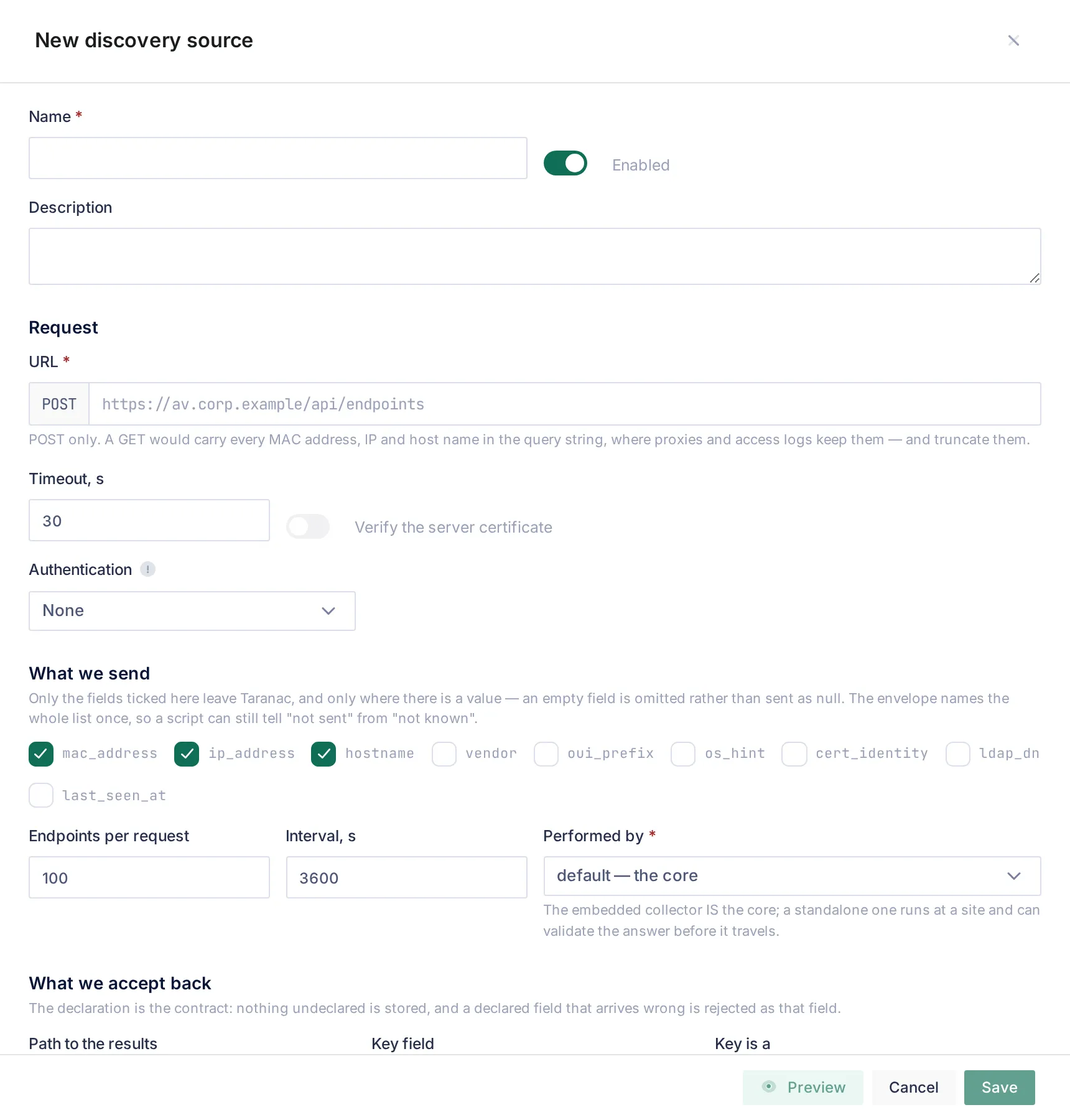
The form has four parts: the name, Request (URL, Timeout, s, Verify the server certificate, Authentication), What we send (the fields, Endpoints per request, Interval, s, Performed by), and What we accept back (Path to the results, Key field, Key is a, the attributes). A source is created Enabled.
Allow this source to create endpoints is off by default. Off, a source only enriches endpoints Taranac already knows. On (MAC-keyed sources only, because an IP is a lease and not a device), an answer about an unknown MAC creates an endpoint with status unknown and the manufacturer from the OUI database. A MAC that exists but was not in the batch is still dropped.
Preview works on the unsaved form. It shows the request exactly as your script will receive it, built from real endpoints, and a well-formed answer to it, with notes about the certificate, plain HTTP, missing attributes and reserved names.
Probe sends a handful of real endpoints (5 by default, up to 25) and shows What happened step by step, What we sent, What came back, What would be stored (already converted to the declared types), and the Problems. It writes nothing and opens no journal row, so it can be run as often as needed. For a source performed by a site collector, the probe runs on that collector. A probe from the core would test a path the pass never uses. The drawer waits for the collector’s next poll and gives up after two minutes.
Viewing needs the NAC Discovery Sources view permission. Creating, editing and deleting sources are separate actions of the same section, because a source holds a credential and decides where endpoint data is sent.
A complete example
Section titled “A complete example”A minimal script for an antivirus console, in Python with Flask. It checks a bearer token, reads the batch, and answers for the endpoints its data knows.
# probe.py: run with  PROBE_TOKEN=... flask --app probe run --host 0.0.0.0 --port 8080import hmacimport os
from flask import Flask, abort, jsonify, request
app = Flask(__name__)TOKEN = os.environ["PROBE_TOKEN"]
# Stand-in for your real data source, keyed by normalised MAC.AV = {    "3C:22:FB:12:34:56": {"av_status": "ok", "last_scan": "2026-09-26T21:04:00+02:00"},    "F4:5C:89:AB:CD:EF": {"av_status": "missing"},}

@app.post("/taranac")def answer():    sent = request.headers.get("Authorization", "")    if not hmac.compare_digest(sent, f"Bearer {TOKEN}"):        abort(401)  # Taranac records "Auth rejected" and stops the pass
    body = request.get_json(force=True)    results = []    for endpoint in body.get("endpoints", []):        mac = endpoint.get("mac_address")        if not mac:            continue        facts = AV.get(mac.upper())        if facts is None:            continue  # saying nothing about a device is a valid answer        # Echo the key exactly as Taranac sent it.        results.append({"mac": mac, **facts})
    # "Path to the results" is empty, so the body is the array itself.    return jsonify(results)
The source that matches it:
| Setting | Value |
|---|---|
| URL | https://av-bridge.corp.example:8080/taranac (or http:// on a trusted segment) |
| Authentication | Bearer token, the same value as PROBE_TOKEN |
| What we send | mac_address (the default three are fine) |
| Path to the results | empty |
| Key field / Key is a | mac / MAC address |
Attribute av_status | One of a set: ok, outdated, missing, Required |
Attribute last_scan | Date and time, RFC 3339 with offset |
Then add a rule Antivirus missing with the condition av_status is missing, and use it in a group. Run Probe first: it shows exactly what a pass would store, and names every rejected field.
To also name the device for profiling, declare profile_device_type (One of a set, for example Laptop, Desktop, Server) and add it to each answer.
Common scenarios
Section titled “Common scenarios”Quarantine machines without a working antivirus. The example above, with the group used in a NAC policy that assigns a remediation VLAN. The device leaves the group when the console reports ok on the next pass, or when the console stops answering about it for three intervals.
Tag devices with an inventory number. A String attribute asset_tag. It appears on the endpoint card under the source’s name, and a rule with has no value finds the devices the inventory does not know.
Let the MDM say what the device is. Declare profile_os_family, profile_os_version and profile_device_type. The MDM’s word then names managed devices in Device Profiling, above any rule.
A script on a site network. Set Performed by to that site’s collector. The core never needs a route to the script.
When to use what
Section titled “When to use what”| You want… | Use |
|---|---|
| A fact that lives in a system you own (AV, MDM, inventory, CMDB) | Web Probe |
| What the device says about itself when it asks for an address | DHCP Probe |
| What is on a wire, including silent devices | Scanner |
| Where a device is plugged in | SNMP forwarding and neighbour tables |
| A general rule that works on every installation | A profiling rule, not a reserved attribute |
Reference
Section titled “Reference”| Item | Value |
|---|---|
| Menu | NAC → Discovery Sources → Web Probe (Sources, Journal) |
| Method | POST, JSON body, no redirects followed |
| Authentication | None, Bearer token, Basic, Custom header |
| Defaults | Timeout 30 s · 100 endpoints per request · interval 3600 s · certificate not verified · key mac as MAC |
| Limits | Timeout 1–300 s · batch 1–1000 · interval 60–604800 s · 32 attributes · 256 characters per string · 32 enum values · 8 KB stored per endpoint per source · 8 MB response |
| Pass limits | 2000 batches or one hour; one transient retry per batch |
| Stale after | 3 × interval, at least 1 hour |
| Rules | AND only, up to 16 conditions; OR = two rules on one group |
| Reserved attributes | profile_os_family, profile_os_version, profile_device_type, profile_vendor (String ≤ 128 or One of a set) |
| Rejection codes | missing_required, wrong_type, too_long, not_in_enum, unparsable_date, naive_datetime, out_of_range, too_large, not_an_object, unkeyed (no usable key), unasked (not in the batch), items_path_not_found, items_not_a_list |
| Jobs | Web Probe Sweep (every 60 s, leader only), Web Probe Run Retention |
| Journal retention | 90 days, web_probe.run_retention_days |
| Permission | NAC Discovery Sources: View, Create, Edit, Delete sources |
Related
Section titled “Related”- Discovery & profiling: where the Web Probe fits among the sources.
- Endpoints: endpoint groups and classification rules.
- Device profiling and Profiling rules: what reserved attributes feed.
- Collectors: running a source from a site.