

SNMP
Every other discovery source looks at endpoints. SNMP looks at the network devices you manage: the switches, routers and access points under Infrastructure → Network → Devices. Taranac asks each device what it is and keeps its vendor, model, serial number, software version and uptime, its ports, its LLDP/CDP neighbours and its forwarding table. The last two are what endpoints gain from it: a switch’s neighbour table carries what phones and access points say about themselves, and its forwarding table says which port a MAC address is behind.
Profiles and templates are under NAC → Discovery Sources → SNMP. Whether a device is polled, and what it answered, is on the device itself.
Key concepts
Section titled “Key concepts”| Term | What it means |
|---|---|
| Profile | The credential (a community for v1/v2c, a USM user for v3), the transport (port, timeout, retries), the template to read devices with, and who polls: the core or one named collector. |
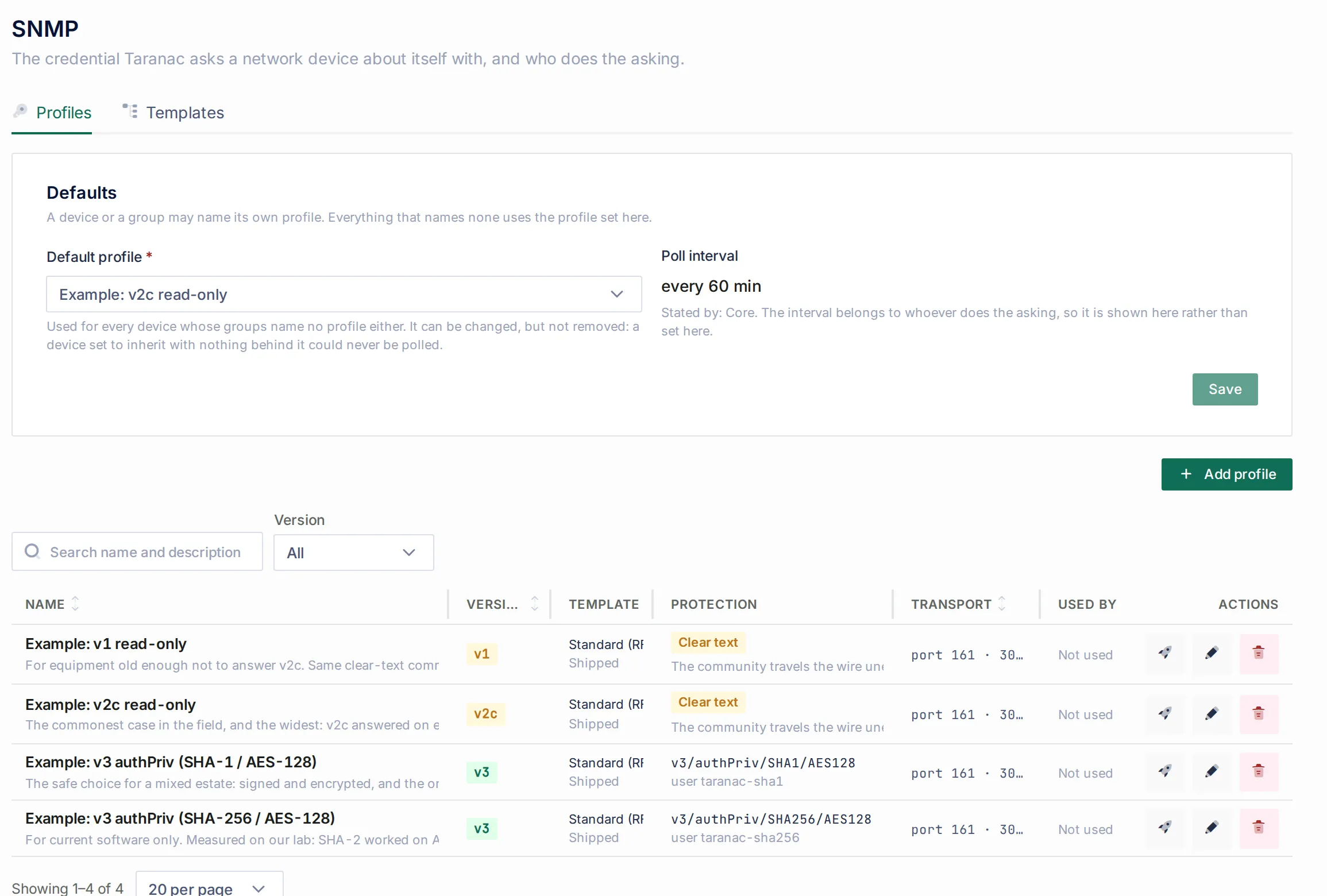
| Default profile | The profile used by every device that names none of its own. It can be changed but not removed. |
| Template | Vendor knowledge as data: for each device field, an ordered list of places to read it from, plus how ports, neighbours and the MAC table are read on this kind of box. |
| Poll | One conversation with one device, collecting its facts, ports, neighbours and forwarding table. Read-only: Taranac sends GET, GETNEXT and GETBULK and never SET. |
| Device facts | Vendor, platform, model, serial number and OS version, written into the device’s own fields. Each field shows who wrote it. |
What SNMP versions and algorithms are supported
Section titled “What SNMP versions and algorithms are supported”| Version | Authenticates with | Notes |
|---|---|---|
| v1 | Community | For equipment too old to answer v2c. A separate version on purpose: a v1-only agent drops a v2c request in silence. |
| v2c | Community | The widest: it answered on every device in our lab. The community travels in clear text; use read-only access. |
| v3 | USM user | noAuthNoPriv, authNoPriv or authPriv. authPriv is the only level where nothing on the wire can be read. |
For v3, the Signing algorithm is one of MD5, SHA1, SHA224, SHA256, SHA384, SHA512, and the Encryption algorithm one of DES, 3DES, AES128, AES192, AES256. The form offers only what this build can actually perform, and says so if something is missing.
The recommended pair is SHA1 / AES128, and the form pre-selects it. It is what the estate answers on. In our lab, three devices out of five could not do SHA-2 at all (Cisco IOS 15.2 and RouterOS 7.5 accept only MD5 and SHA-1), and that depends on the software version, not the vendor. Choose SHA-2 where you know the device supports it. AES192 and AES256 are not described by any SNMP standard, and vendors implement them with incompatible key schemes. The form warns that such a profile may work on one vendor and fail on the next, with an error that looks exactly like a wrong passphrase.
A new installation has four example profiles: Example: v2c read-only (the default), Example: v3 authPriv (SHA-1 / AES-128) with user taranac-sha1, Example: v3 authPriv (SHA-256 / AES-128) with user taranac-sha256, and Example: v1 read-only. Their communities and passphrases were generated when the installation was created. Nothing is shipped, and no two installations share a credential. To use one, reveal the secret (this needs the Reveal secret permission and is audited) and configure the same values on your devices. Until you do, a device polled with an example profile usually reports Silence on v1/v2c and Unknown user on v3: the profile is complete, and what is missing is on the device.
How it works
Section titled “How it works”1. Which profile applies, and who asks
Section titled “1. Which profile applies, and who asks”A device either names a profile or is set to Inherit, which takes the Default profile from the Defaults card on the SNMP page. The device form shows the result as Applied: … with where it came from, for example set on this device or inherited from the defaults. It also shows who will do the asking (Asks from: …).
Who polls is a property of the profile (Poll from): the core, or one named site collector. A profile that names a collector is polled by that collector or not at all. There is no silent fallback to the core. A poll that succeeded from the wrong place would describe a network path nobody uses, and a failure is named by where it happened:
| Outcome | Meaning |
|---|---|
| Collector silent | The collector is not reporting in, so nothing is known about the device. |
| Collector never answered | The poll was handed over and no answer came back in time. The problem is the path to the site, not the device. |
| Collector cannot do SNMP | The collector’s image cannot perform SNMP. Upgrade it. Nothing was sent to the device. |
A collector runs exactly the same collection code with the same template as the core, so answers from the two are comparable.
2. What is asked, and what is kept
Section titled “2. What is asked, and what is kept”A poll asks four things, independently:
| Area | Read from | Kept |
|---|---|---|
| Device facts | SNMPv2-MIB (sysDescr, sysObjectID, sysName, sysLocation, sysContact, sysUpTime), ENTITY-MIB’s chassis row, and whatever the template names | Vendor, model, serial number, OS version and platform in the device’s fields; uptime, sysDescr and sysObjectID alongside |
| Ports | IF-MIB | Name, description, type, admin and link status, speed, MAC; a port that disappears is kept, marked gone |
| Neighbours | LLDP-MIB, and CDP where the template asks for it | Local port, the neighbour, its port, the protocol |
| Forwarding table | Q-BRIDGE-MIB or BRIDGE-MIB, or per VLAN, as the template says | MAC, VLAN, port, entry status, last seen |
The vendor comes from the IANA enterprise number inside sysObjectID (1.3.6.1.4.1.14988.… is MikroTik). It answered correctly on every device measured, including the ones that name no model. The forwarding table is a snapshot: each poll replaces the previous one, and a MAC that left the table is removed.
3. Templates: vendor knowledge as data
Section titled “3. Templates: vendor knowledge as data”Vendors put the same facts in different places and keep inventing new ones. A template is the map, and it is data you can copy and correct yourself, without waiting for a release.
- What to read about the device. Four fields (Model, Serial number, Software version, Platform / software image), each with a list of sources tried top to bottom, where the first non-empty answer wins. A source is An OID I type, A standard ENTITY-MIB column, Read out of sysDescr (a pattern), or This platform does not report it.
- One pattern over sysDescr can fill several fields at once.
*EOS version {os_version} running on an Arista {platform}is the whole reading of Arista’ssysDescr. Patterns use*and{field}placeholders, the same language as profiling rules. They are not regular expressions, because a regular expression run on text a device chose, on every poll, is a fault waiting to happen. A pattern needs literal text before the first field. - “Not reported” is an answer. This platform does not report it ends the list: the field stays empty because the vendor reports nothing, and the device card says not reported instead of looking incomplete. A MikroTik CHR is a virtual machine with no serial number anywhere, and its template says so.
- Ports, neighbours and the MAC table are choices rather than addresses, because reading a forwarding table is index arithmetic, which is code. You can drop port rows by name pattern (up to 10 patterns, for example
InLoopback*). Neighbours are read by LLDP, CDP or both in order, with the local port read as an interface index (the usual) or a bridge port number (Extreme). The MAC table is read by one of five modes:
| Mode | When |
|---|---|
| By the standard, whichever answers | Q-BRIDGE first, plain BRIDGE if Q-BRIDGE returns nothing. The default. |
| By the standard, Q-BRIDGE only | The VLAN arrives with every row. Use it when a truncated Q-BRIDGE answer is beating a fuller BRIDGE one. |
| By the standard, BRIDGE only | No VLAN is reported; the column stays empty. |
| Per VLAN, community@10 | One walk per VLAN with the VLAN appended to the community (Cisco community indexing, v1/v2c). |
| Per VLAN, context vlan-10 | The same over SNMPv3, naming the VLAN by the context. |
The two per-VLAN modes cost one walk per active VLAN on every poll, and walk the VLAN list from Where the VLAN list comes from (the standard dot1qVlanStaticName table, or an OID you type). If no source there answers, the poll falls back to one plain walk.
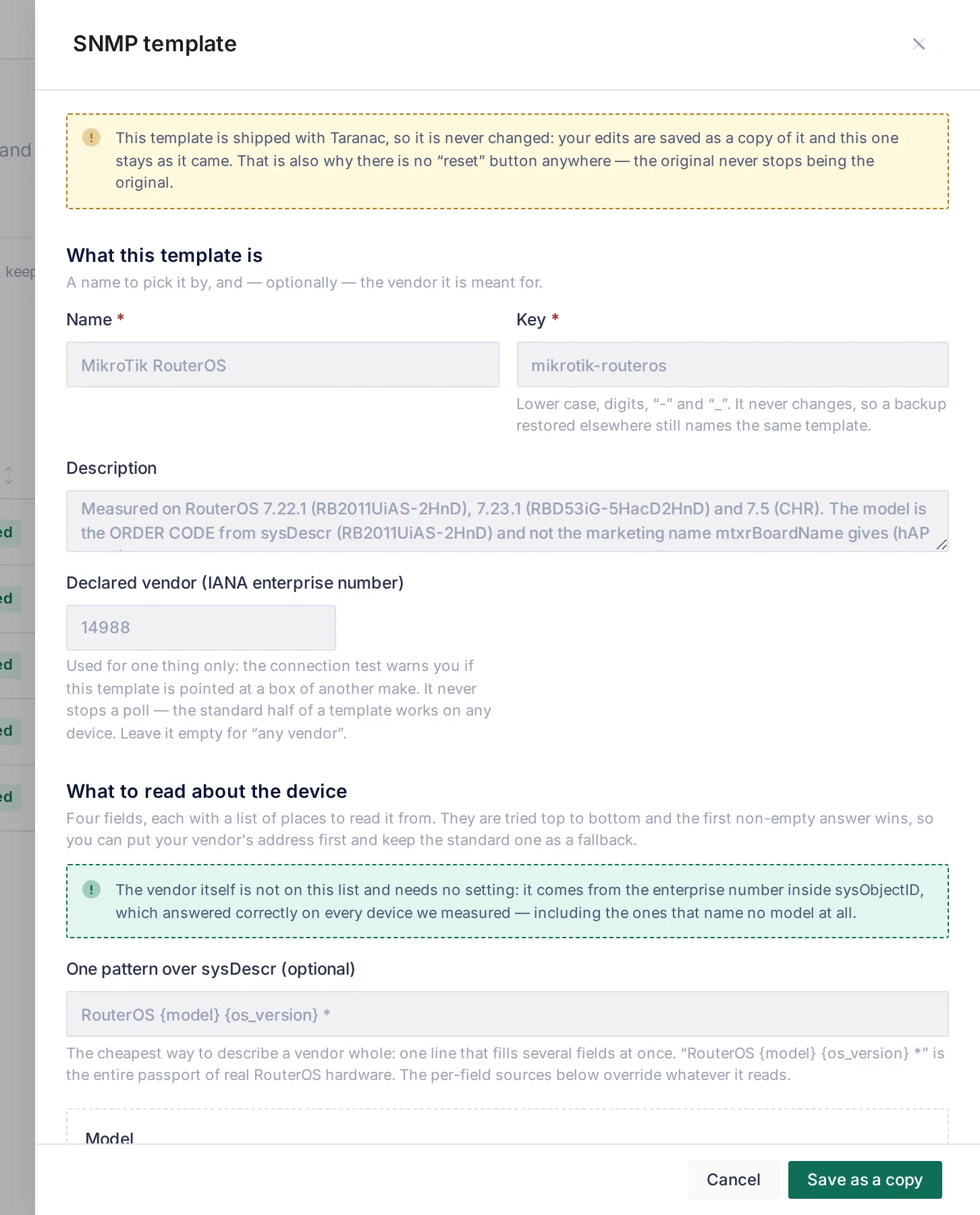
A shipped template is never changed. Editing one saves a copy and leaves the original alone, so there is no reset button: the original is always there. A template can declare its vendor (Declared vendor (IANA enterprise number)). That is used only to warn in the connection test when the template is pointed at another make of device. It never stops a poll, because the standard part of any template works on any device.
4. The shipped templates
Section titled “4. The shipped templates”Every shipped template was measured on real devices in our lab, and its description says what was measured.
| Template | For | What it reads beyond the standard |
|---|---|---|
| Standard (RFC) | Every profile until you choose another | Nothing. SNMPv2-MIB, ENTITY-MIB’s chassis row, IF-MIB, LLDP and the two bridge tables. It cannot be wrong about any device. On a platform that keeps its model or serial number outside ENTITY-MIB, it reports none. It cannot be deleted. |
| Cisco IOS / IOS-XE | Cisco routers and switches (measured: 881 on IOS 15.2(4)M11, IOSv 15.2, IOL 17.12.1) | Version and software image from sysDescr; neighbours by LLDP and CDP (LLDP was empty on all three Ciscos, CDP answered on all three); VLAN list from vtpVlanState. |
| Cisco IOS — forwarding table per VLAN | A Cisco with a built-in switch whose MAC table comes back empty with the ordinary community | The same, with the MAC table walked per VLAN (community@N). The 881 returned 0 entries the plain way and 22 this way. It is the wrong choice for IOSv 15.2, which answers only the plain request. |
| Arista EOS | Arista (measured: EOS 4.36) | Version and platform from one sysDescr pattern; model and serial from ENTITY-MIB. |
| MikroTik RouterOS | RouterOS (measured: 7.22.1, 7.23.1, 7.5 CHR) | Model (the order code) and version from sysDescr, falling back to MikroTik OIDs; serial number from mtxrSerialNumber, or not reported on a CHR; platform not reported. |
There is no automatic choice of template. Two Cisco devices of one IOS family needed opposite MAC-table settings in our lab, and both identify as Cisco, so a guess based on the vendor would be wrong half the time. Point each profile at the template its devices need.
5. Polling
Section titled “5. Polling”Polling is off on every device until you switch it on, with Poll this device on the device form. It is not inherited. A switched-on device is polled once per poll interval, which the Defaults card shows read-only, with who sets it (every 60 min · Stated by: Core). The interval is set on the core by SNMP_POLL_INTERVAL_SECONDS in .env (default 3600, clamped to 60 to 604800). The scheduler checks every minute which devices are due, and only the cluster leader polls.
A device has to be entered as a single host address. SNMP asks one specific address, so a device whose network object is a subnet is reported as No single address. A device entered by name is refused too: a name resolves through DNS, and a trace could not say which address it talked to.
A device that has no SNMP agent at all can be marked This device does not support SNMP, with a required reason. It is then not polled, and not counted as failing, until someone clicks Put it back in the poll.
When a scheduled poll fails, an alert for that device says why. One alert per device, however long it stays silent, and it is closed once the device is no longer polled.
The device form
Section titled “The device form”The device form (Infrastructure → Network → Devices, open a device) has an SNMP section:
- Poll this device: the switch. Off until you turn it on.
- SNMP profile: Inherit, or a named profile, with Applied: … and Asks from: … below it. Create a profile and use it here is offered when there is none.
- Test the connection…: the Test drawer for this device and profile.
Each identity field is badged with who wrote it. A poll fills Vendor, Platform, Model, Serial number and OS version only where the field is empty or was last written by SNMP. It never overwrites a value a person typed. When the device answers differently from what was typed, the field shows take from SNMP with the device’s value. Take the device’s answer writes that one field at once, records it in the audit log, and from then on the field follows the device. The rest of the form still waits for Save. Every change a poll makes to these fields is also audited, with the previous value and who had written it.
The SNMP Info tab shows What the device says about itself (the five facts, uptime, sysName, sysObjectID, sysLocation, sysContact, sysDescr and the raw answer), with Collect now. It also shows Ports, forwarding table, neighbours, each with its own collect button. Each table separates not asked from asked, and empty. An empty neighbour table usually means LLDP is switched off on the device. An empty forwarding table on a Cisco usually means it needs per-VLAN reading. The device list has an SNMP column and filter: Answering, No answer, Never polled, Polling off, No SNMP.
The Test drawer
Section titled “The Test drawer”Test on a device… (from a profile, even an unsaved one) and Test the connection… (from a device) hold one conversation with one device and report it in full. A test changes nothing on the device.
The drawer leads with Will it collect?. Each area (Device facts, Ports, Neighbours, MAC addresses) is tried under a ceiling and shown with its count, and with a note when something is missing: which fields this agent does not report, an agent whose SNMP view excludes the interface table, or neighbours answering on the other protocol than the template reads. For the forwarding table it asks twice, once plainly and once for one VLAN, and says whether to switch the per-VLAN mode on, whether it would not help, or whether it is not needed.
Show the whole conversation opens the trace. For v3 it shows the Engine-id exchange first: a v3 request is three round trips, and nearly every v3 failure happens in the first two. Then every request with its attempt number and timing, and What the device said, object by object with its OID. No such object is a definite answer and is shown as different from a value that could not be read. Copy the trace puts it on the clipboard for a ticket.
The drawer names the failure in terms of what to check:
| Shown as | What it means |
|---|---|
| Silence | Nothing came back. On v1/v2c this looks the same whether SNMP is off, an ACL dropped the request, or the community is wrong, so check those three in that order. |
| Unknown user | The device answered usmStatsUnknownUserNames: this v3 user does not exist on it. |
| Credential refused | A wrong community, or a v3 passphrase or signing algorithm that does not match. |
| Clocks disagree | usmStatsNotInTimeWindows: the credential is right and the device’s clock is not. Fix NTP. |
| Partial answer | The agent served part of what was asked. What came back was kept. |
| No serial number | Everything answered except a serial number. Nothing to fix. |
| Credential is empty | The applied profile has no community or passphrase. |
| No credential | No profile applies at all. |
A test with a saved profile against a device is filed as that device’s last answer: a test is a smaller poll. With an unsaved profile or a bare address, the answer is shown and not filed, and a failed test does not count as a failed poll. With Save the profile and file this answer, one step saves the draft and keeps the result.
taranac diagnose --protocol snmp
Section titled “taranac diagnose --protocol snmp”For a device whose poll comes back empty or not at all, run on the core host:
./taranac diagnose --protocol snmp --device "core-sw-01"--device is the device’s name in Taranac (or its id), not an address. The address polled is one of the things the report works out and explains. The tool runs one real poll through the same collection code the scheduled poll uses, writes nothing to the database, and produces one text report in ./diagnostics/ (use --out DIR to put it elsewhere), layer by layer, cheapest first:
- Resolution, before any packet: whether polling is on, which profile applied and where it came from, version and algorithms, port, timeout and retries, who would ask, which address and why.
- Crypto state: which USM algorithms this image can perform, and whether the profile’s are among them.
- The v3 engine-id exchange on its own.
- The poll: every request, numbered and timed.
- What was learned and what was not: which objects the device declined to have, CDP checked when LLDP is empty, which forwarding MIB answered, and when the table carries no VLANs, one VLAN-indexed request with both counts side by side. This is the answer to “why is the MAC table empty”.
The report never contains a community or passphrase, not even its length. If the profile polls from a collector, the report says so at the top: the conversation it records is the core’s own and serves as a comparison, not the collector’s poll.
How SNMP feeds the rest of Taranac
Section titled “How SNMP feeds the rest of Taranac”Switch-port location. An endpoint’s page has a Where it is plugged in card. It lists every switch port whose forwarding table holds the endpoint’s MAC, with the likely access port first and a reason for each: the switch authenticated the device on that port, the device announces itself there over LLDP or CDP, it is the only edge port reporting it, it has the fewest MACs, or the port leads to another device you manage. It needs the forwarding tables of your access switches, so poll them. See Endpoints.
Neighbour descriptions for profiling. LLDP and CDP are how a desk phone, access point or camera tells the switch what it is (Cisco IP Phone 8845, AP 3802I). When a neighbour’s chassis or port id is an endpoint’s MAC, including the SEP + MAC id Cisco phones use in CDP, its description becomes that endpoint’s LLDP / CDP self-description signal. A neighbour that is merely on the same port (a PC behind a phone) does not describe that PC. The scanner hearing the same frame counts as the same witness, not a second one. A switch sees every access port in the estate, whereas a scanner sees only the wires it is attached to.
sysObjectID. A polled device that is also an endpoint (an access point or switch that authenticates to a port), recognised by an interface MAC equal to the endpoint’s, gives its sysObjectID to profiling as the SNMP sysObjectID signal. It is the vendor’s IANA arc, assigned rather than claimed. See Profiling rules.
Device-side configuration
Section titled “Device-side configuration”Allow only Taranac’s address (or the collector’s, for a profile that polls from a site) to query, and give read-only access. Examples for the shipped Example: v3 authPriv (SHA-1 / AES-128) profile. Reveal its passphrases first.
Cisco IOS / IOS-XE:
ip access-list standard TARANAC-SNMP permit 10.0.0.10!snmp-server view TARANAC-RO iso includedsnmp-server group TARANAC v3 priv read TARANAC-RO access TARANAC-SNMPsnmp-server user taranac-sha1 TARANAC v3 auth sha <signing passphrase> priv aes 128 <encryption passphrase>!! neighbours: CDP is on by default; LLDP is notlldp runsnmp-server user lines do not appear in the running configuration. Check with show snmp user. For a Cisco whose forwarding table needs per-VLAN reading over v3 (Per VLAN, context vlan-10), the group must also serve the VLAN contexts: snmp-server group TARANAC v3 priv context vlan- match prefix read TARANAC-RO access TARANAC-SNMP. With v2c, Per VLAN, community@10 needs nothing more than the community.
MikroTik RouterOS 7:
/snmp community add name=taranac-sha1 addresses=10.0.0.10/32 security=private \ authentication-protocol=SHA1 authentication-password=<signing passphrase> \ encryption-protocol=AES encryption-password=<encryption passphrase> \ read-access=yes write-access=no/snmp set enabled=yesOn RouterOS, v2c communities and v3 users share one list of names, and a second entry with an existing name is refused. That is why the two v3 examples use different user names. Neighbours are read over LLDP, which RouterOS supports.
After configuring, use Test the connection… on the device before switching Poll this device on.
Common scenarios
Section titled “Common scenarios”Start polling the access layer. Configure the default profile’s credential on the switches, pick the template that fits (for mixed Cisco access switches, start with Cisco IOS / IOS-XE and run the Test drawer on one of each model), switch Poll this device on, and check Will it collect?. Within one interval, endpoints show Where it is plugged in.
A Cisco switch with an empty MAC table. Run Test the connection…. If it says to switch on the per-VLAN table, give that switch’s profile the Cisco IOS — forwarding table per VLAN template (or a copy of your own with Per VLAN, community@10).
A vendor with no shipped template. Copy Standard (RFC), add the vendor’s OIDs or a sysDescr pattern for the fields it keeps elsewhere, and use This platform does not report it for what the platform lacks. Test it against one device before pointing a profile at it.
A site the core cannot reach. Create a profile with Poll from set to that site’s collector, and use it on the site’s devices.
When to use what
Section titled “When to use what”| You want… | Use |
|---|---|
| Inventory of the network devices themselves (model, serial, software) | SNMP |
| Where an endpoint is plugged in, across the whole estate | SNMP forwarding and neighbour tables on the access switches |
| What is on one wire, including devices on unmanaged switches | Scanner |
| What an endpoint says when it asks for an address | DHCP Probe |
| The configuration of a device, versioned | Config Tracker (SSH/Telnet, a different credential) |
Reference
Section titled “Reference”| Item | Value |
|---|---|
| Menus | NAC → Discovery Sources → SNMP (Profiles, Templates); Infrastructure → Network → Devices → device (SNMP section, SNMP Info tab) |
| Versions | v1, v2c, v3 (noAuthNoPriv, authNoPriv, authPriv) |
| v3 algorithms | Auth: MD5, SHA1, SHA224, SHA256, SHA384, SHA512 · Priv: DES, 3DES, AES128, AES192, AES256 · Recommended: SHA1 / AES128 |
| Transport defaults | Port 161 · timeout 3000 ms (100–60000) · 2 retries (0–10) |
| Poll interval | SNMP_POLL_INTERVAL_SECONDS, default 3600, 60–604800; shown on the Defaults card |
| Operations | GET, GETNEXT, GETBULK only |
| Shipped templates | Standard (RFC), Cisco IOS / IOS-XE, Cisco IOS — forwarding table per VLAN, Arista EOS, MikroTik RouterOS |
| Device facts | Vendor, Platform, Model, Serial number, OS version (filled if empty or SNMP-owned; never over a typed value) |
| Jobs | SNMP Poll Sweep (checks every 60 s, leader only), SNMP Alert Reconciliation |
| Permissions | SNMP: View, Create profiles, Edit profiles, Delete profiles, Poll devices, Reveal secret |
| CLI | ./taranac diagnose --protocol snmp --device <name> |
Related
Section titled “Related”- Discovery & profiling: where SNMP fits among the sources.
- Endpoints: the switch-port card, and classification.
- Profiling rules: the LLDP/CDP and
sysObjectIDsignals. - Scanner: the other way to hear LLDP and CDP.
- Collectors: polling from a site.