

Profiling rules
A profiling rule is one sentence: if this signal matches this pattern, then this dimension is this value, and I am this sure. Rules are what turn evidence into the verdicts that Device profiling builds a name from. They are managed on the Rules tab of NAC → Discovery Sources → Device Profiling. The Dictionary tab next to it says how the names rules conclude relate to each other.
Key concepts
Section titled “Key concepts”| Term | What it means |
|---|---|
| Claims to know | The dimension the rule speaks in: OS family, OS version, Device type or Manufacturer. Conflicts are settled inside one dimension only: Windows and Windows 11 do not disagree, Windows and Linux do. |
| Looks at | The signal the rule reads, and how it compares (pattern, list, range, prefix). |
| Pattern | What the signal must look like. Text is matched with * wildcards, case-insensitive, against the whole value. |
| Then it is | The value concluded. For an extracting rule it contains {version} and is filled from the signal. |
| Confidence | 0–100: how diagnostic the signal is, meaning roughly the inverse of how many unrelated devices it also matches. It is not how likely the answer feels. |
| Effect | Concludes (states an answer) or Refuses (keeps the dimension empty, with a mandatory reason). |
| Priority | A tie-break between two equally strong, different answers in one dimension. Default 0. |
| Layer | Your rules or Shipped rules. |
Signals a rule can read
Section titled “Signals a rule can read”A device sends only some of these. A rule over a signal a device never sends will never fire. That is the most common reason a rule that looks right does nothing. The rule form explains each signal under Where do these come from?, with a working example you can insert with Use this.
Signals that share a witness count as one vote together, however many rules read them.
| Looks at | Witness | Where it comes from | Example pattern |
|---|---|---|---|
| Host name (pattern) | host name | The name in the device’s own DHCP request (option 12). Many devices send none. DHCP Probe | roborock-* |
| Full name (pattern) | DHCP domain name | The full name claimed in DHCP (option 81), with its domain. Mostly domain-joined machines. DHCP Probe | *.lab.example.com |
| Vendor class (pattern) | DHCP vendor class | What the DHCP client says about itself (option 60): MSFT 5.0, android-dhcp-14, udhcp 1.36. Absent more often than not. DHCP Probe | MSFT 5.0* |
| Request list is exactly / starts with / contains all of | DHCP request list | The options a DHCP client asks for (option 55), in its own order: a fingerprint of the client software. Option numbers, comma-separated. DHCP Probe | 1,121,3,6,15 |
| Client signature (exact) | DHCP signature | The whole DHCP request as one string. The Not identified worklist uses it to record a signature. It does not produce a verdict by itself, so write your rule on the request list instead. DHCP Probe | — |
| Manufacturer prefix (OUI) | MAC address | The first three bytes of the MAC, looked up in the IEEE registry. Always present, except on randomised addresses, which modern phones use by default. | 94:83:C4 |
| Browser User-Agent (pattern) / (extract a version) | browser string | The line a browser sent to the captive portal. The most informative signal, but only for devices that went through a portal. Captive portal | *iphone*cpu*os* |
| Browser platform version (range) | browser string | Client Hints from Chromium browsers (Chrome, Edge, Opera, most Android browsers). Written as the platform, a colon, then a range of the major version, and either end may be open. Safari and Firefox send none. Captive portal | Windows:13- |
| Browser-reported device model (pattern) | browser string | The model Client Hint. Captive portal | Pixel* |
| OS recorded in the directory (pattern) / (extract a version) | directory record | The operating system on the computer object in Active Directory or FreeIPA. It was set by an administrator rather than guessed. Directory | Windows 10* |
| Open ports include all of | open ports and services | Ports the scanner found open. Identify knocks on a short list (22, 80, 443, 445, 3389 and a few more). A port outside it needs Deep. Scanner | 135,445 |
| Service answering on a port (pattern) | open ports and services | One line per open port as nmap writes it, plus the SSH greeting and web-server header that Identify reads. Fires if any line fits. Scanner (Deep for nmap lines) | *microsoft windows* |
| Operating system nmap guessed (pattern) | nmap OS guess | nmap’s guess from how the network stack answers, often a range. Scanner, Deep only | *microsoft windows* |
| UPnP announcement, SERVER line (pattern) | UPnP announcement | The SERVER line of the device’s own UPnP announcement. Heard by listening. Scanner | microsoft-windows* |
| mDNS service type (pattern) | mDNS announcement | Service types announced over Bonjour, such as _ipp._tcp.local. Scanner | _companion-link._tcp* |
| mDNS name (pattern) | mDNS announcement | The .local names a device answers to. In a contribution they are reduced to their shape unless you choose to send full host names (Rule-set updates). Scanner | *iphone* |
| mDNS model identifier (pattern) | mDNS announcement | The manufacturer’s model identifier from mDNS TXT (model=MacBookPro18,3, Cast md=). Scanner | MacBookPro* |
| NetBIOS workgroup (pattern) | NetBIOS broadcast | The workgroup or domain a device broadcasts. * means “speaks NetBIOS”. Supporting evidence only, because Samba speaks it too. Scanner | * |
| LLDP / CDP self-description (pattern) | LLDP / CDP self-description | What phones, access points and cameras say they are. Heard by the scanner, or read from a switch’s neighbour table; both count as one witness. From CDP, platform and software are joined by /. Scanner or SNMP | *ip phone* |
| SNMP sysObjectID (prefix) | SNMP | The sysObjectID of a device this installation polls, used when it is also an endpoint (an access point or switch with the same MAC). Matches by whole arcs: 1.3.6.1.4.1.9 matches …9.1.1208, not …99. SNMP | 1.3.6.1.4.1.9 |
The browser string and its Client Hints are one witness, and so are ports and banners, and so are all the mDNS signals.
Writing a rule
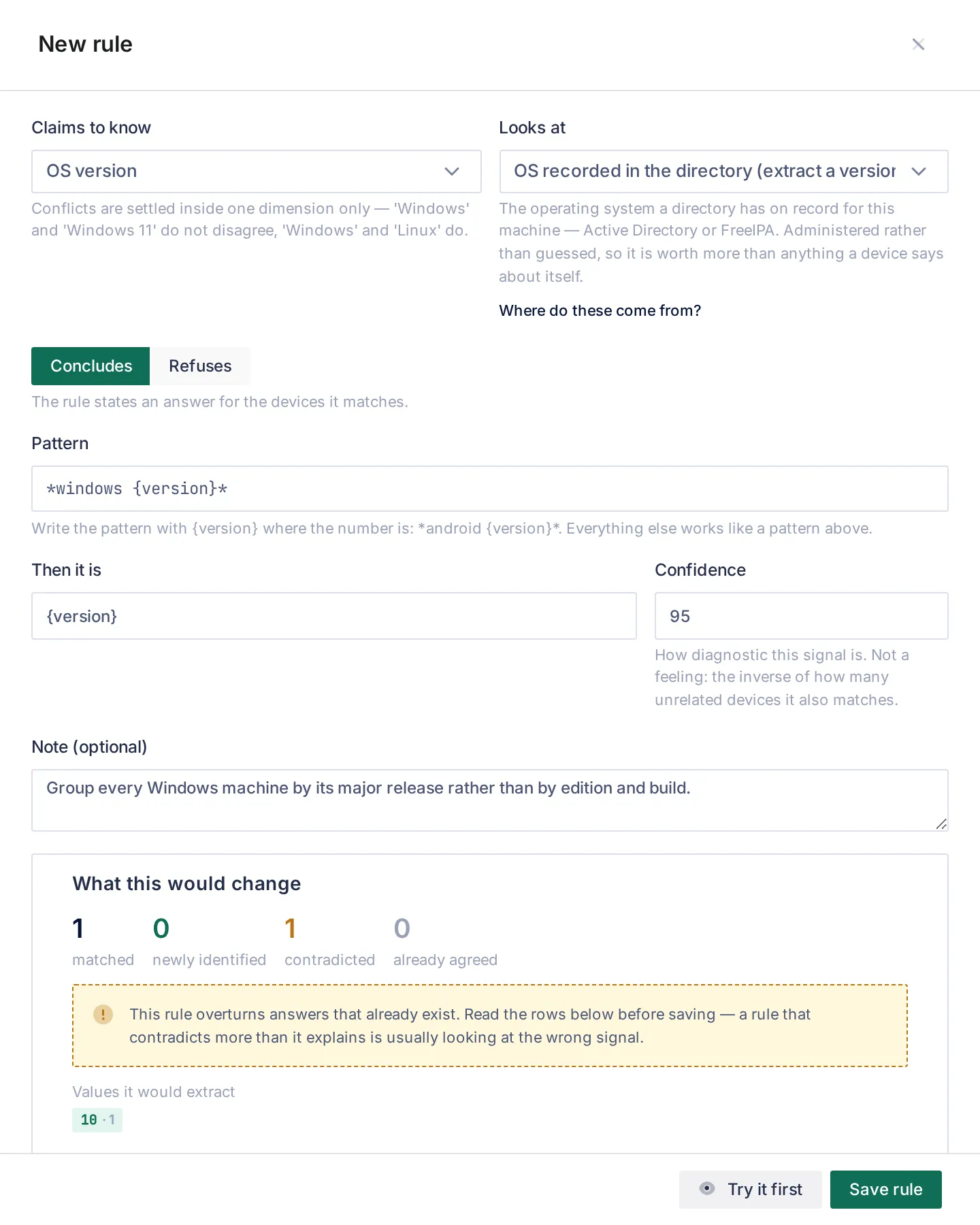
Section titled “Writing a rule”Open Rules → Add rule. The drawer asks for the dimension (Claims to know), the signal (Looks at), Concludes or Refuses, the Pattern, the value (Then it is), the Confidence and an optional Note. The note is shown on the device card beside what the rule decided, and it is required for a refusing rule.
Preview is mandatory
Section titled “Preview is mandatory”Save rule stays disabled until Try it first has run. Any edit to the draft discards the preview. The preview runs the draft against every device the installation knows, across all sources, up to 2,000 devices (it says when it hit that limit), and counts:
| Count | Meaning |
|---|---|
| matched | devices whose signal the pattern fits |
| newly identified | had no value in this dimension and would gain one |
| contradicted | already had a different value, which would be replaced. Read these before saving. |
| already agreed | already said the same thing, so nothing changes |
Contradictions are listed first, each as before → after, with a warning. A rule that contradicts more than it explains is usually looking at the wrong signal. For an extracting rule, Values it would extract lists each distinct value with its device count. 13 · 14 · 15 and a single 605.1 both “match”, and only the list shows whether the pattern reads the right token.
The preview compares values as written, so a rule that says iOS where the device currently reads Apple is counted as contradicted, even though the profiler will treat it as a refinement of Apple (see the Dictionary).
The rule form can be opened pre-filled from two places: from a Not identified group (the signal is pre-filled from what was seen, see Not identified), and from Add a rule on a profile’s condition (the dimension and value are pre-filled, and you choose the signal).
Extracting rules
Section titled “Extracting rules”A rule of type Browser User-Agent (extract a version) or OS recorded in the directory (extract a version) answers with what it finds rather than a fixed string. One rule then covers releases nobody has shipped yet.
- Write
{version}in the pattern where the number is, with literal text right before it:*android {version}*. A pattern with no text before{version}is refused, because it would read the first number anywhere in the string. - Then it is must contain
{version}too. It can be just{version}(use Use the extracted value as the answer), or wrap it:Fedora {version}. - Exactly one
{version}per pattern. - What is read starts with a digit and continues with digits, dots and underscores. It is kept as the device wrote it, so iOS gives
17_4. An over-long token yields nothing rather than a clipped, wrong-looking version.
The shipped directory rule for Windows uses a second placeholder, {rest}: *windows {rest}. It takes everything after the anchor, so the card shows 10 Enterprise LTSC 10.0 (19044), the full truth about that one machine. A node condition such as 10* still groups it. Rules you write use {version}.
Refusing rules
Section titled “Refusing rules”A refusing rule states that a dimension must stay empty for the devices it matches, whatever else concluded. Use it for a value a device reports that says nothing true about it. It:
- carries no value, and requires a reason in the Note. The reason is what the device card prints where the value would have been;
- is judged before anything else in the dimension, including before your own rules take precedence over ours. A shipped refusal therefore holds even against a rule of yours. The way to overrule it is to switch it off.
Three ship:
| Pattern (Browser User-Agent) | Dimension | Why |
|---|---|---|
*macintosh*mac os x 10_15* | OS version | Safari has reported macOS 10_15_7 since Catalina, on every current Mac. |
*macintosh*mac os x 10.15* | OS version | The same frozen value in the dotted spelling other browsers use. |
*cros * | OS version | The number in a ChromeOS string is the platform build (14541.0.0), not the version an administrator knows. |
Vendor habits the shipped rules name
Section titled “Vendor habits the shipped rules name”Some browser strings are ambiguous, and the shipped rules say so instead of guessing:
Windows NT 10.0reads10 / 11. Windows 11 never changed the NT number. When the browser also sends Client Hints, the rulesWindows:13-→11andWindows:1-12→10(Microsoft’s documented mapping) answer precisely. They are equally confident and win on priority 1.- Apple froze the iOS number. A phone on a much newer release still sends
18_7, so*iphone*cpu*os 18_*(and the iPad equivalent) reads≥18. These rules have priority 10, so they beat the{version}extraction underneath, which still answers precisely for any release that reports its own number (17_4). - macOS
10_15_7and ChromeOS builds are refused, as above.
Your rules and ours
Section titled “Your rules and ours”| Your rules | Shipped rules | |
|---|---|---|
| Who writes them | You | Taranac, from what each protocol is specified to carry or from a client’s own source code |
| Editable | Switch off, delete | Switch off only. They are re-synced on every start, and switching one off is kept. View this rule shows it read-only, with its note and Profiles that depend on this. |
| Upgrades | Never touched | Replaced by the release or by an installed rule set |
| Exported in a contribution | Yes | — |
Yours come first, per dimension. When any enabled rule of yours matches a device in a dimension, the shipped rules in that dimension are set aside for that device, and only yours are weighed. You never have to out-argue our confidence to correct us. The flip side: if your matching rule is weaker than 50, the dimension ends up empty rather than falling back to ours. Give a corrective rule a confidence you would accept on its own. The preview’s contradicted rows show exactly this.
Before switching off a shipped rule, open it and check Profiles that depend on this. Switching off the only rule that fills a branch leaves that branch with nothing to fill it.
Priority
Section titled “Priority”Priority (0–1000, default 0) only settles two different answers that ended at the same combined confidence. It is never the main lever, because first-match-wins would stop weak signals from adding up. The rule form does not set it. A shipped rule shows its value in View this rule, and for your own rules it is set through the API (PATCH /api/v1/nac/profiling/rules/{id} with "priority"). If a device card says a dimension is disputed, there are three ways out: switch the wrong rule off, raise the other’s priority, or record in the Dictionary that one name refines the other.
The Dictionary
Section titled “The Dictionary”The Dictionary tab is the vocabulary the rules conclude, per dimension (OS family, Device type, OS version, Manufacturer), and which name refines which. iOS is Apple said precisely. That is why a device heard as Apple by one witness and as iOS by another has one answer and not a dispute.
The shipped OS family vocabulary is a set of separate families: Apple (with iOS, iPadOS, macOS under it), Windows, Linux (with Embedded Linux), Android and ChromeOS. Selecting a name shows its spellings, how many rules conclude it and how many devices carry it. A name no rule concludes is flagged, because no device will ever carry it.
- Spellings. Case, spaces, hyphens and underscores are ignored, so
Chrome OSandChromeOSare already one name. Add other spellings for names that differ in more than that. - Two layers. Ours arrives with the release and is replaced by it, whole. Yours answers first.
- Copy a family and extend it. Copy the name family copies the family’s root and everything under it into your vocabulary. From then on your copy applies, and nothing we release changes it. Families are copied whole and deleted whole. A half copy would split the names one device answers to between two vocabularies, and two names that cannot be shown to refine each other are read as a dispute.
- Upstream changes are shown, not merged. Your copy says which change of ours it was taken from. If ours has changed since, or was withdrawn, the term says so. There is nothing to accept: your copy is what applies.
- Delete your family removes it, and ours applies again from that moment. It is the only way back from a copy.
- New family starts a name of your own. A term of yours can only be placed under another term of yours, never inside ours.
A name the Dictionary has never heard of still works: it becomes a name of its own, with no relations.
Worked examples
Section titled “Worked examples”1. A host-name convention names your kiosks. Your kiosks all request DHCP with host names like kiosk-lobby-03. Add a rule: Claims to know Device type, Looks at Host name (pattern), pattern kiosk-*, then it is Kiosk, confidence 80. The preview should show them as newly identified. Then add a profile Kiosk under Any device with the condition device type is Kiosk, and classify an endpoint group on it. This needs the DHCP Probe, because the host name is option 12.
2. A distribution your directory records. Machines join FreeIPA with the OS recorded as Astra Linux 1.7. The shipped *linux* directory rule already makes them Linux, but no shipped rule reads the version. Add an OS version rule, OS recorded in the directory (extract a version) *astra linux {version}* → Astra {version}, confidence 95. The Linux node’s gap list will then offer Astra 1.7 as a profile to add.
3. Grouping Windows by major release. The shipped directory rule gives the full string (10 Enterprise LTSC 10.0 (19044)). Previewing *windows {version}* → {version} on the OS version dimension (the screenshot above) extracts 10, but reports the device as contradicted, because your rule would replace the detailed value on every Windows machine. Usually the better move is not a rule but a profile: a node with the condition OS version is 10* groups them and keeps the detail on the card.
Related
Section titled “Related”- Device profiling: how verdicts become a name, and how to read the card.
- Not identified: where most rules start.
- Rule-set updates: new shipped rules between releases.
- Discovery & profiling overview: which source provides which signal.