

Network devices
A network device in Taranac represents a single network access server (NAS) — a switch, router, firewall, VPN concentrator, or access point — that sends TACACS+ or RADIUS requests to the platform. A device record tells Taranac three things: where the NAS lives on the network (its IP), which secret to use when talking to it, and which protocols it participates in (TACACS+, RADIUS, NAC, or any combination).
Devices are also one half of the WHERE dimension in AAA and NAC policy: a policy rule can match on an individual device or on a device group, so you decide which administrators can do what on which equipment. This page covers registering devices, organising them into groups, the network objects that anchor their addresses, and — most importantly — how shared secrets and login banners are inherited along the device → group → global chain.
You manage all of this under Infrastructure → Network in the admin UI.
- Device empty · inherit
- Device group core-switches key
- Global default tacacs.global_key
Key concepts
Section titled “Key concepts”| Concept | What it is |
|---|---|
| Device | One NAS. Holds its protocols, secrets, CoA settings, and a reference to exactly one network object (its IP). |
| Network object | A named address: a host (single IP), a subnet (CIDR), an address range, or an FQDN (hostname). A device must reference one host or subnet object — its NAS address. Network objects are also the source (client-IP) dimension in policy. |
| Device group | A logical set of devices that share default secrets and CoA settings. The middle tier of secret inheritance and a coarse-grained handle for policy. |
| Shared secret | The TACACS+ key or RADIUS secret the daemon uses to authenticate the device. Stored encrypted; never shown unless explicitly revealed. |
| CoA settings | The port and secret used to push Change-of-Authorization / disconnect packets back to a NAC device. |
Which address to register
Section titled “Which address to register”For TACACS+ and RADIUS device administration, a request belongs to the device whose network object covers the address the request is sent from — the TCP peer for TACACS+, the packet source for RADIUS. That address also selects the shared secret, decides the WHERE match and names the device in the logs. The NAS-IP-Address a RADIUS device writes into its requests is not used for this; RADIUS → How a request finds its device has the consequences, NAT included. So register the address the device really sends from, and pin it on the device with a source-interface setting where the platform has one.
NAC (802.1X and MAB) is different: the shared secret is still chosen by the packet source, but NAC policy finds the device by the NAS-IP-Address in the request. On most switches the two are the same address.
Only inventoried devices log in
Section titled “Only inventoried devices log in”TACACS+ answers only devices in the inventory. A connection from an address that no enabled device with TACACS+ turned on covers is refused, over classic TACACS+ and over TACACS+ over TLS alike, whatever key or certificate it presents. The refusal is a Not in the inventory row in the Authentication Log (TLS: the address is not in the device inventory over TLS), and the address raises the Unknown TACACS+ device warning, once per address, for IPv4 and IPv6 alike. Add the device, or enable it, and the next connection is answered.
The global TACACS+ key does not open the door to unregistered addresses. Behind the inventory, the generated configuration ends with a catch-all for every other address, and that catch-all always has a key of its own that no device is given. The config previews show it masked, so it cannot be copied onto a device.
Which TACACS+ key a device gets
Section titled “Which TACACS+ key a device gets”For an inventoried device, the key resolves along the inheritance chain and the first level with a value wins:
Device → Device group (oldest first) → Global Shared Secret (tacacs.global_key)The global key is therefore the fallback key of inventoried devices only. A device
whose packets do not decode with the key it resolves to is refused as Key mismatch; the
row’s details tell a wrong key (key mismatch) from a device that sent its packets with no
key at all (unobfuscated packet).
A device with no key at any level logs in over TACACS+ over TLS only, which uses certificates instead of the shared key: classic TACACS+ from it is refused. With the TLS listener off, such a device is left out of the TACACS+ configuration and cannot log in.
Subnets and catch-all entries
Section titled “Subnets and catch-all entries”The check is per address, not per device. A device registered with a subnet lets every
address in that subnet in, with that device’s key and, over TLS, with any certificate the
TLS Client Trust accepts. Where entries overlap,
the most specific one covering the address is used. A device registered as 0.0.0.0/0 or
::/0 admits every IPv4 or IPv6 address with its key: that is how to accept every address
deliberately, and it is a working entry (the catch-all for unregistered addresses steps
aside for it).
IPv6 devices
Section titled “IPv6 devices”An IPv6 device is matched by its own IPv6 address: the address the TCP connection comes
from selects the device, its key and its WHERE
match, as for IPv4. It needs a device entry covering that address. A device record holds one
network object, so a device that reaches Taranac over both IPv4 and IPv6 needs one entry per
address it sends from, each with the key the device uses. A ::/0 entry admits every IPv6
device with its key. What the host needs for this, and what each service does with an IPv6
client, is on IPv6.
A rewritten source address
Section titled “A rewritten source address”When Docker’s userland proxy or its source NAT forwards a connection (for example IPv6 with Docker’s ip6tables turned off), the connection arrives from the gateway of the stack’s Docker network instead of the device’s address. Taranac recognises those gateway addresses: such a refusal is logged as The source address was rewritten by Docker and raises no alert. Never add the bridge gateway to the inventory: every client the proxy forwards would arrive from that one address and be let in with its key.
Registering a device
Section titled “Registering a device”Open Network → Devices and click Add Device. The form is split into an identity column and a protocol/secrets column.
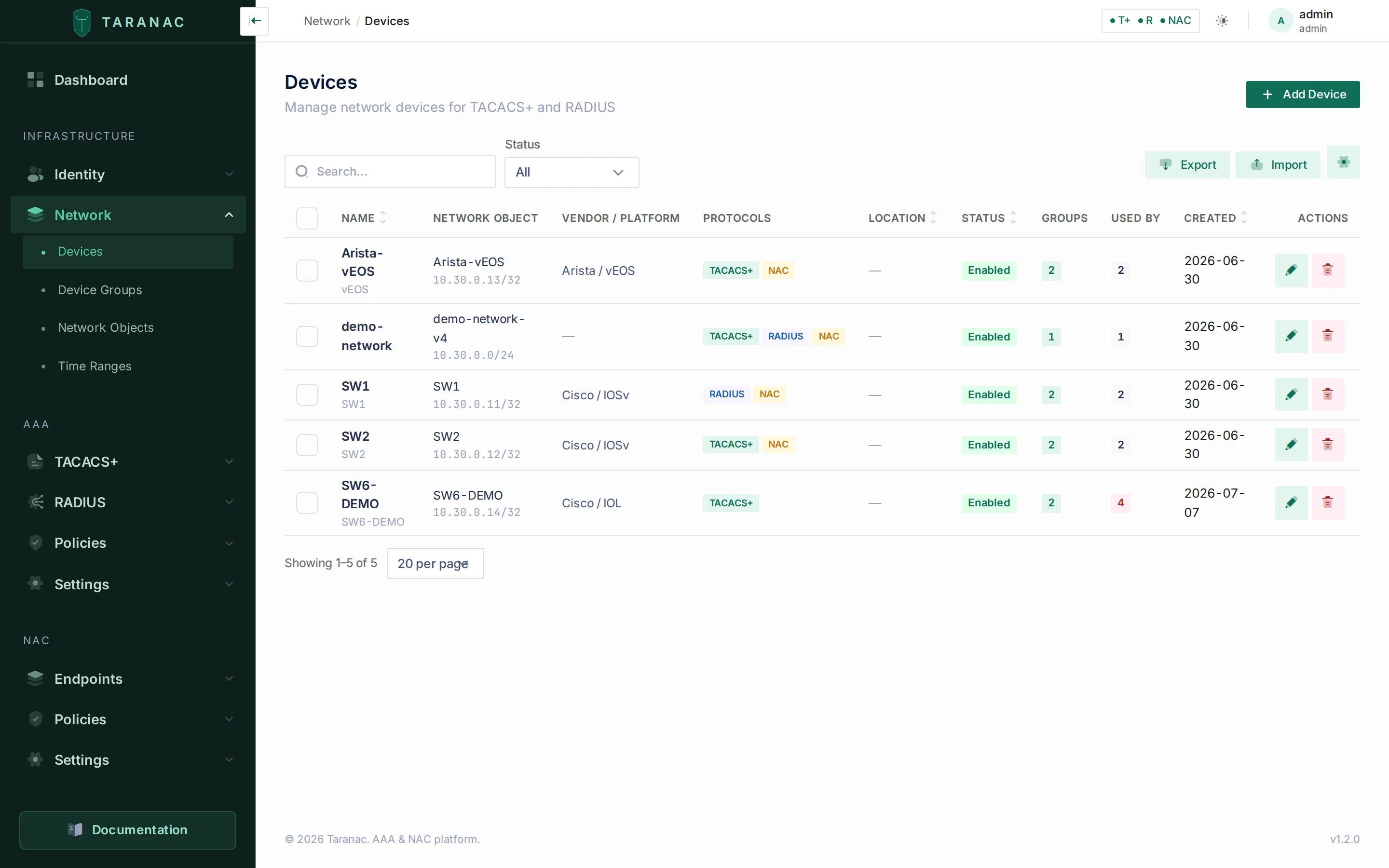 The Devices list: name, network object, vendor/platform, enabled protocols, location, status, group count, and a Used by badge showing what references the device.
The list can be narrowed by status, by Device group (direct members of the group you pick) and, once an SNMP profile exists, by SNMP state. The group filter appears only to operators who may view device groups.
Identity fields
| Field | Required | Notes |
|---|---|---|
| Name | Yes | Unique, up to 128 chars, e.g. core-sw-01. |
| Hostname | No | FQDN or display name; documentation only. |
| Network Object | Yes | The address the device sends its requests from — see Which address to register. Picked from the network-object selector; range and FQDN objects are hidden here. You can create a new host/subnet object inline. |
| Device Groups | No | The groups this device belongs to — see Device groups below. |
| Description | No | Free text. |
| Vendor / Platform | No | Free text, e.g. Cisco / IOS-XE. Used for display and for CoA encoding auto-detection. |
| Location | No | Free text, e.g. DC-East Rack 14. An SNMP poll fills it from the device’s sysLocation while it is empty, and never overwrites a value typed here. |
| Notes | No | Free text, for internal notes. |
| Tags | No | Comma-separated free-form labels, used for filtering. |
Protocol support. Three toggles — TACACS+, RADIUS, and NAC — declare which protocols this device speaks. All three are on by default. They gate which secret fields appear:
- TACACS+ on → shows the TACACS+ Key field and the Single Connection toggle.
- RADIUS or NAC on → shows the RADIUS Secret field (NAC rides on the RADIUS protocol, so it reuses the RADIUS secret).
- NAC on → shows a CoA Settings block with CoA Secret, CoA Port, and an optional Vendor Dictionary selector.
The form also carries an SNMP section — which SNMP profile applies to the device and whether Taranac polls it. That is covered on SNMP. Vendor, Platform, Model, Serial number, OS version and Location are the fields a poll may fill; each is badged with who wrote it.
A device with a protocol disabled is left out of that protocol’s generated daemon config entirely.
Single Connection (TACACS+ only): when enabled, the device reuses one TCP session for all authentication, authorization, and accounting exchanges. It is a per-device setting; there is no global one.
Enabled toggle: a disabled device is excluded from all AAA/NAC processing — no config is generated for it and no daemon reload references it.
Secret fields
Section titled “Secret fields”The TACACS+ Key, RADIUS Secret, and CoA Secret fields all behave the same way and are stored encrypted at rest:
- Leaving a secret empty means “inherit” — the device falls back to its group, then to the global default (see below). The device’s Details card names the level each inheritable field actually resolved from: the device itself, a named group, the global setting, or nothing set anywhere.
- On an existing device, a stored secret displays as a placeholder (
••••••••). Submitting it unchanged keeps the current value; clearing it to empty removes the override (falling back to inheritance); typing a new value replaces it. - The reveal (eye) action decrypts and shows a secret in plain text. This is audit-logged — every reveal records who looked and when.
- The generate action opens a generator to create a strong random secret.
- Secrets may contain letters, digits, and most punctuation, but not spaces, single/double quotes, backticks, backslashes,
?, or$.
CoA settings (NAC)
Section titled “CoA settings (NAC)”When NAC is enabled, the CoA block configures how Taranac pushes Change-of-Authorization or disconnect packets to the device:
- CoA Secret — encrypted; inherits like any other secret if left empty.
- CoA Port — an integer 1–65535. Typical values are 3799 (RFC 5176) or 1700 (Cisco IOS). Leave it empty to inherit — see the order below.
- Vendor Dictionary (CoA) — pins the vendor dictionary entry for this device. Left on Auto-detect, CoA actions are encoded for the vendor detected from the device’s RADIUS requests, falling back to the generic entry. Pinning an entry does two more things: it supplies the vendor’s own CoA port, and it decides whether the device can be asked for a CoA test.
Where a CoA is sent. The port is resolved from the most specific statement down:
Device → Device group (oldest first) → Vendor dictionary → nac.coa_port → 3799The vendor’s port sits above the global setting on purpose: a port on the device or its group is about this hardware, the vendor’s is about this kind of hardware, and nac.coa_port is about everything at once — and holds 3799 on every installation unless you change it. So a device pinned to Cisco IOS / IOS-XE sends its CoA to 1700, the port IOS listens on, with nothing typed. The vendor step applies only to a pinned dictionary; with Auto-detect the port comes from the device, a group or the global setting. The device’s Details card shows the resolved port and where it came from — On device, Group «name», From the vendor dictionary or Global default — computed by the same code that sends the packet. Any configured port other than 3799 is named once in the service log at start-up, so a stale or mistyped value is caught before a real disconnect needs it.
CoA test
Section titled “CoA test”The Details card of a saved device has a CoA test row with a Test button.
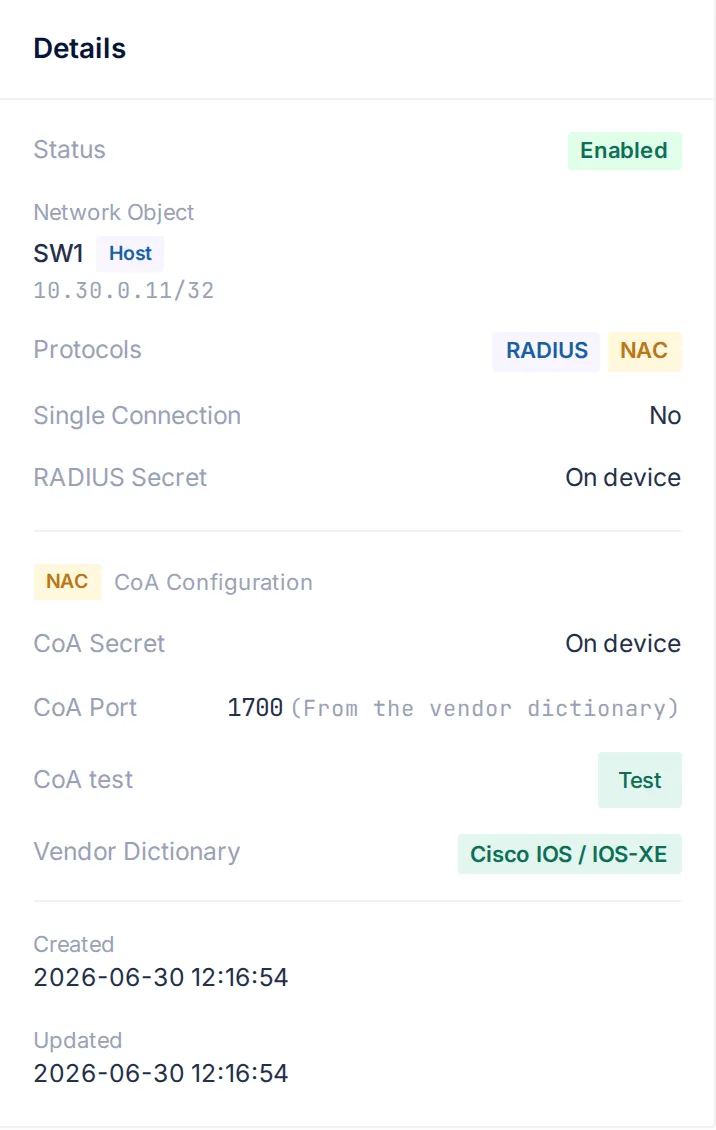 A switch pinned to Cisco IOS / IOS-XE: nothing is typed in its CoA Port field, so the card resolves 1700 and says where it came from. Test sends the probe to exactly that port. It answers “will a CoA work here?” before any endpoint depends on it — typically right after you fill in the port and the secret.
The test sends a Disconnect-Request for a session that cannot exist (its Acct-Session-Id starts with taranac-probe-, so it is recognisable in the switch’s log). No real session is touched. Any authenticated answer — normally a Disconnect-NAK saying the session was not found — proves three things in one datagram: the port is right, the shared secret is right, and the device accepts Taranac as a dynamic-authorization client. The result reads:
- The device answered on port N — all three are in place.
- Nothing answered on port N — the port is wrong, dynamic authorization is not configured, an ACL is in the way, or the device is unreachable.
A test that could not answer honestly is refused instead of run:
| Refused when | Why |
|---|---|
| The device is registered as a subnet or range | A CoA goes to one address; the button is shown only for a host. |
| No CoA secret resolves at any level | Silence would prove nothing. |
| The pinned vendor does not declare a safe probe | A vendor that stays silent about an unknown session would make a correctly configured switch look broken, and some hardware stops responding to such a request altogether. |
Whether a vendor may be probed is recorded in its vendor dictionary entry. Cisco IOS / IOS-XE is measured and enabled. Huawei VRP is refused explicitly — VRP does not answer at all for a session it does not know. Every other vendor, and a device left on Auto-detect (which falls back to the generic entry), is not probed: an unmeasured vendor is never asked. For those, check CoA with a real action on a live session — see where you trigger CoA. Running the test needs the permission to manage NAC sessions.
Device groups
Section titled “Device groups”Open Network → Device Groups to create a group, then attach devices to it. A group has a name, optional description, its own TACACS+ Key / RADIUS Secret / CoA Secret / CoA Port, its own Welcome and MOTD banners, an SNMP profile for members that name none of their own (see SNMP; changing it needs the SNMP Edit profiles permission), and tags. Members are managed on the group’s edit page (add or remove devices); membership changes are saved together with the rest of the form.
Membership can also be written from the device side: the device form carries a Device Groups picker, so a device can be linked without leaving it for the group. Both directions produce the same audit trail.
Groups serve two purposes:
- Shared defaults. Set a secret once on the group and every member device that has no per-device override inherits it.
- Policy granularity. A policy rule can reference a whole group instead of listing devices one by one.
A device can belong to multiple groups. Deleting a group does not delete its member devices — it only removes the membership links. A group that is named by an AAA or NAC policy rule cannot be deleted at all until the rule stops referring to it (see References and deletion below).
Secret inheritance
Section titled “Secret inheritance”Every secret (TACACS+ key, RADIUS secret, CoA secret, and CoA port) — and each login banner — resolves along a fixed three-level chain; the CoA port additionally consults the pinned vendor dictionary between the group and the global level (see CoA settings). The first level that has a value wins:
Device → Device group → Global default- Device level — a value set directly on the device always takes precedence.
- Group level — if the device has no own value, Taranac walks the device’s groups oldest group first (ordered deterministically by creation time) and uses the first group that has a value.
- Global level — if neither the device nor any group supplies a value, the global system setting is used.
The global defaults live in system settings. For TACACS+, the global key is the fallback of inventoried devices only (see Only inventoried devices log in):
| Secret | Global setting |
|---|---|
| TACACS+ key | tacacs.global_key |
| RADIUS secret | radius.global_secret |
| CoA secret | nac.coa_secret |
| CoA port | nac.coa_port (3799); a pinned vendor dictionary’s port comes first |
CoA port and CoA secret are resolved independently — a device can pick up its secret from a group while taking its port from the vendor dictionary or the global setting.
Login banners
Section titled “Login banners”TACACS+ can put two pieces of text in front of an operator logging in to a device, and they are separate settings because they ride in different packets and therefore reach different people:
- Welcome Banner — prepended to the first login prompt, so anyone who can reach the port sees it before entering a credential. A legal notice belongs here.
- MOTD Banner — carried in the reply that grants the login, so only someone who authenticated sees it. Relaying it is the device’s choice: Cisco IOS prints it, Arista EOS discards it in favour of its own “Last login” line.
Each one can be set at three levels — on the device, on a device group, and globally under AAA → Settings → TACACS+ — and every device resolves them along the same device → oldest device group → global chain, with the same creation-time ordering, that the TACACS+ key already uses. The two banners resolve independently: a device that overrides only the MOTD still takes its welcome banner from a group or from the global setting.
On both the device form and the device-group form the two fields sit in a collapsed Login Banners block — on the device side it appears only when TACACS+ is enabled for that device. The block opens by itself when a banner is already stored, so an override never hides behind a closed section, and the device’s Details card names the level each banner resolved from.
Banners are display text, not secrets, so they are stored and shown in the clear. Each field holds up to 4096 characters and multi-line text is fine — line breaks survive to the terminal. One sequence is refused when you save: a literal ${, which in the generated tac_plus-ng configuration is a syntax error rather than text and would stop the whole file from loading — one device’s banner taking AAA down for the entire fleet.
A % in a banner reaches the terminal as typed.
Banners are a TACACS+ mechanism; RADIUS has no equivalent. The welcome banner cannot vary per user, because it is sent before any policy has been evaluated. The MOTD can: a TACACS+ profile’s MOTD replaces the device, group or global MOTD for the logins its policy rule admits.
Devices in policy: the WHERE dimension
Section titled “Devices in policy: the WHERE dimension”AAA and NAC policy rules use devices to answer “on which equipment does this rule apply?” — the WHERE dimension. A rule can target:
- Specific devices — pick individual NAS records, or
- Device groups — match every member of a group.
Pairing this with the source dimension (network objects = the client’s IP) and the when dimension (time ranges) lets you write rules such as “network engineers may run show/config commands on the core-switches group, on weekdays, from the NOC subnet.” See AAA policy for how the WHERE dimension combines with identity, source, and time conditions.
References and deletion
Section titled “References and deletion”Devices, device groups and network objects are all referenced by other objects, and Taranac refuses to delete one out from under a reference rather than cascading or failing opaquely. Each list carries a Used by column; clicking the badge opens a where used panel that separates references you must detach first from those that clear themselves:
| Deleting… | Is blocked by | Clears automatically |
|---|---|---|
| A device | Any AAA/NAC policy rule that names it in its WHERE dimension | Its device-group memberships |
| A device group | Any policy rule that names the group | Its memberships — member devices are not deleted |
| A network object | Any device using it as its address, plus any rule using it as a source | — |
The panel lists each blocker by name with a link to it, so “detach it first” is a click rather than a search.
Common scenarios
Section titled “Common scenarios”One global key, a few exceptions. Set tacacs.global_key once. Every inventoried device inherits it; an address outside the inventory is refused whatever key it uses. For the handful of legacy boxes that need a different key, set the key directly on those devices — they override the global value while everything else keeps inheriting.
Per-vendor CoA. Pin Cisco IOS / IOS-XE as the Vendor Dictionary on the Cisco switches and the matching entry on the others. Each CoA goes to its vendor’s port (1700 for IOS, 3799 for most others) with no port typed anywhere. Press Test on one Cisco switch’s Details card to confirm the port, the secret and aaa server radius dynamic-author at once.
Site-specific RADIUS secret. Create a group per site (site-emea, site-apac), set the RADIUS secret on each, and add the site’s devices. Devices inherit the site secret; a device that needs its own secret simply sets one and overrides the group.
Decommissioning. Disable a device (uncheck Enabled) to pull it out of all config generation without deleting its record or history. Delete it only when you no longer need the audit trail.
When to use what
Section titled “When to use what”| You want to… | Use |
|---|---|
| Set a secret for the whole estate | Global default (system setting) |
| Set a secret for a class of devices (vendor, site) | Device group |
| Override a single box | Per-device secret |
| Match a policy rule to many devices at once | Device group in the rule’s WHERE dimension |
| Match a policy rule to one or two specific boxes | Individual devices in the WHERE dimension |
| Refer to a client subnet as a policy source | Network object (subnet type) |
| Anchor the address a device sends from | Network object (host or subnet type) |
| Accept every address with one key, deliberately | A device registered as 0.0.0.0/0 and/or ::/0 |
| Let a device log in over TACACS+ over TLS only | Leave its TACACS+ key empty at every level |
| Show one legal notice on every box | Global Welcome Banner (AAA → Settings → TACACS+) |
| Show a different notice on one site’s boxes | Welcome Banner on that site’s device group |
Reference: device fields
Section titled “Reference: device fields”| Field | Inherits? | Notes |
|---|---|---|
| Name | — | Unique, required. |
| Network object | — | Required; host or subnet only; 1:1 with the device. |
| Protocol flags | — | TACACS+ / RADIUS / NAC; default all on. |
| TACACS+ key | Yes | Device → group → tacacs.global_key. None at any level: TACACS+ over TLS only. |
| RADIUS secret | Yes | Device → group → radius.global_secret. Also used by NAC. |
| CoA secret | Yes | Device → group → nac.coa_secret. |
| CoA port | Yes | Device → group → pinned vendor dictionary → nac.coa_port → 3799. |
| Welcome banner | Yes | Device → group → tacacs.welcome_banner. TACACS+ only; empty = inherit. |
| MOTD banner | Yes | Device → group → tacacs.motd_banner. Inherits independently of the welcome banner. |
| Single Connection | — | TACACS+ TCP session reuse. |
| Vendor / Platform / Location | — | Display and CoA auto-detection. SNMP fills them while empty. |
| Vendor Dictionary (CoA) | — | Pins CoA attribute encoding, supplies the vendor’s CoA port and decides whether a CoA test is offered; empty = auto-detect. |
| Device groups | — | Memberships, editable from here or from the group. Omitting the field leaves them untouched. |
| Enabled | — | Disabled = excluded from all processing. |
| Notes / Tags | — | Free text and free-form labels. |
Devices, device groups and network objects can be exported and imported in bulk (XLSX, CSV or JSON) from the Export and Import buttons above each list. The device file carries every field of this form — CoA port and secret, banners, collector, SNMP polling and group membership included — and an import runs each row through the same checks as the form. Decrypted secrets are exported only on an explicit opt-in that needs devices.edit, and every export is audit-logged. See Bulk import & export for the columns and the rules.
Related
Section titled “Related”- AAA policy — how devices and device groups drive the WHERE dimension.
- TACACS+ profiles & command sets — the global TACACS+ settings, and why a banner is not a profile field.
- TACACS+ over TLS — the inventory rule over TLS, certificates and revocation.
- Logging & accounting — refused TACACS+ connections and their reasons.
- Project repository