

Device profiling
Device Profiling gives every endpoint a name: the deepest node of a profile tree that the evidence supports, such as Any device › Computer › Windows › Laptop or Any device › Phone or tablet › Android. The name is what endpoint groups classify on, so it decides which policy applies to the device and, through the policy, which VLAN it gets.
It lives at NAC → Discovery Sources → Device Profiling. This page explains how the name is reached and how to read it. The rules that feed it are on Profiling rules, and where the evidence comes from is on the overview.
Nothing narrower than Laptop ships — add your own to go deeper.
Key concepts
Section titled “Key concepts”| Term | What it means |
|---|---|
| Profile (node) | A name in the tree, with conditions and a minimum confidence. Shipped nodes are ours. Nodes you add are yours and survive upgrades. |
| Condition | ”the dimension is pattern”, for example the operating system is Windows. Patterns take *, are case-insensitive, and are compared with the value the rules concluded, not with what the device sent. |
| Dimension | What rules conclude, each on its own: OS family, OS version, device type, manufacturer. Nodes can also ask about connection (Wi-Fi or cable), which is read from RADIUS sessions. |
| Witness | The signal a rule read, such as the DHCP request list, the browser string or the directory record. One witness gets one vote, however many rules read it. |
| Verdict | The value a dimension settles on, with a confidence. It can also be empty, and the card says why. |
| Stop reason | Why the chain ended where it did. Each reason points to a different fix. |
The profile tree
Section titled “The profile tree”A device gets its name by walking down from Any device. At each level the profiler looks at the children of the current node and moves into the one whose conditions hold, as long as the confidence reaches that child’s minimum confidence. When no child qualifies, the walk stops, and the current node is the device’s name.
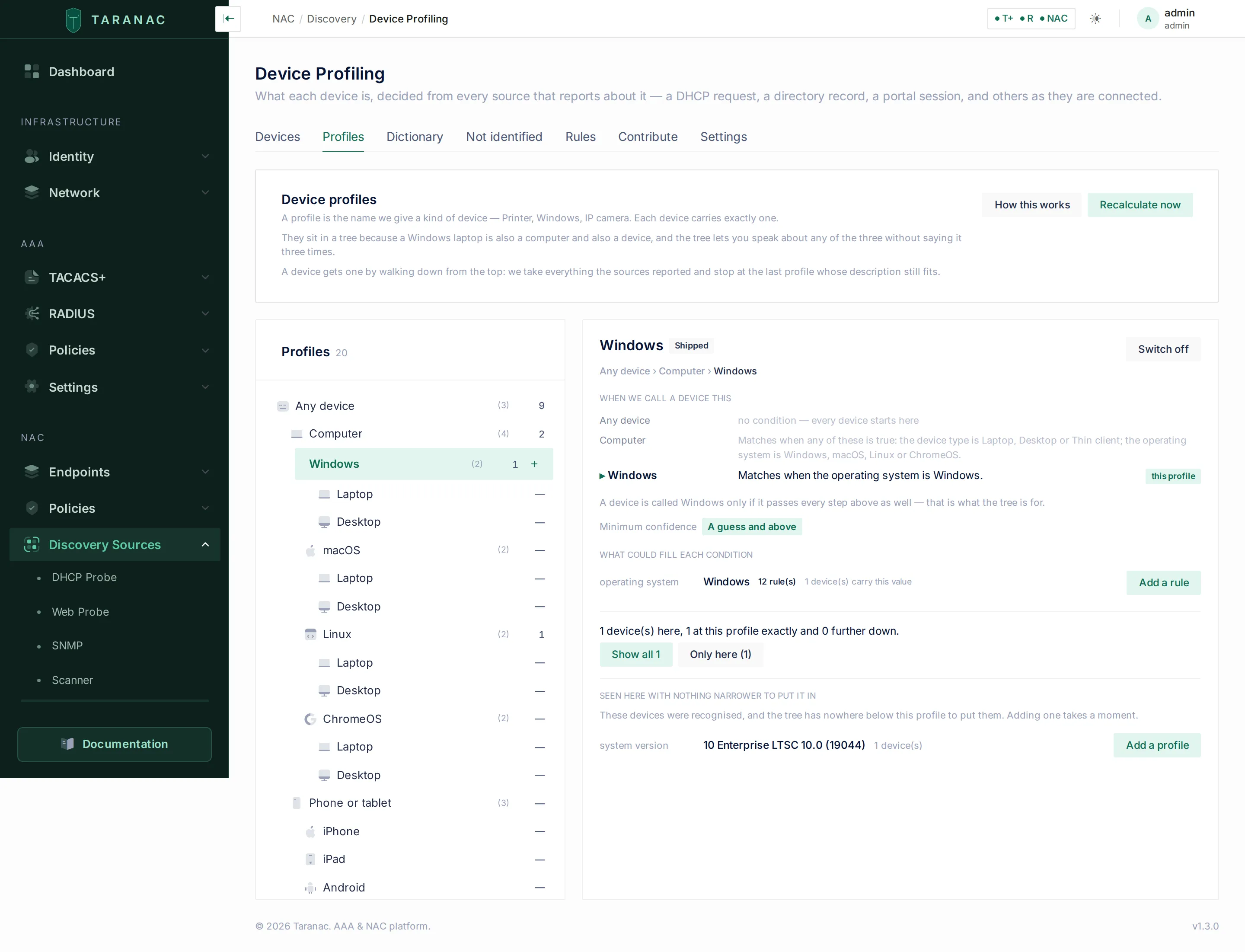
How a node matches:
- Patterns within one dimension are alternatives. A dimension holds one value, so the device type is Laptop, Desktop or Thin client matches any of the three.
- Across dimensions, all conditions must hold by default. The confidence of the node is then its weakest clause. Under Advanced, Any one condition is enough switches the node to “any”, and its confidence is that of the clause that matched.
- Minimum confidence is chosen as a word: A guess and above, Likely and above or Confident and above. Below it, the device keeps the name above.
- Confidence flows upward, never down. A child that matched lifts every ancestor to at least its own level. Being 95 sure a device is an iPhone means being at least 95 sure it is a phone. A parent never lends confidence to a child.
- Your node beats a shipped sibling, but only among siblings that already cleared their own minimum. A weak node of yours cannot silence a strong shipped one.
- Two siblings matching equally are not decided by position. The walk stops at the parent and the card names both. Sibling conditions we ship do not overlap, so a tie means two nodes of yours, or one of yours and one of ours, describe the same devices.
- A switched-off node is skipped, and the card says the device matched it but it is off.
Shipped nodes can be switched off but not edited or deleted, because the next start would re-sync them. Your own nodes can be edited and deleted. Use Add a profile under … (the + beside a node) to add one anywhere in the tree.
What we ship
Section titled “What we ship”The shipped tree is deliberately small: every node in it can actually hold a device on the rules we ship.
| Branch | Nodes | Reached through |
|---|---|---|
| Computer | Windows, macOS, Linux, ChromeOS, each with Laptop and Desktop | OS family (or a Laptop / Desktop / Thin client device type) |
| Phone or tablet | iPhone, iPad, Android | OS family iOS, iPadOS, Android |
| Embedded device | Single-board computer | Device type IoT, Embedded device, Single-board computer and others; OS family Embedded Linux |
All shipped nodes ask for A guess and above. A rule-set update from taranac.pro can add shipped nodes (see Rule-set updates).
Laptop and Desktop come from the port
Section titled “Laptop and Desktop come from the port”The one reliable signal of form factor is radio. Under each operating system, Laptop matches a computer whose RADIUS sessions report a wireless NAS-Port-Type, and is worth likely. Desktop matches one only ever seen on a wired port, and is worth a guess, because laptops dock. A device that was ever on Wi-Fi counts as wireless, because a dock passes the laptop’s own MAC through to its Ethernet port.
This is a node condition and not a rule on purpose. A rule “on radio means Laptop” would call every phone a laptop. The operating system is established first, and the port only decides the form factor. It also means a device that is not authenticated by 802.1X or MAB, or whose switch or access point sends no accounting, stops at the OS node. Its card says the connection was never reported.
Versions are yours to add
Section titled “Versions are yours to add”No OS version nodes ship. The vocabulary of versions belongs to your estate: a real network carries 11 Enterprise 22H2, 10 Enterprise LTSC 10.0 (19044), Fedora 40, 17_4. A shipped “Windows 11” node would miss most of them and look like coverage.
Instead, a node’s panel lists, under Seen here with nothing narrower to put it in, the values that devices at that node actually carry, with a device count and an Add a profile button pre-filled with the value. The same panel shows, for each condition, how many rules could ever conclude it and how many devices carry the value. Add a rule opens the rule form with the dimension and value already filled in. A condition that no rule can conclude says so, because nothing will ever match on it.
How a verdict is reached
Section titled “How a verdict is reached”Each of the four dimensions is settled separately, and in this order:
- Refusals first. If a refusing rule matches, the dimension is left empty on purpose, whatever else concluded. The reason is shown on the card (see refusing rules).
- Your rules before ours. If any rule of yours matched in this dimension, the shipped rules in that dimension are set aside.
- One vote per witness. Rules concluding the same value are grouped, and only the strongest rule per witness counts. Independent witnesses are combined, so that each one leaves less room for doubt: two at 60 make 84, three make 94, and nothing exceeds 100. Rules that heard a witness already counted are kept on the card as agreeing, not voting.
- Agreement at different depths strengthens. If the request list says Apple and the browser string says iOS, that is one answer given at two precisions. The answer is iOS at the strength of both, and the card shows both witnesses. The deeper answer must clear the bar on its own evidence before it inherits the other’s support. If both iOS and macOS clear it, Apple does not strengthen either. Which name refines which comes from the Dictionary.
- Highest confidence wins, then highest priority. A rule’s priority exists only to settle two equally strong, different answers. For example, the shipped Client Hints rule for Windows 11 has priority over the
Windows NT 10.0rule that says10 / 11. - Still level? The dimension stays empty and is marked disputed. No tie-break is invented. The card shows both sides with their witnesses.
- Below 50, nothing is recorded. An answer that did not reach the scale’s floor is shown as a near miss (“something hinted…”), never as a value.
A value asserted by a source (a Web Probe reserved attribute such as profile_os_family) replaces what the rules concluded for that dimension. The rules’ conclusion is kept beside it: the card reads “The device’s own signals agree” or “On record as X; the device’s own signals read Y. The record stands, and the difference is worth a look.”
Confidence: three words
Section titled “Confidence: three words”Confidence is shown as a word, because a percentage claims a precision the inputs do not have. The scale is on the Profiles tab under How this works:
| Word | Range | Typical evidence |
|---|---|---|
| confident | 83–100 | two independent signals agreed, a fingerprint and a directory say |
| likely | 66–82 | one strong signal, such as a vendor class that names the product outright |
| a guess | 50–65 | one weak signal, such as a request list other systems send too |
| (no name) | below 50 | nothing is recorded rather than something being guessed |
The number itself is still available: hover a step of the chain, or expand it.
Reading the device card
Section titled “Reading the device card”The Device profile card is on every endpoint’s page. The same profile appears in the drawer that opens from the Devices tab and from the magnifier beside a MAC in NAC Sessions, the NAC Auth Log and Guest Sessions. It is worked out fresh each time you open it, across every source.
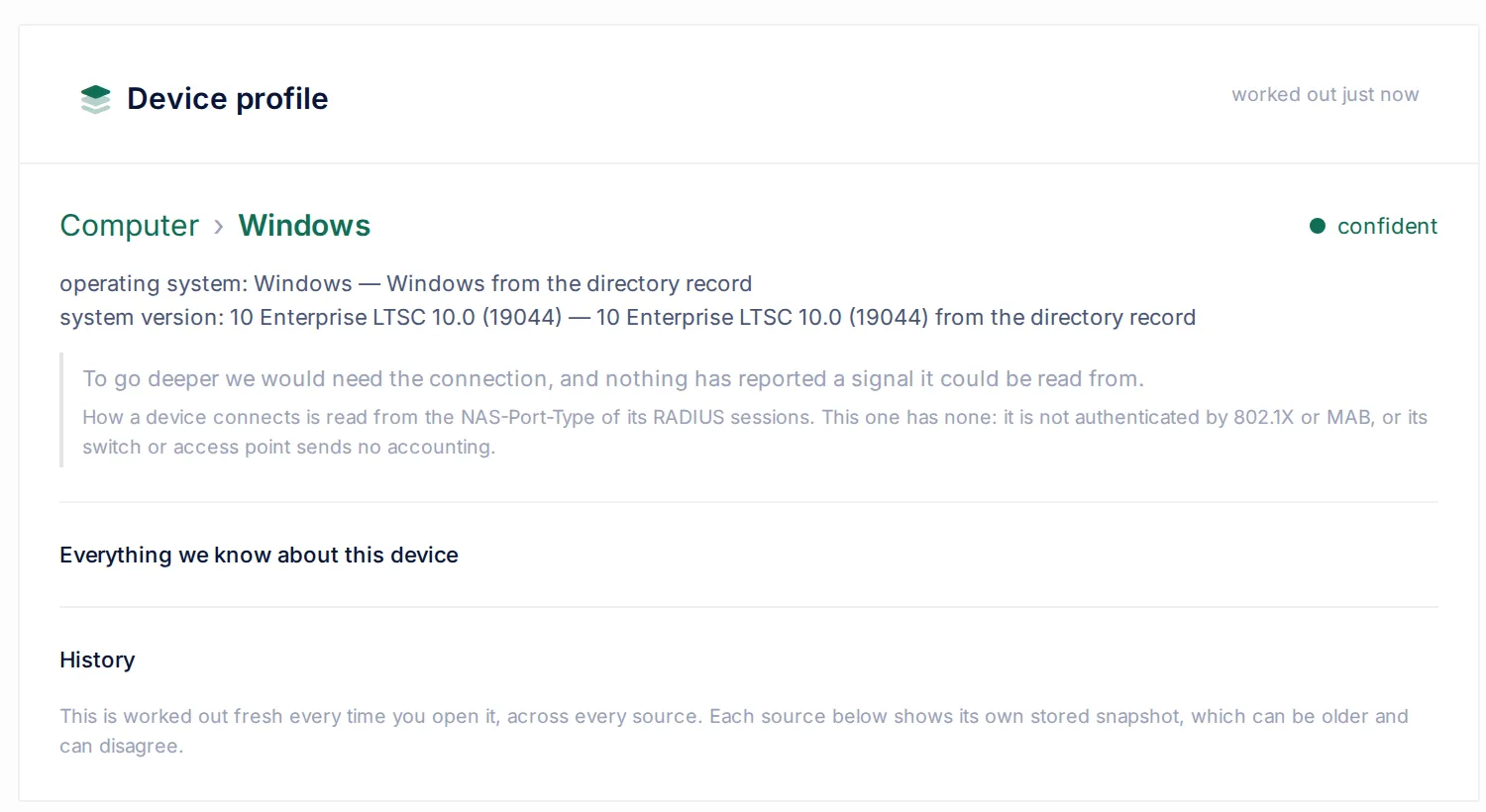
At rest, it shows:
- The chain of names, each step coloured by its own confidence, with one confidence word for the whole chain. Because confidence only flows upward, the deepest word is true of every name on the line.
- One answer line per dimension, with the witness behind it: operating system: Windows, Windows from the directory record.
- One sentence saying why the chain stopped, with a second line naming the lever when there is one.
Click a step to expand it: the claim as a sentence, its confidence as a number, the rules that carried it, the exact phrase the device transmitted (saw: …), rules that agreed without voting, and the alternatives that were considered. Everything we know about this device opens every source’s raw evidence.
A device nothing has ever reported gets its own heading rather than “Not identified”. A disputed dimension is shown in amber, not red: the profiler did not fail, it declined to invent a winner.
Why the chain stopped
Section titled “Why the chain stopped”| The card says | What it means | What to do |
|---|---|---|
| Nothing has reported anything about this device yet. | No source has heard it. | Check that the DHCP Probe or the portal sees its traffic. |
| To go deeper we would need the dimension, and nothing has reported a signal it could be read from. | The next level needs a fact no connected source provides. | Connect a source that reports it. |
| The device did report something, and no rule recognises a dimension in it. | A gap in the rules. | Write the rule. The Not identified tab already holds the group it falls into. |
| Something hinted the dimension is value, but too faintly to record. | Below 50. | Raise that rule’s confidence, or wait for a second, independent source to agree. |
| The dimension is disputed: values are equally supported. | A genuine tie. | Switch the wrong rule off, raise the other’s priority, or record in the Dictionary that one name refines the other. |
| We deliberately do not record the dimension for a device like this. | A refusing rule matched. Its reason is shown. | Usually nothing. |
| The dimension is value, and no profile under name covers that. | The value is known and the tree has no place for it. | Add a profile for that value (the gap list offers it). |
| Child matches, but the evidence is not strong enough for it. | Below the child’s minimum confidence. | Lower that profile’s level, or raise the confidence of the rule that feeds it. |
| Child matches this device, but it is switched off. | Somebody’s decision. | Switch it back on if that was not intended. |
| A and B match equally well, so neither was chosen. | Two sibling nodes overlap. | Narrow the conditions of one of them. |
| Nothing narrower than name ships. Add your own to go deeper. / You have nothing below name. | The honest end of the tree. | Add a profile if you need a finer name. |
| The vocabulary changed after this device was named… | The stored name predates a Dictionary change. | Nothing: the next recalculation settles it, and the device keeps its group until then. |
| The name this device carried is no longer shipped… | A shipped branch was withdrawn. The device was moved up to the nearest surviving node rather than dropped out of its groups. | Nothing: the next pass names it again. |
History
Section titled “History”The History section of the card records every time the device’s name or a dimension’s verdict changed: before and after, the rules that decided it, and what triggered the pass (DHCP, network scan, captive portal browser, directory, Web Probe, switch neighbour table, RADIUS session, a rule, tree, vocabulary, trust or settings change, a rule-set update, a product upgrade, the periodic re-check, or a manual recalculation). A confidence that merely moved is not recorded.
History is kept for 180 days by default. The setting is profiling.history_retention_days and appears as Profile Changes in the NAC group of Settings → System → Log Rotation (see Settings reference). 0 keeps it forever.
The page, tab by tab
Section titled “The page, tab by tab”| Tab | What it is for |
|---|---|
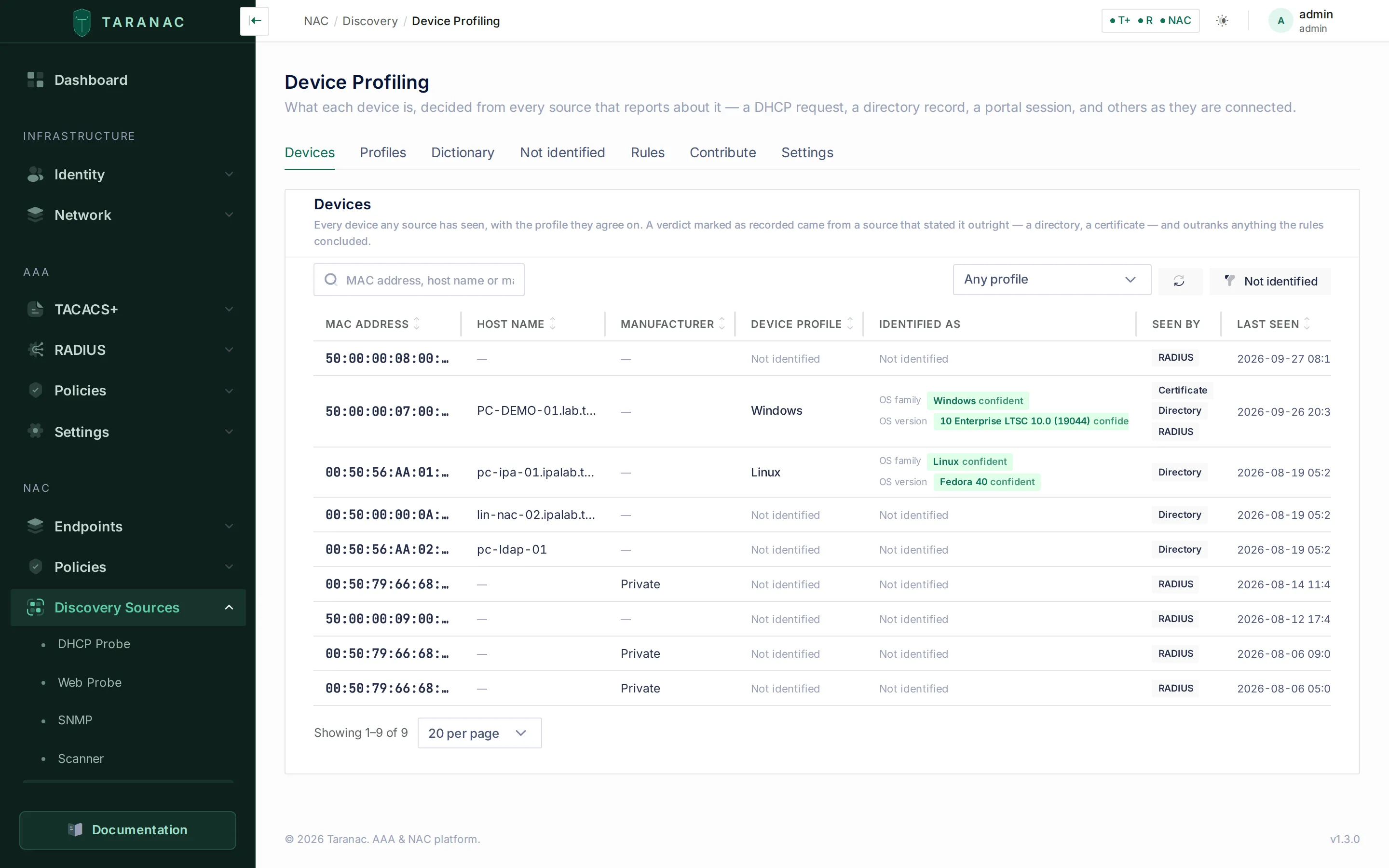
| Devices | Every device any source has seen, with its profile, what it was identified as per dimension, the sources that saw it and when. Filter by a profile exactly or and below, or show only Not identified. A row opens the device’s profile in a drawer. |
| Profiles | The tree. Select a node to see its chain of conditions, its minimum confidence, what could fill each condition, how many devices sit here and below, and the gap list. Add, edit and switch off nodes; Recalculate now. |
| Dictionary | The vocabulary rules conclude and which name refines which. See Profiling rules. |
| Not identified | The worklist of devices no rule explains, grouped by what one rule would close. See Not identified. |
| Rules | Your rules and the shipped ones. See Profiling rules. |
| Contribute | The exchange with taranac.pro and rule-set files. See Rule-set updates. |
| Settings | The confidence floor and the OS trust order. See below. |
When names are recalculated
Section titled “When names are recalculated”Nothing is recalculated inside your request, and nothing waits for a timer:
- New evidence. Every source marks the devices it heard about in the same transaction that stores the evidence. A queue drained every few seconds on the cluster leader works out their names again, oldest first. A device that just asked for a lease never waits behind a whole-estate pass.
- A change of meaning. Editing a rule, the tree, the Dictionary, the trust order or the confidence floor, installing a rule set, or upgrading the product asks for the whole estate in one coalesced pass.
- The backstop. A periodic re-check runs every 24 hours (
profiling.profiles.recompute_interval_hours). It catches evidence that aged out of its retention window. - Recalculate now on the Profiles tab queues the whole estate and says how many devices it queued. It does not block the page.
Group membership is checked again only for devices whose name actually changed.
Settings
Section titled “Settings”The Settings tab holds the two judgements your estate can make wrong. Everything else, including how confidence is combined, is fixed so that the same device gets the same answer on every installation. Saving either setting recalculates every device.
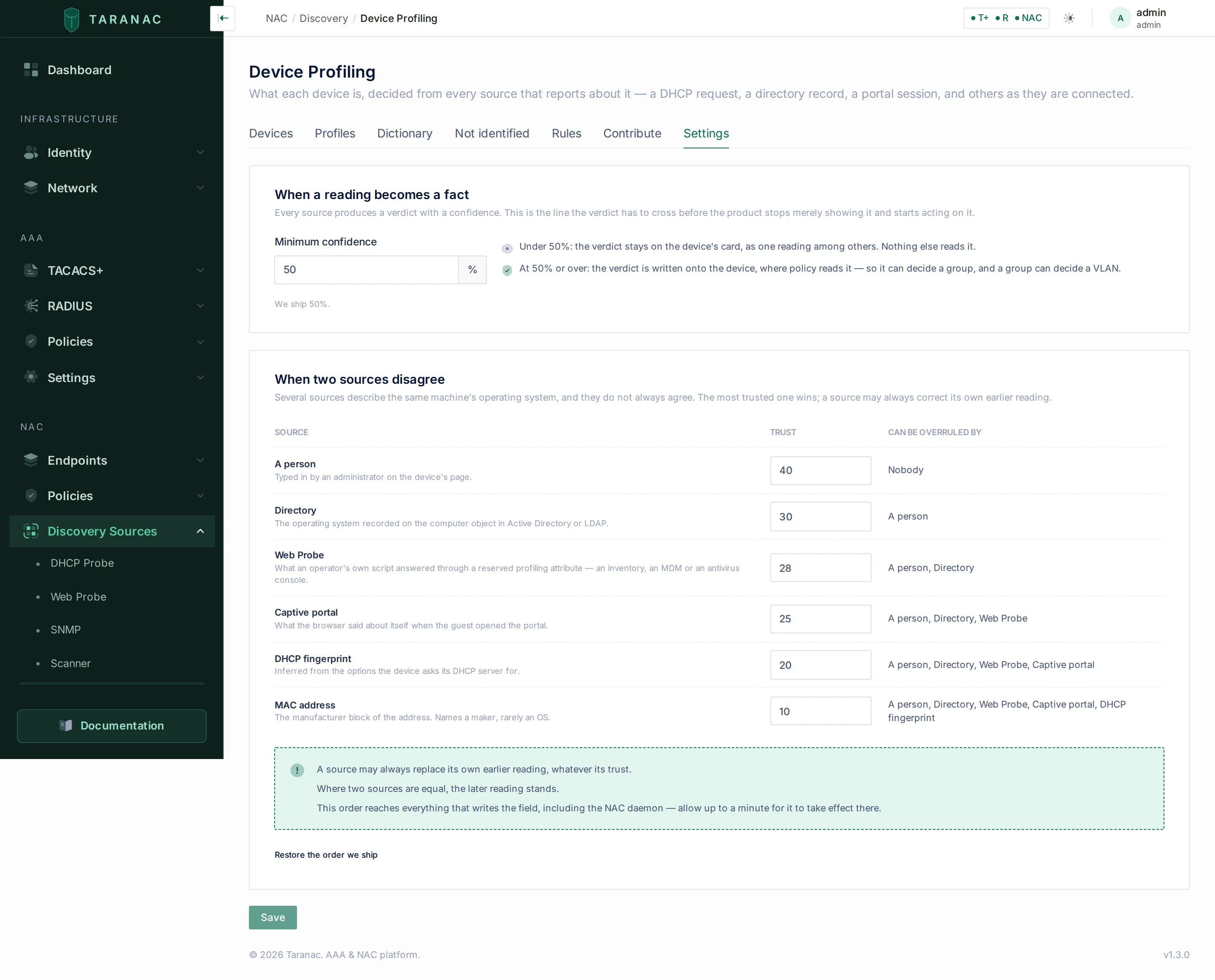
When a reading becomes a fact: Minimum confidence (default 50%). A DHCP or captive-portal verdict at or above it is written into the endpoint’s operating-system field. That is the field classification rules read, so it can decide a group, and a group can decide a VLAN. Under it, the verdict stays on the device card as one reading among others. Raise it if you act on the OS field and want only strong readings there. The profile name itself is decided by the tree’s own minimums and is not affected.
When two sources disagree: trust order. A 0–100 trust per source that may write the endpoint’s operating system: A person 40, Directory 30, Web Probe 28, Captive portal 25, DHCP fingerprint 20, MAC address 10. The table shows, for each source, who can overrule it. A source may always replace its own reading, and equal trust means the later reading stands. The order also decides which source’s assertion wins on the profile. It reaches the NAC daemon within about a minute. Restore the order we ship puts it back, and Changed here marks what differs from the default. A typical change: raise Web Probe above Directory when your MDM is more current than your directory.
Common scenarios
Section titled “Common scenarios”- A device should be deeper than it is. Open its card and read the stop sentence. It tells you whether to connect a source, write a rule, add a node, or accept the answer.
- A device is named wrongly. Expand the step you disagree with. It names the witness, the rule and what the device said. If the rule is wrong, switch it off or write your own (yours win in that dimension). If the device is unusual, write a narrower rule of your own.
- You need Windows 11 machines in their own group. Add a node under Computer › Windows with the condition OS version is
11*, then classify a group on it. The gap list on the Windows node shows the exact version values your devices carry. - Laptops never appear. Laptop needs a wireless NAS-Port-Type in the device’s RADIUS sessions. Check that the device authenticates by 802.1X or MAB and that the access point sends accounting.
Related
Section titled “Related”- Discovery & profiling overview: the sources and the trust model.
- Profiling rules: signals, capturing and refusing rules, preview, Dictionary.
- Not identified: the worklist.
- Endpoints: classifying groups on a Device profile condition.