

Backup & upgrades
Taranac backs up its configuration, not its history. A backup captures everything that defines how the system authenticates and authorises — devices, policies, profiles, users, groups, RBAC, the internal CA, daemon configs and the host secrets needed to bring the stack back up — and packages it into a single encrypted archive. Logs, live sessions, alerts and other dynamic data are deliberately excluded.
Backups are created and managed from the admin UI under System → Backup (the page itself is titled Backup & Recovery). Restore is not in the UI — it is destructive (it erases the current configuration) so it runs from the ./taranac restore CLI, off the API, and verifies your master key before it touches anything. This page covers what is in an archive, how an archive reports its own completeness, scheduling and retention, recovery, the ./taranac update upgrade path and the extra steps some older releases need, and how backups relate to high availability.
- dbalways
- certs
- host_files
- daemon_configs
What is in a backup
Section titled “What is in a backup”An archive is named taranac-backup-<UTC-timestamp>.tar. It is an outer tar with two members:
manifest.json— plaintext, non-secret metadata:format_version,created_at,trigger(manual/scheduled),actor, the Taranac version (app_version), the database schema revision (alembic_head), a short master-key fingerprint (kek_fingerprint) and an encrypted canary token (kek_canary), apayload_sha256, and the archive’s own report of itself —included,missingand per-itemissues(see Does the archive hold what it claims? below). Because it is readable without the key, recovery can verify the right master key before decrypting anything, and the answer to “is this archive usable” travels with the archive and survives being copied.payload.enc— the actual contents, an inner tar encrypted with the master key (Fernet).
The encrypted payload contains:
| Component | Badge | What it is | Always included? |
|---|---|---|---|
| Database dump | db | A data-only dump of the configuration tables (dynamic tables excluded) | Yes — not a toggle |
| Certificates | certs | The internal CA plus all server key/certificate pairs | Optional (include_certs) |
| Host files | host_files | The active .env file and Docker Compose file — i.e. the non-database secrets: master key, API keys, DB password. All-or-nothing: if either is uncollectable the component is reported missing | Optional (include_host_files) |
| Host config | host_config | The operator’s own files under config/: tls/ (your CA-signed certificate), firebase/ (the Push MFA service-account key) and etcd-ca/ (the cluster’s etcd CA — what admits or replaces a node). Carried under the same include_host_files toggle | Opportunistic (see below) |
| Daemon configs | daemon_configs | Generated TACACS+ / RADIUS / NAC config snapshots (informational — regenerated from the DB on restore) | Optional (include_daemon_configs) |
A leaked archive is useless without the master key. Two things are deliberately not in it, and both matter at recovery time: the MFA enrollments (taranac-mfa has its own database and its own crypto — users with Push/TOTP re-enroll unless you protected that side separately) and the Active Directory machine account (Samba rotates its password weekly, so a restored one is a broken trust that reads as a mysterious authentication failure; re-join the domain from System → Authentication). config/cluster-secrets/ is also excluded — it describes this cluster’s identity, not portable configuration.
host_config is opportunistic in declaration, never in reporting. An install with no CA-signed certificate and no Firebase key legitimately has nothing there, and an empty tree raises nothing; a tree that holds something the api container cannot read is always an operator fault and is named, per file, in the archive’s report.
Does the archive hold what it claims?
Section titled “Does the archive hold what it claims?”The manifest carries the archive’s own verdict, in plaintext beside the payload, so the answer is known at backup time rather than at recovery:
included— the components that actually made it in.missing— declared components that did not. Anything your settings promised and the build could not collect.issues— the per-item half: one entry per path that was not archived, withcomponent,item, a stablereason(unreadable,not_mounted,empty,unlistable) and the raw OS message.included/missinganswer which components; that is the right granularity for a headline and the wrong one for acting on.
An incomplete archive is still written — a partial archive beats no archive — but the outcome is reported as degraded: an error in the log, the detail in the BACKUP_CREATED audit entry, and one standing backup:incomplete alert that clears only when a complete archive is produced. Deliberately one alert, not one per file. In the UI the row carries an incomplete badge and a Show what was not archived panel listing each path and reason.
Directories are all-or-nothing. tar writes members as it walks, in sorted order, so without a check an unreadable 0600 private key would leave its ca.crt/tls.crt siblings in the archive — restoring a certificate with no private key, and looking like it had worked. A tree is therefore proved readable before a byte of it is written.
Configuration vs dynamic data
Section titled “Configuration vs dynamic data”The boundary between “config” (backed up) and “dynamic” (excluded) is defined in one place in the product, so the backup side and the restore side never disagree. Excluded from the database dump:
- Log tables (authentication, sessions, accounting, audit logs, LDAP sync logs)
- Live NAC sessions, the alert queue and firing alerts, MFA challenges
- Ephemeral tokens (refresh tokens, password-reset tokens, certificate-download tokens) and password-reuse history
- Endpoint discovery staging (auto-repopulates from live traffic)
- The NCM collection-run journal (
ncm_runsand itsncm_resultschildren) and NCM collection-runtime state — collector enrollment tokens, in-flight dispatch, JIT mint leases, the notification outbox. The durable NCM record (sources, recipes, scrub sets, credentials, tracked configs, snapshots) is configuration and is backed up - The IEEE OUI manufacturer database (re-synced on a schedule)
- HA cluster-runtime state — the node roster (
cluster_nodes), its join tokens (cluster_join_tokens), and per-node service health (node_service_health). This describes this physical cluster, not portable configuration; the running node keeps its own current roster on restore, so a stale roster can’t resurrect decommissioned or foreign nodes - The schema-version row (the restore target is already at the right schema)
Everything else — your real configuration — is included.
Creating and scheduling backups
Section titled “Creating and scheduling backups”System → Backup has three sections: schedule & retention, the archive list, and a recovery-instructions panel. Access is gated by the backup RBAC permission set (view, create, download, delete, manage); if you lack backup.view the page is empty.
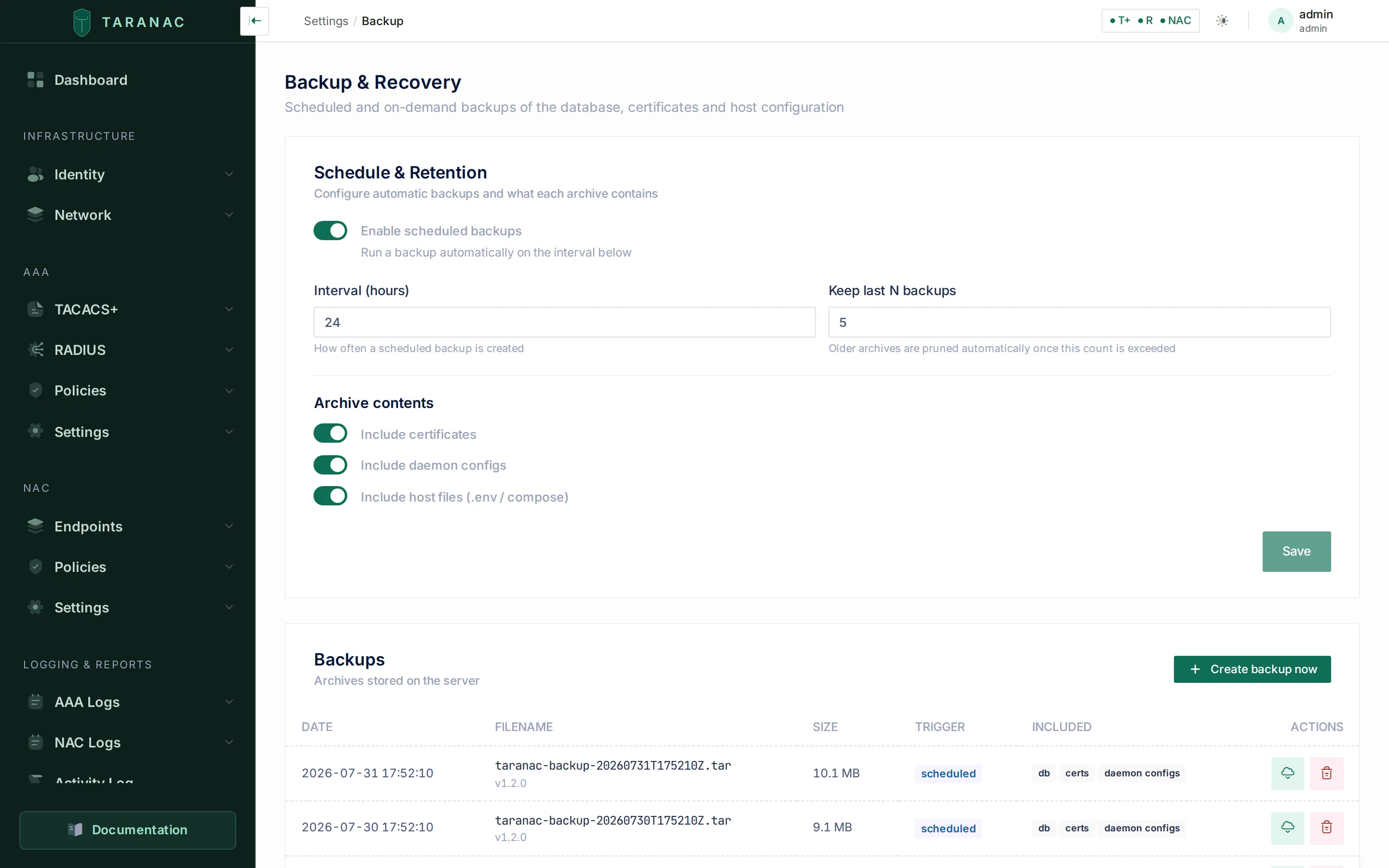 The Backup & Recovery page: schedule and retention on top, the archive list with per-archive badges below.
Schedule & retention
Section titled “Schedule & retention”Editable settings (saving requires backup.manage):
| Setting | Default | Meaning |
|---|---|---|
schedule_enabled | on | Master toggle for automatic backups. On by default — an install that has to be visited before it protects itself spends its first weeks unprotected, and nobody discovers that until a disaster |
interval_hours | 24 | Hours between scheduled backups (floored to a 1-hour minimum) |
retention_count | 5 | How many archives to keep on disk; older ones are pruned. Applies to manual backups too, not only scheduled |
include_certs | on | Pack the internal CA and TLS certificates |
include_daemon_configs | on | Pack the generated TACACS+/RADIUS/NAC config files |
include_host_files | on | Pack the .env and Compose file (the host secrets) |
The database dump is always packed; there is no toggle to exclude it.
Paths are internal and not editable from the API: archives are written to /app/backups in the container, certificates are read from /opt/taranac/certs, and the host material comes from the read-only mounts /app/host/env, /app/host/compose.yml and /app/host/config.
When scheduling is enabled, a background worker runs on the configured interval, creates one archive, and prunes to the retention count. A scheduled-backup failure is loud: it records a BACKUP_FAILED audit event and raises a firing backup:scheduled alert (cleared automatically on the next successful run). The worker never crashes the scheduler.
Creating a backup now
Section titled “Creating a backup now”Create backup now (backup.create) builds an archive synchronously — it usually takes a few seconds. On success the archive list refreshes.
The dump runs under a 15-minute ceiling. A configuration dump is small (logs are excluded — under a megabyte in practice), so a run past that is hung, not slow, and a hung dump was the quietest failure this feature had: it held the scheduler’s single slot forever, every later tick was dropped as a misfire, and the dashboard kept showing the last successful archive. The timeout turns that into an ordinary failure, with an audit event and an alert.
A single unreadable file does not kill the whole archive either. The api container runs as a different user from the operator who installed Taranac, and .env is mounted read-only, so the installer and the updater set the group permissions on the host; a file that still cannot be read degrades the archive (reported as missing, with an alert) instead of aborting it.
The archive list
Section titled “The archive list”Each row shows the creation date (in your configured timezone), the filename with its app_version, the size, the trigger badge (manual or scheduled), and “included” badges (db, certs, host files, host config, daemon configs). An archive that fell short also carries an incomplete badge and a Show what was not archived panel — the per-item report out of the manifest, one row per path with its reason. Two actions:
- Download (
backup.download) — streams the.tarthrough the authenticated API; the file never appears in a URL. Store it somewhere safe and off-box. - Delete (
backup.delete) — asks for confirmation with the exact filename, then permanently removes the archive. This cannot be undone.
The dashboard widget
Section titled “The dashboard widget”The Backup status widget leads with a verdict, not a timestamp — “a backup happened” is not the question an operator has at a glance. It reports three states, read from the same plaintext manifest as everything else:
| Status | Meaning |
|---|---|
success | The archive holds everything it declared |
incomplete | An archive exists and was written without part of its content |
failed | No archive at all — there is nothing to restore from |
incomplete is deliberately not called failed: they demand different actions, and an operator reading “failed” over an archive that is 90 % usable — possibly their only copy — may delete it or skip restoring from it.
Stale is orthogonal and keeps its own warning tone: a complete archive can still be too old, and an incomplete one can be minutes fresh. With scheduling on, “stale” means older than twice the configured interval; with scheduling off, only “no archive at all” is stale — the manual cadence is the operator’s call.
Restoring (disaster recovery)
Section titled “Restoring (disaster recovery)”Recovery is CLI-only and destructive. A fresh Taranac deploy is not empty — startup migrations and seeds build a working default system — so recovery first wipes the current configuration and then loads the backup. That is why it is a deliberate, off-the-API action.
The intended flow:
- Deploy a fresh, healthy Taranac of the archive’s version and log in as the default admin. Confirm the deploy itself works (this separates “deploy failed” from “recovery failed”).
- Have the original master key at hand.
- Copy the archive onto the host and run
./taranac restorewith its path.
The Recovery instructions panel in the UI prints the same commands; there is no recover-from-browser button by design.
Where the archives are
Section titled “Where the archives are”Archives live in the backups Docker volume, mounted into the api container at /app/backups. A named volume on purpose: on the container’s writable layer they would be lost the moment an update recreated the api. Its ownership is set at boot, so the first backup on a brand-new install works like any other. Besides the UI’s Download button you can take them off the box with your own tooling:
docker run --rm -v taranac_backups:/b -v "$PWD:/out" busybox \ sh -c 'cp /b/taranac-backup-*.tar /out/'The volume name is prefixed by your Compose project — docker volume ls | grep backups if you renamed the install directory.
Getting an archive back needs nothing of the kind: ./taranac restore takes the archive’s path on the host — relative to the directory you run it from, or absolute — and copies it into the volume itself, readable by the api. An archive that is already in the volume (one this install wrote, listed under System → Backup) is named by its file name alone.
The guided restore
Section titled “The guided restore”Run it from the install directory. It performs the whole runbook, both phases included:
./taranac restore /root/taranac-backup-YYYYMMDDTHHMMSSZ.tar # a file on this host./taranac restore taranac-backup-YYYYMMDDTHHMMSSZ.tar # already in the backups volume./taranac restore <archive> --master-key-file /root/old.key # this install runs a different key./taranac restore <archive> --yes # skip the phase-2 confirmationWhen this install does not already run the original master key, give it in one of two ways — never as an argument, where it would sit in the shell history and in ps for every user of the host:
./taranac restore <archive> --master-key-file /root/old.key           # a file that holds only the key./taranac restore <archive> --master-key-file - --yes < /root/old.key  # '-' reads it from stdin
read -rs TARANAC_MASTER_KEY && export TARANAC_MASTER_KEY      # or the environment: paste the key, press Enter./taranac restore /root/taranac-backup-YYYYMMDDTHHMMSSZ.tar
--master-key <KEY> is refused, with nothing changed. The file wins when both are given. Whichever way it arrives, the key is written into .env — every container that reads it is recreated from that file.
Restore asks you to type yes before it erases the configuration. With no terminal to type it on — piped, ssh without -t, or the key read from stdin — it refuses before it changes anything and prints the same command with --yes.
In order, the script:
- Refuses up front what it cannot finish: an install that reads its key from a file (
MASTER_KEY_SOURCE=fileorprompt— switch toMASTER_KEY_SOURCE=envwith the original key asMASTER_KEYfor the recovery, or put the original key where your key source reads it), and, under HA, any node that is not the leader. - Copies the archive in, verifies the key against it and extracts the host material (phase 1).
- Overlays the five recovery keys onto this install’s
.env, keeping the previous file as.env.pre-restore.<UTC time>— a new one per run, so a second attempt never overwrites the original. - Checks that the key now in
.envopens the archive. If it does not,.envis put back and nothing else has changed; the message tells you to pass the original key with--master-key-file(orTARANAC_MASTER_KEY). Everything after this step is irreversible, which is why the check sits here. - Restores the certificates into the
taranac_certsvolume and the operator’s files — your TLS certificate, the Firebase key, the etcd CA — into./config, with the group the api needs to read them, so this node’s next backup carries them too. An etcd CA that this host does not trust — an archive taken before acluster rotate-ca, or another cluster’s — is not put over the one in place: it is set aside inconfig/etcd-ca.restored-<time>and the script says so. That directory holds a CA private key; delete it once you are sure the restore went to the right cluster. - Loads the database (phase 2) from a one-off container while the api is stopped: the api refuses to start on a database whose key check belongs to another key, so the data goes in first, and nothing can write into it under the old key meanwhile. If the load fails, the script tells you whether the data went in: if it did not, the api is started again as it was and you re-run the same command once the cause is fixed — the load truncates and reloads, so a second run is safe.
- Clears the daemons’
master_keyvolume so their entrypoints adopt the restored key, recreates the api, the AAA/NAC daemons, MFA and the renderer, waits for the api to report healthy, restarts every service so each re-reads what was restored, and removes the decrypted extraction from the volume.
A failure before step 6 leaves the database untouched and says so; a failure after it says not to put the previous .env back — its key no longer opens the restored data.
Restoring under HA
Section titled “Restoring under HA”Run the restore on the leader. It loads the dump into the cluster’s one writable database, and every replica takes it from there by replication; on a replica the script refuses, changes nothing and points to ./taranac cluster status to find the leader. It merges the Patroni overlay by itself and never recreates the database or etcd containers.
Two more refusals keep the cluster in one piece:
- An archive cut under other keys than the cluster runs now — taken before a
rotate-key— is refused before.envis touched. Every node carries the same five keys; restoring the old ones on the leader alone would leave the other nodes unable to read the restored data or talk to it. Restore an archive taken after the last key change, or, if you need exactly that one, bring the cluster down to this node first (./taranac cluster remove-node --node <name>for each other node, then./ha-deconvert.sh), restore, and build the cluster again. - The cluster’s live topology is kept. The node roster, its join tokens, per-node health and the published cluster manifest describe the cluster as it is, not as it was when the archive was cut, so they survive the restore as they are — a stale node list is never handed to every node.
Doing it by hand
Section titled “Doing it by hand”The guided script exists because recovery has to edit host files and recreate containers in a precise order; if you need to drive it yourself, these are the same steps. The extraction lives in the backups volume, so it is read through the api container.
Phase 1 — verify the key, extract the host material:
./taranac exec -T api python -m app.scripts.restore host \ /app/backups/<archive>.tar --out /app/backups/restoreIt verifies the canary against the loaded key (or a key read from stdin with --master-key -), decrypts the payload and reports which of env/, compose/, host_config/ and certs/ the archive actually held.
Between the phases — read the five recovery keys out of the snapshot and set them in .env (do not copy the file over), check that the key in .env opens the archive, and put the certificates and config/ back:
./taranac exec -T api cat /app/backups/restore/env/env # take the five values from hereprintf '%s\n' '<MASTER_KEY from .env>' \ | ./taranac exec -T api python -m app.scripts.restore check-key /app/backups/<archive>.tar./taranac exec -T api sh -c 'cp -a /app/backups/restore/certs/. /opt/taranac/certs/'./taranac cp api:/app/backups/restore/host_config/. ./config/sudo chgrp -R 999 ./config && sudo chmod -R g+rX ./config # the api reads them as gid 999check-key reads one key from stdin and exits 0 when it opens the archive, 10 when it is not a key at all, 11 when it is another key. Do not go on past anything but 0.
Phase 2 — the database, with the api stopped:
./taranac stop api./taranac run --rm --no-deps -T api python -m app.scripts.restore db /app/backups/<archive>.tarA one-off container, not exec api: the api would refuse to start on the restored key until the dump is in. Phase 2 verifies the master key, the version and the schema, asks you to type yes to confirm, then in one transaction truncates the configuration tables and reloads the dump. The HA cluster-runtime tables (cluster_nodes, cluster_join_tokens, node_service_health) and the published cluster manifest are left untouched — the running node keeps its own current cluster membership. An older archive taken before those tables were excluded is filtered on the way in, so a stale roster is never reloaded. Restore then regenerates the TACACS+/RADIUS/NAC daemon configs from the restored database and records a BACKUP_RESTORED audit event. Add --yes to skip the interactive confirmation (for automation).
Then let the daemons adopt the key and bring the stack back:
docker run --rm -v taranac_master_key:/d busybox rm -f /d/master_key./taranac up -d --force-recreate api tacacs radius nac taranac-mfa taranac-renderer./taranac restart./taranac exec -T api rm -rf /app/backups/restoreClearing that volume is not optional: tacacs, radius and nac read the KEK from a file in a shared volume and their entrypoints provision it absent-only — an existing file is never updated. A fresh install has already pinned its own generated key there, so without this the daemons decrypt device secrets with the wrong key while the api is perfectly healthy: shared-secret and enable-password reads fail on a system that otherwise looks fine. The database (and etcd under HA) are deliberately not recreated — their data has just been restored.
Hard gates before any destructive action
Section titled “Hard gates before any destructive action”Phase 2 refuses to run unless three checks pass:
| Gate | Check | Override |
|---|---|---|
| Master key | The archive canary decrypts with the loaded key | none — a key mismatch always aborts |
| Version | Archive app_version equals the running version | --force |
| Schema | Archive alembic_head equals the current DB schema revision | --force |
The master-key gate cannot be overridden. The version and schema gates can be bypassed with --force, but only do so when you are certain the configuration is compatible — see upgrades below.
Upgrades & the version model
Section titled “Upgrades & the version model”Taranac ships as a single platform stack: backend, frontend, captive portal and the TACACS+/RADIUS/NAC daemons all roll together under one version and one Git tag. (The optional taranac-mfa push service versions on its own line.) The daemons are downstream consumers of config the backend generates, so they cannot be released separately — what actually guarantees compatibility is the config-format contract between the backend and the daemons, not the version number alone.
./taranac update
Section titled “./taranac update”An upgrade is not only new images. A release can change docker-compose.yml, the taranac wrapper, install.sh, the HA scripts or the docs, and the new images may depend on those changes — so ./taranac update refreshes both halves. It fetches the release bundle and verifies its checksum, then pulls and verifies the new images while the running version is still in place, and only then replaces every framework file (leaving your .env and config/ alone — those are operator-owned and never overwritten), pins TARANAC_VERSION in .env and recreates the stack. Migrations run automatically when the api container starts (alembic upgrade head), before it serves traffic, and missing internal CA/server certificates are regenerated on the same boot.
| Command | What it does |
|---|---|
./taranac version | Installed version, plus a check for a newer one |
./taranac update | Update to the latest published stable version |
./taranac update --check | Report only; change nothing |
./taranac update --version <X> | Update to a specific version |
./taranac update --from taranac-bundle-<ver>.tar.gz | Apply a local bundle (air-gapped). The version is read from the bundle’s own VERSION file, never from the file name |
./taranac update --version <X> --repair | Re-apply the version this node already runs: a new backup, the files swapped, the stack recreated |
./taranac update --no-restart | Refresh files and pin the version; skip the pull and restart |
./taranac update --keep-images | Keep the superseded images instead of reclaiming their disk |
./taranac update --skip-image-verify | Accept pulled images whose digests differ from the release’s list — a registry mirror that re-pushed them |
./taranac update --skip-space-check | Pull even when the free-disk estimate says there is not enough room |
./taranac update --allow-out-of-order | Cluster repair only: skip the cluster’s update order (never its lock); asks for the word OUT-OF-ORDER, or --confirm OUT-OF-ORDER without a terminal |
./taranac update --ipv6-own-address-ok | Go on although inventory entries that matched IPv6 devices through the Docker gateway stop matching them (see IPv6). Also TARANAC_IPV6_OWN_ADDRESS_OK=1 |
./taranac update --yes (-y) | Answer the confirmation prompt — nothing else |
Checked before anything changes
Section titled “Checked before anything changes”Every step that can fail for a reason outside the node runs before the node is touched:
- The host. Docker Engine 28.0 or newer (not Podman), IPv6 in the kernel, and Docker able to create a network with IPv6 beside IPv4 — each a refusal with the command that fixes it. Docker’s ip6tables turned off is a warning. Where an interface takes its IPv6 address or route from router advertisements,
accept_ra=2is set and kept in/etc/sysctl.d/99-taranac-accept-ra.conf. The result is oneHost: …line, also written to.taranac-update.log. See IPv6. - The device inventory. Inventory entries that match IPv6 devices only through the Docker gateway are named, and the update stops while the inventory has no IPv6 entry at all (IPv6). The TACACS+ addresses that logged in during the last 30 days without an inventory entry are listed — a warning, not a stop — and kept in
.taranac-update.log: add them to the inventory, because TACACS+ answers only inventoried devices (Only inventoried devices log in). - The image every running container uses is recorded, with its digest, in the update’s backup directory (
.taranac-backup-<timestamp>/images-before.txt). - Free space in the Docker image store is checked against the images that are not on the host yet.
- The new release’s images are pulled from the new bundle’s compose files, while
.envstill pins the running version and the old files are still in place. - Every pulled image is compared with
IMAGES.lock— the content digest of every image of the release, PostgreSQL and etcd included, shipped inside the bundle and covered by its checksum. A mismatch names the image. - Every image’s files are read against its own layers, and a damaged one is replaced (below). This takes a few minutes; the running stack is not touched.
- Only then are the bundle files swapped, the version pinned and the stack restarted — and the update reports done only when every container runs the new images.
A failure in steps 1–7 — a host requirement, an unreachable registry, a full disk, a digest that is not the release’s, a damaged image with no replacement — leaves the bundle files, .env and the running stack exactly as they were; only downloaded layers remain. The usual cause of a digest mismatch is a registry mirror filled with docker tag + docker push, which changes digests: copy the images with a digest-preserving tool instead (docker buildx imagetools create, skopeo copy --all, crane copy), or, if you trust that mirror, re-run with --skip-image-verify. A bundle built without IMAGES.lock is accepted with a warning that the images were not verified. The shipped compose files pin PostgreSQL and etcd by digest too, so an update never moves the database image to whatever upstream published that day.
Damaged images
Section titled “Damaged images”A digest proves what an image is, not that its files on this disk are whole: a host that lost
power while an image was being unpacked can keep the image’s name and digest with files cut
short, and a container then fails with errors such as exec format error. So ./taranac update, ./taranac cluster init, add-witness, add-node, a node’s join and witness-join.sh
read each image’s files against its layers before they change anything.
A damaged image is replaced only once its replacement is in hand: first a copy of its own
layers, saved on the host (they are intact when only the unpacked files are damaged; no network
needed), otherwise the registry, which must answer for the image at that moment. Then the image
and its stopped containers are removed and the image is loaded back and read again. Without a
replacement nothing is removed, and the message names the damaged files and the cure — the
docker save / docker load commands, or docker save <image> | ssh <this host> docker load
from a host whose copy passes. A container that is running on a damaged image is never
stopped by the check; the message names it. --skip-image-verify skips this check together with
the digest comparison.
What the updater guarantees, and what it will not do
Section titled “What the updater guarantees, and what it will not do”- No half-updates. If the bundle cannot be fetched — no internet, a proxy, a blocked network — the update aborts with nothing changed, the version pin included, and tells you to restore access or bring the bundle over by hand and apply it with
--from. It never continues with the images alone: that would report success while the part that mattered never arrived. A failed checksum aborts the same way. - An abort names the phase it stopped in — pulling the images, verifying the pulled images, replacing the bundle files, writing the version pin into .env, starting the stack — and says what is and is not changed at that point. The backup of the previous bundle it took before the swap is
.taranac-backup-<timestamp>/inside the install directory. Re-running the same command completes the update; restoring from that directory goes back. - “Nothing to do” means the node really runs the version. A re-run on a node whose bundle, pin and running containers all agree answers
Already on <version> — … Nothing to do.: no backup, no file swap, nothing recreated — it only starts containers that are stopped. If the containers still run something else (a pull or restart that failed after the pin), the update proceeds and finishes the job.-yonly answers the prompt; to re-apply a version on purpose, use--version <version> --repair. ./taranac versioncatches a half-finished upgrade. The bundle’s ownVERSIONfile,.env’sTARANAC_VERSIONpin and the images the containers run agree only when the last upgrade ran to the end. Where they differ you get what differs and the one command that finishes it. The pin is read forgivingly: Windows line endings or a quoted value in.envdo not make it report an update for the release you are already running.- It never offers a downgrade. On a pre-release, or on a version newer than the latest stable release,
./taranac versionsays so, and./taranac updatewithout--versionleaves such a node as it is. Going back is always an explicit--version <older>. - Superseded images are removed once the stack is back up, keeping the version just installed and the one before it — the rollback target. Only images under this install’s
IMAGE_PREFIXare ever considered, never anything else on the host, and Docker refuses to delete an image a container still references.--keep-imagesopts out. Without it, every superseded image would stay on disk: roughly 4.5 GB per release across the ten service images, enough to fill an appliance’s disk months after the update that caused it. - A release’s new settings are listed once, as a notice. After the file swap the updater prints the settings this release added — a delta against the
.env.exampleit just replaced, not a comparison against the whole shipped example. The defaults already apply; there is nothing to do. A standalone node is not read cluster-only knobs it will never set (it is told how many were withheld). - The sudo prompt happens once. The api container reads
.envas gid999, and granting that needs sudo on an installation that predates the grant. Pinning the version writes through the existing file rather than replacing it, so the file keeps its inode — and with it the group — across updates. - One run per host. A second
./taranac updatestarted on the same host while one runs is refused, with nothing changed. - A witness is not a Taranac node.
./taranac updateon an HA witness refreshes the bundle’s files, writes the one lineTARANAC_VERSION=<version>into the witness.env, pulls and recreates itsetcd-agent(the one Taranac image a witness runs), applies a changed witness compose file itself on a healthy etcd ring, and starts no Taranac service. It goes last, after every database node — see Living with the witness. - A collector’s version follows its core, through
./collector-join.sh, never from here.
Upgrading a cluster
Section titled “Upgrading a cluster”Run ./taranac update on any member: it works out the order — every replica, then the leader, then the witness — from the cluster’s live state, refuses on the wrong machine before changing anything and names the node to update next, and takes the cluster’s single update lock in etcd so only one member changes at a time. Every run ends with a table of the whole cluster. Copy the printed commands — they carry --version <target>. The whole procedure, what a replica’s update looks like while it waits for the leader’s schema, and the repair options are in Upgrades under HA.
Two cluster-specific points belong here:
PATRONI_REST_PASSWORDis required by the database image, which refuses to start without one. Where.envlacks it, the updater provisions it identically on every node: the value is derived from the master key the cluster already shares, so every node computes the same answer with no coordination and nothing new on the wire. A cluster that already has a password keeps it untouched.install.shis not an upgrade path on a cluster. Re-run on a cluster node or on the witness it refuses, changes nothing and names./taranac update— it would restart the node outside the cluster’s order and lock.
Upgrading from an older release
Section titled “Upgrading from an older release”Most upgrades need nothing beyond ./taranac update. A few older starting points need one extra action. The notes for an update from 1.3.3 come first; an update that skips releases needs the notes of every release it passes.
From 1.3.3 (or older) to 1.3.4
Section titled “From 1.3.3 (or older) to 1.3.4”Before you update
- Docker Engine 28.0 or newer and IPv6 in the kernel. The stack network carries IPv6, and the update refuses, with nothing changed, on an older Docker, on Podman answering the
dockercommand, on a kernel booted withipv6.disable=1, or when Docker cannot create a network with IPv6 beside IPv4; each refusal prints the fix. Check withdocker version --format '{{.Server.Version}}'. See IPv6 → What the host needs. - On an HA cluster, update Docker on every database node before updating the first one. The update checks it node by node and refuses on a node with an older Docker with nothing changed there — but the members updated before it already run 1.3.4, and the rollout stops half-way until that node’s Docker is updated. The witness runs no stack network and is not checked.
- TACACS+ answers only inventoried devices, over classic TACACS+ and over TLS. A device without an inventory entry no longer logs in with the global key; the global key stays the fallback key of inventoried devices. Before its “Proceed?” question (after it, on this first update, whose prompt comes from the updater already installed) the update — and
install.shrun on an existing installation — lists the addresses that logged in with the global key without an inventory entry in the last 30 days, and keeps the list in.taranac-update.log. Add them, or enable their entry. A TLS connection from an address outside the inventory is refused whatever its certificate. See Only inventoried devices log in. - IPv6 devices are matched by their own address — check their keys. Until 1.3.3 every IPv6 device reached TACACS+ and RADIUS from the Docker gateway (
10.255.255.225), so an entry covering it — the Docker subnet, a/8,0.0.0.0/0— matched all of them with its key. While such entries exist and the inventory has no IPv6 entry at all, the update andinstall.shstop, name them and say what to add: an IPv6 entry beside each with the same key, or::/0for all. With an IPv6 entry in the inventory they name them and go on. To go on regardless, typeCONTINUE, or runTARANAC_IPV6_OWN_ADDRESS_OK=1 ./taranac update— the updater already installed runs this first update and does not know--ipv6-own-address-okyet;./install.sh --ipv6-own-address-okfor the upgrade throughinstall.sh. IPv6 devices are refused until they have entries../taranac diagnosenames such entries too. See IPv6 devices and A rewritten source address. - Take the backup. Going back to 1.3.3 needs either a database downgrade or the backup taken before the update (last item below).
During the update
- The stack goes down and comes up once. The update recreates the stack’s Docker network, which gains its IPv6 subnet; so does
install.shrun on an existing installation. Data volumes stay. - Each image’s files are read against its layers before anything changes, a few extra minutes (Damaged images). Appliances installed from the 1.3.3 OVA shipped two preloaded images cut short (
quay.io/coreos/etcd:v3.5.17anddocker:27.5.1-cli), which madecluster add-witnessfail withexec format errorand stopped an HA node’s update with the replica in awaiting schema; the update finds and replaces them. - Where an interface takes its IPv6 address or route from router advertisements, the update sets
accept_ra=2and says so (IPv6). It needs root for that: run it as root, with password-lesssudo, or at a terminal.
After the update — network and firewall
- IPv6 to the client-facing ports no longer passes the host’s ufw
INPUTrules, as IPv4 already did not: web interface (80/443), MFA, TACACS+, RADIUS, NAC, EST/SCEP and the captive portal. Filter IPv6 to them in theDOCKER-USERchain. The HA ports (5432, 8008, 2379) are unchanged. See IPv6 → The host firewall. - Port 8446 (plain HTTP, SCEP paths only) is published on every installation, whether SCEP is on or not. If you do not use SCEP, filter it in
DOCKER-USER;SCEP_HTTP_PORTin.envmoves it. See SCEP → Ports and firewall. - Per-address limits count an IPv6 client by its /64, and “login from a new IP” means a new /64. See IPv6.
After the update — TACACS+
- The first configuration apply reloads tac_plus-ng once (a new
tls crl-dirline). From then on TACACS+ over TLS checks client revocation: a CA whose CRL was ignored before starts refusing its revoked certificates. See Revocation. - The global Single Connection setting (
tacacs.single_connection) andtacacs.ipv6_enabledare gone. The catch-all for addresses outside the inventory always covers IPv4 and IPv6 and keeps no connection open. Single Connection per device stays. - The built-in Palo Alto PAN-OS template matches
service == PaloAltoon new installations only. An existing installation keeps its template, whosepaloaltonever matched: correct the service name in it by hand.
After the update — RADIUS and NAC
- Every RADIUS Access-Reject is answered 1 s later. Reject Delay (default 1 s) takes effect. Set it to
0on AAA → Settings → RADIUS to answer at once. See Server settings. - OCSP responder URLs stored earlier on Trusted CAs take effect — check them. A stored URL is the responder for that CA, ahead of any address in the certificates; a stale one refuses every client of the CA. Only
http://is accepted. A stored URL that cannot be used (https://, a user name and password, spaces or quotes) keeps the node’s NAC configuration as it was, with the NAC CA bundle not updated alert naming the CA, until it is corrected, cleared or OCSP is turned off. See The responder URL field. - CRL checking applies per CA. Enable CRL Check keeps its value; with it on, the update only removes rejects, because a CA with no CRL configured no longer needs one. The per-CA CRL switches on Trusted CAs and LDAP are gone: the API refuses
check_crlon a Trusted CA andeap_tls_check_crlwhen creating an LDAP configuration (422), and an LDAP update ignores it. A sub-CA client whose chain has a CRL only on the root is refusedtls_crl_missing: add the issuing CA’s CRL. See The CRL that counts is the issuing CA’s. - Update the
radiusandnacimages of every node with the api. A node whosenacimage does not know the per-CA revocation policy raises NAC daemon does not understand the per-CA revocation policy; it keeps a CRL-only configuration and does not deploy one with OCSP. - The NAC configuration is applied once after the update, without a restart, where its files change: installations with no trusted CA, a CA bundle held in another order, and
server.pemrewritten with its intermediates. - Memory. While a RADIUS or NAC configuration is applied, two radiusd processes run in the container for up to about a minute. See Applying a configuration.
- NAS timeouts and push MFA. A push is answered at most Max Request Time − 3 s after the request (27 s by default); a NAS whose timeout × (retransmits + 1) is shorter gives up first. Max Request Time accepts 5–120 s. See Push MFA over RADIUS.
- Endpoint groups. Blocked and Unclassified stay with their members as ordinary groups that can be renamed and deleted; a default group deleted before the update is not recreated. A group whose scan exclusion was saved again after it was enabled is scanned again — reopen the groups you excluded and enable it. See Endpoint groups.
After the update — PKI, EST and SCEP
- EST: the Device identity binding becomes Device accounts. An instance set to Device lists every local account that has already enrolled with a password; an account that has not enrolled yet is not listed, and a router enrolling with it gets a certificate in the account’s own name — add it to Device accounts first. An instance set to Strict starts with an empty list. Requests waiting for approval are issued as requested. See Device accounts.
- EST: devices configured with port 443 enroll but cannot renew. Point them at the device enrollment URL
https://<host>:8445/.well-known/est. See The device enrollment URL. - EST: wrong passwords do not lock the account. They count against the source address instead: five in 15 minutes block that address from EST for 15 minutes. The web console keeps its own lockout; deny Device accounts the web console. See The enrollment guard.
- EST:
GET /api/v1/nac/pki/est-requestsreturns pending requests first, then newest. A script that needs the oldest first passessort_by=created_at&sort_order=asc. An empty result haspages: 0. - EST:
certs/est/crl.pemis gone. The gateway checks no CRL; revocation for renewal is decided by the api. - An Internal CA’s certificate field takes exactly one certificate, and a root that is not self-signed is refused; the API refuses a certificate field holding several certificates, with the count. The issuing chain has its own field. See Import an externally signed CA.
- A CA imported earlier with “certificate + chain” in its certificate field keeps the extra certificates as EAP-TLS trust anchors until you take them out with Replace chain. A corporate SubCA imported earlier as a root shows Stored as a root, but issued by … and is repaired with Replace chain, keeping its key. See Replace chain.
- A CA that its expiry disabled before the update is not enabled again by a renewal: enable it by hand.
- Issued certificates from before the update show Source Unknown.
- An Internal CA’s
ocsp_responder_urlis no longer accepted by the API (422) or returned. No UI field existed.
Going back to 1.3.3
The 1.3.3 api does not start on the 1.3.4 schema. Either restore the backup taken before the update, or roll the migration back first: in the 1.3.4 api container (on HA, on the leader) run
./taranac exec -T api python -m alembic downgrade 0030then switch to the 1.3.3 images with ./taranac update --version 1.3.3 (a cluster member asks you to type DOWNGRADE; see Running it again, repairs and downgrades). The downgrade drops what only 1.3.4 stores: the issuing chains of Internal CAs signed outside Taranac, pending CA requests with their keys, SCEP’s settings, its RA certificates and the protocol of queued requests (a request queued over both EST and SCEP keeps its EST row), the EST/SCEP enrollment guard and its blocks, the reason and count of refused TACACS+ connections (the rows stay), the User-Name the NAS holds NAC sessions under, and the source and renewal link of issued certificates. Device accounts turn back into the Device binding if the list holds any account, Strict otherwise. The two CA columns 1.3.4 removed come back empty.
Older starting points
Section titled “Older starting points”- From before 1.3.3, on an HA cluster — update every member, the witness included. Each member renews its own etcd certificate in an
etcd-agentcontainer, on every database node and on the witness. Update in the usual order; until a member is updated the cluster raisescluster:etcd_agent_outdated:<member>(… needs an update to renew its etcd certificate). The witness pullsghcr.io/taranaclabs/taranac/etcd-agent:<version>: on an air-gapped witness, copy that image to your mirror with a digest-preserving tool and addETCD_AGENT_IMAGE_PREFIX=<your mirror path>to the witness.envbefore updating it. After the update the witness receives the cluster’s etcd CA key and keeps it inconfig/etcd-ca(0600) — protect the witness like a database node. A database node that joined under 1.3.1 or earlier has its etcd container recreated once by the update, which keeps quorum one node at a time. See etcd certificates and the etcd CA. - From before 1.3.3, with remote collectors. A collector on an older release gets no configuration-collection work (its SNMP and Web Probe work continues), shows Requires update and raises
collector:update:<id>. After the core, run./collector-join.sh --updateon each collector host. See Keep the collector in step with its core. - From before 1.3.3, with standalone captive portals. Until a portal runs the matching configuration the core does not believe the guest address it passes on. Run
./taranac captive-portal update(or./portal-join.sh --update) on each portal host. See How the core learns the guest’s address. - From before 1.3.3, with devices that enroll over EST. First enrollment is by password only: a device that obtained its first certificate by presenting a client certificate enrolls once by password (HTTP Basic), then renews;
tlsin the allowed methods means renewal (whattlsmeans). Configure devices with the one device enrollment URL on theest-gateway,https://<host>:8445/.well-known/est(EST_GATEWAY_PORT), which serves both enrollment and renewal, and open that port in the firewall (the device enrollment URL, ports). The gateway presents its own certificate, signed by the Infrastructure CA — devices must trust that CA, or you put your ownest-gateway/server.{crt,key}in place (its certificate) — and renews only certificates from this Taranac’s enabled internal CAs (what it trusts). - From before 1.3.3, with EAP-TLS for directory accounts. The user comes from the certificate only (UPN, then email, then CN;
User-Nameis never used). A directory account matches only its own email, or a UPN/CN in the LDAP configuration’s domain suffix; anything else is rejected before policy withtls_identity_domain_mismatchortls_identity_no_domain. For OpenLDAP and FreeIPA configurations, fill in the domain suffix, or EAP-TLS matches their users by email only. Local accounts are unaffected. See EAP-TLS identity and domain suffix. - From before 1.3.3, with RADIUS device administration. The device is the packet’s source address;
NAS-IP-Addressdecides nothing. Check devices behind NAT or sending from one shared address (they become one device and, without a Calling-Station-Id, share one brute-force ban), and devices that send RADIUS from an address other than the one configured on them (they match the device record for their source address — check their policy rules). Log entries written before the update still showNAS-IP-Addressin the NAS IP column. The RADIUS configuration redeploys itself and the RADIUS service restarts once; if the RADIUS configuration auto-reload is paused or off, reload it by hand after updating — until then only rules with WHERE = Any match. See How a request finds its device. - From before 1.3.3, with TACACS+ MFA. A login that will be asked for an OTP is prompted
Password+MFA:(the MFA password prompt). If you customised the default password prompt to mention the OTP, set the MFA password prompt too. If you exempt particular accounts (break-glass) from a rule that requires MFA for everyone, leave the MFA password prompt empty — it would pick those accounts out. See Password prompts and MFA. - From before 1.3.3, with TACACS+ over TLS (port 6049). The listener accepts clients: by default it trusts every enabled internal CA, including the CAs that issue EAP-TLS user and laptop certificates. To narrow it, set TACACS+ Settings → TLS Client Trust to Selected CAs. See TLS client trust.
- From before 1.3.3, with TACACS+ command sets. The TACACS+ configuration is regenerated once after the update. A command set whose command holds characters other than letters, digits,
_ . : -and single spaces, or whose pattern is not a one-line regular expression, must be corrected the next time it is saved. See Command sets. - From before 1.3.3, with an LDAP server that caps paged searches (OpenLDAP’s default is 500 entries). The sync fails with a clear error instead of syncing a truncated list. Raise the server’s limit for the bind account. See When the answer cannot be trusted.
- From before 1.3.3, with Taranac MFA.
TARANAC_MFA_API_KEYmust be at least 32 characters, or the MFA service does not start. Installer-made installations already have one. If.envhad none, the update generates it: enter the same key under Settings → MFA, or push MFA stops working. A shorter key must be replaced in both places. A standalone MFA service behind your own reverse proxy must list that proxy inTARANAC_MFA_TRUSTED_PROXIES. See Where it sits. - From before 1.3.3, with Telegram MFA and shared logs. Older api logs hold the Telegram bot token. If those logs were forwarded or attached to a support ticket, revoke the token in @BotFather and set the new one in Settings.
- From before 1.3.3, with scripts that pass secrets on the command line.
collector-join.sh --enrollment-token,portal-join.sh --token(and./taranac captive-portal join --token) and./taranac restore --master-keyare refused. Give the token at the prompt, with--enrollment-token-file/--token-file(-reads stdin) or inTARANAC_ENROLLMENT_TOKEN/TARANAC_PORTAL_TOKEN; give the master key with--master-key-fileorTARANAC_MASTER_KEY. See Run the join on the site host, Installing a portal and The guided restore. - From before 1.3.3, with API scripts that manage server certificates.
POST …/server-cert/csr(TACACS+ and NAC) is gone: generate the key and CSR outside Taranac and upload the signed certificate.tls_cert/tls_key/tls_caon/tacacs/settingsare ignored without an error, so a script that still sends them changes nothing. See Server certificates. - From before 1.3.3, with custom email or SMS templates. Templates are checked when saved. One saved earlier that the template sandbox rejects makes sending that email or SMS fail until it is corrected — open and save each custom template. See Templates run in a sandbox.
- From before 1.3.3, without
APP_ENVin.env. A missingAPP_ENVmeansproduction(it meantdevelopment), so the initial admin password is not shown on the login page. SetAPP_ENV=developmentexplicitly where that is wanted. See Installation. - From before 1.3.3, with
NAC_COA_PORTin.env. The NAC container does not publish 3799/udp, and that line is ignored: CoA and Disconnect are sent from the backend to the switch. Nothing to open inbound. See Network ports. - From before 1.3.3, with protocol ports changed in
.env. Devices keep the port they use: each port is now the same number on the host, inside the container and on the settings pages. To change one, edit.envand run./taranac up -d; under HA keep them equal on every node. See Changing a protocol port. - From before 1.3.3 — the Docker network.
./taranac updatereplaces the stack’s network with10.255.255.224/27and recreates the containers on it; the data stays. The HA host-firewall rule from10.255.255.240/28stays as it is. Only rules of your own that name container addresses need a look. See The node’s own Docker network. - From before 1.3.3, with CRL checking. The CRL fetch interval is set on the Workers page in minutes. Installations on the former 6-hour default, or with fetching set to 0, move to 15 minutes; a custom interval is kept. The update restarts the NAC service once on installations with CRL checking on. See Fetching CRLs from a URL.
- From before 1.3.3, with sponsored guest access. Sponsor links emailed before the update do not work; the guest requests access again. See The sponsor’s link.
- From before 1.3.3, behind a reverse proxy or CDN of your own. Login, MFA and guest-registration rate limits apply per client address. With an extra proxy in front, raise
TRUSTED_PROXY_HOPSby one per proxy, or every client shares the proxy’s limit. See What the schema documents. - From before 1.3.2, on an HA cluster — the first update. Start it the usual way, on any member. The older updater downloads the release and hands the run to the new one, so the order, the lock and the cluster table apply from the first node on. Two differences while members are still on the older release: the order is checked after the download and the confirmation prompt rather than before (answering the prompt on the wrong node still changes nothing), and the table shows the version of a member that has not run the new updater yet from its api’s heartbeat, marked
*— the witness as? no recorduntil it is updated. The witness’s update adds aTARANAC_VERSION=line to its.env. - From before 1.3.2, on an HA cluster whose
max_connectionswas never raised. The warningcluster:connection_ceilingappears right after the upgrade. It is the shortfallcluster verifyalready reported, not a new fault: raise the connection ceiling — replicas first, the leader last — and it clears within a minute of the last restart. - From before 1.3.2, with LDAP groups shared by two configurations or adopted from local groups. Each configuration gets its own directory group: the second one’s is imported as
name (configuration)on its next sync. Add that group to the AAA and NAC rules that referenced the shared one, or its members stop matching them. Local groups an older sync had adopted keep following the directory, under the same id and in the same rules — except administrator groups, which are detached and stay local with the membership the last sync left. Check who is in them. See Which accounts and groups a sync may take. - From before 1.3.2, with roles that administer other users. A role changes only users and groups whose permissions it holds itself; only an administrator changes an administrator or an administrator group. Roles that edited richer accounts, handed out richer groups or granted permissions they lack get “forbidden” — see Who may change whom. MFA administration (reset, setup links, backup codes, removing someone else’s enrollment) needs
mfa.manage: grant it to the roles that do this. Import in Update existing mode needs<entity>.editas well as.create. - From before 1.3.2, with custom roles that export logs. Exporting the AAA logs needs the Export right of
aaa_logs_view, and the audit log the Export right ofaudit_logs; without it the button is hidden. The seededauditorandoperatorroles have it. Add it to any custom role that exports — see Filtering, searching and export. - From before 1.3.2, with a username held by more than one account (a local account and a directory account, or two directories). Every login refuses such a name — while more than one of its accounts is enabled — and the alert
users:duplicate_usernameslists them. Remove or rename the extra accounts. See One username, one account. - From before 1.3.2, with a SIEM. The syslog HOSTNAME of every message is the node name,
TARANAC_NODE_NAMEin.env— the installer’s default istaranac-node-1— instead of the api container’s id. Update SIEM rules keyed on the old value, and give each standalone server reporting to the same SIEM a distinctive name (edit.env, then./taranac up -d). On a cluster, the SIEM receives one copy of each AAA record (each node sends the records of the requests it served), so drop any de-duplication of per-node copies; forwarding continues from where it stopped. See The HOSTNAME field. - From before 1.3.2, with no alert delivery set up. An install with neither SMTP plus alert recipients nor a syslog destination bound to System / alerts shows the warning Alert delivery is not configured until one is set up. See Alerts that reach nobody.
- From before 1.3.2, with EAP-MD5 on 802.1X ports. Accept MAB over EAP-MD5 is on by default: any supplicant that picks EAP-MD5 with its own MAC as identity reaches the MAB rules, also on ports meant for 802.1X only. Turn it off under NAC Settings → MAC Authentication Bypass to keep EAP-MD5 closed. The NAC service restarts once after this update instead of reloading. See MAB carried as EAP-MD5.
- Restoring an archive taken on 1.3.1 or earlier. Deploy the archive’s version as usual, but replace
taranac-restore.shin that install directory with the one from the current release before running./taranac restore— give the archive’s absolute path. The script those versions shipped does not carry the keys andconfig/across. - From before 1.3.1, on an HA cluster. PostgreSQL and etcd become pinned by digest, so the first update recreates each node’s etcd member once — harmless one machine at a time, which the updater enforces — and the witness’s update applies its changed compose file.
- From 1.3.0, with a self-built
taranac-mfaimage (the workaround for the container that restarted in a loop onNo module named 'psycopg'): go back to the official image.TARANAC_MFA_DATABASE_URLneeds no change. - From before 1.3.0, with MikroTik access points. RouterOS wireless takes the VLAN from
Mikrotik-Wireless-VLANID. A new installation’smikrotikvendor dictionary entry sends it; an existing installation keeps its stored entry, so edit its VLAN mapping as described on MikroTik RouterOS. - An HA cluster whose archives predate 1.2.8. Those archives lack
config/etcd-caand cannot rebuild the cluster, and nothing flagged them as incomplete. After the upgrade, take a fresh backup and confirm it reports as complete. - A cluster upgraded from 1.2.7 or earlier carries one old unscoped
backup:scheduledalert row besides the per-node ones. Close it by hand, once. - From before 1.2.6, with a PEAP rule catching machine certificates. An EAP-TLS exchange whose certificate has an empty subject (the identity in a subjectAltName, as Windows templates often issue) is reported as EAP-TLS, and policy compares the method exactly — so a PEAP rule written to catch those machines stops matching. Add a rule with Method = EAP-TLS for the same machines before upgrading, and remove the PEAP rule afterwards. See 802.1X authentication.
- From before 1.2.6, with Huawei attributes added by hand. 802.1X replies resolve Huawei attribute names from Huawei’s own dictionary. An entry you wrote yourself — in the vendor dictionary or as an additional attribute on an authorization profile — against a name that exists only in the carrier dictionary is silently left out of the reply. Check such entries against Huawei VRP. The shipped downloadable-ACL mapping is corrected on upgrade unless you had replaced it.
- From before 1.2.4, with a directory reached over LDAPS or StartTLS. TACACS+ and RADIUS never use an LDAP configuration’s EAP-TLS CA certificate for the LDAPS connection. Before updating, open Settings → Integrations → LDAP → your configuration → Connection: if Directory server CA certificate is empty and Validate TLS certificates is on, paste the directory server’s issuing CA there (Use the EAP-TLS CA copies it across when it is the same CA). Otherwise TACACS+ and RADIUS logins against that directory fail after the update.
- From before 1.2.4, with a custom 802.1X server certificate. A server certificate already marked as deployed is delivered to the RADIUS service at start-up; after the update, confirm that In use by the service reads Applied (see PKI). The old
nac_certsDocker volume is no longer attached and can be removed once the update works (docker volume rm <project>_nac_certs); it holds only the built-in key. - A cluster converted to HA before 1.2.3 has no
PATRONI_REST_PASSWORD. The database image refuses to start without it, and./taranac updateprovisions it on each node (see above), so upgrade such a cluster with the updater. - From before 1.2.2, with a custom report dataset on the
config_rbac_rolestemplate that showsis_system. That column is not declared by the template, so the dataset is refused on its next run. Re-pick its columns. No seeded dataset uses it.
Backup before you upgrade — and why version matters
Section titled “Backup before you upgrade — and why version matters”Because a restore is gated on exact version and schema match, the safe recovery story is: a backup taken on version X restores cleanly onto a deployment running version X. After you upgrade to Y, an older X archive will hit the version/schema gate.
The decision guidance:
| You have… | …and you want to restore onto | Do this |
|---|---|---|
| A backup from the running version | The same version | Restore directly — all gates pass |
| A backup from an older version | A newer deployment | Re-deploy the older version, restore there, then upgrade forward (so migrations run normally); avoid --force. For an archive from 1.3.1 or earlier, see Upgrading from an older release |
| A backup whose version you can’t match | A newer deployment | --force overrides the version/schema gate — only if you are confident the schema is compatible; not the default path |
Rotating the master key
Section titled “Rotating the master key”Because every archive is sealed with the master key, rotating it decides which archives stay readable. ./taranac rotate-key does it on a stopped system, in one database transaction, so “half the data on the old key” cannot happen:
./taranac rotate-key --confirm LOCAL-ACCESS-VERIFIED./taranac rotate-key --confirm LOCAL-ACCESS-VERIFIED --new-key-file /path/to/key # supply your ownIt asks for the current key first, and that is not a formality: if you cannot produce it, every archive you hold is already unreadable and rotating would only make that permanent. It then takes a backup, re-encrypts every stored secret, writes the new key to both places the runtime reads it from (.env and the daemons’ shared master_key volume), and restarts. The previous key is kept under config/retired-keys/ — keep it, because every archive taken before the rotation needs it (--master-key-file <file with the previous key> at restore).
The typed confirmation is the point. Rotation stops TACACS+ and RADIUS along with everything else, and the admin UI that would fix that is down too: while the window is open nobody can log in to switches, new 802.1X authentications fail, and if the local fallback accounts on your network gear are not known-good you can lock yourself out of your own network. Taranac cannot verify that for you.
Other flags: --current-key-file <path> reads the current key from a file instead of prompting, and --no-backup skips the pre-rotation backup.
High availability
Section titled “High availability”Taranac ships a turnkey high-availability mode as a licensed Pro feature: the stack runs across two or more hosts with a Patroni-managed primary/replica PostgreSQL cluster (etcd coordination, optional witness for two-node setups), and automatic failover keeps authentication answering when a host goes down. All durable state lives in PostgreSQL, so replicating the database is what makes the system highly available. See High availability for the full architecture, prerequisites, enablement, and day-2 operations, and Licensing for how HA is unlocked.
Upgrades on a cluster have their own order — every replica, then the leader, then the witness — which ./taranac update works out and enforces itself. See Upgrading a cluster above.
Backups complement HA — they do not replace it. HA protects against a host or process failure; it does not protect against operator error, a bad upgrade, or corruption that replicates to every node. Whether or not you run HA, keep regular, off-box backups plus a securely stored master key as your recovery-of-last-resort. Note that a configuration backup deliberately excludes the HA cluster-runtime tables (see Configuration vs dynamic data above), so a restore never disturbs live cluster membership — the running node keeps its own roster.
Reference
Section titled “Reference”Recovery CLI
Section titled “Recovery CLI”| Command | Purpose |
|---|---|
./taranac restore <path on this host> | Guided disaster recovery — the whole runbook, both phases; the archive is copied into the backups volume |
./taranac restore <archive name> | The same, for an archive already in the backups volume |
./taranac restore … --master-key-file <path|-> | Open the archive with the key in that file (- reads stdin), written into .env. Or set TARANAC_MASTER_KEY in the environment. --master-key <KEY> is refused |
./taranac restore … --yes | Skip the phase-2 confirmation — required when there is no terminal |
./taranac exec -T api python -m app.scripts.restore host <archive> --out <dir> | Phase 1 by hand: verify key, extract env/ + compose/ + host_config/ + certs/ |
python -m app.scripts.restore host … --master-key - | Decrypt with a key read from stdin instead of the loaded one |
python -m app.scripts.restore check-key <archive> | Check one key, read from stdin, against the archive: exit 0 it opens it, 10 not a key, 11 another key |
python -m app.scripts.restore db <archive> | Phase 2 by hand, in a one-off container with the api stopped: verify gates, wipe config tables, reload the dump, regenerate daemon configs |
python -m app.scripts.restore db … --yes | Skip the interactive confirmation |
python -m app.scripts.restore db … --force | Override the version/schema gate (the key gate still applies) |
Upgrade CLI
Section titled “Upgrade CLI”| Command | Purpose |
|---|---|
./taranac version | Installed version + newer-release check; warns if a previous update stopped half-way |
./taranac update | Update images and bundle files to the latest stable release |
./taranac update --check | Report only, change nothing |
./taranac update --version <X> | Update to a named version |
./taranac update --from <bundle>.tar.gz | Apply a local bundle (air-gapped); the version comes from the bundle |
./taranac update --version <X> --repair | Re-apply the version this node already runs |
./taranac update --no-restart | Refresh files and the pin; skip the pull and restart |
./taranac update --keep-images | Keep the superseded images |
./taranac update --skip-image-verify | Accept images whose digests differ from IMAGES.lock (a re-pushing mirror) |
./taranac update --skip-space-check | Pull despite the free-disk estimate |
./taranac update --allow-out-of-order | Cluster repair only: skip the update order, never the lock; typed OUT-OF-ORDER or --confirm OUT-OF-ORDER |
./taranac update --ipv6-own-address-ok | Go on although gateway-covering inventory entries stop matching IPv6 devices |
./taranac update --yes | Answer the confirmation prompt |
Key-rotation CLI
Section titled “Key-rotation CLI”| Command | Purpose |
|---|---|
./taranac rotate-key --confirm LOCAL-ACCESS-VERIFIED | Rotate the master key on a stopped system, in one transaction |
./taranac rotate-key … --new-key-file <path> | Use a key you supply instead of a generated one |
./taranac rotate-key … --current-key-file <path> | Read the current key from a file instead of the prompt |
./taranac rotate-key … --no-backup | Skip the backup taken before rotating |
Audit events
Section titled “Audit events”Backups emit BACKUP_CREATED, BACKUP_DELETED, BACKUP_DOWNLOADED, BACKUP_FAILED, BACKUP_SETTINGS_CHANGED and BACKUP_RESTORED — review them in the audit log. BACKUP_CREATED carries the archive’s included, missing, issues and a complete flag, so the audit log alone tells you whether an archive is usable.
Related
Section titled “Related”- CLI reference — the
taranacwrapper and its other subcommands - Settings reference — the
backup.*andupdate_feed.*settings registries - Versioning — how platform versions are bumped and what compatibility actually depends on
- Alerts — where a failed scheduled backup surfaces
- Audit & syslog — backup audit events
- Installation — deploying the stack and provisioning the master key
- High availability — the multi-node Pro topology backups complement
- Licensing — how the HA Pro feature is unlocked
- Project repository