

Kerberos SSO
A person signed in to a Windows domain can open Taranac and press Sign in with Windows — <configuration name> on the login page: the browser hands over the person’s Kerberos ticket and they are in without typing a password. Taranac MFA still applies, exactly as after a password. The password form stays on the page for everyone else.
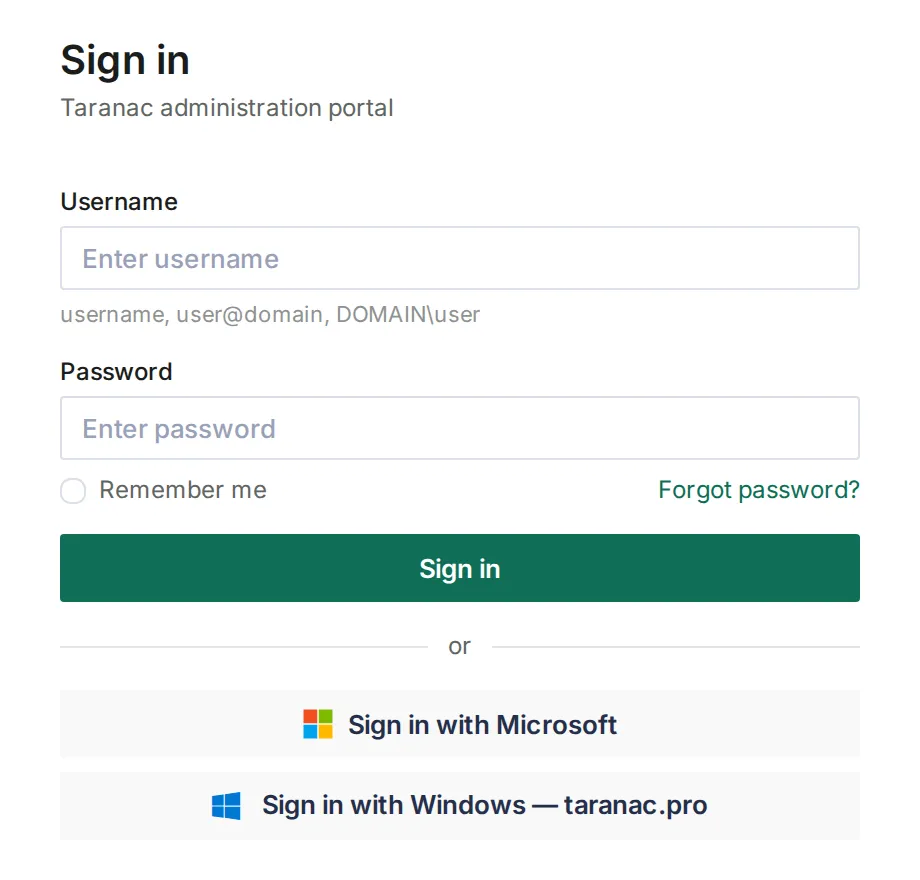
Kerberos SSO is a setting of an Active Directory configuration (Settings → Integrations → LDAP, the Kerberos SSO tab). Each configuration that has it switched on gets its own button. It concerns the web console only: TACACS+, RADIUS and 802.1X sign-ins are unaffected.
Four things live outside Taranac, and this page walks through each: a DNS record for the address, the web certificate, a keytab the domain administrator makes with ktpass, and a browser policy. Taranac writes nothing to Active Directory — the configuration’s own service account only reads.
- domain PC signed in to Windows as CORP\alice presses “Sign in with Windows — Corp AD” user
- KDC · DC ticket for HTTP/taranac.corp.example.com the SPN svc-taranac holds · 88/tcp ticket
- browser Authorization: Negotiate <ticket> Local intranet zone or allowlist only sent
- Taranac opens it with the keytab realm CORP.EXAMPLE.COM = this configuration valid
- account alice · found by sAMAccountName the sync stored it · not disabled · then Taranac MFA signed in
HTTP/<address of Taranac>, the browser hands it over, Taranac opens it with the keytab and finds the account the sync imported. A browser that sends no ticket — or NTLM — leaves the person at the password form.Key concepts
Section titled “Key concepts”- The address. A browser asks the domain controller for a ticket to the service
HTTP/<host>, where<host>is the name in the address bar. That host must be a full DNS name with dots — never an IP address — and it is what the service principal, the keytab and the browser policy are all written for. The port is not part of the service name. - The service account and its SPN. In Active Directory, one user account holds
HTTP/<host>as its service principal name (SPN). The domain controller encrypts every ticket for that address with that account’s key. - The keytab. A file holding that key. The domain administrator writes it with
ktpassand uploads it on the tab. Whoever holds the service account’s password can sign in to Taranac as any person of the domain (MFA aside), so treat that password like a domain-admin secret. - The account. The ticket names the person as
alice@CORP.EXAMPLE.COM. Taranac finds the account of this configuration whose sAMAccountName isalice— the sAMAccountName the user sync stores. It never creates an account: a person the sync has not imported cannot sign in this way. - One button per configuration. Each Active Directory configuration with Kerberos SSO on shows its own Sign in with Windows — <name> button, leading to its own address. A person signed in to Windows with an account of another domain is refused on that button and uses their own domain’s.
Before you start
Section titled “Before you start”- An Active Directory configuration whose user sync has run. Other directory types have no tab: they have no KDC.
- A name people open Taranac by, with a DNS A record (not a CNAME) in the domain’s DNS, and a web certificate that covers it.
- A domain administrator who can create one service account and run
ktpass. - Group policy for the browsers on the domain PCs.
Setting it up
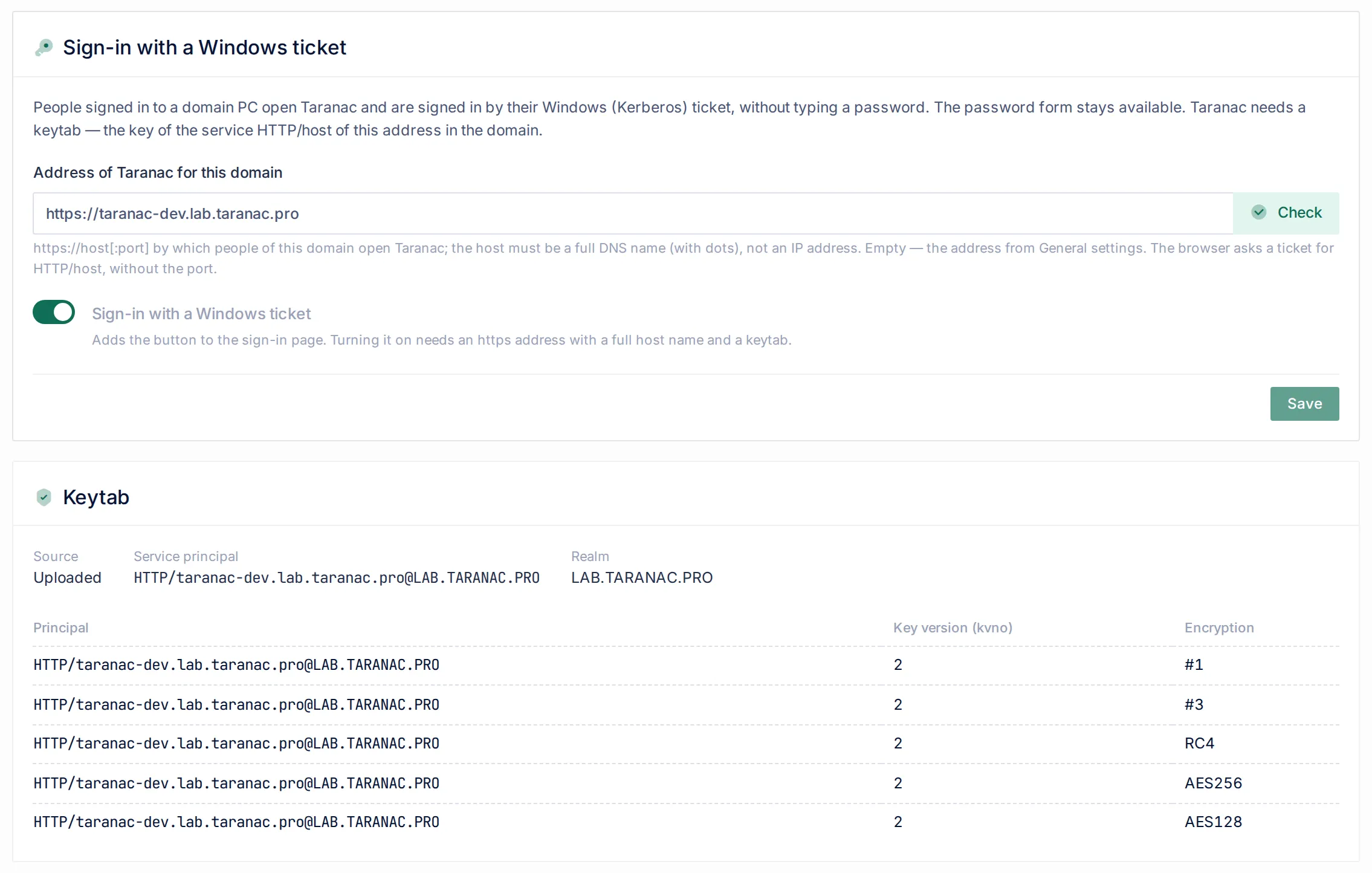
Section titled “Setting it up”Open Settings → Integrations → LDAP, edit the Active Directory configuration and select Kerberos SSO. The tab has four cards — Sign-in with a Windows ticket, Keytab, Get a keytab and Check — and a list of what to set up outside Taranac.
1. The address
Section titled “1. The address”Address of Taranac for this domain — https://host[:port], the address people of this domain open Taranac by. Empty means the Taranac address from Settings → General. The host must be a full DNS name with a dot; an IP address, localhost or a name without a dot is refused for sign-in, because Windows never asks a ticket for it.
Check beside the field tests the value you typed, before it is saved, from the Taranac server: DNS, Leads to this Taranac and Certificate. It never blocks saving. PCs resolve names with their own DNS, so their side is confirmed only by the check from a browser (below).
What the address needs around it:
- An A record (and AAAA, if any), not a CNAME. Chrome and Edge ask a ticket for the canonical name: behind a CNAME they ask for
HTTP/<target of the CNAME>and get nothing usable. Point the PTR record of the address at the same host — Linux and macOS Kerberos clients take the name from PTR. - The address on the edge. The node answers as Taranac only on its own domain and the names listed in
TARANAC_EXTRA_ADDRESSESin the installation’s.env(comma-separated). Add the address of each Active Directory configuration there, and its short name if people use it, then run./taranac up -d edge: the edge reads the list when its container is created, so a plain restart does not pick it up. When the address check says another server answers, this is the usual cause. - The web certificate. It must cover the address of every configuration with Kerberos SSO (and the short name, if used); otherwise the browser shows a certificate error on the button, which leads to its own configuration’s address. The self-signed certificate of the edge already includes the names in
TARANAC_EXTRA_ADDRESSES. - Not the node’s MS-CHAPv2 machine account name. If a node joined the domain under the name
TARANAC, the addresstaranac.<domain>already belongs to that computer account. Use another name for the web.
Save before going on: the keytab actions and Check work with the saved address.
2. The keytab
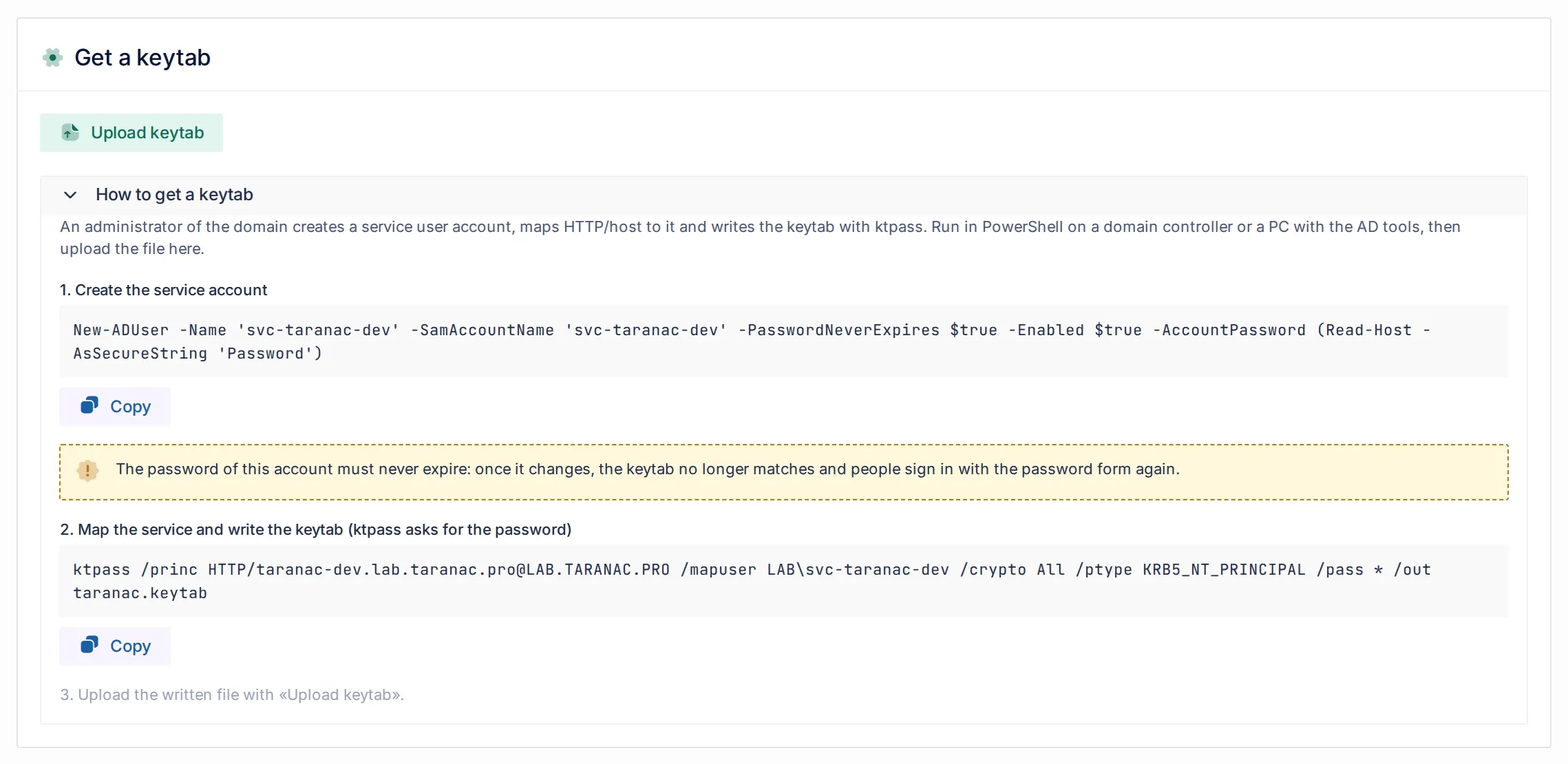
Section titled “2. The keytab”The Get a keytab card shows, under How to get a keytab, the exact commands for the saved address and domain. Run them in PowerShell on a domain controller or a PC with the Active Directory tools. For the address https://taranac.corp.example.com of the domain corp.example.com (NetBIOS CORP) they read:
# 1. Create the service account (the console asks for its password)New-ADUser -Name 'svc-taranac' -SamAccountName 'svc-taranac' -PasswordNeverExpires $true -Enabled $true -AccountPassword (Read-Host -AsSecureString 'Password')
# 2. Map the service and write the keytab (ktpass asks for the password)ktpass /princ HTTP/taranac.corp.example.com@CORP.EXAMPLE.COM /mapuser CORP\svc-taranac /crypto All /ptype KRB5_NT_PRINCIPAL /pass * /out taranac.keytab
Then 3. Upload the written file with Upload keytab.
- The account is
svc-<first label of the host>, lower-cased and cut to 20 characters. - Its password must never expire. A changed password is a new key in Active Directory, and the keytab stops matching — people fall back to the password form.
- A user account, never a computer.
ktpassresets the password and rewrites the UPN of the account it maps; a computer object would lose its own trust with the domain. - If
New-ADUserreports that the domain refused the password (length or complexity policy), it still creates the account — disabled.ktpassand the upload go through, but the domain controller issues no tickets for a disabled account, and Check shows The object in AD red. Enable it withEnable-ADAccount svc-taranac; the key does not change, so the keytab stays valid.
Upload keytab accepts a file of at most 64 KB that holds HTTP/<host>@<REALM> with at least one AES256, AES128 or RC4 key. Taranac keeps that service’s entries of its two newest key versions and names everything else it dropped. Every entry of those versions is kept, whatever its encryption type: /crypto All also writes DES keys, which the card lists by number (#1, #3). The Keytab card then shows the Source (Uploaded), the Service principal, the Realm, and each entry’s Principal, Key version (kvno) and Encryption.
The keytab is stored encrypted in the settings, so every node of a cluster has it and a person can sign in through any node.
Changing the key
Section titled “Changing the key”The key does not age on its own. To change it, run the same ktpass again (a new password, the key version goes up by one) and upload the new file straight after. Between the two, the domain controller already issues tickets with the new key and Taranac does not have it yet: anyone who gets a new ticket in that window is refused (kerberos_keytab_mismatch), signs in with the password, and the alert of the configuration opens; the upload closes it. Tickets issued before ktpass — a browser keeps them up to 10 hours — are still accepted after the upload, because Taranac keeps the previous key version too.
Reset the service account’s password only through ktpass. A reset in Active Directory Users and Computers leaves Taranac with the old key.
3. A keytab shared by two domains of one forest
Section titled “3. A keytab shared by two domains of one forest”Two domains of one forest can use one address. A service name exists once in a forest and has one key, so the second configuration uses the keytab of the first: Use the keytab of another configuration of the same forest, pick it, Use. The Keytab card then reads Keytab of the configuration «name».
- Only configurations with their own keytab and the same host are offered (the port does not count). A shared keytab opens tickets for its owner’s
HTTP/<host>@<REALM>only, so saving with another host is refused, naming both. - Taranac does not check the forest on save — only Active Directory knows it. Check does.
- The owner’s address is fixed while a switched-on configuration shares its keytab. To move both to a new address: switch Kerberos SSO off on the sharer, change the owner’s address (and upload a keytab for it), give the sharer the same address, switch it on again.
- The owner cannot be deleted, nor its keytab cleared, while another configuration uses it.
- Do not run the second configuration’s ktpass commands.
HTTP/<host>is already held by the owner’s service account; a secondktpasswould create a duplicate SPN.
4. Browsers
Section titled “4. Browsers”A browser hands a ticket only to an address it trusts for that. Without a policy, an address with dots gets nothing. The tab lists the exact values for your address under What to set up outside Taranac, each with a copy button:
| Where | What to set |
|---|---|
| Local intranet zone (Windows; Chrome and Edge read it) | Group policy Site to Zone Assignment List: https://<host> with the value 1. |
| Chrome and Edge | Group policy AuthServerAllowlist = <host>. A configured allowlist replaces the zone check, so it must list every address where Windows sign-in is wanted. |
| Firefox | network.negotiate-auth.trusted-uris = https://<host>, in about:config or the enterprise policy. Firefox’s private windows do not offer Windows sign-in by default. |
| Short name, without policies | https://<label>/ — the first label alone — is in the Local intranet zone by itself on a PC in the domain network. It needs an A record for the label in the domain’s DNS, the label in the web certificate and in TARANAC_EXTRA_ADDRESSES. The ticket is still for HTTP/<host>. |
The Chrome and Edge policy templates must be installed in the domain; check the exact policy path against Microsoft’s and Google’s documentation for your template version.
The Windows password window. When the address is outside the zone and the allowlist, Chrome and Edge may show Windows’ own window asking for a user name and password. It is not Taranac’s form. If the person fills it in, Windows uses the password to get a Kerberos ticket from the domain and the sign-in goes through; if they cancel, the browser sends nothing and the Taranac password form stays. Either way the window means the policy above is missing on that PC.
Over VPN or through a proxy the short name may not be recognised as intranet; use the zone policy with https://<label> then. When two Windows buttons share a label (taranac.a.example and taranac.b.example), both lead to the full address.
5. Switch it on and sync
Section titled “5. Switch it on and sync”- Switch on Sign-in with a Windows ticket and Save. Switching it on needs an
httpsaddress with a full host name and a keytab; switching it off always works, even with everything broken. The button appears on the login page. - Run the user sync of this configuration (or let the schedule run it). The sign-in finds the account by the sAMAccountName the sync stores; Check counts how many accounts can be found.
In a hybrid Microsoft Entra tenant the person sees two buttons — Sign in with Microsoft of the Entra configuration and Sign in with Windows of the linked Active Directory configuration — and both lead to the same account. See Microsoft Entra ID.
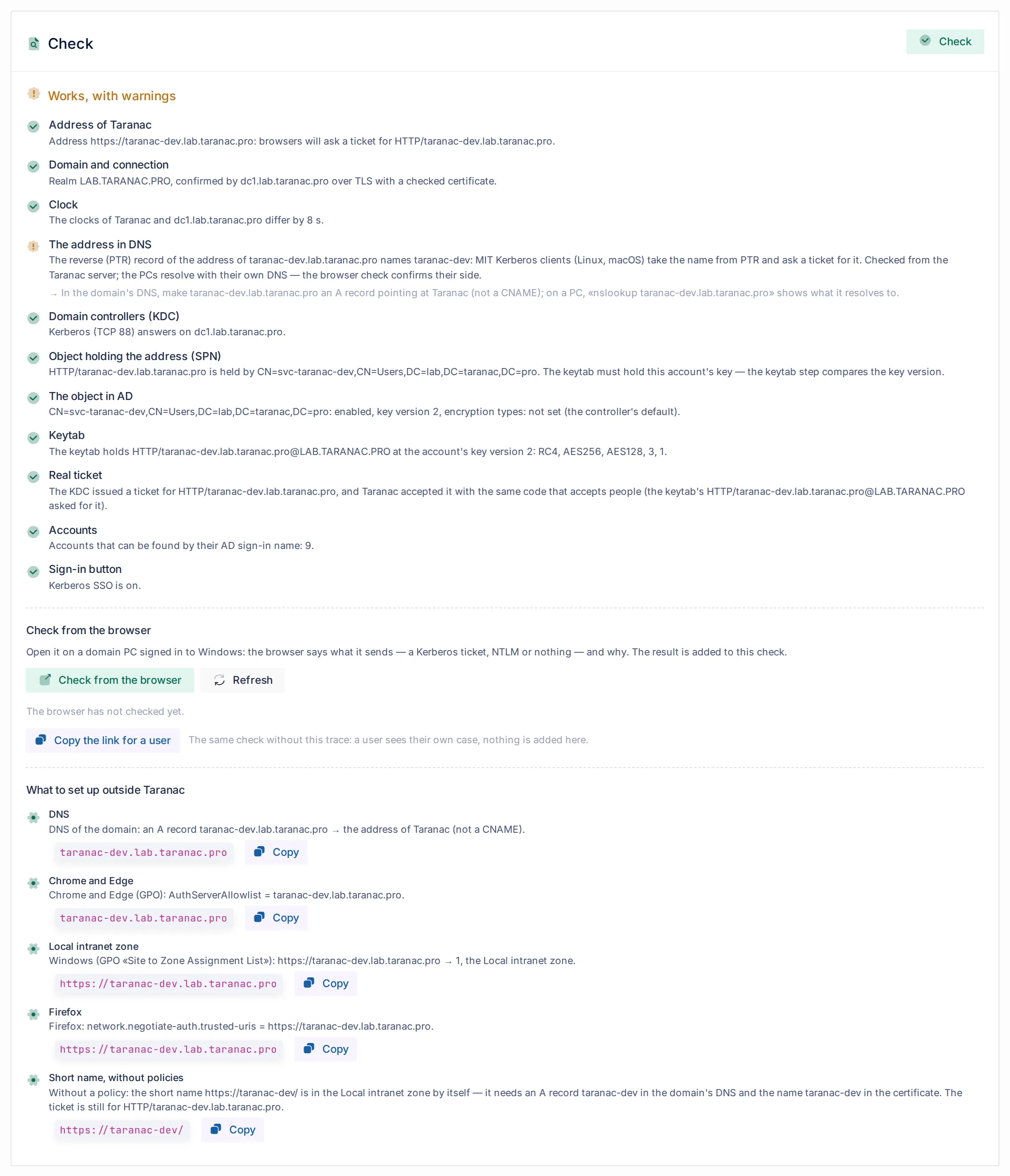
Check, at the bottom of the tab, tests the saved settings step by step and takes up to a minute. A red step does not stop the others, and each says what is wrong and what to do. The result reads Everything works, Works, with warnings, Does not work yet or Not all was checked.
| Step | What it checks |
|---|---|
| Address of Taranac | The address in use is https:// with a full host name; names the SPN browsers will ask for. |
| Domain and connection | The configuration’s domain controller answers over TLS with its service account and serves the domain the configuration names — the realm is the Active Directory DNS domain. |
| Clock | The clocks of Taranac and the domain controller. Kerberos allows 5 minutes; a difference of a minute or more is a warning. |
| The address in DNS | From the Taranac server: the address resolves, leads to this Taranac, the certificate covers it; a CNAME or a PTR record naming another host is pointed out. |
| Domain controllers (KDC) | Kerberos (TCP 88) answers on the domain controllers. |
| Object holding the address (SPN) | Who in the forest holds HTTP/<host>: nobody, several objects (a duplicate), or the node’s MS-CHAPv2 machine account. |
| The object in AD | The holder is enabled; its key version; its encryption types; resource-based delegation; an old password a stale-computer clean-up might act on. |
| Keytab | The keytab holds the key of that account at its current key version and with an encryption type the domain controller may use. |
| Real ticket | Taranac asks the domain controller for a ticket to its own address and accepts it with the same code that accepts people. Green means the domain controller, the SPN, the key, its version and the clocks agree. It does not mean the PCs and browsers are set up. |
| Accounts | How many accounts of this configuration can be found by their sAMAccountName. Zero means the user sync has not run. |
| Sign-in button | Whether Kerberos SSO is on. |
| Browser | Added by the check from a browser, below. |
- The object in AD is red about delegation (RBCD). The service account has
msDS-AllowedToActOnBehalfOfOtherIdentityset: the accounts named there can get a ticket to Taranac in the name of any person of the domain. Unless it was set on purpose, clear it (the step gives the command) and find out who wrote it — write access tosvc-<label>is as good as signing in as anyone. Mark Taranac administrators Account is sensitive and cannot be delegated. - The DNS steps go no higher than a warning: the Taranac server resolves with its own DNS, the PCs with theirs.
- A configuration that uses another’s keytab is checked the way its people sign in. Address, domain, clock, KDC and the holder of the address are its own. The object, the keytab and the real ticket are read with the owner’s directory, key and realm. A red The object in AD where the owner’s directory finds another account means the two configurations are in different forests: a shared keytab does not work there — upload a keytab of its own.
Check from the browser
Section titled “Check from the browser”Check from the browser opens a tab: open it on a domain PC signed in to Windows with a domain account. It shows what the browser sent — A Kerberos ticket, NTLM — Taranac does not accept it, or Nothing — the browser did not offer the Windows sign-in — the Windows account, the domain, the account in Taranac and the address the browser came by, and adds the Browser step to the same check. Refresh reads the result back.
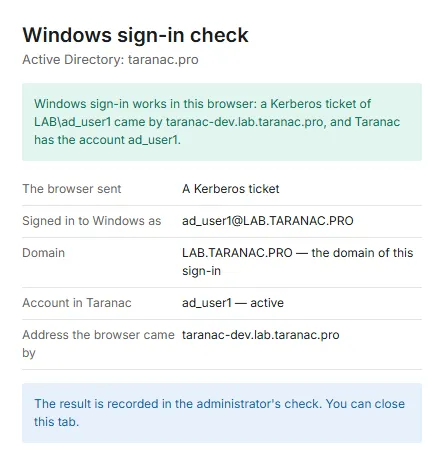
Copy the link for a user gives the same check without the trace: send it to a person whose Windows sign-in does not work. They see their own case and who can fix it (You: this PC or browser, Active Directory administrator, Taranac administrator); nothing is added to your check.
For a support request, ./taranac diagnose --protocol ldap includes the steps of the latest checks, without secrets.
What the person sees, and who fixes it
Section titled “What the person sees, and who fixes it”A refused Windows sign-in sends the person back to the login page with a short text of what to do; the password form is still there. The reason is in the activity log, as a failed login (USER_LOGIN_FAILED) with method = kerberos, reason, side and detail.
| Reason | Who fixes it | What it means and what to do |
|---|---|---|
kerberos_no_token | The person | The browser sent nothing: the address is outside the Local intranet zone or the allowlist, Firefox has no trusted-uris, or the person cancelled Windows’ password window. See Browsers. |
kerberos_ntlm | Active Directory | Windows found no service for the address and offered NTLM: no SPN, a duplicate SPN (setspn -D the extra one), the address is a CNAME or an IP, the PCs cannot reach a domain controller, or the SPN has not replicated to their domain controller yet. Check → Object holding the address (SPN); the browser check shows which name the browser came by. |
kerberos_keytab_mismatch | Taranac | The ticket does not open with the keytab: the service account’s password changed (a reset in ADUC, or ktpass run without the upload), the SPN moved to another account, or a keytab of another key version was uploaded. Make a new keytab with ktpass and upload it. Opens the configuration’s alert. |
kerberos_clock_skew | Taranac | The node’s clock and the domain’s differ by more than 5 minutes. Fix NTP on the node the alert names. |
kerberos_wrong_realm | The person | Signed in to Windows with an account of another domain: use that domain’s button. |
kerberos_token_invalid | The person | A broken or replayed token. Try again, or sign in with the password. |
kerberos_principal_unsupported | Taranac | The ticket is a computer’s or a service’s, not a person’s. |
sso_not_synchronized | Taranac | No account of this configuration has that sAMAccountName: the user sync has not run, or the person is outside its scope — or two accounts of the configuration hold that sAMAccountName (a forest read through a Global Catalog, a rename before the next sync), and Taranac does not pick one. |
directory_user_disabled | Active Directory | The last user sync found the account disabled in Active Directory, or did not find it at all. See Directory state. |
sso_flow_invalid | The person | The sign-in took longer than a minute or was started in another window. Try again. |
sso_unavailable | Taranac | Kerberos SSO or the configuration is off, or there is no keytab or address. |
After the ticket, the account passes the same gates as after a password: an account switched off, locked or outside its validity period is refused, a group that denies web console access keeps the person out, and Taranac MFA asks for the second factor where it applies.
The alert Kerberos SSO refuses Windows sign-ins: <name> (kerberos_sso:<config_id>, severity error) opens only for the reasons on Taranac’s side that a person cannot fix — a key that does not match, a clock out of step — and names the node. The first accepted ticket or a green Check resolves it; a clock alert resolves only from the same node. A junk token from a stranger can open it too; the next real sign-in closes it.
Your own reverse proxy in front of Taranac
Section titled “Your own reverse proxy in front of Taranac”The ticket of a person in many Active Directory groups is tens of kilobytes in one Authorization header. The built-in edge and web server accept up to 64 KB per header line. A proxy or load balancer of your own must:
- allow request header lines of at least 64 KB (nginx:
large_client_header_buffers 4 64k;, which HTTP/2 follows too) — otherwise only people with many groups fail, with a 400 or 431 from the proxy; - pass
AuthorizationandWWW-Authenticateunchanged in both directions, and not replace the 401 answer with a page of its own; - pass
Hostas the browser sent it, over HTTPS only.
Taking it out of service
Section titled “Taking it out of service”- Switch off Sign-in with a Windows ticket: the button disappears. The keytab stays, so switching it back on needs nothing from Active Directory.
- Taranac created nothing in Active Directory, so the domain administrator removes what was made by hand: the
svc-<label>account (or only its SPN:setspn -D HTTP/<host> <NETBIOS>\svc-<label>), and the address from the zone or allowlist policy. After a change of address to another label, the oldsvc-<label>with the old SPN is left as well. - Deleting the LDAP configuration erases its keytab in Taranac; it touches nothing in Active Directory. A configuration whose keytab others use cannot be deleted until they are switched to another keytab.
When to use what
Section titled “When to use what”| You want… | Use |
|---|---|
| Domain staff on domain PCs to reach the console without typing a password | Kerberos SSO on the Active Directory configuration |
| People of a Microsoft Entra tenant, on any device, to sign in with their Microsoft account | Sign in with Microsoft |
| Sign-in to switches and routers | Unchanged — TACACS+ or RADIUS with the directory password; see LDAP directories |
| A way in when the domain or the browser policy is broken | The password form, which is always there, and a local break-glass account |
Reference
Section titled “Reference”| Item | Value |
|---|---|
| Tab | Settings → Integrations → LDAP → Active Directory configuration → Kerberos SSO |
| Directory types | Active Directory only |
| Address | https://host[:port], host a full DNS name; empty = Settings → General → Taranac address |
| Service principal | HTTP/<host>@<REALM> (realm = the configuration’s domain suffix in upper case) |
| Service account | svc-<first label of the host>, a user account, password never expires |
| Keytab | MIT format, at most 64 KB; must hold an AES256, AES128 or RC4 key; every entry of the service’s two newest key versions is kept |
| Ports | TCP 88 from Taranac to the domain controllers for Check; the PCs reach the KDC themselves |
| Clock | Within 5 minutes of the domain; Check warns from 1 minute |
| Permissions | kerberos_sso.view to see the tab, kerberos_sso.manage to change it |
| Activity log | KERBEROS_SSO_UPDATED, KERBEROS_SSO_KEYTAB_UPLOADED; refused sign-ins as USER_LOGIN_FAILED with method = kerberos |
| Alert | kerberos_sso:<config_id>, severity error |
Related
Section titled “Related”- LDAP directories — the Active Directory configuration, the user sync and the sAMAccountName it stores
- Microsoft Entra ID — Sign in with Microsoft and hybrid accounts
- Users & groups — web console access per group
- Multi-factor (MFA) — the second factor after a Windows sign-in