

Rule-set updates
The profiling rules Taranac ships are one rule set, with a version number. A device type learned about in one network can reach every installation without waiting for the next release: we publish a newer, signed rule set, and an installation fetches and installs it. This page covers how that happens, what your installation gives in return, and how to stay in control of it.
Everything here is optional. An installation that never registers and never exchanges keeps the rule set its release shipped with, and every profiling feature works on it.
Key concepts
Section titled “Key concepts”| Term | What it means |
|---|---|
| Rule set | The shipped rules, the shipped profile tree and the shipped vocabulary, as one signed package with an integer version. |
| Shipped layer | Where the rule set lives. It holds either the set this release carries or a newer one installed since, never both. Your rules are a separate layer. |
| taranac.pro account | The binding between this installation and your account on taranac.pro, made on the Licensing page. It is what lets the installation sign its requests. |
| Installation key | An Ed25519 key the installation makes for itself. Every request to taranac.pro is signed with it. |
| Exchange | One operation: send what this installation sees about its devices (the contribution), then fetch the latest rule set. |
| Contribution | One signed file: a record per device, built from a white list of signals, with no addresses, users or MACs. |
| Import rule-set file | Installing a rule-set package carried in by hand, with the same checks as the network path. |
| Restore shipped rule set | Returning the shipped layer to what this release carries, and declining the version you undid. |
How it works
Section titled “How it works”one record per device: signals, verdict, OUI, keyed hash — no IP, no user, no MAC
202 accepted · next send after 6 h
signature ✓ format ✓ v8 > v7 ✓
installed into shipped rules · your rules untouched
Download contribution file → upload in your account → Import rule-set file
same checks · same install
- Register the installation once, on Settings → System → Licensing → taranac.pro account, with a one-time code from your taranac.pro account or with an offline registration file. This creates the installation key and binds it to your account.
- Choose when to exchange on NAC → Discovery Sources → Device Profiling → Contribute, in the Exchange with taranac.pro card: Off, Manual or Daily.
- An exchange sends the contribution to
contribute.taranac.pro, then asks for the rule set. A newer, correctly signed set is installed into the shipped layer, and every device is queued for re-profiling. - Without a network path, the Offline exchange section does the same with files: the contribution file goes to your account by hand, and the rule-set file comes back by hand.
Taranac talks to one host for all of this, contribute.taranac.pro, over HTTPS. It is a host of its own, separate from the site that sells the product.
Who gets the rule set
Section titled “Who gets the rule set”| Installation | Receives the rule set | Sends data |
|---|---|---|
| Free | With each exchange. The site gives the rule set to an installation whose contribution it accepted within the last 6 hours, which is the same window as the minimum gap between two sends. In practice: every update is an exchange. | Always, when it exchanges. The send is what the update is had for. |
| With paid support | With each exchange, whether it sends or not. | Only if Send my data is on (it is on by default). Off, an exchange only fetches. |
“Paid” is what taranac.pro says about the account (the Rule-set access field on the account card: Paid support, Contributor or None, with the date it runs until). Before the site has answered for the first time, active support in the installed license counts as paid.
Registering the installation
Section titled “Registering the installation”The installation ID alone cannot be a credential: it appears on screenshots and in support mail, and anyone who saw it could claim the installation. So registration binds a key instead, and a one-time code proves both halves at once: whoever pastes it controls the account, and has this box in hand.
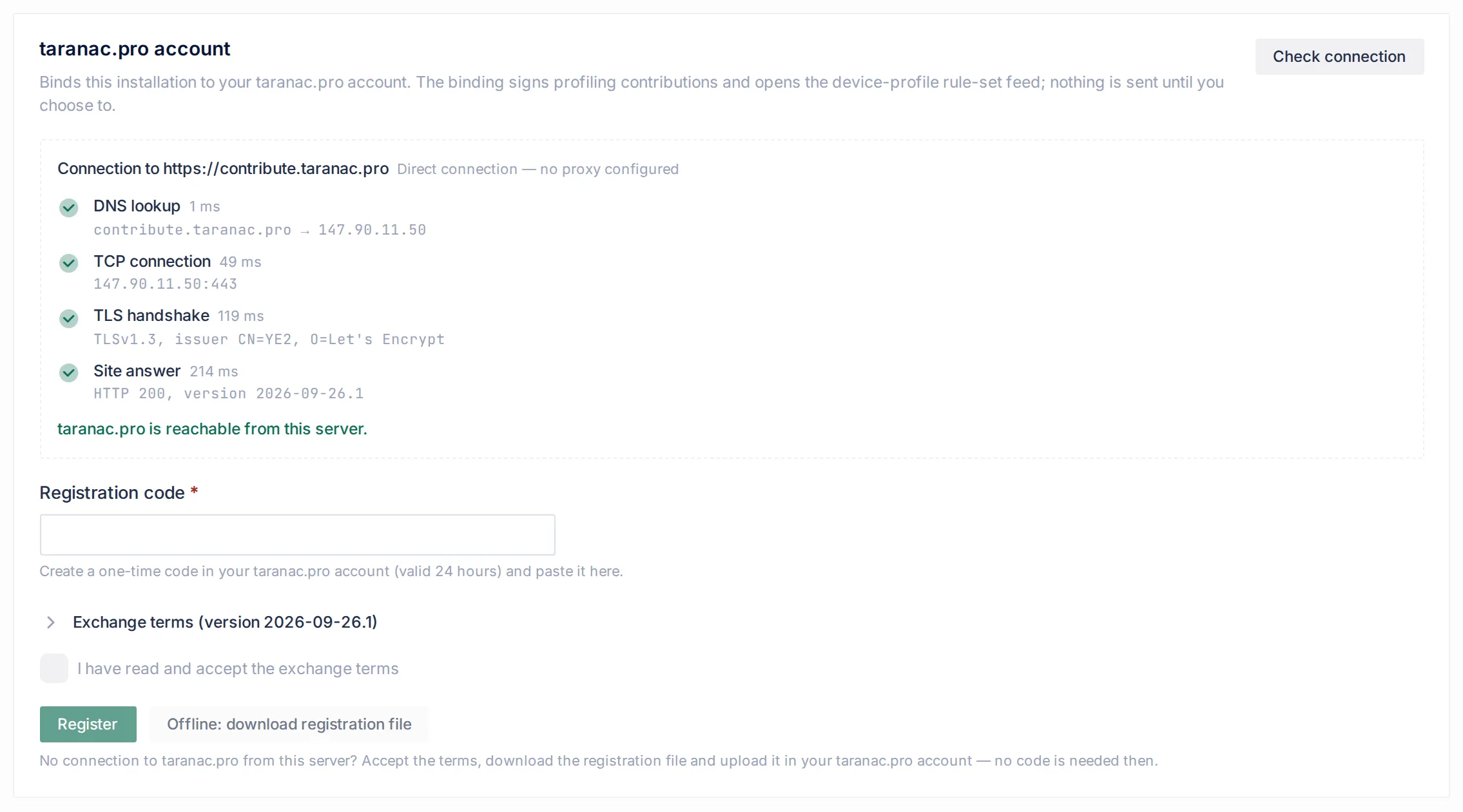
With a code
Section titled “With a code”- Sign in at taranac.pro/app/ and open Installations. Click Add installation. The code is valid for 24 hours and can be used once.
- On the appliance, open Settings → System → Licensing. In the taranac.pro account card, paste the code into Registration code.
- Expand Exchange terms, read them and tick I have read and accept the exchange terms. The terms are fetched from taranac.pro, not shipped with the product, so you agree to the wording the site currently uses. If they cannot be fetched, nothing can be registered; the card says so and offers Try again.
- Click Register.
The card then shows the site’s view of the installation: Account, Registered, Key fingerprint, Rule-set access, Last contribution, Next contribution allowed and Consent accepted, with the time the site last answered. Refresh status asks again. What the card shows is always the site’s own last answer, never a guess.
A refused code says why: the code is not valid, has expired, or was already used; the account already has its maximum of 8 installations (installations are removed by support); or the installation is already bound to another account (moving it is done by support).
Offline
Section titled “Offline”For an installation that cannot reach taranac.pro, accept the terms and click Offline: download registration file. The file carries the installation ID, the public half of the key, the product version and the consent version, and a proof signed with the key. Upload it on the Installations page of your account with Register offline; no code is needed, because you are signed in there. The card then says the file was downloaded and waits for the binding; Refresh status confirms it once the site can be reached. An installation that never reaches the site at all is still able to sign contribution files for the offline exchange.
Registering requires the manage right on licensing (license.manage). Without it the card only shows that the installation is not registered.
The installation key
Section titled “The installation key”- It is created the first time it is needed (a registration or an offline registration file) and reused afterwards. Registering again, with a new code or to another account, keeps the same key, so the site sees the same installation rather than a new one against your limit.
- The private key is stored encrypted in the database, as machine state that is never shown on a settings screen. It therefore travels with a backup and restore, and is shared by every node of an HA cluster, which is one installation to the site.
- Only a genuinely fresh install makes a new key.
- The card shows the key’s fingerprint.
If the site stops recognising the key (support unbound the installation, or the site dropped it), the installation notices on its next conversation, stops presenting itself as registered, records this in the audit log and asks for a new code. Link to another account is the same form, for moving the installation after support has unbound it; the new code re-binds the same key.
Check connection
Section titled “Check connection”Check connection on the account card tests the path to contribute.taranac.pro step by step and stops at the first failure. It is read-only: the last step fetches the public exchange terms without a signature, so nothing about the installation is sent.
| Step | What is checked | Through a proxy |
|---|---|---|
| DNS lookup | The host name resolves. | The proxy’s name is resolved. |
| TCP connection | Port 443 accepts a connection. | The connection is to the proxy. |
| TLS handshake | The certificate verifies. The detail shows the TLS version and the issuer. | TLS runs inside the proxy’s tunnel, as the real requests do. |
| Site answer | taranac.pro answers with the terms. |
The header says whether a proxy is in use (Through proxy … or Direct connection — no proxy configured). Every step shows its time. The same classification is used whenever a registration, a status request, an exchange or a rule-set fetch fails, and the message names the step and the fix:
| Problem | Usual cause and fix |
|---|---|
| DNS | The appliance’s DNS servers do not resolve external names. |
| Connection refused or no route | A firewall blocks outbound HTTPS (TCP 443) to contribute.taranac.pro. Allow it, or set a proxy. |
| Timeout | A firewall silently drops the traffic. |
| TLS | Almost always corporate SSL inspection. Add the inspecting proxy’s CA certificate to the bundle named by OUTGOING_CA_CERTFILE in the api container’s environment, or exclude contribute.taranac.pro from inspection. There is no setting to turn verification off. |
| Proxy | The proxy in HTTPS_PROXY refused the request or wants credentials. |
| Something else answered | A captive portal or a proxy login page answered instead of taranac.pro. |
| Site unavailable | taranac.pro itself failed. Nothing is wrong on your side. |
The proxy is taken from the process environment (HTTPS_PROXY, NO_PROXY), the same way the installer passes it to every container. An unreachable site is a normal state for Taranac, not an error: the rules you have keep working.
The Exchange card
Section titled “The Exchange card”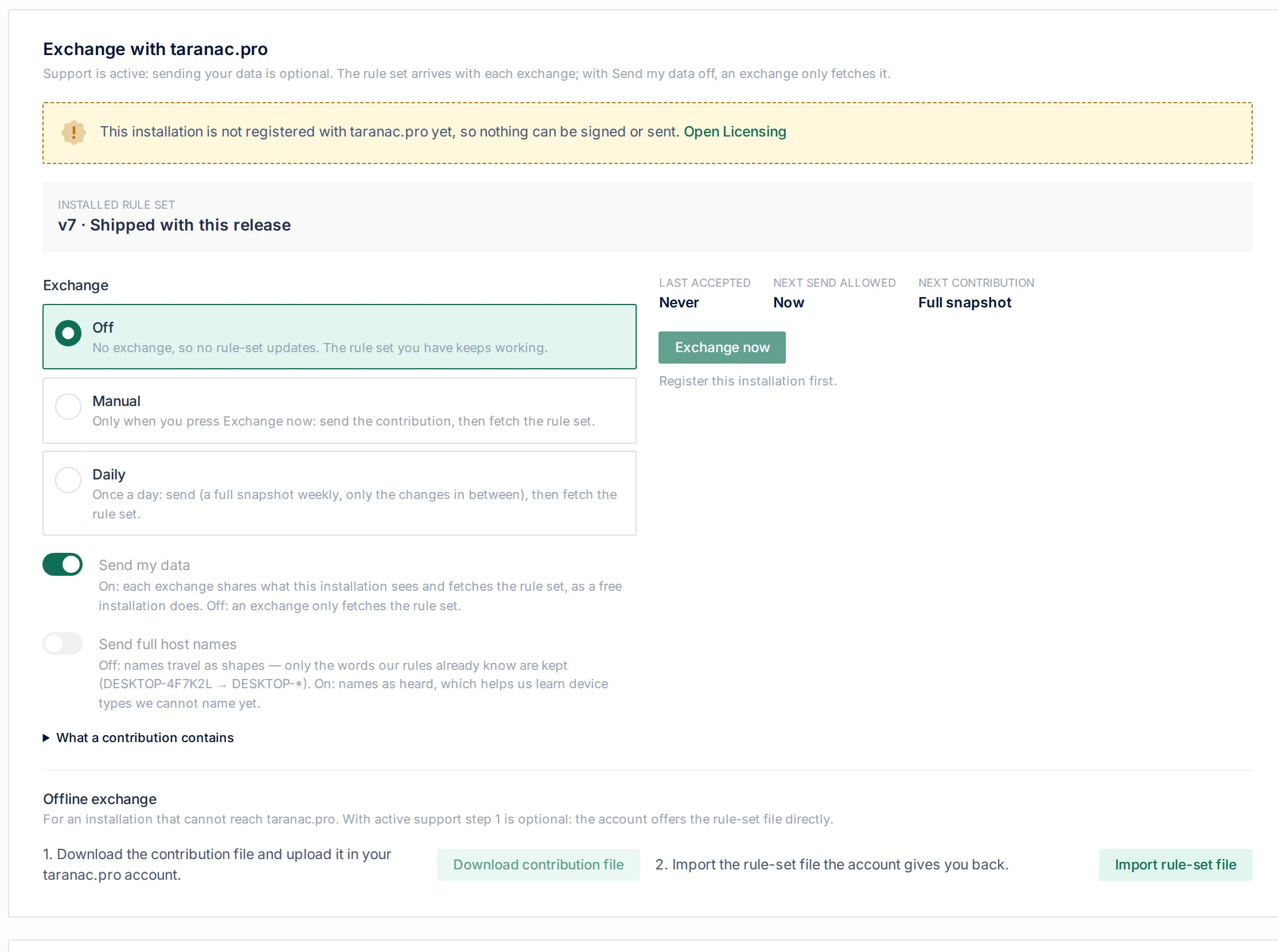
The card is the first thing on the Contribute tab. At most one warning is shown at the top, the one that stops the most: the installation is not registered, the path to the site failed, the site refused rule-set access, or new terms must be accepted.
Installed rule set
Section titled “Installed rule set”The top line names the installed version and how it arrived: Shipped with this release, From an exchange, Imported from a file (with the date), with the number of rules, terms and profile nodes it carried. After an update, a line says how many of your devices it identified that nobody could name before, and, if some are still unknown, that sending them helps the next update. Restore shipped rule set sits beside it once a newer set has been installed.
When it runs
Section titled “When it runs”| Mode | What happens |
|---|---|
| Off (default) | No exchange, so no rule-set updates, and nothing is sent. The rule set you have keeps working. |
| Manual | Only when you press Exchange now: send the contribution, then fetch the rule set. |
| Daily | Once a day: send, then fetch. The schedule checks every hour and sends once about a day has passed since the last accepted contribution. |
taranac.pro accepts at most one contribution every 6 hours from an installation. Inside that window Exchange now skips the send, still fetches the rule set, and the card says until when the window runs. The fields Last accepted, Next send allowed and Next contribution show where you stand.
A contribution is normally a Full snapshot once a week and Changes only in between: only the devices whose evidence moved since the last contribution the site accepted. A send that fails never moves that mark, so nothing is skipped. After a registration to another account, the next contribution is always full.
Two switches:
- Send my data (only on an installation with paid support). On: each exchange sends and fetches, as a free installation does. Off: an exchange only fetches.
- Send full host names. Off (default): names travel as shapes. On: names travel as heard. See below.
After an exchange, Last exchange records both halves: what was sent (with the site’s reference and the number of devices, or why nothing was sent) and what came back (Received v8 with the rules, terms and nodes it carried, Rule set up to date, or the problem). Last attempt shows the details of the last send: reference, devices sent of the candidates, size, full or changes, name mode. If a send had to be cut, it says how many devices were left out.
Changing the settings and running an exchange need the edit right on endpoints.
What a contribution contains
Section titled “What a contribution contains”A contribution is built from a white list. A field nobody thought about is absent by default instead of leaking by default. What says what class of device something is travels; what says who owns it does not.
| Included | Never included |
|---|---|
| One record per device, keyed by a keyed hash of its MAC (HMAC-SHA256 with a per-installation secret that is stored encrypted and never leaves). The site can recognise the same device across contributions and cannot turn the key back into an address. | MAC addresses |
| The manufacturer prefix (OUI). A randomised MAC sends no prefix at all, only the fact that it is randomised. | IP addresses |
| First and last seen (the day) and the last authentication method | User names and accounts |
The signals the rules read: DHCP options and vendor class, browser strings and Client Hints, open ports and nmap service lines, nmap’s OS guess, UPnP, mDNS and LLDP/CDP announcements, the OS a directory records, an SNMP sysObjectID | Certificate subjects, directory object names |
| What the rules concluded per dimension, the rule patterns behind it, and anything that disagrees with it | SSH greetings and web-server banners |
| Your own enabled rules, as patterns | Your rules over names, while names travel as shapes |
| Your own profile nodes and vocabulary words: they are your vocabulary for kinds of device, not data about a device | Domains, while names travel as shapes |
| Installation-wide counts: devices, profiled, unexplained, disputed. Which sources hold data here, and the product version |
Host names, by default, travel as shapes. A part of a name stays only if the product already knows the word: one of our terms, a class word of our profile tree, a literal of one of our shipped name patterns, or the device’s own manufacturer name. Everything else is masked, * for letters and # for digits: DESKTOP-4F7K2L becomes DESKTOP-*. Words you added yourself do not count as known, because they are your organisation’s words. A full name loses its domain, and the NetBIOS workgroup, usually your AD domain’s own name, is not sent at all. Send full host names sends names as heard. It is the only way a word we do not know yet can reach us, and it helps us learn device types we cannot name.
A contribution holds at most 100,000 devices and 8 MiB compressed. Unidentified and disputed devices go first, since the site cannot learn them anywhere else. The file is gzip: a header carrying the installation ID, the key fingerprint, the payload’s SHA-256 and an Ed25519 signature, then the payload. The downloaded file for the offline path is byte for byte the same format.
Every send and every downloaded contribution file is recorded in the audit log, with the trigger, the mode, the name mode, the number of devices, the size and the outcome. So are registrations, the creation of the key, accepted terms and a lost binding.
The terms
Section titled “The terms”The exchange terms are published by taranac.pro and shown before anything is agreed to: when registering, and again when the site publishes new wording. Each contribution carries the version of the terms an administrator accepted on this installation. When taranac.pro has newer wording, sending pauses by itself and both the account card and the Exchange card say so; an administrator with the manage right on licensing clicks Accept new terms on the Licensing page. Until then a free installation receives no rule-set updates, because it sends nothing.
On taranac.pro
Section titled “On taranac.pro”In your account, Installations lists your registered installations and recent contributions. Received contribution files are deleted 90 days after they are processed, and names sent in full are dropped after 90 days. Delete data on an installation erases every device record it sent and the stored files; the installation stays linked, and rules already published are not recalled.
Offline: the same trade by hand
Section titled “Offline: the same trade by hand”For an installation that reaches nothing, the Offline exchange section of the card is the same trade with files:
- Download contribution file (needs the installation to be registered, online or by file). Upload it on the Installations page of your account with Upload contribution (offline). The site offers Download the rule set right away, for 6 hours. With paid support this step is optional: the account offers Download ruleset directly.
- Import rule-set file on the appliance.
A file goes through exactly the checks a fetched package does, in the same order and by the same code:
- the signature is verified against a key built into this release; a package that fails changes nothing;
- a package built for a newer format than this build reads is refused (update Taranac first), and so is one whose profile tree this build cannot hold;
- the version must be higher than the one installed. An older or equal version is refused with the two version numbers. A set is replaced by publishing a higher version, never by reinstalling an older one.
Unlike the network path, an import answers you directly: a refused file shows the reason and states that nothing was changed. Importing needs the edit right on endpoints.
What an install changes, and what it never touches
Section titled “What an install changes, and what it never touches”A rule set, from the network or from a file, installs into the shipped layer only.
- Your own rules, profile nodes and words are never touched. A rule of yours still overrides ours once it clears the threshold.
- A shipped rule you switched off stays off.
- Groups you accepted on the Not identified tab stay accepted.
- Shipped rules the new set does not carry are withdrawn. Rules the set carries in a form this build cannot evaluate (an unknown signal or dimension) are skipped, not fatal, so the rest of the corrections still arrive.
- The shipped profile tree is updated with it. If a shipped node is withdrawn, any node of yours that hung under it is moved up to the nearest node that stays.
- Every device is queued for re-profiling, and group membership is re-judged for devices whose name actually changed.
A later release does not undo an update either: if a newer set is already installed than the one the release carries, the release’s set stands aside.
Restoring the shipped rule set
Section titled “Restoring the shipped rule set”If an update makes things worse, Restore shipped rule set on the Exchange card takes the shipped layer back. With v8 installed, the confirmation reads: The rule set that shipped with this release replaces v8. Your own rules are not touched. Later exchanges do not install v8 again, only a newer set.
- “Back” means the set compiled into this release, not the package before last. It is always present and is the one state a support conversation can name without asking.
- The profile tree and vocabulary go back with it, with your own nodes moved up where their shipped parent is gone.
- Your own rules, and your switched-off shipped rules, are untouched.
- The version you undid is declined. Without that, the next exchange would see a version higher than the one installed and quietly reinstall the package you just rejected. Exchanges install only a version higher than the declined one.
- A file you import yourself is not held back: an operator choosing a specific package is a decision, not a schedule. It still has to be newer than what is installed.
Common scenarios
Section titled “Common scenarios”A free installation that wants updates. Register with a code, set the mode to Daily. Once a day the installation sends and fetches. If you prefer to decide each time, use Manual and press Exchange now.
A paid installation that must not send anything. Register, switch Send my data off, set Daily. Every exchange only fetches. The card’s hints change to fetch the rule set. Nothing is sent.
An air-gapped network. Register with Offline: download registration file, upload it in your account. Periodically download the contribution file, upload it in the account, bring the rule-set file back and Import rule-set file. With paid support you can skip the contribution and download the rule set directly from the account.
An update misnamed a class of device. Restore shipped rule set, tell support which version and which devices. The next set published with a higher version fixes it and installs normally.
“Contribution needed”. A free installation fetched without an accepted contribution in the last 6 hours: the mode is Off, the send was skipped or refused, or new terms are waiting. Set Manual or Daily, accept the terms if asked, and Exchange now.
When to use what
Section titled “When to use what”| You want | Use |
|---|---|
| Updates with no manual steps | Daily |
| Updates, deciding each time | Manual + Exchange now |
| No outbound traffic at all | Off, and optionally file imports |
| Updates without sending data | Paid support + Send my data off, or the account’s rule-set download |
| Device types named only on your network | Your own rules; see Not identified |
Reference
Section titled “Reference”| Item | Value |
|---|---|
| Host | contribute.taranac.pro, HTTPS (TCP 443) |
| Registration code | one-time, valid 24 hours |
| Installations per account | 8 |
| Contributions accepted | at most one per 6 hours per installation |
| Free rule-set access | within 6 hours of an accepted contribution |
| Full snapshot | at least weekly; changes only in between |
| Daily schedule | checked hourly; sends about once a day; retries a day after a failure |
| Contribution limits | 100,000 devices, 8 MiB compressed |
| Environment | HTTPS_PROXY / NO_PROXY for the proxy, OUTGOING_CA_CERTFILE for an extra CA bundle, TARANAC_EXCHANGE_URL and TARANAC_DHCP_RULESET_URL for a staging site or on-premises mirror |
| Label | Meaning |
|---|---|
| Not registered | Register on the Licensing page. |
| Contribution needed | A free installation needs an accepted contribution in the last 6 hours. |
| Signature not recognised | The site does not know this key any more. Register again with a new code. |
| Access refused | Contact support. |
| Exchange not open yet | The site has not opened the exchange. Nothing is wrong with the installation. |
| Too soon | The 6-hour window. The schedule waits for it. |
| No updates published yet | There is no rule set to fetch yet. |
| Right | Needed for |
|---|---|
| licensing · manage | registering, accepting new terms |
| licensing · view | seeing the account card |
| endpoints · view | seeing the Exchange card |
| endpoints · edit | mode and switches, Exchange now, contribution file, Import rule-set file, Restore shipped rule set |
Related
Section titled “Related”- Licensing & editions: the Licensing page, where the account card lives.
- Device profiling: the tree the rule set extends.
- Profiling rules: your rules and ours.
- Not identified: what even the latest set leaves unanswered, and how to explain it yourself.
- Audit & syslog: where registrations and sends are recorded.