

NAC policy
NAC policy is where you decide what access a device or user gets once it has proven who it is. 802.1X authentication answers who connected (a corporate laptop with a certificate, an employee over PEAP, a printer over MAB). NAC policy answers what they may reach — which VLAN they land in, which ACL is enforced, and whether they are redirected to a portal first.
- 1 dot1x · Employees → VLAN 100
- 2 MAB · Printers · 09–18 → VLAN 30 · dACL
- · default → reject
Printers rule, and is granted VLAN 30 plus a downloadable ACL.In Taranac these are two distinct steps. The authentication layer verifies the identity (EAP, certificate, or MAC). The policy layer then evaluates an ordered list of rules, picks the first one that matches, and returns the authorization result the switch should apply. Everything on this page is configured under the Policies section of the admin UI — there is no need to touch RADIUS or any switch CLI by hand.
Key concepts
Section titled “Key concepts”Authorization profile
Section titled “Authorization profile”An authorization profile is the result of a policy decision — the bundle of access you grant when a rule permits a device. Profiles are vendor-agnostic: you describe the intent (a VLAN, an ACL name, a set of ACL lines, a redirect URL), and Taranac renders the correct RADIUS attributes for whichever switch the request came from (see the Vendor Dictionary note below). A profile can carry any combination of:
| Field | What it does |
|---|---|
| VLAN ID (+ optional VLAN name) | Assigns the access VLAN (Tunnel-Private-Group-ID), 1–4094. VLAN name is display-only. |
| ACL name | A named/filter ACL that already exists on the switch (sent as Filter-Id or the vendor equivalent). |
| ACL lines | An inline, downloadable ACL (dACL) — an ordered list of rules pushed from Taranac. |
| Session timeout | Session-Timeout in seconds — the switch ends the session when it expires. |
| Reauth timer | Periodic re-authentication, rendered as Session-Timeout plus Termination-Action = RADIUS-Request. |
| URL redirect (+ redirect ACL) | Redirects the session to a captive portal or web page. |
| Extra attributes | Free-form RADIUS attributes passed through verbatim (no vendor mapping). See attributes your equipment defines. |
The two timers are mutually exclusive. Both render into Session-Timeout and
differ only in the Termination-Action that goes with it, so a profile that sets
both is refused on save rather than letting one silently override the other.
Profiles are always a permit result. A reject is expressed on the rule itself, not as a profile (see below).
Profiles live under Policies → Authorization Profiles. The list can be filtered by VLAN — “which profiles drop an endpoint into VLAN 40” without paging through it — and shows how many rules use each profile; a profile a rule names cannot be deleted until the rule stops naming it.
Policy rule
Section titled “Policy rule”A policy rule maps a set of conditions to an action. Rules live in one ordered table and are evaluated top to bottom — first match wins. As soon as a rule’s conditions all match, its action is applied and evaluation stops.
A rule’s action is either:
- Permit — apply the referenced authorization profile (returns Access-Accept with VLAN / dACL / redirect attributes).
- Reject — return Access-Reject with no attributes (no profile).
Beyond its conditions and its action a rule carries a name, an optional description, an Enabled toggle (a disabled rule is skipped during evaluation as though it were not there) and an optional validity period. A rule can also require MFA. On 802.1X that is push only, and it is offered neither for MAB nor for a reject rule; see 802.1X authentication for what satisfies it.
Conditions
Section titled “Conditions”Each rule matches on up to five condition dimensions. Within a single dimension the list is OR (any member matches); across dimensions the logic is AND (every configured dimension must match):
| Dimension | Matches on | Notes |
|---|---|---|
| How | Authentication method | peap, eap_tls, eap_ttls, mab, or any. mab covers every way a switch carries the MAC, EAP-MD5 included (How the MAC arrives). Also used to group the table visually. |
| Who | User groups | For 802.1X (dot1x) identities. “Any user” or a list of groups. |
| What | Endpoint groups | ”Any endpoint” or a list of endpoint groups. |
| Where | Device (NAS) groups, and the wireless network | Restricts the rule to switches in given device groups. A NAS that is not registered as a device still matches when its IP falls inside a network object belonging to a device in one of those groups. Wireless network (SSID) narrows it further to one network; see below. |
| When | Time | ”Always” or a named time range. |
Any dimension can be left as “any”, which makes it not participate in matching.
Wireless network (SSID)
Section titled “Wireless network (SSID)”An access point is several networks at once: one address, one device entry, several SSIDs whose clients belong in different places. Where alone can only say which NAS. The Wireless network (SSID) field under Where says which network on it:
- A pattern, case-insensitive.
Corpmatchescorp; a glob works:guest-*coversguest-lobbyandguest-cafe. Without a wildcard the value must equal the whole network name. Leave it empty for any network. - Read from
Called-Station-Id, by the shape of the value. Vendors write the access point’s MAC and the network name into that one attribute in different ways, and nothing marks where one ends. Taranac reads twelve hex digits at the front (with:,-or.between them) as the address, and everything after the next separator as the network name, colons included. So hostapd’s94-83-c4-4a-37-22:Corp, RouterOS’sAA:BB:CC:DD:EE:FF:Corp, and a bareCorp(RouterOS withradius-called-format=ssid, Aruba) all read asCorp. - A rule that names a network never matches a wired NAS. A switch sends only
its own MAC in
Called-Station-Idand names no network, and “it did not say” never counts as a match. A rule for a guest SSID therefore cannot start catching wired ports. A rule with the field empty is unaffected by it and matches wired and wireless alike.
One ambiguity is left on purpose: a network whose name is itself twelve hex digits reads as an address, so it names no network and an SSID rule for it does not match. Rename such a network.
The network name is also shown as Wireless network (SSID) in the details of NAC sessions, NAC auth log entries and guest sessions. It is read from the stored attribute, so older records show it too. In the policy table, a rule with an SSID shows it after on network.
Validity period
Section titled “Validity period”A rule can be in force only for a period: Valid From and Valid Until, under Validity period in the rule form. They are absolute instants, entered and shown in the system timezone, and either one may be left empty (no start, or no expiry). Both ends are inclusive. This is different from When, which is a recurring weekly window.
- Outside its period a rule is skipped exactly as if it were switched off. Evaluation moves on to the next rule, and the period passes on its own; nobody has to come back and flip a toggle.
- It stays in the table, greyed, with a badge naming the boundary: Starts … before the period, Expired … after it, and until … while an expiry is ahead.
- It is checked on every request. A period that begins or ends applies to the next authentication, to the second. An endpoint already connected keeps the access it was granted until it re-authenticates; to cut it at once, use a CoA from Sessions (see CoA on policy change).
- The default rule cannot have a period. It is the catch-all and is always in force.
Typical uses: a contractor’s rule that should lapse on the last day of the contract, a temporary exception during a migration, or a rule prepared ahead of a cut-over that must not fire before it.
Order user conditions above device conditions
Section titled “Order user conditions above device conditions”One ordering trap is worth knowing before you build the table, because it produces a policy that tests fine and misbehaves later.
A WHO condition is only true when a user authenticated. A WHAT condition is true whenever the endpoint is in the group — with or without a user. So a rule matching on an endpoint group also matches sessions that do have a user, while a rule matching on a user group can never match one that does not.
That makes the endpoint-group rule the broader of the two, and broader rules belong lower. Put a device-conditioned rule above a user-conditioned one and it takes both, and every authenticated user silently receives the access you designed for unattended devices.
This bites hardest with 802.1X machine authentication, where the same port authenticates twice — once as a computer with no user, once as the user. See Machine authentication and SSO.
The default rule
Section titled “The default rule”The table always ends with a locked default rule (lowest priority). It is a catch-all that fires when nothing above it matched. By default it is a reject, so an unrecognized device gets no access unless an earlier rule explicitly grants it. It sits in its own card below the list. You cannot delete, disable or reorder the default rule, but you can change its action — for example, point it at a guest-redirect profile instead of rejecting.
Building NAC policy
Section titled “Building NAC policy”The policy table
Section titled “The policy table”Open Policies → Policy Table. Each row is a rule, in priority order. The table puts a heading over each run of consecutive rules sharing an authentication method (PEAP, MAB, EAP-TLS, and so on), but it remains a single flat, ordered list — the grouping is only for readability, and a method whose rules are not adjacent gets more than one heading.
Reorder rules by dragging; the rule that should win for overlapping conditions must sit higher. Dragging is switched off while a filter is active, so you can never reorder a subset of the list and corrupt the real order. Each row also offers insert rule above / below, duplicate, and the enable toggle.
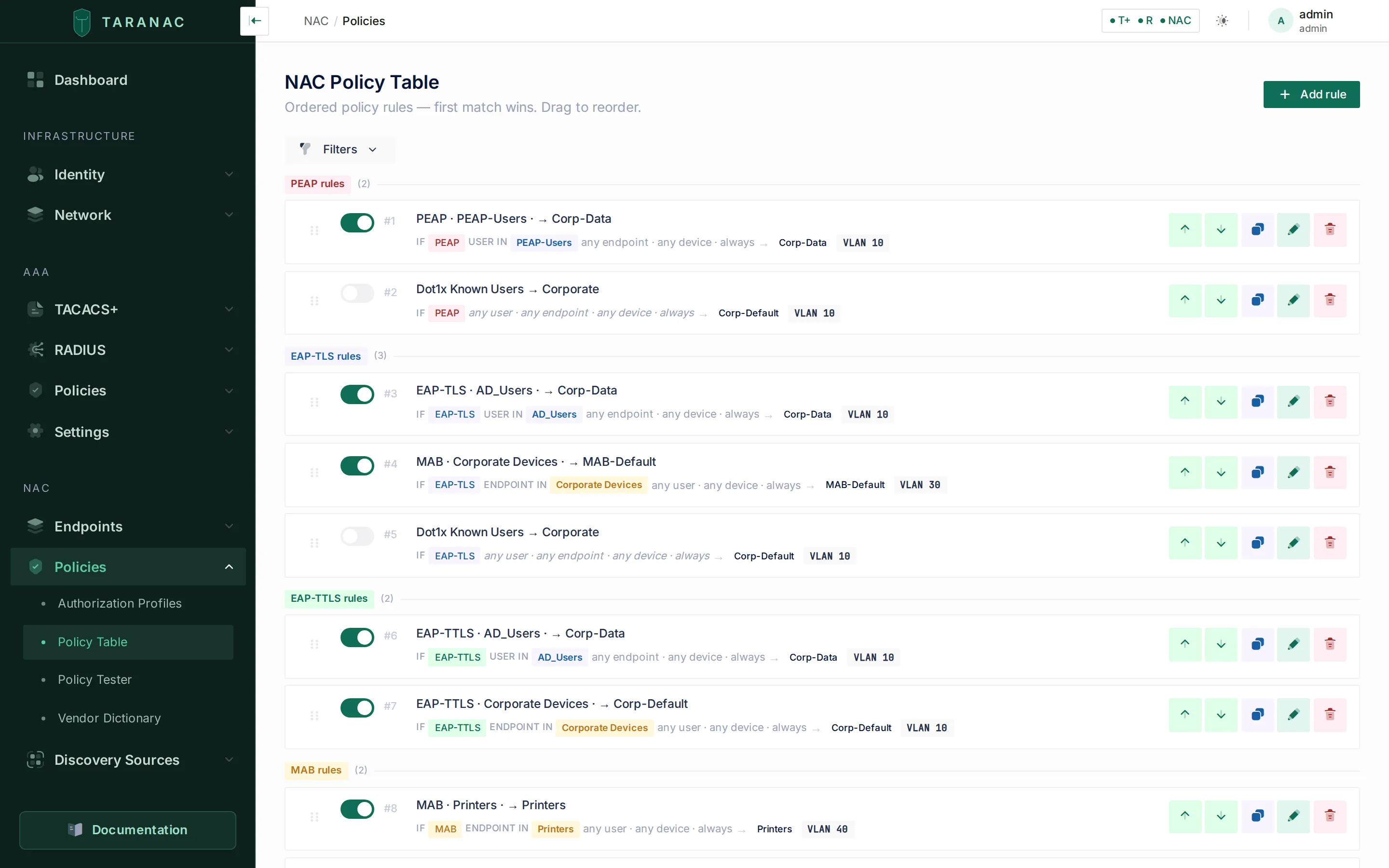 The NAC policy table — ordered rules, first match wins, with the locked default at the bottom.
For each rule you set:
- How — the authentication method (or
any). - Who / What / Where / When — the condition dimensions. Leave any of them as “any” to ignore that dimension.
- Action — permit (then choose an authorization profile) or reject.
Endpoint groups as conditions
Section titled “Endpoint groups as conditions”The What dimension is built on endpoint groups. Group membership is what lets you write a single rule like “any device in Printers → restricted VLAN” instead of listing MAC addresses. Endpoints land in groups either by manual assignment, through a captive portal, or automatically through classification rules: by what the device is (its device profile), by what a Web Probe source says about it, by certificate, by the machine’s place and groups in a directory, by manufacturer, host name or MAC. A rule can combine several of these; all of them must hold.
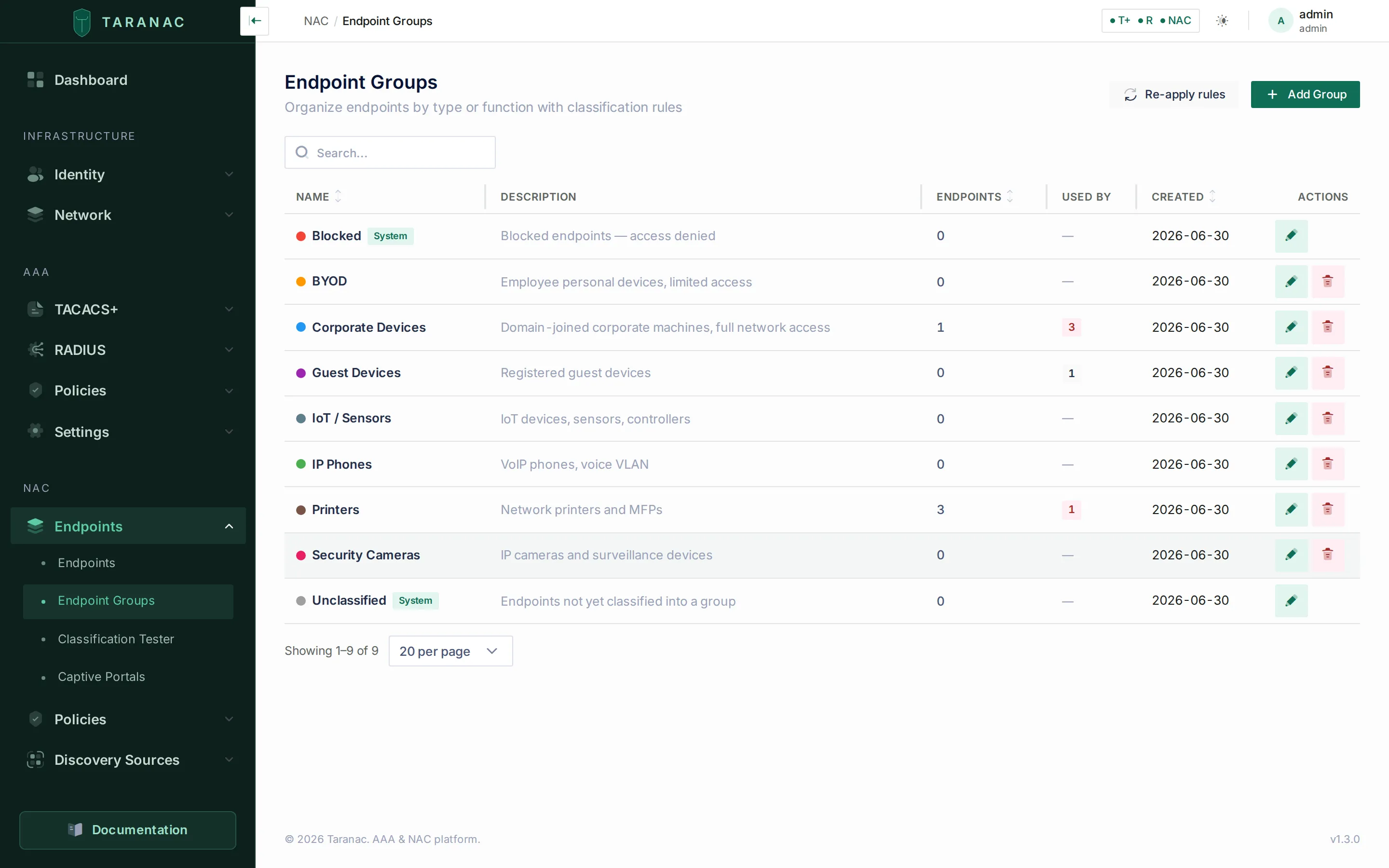 Endpoint groups — referenced by the “What” condition of a rule.
Discovered devices appear under Endpoints, where you can see which groups each one belongs to before you reference those groups in policy.
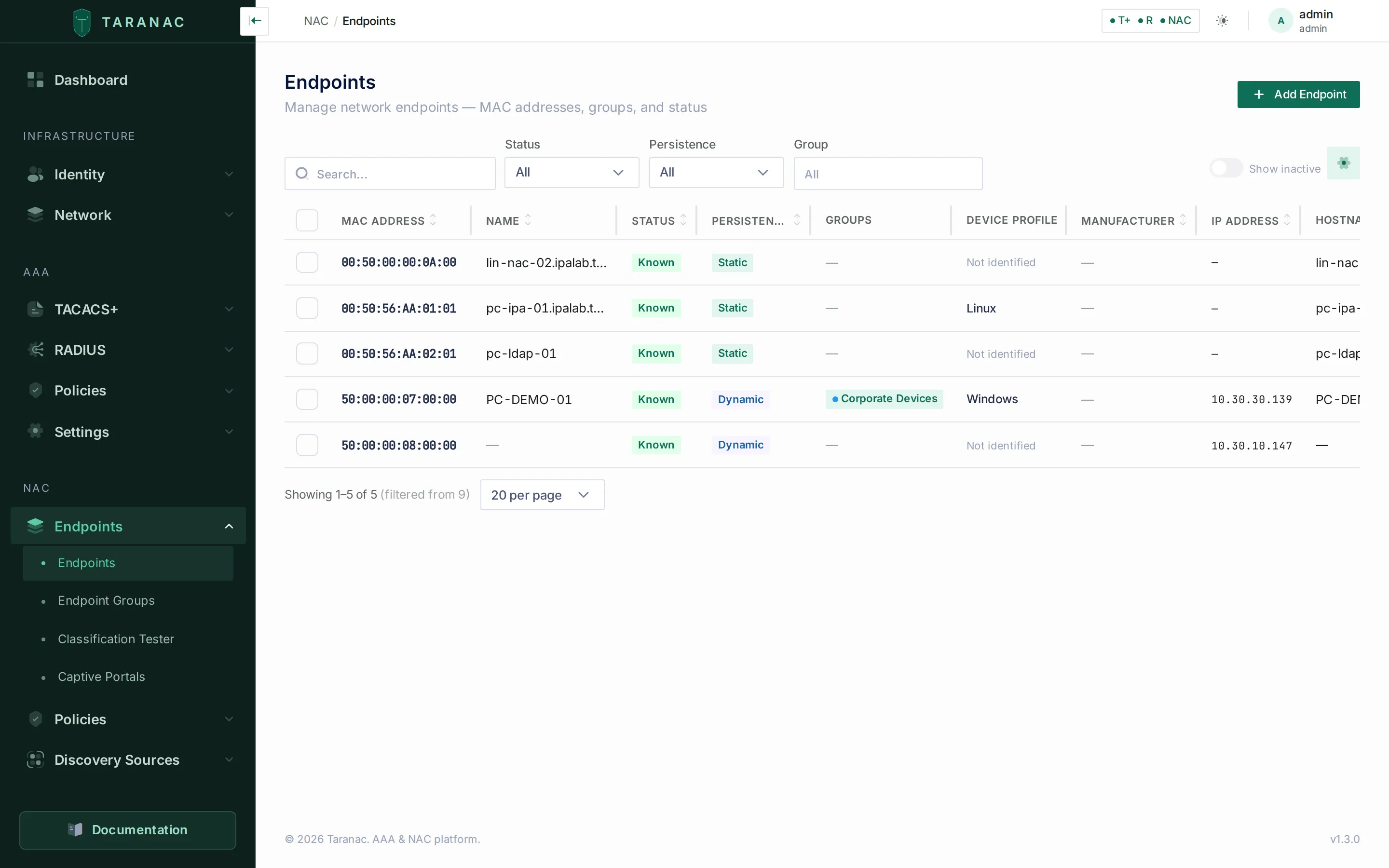 Endpoints with their groups and device profile.
Authorization results
Section titled “Authorization results”A permit result is made of three independent levers. Use them alone or in combination.
VLAN assignment
Section titled “VLAN assignment”The switch places the authenticated port (or MAC, in multi-auth mode) into a specific VLAN. This is the coarsest and most widely supported control — segmentation happens at the switch. Configure it by setting a VLAN ID on the profile.
Under the hood this is the standard RADIUS VLAN tunnel triple, which Taranac emits for every vendor:
Tunnel-Type = VLANTunnel-Medium-Type = IEEE-802Tunnel-Private-Group-ID = 100Downloadable ACL (dACL)
Section titled “Downloadable ACL (dACL)”A downloadable ACL pushes the access-control rules from Taranac to the switch as part of Access-Accept — you do not have to pre-define them on every switch. Enter the rules as an ordered ACL lines list on the profile, for example:
permit udp any any eq 53permit tcp any any eq 443deny ip any anydACLs give per-session, granular filtering on top of (or instead of) a VLAN. They are
vendor-dependent — Taranac renders them where the switch supports them (for
example Cisco’s ip:inacl# AV-pairs, or Juniper / Huawei filter attributes). Where a
vendor offers only role-based access (such as Aruba user roles) or no dACL at all, use
a named ACL (an ACL already defined on the switch, referenced by name) or rely on
VLAN segmentation instead. The Policy Tester’s per-vendor preview shows exactly what
each switch would receive.
URL redirect
Section titled “URL redirect”A URL redirect sends the session’s web traffic to a portal — typically a captive portal for guest registration, BYOD onboarding, or an acceptable-use prompt. A redirect profile usually combines three things: a holding VLAN, the redirect URL, and a redirect ACL that defines which traffic is intercepted (web) versus allowed through (DNS, the portal itself). URL redirect is the most vendor-specific result of the three: in the shipped Vendor Dictionary only Cisco IOS / IOS-XE declares it. On a switch without it, fall back to a dedicated guest VLAN whose gateway forces the portal.
Combining results
Section titled “Combining results”The three levers stack. Common combinations:
- VLAN only — simplest; segmentation handled by the switch.
- VLAN + dACL — a broad VLAN plus fine-grained per-session filtering.
- VLAN + redirect (+ redirect ACL) — a holding VLAN that bounces the user to a portal before granting real access.
Vendor-agnostic profiles
Section titled “Vendor-agnostic profiles”You author one profile by intent and Taranac maps it to the right attributes per switch vendor via its built-in Vendor Dictionary. A single “Printers — VLAN 300, ACL PRINTERS-ONLY” profile therefore works across Cisco, Aruba, Juniper, Mikrotik and the rest — the renderer produces the correct VLAN, dACL or role attributes for whatever NAS sent the request. The vendor is detected from the request’s attributes, or taken from the device record. You can inspect and extend the dictionary under Policies → Vendor Dictionary.
Attributes your equipment defines
Section titled “Attributes your equipment defines”An extra attribute on a profile is sent by name, exactly as you typed it, with no vendor mapping — and the 802.1X service can only send a name it can look up. The FreeRADIUS dictionaries it ships with are large (around 8500 attributes across 195 vendors) but do not carry everything a vendor defines, and a profile referring to a name that is not there would produce nothing at all, with no error anywhere.
Settings → NAC therefore has an Attribute dictionary card. Paste the vendor’s own dictionary text into it, verbatim:
VENDOR Example 32473BEGIN-VENDOR ExampleATTRIBUTE Example-Policy-Id 1 stringEND-VENDOR ExampleOnce saved, the name can be used like any other as an extra attribute on an
authorization profile, and it goes out in the Access-Accept. VALUE lines work
too. What already exists, beside the editor, opens a searchable list of what
the service already ships — worth a look first, since a name that already exists is
refused on save. A mistake is refused with its line number in your own text, and
saving applies it automatically: FreeRADIUS parses dictionaries once, when a process
starts, and every configuration is applied by starting a new process beside the
running one, which takes over with no request lost (see
Applying a configuration). The
dictionary is capped at 64 KB.
Each service keeps its own: the one on Settings → NAC is not shared with the device-administration dictionary on Settings → RADIUS.
CoA on policy change
Section titled “CoA on policy change”When you change policy, devices that are already connected keep whatever authorization they were granted at connect time — RADIUS Access-Accept is a one-time event. To push a new decision to a live session, the switch must be told to re-evaluate. That mechanism is Change of Authorization (CoA): Taranac sends a RADIUS CoA packet to the switch, and the switch acts on it. The port is taken from the device, else its device group, else the vendor’s own port from the Vendor Dictionary pinned on the device (Cisco IOS listens on 1700), else the global default, 3799. A device’s CoA test checks the port and secret without touching a session — see Network devices.
Taranac does not silently re-push policy to every live session the instant you edit a rule. CoA in the current release is an operator-initiated action plus some automated session housekeeping — not an automatic blanket re-authorization on every policy edit. The CoA actions available are:
| Action | What it does |
|---|---|
| Re-authenticate | Tells the switch to re-run authentication for the session; the new policy is then applied. The usual way to make a policy change take effect on a live session. |
| Disconnect | Terminates the session (standard RFC 3576/5176 Disconnect-Request). The device must reconnect, hitting current policy. |
| Bounce Port | Bounces the switch port (link down/up) so the device’s supplicant restarts and re-authenticates. |
| Change VLAN | Pushes a new VLAN directly to the live session without a full reconnect. |
Where you trigger CoA
Section titled “Where you trigger CoA”- Logging & Reports → NAC Logs → Sessions — per-session Disconnect, Re-authenticate, Change VLAN… and Bounce Port. This is the only surface with explicit CoA actions.
- Blocking an endpoint disconnects its live sessions via CoA as a side effect, so the block takes hold without waiting for the device to reconnect. Bulk block deliberately skips that step — see Endpoints.
- The captive portal, where the network opens access, sends a CoA of its own once a guest registers, which is what moves the device out of the registration VLAN. A portal that opens access itself sends none.
Changing an endpoint’s groups sends nothing — neither a manual reassignment nor a classification change. That is a session teardown, and the decision is left to you.
What happens after a Disconnect
Section titled “What happens after a Disconnect”An acknowledged Disconnect does not drop the session row on the spot. Taranac waits for the switch’s Accounting-Stop so the session is archived with its final counters; if no Stop arrives within a grace window (30 seconds by default), a background job closes it and records it as an admin disconnect rather than as a stale session. The same job covers a guest session revoked or expired by the captive portal. It sends nothing to the network — session liveness is read from accounting and never by asking the switch, which is described in the NAC overview.
The job is NAC Session Finalize (pending disconnects), runs every 10 minutes by default, and is listed under System → Workers. Turning it off is a stored setting, so it stays off across container restarts.
Common scenarios
Section titled “Common scenarios”Corporate laptop → employee VLAN. PEAP or EAP-TLS rule with How = PEAP/EAP-TLS and Who = employee user group (or What = a corporate-devices endpoint group for machine auth). Action: permit → a full-access profile with the employee VLAN.
Unknown device → guest VLAN + captive portal. A low-priority MAB rule placed below your endpoint-group rules, so it catches every MAC none of them matched (the default rule can play this part) → permit a Guest-Redirect profile: a registration VLAN plus a redirect to the captive portal. After the visitor registers, their endpoint moves into a guest group and the portal’s own CoA re-auth drops them into the real guest VLAN.
Printer (MAB) → restricted dACL. Classification rules put the printer’s MAC into a Printers endpoint group (by OUI manufacturer). A How = MAB, What = Printers rule permits a profile with a restricted VLAN and a print-only dACL (allow print/discovery ports, deny the rest).
Quarantine for non-compliant devices. Put the affected endpoints in a Quarantine group and add a high-priority rule What = Quarantine → permit a remediation profile (isolated VLAN, dACL allowing only patch/AV servers), or reject outright. Moving an endpoint into the group and re-authenticating its session from Sessions quarantines a live device immediately.
When to use what — decision guidance
Section titled “When to use what — decision guidance”| Result | Reach for it when… | Trade-offs |
|---|---|---|
| VLAN assignment | You want broad segmentation and the widest switch support. | Coarse — everything in the VLAN shares its reachability; relies on upstream routing/ACLs for finer control. |
| Named ACL | A consistent ACL is already defined on your switches and you just need to apply it by name. | You must maintain the ACL on every switch; Taranac only references it. |
| Downloadable ACL (dACL) | You need per-session, centrally managed filtering and your switches support it. | Vendor-dependent; not all platforms accept dACLs (use named ACL / VLAN as fallback). |
| URL redirect | You need a portal flow — guest, BYOD, or AUP. | Most vendor-specific; supported on a subset of switches. Without it, use a guest VLAN whose gateway forces the portal. |
Rules of thumb:
- Start with VLAN assignment for everyone; it is the most portable.
- Add a dACL (or named ACL) when a VLAN is too coarse and you need device-class-specific filtering (printers, IoT, cameras).
- Use redirect only for onboarding/guest flows, and always pair it with a holding VLAN and a redirect ACL.
- When mixing vendors, lean on VLAN + named ACL for the common denominator and reserve dACL/redirect for the platforms that support them — the Policy Tester’s per-vendor preview will tell you what each switch actually gets.
Related
Section titled “Related”- NAC overview — how NAC differs from AAA.
- 802.1X authentication — EAP-TLS, PEAP, EAP-TTLS and MAB (the who).
- Endpoints — endpoints, groups and classification rules (the what).
- Captive portal — guest, BYOD and AUP onboarding flows.
- Internal PKI — certificates for EAP-TLS.
- Deployment bundle: github.com/TaranacLabs/taranac