

Deploy a standalone collector
This is the walkthrough for standing up a standalone collector: the dial-out container that works a site on the core’s behalf, collecting configurations, polling SNMP, running Web Probe, listening for DHCP and scanning. It keeps no database; its durable state is its own identity and an outbox of results the core has not acknowledged yet.
A collector dials out to the core. The site needs outbound HTTPS to the core and nothing inbound from it.
The deployment is one command, and the core writes it for you. Everything below is the clicking that produces that command, what the command checks, and how to see that it worked.
Before you start
Section titled “Before you start”- A host at the site that runs Docker, with outbound access to the core’s API. Or a Taranac appliance, which installs the collector from an image already on its disk.
- On the core, the Collectors permission section: create to add the collector, edit to issue its enrolment token (and later to revoke its identity). See Collectors → who may manage them.
- Reach from that host to whatever it will work on: SSH/SCP/HTTPS to the devices whose configurations it collects, UDP 161 to the devices it polls, an interface in each segment it should scan.
- If a proxy, load balancer or firewall sits between the site and the core, it must tolerate
an idle HTTPS request of about half a minute. The collector’s job poll is a held
long-poll: the core keeps the
GETopen for roughly 25 seconds and answers the moment work appears. A middlebox that cuts idle connections sooner breaks nothing, but the collector falls back to its poll interval and Collect now stops feeling immediate.
Step 1: create the collector on the core
Section titled “Step 1: create the collector on the core”Go to Settings → System → Collectors and choose New Collector.
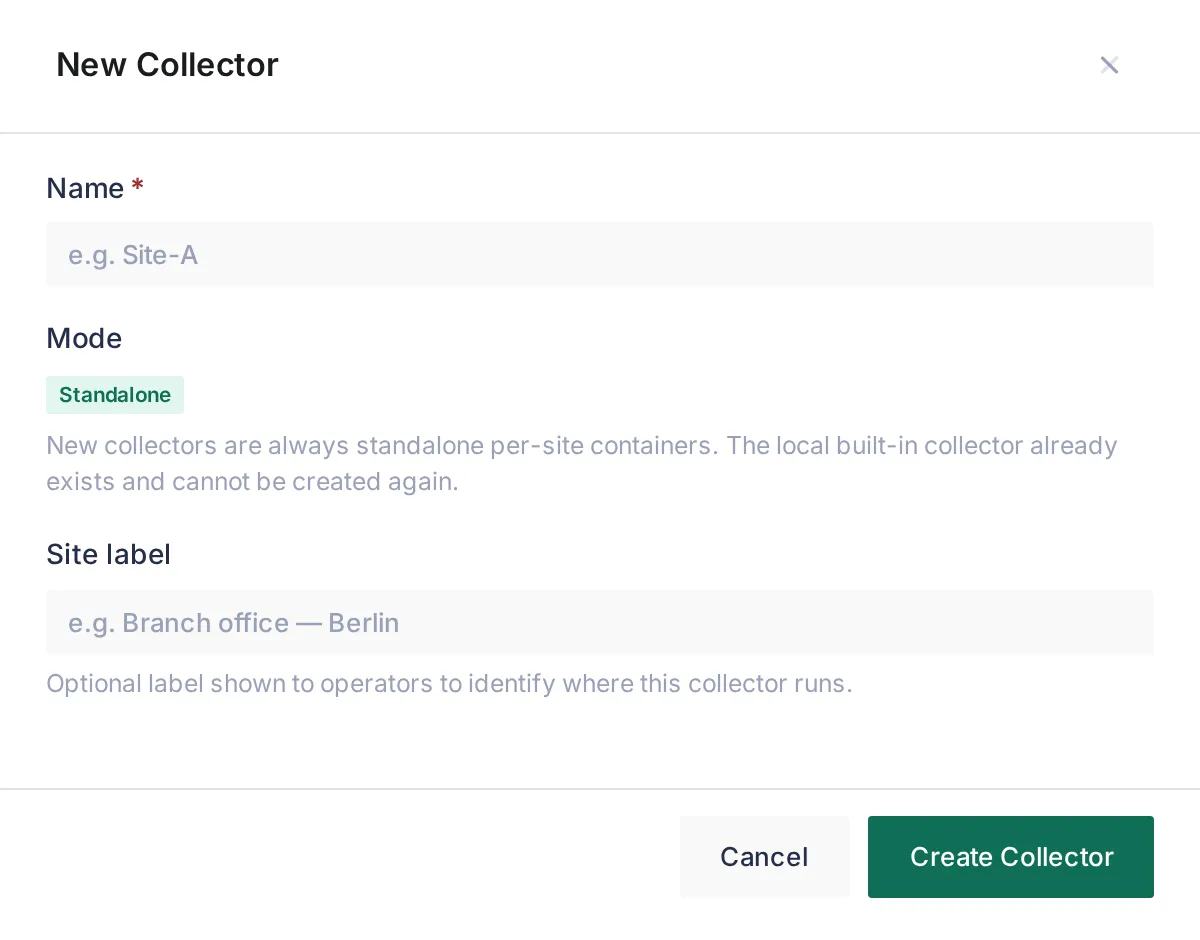
Give it a Name and, optionally, a Site label: free text for humans, because the core never calls a collector. Mode is always Standalone; the built-in collector already exists and cannot be created again. The new collector reads Unknown until it first reports.
Step 2: issue an enrolment token
Section titled “Step 2: issue an enrolment token”Open the collector. Its Details rail reads Not enrolled and Never seen; this is where you will watch the deployment land.
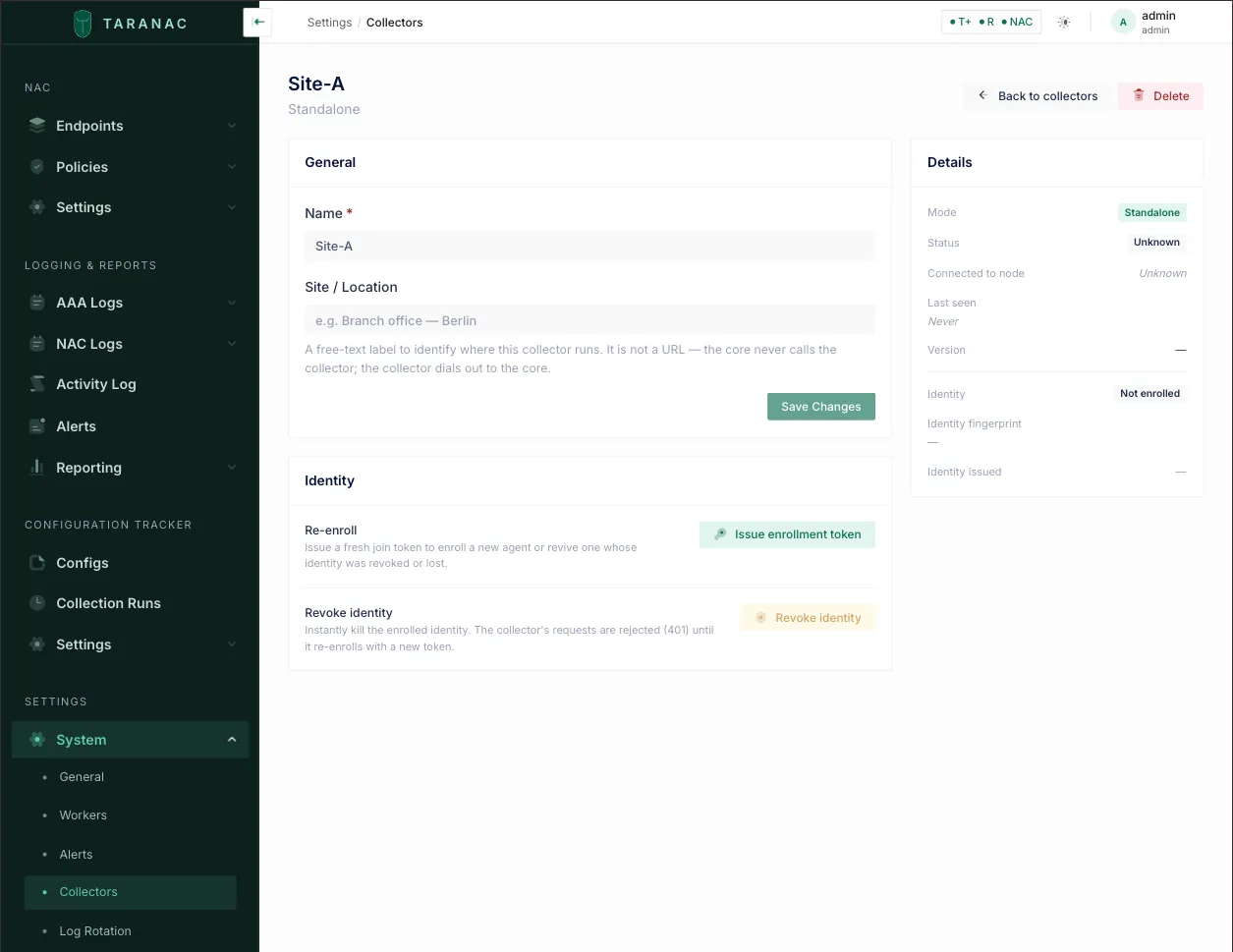
Choose Issue enrollment token. One drawer asks three things:
| Field | What it is for |
|---|---|
| Core URL | The address the collector will dial. It is filled in with the address your browser is using right now, plus /api/v1, so it is an address that demonstrably works. Change it if the site must reach the core by another name (NAT, a public FQDN, another port). The drawer warns when the address is not https or is localhost, because no collector could use it. The URL is not part of the token, so it stays editable after issuing and the command follows it. |
| Token lifetime (minutes) | Default 60, at most 7 days. It is minted into the token, so it locks once issued. |
| Build nmap on the collector host | Adds --with-nmap to the command. nmap enables the scanner’s Deep method; the host builds it from its own package mirrors, because Taranac does not ship it. Everything else works without it. |
Issue token then shows, once: the Join command, the Enrollment token on its own, the core URL with its own copy button (the appliance installer asks for the two separately), and when the token expires.
The drawer also says where the scanner is configured: nowhere at install time. The collector reports every interface of its host by itself, and you choose where it listens and scans in the core, under NAC → Discovery Sources → Scanner.
Step 3: run the join on the site host
Section titled “Step 3: run the join on the site host”Run the command from the drawer in the unpacked bundle directory:
cd /opt/taranac./collector-join.sh \ --core https://core.example.com/api/v1 \ --enrollment-token v_yj0s3BGEugY_WHjuxaa… \ --with-nmapWhat it checks before installing anything
Section titled “What it checks before installing anything”Nothing is written and no image is pulled until the core and the token check out. The script asks the core about the token without spending it, and a wrong address or a dead token is named at the terminal instead of surfacing minutes later as an attach timeout:
| You see | Meaning |
|---|---|
--core must be an https:// URL | The address is plain http. The channel carries device credentials. |
cannot resolve the core's name in '…' | This host cannot resolve the name. Use a name or address the site can reach. |
nothing answers at '…' | Connection refused or no route. With localhost or 127.x, it also says that this means the collector host, not the core. |
the core … did not answer within 15 seconds | A firewall or a wrong port between the site and the core. |
the TLS handshake with '…' failed | Something answers, but not as HTTPS (or, with --ca-file, not with a certificate that CA signed). |
… answers, but not as a Taranac collector gateway (HTTP 404) | Usually the /api/v1 suffix is missing, or the address points at another service. |
the core refused the token: … | The token is spent, expired, superseded by a newer one, or its collector was deleted. The core’s reason follows. Issue a fresh token. |
core reachable; token valid for collector '…' until … | Good to go. |
The check establishes no trust (pinning happens in the collector on first contact). On a
host without curl, the script says it is skipping the check and the collector reports
either problem itself once it starts. A --core without /api/v1 gets a warning: the request
signature covers the full path, so a missing prefix fails every signed poll.
What it does next
Section titled “What it does next”- Writes
collector.env(the collector’s own configuration) and the one-shotenrollment-tokenbeside the compose file. - With
--with-nmap, or if you answer y to install nmap on this scanner? when it runs in a terminal, builds a derived…-nmapimage fromDockerfile.nmap, checks that nmap actually runs in it as the collector’s user, and records that image so later updates keep using it. Details are on the Scanner page. - Starts the container, recreating it if one exists.
- Waits until the collector has attached before reporting success:
collector-join: checking the core at https://core.example.com/api/v1 and the enrollment token…collector-join: core reachable; token valid for collector 'Site-A' until 2026-09-27T14:05:00Z.collector-join: writing collector.env, enrollment-token…collector-join: starting the collector…collector-join: waiting for the collector to attach to the core…
collector-join: the collector is attached to https://core.example.com/api/v1.  Trust:       pinned on first contact (the fingerprint appears in the log below)  Core UI:     Settings -> System -> Collectors — it is there now.
If it does not attach within a minute, the script prints the collector’s own reason and exits non-zero, instead of leaving a container restart-looping out of sight.
On first start the collector generates its Ed25519 key, redeems the token (and blanks the token file), and the core pins its public key. Every request after that is signed and timestamped; there is no long-lived shared secret on the wire.
Running the join again
Section titled “Running the join again”Running collector-join.sh on a host that already has a collector, with a fresh token,
re-enrols it and applies the new configuration: the container is recreated, so a changed
address, trust mode or poll interval takes effect. The collector keeps its outbox.
The join rewrites collector.env and .env.collector from its flags. A line you added
by hand, such as COLLECTOR_DHCP_PROBE_ENABLED=true or COLLECTOR_NETWORK_MODE=bridge, has to
be added again afterwards.
On an appliance
Section titled “On an appliance”The same install is sudo taranac-module collector, run over SSH. It asks for the core
URL and the token (the two values the drawer lets you copy separately) and a poll interval
(default 30 seconds), and installs from an image already on the appliance’s disk; it
never reaches for a registry. Its files live under /opt/taranac/modules/collector. The
appliance installer does not build nmap.
Step 4: check it and give it work
Section titled “Step 4: check it and give it work”Back on the core, the collector’s page answers for the whole deployment: Status: Online, Connected to node, Version with Compatible, Identity: Active with its fingerprint, and within a minute of starting the Interfaces card and the nmap row. See a collector’s page.
Then point work at it. Nothing reaches a collector until something names it:
| Job | Where |
|---|---|
| Configuration collection | The collector on the site’s sources, or bulk-onboard the site with this collector selected |
| SNMP polling | An SNMP profile whose poller is this collector |
| Web Probe | A Web Probe source running on this collector |
| Scanner | Zones on its interfaces, under NAC → Discovery Sources → Scanner (Scanner) |
| DHCP listening point | Its environment, see below, then a helper address on the site’s relay (DHCP Probe) |
Networking
Section titled “Networking”The collector runs with the host’s network by default. A relayed DHCP copy and a client’s broadcast both have to reach the listener with their real source address, which a published port cannot deliver, and the scanner has to see the host’s real interfaces, VLAN sub-interfaces and trunk tags. A collector serves nothing to the core and publishes no port, so a separate network namespace buys little.
COLLECTOR_NETWORK_MODE=bridge keeps Docker’s network isolation instead. The cost: the
container sees only its own Docker interface, so the scanner has nothing to build a zone on,
and the DHCP listening point cannot be reached. Configuration collection, SNMP and Web Probe
work either way. COLLECTOR_NETWORK_MODE is read by Compose, so it goes in .env.collector
(on an appliance, the module directory’s .env), followed by a recreate:
docker compose --env-file .env.collector -f docker-compose.collector.yml up -d --force-recreateConfiguration files and environment
Section titled “Configuration files and environment”The join writes two files beside the compose file, and they do different jobs:
collector.env: the collector’s own settings, read by the daemon. The one you edit..env.collector: Compose interpolation only (image, version, network mode, CA mount). It exists so the install never writes the bundle’s own.env, which belongs to a different stack. That is why every compose command here carries--env-file .env.collector.
Compose does not notice a changed env file on its own; recreate the container after an edit (the command above).
| Variable | File | Default | What it does |
|---|---|---|---|
COLLECTOR_CORE_BASE_URL | collector.env | (required) | The core’s collector gateway, ending in /api/v1. Written from --core. |
COLLECTOR_TLS_TRUST | collector.env | pin | pin or any. Ignored when a CA bundle is set. |
COLLECTOR_CA_CERT_PATH | collector.env | (unset) | Verify the core against a CA bundle. Written by --ca-file. |
COLLECTOR_POLL_INTERVAL_S | collector.env | 30 | The floor between job polls when backing off; a healthy poll is held open by the core. |
COLLECTOR_HEALTH_MAX_AGE_S | collector.env | 130 | How stale the liveness file may get before the container reads unhealthy. The join derives it from --poll-interval. |
COLLECTOR_COLLECT_CONCURRENCY | collector.env | 5 | Configuration collections in flight at once, 1 to 64. |
COLLECTOR_OUTBOX_MAX_ROWS | collector.env | 10000 | Past this many unacknowledged results, the collector stops claiming new work until the outbox drains. |
COLLECTOR_DHCP_PROBE_ENABLED | collector.env | false | Make this collector a DHCP listening point. Off by default: a collector deployed to collect configurations was not asked to open the DHCP port. |
COLLECTOR_DHCP_PROBE_LISTEN_ADDRESS | collector.env | 0.0.0.0 | Address the DHCP socket binds; empty or 0.0.0.0 means every interface. |
COLLECTOR_DHCP_PROBE_LISTEN_PORT | collector.env | 67 | For a host where 67 is taken. A relay always sends to 67, so moving it makes the collector unreachable for relayed traffic. |
COLLECTOR_NETWORK_MODE | .env.collector | host | bridge keeps Docker’s isolation at the cost above. |
COLLECTOR_IMAGE | .env.collector or shell | the published image for this version | Run an image already on the host: the air-gapped case, or the …-nmap image --with-nmap built. |
SNMP, Web Probe and the scanner have no switch on the collector: they run when the core hands the collector that work.
collector-join.sh flags
Section titled “collector-join.sh flags”| Flag | What it does |
|---|---|
--core <url> | The core’s gateway URL, with /api/v1. Required for an install. |
--enrollment-token <token> | The one-time token. Required for an install. |
--with-nmap | Build and verify a derived image with nmap from this host’s own mirrors. Without the flag, an install run in a terminal asks. |
--ca-file <path> | Verify the core against a PEM CA bundle instead of pinning. |
--trust-any | Verify nothing. Lab only; this channel carries device credentials. Contradicts --ca-file, and the script says so. |
--collector-id <label> | A display label for this container. Cosmetic. |
--poll-interval <seconds> | Default 30, minimum 5. Widening it also widens the health window, so a slow site does not read unhealthy while collecting fine. |
--status | What the collector is doing, from local state only (below). |
--update [--check] | Move to the version the core runs, or only report whether it is behind. |
--update --version <ver> | Move to a version you name. |
--update --from <image.tar> | Load an image tarball first (air-gapped). |
--reset-trust | Forget the pinned core certificate and pin the next one. |
--uninstall [--force] | Remove the collector from this host; --force discards a non-empty outbox. |
Trust modes
Section titled “Trust modes”| Mode | How to get it | What it means |
|---|---|---|
| Pin (default) | nothing to do | The certificate presented on first contact is the only one accepted afterwards. A later change is refused and named, not accepted silently. |
| CA | --ca-file /path/ca.crt | Verify against a PEM CA bundle. The strictest mode. Behind an nginx edge, this is the edge’s CA. |
| Any | --trust-any | Verify nothing. Do not ship it. |
On an appliance the CA mode is sudo env COLLECTOR_CA_FILE=/path/ca.crt taranac-module collector.
When the core’s certificate is legitimately replaced, the collector refuses the new one and logs both fingerprints. Re-pinning is a deliberate one-shot, with no new token and no loss of identity:
./collector-join.sh --reset-trust # on a Docker hostsudo taranac-module collector --reset-trust # on an appliancePersistence
Section titled “Persistence”The collector’s durable state lives on one named volume that must survive restarts and image updates: its identity (private key, certificate, fingerprint), the pinned core certificate, and the outbox. Results in the outbox are re-delivered idempotently after an outage or a restart. Past 10,000 waiting results the collector stops claiming new work and says so, while the uploader keeps draining, so a very long outage pauses collection rather than growing a queue without limit. Destroy the volume and the collector must be re-enrolled.
Rotating and revoking identity
Section titled “Rotating and revoking identity”- Re-enrol: issue a fresh token from the collector’s page (Re-enroll) and run the join again. The collector rotates its key pair and enrols again.
- Revoke: Revoke identity on the collector’s page invalidates its key immediately; the next signed request is rejected. After five consecutive rejections the collector stops polling and halts in a re-enroll required state rather than inventing a new identity. It keeps its outbox, which uploads once it is enrolled again. Use this when a site host is decommissioned or compromised.
Status and removal
Section titled “Status and removal”Both come from local state only and make no network call: this is what you run when the core is the thing you suspect.
./collector-join.sh --status # where it points, trust mode, container health, # enrolled key-id, pinned core-cert fingerprint, # time since the last poll, results in the outbox, # and the last error SINCE IT LAST STARTED./collector-join.sh --uninstall # container, state volume and config files./collector-join.sh --uninstall --force # …discarding a non-empty outboxOn an appliance:
sudo taranac-module --list # what is installed on this boxsudo taranac-module collector --statussudo taranac-module collector --uninstall [--force]Only errors since the last start are shown: a collector that failed twice and then attached is healthy.
- The outbox is checked first. If it holds results the core has not accepted, the
uninstall refuses and says how many. They exist nowhere else; let it drain or pass
--force. - It is local. Neither command deletes the collector on the core, because a host being decommissioned often cannot reach the core any more. Delete it under Settings → System → Collectors, or it stays in the list as offline.
Keep the collector in step with its core
Section titled “Keep the collector in step with its core”Collector and core must agree on the snapshot contract (how a configuration is scrubbed, hashed and fingerprinted). If they do not, the core hands that collector no work and accepts nothing from it until they do; the mechanism is on the Collectors page. What to carry into the field:
- It stops all work the core dispatches to that collector, not only the configurations touched by the change.
- A refused poll is not a heartbeat. Within 15 minutes the collector reads Offline and
raises the collector-offline alert; locally the container reads
unhealthy. A collector that “went offline” right after a core upgrade is usually a contract skew, not a dead link: look forversion mismatch (409)in its log. - Other jobs are offered by what the collector declares. An older image keeps collecting configurations while newer jobs wait for the matching image.
The cure
Section titled “The cure”./collector-join.sh --update # move to the version its CORE runs./collector-join.sh --update --check # report only, change nothing--update asks the core, never a public release feed: a collector must match its own
core, and a site can always reach its core while it often cannot reach the internet. The core
reports its version on every authenticated answer, including refusals, and the collector
records it, so this opens no extra connection. It pulls the matching image, swaps it in, waits for the collector to attach, and rolls back to
the previous version if it does not come back, because nobody is standing next to a remote
collector that fails to start.
--update will not report already in step while the collector’s own log shows the core
refusing it on a contract mismatch; it tells you to read the core’s version (./taranac version, or the web UI) and name it. Two forms work without asking the core:
./collector-join.sh --update --version 1.3.0 # move to a version you name./collector-join.sh --update --from ./image.tar # docker load an image tarball firstAn appliance has no --update. The module installer never downloads anything, so moving
an appliance collector means having the matching image on that box and installing the module
again with a fresh token: sudo env COLLECTOR_IMAGE=<image> taranac-module collector.
Troubleshooting
Section titled “Troubleshooting”| Symptom | Likely cause | Fix |
|---|---|---|
| The join stops before installing | The pre-flight check named the address or the token | Fix what it names; a refused token needs a fresh one. |
| Status stuck Unknown | The collector never started or never enrolled | Re-run the join; if it exited non-zero, its message names the cause. |
| Every signed poll fails authentication | --core without /api/v1 | Re-run with the prefix; the script warns when it looks absent. |
| Offline shortly after a core upgrade | Contract skew | ./collector-join.sh --update; the log shows version mismatch (409). |
| Offline after working | Host down, link down, container stopped | Restart it; check outbound reachability. --status answers without the core. |
| Log says the core’s certificate changed | The certificate was replaced, or something impersonates the core | If you replaced it, --reset-trust. If not, find out why first. |
Container unhealthy while the daemon looks alive | Only a successful poll refreshes the liveness file | Read the log: version mismatch (409) means --update; re-enroll required means a fresh token. |
DHCP Probe column shows — | The probe is off on this collector, or it never reported | Set COLLECTOR_DHCP_PROBE_ENABLED=true and recreate. |
| DHCP Probe Not listening | The port is taken, or the collector runs in bridge mode | Read the reason in the column; free port 67 or return to host networking. |
| No interfaces worth scanning | COLLECTOR_NETWORK_MODE=bridge | Use host networking. |
| A hand-added setting is gone | The join rewrote collector.env / .env.collector | Add the line again and recreate. |
| Uninstall refuses | The outbox holds results the core never accepted | Let it drain, or --uninstall --force. |
| Collect now feels slow at one site | A middlebox cuts the ~25 s held long-poll | Allow the idle connection, or accept the slower cadence. |
Related
Section titled “Related”- Collectors: what a collector does, health, compatibility and rights.
- Virtual appliance: a collector as an appliance rather than a container on your own host.
- Collectors in the Configuration Tracker: pointing configurations at a collector.
- DHCP Probe and Scanner: the two jobs that depend on the collector’s networking.