

Snapshots, diff & drift
Every collection produces a snapshot — one immutable, content-hashed capture of a device’s config. Snapshots are what the tracker versions, diffs and watches for drift, and — because Taranac is your AAA server — what it can attribute to the operator who made the change.
Key concepts
Section titled “Key concepts”| Term | What it is |
|---|---|
| Snapshot | One capture, stored with its content hash, size and capture time. Text is stored inline; a text capture past the store threshold and every binary config are stored hash-only — versioned by hash, with no stored body and no diff. |
Version (v{n}) | A per-config sequence number — v1 is the oldest capture, v{n} the newest. It counts that config’s snapshots in capture order. |
| Content hash | A SHA-256 of the stored body (for a binary config, of the captured bytes). It’s how the tracker decides whether a capture is a change or a duplicate. |
| Baseline | The one snapshot per config you declare “known-good.” Drift is measured against it. |
| Drift | The latest capture’s hash no longer matches the baseline’s hash. |
| Config status | A derived health value shown on the Configs list (below). |
| AAA activity | Who logged in, which commands they ran, and the session accounting — in the window between two versions. |
Versioning and de-duplication
Section titled “Versioning and de-duplication”When a collection completes, Taranac hashes the config as it will be stored and compares it to the latest snapshot only:
- Same hash → nothing is stored. The run records the target as
unchanged; no new version is cut. - Different hash → a new snapshot is stored and the version number advances
(
changed).
Because comparison is against the latest snapshot (not the whole history), reverting
a device to an older config is correctly recorded as a new change — the hash differs
from the current latest, so a new version is cut. Version numbers are per config, so
every tracked config has its own clean v1…v{n} timeline.
What a snapshot actually stores
Section titled “What a snapshot actually stores”By default the stored body is the scrubbed one — volatile lines trimmed, secrets masked (see scrub sets). That is a default, not a law.
A scrub set carries a Mask secrets automatically switch. When the tracked config’s
recipe points at a set that has it off, the set’s own rules become the entire policy —
and with no rules at all, the configuration is stored exactly as the device returned it.
Real secrets are then in the ordinary body, and they appear that way in the diff,
in drift notifications and in exports, to anyone holding
ncm_tracked_configs.view.
All three conditions have to hold for that: the recipe points at a scrub set, that set has Mask secrets automatically off, and the set’s rules don’t mask the value. A recipe with no scrub set — or no recipe at all — is always fully masked.
Separately, and much more narrowly, a recipe can keep a second, encrypted copy of the unscrubbed capture (Keep an unmasked copy of every capture, off by default). The ordinary body stays masked exactly as before; reading the copy is a distinct, audited action — see Revealing the raw body.
The baseline and drift
Section titled “The baseline and drift”Any version can be pinned as the baseline — the config you consider correct. From then on, the tracker compares each new capture’s hash to the baseline’s:
- Latest hash matches baseline → the config is in sync.
- Latest hash differs → the config is drifted, and it’s flagged the instant the drifting capture lands.
There is exactly one baseline per config: pinning a new one moves the marker off the old version. A config with no baseline is never “drifted” — drift is defined only relative to a baseline you’ve set.
Beyond the baseline, a version can also carry a free-form tag — a short Label plus an optional Description — to mark releases or maintenance windows in the history. Add, edit or remove it from the pencil on that version in the Versions rail; a version holds at most one. A tag is organisational only: it pins nothing, moves no baseline and doesn’t affect drift. Its label is searchable in the compare-version picker, alongside a content-hash prefix.
Config status
Section titled “Config status”The Configs list shows a derived status per tracked config. It is computed at read time in priority order (the first that applies wins):
| Status | Meaning |
|---|---|
| Disabled | The config is disabled and is not collected. |
| Collector offline | A collector that serves this config’s addresses is offline. |
| Failing | The most recent scheduled collection failed (with a failure class — auth, transient or partial). |
| Drifted | The latest capture’s hash differs from the baseline’s. |
| Never collected | Nothing has been captured yet. |
| OK | Collected, and either matching the baseline or with no baseline set. |
Open a config and pick a version on the Versions rail to see a side-by-side diff. By default a version is compared to the one before it; you can also compare against:
| Compare mode | Diffs the selected version against… |
|---|---|
| Previous (default) | The capture immediately before it. |
| Baseline | The pinned baseline (shows the full drift). |
| Any version… | Any other version you pick, from a searchable picker. |
The diff renders as aligned Side by side rows or an Inline unified view, with long runs of unchanged lines collapsed (click to expand) and added / removed / modified counters. Alongside it the toolbar carries View full — the whole stored configuration instead of the diff — plus Download, Copy and Fullscreen.
Word wrap exists on both the diff and the full configuration view, and the setting is shared between them: flip it in one and the other follows. The full view is windowed, so a configuration of tens of thousands of lines opens immediately instead of freezing the tab.
Download and Copy always emit the stored body — never a revealed raw one, even after a reveal.
What can’t be diffed
Section titled “What can’t be diffed”| Case | What you get instead |
|---|---|
| Binary config | An artifact card with size, capture time and content hash. Binary snapshots are hash-only: no diff, and no bytes to download. |
| Oversized text | A distinct card — the version is tracked, the body was not stored, and raising the threshold is what changes that. The diff is refused outright rather than reporting the whole file as deleted. |
| Very large text | Past roughly 10,000 lines the side-by-side view is dropped and only the unified diff is rendered; past roughly 20,000 lines no inline diff is rendered at all and the panel points you at Download / Copy to compare in your own tools. |
The oversized threshold is ncm.text_store_max_bytes (default 8 MiB), one of three
capture-size limits — see the settings reference.
The version viewer marks such a version Too large and says it is tracked by content hash.
A configuration longer than the collector processes
Section titled “A configuration longer than the collector processes”Before the scrub rules run, the collector bounds its input: at most ncm.scrub_max_lines
lines (default 200,000, range 1,000 to 5,000,000) and at most
ncm.scrub_max_line_length characters per line (default 32,768, range 1,024 to
1,048,576). The per-line bound is what protects your own scrub rules from a regular
expression that backtracks catastrophically on one long line; the line count bounds the
total work.
What falls outside a bound is not stored and not shown, but it is never silently lost:
- The discarded tail is hashed into the version. A change past the cut still creates a new version, so an edit at the end of a very long configuration cannot pass for “no change”.
- The version viewer and the preview warn per bound. Truncated: the last N lines were not
collected when the line count was hit; Long lines were cut: N line(s) when single lines
were, with the marker
…[truncated by collector input-bound]at each cut. - Two versions that differ only past the cut say so. Their stored bodies are identical, so instead of No differences the diff reads The change is outside the collected part and names how many lines were not collected.
- An alert is raised for the tracked configuration (one per configuration, not one per run) and clears itself once a capture fits. See Change alerts.
The cure is the operator’s: raise the bound the warning names, or narrow the recipe. A
FortiOS show full-configuration, for example, runs past the default line count.
Revealing the raw body
Section titled “Revealing the raw body”When the config’s recipe kept an unmasked copy, a version that carries one shows two extra buttons in the diff toolbar: Reveal raw and Download raw.
Both require ncm_tracked_configs.reveal_raw (Reveal raw config) — a separate,
high-privilege action that permission to view tracked configs does not imply — and
both are written to the activity log before the copy is
decrypted, so an access that reaches the stored ciphertext and then fails is recorded just
as a successful one is. Saving to a file is audited exactly like reading on screen.
Revealing swaps the panel for the raw text under a standing banner — “Showing the unscrubbed raw body — this reveal is audited.” — and the reveal is per version: move to another version on the rail and it is dropped, so one version’s cleartext can never be shown under another’s identity.
AAA activity — who typed what
Section titled “AAA activity — who typed what”This is what a standalone backup tool can’t do. Open the diff and choose View AAA
activity: Taranac shows who touched that device in the window between the two
versions being compared — (previous capture time → this capture time]. (For the
very first version, it looks back 24 hours.) The drawer has three tabs:
| Tab | Shows | Source |
|---|---|---|
| Authentication | Who logged in, from where, and whether it succeeded. A refused TACACS+ connection is left out: nobody tried to log in. | TACACS+ and RADIUS |
| Authorization | Which commands were run, permit/deny. | TACACS+ only |
| Accounting | Session start/stop and elapsed time. | TACACS+ and RADIUS |
The honest limit: per-command attribution needs TACACS+ command authorization. A RADIUS-only device still gives you who-logged-in and session accounting — it just can’t tell you the individual commands, because RADIUS device administration doesn’t record them. (802.1X / MAB network-access sessions are excluded — this is device-admin activity only.)
Correlation is by device address: the activity is matched to the config’s addresses against the AAA logs’ NAS-IP. That’s a heuristic on the same network identity, so keep a tracked config’s addresses accurate for the attribution to line up. A user filter and per-tab counts let you narrow to one operator quickly.
Collection runs
Section titled “Collection runs”Captures happen inside a collection run, listed under Configuration Tracker → Collection Runs:
- Scheduled — a leader-driven periodic sweep collects every enabled config; the sweep interval is the collection cadence (there’s no per-config schedule).
- On demand — an operator’s Collect now on a single config.
A run’s status is running, completed, or interrupted (an interrupted run is
one whose lease expired mid-flight — e.g. an HA failover — and is never resumed). Each
target in a run gets a per-device result: ok (first capture), changed, unchanged
or failed.
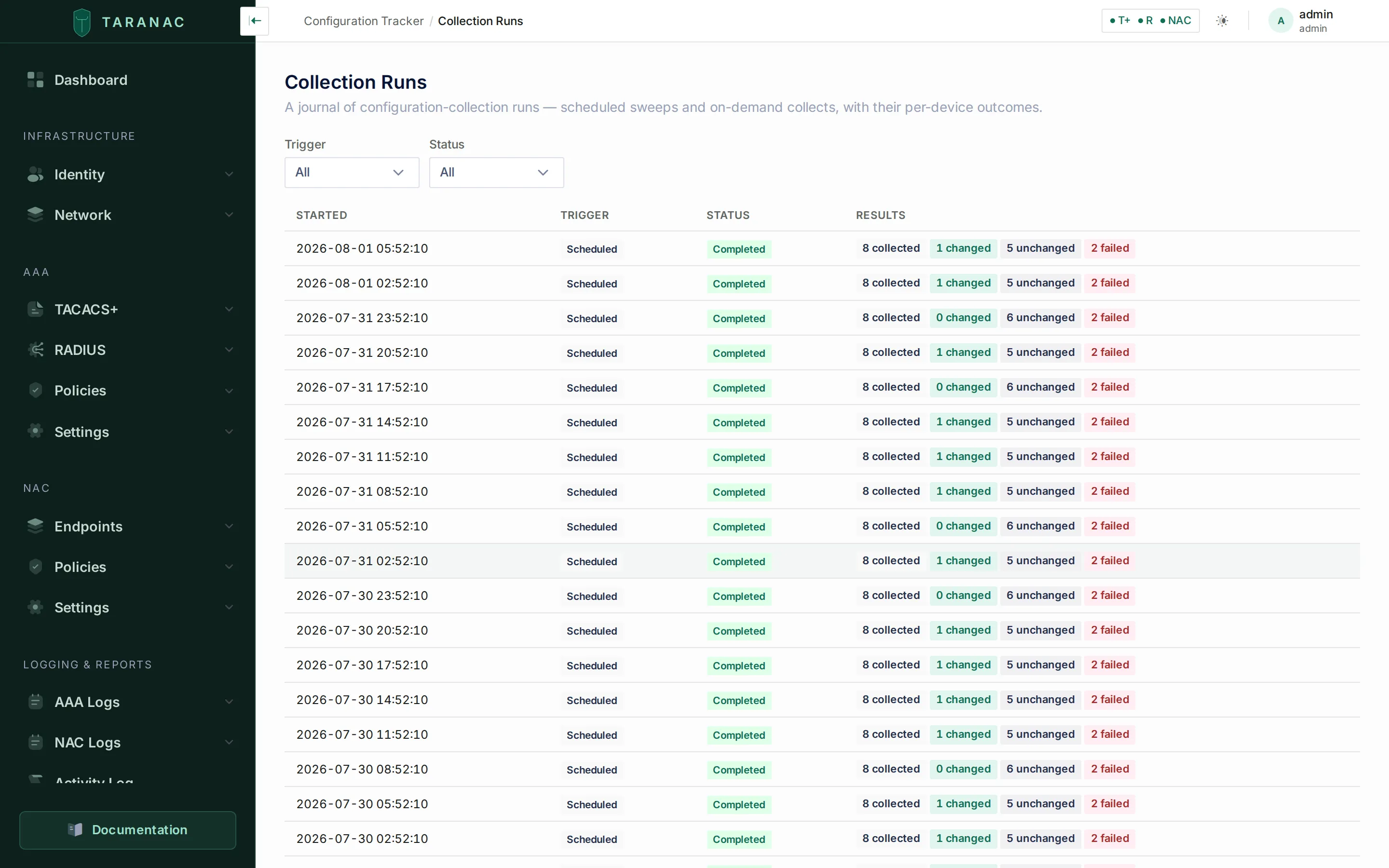 The Collection Runs journal: scheduled sweeps and on-demand collects, each with its per-device tally of collected / changed / unchanged / failed. Failed results carry a failure class —
 auth (never retried, to avoid
tripping device lockouts), transient (retried with backoff) or partial (holds the
last-good). When a config’s scheduled collections fail repeatedly, Taranac escalates a
collection-failed alert.
A failure inside Taranac rather than on the device is recorded as a failed result with
no failure class, and its error names the stage it happened in, with the details left to
the api log:
| Stage | The error says |
|---|---|
| Preparing the collection | Internal error while preparing the collection (…); the device was not contacted. |
| Talking to the device | Internal error while collecting from the device (…); nothing was stored. |
| Storing the version | The configuration was collected, but storing it as a version failed with an internal error (…). |
| Recording the result | Internal error while recording the result of the collection (…), or, when the version was already stored, The configuration was collected and stored as a version, but recording the result failed … |
The parenthesis holds only the name of the error (for a database refusal, the driver’s
own error class), never its text, which could carry the configuration. A domain refusal
while storing (for example a validation error) is shown with its own message instead.
For Collect now, the run is closed straight away and the failed result opens with its
trace, the step that failed marked: a stage before the device on the plan step, storing
or recording on the result step. If even closing the run fails, the run is marked
interrupted rather than left running.
Common scenarios
Section titled “Common scenarios”Prove nothing changed overnight. Sort the Configs list by status; anything not OK stands out. For a clean config, the version rail shows no new version since the baseline.
Investigate an unexpected change. Open the drifted config, diff the latest version against the baseline to see the full delta, then View AAA activity to see who logged in and what they ran in that window.
Roll back and record it. Restore the device to a known-good config out-of-band, then Collect now. The revert is captured as a new version (hash differs from the drifted latest), and pinning the restored version as the baseline clears the drift.
When to use what
Section titled “When to use what”| You want to… | Do this |
|---|---|
| See what changed between two captures | Side-by-side diff, Previous mode |
| See everything that drifted from known-good | Diff against Baseline |
| Compare two arbitrary versions | Diff in Any version… mode |
| Read the whole configuration, not just the delta | View full on the diff toolbar |
| Read a real password on a version that kept one | Reveal raw — needs Reveal raw config, and is audited |
| Find out who made a change | View AAA activity on the diff |
| Define what “correct” means for a device | Pin baseline on the good version |
| Mark a version for your own reasons | Add a tag from the pencil on the version |
| Force a fresh capture now | Collect now |
Reference
Section titled “Reference”Snapshot facts:
| Field | Notes |
|---|---|
| Version | Per-config sequence number, oldest = v1. |
| Content hash | SHA-256 of the stored body; the only de-dup and drift signal. |
| Content kind | text (stored inline) or binary (hash-only, no diff, no download). |
| Oversized | A text capture past ncm.text_store_max_bytes (default 8 MiB): version recorded, body not stored, diff refused. |
| Truncated capture | A capture past ncm.scrub_max_lines or ncm.scrub_max_line_length: the cut part is not stored but is hashed into the version, the viewer and preview warn, and an alert is raised until a capture fits. |
| Size | The real captured size — reported even when the body wasn’t stored. |
| Captured at | When the snapshot was taken. |
| Attribution | The AAA-derived “who changed it,” computed at capture. |
| Labels | The baseline anchor, plus an optional user tag (label + description). |
| Raw body | Present only when the recipe kept an unmasked copy; encrypted; revealable only with ncm_tracked_configs.reveal_raw. |
Compare modes: prev (default) · baseline · snapshot. Run triggers: scheduled ·
on_demand. Run statuses: running · completed · interrupted. Per-device results:
ok · changed · unchanged · failed (classes auth · transient · partial).
Related
Section titled “Related”- Recipes & scrub sets — how a capture is cleaned before it becomes a snapshot.
- Credentials & the vault — the logins that make a collection possible.
- Change alerts & safe deletion — drift and collection-failed alerts.
- Audit & syslog — where reveals and other privileged actions are recorded.