

AAA policy
The AAA policy is the shared decision engine for device administration. Every TACACS+ and RADIUS request that reaches Taranac is evaluated against one ordered list of rules. The engine walks the list top to bottom and stops at the first rule that matches — that rule decides whether the session is permitted, which profile (command set, privilege level, RADIUS attributes) is applied, and whether MFA is required.
Because evaluation is first-match-wins, rule order is the policy. A broad rule placed near the top will shadow more specific rules below it. The list always ends with a single, undeletable default rule that catches everything not matched above — so there is no such thing as “no decision”.
- 1 noc Any Any 22–06 profile
- 2 noc Any Any 09–18 profile
- · Any Any Any Always deny
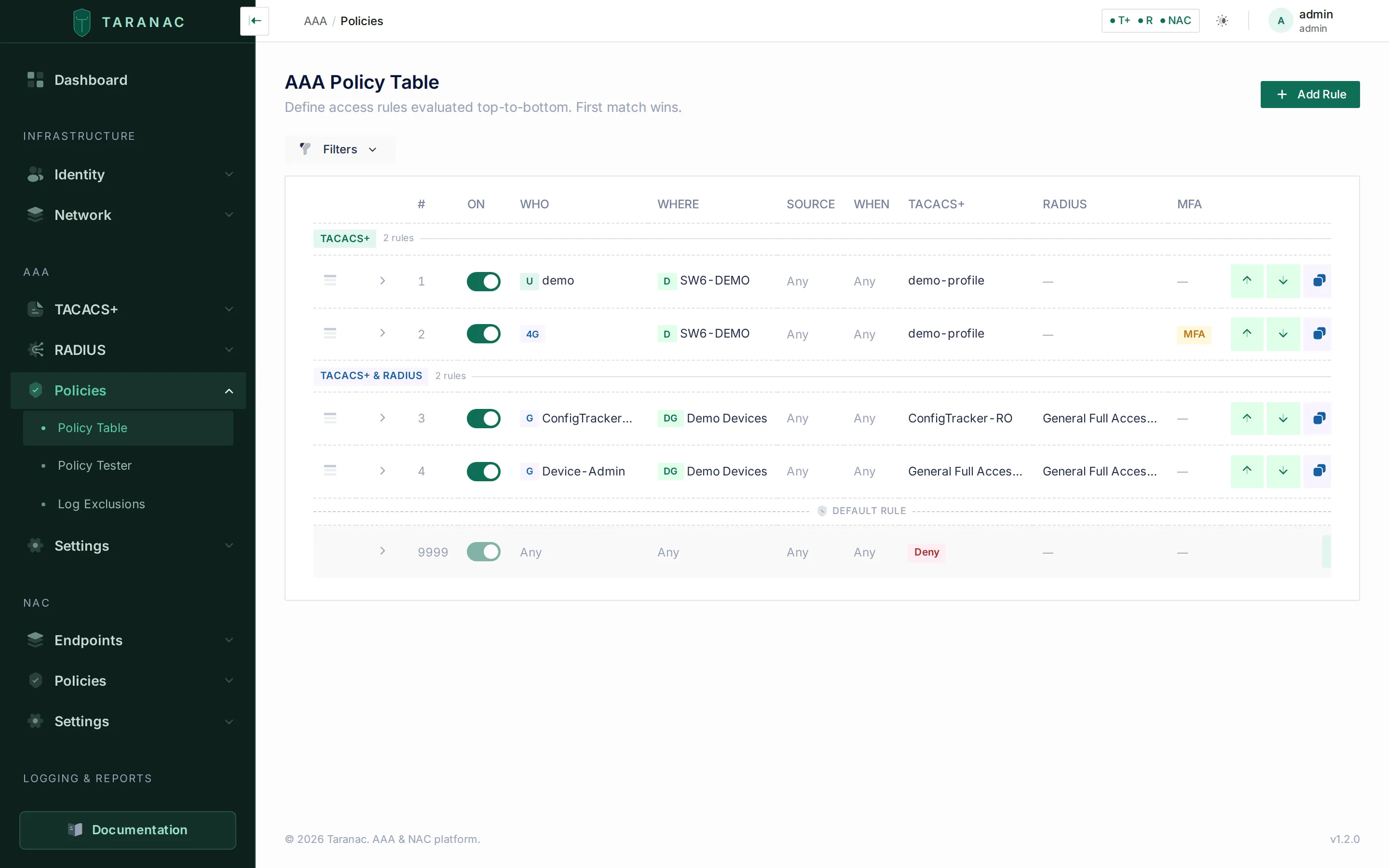 The AAA policy table: ordered rules with WHO / WHERE / SOURCE / WHEN conditions and per-protocol actions, with the default rule pinned below the separator.
Key concepts
Section titled “Key concepts”A rule has four match dimensions and two independent action columns (one for TACACS+, one for RADIUS). A rule matches a request only when all four dimensions match; the action column for the request’s protocol then decides the outcome.
| Dimension | Question it answers | What you select |
|---|---|---|
| WHO | Which identity is authenticating? | ”Any user”, or a set of users and/or groups |
| WHERE | Which network device (NAS) is the request coming through? | ”Any device”, or a set of devices and/or device groups |
| SOURCE | How / from where did the session originate? | ”Any source”, a set of source networks, or “console” (TACACS+ only) |
| WHEN | At what time is the request happening? | ”Always”, or a named time range |
Each rule carries the following beyond its dimensions:
- Description — an optional free-text label shown in the table. (Rules are identified by their order and description; there is no separate “name” field.)
- Order — the rule’s position in the list; lower runs first.
- Enabled — a disabled rule is skipped entirely during evaluation, as if it were not present.
- Validity period — optional Valid From / Valid Until instants; outside them the rule is skipped as if disabled. See validity period.
- MFA —
offorrequired. Whenrequired, the matched session must satisfy multi-factor before the action is applied (subject to global MFA being enabled and the user having an enrolled provider).
Match dimensions in detail
Section titled “Match dimensions in detail”WHO. With “Any user” off, the rule matches if the authenticating user is directly listed or belongs to any listed group. Group membership is resolved at evaluation time, so adding a user to a group immediately changes which rules they hit.
WHERE. With “Any device” off, the rule matches if the device is directly listed or is a member of a listed device group. The device is identified by the address the request is sent from: the TCP peer for TACACS+, the packet source for RADIUS. The NAS-IP-Address a RADIUS device writes into the request plays no part (see How a request finds its device). A device defined as a subnet also matches when that address falls within its network object — so you can target a whole management subnet with a single device entry. (A device’s address is always a host or a subnet: range and FQDN network objects cannot be attached to a device, because neither yields addresses to match on.) For TACACS+, “Any device” still means a device in the inventory: a connection from any other address is refused before a policy is consulted (see Only inventoried devices log in).
SOURCE. This dimension describes where the client session comes from:
- Source networks — match when the client’s source IP is contained in one of the selected network objects (host, subnet, or address range; FQDN objects are not offered, because matching is by address). A range is expanded into the CIDR blocks that cover it when the TACACS+ configuration is generated.
- Console — a TACACS+-only checkbox that matches sessions arriving on a device’s console/AUX port rather than over the network. It is exclusive with source networks: a rule restricts SOURCE either by address or to the console, never both.
WHEN. “Always” matches at any time. Otherwise you pick one time range — a reusable schedule of weekday + start/end windows (overnight windows like 22:00–06:00 are supported). Times are interpreted in the node’s local timezone — the host OS zone, which is mounted into the Taranac containers — and never in UTC, so “09:00–18:00” means 09:00–18:00 where the server runs. That zone is detected from the host and is read-only in the product: it is shown as a badge beside a time range and on the dashboard rather than being edited in settings.
Validity period
Section titled “Validity period”A rule can be in force only for a period: Valid From and Valid Until, under Validity period in the rule form. They are absolute instants, entered and shown in the system timezone, and either may be left empty (no start, or no expiry). Both ends are inclusive. This is not WHEN: a time range repeats every week, a validity period happens once.
- Outside its period a rule is skipped exactly as if it were disabled, for both protocols. Evaluation continues with the next rule, and the period passes on its own; nobody has to come back and switch the rule off.
- It stays in the table, greyed, with a badge naming the boundary: Starts … before the period, Expired … after it, and until … while an expiry is ahead.
- RADIUS checks the period on every request, to the second.
- TACACS+ checks it at every login, to the second. It also drops a rule outside its period from the rendered TACACS+ configuration on the next configuration cycle (every 30 seconds by default), and adds it back when its period begins. That is what makes the period reach sessions already open: command authorization in a session admitted before the rule lapsed stops being granted by it within one cycle.
- The default rule cannot have a period. It is the catch-all and is always in force.
Typical uses: a contractor’s or auditor’s access that must end on a date, a change-window rule that grants privilege 15 for one night, or a rule prepared ahead of a cut-over.
The two action columns
Section titled “The two action columns”Each rule sets a mode for TACACS+ and, independently, for RADIUS:
| Mode | Meaning |
|---|---|
none | This rule does not handle this protocol. Evaluation continues to the next rule for that protocol. |
deny | Explicitly deny access for this protocol. |
auth_only | Permit, but assign no profile — authentication succeeds with no attributes/authorization. |
profile | Permit and apply a named profile (full attribute / command-set / privilege injection). |
The none mode is what lets a single list serve both protocols. A rule can, for example, apply a TACACS+ command-set profile while leaving RADIUS at none, so RADIUS requests pass straight through to rules below.
Messages differ by protocol. For RADIUS, a deny or auth_only rule may carry a Reply-Message (capped at 253 bytes by the protocol; not every NAS displays it). For TACACS+, a profile rule may carry a Terminal Message, shown once right after login, while deny and auth_only carry fixed texts — a TACACS+ denial is answered exactly like a wrong password. The reasons are on TACACS+ → Terminal Message.
The default rule
Section titled “The default rule”Exactly one rule is the default (catch-all). It is pinned below a separator at the bottom of the list and is special:
- It cannot be deleted or reordered — it is always last.
- Its WHO / WHERE / SOURCE are locked to “Any” and WHEN to “Always”, so it matches every request that nothing above caught.
- Out of the box it ships as deny all (TACACS+
deny, RADIUSnone).
This is a deny-by-default design: access is only what your rules explicitly grant. You may change the default’s actions, but not its conditions.
Building the policy in the admin UI
Section titled “Building the policy in the admin UI”Open AAA → Policies → Policy Table. The table lists all rules in evaluation order; the default rule sits under the divider.
- Add a rule. Click to create a rule. The form is organised as the four dimensions plus the two action columns. Toggling a dimension to “Any” clears and hides its selectors.
- Set conditions. For each dimension, either leave it on “Any” or pick the specific users/groups, devices/device groups, source networks, or time range. Selectors let you create the referenced object inline if it does not exist yet.
- Set actions. Choose a mode per protocol. Pick a profile for
profilemode. A TACACS+profilerule offers an optional Terminal Message; a RADIUSdeny/auth_onlyrule an optional Reply-Message. - Choose MFA. Tick “require MFA” if this rule’s sessions must pass multi-factor.
- Place the rule. New rules can be inserted at a chosen position; “Insert above”/“Insert below” on existing rows put the new rule exactly where you want it. You can also reorder later by dragging rows.
Rows can be expanded to inspect the resolved profile and the membership of any selected group or device group (read-only).
When to order rules — the core skill
Section titled “When to order rules — the core skill”Since the first match wins, place rules from most specific to most general:
- Explicit denies and break-glass exceptions first. A “lock out contractor group everywhere” rule must sit above any rule that would otherwise grant them access.
- Narrow grants next. Rules scoped to specific devices, source networks, or time windows.
- Broad grants after. “All network engineers get the standard profile on all devices.”
- The default rule last (it is pinned there automatically) — deny-all backstop.
A useful test: if rule B is a strict subset of rule A’s conditions, B must come before A, or it can never fire.
Common scenarios
Section titled “Common scenarios”Read-only NOC during business hours. WHO = group noc; WHERE = Any; SOURCE = Any; WHEN = time range business-hours; TACACS+ = profile (a read-only command set); RADIUS = none. Outside the window this rule does not match, so the user falls through to whatever comes next (often the deny-all default).
Full admin from the jump host only. WHO = group network-admins; WHERE = Any; SOURCE = source network jump-hosts; WHEN = Always; TACACS+ = profile (privilege 15). Because SOURCE is set, keep RADIUS = none — RADIUS could never satisfy the source restriction anyway. Order this above the read-only NOC rule if admins are also NOC members.
Console always works (break-glass). WHO = Any; WHERE = device group core; SOURCE = console; WHEN = Always; TACACS+ = a profile (auth_only only where the device does not ask Taranac to authorize the console shell — one that does is refused). Placed near the top, this guarantees physical console access even if network paths are misconfigured.
RADIUS Wi-Fi admin onboarding to switches. WHO = group wifi-admins; WHERE = device group access-switches; SOURCE = Any; WHEN = Always; RADIUS = profile; TACACS+ = none. Mirrors the TACACS+ rules but on the RADIUS column.
Service account, permitted but silent. Combine an auth_only rule for a monitoring account with a log exclusion (below) so the constant polling does not flood the logs.
When to use which action mode
Section titled “When to use which action mode”| Situation | Use mode |
|---|---|
| Grant access with a specific privilege / command set / attributes | profile |
| Permit the login but assign nothing (rare; e.g. a NAS that authorizes itself) | auth_only |
| Block this identity/scope outright | deny |
| This rule is only about the other protocol — let this one fall through | none |
Testing before you commit: the policy tester
Section titled “Testing before you commit: the policy tester”Open AAA → Policies → Policy Tester. The tester simulates a request against the live rules and shows exactly which rule wins and why, without touching production traffic. Use it after every non-trivial change. It reads the rules straight from the database, so it reflects an edit the moment you save it; the TACACS+ and RADIUS engines pick that same edit up on their next configuration refresh — about 30 seconds later by default.
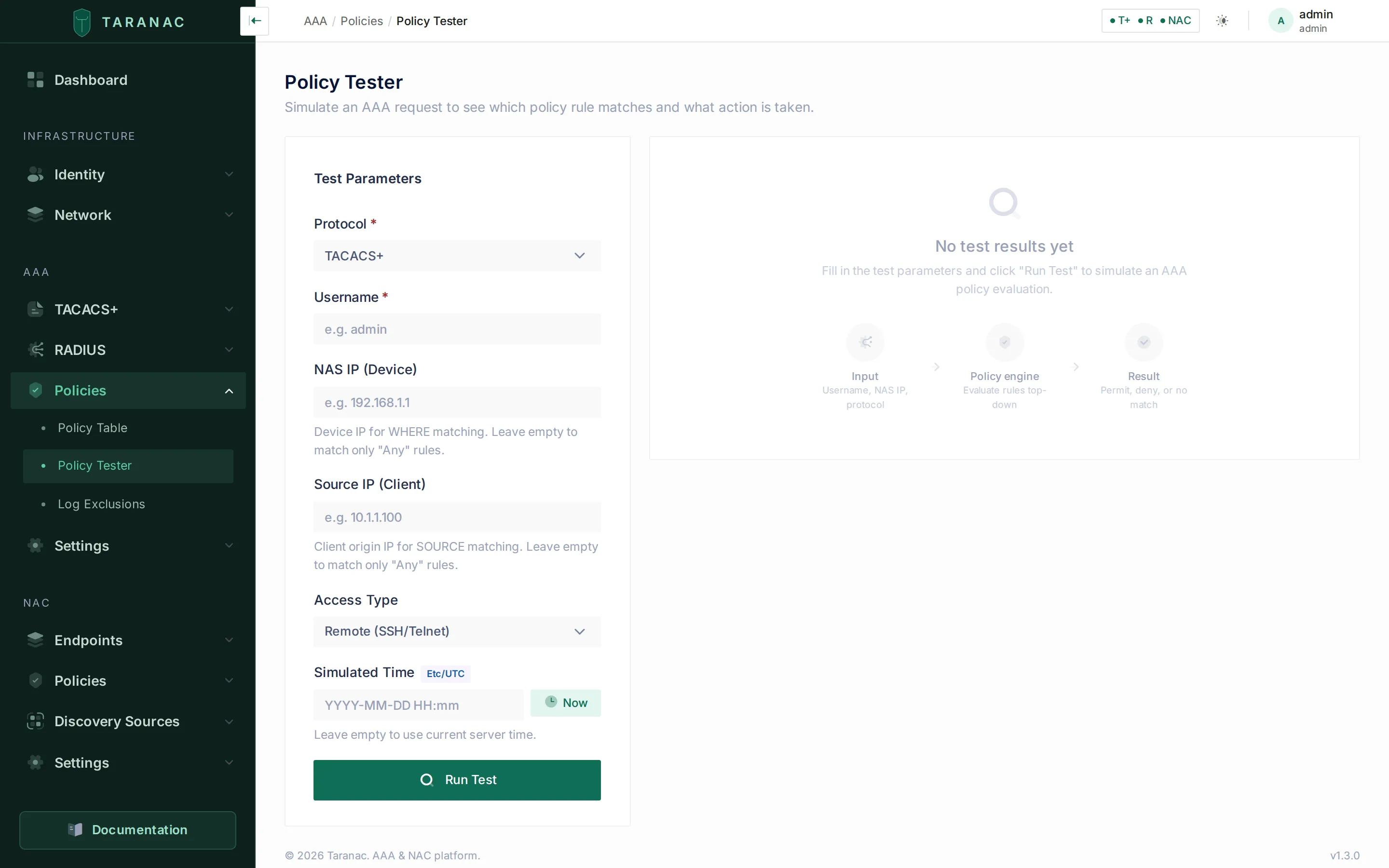 The policy tester: enter a simulated request and read back the winning rule, resolved action, MFA/enable chain, and a per-rule pass/fail trace.
Enter the request parameters:
| Field | Notes |
|---|---|
| Protocol | tacacs or radius — selects which action column is evaluated. |
| Username | The identity to test (must exist; an unknown user returns a “user not found” result). Matched case-insensitively, as at login. |
| Device IP | The address the device sends RADIUS or TACACS+ from (the packet source), for WHERE matching. Omit it and only “Any device” rules can match. |
| Source IP | The client IP, for SOURCE matching. Omit it and only “Any source” rules can match. |
| Access type | remote or console (TACACS+ only) — drives the console SOURCE check. |
| Simulated Time | The instant the request is evaluated at, for WHEN matching and for each rule’s validity period, entered in a date-time picker. Now fills in the current time and a clear button beside it empties the field again; a timezone badge shows which timezone applies. Left blank, the current server time is used. Testing at a future instant is how you check that a rule starts or lapses when intended. |
The result shows:
- A banner — green for a permit, red for a deny or unknown user, yellow when no rule matched.
- The winning rule and its resolved action (mode + profile name).
- The MFA chain (whether MFA is enforced, the user’s resolved provider, or a warning if MFA is required but the user has no provider) and, for TACACS+, the enable-password chain showing which level resolved it (user / group / profile / global).
- The resolved context — the effective username, NAS, source, time, and access type used.
- A full evaluation trace: every rule that was examined, marked
match,skip, ordisabled, each expandable to a per-dimension pass/fail breakdown (e.g. “user ‘admin’ is member of matching group ‘network-admins’”). A rule outside its validity period at the simulated instant is markedskip, with “Not yet in force” or “Expired” as the reason. This is the fastest way to find a rule that fires too early or never fires. - Warnings — notably the RADIUS-SOURCE caveat described above.
Log exclusions
Section titled “Log exclusions”Log exclusions are a separate list, under AAA → Policies → Log Exclusions, that suppresses noisy-but-expected traffic from the logs — monitoring pollers, backup accounts, automation — without affecting access decisions. They are matched independently of the policy rules and apply to both protocols by default.
Each exclusion matches on:
- Identity — by exact
username, ausername_patternregular expression matched against the whole username (e.g.svc-.*), or auser_group. - NAS filter (optional, matched on the address the request is sent from) —
any, anetwork_object(FQDN objects are not offered — matching is by address), or adevice_group. - Protocol —
all,tacacs, orradius.
And controls, independently, which event types to suppress (authentication, authorization, accounting) and where to suppress them:
| Destination | Default | Effect |
|---|---|---|
| Database | suppressed | Keeps the event out of the UI logs table. |
| Syslog | kept | Whether the event is still forwarded to external syslog. |
| Alerts | suppressed | Keeps the event from raising alerts. |
Related
Section titled “Related”- TACACS+ profiles & command sets — the profiles you assign in
profilemode. - RADIUS profiles — the RADIUS attribute profiles assigned by rules.
- Network devices — devices and device groups used in WHERE.
- Users & groups and MFA — the identities and second factor evaluated by WHO and the MFA flag.
- Logging & accounting — where excluded and kept events land.
- Project repository