

TACACS+
TACACS+ is how Taranac controls administrative access to your network gear — the routers, switches, firewalls and other devices your engineers log in to. It separates authentication (who you are), authorization (what you may do once logged in) and accounting (a record of what you did), and it can authorize individual commands, which is what makes it the standard choice for device administration.
show running-config and denies reload for a read-only operator.In Taranac, TACACS+ and RADIUS share one identity store, one set of network devices and one AAA policy table. Use TACACS+ when an admin opens a shell on a device (SSH, Telnet or console) and you want to grant a privilege level, restrict commands, or keep a per-command audit trail. Use RADIUS for endpoint network access (802.1X, MAB) and for platforms that do their administration over RADIUS instead.
Key concepts
Section titled “Key concepts”Taranac models TACACS+ authorization with three linked objects plus the privilege/enable chain. Everything is bound to users and devices through the policy table — you build the objects once and reference them from rules.
| Term | What it is |
|---|---|
| Template | A vendor/platform schema: which TACACS+ services exist (shell, exec, ppp…), which attributes (AV-pairs) each service carries, and whether the platform supports enable and per-command authorization. Templates hold no values — they describe the shape of a profile’s form. Taranac ships templates for the major vendors. |
| Shell / authorization profile | The concrete values for a session: the attribute values (such as priv-lvl), an optional command set with its default command action, an enable-password mode and session/idle timeouts. A profile references exactly one template and is what a policy rule hands back on a match. |
| Command set | A named, ordered list of permit/deny rules matched top-to-bottom against each command the device sends for authorization. A command no rule matches falls through to the profile’s default command action. Attached to a profile (only when the template’s platform supports command authorization). |
Privilege level (priv-lvl) | The coarse-grained access level the device enforces (commonly 1 = read-only/user EXEC, 15 = full/privileged EXEC on Cisco). Set as a profile attribute. |
| Enable | Privilege escalation on the device (the enable step). Taranac decides whether to grant it and which password to check via the enable chain (below). |
How WHO → result matching works
Section titled “How WHO → result matching works”When an admin authenticates, Taranac evaluates the AAA policy table top to bottom, first match wins. Each rule matches on four dimensions — WHO (user or group), WHERE (device or device group), SOURCE (network the admin connects from, or the physical console) and WHEN (always, or a time range). The first rule whose conditions all match determines the TACACS+ action:
- profile — apply the named shell/authorization profile (priv-lvl, command set, etc.)
- auth_only — authenticate the login but give no authorization opinion. A device that does ask Taranac to authorize the shell is refused, with the fixed text No authorization profile is set for this connection.
- deny — reject. The operator sees the device’s own wrong-password text (see Terminal Message for why).
- none — the rule does not apply to TACACS+ (it may still act on RADIUS)
The default catch-all rule sits last and denies everything, so anything not explicitly permitted is rejected. A rule can also be limited to a validity period; outside it the rule is skipped, and TACACS+ drops it from the generated configuration on the next cycle, so the change also reaches sessions that were already admitted.
The enable chain
Section titled “The enable chain”For privilege escalation, Taranac resolves the enable mode by walking a chain and taking
the first non-inherit value:
User → Group → Profile → Global setting (tacacs.global_enable_mode)Modes are:
| Mode | Behaviour |
|---|---|
inherit | Defer to the next level in the chain. |
login_password | Re-use the admin’s login credentials for enable. |
custom | Check a separate password stored encrypted on the profile. |
deny | Refuse privilege escalation. |
permit | Grant enable without a password challenge (profile level only). |
The global level is set under AAA → Settings → TACACS+ → Global Enable Password, with the modes Login Password (the default), Custom Password and Deny. The password behind Custom Password is generated at installation, so choosing that mode never leaves an empty password behind it — an empty one would deny every enable request. Nobody can guess the generated value, so escalation through it stays closed until you reveal it (the reveal is audit-logged) or replace it with a password people can type at the device’s enable prompt.
Configuring TACACS+
Section titled “Configuring TACACS+”The TACACS+ objects live under the AAA section of the admin UI. The usual order is: pick or create a template, build any command sets you need, create the profiles that carry the values, then bind profiles to users/devices in the policy table.
1. Templates
Section titled “1. Templates”A template fixes the attribute schema for a vendor/platform. Most operators never create
one — the built-in templates already cover the common platforms. Open one to see the
services it defines (typically shell) and the attributes available on a profile built
from it. Two template capabilities matter when you build profiles:
- Enable Password — whether the platform supports TACACS+ privilege escalation.
- Command Authorization — whether the platform supports per-command authz, and the
match style (
regex,exact, orprefix) used to compare command arguments.
Each attribute in a template also declares two things that reach a profile:
- On the device — Mandatory (=) or Optional (*), the two kinds RFC 8907
defines. A device that cannot apply a mandatory attribute must refuse the whole
authorization; an optional one it may ignore and carry on. The generated
tac_plus-ngconfiguration writes a mandatory attribute asset name = valueand an optional one asadd name = value, so an optional value leaves the daemon whether or not the device asked for that attribute by name. - May be blank — whether a profile may leave the attribute empty. With the box
cleared the attribute is required: it is marked with a red
*in the profile form and cannot be saved empty. This is independent of Mandatory/Optional, which is about the device, not the form; an empty attribute is simply not sent.
Services with protocol phases
Section titled “Services with protocol phases”Some services are authorized more than once per session. A device bringing up ppp
asks for lcp first and then for ip, and each phase expects only its own attributes.
In the Services step of the template wizard a service block can name a Protocol
(optional); the Protocol button next to a service adds another block for the same
service and a different phase. A block with no protocol holds what every phase
gets. The same service with the same protocol cannot be declared twice.
A profile keeps its values per service and protocol, and the generated configuration renders the service as one block with a condition per phase:
if (service == ppp) { set idletime = 600 # the block with no protocol: every phase if (protocol == lcp) { set callback-dialstring = "5550100" } if (protocol == ip) { set addr = "10.20.0.15" add inacl = "101" # an Optional (*) attribute } permit}The phase blocks carry no permit of their own: tac_plus-ng stops at the first
permit it reaches, so the single permit that closes the service is the only one.
Attribute names come from the template; the ones above only show the shape.
2. Command sets
Section titled “2. Command sets”A command set is where you express “this role may run these commands and not those.”
Each row is a command (for example show) with a permit/deny action and an optional
args sub-list of patterns that refine the match. Rules are evaluated in order, and a
command no rule matches falls through to the attached profile’s Default Command
Action — which is permit on a new profile. So a read-only set is a few permits plus
a profile whose default command action you set to deny.
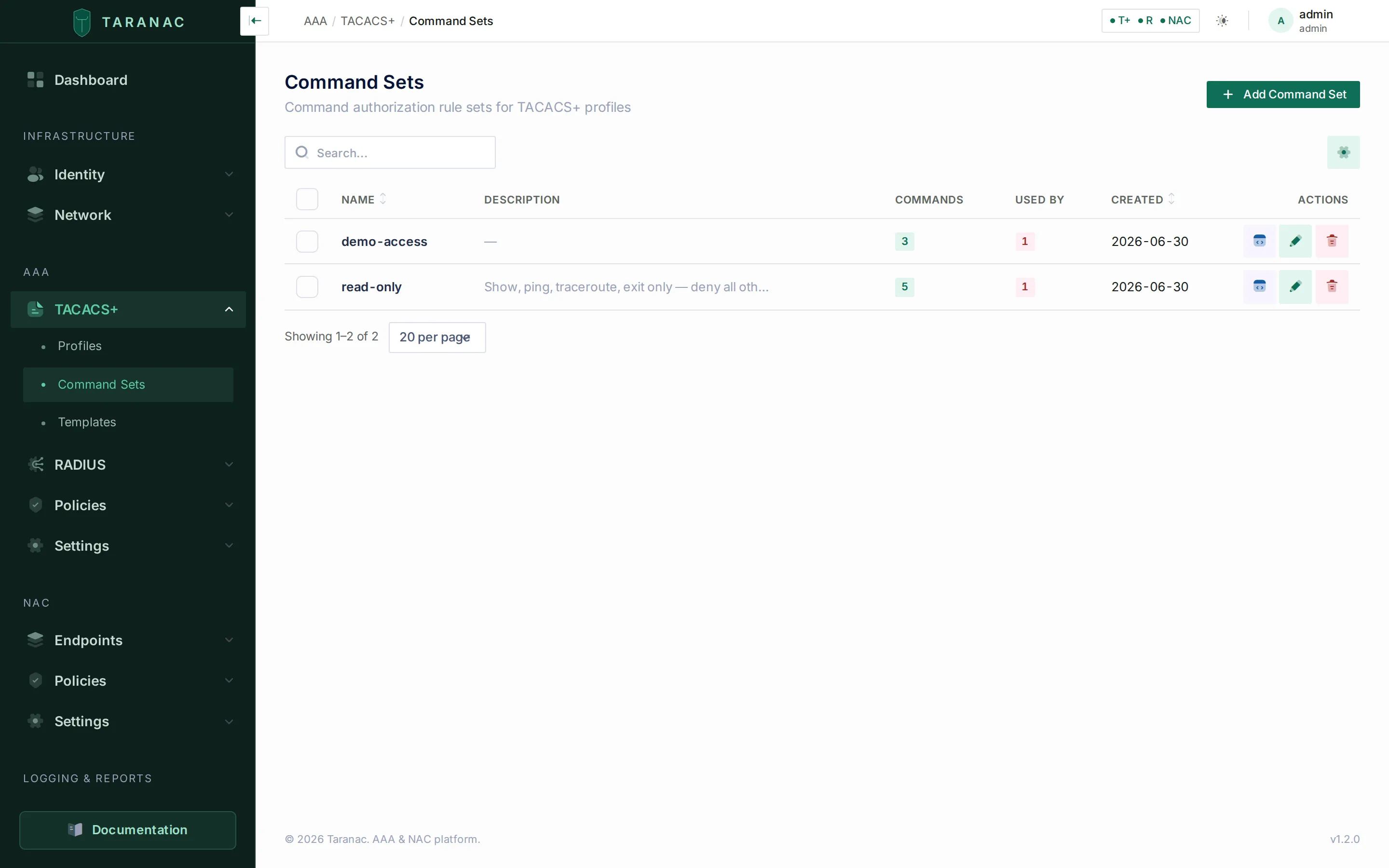 Command sets: ordered permit/deny rules with optional per-argument patterns.
Each command row supports:
- a command to match (e.g.
show,configure), - a permit/deny toggle,
- optional permit/deny messages returned to the device,
- an args list, each entry an action plus a match pattern (regex or exact string, per the template’s match style).
The command is one or more CLI words matched literally, not a pattern: letters, digits,
_ . : -, with single spaces between words (show, configure terminal). An args
pattern is a regular expression on one line, and it must compile; both are checked when you
save, so a value that would not do what it looks like is refused at the field.
Taranac seeds one starter command set — read-only (show, ping, traceroute and
exit permitted) — which you can use as-is or clone.
3. Profiles
Section titled “3. Profiles”A profile binds it all together: it references a template, supplies the attribute values
(for the shell service this includes priv-lvl), optionally attaches a command set with
its default command action, and configures the enable mode and timeouts.
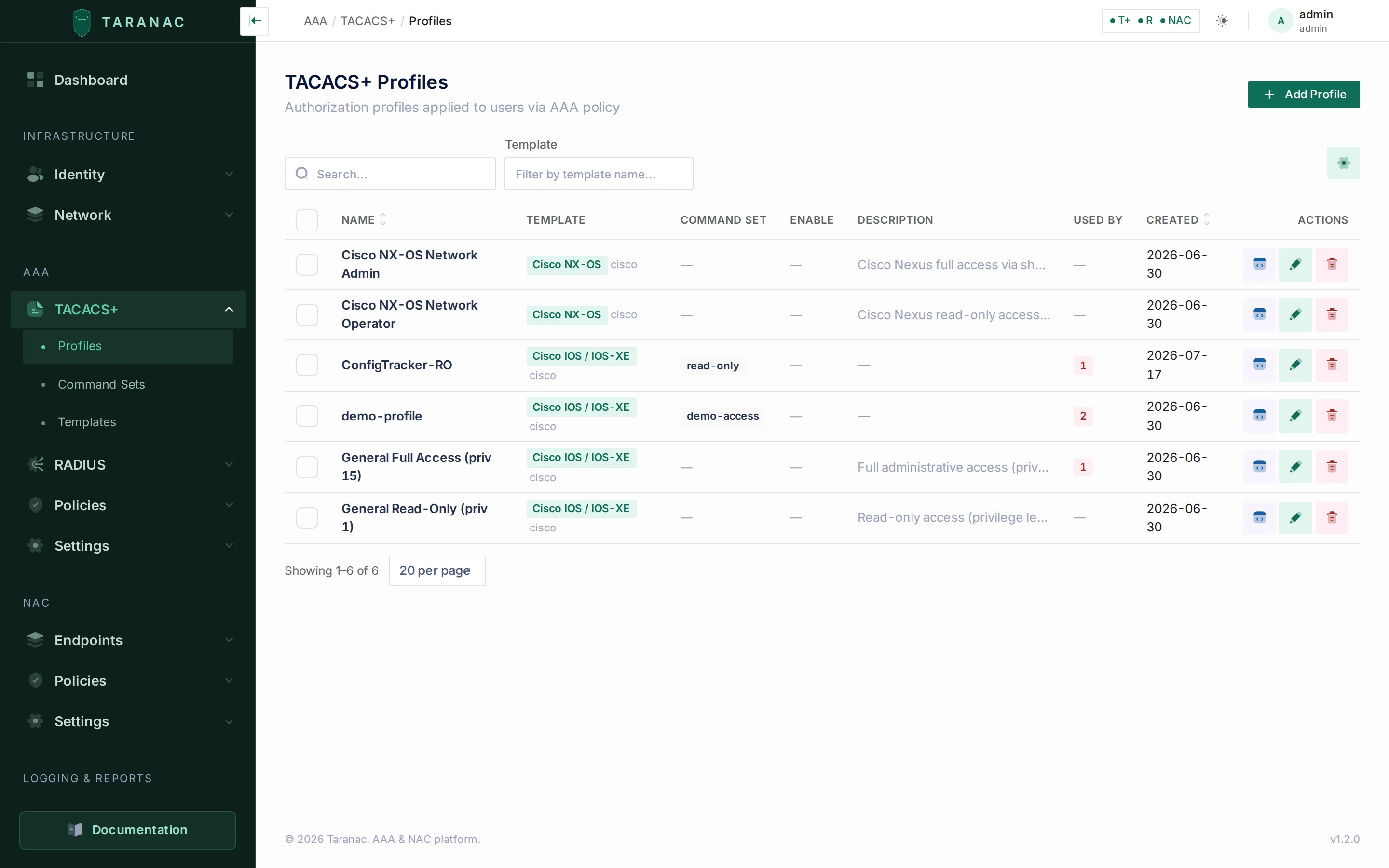 Profiles: each entry references a template and carries the values applied on a policy match.
Key profile fields:
- Template — selects the form/attribute schema.
- Service attributes — values per service (e.g.
priv-lvlonshell), and per protocol phase where the template declares phases — each phase is labelled with its protocol, and the block with none as every protocol. The input type follows the attribute’s data type (text, number, enum select, or toggle); an empty optional field shows Empty — attribute not sent. - Command Set — shown only when the template supports command authorization, together
with the Default Command Action (
permitordeny) applied to commands the set does not match. A new profile starts atpermit, so it works the moment it is attached and you narrow it afterwards. - Enable Password —
inherit,login_password, orcustom(custom stores an encrypted secret, revealed on demand by an authorized operator). - Session timeout, idle timeout — optional.
- Raw AV-pairs — a freeform escape hatch for vendor-specific attributes the template does not model. A raw pair naming a service the template already defines is merged into that service’s block (and overrides a templated attribute of the same name) rather than getting a block of its own.
Taranac seeds four ready-to-use profiles, including General Full Access (priv 15) and General Read-Only (priv 1). These are seeded once; your edits and deletes survive a container rebuild.
Profile MOTD
Section titled “Profile MOTD”A profile can carry its own MOTD Banner. For a login matched by a policy rule that
assigns the profile, it replaces the MOTD the device would otherwise resolve (device →
oldest device group → global, see Login banners); it is
never appended to it. Left empty, the login keeps the inherited MOTD. Rules in deny or
auth_only mode assign no profile and so no MOTD.
The MOTD rides in the reply that grants an ASCII login, so only that kind of login shows
it — PAP and enable replies carry none. Whether the device prints it is the device’s
choice: Cisco IOS does, Arista EOS replaces it with its own “Last login” line. Keep it
ASCII: Cisco IOS strips the eighth bit, so an em-dash or an umlaut arrives as garbage. Up
to 4096 characters, multi-line, and ${ is refused, as in the device banners.
The Welcome Banner has no profile field: it is sent with the first prompt, before any policy has been evaluated, so it cannot vary per user. For text shown only to the people a particular rule admits, there is also the rule’s Terminal Message.
4. Bind profiles in the AAA policy table
Section titled “4. Bind profiles in the AAA policy table”Profiles do nothing until a policy rule references one. In the policy table, add a rule, set its WHO/WHERE/SOURCE/WHEN conditions, set the TACACS+ action to profile, and pick the profile. Rules are first-match-wins, so order them from most specific to most general; the default deny stays last.
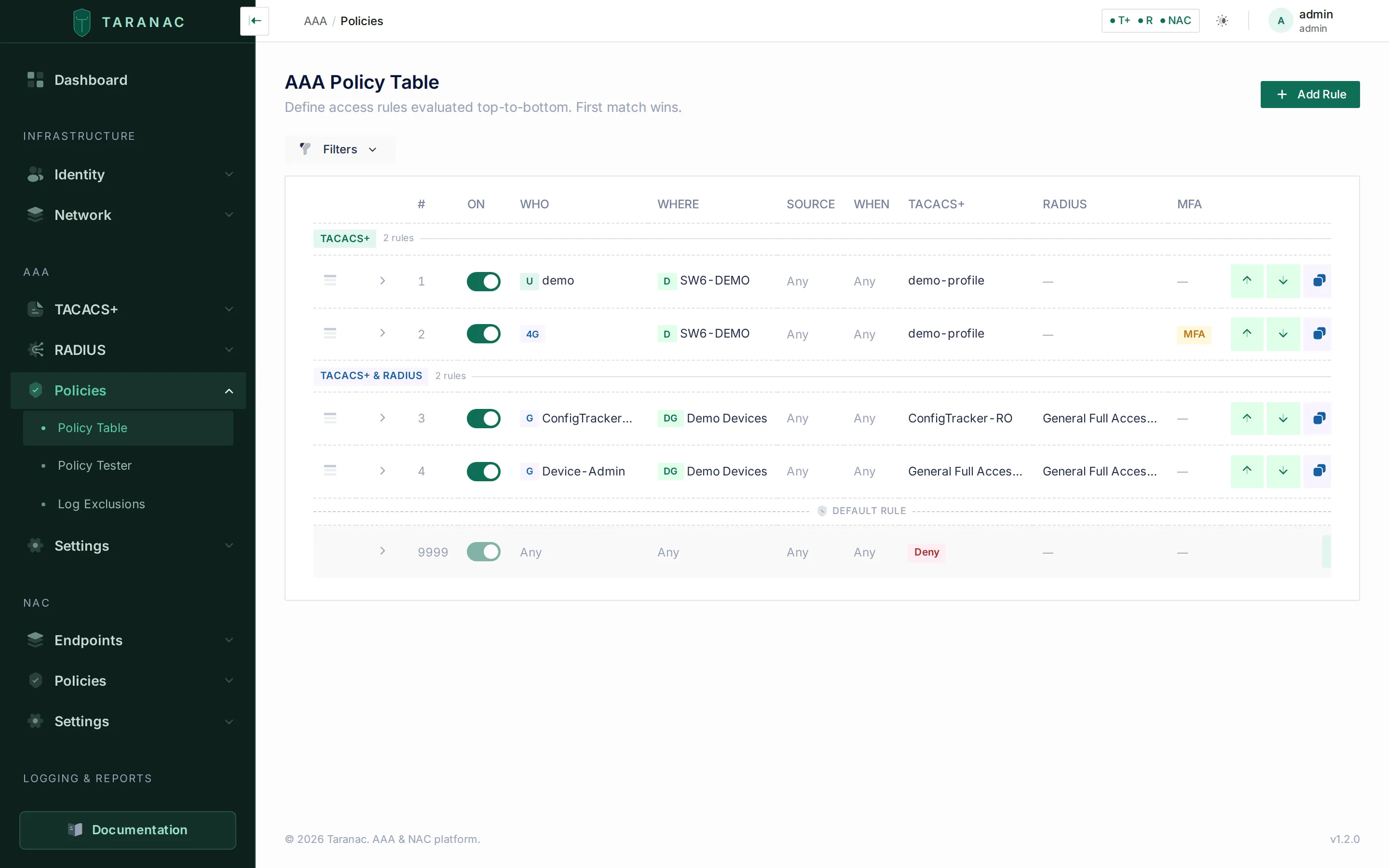 The AAA policy table: first-match-wins rules mapping WHO/WHERE/SOURCE/WHEN to a TACACS+ (or RADIUS) action.
Terminal Message
Section titled “Terminal Message”A rule whose TACACS+ action is profile offers a Terminal Message: text shown once, right after login. It rides in the reply that authorizes the shell, and the generated configuration attaches it to that exchange only — so a device that authorizes every command does not repeat it before each command’s output. Whether it is displayed at all is the device’s decision; Cisco IOS prints it. One property belongs to the device too: the text is printed into the output of the request that carried it.
The other two modes carry a fixed text instead of an editable one, because an editable text there would promise something the protocol cannot deliver:
| Mode | What the operator sees | Why it is fixed |
|---|---|---|
| deny | The device’s own wrong-password text (on Cisco IOS, Password incorrect.) | The daemon answers a policy denial exactly like a wrong password, so a denial cannot be told apart from a typo — and cannot be used to find out which accounts exist. No per-rule text has a packet to ride in. The configuration still carries Access denied by policy (Access denied by default policy on the default rule) for devices that do show it on a refused command. |
| auth_only | No authorization profile is set for this connection | It arrives on the refusal of the shell authorization, just before the device drops the session. A greeting written there would be read as a farewell; the fixed text states the one diagnostic fact. |
The Terminal Message is not a banner: for text shown before credentials, or a message of the day for every rule, use the login banners.
A % in a Terminal Message, a banner, an MOTD or a prompt is shown as typed.
A rule takes effect on TACACS+ once its configuration is applied, and not before. Until then the daemon goes on answering with the rules it was last given; a change in rule order cannot hand one rule’s profile to another rule’s users. Applying a configuration reloads the daemon without closing its listening ports, so no connection is refused or reset while it applies.
Before rolling a change out, simulate it with the policy tester: supply a username, a device IP (the address the device sends from), the protocol, the source and a time, and Taranac shows which rule matches and which profile (and command set) would apply. This catches ordering mistakes without touching a live device.
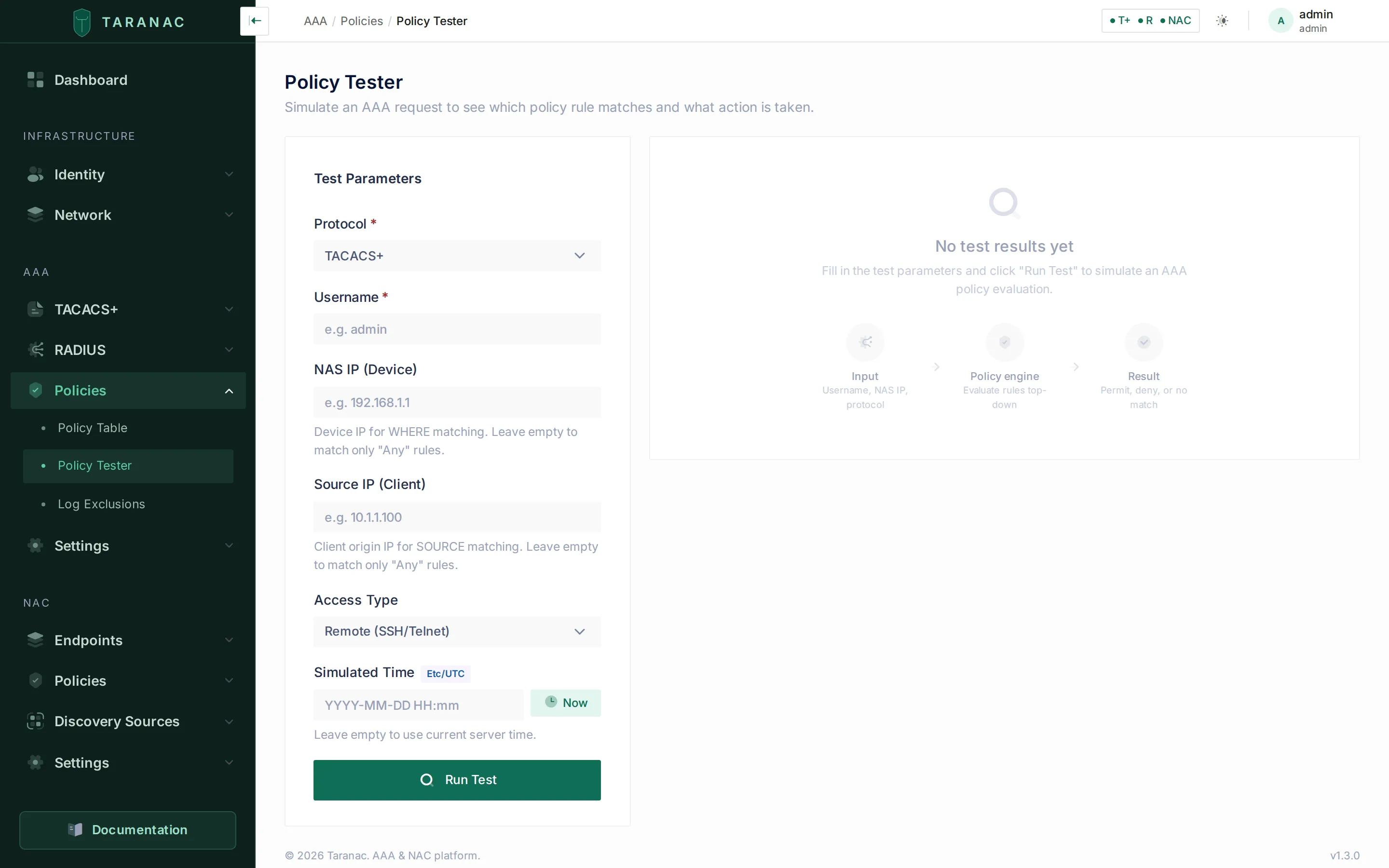 Policy tester: simulate a request and confirm which rule and profile would win.
Password prompts and MFA
Section titled “Password prompts and MFA”On an interactive (ASCII) login the daemon asks for the password with a prompt you can set
under AAA → Settings → TACACS+. Both prompts are sent only while MFA Mode is
enabled; with MFA disabled the daemon uses its built-in Password: .
| Setting | Default | Shown to |
|---|---|---|
Default password prompt (tacacs.mfa_prompt) | Password: | Every interactive login that the MFA password prompt does not cover. |
MFA password prompt (tacacs.mfa_password_prompt) | Password+MFA: | A login whose matching policy rule requires MFA (and is not a deny rule), so the operator knows to add the code. Empty turns it off, and those logins get the default prompt. |
The MFA password prompt follows the same policy evaluation that enforces MFA when the password arrives. It does not depend on the user’s MFA provider, so a push user sees it too — word it to suit both. A name that does not exist is evaluated as a user without groups, so an unknown name and a known user without groups see the same prompt. A PAP login carries the password in its first packet and sees no prompt, and an enable request is not given the MFA password prompt. The trailing space in both defaults is part of the prompt.
Push MFA over TACACS+
Section titled “Push MFA over TACACS+”When a rule requires MFA and the user’s provider sends a push, the login waits for the answer inside the TACACS+ request:
- At most 50 seconds. The device’s connection is closed about a minute after it opens,
so Taranac stops waiting after 50 seconds (less when the push challenge lifetime,
mfa.internal.challenge_ttl, is shorter) and cancels the push. An approval tapped after that is recorded as expired, never as a login. The device’s own TACACS+ timeout limits the wait too, and the shorter of the two decides: the vendor pages set 30 seconds, and a value up to 50 gives the user more time. Beyond 50 seconds the device gains nothing. - Denied or unanswered is a failed login, and counts toward the TACACS+ brute-force protection like a wrong password.
- A push that failed for a reason outside the person — the MFA service could not be reached, the challenge could not be created, or the same user started a newer login that replaced it — is also answered as a failed login, not as a server error. The device does not move on to its next server or to its local accounts, so MFA cannot be bypassed that way. These failures do not count toward brute-force protection.
The MFA methods and providers themselves are described under MFA.
Ports and TLS
Section titled “Ports and TLS”The TACACS+ service listens on TCP 49 (TACACS_PORT) and, for TACACS+ over TLS, on TCP
6049 (TACACS_TLS_PORT), each on IPv4 and IPv6. The TLS listener, its server certificate,
the CAs it trusts for client certificates and their revocation are covered on
TACACS+ over TLS.
Who may connect
Section titled “Who may connect”TACACS+ answers only devices in the inventory: a connection from an address that no enabled device with TACACS+ covers is refused, whatever key or certificate it uses, and raises the Unknown TACACS+ device alert. The global key (AAA → Settings → TACACS+ → Global Shared Secret) is the fallback key of inventoried devices that have no key of their own or from a group; a device with no key at any level logs in over TLS only.
Every connection the daemon refuses before a login can be tried — a key mismatch, an address outside the inventory, a failed TLS handshake — is a row on Authentication Log → TACACS+ with its reason, folded to one row per minute per address and reason. See Refused TACACS+ connections.
Common scenarios
Section titled “Common scenarios”Read-only NOC operator. Create (or reuse) a read-only command set that permits show
and a few diagnostics. Put it on a profile with priv-lvl 1, enable mode deny, and the
default command action set to deny so everything the set does not permit is refused.
Add a policy rule: WHO = the NOC group, action = profile.
Full network admin with enable. Use the seeded General Full Access (priv 15)
profile, or one like it, with no command set (or a permissive one) and enable mode
login_password (re-uses login credentials) or inherit (defers to the group/global
setting). Policy rule: WHO = the network-admins group.
Restrict configure / show running-config. In a command set, add explicit deny
rows for configure and for show with an args pattern matching running-config, placed
above the broader permits. Because matching is first-match-wins within the set, the denies
win for those commands while everything else stays permitted.
Per-device-group privilege. Build two profiles (e.g. full vs. read-only) and two policy rules with the same WHO but different WHERE (device groups), e.g. full access on lab devices and read-only on production. Order the more specific rule first.
Console fallback. Add a rule with SOURCE = console to apply a specific profile (or an explicit deny) when an admin connects on the physical console rather than over the network. Console is a TACACS+-only source dimension.
When to use what — decision guidance
Section titled “When to use what — decision guidance”Command sets vs. shell-profile attributes. Use priv-lvl (a profile attribute) for
coarse, device-enforced levels — it’s simplest and needs no per-command round-trips. Reach
for a command set when you need finer control than the privilege level gives you (allow
some commands but not others at the same level) and the platform supports command
authorization. Many roles use both: a privilege level plus a command set that trims it.
Templates vs. per-profile configuration. Templates define structure and are mostly a one-time, per-platform concern; profiles hold the values you tune. Don’t create templates to express role differences — that’s what profiles and command sets are for. Create or edit a template only when a vendor/platform or attribute the shipped templates don’t model.
Privilege level vs. command authorization.
Privilege level (priv-lvl) | Command authorization (command set) | |
|---|---|---|
| Granularity | Coarse (level only) | Per command (and per argument) |
| Enforced by | The device | Taranac, per command, at run time |
| Setup effort | Low | Higher (write/maintain rules) |
| Audit trail | Login-level | Per-command (accounting) |
| Best for | Broad role tiers | Fine-grained restrictions, regulated environments |
TACACS+ vs. RADIUS for device administration.
| Choose TACACS+ when… | Choose RADIUS when… |
|---|---|
| Admins open a shell on the device (SSH/Telnet/console). | The platform does its administration over RADIUS, not TACACS+. |
| You need per-command authorization and accounting. | Privilege via a returned attribute is enough; no per-command authz. |
| You want separate authn/authz/accounting. | You’re already standardized on RADIUS for that gear. |
The platform authorizes over TACACS+ — under shell, or under a vendor service such as Juniper junos-exec, FortiGate, Palo Alto or Calix Login. | The platform exposes no TACACS+ authorization service at all. |
Reference
Section titled “Reference”Profile fields exposed in the UI:
| Field | Notes |
|---|---|
| Name | Required, unique. |
| Description | Optional. |
| Template | Required; defines the available service attributes. |
| Service attributes | Per-service values (e.g. priv-lvl on shell), kept per protocol phase where the template declares phases; input type follows the attribute’s data type (string / integer / enum / boolean). An attribute the template marks required cannot be saved empty; clearing an optional one switches it off, rather than falling back to the template default. Rendered as set (Mandatory =) or add (Optional *). |
| Command Set | Optional; only when the template supports command authorization. |
| Default command action | permit or deny, applied to commands the attached set does not match. permit on a new profile. |
| Enable mode | inherit · login_password · custom (encrypted secret). |
| Session timeout | Optional, seconds. |
| Idle timeout | Optional, seconds. |
| MOTD Banner | Optional; replaces the inherited MOTD for logins the rule admits. Empty = inherit. ASCII login only. |
| Raw AV-pairs | Optional freeform vendor-specific attributes. A name may contain # (Cisco’s numbered families — inacl#1, interface-config#1) but may not start with one. A pair naming a service the template already defines is merged into that service’s block. |
Command-set fields:
| Field | Notes |
|---|---|
| Name | Required, unique. |
| Description | Optional. |
| Command rows | Ordered; each has a command (CLI words matched literally: letters, digits, _ . : -, single spaces), a permit/deny action, optional permit/deny messages. |
| Args | Per-command list of action + match pattern (regex / exact / prefix per the template’s match style). A one-line pattern that must compile. |
| Fall-through | A command no rule matches takes the attached profile’s default command action — not an implicit deny. |
Enable-chain modes (first non-inherit wins, evaluated User → Group → Profile → Global):
inherit, login_password, custom, deny, and permit (profile level only). The
global level defaults to login_password; its custom password is generated per
installation.
Policy-rule TACACS+ modes and the text each carries:
| Mode | Text sent |
|---|---|
profile | The rule’s Terminal Message, if set — once, at login. |
auth_only | Fixed: No authorization profile is set for this connection. |
deny | Fixed: Access denied by policy (default rule: Access denied by default policy); the operator normally sees the device’s wrong-password text. |
none | — (the rule does not act on TACACS+). |
Related
Section titled “Related”- AAA overview — what TACACS+ and RADIUS each cover.
- Network devices — devices, device groups, shared secrets and the inventory rule.
- Logging & accounting — authentication, authorization and accounting logs, refused connections included.
- AAA policy — the first-match rule table that binds profiles to users and devices.
- TACACS+ over TLS — the TLS listener, its certificate and client trust.
- RADIUS — RADIUS profiles and vendor-specific attributes.
- Taranac on GitHub — the deployment bundle and product documentation.