

Not identified
The shipped rules name what every Windows laptop and every iPhone says about itself. They cannot name the smart plug that calls itself CUPER PRO, the label printers in the warehouse or the access-control panel in the riser. Nobody outside your network has heard of those. You are the one who can walk over and read the label, and Taranac is built so that this knowledge ends up as a rule.
This page covers the two places where that work happens, both under NAC → Discovery Sources → Device Profiling:
- Not identified tab: the worklist of devices no rule explains, grouped so that one rule closes one row.
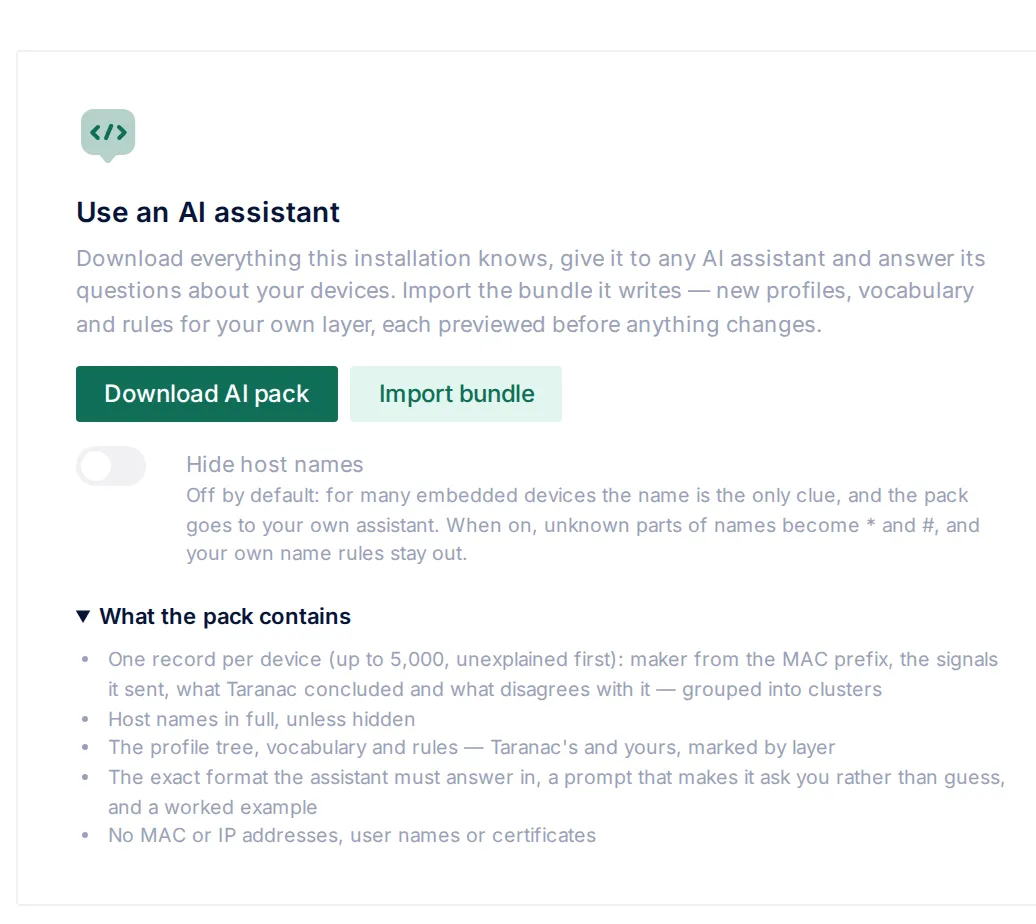
- Contribute tab, Use an AI assistant card: download everything the installation knows as one archive, work through it with an assistant of your choice, and import the bundle it writes after a preview.
The third route, sending what your installation sees to taranac.pro so that the next rule-set update covers it, is described in Rule-set updates.
Key concepts
Section titled “Key concepts”| Term | What it means |
|---|---|
| Group | Every device that one rule would close. For DHCP it is one client signature (the whole request: option list, vendor class and the structural options it sends). For the captive portal it is one browser string. Four hundred identical doorbells are one row, not four hundred. |
| Still missing | The dimensions the rules leave empty for the group. The worklist asks for OS family and Device type. A manufacturer is never owed, because the OUI registry names it without help, and an OS version only refines a family that has to be there first. |
| Already known | What the rules do conclude about the group. A half-answered group stays on the list. |
| What we can see | The clues behind the group, in the source’s own terms: host names, manufacturers, vendor class, request list and so on. |
| No rule needed | Accepting that a group stays unexplained. It writes nothing into the rule base and identifies nothing. The group moves to the Accepted view. |
| AI pack | One archive with your devices, the whole profile tree, vocabulary and rule set, the answer format and a prompt. It is downloaded by you and handed to an assistant by you. |
| Custom bundle | The JSON file the assistant writes back: profiles, terms and rules for your own layer. |
| Preview | What the bundle would do, item by item and device by device, before anything is written. |
The worklist
Section titled “The worklist”Open Device Profiling → Not identified. The list is titled Groups no rule explains. The two pills in its corner switch between Open and Accepted, and the number on each pill counts the whole list, not the page, because the list is a measure of outstanding work.
The list is computed when you open it, from the observations already stored and the rules in force. Nothing accumulates in the background, so a rule you save closes its group the moment it is saved, and there is nothing to reconcile. Groups are ordered by the number of devices behind them, largest first.
Two sources feed it today: the DHCP Probe (grouped by client signature) and the captive portal (grouped by browser string). Every row carries a Source badge, the kind of match that would close it (for example Client signature (exact)), and the value itself.
| Column | What it shows |
|---|---|
| Source | Where the group was observed, the match type and the value that identifies the group. |
| Devices | How many devices carry this signature or string. Highlighted when more than one does. |
| Already known | The verdicts the rules already reach for the group, or nothing. |
| Still missing | OS family, Device type or both. |
| What we can see | The clues, readable ones first: Host names (a sample of the names the devices sent), Manufacturers, Vendor class, Host name, Full name, Request list, Manufacturer prefixes, Structural options, then anything else the source attached, such as Client identifier or Max message size. |
The clues are what you judge by. A signature hash says nothing to a person. “Tuya Smart, with a host called wlan0” is a thirty-second decision.
Explain this
Section titled “Explain this”Explain this opens the rule drawer pre-filled from the group, so the first action is deciding, not typing. The seed is chosen by which clue the group has:
| The group has | The drawer proposes |
|---|---|
| A host name | Device type from a host-name pattern: the first part of the name and a * (roborock-wdv-a260 → roborock*), confidence 80. A name usually says what a device is, not what it runs. |
| A vendor class, and no host name | OS family from a vendor-class pattern (the first word and a *), confidence 85. |
| Neither | OS family from the request list’s prefix, confidence 60. |
If the proposed dimension is not among the missing ones, the drawer picks one that is. You still choose the value, and the preview must run before Save is enabled. See Profiling rules for the form, the signals and the preview.
No rule needed
Section titled “No rule needed”Some groups will never be explained. A doorbell that sends four DHCP options and no vendor class has said everything it is ever going to say. Writing a rule just to clear it off the list would be wrong: that rule would go on answering questions about other devices.
Click No rule needed on the row. The dialog Accept that this stays unexplained asks for an optional reason (Why, up to 500 characters), for example four options and no vendor class, nothing here will ever identify it. Confirming it:
- adds nothing to the rule base and identifies no device;
- is recorded per dimension, for the dimensions that are open at that moment. If a group already has an OS family and lacks a device type, you accept the device type only. A dimension a rule could still answer is never hidden by accepting the other one;
- stores how many times the group had been seen when you decided;
- is written to the audit log.
The group moves to the Accepted view (Groups taken off the list). It stays visible there because a decision nobody can see is a decision nobody can revisit, and the observations keep accumulating under it. The columns are Source, Devices, Accepted as unknown (the dimensions you accepted), What we can see and Decided (the date and your reason). The Devices badge turns amber when the group has been seen more often since you decided; its tooltip says Seen N times now, M when this was decided. A group dismissed at two sightings and now carried by forty devices deserves a second look.
Put back reopens the group, all accepted dimensions at once, and is audited too. If the observations behind an accepted group are trimmed by retention, the group disappears from the view, but the decision stays and applies again when the same signature returns.
Accepting and putting back need the edit right on endpoints (nac_endpoints).
The AI assistant
Section titled “The AI assistant”The worklist is one group at a time. When there are dozens of groups, an assistant can do the reading for you: it goes through every unexplained device, asks you what it cannot tell from the evidence, and writes the rules, nodes and words in the format Taranac imports. You choose the assistant, and you carry the files. There is no API key in Taranac and no connection from the appliance to any AI service.
- devices.json records + clusters
- knowledge.json tree, words, rules
- schema.json answer format
- PROMPT.md · EXAMPLES.md
c1: 6 devices, OUI Zebra, port 9100 open, names ZBR-… What are these?
ZD421 label printers. ZBR- is our prefix for them.
ZBR-* → Label printerThe card is on the Contribute tab under Two ways to explain the rest, beside Work through it yourself (which opens the worklist).
What the pack contains
Section titled “What the pack contains”Download AI pack produces taranac-ai-pack-YYYYMMDD.zip:
| File | Contents |
|---|---|
devices.json | One record per device, up to 5,000. Unexplained and disputed devices come first, so a cut costs the assistant only devices already understood; the file says how many were left out. The devices are also grouped into clusters that share a manufacturer, DHCP request list and vendor class, with the signals every member shares, sample names and the profiles they currently stand on. |
knowledge.json | The whole profile tree, the vocabulary and every rule, both layers, each item marked as shipped or yours. It also lists every value the rules can conclude and the nodes that take it, so the assistant reuses Printer instead of inventing Network printer next to it. |
schema.json | The exact format of the bundle to return, generated from the same limits the importer checks. |
PROMPT.md | The instructions for the assistant. |
EXAMPLES.md, custom.example.json | A worked conversation and the bundle it ends in. |
README.md | How to use the pack, in short. |
The prompt makes the assistant an interviewer, not an oracle. It is told never to state what a device is from memory, because published fingerprint lists copy each other and some widely repeated entries have been wrong for years. A clue in the files (a manufacturer from the OUI, a vendor class that names a model, a directory record) counts as evidence, and the assistant names the clue it relies on. Anything else is asked as a question and waits for your answer. Every rule it writes carries a note saying what you confirmed or which clue it rests on. “Nothing here identifies these devices” is an acceptable outcome.
What leaves the appliance in the pack
Section titled “What leaves the appliance in the pack”The pack goes to a tool you chose, so it carries more than a contribution to taranac.pro does, but it is still built from a white list. Before handing it to a third-party service, check it against your own policy.
| Included | Not included |
|---|---|
| The manufacturer prefix of the MAC (OUI) and the registered manufacturer name; whether the MAC is randomised | MAC addresses. Each device is identified by an opaque key, a keyed hash of its MAC whose key never leaves the installation |
| First and last seen dates (the day, not the time) and the last authentication method | IP addresses |
The signals the rules read: DHCP options, vendor class and names; browser strings and Client Hints; open ports and nmap service lines; nmap’s OS guess; UPnP, mDNS and LLDP/CDP announcements; the OS a directory records; the NetBIOS workgroup; an SNMP sysObjectID | User names, certificate subjects, directory object names |
| What Taranac concluded for each dimension, the rules that carried it, and what disagrees with it | SSH greetings and web-server banners (only port-numbered service lines are included) |
| The profile a device stands on, including the names of your own nodes | |
| Your own rules, nodes and words, with their notes (a rule’s note is cut at 300 characters) |
Host names travel in full by default, because for many embedded devices the name is the only clue there is. Switch on Hide host names before downloading to change that:
- every part of a host name or mDNS name that Taranac does not already know is replaced:
*for letters,#for digits (DESKTOP-4F7K2L→DESKTOP-*). Words the product already knows are kept, and so is the device’s own manufacturer name; - a full name loses its domain and keeps only its shaped host part;
- the NetBIOS workgroup is left out;
- your own rules over names are left out of
knowledge.json, since their patterns are your naming scheme.
Downloading the pack needs the view right on endpoints and is recorded in the audit log (whether names were full or hidden, how many devices, whether the list was cut).
Working with the assistant
Section titled “Working with the assistant”- Open any AI assistant you are allowed to use.
- Paste the text of
PROMPT.mdbelow its line, and attachdevices.json,knowledge.json,schema.jsonandEXAMPLES.md. The prompt tells the assistant to stop if the data files are missing. - Answer its questions. It starts with the largest unexplained cluster and asks what the devices are, and whether all devices of one pattern are the same model.
- Save the JSON it produces as a file.
The pack is a snapshot. Download a fresh one when new devices have appeared.
Importing the bundle
Section titled “Importing the bundle”Click Import bundle and choose the file. Taranac reads it and shows What this bundle would do. Nothing is written yet.
Some faults reject the whole file, because it is the wrong file rather than a fixable one: it is not JSON, it has the wrong format or a newer version than this build reads, or a section holds more than 500 items. Everything else is judged per item, so one typo costs one item, not the bundle.
The preview is grouped into Profiles, Vocabulary and Rules, with counts at the top (to add, to update, unchanged, rejected). Each item is marked:
| Action | Meaning |
|---|---|
| Add | A new item for your layer. |
| Update | An item of yours with the same key (for a rule, the same dimension, signal and pattern) whose fields differ. The changed fields are listed. |
| Unchanged | Already present exactly like this. Importing the same bundle twice changes nothing. |
| Rejected | Refused, with the reason in a sentence written to be pasted back to the assistant. |
Each rule also shows what it would do to the devices this installation knows: how many it would newly identify, how many verdicts it would contradict, how many it would make more precise and how many it only confirms. A rule that says iOS where the verdict was Apple is counted as more precise, not as a contradiction, because the Dictionary knows iOS is a kind of Apple answer. On a large estate these counts are taken over a sample of the observed devices; the device moves described below always cover every endpoint. The number to watch is contradicted: forty new identifications is the feature working, thirty overturned verdicts is somebody about to relabel the printers. A confidence above 90 is lowered to 90, the ceiling for an imported rule, and the row says so.
Copy rejections for the AI puts every refusal on the clipboard, each with its section, position and code, under a header asking the assistant to fix exactly those items and output the whole bundle again. Items that were accepted but look like mistakes (for example a node no device can ever reach, or a node its parent would never let a device through to) travel in the same text as warnings. Paste it into the conversation, save the corrected bundle and import it again.
Devices that change profile
Section titled “Devices that change profile”Below the items, Devices that change profile shows where devices would end up. Every endpoint is placed twice, once under the knowledge in force and once with the bundle staged, and the two placements are compared. Nothing is written by this: no profile, no history entry, no group change.
- The summary says how many devices change profile out of how many were checked.
- Arriving lists each node that would gain devices, with
+Nand where they come from. - Leaving lists each node that would lose devices, with
−Nand where they go. - Devices that would lose their profile, named today and back at the root after the bundle, are listed first, in red.
- Up to 50 device names are listed per node; the counts are always complete.
This catches what rule counts cannot: a Linux server moving from Linux to the bundle’s new Server node changes no verdict at all, only a placement.
Applying
Section titled “Applying”You cannot tick individual items. Apply N changes applies every item marked Add or Update, and nothing else. To leave an item out, ask the assistant to remove it and import the corrected bundle, or click Discard. If every item is unchanged or rejected, the preview says Nothing to apply.
The preview is the apply rolled back: the same code stages the bundle through the same services and then undoes it. So the apply cannot do anything the preview did not show, unless the data changed in between.
What an apply can and cannot do:
- It writes only to your layer. A key of a shipped node is refused, and nothing Taranac ships can be changed by a bundle.
- It only adds and updates. Your own items that the bundle does not mention are left exactly as they are.
- Imported rules are marked as coming from an AI bundle and are enabled.
- The whole estate is queued for re-profiling, and the import is recorded in the audit log with a count per section and action.
Applying needs the create right on endpoints; previewing needs view.
Worked scenario: six label printers
Section titled “Worked scenario: six label printers”The row. The worklist shows a DHCP group with 6 devices. Already known: nothing. Still missing: OS family, Device type. What we can see: Host names ZBR-0412, ZBR-0413, ZBR-0419…, Manufacturers Zebra Technologies Inc., Request list 1,3,6,12,15,28,42.
By hand. Explain this would propose Device type from the host-name pattern ZBR*. Type Label printer, run the preview, save. That is enough for one group.
With the assistant. Twenty more groups like it are waiting, so you download the pack instead. The assistant opens with cluster c1: 6 devices, OUI Zebra Technologies, ports 80 and 9100 open, names ZBR-… What are these? Are all ZBR- hosts the same model? You answer: Zebra ZD421 label printers; ZBR- is our prefix for exactly those. It looks in knowledge.json, finds no printer node and no printer term, and writes a bundle with two profiles (printer under the root and label-printer under it), one term (Label printer, device type) and one rule (host name ZBR-* → device type Label printer, with a note saying you confirmed it).
The preview. Four items marked Add. The rule: 6 newly identified, 0 contradicted. Devices that change profile: Printer › Label printer +6, arriving from Any device. No device loses its profile. You click Apply 4 changes.
Afterwards. The group is back on the worklist with Already known Label printer and Still missing OS family only. Zebra printers run the vendor’s own firmware and nobody filters them by OS, so you click No rule needed with the reason printer firmware, no OS to name. The group moves to Accepted with Accepted as unknown: OS family. If a firmware string ever makes the OS answerable, Put back returns it to the list.
When to use what
Section titled “When to use what”| Situation | Use |
|---|---|
| A handful of groups, each with a telling clue | Explain this on the worklist. |
| Dozens of groups, or clusters you need to reason across | The AI assistant route. |
| A group that carries nothing a rule could key on | No rule needed. |
| Devices a directory or certificate already names | What this installation can already answer on the Contribute tab, when it appears: those rules only need confirming. |
| Device types that should be recognised everywhere, not only here | The exchange with taranac.pro. |
Reference
Section titled “Reference”| Action | Where | Right needed | Audited |
|---|---|---|---|
| View the worklist | Not identified | endpoints · view | — |
| No rule needed / Put back | Not identified | endpoints · edit | yes |
| Download AI pack | Contribute → Use an AI assistant | endpoints · view | yes |
| Preview a bundle | Contribute → Import bundle | endpoints · view | — |
| Apply a bundle | Contribute → Import bundle | endpoints · create | yes |
| Limit | Value |
|---|---|
| Devices in one pack | 5,000 (unexplained and disputed first) |
| Items per bundle section | 500 profiles, 500 terms, 500 rules |
| Confidence of an imported rule | at most 90 |
| Device names listed per node in the preview | 50 |
| Reason on an accepted group | 500 characters |
Related
Section titled “Related”- Device profiling: the tree, verdicts and confidence.
- Profiling rules: writing a rule, signals, the mandatory preview.
- Rule-set updates: the exchange with taranac.pro and rule-set files.
- Audit log: where downloads, imports and acceptances are recorded.