

DHCP Probe
Nearly every device on your network asks for an address, and the request describes the device that sent it. A Windows laptop names itself and says MSFT 5.0, an iPhone asks for a particular set of options in a particular order, and a smart plug often sends a host name that includes its brand. The DHCP Probe records what devices send. It lets you learn about a device before it authenticates, and about devices that never authenticate at all.
The probe is a passive listener on the DHCP server port (UDP 67). It has no reply path and never sends a byte. It is found under NAC → Discovery Sources → DHCP Probe.
no reply path · sends nothing
- Announced name
- LAPTOP-7F2K
- Vendor class
- MSFT 5.0
- Request list
- 1,3,6,15,31,33,43,44,46,47,119,121,249,252
- Switch port
- Gi1/0/14 option 82
evidence for profiling · creates no endpoint
Key concepts
Section titled “Key concepts”| Term | What it means |
|---|---|
| Relayed | A copy that a relay agent (the VLAN’s gateway, configured with ip helper-address or its equivalent) sent to Taranac as unicast. It carries the relay’s address (giaddr) and, where the relay adds it, option 82. This is the normal production case. |
| Broadcast | The client’s own broadcast, heard by a listening point that sits in the same segment. No relay is needed, but the listening point has to be on that wire. |
| Served | A lease that a standalone captive portal granted from its own DHCP server and reported. Unlike the other two, it includes the address that was actually handed out. |
| Listening point | A place where the probe runs: a cluster node, a site collector, or a standalone captive portal. Each point reports its own state. |
| Client signature | The request as a whole: the option list, the vendor class and the structural options the client sends. It identifies a DHCP client implementation, not a device. Many IoT products from unrelated vendors share one embedded network stack, and so they share one signature. |
| Relay allow-list | The relays whose copies are accepted. It is empty by default, which means any relay is accepted. |
Why it costs your DHCP server nothing
Section titled “Why it costs your DHCP server nothing”A relay agent does not choose between helper addresses. It sends its own copy of each client message to every helper address configured on the interface. Adding Taranac as a second helper therefore does not take anything away from the real server. The server gets the same copy it always got and answers as before. Taranac gets a separate copy and never answers, because the listener has no code that sends.
As a result, the probe cannot hand out a wrong address, cannot delay a lease and cannot act as a rogue server. If Taranac is down, the relay’s copy to it is simply lost, and clients do not notice.
What the probe can see is set by DHCP itself:
DISCOVER,REQUESTandINFORMgo through the relay, so the probe receives them.OFFERandACKare addressed to the relay, and the probe never receives them. A listening point therefore sees what a device asked for, not what it got. The one exception is a portal that is itself the DHCP server.- A renewal at T1 is unicast straight to the server and bypasses the relay. A relayed probe sees a device roughly once per lease, not continuously. Last seen in the device list is the last time the device asked for an address. It does not show whether the device is still on the network.
What it records
Section titled “What it records”| Field | From | Used for |
|---|---|---|
| Host name | Option 12 | Offered to the endpoint’s host name (see below). Often the only identifying signal an IoT device sends. |
| Full name | Option 81 (client FQDN) | Preferred over the host name when present. A domain suffix here means the machine is domain-joined. |
| Vendor class | Option 60 | Profiling: MSFT 5.0, android-dhcp-14, udhcp 1.36.1 and so on. |
| Parameter request list | Option 55, in the order sent | Profiling. The order is part of the signal. |
| Client signature | The request as a whole | Grouping in the Not identified worklist; profiling. |
| Requested address | Option 50 | Shown on the card. It is what the client asked for, and is never written as the endpoint’s address. |
| Server it accepted | Option 54 | Shown on the card. If this is not your DHCP server, a rogue server answered the client. |
| Relayed by | giaddr | Shown on the card; checked against the relay allow-list. |
| Switch port | Option 82, circuit ID | Shown on the card as the relay or switch sent it: as text where the bytes are printable, otherwise as hex. The remote ID is stored as well. |
| Address granted | Portal leases only | Offered to the endpoint’s IP address. |
The manufacturer is not stored with the message. It is looked up from the MAC prefix in the OUI database when the data is displayed, so it follows the weekly OUI refresh. For a randomised MAC (a locally administered address), no manufacturer can be read, and the host name may be all the device offers.
Before anything is stored
Section titled “Before anything is stored”Every packet that reaches the probe was chosen by whoever sent it, so worthless traffic is dropped in memory before it costs a database write:
- Duplicates collapse. A frame is often delivered twice, for example once in each direction on a trunk. The same message from the same MAC within 10 seconds is kept once. A broadcast and its relayed copy are both kept and then merged, because only the relayed copy carries the relay and option 82.
- One device may not flood. At most 3 messages per MAC are accepted in a 10-second window. A normal acquisition is a
DISCOVERand aREQUEST. - The buffer is bounded at 5,000 messages between flushes, which happen every 5 seconds.
- A copy from a relay outside the allow-list is refused. The allow-list is applied only to relayed copies. A client’s own broadcast comes from
0.0.0.0and has no source address worth checking, so narrowing the allow-list never switches off broadcast listening.
Nothing is dropped silently. The Dropped column of each listening point counts duplicates, messages over the per-device cap, messages dropped while the buffer was full, and copies from relays that are not allowed.
Evidence, not a record
Section titled “Evidence, not a record”The sender of a DHCP packet chooses its own MAC address, host name and vendor class. The probe is built on that assumption:
- It creates no endpoints. A message from a MAC that NAC does not know is stored unattached, as material for the worklist and for rule-writing. If an endpoint with that MAC appears later, the stored messages are attached to it then. Nobody can fill your endpoint table by sending crafted packets.
- It writes only where nobody better-trusted has written. From DHCP evidence the probe may offer three fields to an endpoint: the host name (the full name if sent, otherwise the host name), the operating system, and, for portal leases only, the IP address. Each field has an owner. DHCP ranks below a person, the directory and a machine certificate for the host name, so a name set by any of them stands. See the trust table in Discovery & profiling. If a device announces a different name from the one on record, the endpoint card shows both side by side, without changing the record.
- A weak guess stays on the card. The operating system is written into the endpoint’s OS field only when the profiling verdict reaches the minimum confidence on the Device Profiling Settings tab.
- Every rename is audited. Every write any source makes to these fields is recorded in the audit log with the previous value and the source that held the field before. A write that was refused is not recorded, because a refusal happens on nearly every message.
- The card shows the typical value, not the latest. For each text field the card shows the value the device has reported most often, with a tie going to the newer one. A single malformed or spoofed packet cannot rename a device. Three fields do follow the newest message, because they describe how the device reached you rather than what it is: how the message arrived, the relay it came through, and the granted address.
When a field that a classification rule can read changes, the endpoint’s group membership is checked again straight away. A printer that never authenticates is still judged on the host name it announced. The device is also queued for profiling in the same transaction that stored the message, so its profile follows within seconds.
Where the probe can listen
Section titled “Where the probe can listen”A probe runs wherever there is a listening point, and several can run at once. A relay can name more than one of them as helpers. A device heard by several points is still one row in the device list, and its card names the point that heard it last (Seen at).
On the core
Section titled “On the core”Every cluster node runs a listener in its API container. It is on by default. Whether it listens, on which address and on which port is set per machine in the environment, not in the UI. A socket belongs to one machine, and a shared setting could not say “67 is free on this node and taken on that one”.
Variable (.env on the node) | Default | Meaning |
|---|---|---|
DHCP_PROBE_ENABLED | true | Whether this node listens at all. |
DHCP_PROBE_LISTEN_ADDRESS | empty (every interface) | The address to bind inside the container. A host address that does not exist in the container’s network namespace fails to bind, so leave it empty under Docker’s bridge networking. |
DHCP_PROBE_LISTEN_PORT | 67 | The port inside the container. A relay always sends to 67. |
After editing .env, recreate the API container: ./taranac up -d --force-recreate api.
If the port cannot be bound, for example because a dnsmasq or a captive-portal bundle on the same host already holds 67, the API still starts. The listener logs a warning, keeps retrying, and comes up on its own when the port is freed.
On a site collector
Section titled “On a site collector”A standalone collector already sits inside the site’s network, next to the relay, which is where the probe needs to be. It runs the same listener and reports over the enrolment it already has. There is no second token and nothing else to register.
-
Off by default. A collector that was deployed to collect configurations was not asked to open a socket on the DHCP port, so it does not. To switch the probe on, add the following line to
collector.envin the collector’s directory:Terminal window COLLECTOR_DHCP_PROBE_ENABLED=trueThen recreate the container, because Compose does not notice a changed env file on its own:
Terminal window docker compose --env-file .env.collector -f docker-compose.collector.yml up -d --force-recreateCOLLECTOR_DHCP_PROBE_LISTEN_ADDRESS(default0.0.0.0) andCOLLECTOR_DHCP_PROBE_LISTEN_PORT(default67) exist for a host where 67 is taken. Moving the port makes the collector unreachable for relayed traffic. -
Host networking is what makes it reachable. The collector’s compose file uses the host’s network by default (
COLLECTOR_NETWORK_MODE=host), so it receives both a relay’s unicast copy to UDP 67 and a client’s broadcast in the collector’s own segment. WithCOLLECTOR_NETWORK_MODE=bridge, the collector keeps Docker’s network isolation, but the DHCP listening point cannot be reached. -
It holds on through an outage. Messages are buffered in memory while the core cannot be reached, up to 5,000; when the buffer is full, the oldest are dropped and counted. They are sent in batches of up to 500 once the link returns. A failed report backs off instead of retrying every cycle. Nothing is written to disk. A DHCP client renews and says the same things again, so the loss after a crash is at most one cycle.
-
The allow-list comes from the core. The collector has no database. The relay allow-list arrives in the answer to every report, so narrowing it on the Settings tab reaches the site within one cycle, about five seconds.
-
The collectors list says which sites listen. Settings → System → Collectors has a DHCP Probe column: Listening with the bound address, Not listening with the reason, or
—for a collector that has never reported on DHCP. The same appears on the collector’s own page.
On a standalone captive portal
Section titled “On a standalone captive portal”A standalone captive portal usually serves DHCP for its own registration segment, so it is the DHCP server there and not a listener. It reports every lease it grants, with the fingerprint of the request and the address actually handed out. A listening point can never learn that address. The portal’s own DHCP server (dnsmasq) writes each lease to a spool, and the portal posts the spool to the core with its portal token. A spooled lease is deleted only after the core accepts it, so a network interruption delays the report without losing it.
This needs no configuration beyond deploying the portal with its own DHCP server. Portal Instances shows whether a portal Reports its leases. On the endpoint card such evidence is marked from our own DHCP server, and the address is offered to the endpoint’s IP address field, where the most recent of this and RADIUS accounting wins. An embedded portal shares its host with the core, which already listens there, so it does not report separately.
Pointing a relay at Taranac
Section titled “Pointing a relay at Taranac”Add Taranac, meaning a node’s address or a collector’s, as an additional helper on the interface that is the gateway for the client VLAN. Keep your real DHCP server on the list. Order does not matter, because each helper gets its own copy.
In the examples below, 10.10.0.5 is your DHCP server and 10.10.0.20 is the Taranac listening point.
Cisco IOS / IOS XE
interface Vlan30 ip address 10.20.30.1 255.255.255.0 ip helper-address 10.10.0.5 ip helper-address 10.10.0.20!! optional: have the relay add option 82 (circuit ID / remote ID)ip dhcp relay information optionArista EOS
interface Vlan30 ip address 10.20.30.1/24 ip helper-address 10.10.0.5 ip helper-address 10.10.0.20!ip dhcp relay information optionHuawei VRP
dhcp enableinterface Vlanif30 ip address 10.20.30.1 255.255.255.0 dhcp select relay dhcp relay server-ip 10.10.0.5 dhcp relay server-ip 10.10.0.20MikroTik RouterOS
/ip dhcp-relay add name=relay-vlan30 interface=vlan30 \ dhcp-server=10.10.0.5,10.10.0.20 local-address=10.20.30.1 disabled=noWhat option 82 contains depends on the vendor and platform. Taranac shows it as it arrived and does not interpret it. On many access switches the circuit ID names the port or the VLAN (for example Vlan30 from an Arista relay). On others it is a binary encoding, which is shown as hex.
Firewall
Section titled “Firewall”- The listening point must accept UDP 67 from the relays, meaning the relay’s interface addresses as seen from the listening point. If a host firewall (ufw, nftables) runs on the collector or node, allow it there.
- Taranac sends nothing back, so no outbound rule is needed for the probe itself. A collector reports over its existing HTTPS channel to the core.
- If a firewall between the relay and Taranac only allows DHCP to the real server, add the listening point’s address as a destination.
The DHCP Probe page
Section titled “The DHCP Probe page”Four counters head the page: Messages (kept, after duplicates were collapsed), Devices seen (distinct MACs), Client signatures (distinct DHCP client implementations, not devices) and Randomised MACs (locally administered addresses, from which no manufacturer can be read).
Devices
Section titled “Devices”One row per device, not per packet:
| Column | What it shows |
|---|---|
| MAC | Marked randomised for a locally administered address and unknown when no NAC endpoint has this MAC yet. |
| Manufacturer | From the OUI database, or hidden by randomisation. |
| Host name | The name the device sends most often, with the full name (option 81) under it when present. |
| Identified as | What the profiling rules conclude from this device’s DHCP alone, or not identified. For embedded devices not identified is common and correct: the request list is shared across manufacturers, and only the host name or the manufacturer can settle it. |
| Client signal | The vendor class (or no vendor class sent) and the parameter request list. A MAC that produced more than one signature is marked, which usually means two DHCP clients on one machine. |
| Messages, Last seen | How many messages are kept, and when the device last asked for an address. |
Unknown devices only filters to the MACs no endpoint has. They are the raw material for new rules. The list refreshes itself every 30 seconds.
Clicking a row opens the device. What this looks like shows the rules that argued for each answer, so a wrong rule can be told apart from an unusual device. A rule you wrote yourself is marked yours. Messages lists every message kept from this MAC, each marked Relayed or Broadcast. Selecting one shows Options as received: every option, as text where the bytes are printable and as hex underneath. Everything here is read from the stored messages. Nothing is sent to the device.
The same evidence appears on the endpoint’s own page, in its Discovery card under DHCP: Announced name, Full name, Vendor class, Parameter request list, Requested address, Server it accepted, Address granted, Relayed by, Switch port, Seen at (the listening point and how the message arrived) and Messages.
Settings
Section titled “Settings”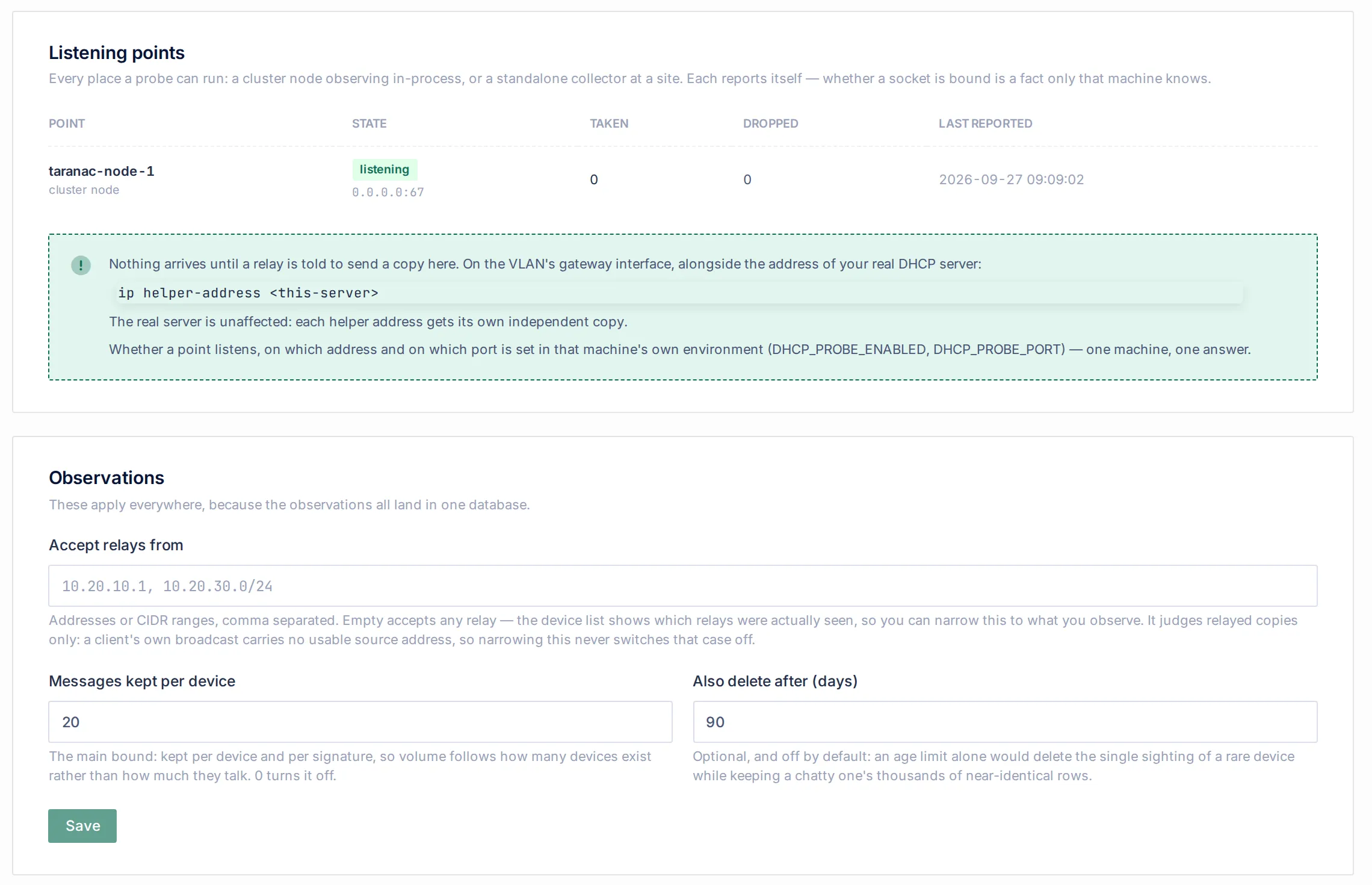
Listening points lists every point that has ever reported, freshest first: its name and kind (cluster node, standalone collector or Captive portal), its state (listening with the bound address, or not listening with the error), Taken, Dropped (hover for the breakdown) and Last reported. A point that stopped reporting stays in the list, showing the time it last reported, so it does not quietly disappear.
Observations holds the settings that apply everywhere, because every point’s messages land in the same database:
| Setting | Default | Meaning |
|---|---|---|
| Accept relays from | empty (any relay) | Addresses or CIDR ranges, comma separated. It applies to relayed copies only. A malformed entry is refused when you save. The change takes effect within one cycle on every node and collector. |
| Messages kept per device | 20 | The main retention limit: the newest N messages per device and per signature. Storage then grows with the number of devices you have, not with how often they talk. 0 turns this limit off. |
| Also delete after (days) | 90 | An age limit applied on top of the per-device limit. 0 turns it off. |
Retention runs hourly on the cluster leader. Only a device’s surplus messages are trimmed, so pruning does not lose the single sighting of a rare device. The per-device limit keeps its newest messages. The age limit is what eventually removes it.
Viewing the page needs the NAC Endpoints view permission, and saving settings needs the edit permission.
Common scenarios
Section titled “Common scenarios”Profile an office floor without touching the clients. Add Taranac as a second ip helper-address on the floor’s SVI. Within one lease cycle, every device that asks for an address appears in Devices, and its evidence feeds Device Profiling.
A branch with its own relay. Enable the probe on the branch’s collector and add the collector’s address as a helper on the branch router. The relay’s copy never leaves the site. The collector sends the core only the parsed messages, over its existing channel.
Guests on a standalone portal. Nothing to add: the portal reports the leases it grants, including the address, and the browser’s User-Agent at sign-in adds to the same device’s evidence.
Lock the allow-list down. Leave it empty on day one. Once relays are configured, check each device’s Relayed by value on its endpoint card, enter those addresses or their subnet in Accept relays from, and watch the refused count in Dropped for anything you missed.
Find a rogue DHCP server. On a device’s card, Server it accepted names the server the client chose. An address that is not your DHCP server means another server answered it.
When to use which listening point
Section titled “When to use which listening point”| Situation | Listening point |
|---|---|
| Clients in routed VLANs, and the core is reachable from the relays on UDP 67 | The core |
| A site with its own relay, or where the core cannot receive UDP 67 from the relays | That site’s collector, as a helper address |
| No relay: the switch serves DHCP itself, or the server is in the clients’ segment | A collector with an interface in that segment (broadcast) |
| A registration or guest segment served by a standalone portal | The portal itself: it reports what it grants |
| High availability | Every node listens. Name two nodes as helpers if you want the probe to survive losing one. |
Reference
Section titled “Reference”| Item | Value |
|---|---|
| Menu | NAC → Discovery Sources → DHCP Probe |
| Protocol / port | UDP 67, receive only |
| Messages read | DISCOVER, REQUEST, INFORM and other client messages (BOOTREQUEST). Server replies are ignored. |
| Duplicate window | 10 seconds |
| Per-device cap | 3 messages per 10 seconds |
| Buffer | 5,000 messages, flushed every 5 seconds |
| Collector buffer during an outage | 5,000 messages, oldest dropped first, reported in batches of 500 |
| Core environment | DHCP_PROBE_ENABLED (true), DHCP_PROBE_LISTEN_ADDRESS (all), DHCP_PROBE_LISTEN_PORT (67) |
| Collector environment | COLLECTOR_DHCP_PROBE_ENABLED (false), COLLECTOR_DHCP_PROBE_LISTEN_ADDRESS (0.0.0.0), COLLECTOR_DHCP_PROBE_LISTEN_PORT (67), COLLECTOR_NETWORK_MODE (host) |
| Retention | 20 messages per device and signature; 90 days; hourly job DHCP Observation Retention |
| Endpoint fields it may write | Host name, OS (above the minimum confidence), IP address (portal leases only), each only where DHCP outranks the current owner |
Related
Section titled “Related”- Discovery & profiling: how DHCP evidence fits with the other sources.
- Device profiling and Profiling rules: what the rules make of a request list, a vendor class and a host name.
- Not identified: client signatures no rule explains yet.
- Scanner: the other source that runs on a collector, for devices that stay quiet on DHCP.
- Collectors and Deploying a collector.
- Standalone captive portal: standalone portals and their own DHCP.