

Recipes & scrub sets
Where a source says how to reach a device, a recipe says what to fetch once connected. And before any capture is stored, a scrub set cleans it — stripping the volatile lines that would create false diffs and masking the secrets that should not land in a snapshot.
Two switches — one on the scrub set, one on the recipe — can deliberately let a real secret through. They are the most consequential settings on this page, so they get their own sections below, and a summary of exactly when a plaintext secret reaches storage at the end.
Recipes — what to fetch
Section titled “Recipes — what to fetch”A recipe has a kind that matches the transport family it runs on, an optional netmiko driver, a link to a scrub set, and a switch for keeping an unmasked copy of every capture. Recipes live under Configuration Tracker → Settings → Recipes.
| Kind | Runs on | What it carries |
|---|---|---|
cli | ssh, telnet | An ordered list of commands (e.g. show running-config). Each step is one command; the output is captured in order. |
http | http, https | Exactly one request: a method, a path, static headers and an optional body_template. |
file | scp, sftp | One remote_path — the file to pull off the device (up to 512 characters). |
- CLI recipes are the common case. The netmiko driver on the recipe (a device
type like
cisco_ios,arista_eos,juniper_junos) drives the terminal session. It is a CLI-only property — an HTTP or file recipe never carries one. Pick it from the searchable, vendor-grouped picker, which is served live from the netmiko drivers actually installed in this build, and a value netmiko does not know is refused when you save rather than failing cryptically at collect time. Leave it blank and the driver falls through to its napalm-platform map, and finally tocisco_ios. - HTTP recipes are the open door: because the request is yours — path, headers,
body — a custom recipe can fetch essentially any file or endpoint a device’s API
exposes, not just a fixed command. Headers and body may reference vault fields with
{{cred.*}}placeholders; in the path, only{{cred.username}}is allowed, because a secret in a URL leaks into server and proxy logs. A placeholder naming a field the credential does not carry fails the collection instead of hitting the device with a blank secret. - File recipes carry just the remote path an SCP/SFTP source fetches.
Steps that change the CLI prompt
Section titled “Steps that change the CLI prompt”Every step of a CLI recipe must end at the prompt the session started at: after each
command the driver waits for the prompt it saw before that command. A step that changes the
CLI context, such as FortiOS config vdom or edit, or configure terminal, ends at a
different prompt, so the step runs into the collection timeout. This is not supported, on
purpose: collection only reads, and a context command is the way into editing (in FortiOS a
mistyped VDOM name after config vdom / edit creates a new VDOM).
Such a run does not fail with a generic error. The run’s error and the preview trace name the step number and its command, mark that step as failed, and say why: Recipe step 2 (config vdom) did not return to the device prompt within … s, followed by the explanation that a command changing the CLI context is not supported. If the command does not change the prompt, it simply did not finish in time. If output had already arrived from earlier steps, the run is classed as a partial capture; otherwise as a transient failure.
To collect one context without switching to it, fetch it the way the device offers it from
the start prompt. On a FortiGate, show run by a global administrator returns the global
configuration and every VDOM; an administrator restricted to one VDOM lands in it at login
(give that recipe the generic driver, because the fortinet driver’s session setup reads
the global console settings).
Trimming volatile output
Section titled “Trimming volatile output”A recipe can trim the capture before it even reaches the scrub set — skipping a fixed number of lines from the top or the bottom, or keeping/rejecting lines by regex. This is handy for lopping off a command echo or a trailing prompt that would otherwise show up as noise. (For content-based cleanup — masking secrets, dropping timestamps — use a scrub set, below.)
Trim is authored per step (the form offers skip top / skip bottom on each CLI command, and one block for an HTTP response), but at collection time every step’s directives are merged into a single pass over the whole capture: the largest skip counts win and the keep/reject patterns are unioned. For the single-command and single-response recipes that make up almost every real catalog that is exactly equivalent; on a multi-command recipe, do not expect a skip you set on step 2 to apply to step 2 alone.
The keep/reject regex lists are carried by the API and by seeded or cloned recipes,
but the form only exposes the skip counts — a recipe you clone keeps whatever patterns
it already had.
Keeping an unmasked copy of every capture
Section titled “Keeping an unmasked copy of every capture”A recipe can archive a second copy of every capture — the device output exactly as returned, before trim and scrub. The normal body stays masked exactly as it always was; this is an additional archive, not a replacement.
- Off by default, set per recipe (Keep an unmasked copy of every capture), and it applies to every device using that recipe.
- The copy is stored encrypted (Fernet) in the snapshot’s
raw_body. - Reading it — on screen or as a download — needs the Reveal raw config permission
(
ncm_tracked_configs.reveal_raw), a separate action on the Tracked Configs section that is not implied byview. Every access is written to the activity log before the copy is decrypted, so an attempt that reaches the ciphertext and then fails is recorded just like a successful one. - A capture past the text store threshold is tracked by checksum alone and gets no second copy — the storage that threshold saves must not come back through the encrypted column.
- A preview archives nothing (it stores nothing at all); Collect now archives exactly what the schedule would.
- The switch is read from the current recipe at ingest, not from the job that was dispatched. Turn it off while a collection is in flight and that result lands without an unmasked copy.
- Cloning a recipe carries the switch — a copy that quietly stopped archiving would look identical and behave differently.
Starter recipes ship per vendor
Section titled “Starter recipes ship per vendor”Taranac seeds a running-config recipe for the major platforms, each already wired to a matching scrub set:
| Recipe | Driver | Command |
|---|---|---|
| Cisco IOS — running-config | cisco_ios | show running-config |
| Cisco NX-OS — running-config | cisco_nxos | show running-config |
| Cisco ASA — running-config | cisco_asa | show running-config |
| Cisco IOS-XR — running-config | cisco_xr | show running-config |
| Arista EOS — running-config | arista_eos | show running-config |
| Juniper Junos — configuration | juniper_junos | show configuration | no-more |
| Huawei VRP — running-config | huawei | display current-configuration |
| FortiGate FortiOS — full-configuration | fortinet | show full-configuration |
| MikroTik RouterOS — export | mikrotik_routeros | /export terse |
| Aruba AOS-CX — running-config | aruba_aoscx | show running-config |
| Dell OS10 — running-configuration | dell_os10 | show running-configuration |
| Extreme EXOS — configuration | extreme_exos | show configuration |
| C-Data OLT — current-config | cisco_ios | terminal length 0, then show current-config |
The C-Data OLT recipe is for C-Data GPON OLTs (FD16xx) on v3 firmware. netmiko has no
C-Data platform, so it drives the session with the Cisco IOS driver, whose prompt handling
and enable work on these boxes. show current-config answers only from the privileged #
prompt: unless the login lands there already, link the source’s login credential to an
Enable secret (privileged mode). The recipe
sends terminal length 0 itself, from #. Firmware before v3 answers show current-config
only from (config)#, which a recipe step cannot enter, so the recipe does not work there.
Its scrub set, C-Data OLT — default scrub, keeps description and snmp-agent sys-info
lines and masks the value in snmp-agent community read|write <value> while keeping the
access word, so a diff still shows whether a community is read or write. The OLT stores that
value in its own obfuscated form, which is reversible, so it is masked too.
A generic HTTP GET starter recipe ships too, as a template for API-driven platforms. Seeded recipes are marked System, but that is a provenance badge, not a write-lock: they are fully editable, cloneable and deletable, and both your edits and your deletes survive a restart or an update — a built-in you delete is not re-created. The usual pattern is to clone a system recipe and tweak the copy. New built-ins introduced by a later release still arrive on upgrade.
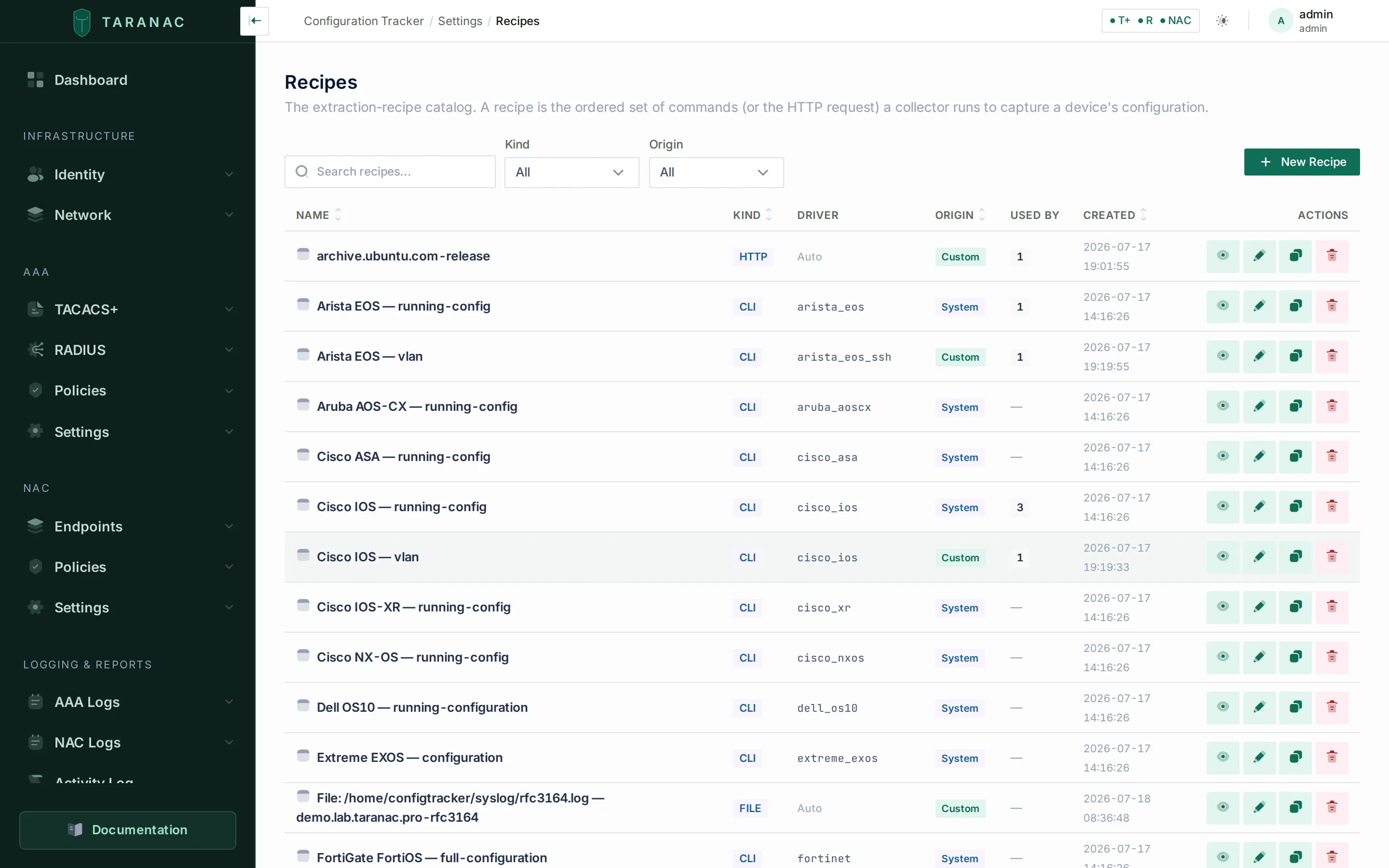 The recipe catalog: CLI, HTTP and FILE kinds, each with its netmiko driver and a System/Custom origin.
Scrub sets — clean before you store
Section titled “Scrub sets — clean before you store”A scrub set is an ordered list of rules applied to a capture inside the collector, before the snapshot is persisted. It does two jobs:
- Strip volatile lines — timestamps, uptime counters, “current configuration” save headers: the lines that change every capture and would otherwise make every diff noisy and every config look drifted.
- Mask secrets — replace password/community/key values with a stable placeholder
(
••••••••) while keeping the line’s structure, so a snapshot is safe to store, diff and share.
Scrub sets live under Configuration Tracker → Settings → Scrub Sets, and attach to a recipe (not to a tracked config), so every config using that recipe is cleaned the same way. You can create or edit one without leaving the recipe form — the scrub-set picker has its own + New and edit actions, and saving there saves only the set.
Rule stages
Section titled “Rule stages”Each rule has a stage, a regex pattern, and (for masking) an optional
replacement. Rules apply in order, and per line the strongest action wins
(drop → mask → keep):
| Stage | Effect |
|---|---|
drop_volatile | Delete the whole matching line (timestamps, counters, save headers). |
mask_secret | Replace the secret value in the line with the placeholder; keep the line’s shape. Capture the value in a named secret group (else group 1, else the whole match) so only the value — not the keyword — is masked. |
keep | Mark a benign line as safe, so the automatic masking (below) leaves it alone. |
Two guards run on every write — create, update and clone — because a broken or over-broad rule is a leak, not a typo:
- every
patternmust compile as a regex, and everyordermust be unique in the set; - a
keeprule must target a named benign line. A catch-all (.*,^.*$,(.+)and friends) is rejected, and so is akeepwhose pattern names a strong secret keyword (secret,password,pre-shared-key,private-key,md5-key, …) — either would wave a secret-bearing line straight into storage. The bare wordkeyis deliberately allowed, becausekey chain <name>is benign.
Automatic secret masking — and turning it off
Section titled “Automatic secret masking — and turning it off”Underneath your rules, Taranac masks secrets automatically: any line carrying a
secret-bearing keyword (password, passwd, secret, key, community,
pre-shared-key) in value position is masked even if no rule matched it, and PEM
private-key blocks are masked as a block (a truncated block — BEGIN with no END —
is masked to the end of the document rather than leaked). Public certificate material is
left alone, so certificate rotations still diff.
This is a safety net, not a scrubber: on its own it over-masks benign lines that merely
contain a secret word (key chain MYCHAIN, a description, a banner). That is what the
seeded per-vendor keep rules are for.
A scrub set carries a Mask secrets automatically switch, on by default.
Standalone collectors must be updated in the same maintenance window as the core: this switch changed the collector contract, and a collector on the previous version stops collecting entirely — every tracked config it serves — rather than storing a snapshot masked differently from what the core expects. It idles, and resumes on its own once updated.
Starter scrub sets
Section titled “Starter scrub sets”Every seeded vendor recipe ships with a matching “<Vendor> — default scrub” set
carrying that platform’s drop_volatile + mask_secret + keep rules, written against
that vendor’s real config syntax — Cisco’s username/enable secret/snmp-server community/key-string forms, Junos’ quoted encrypted-password and
authentication-key, Huawei’s %^%#…%^%# ciphertext and irreversible-cipher,
FortiOS’ set … ENC blobs and inline private-key bodies, AOS-CX’s
ciphertext/plaintext markers, EXOS’ encrypted / shared-secret and MikroTik’s
password= / secret= / key= pairs. Like recipes, they are System-marked but
editable, cloneable and deletable, and your changes persist across updates.
Deleting a scrub set that a recipe still points at is refused (the error names the recipes): silently detaching them would drop those recipes to bare automatic masking without anyone deciding to. Deleting a recipe that tracked configs use is allowed — they are detached and will need a recipe again.
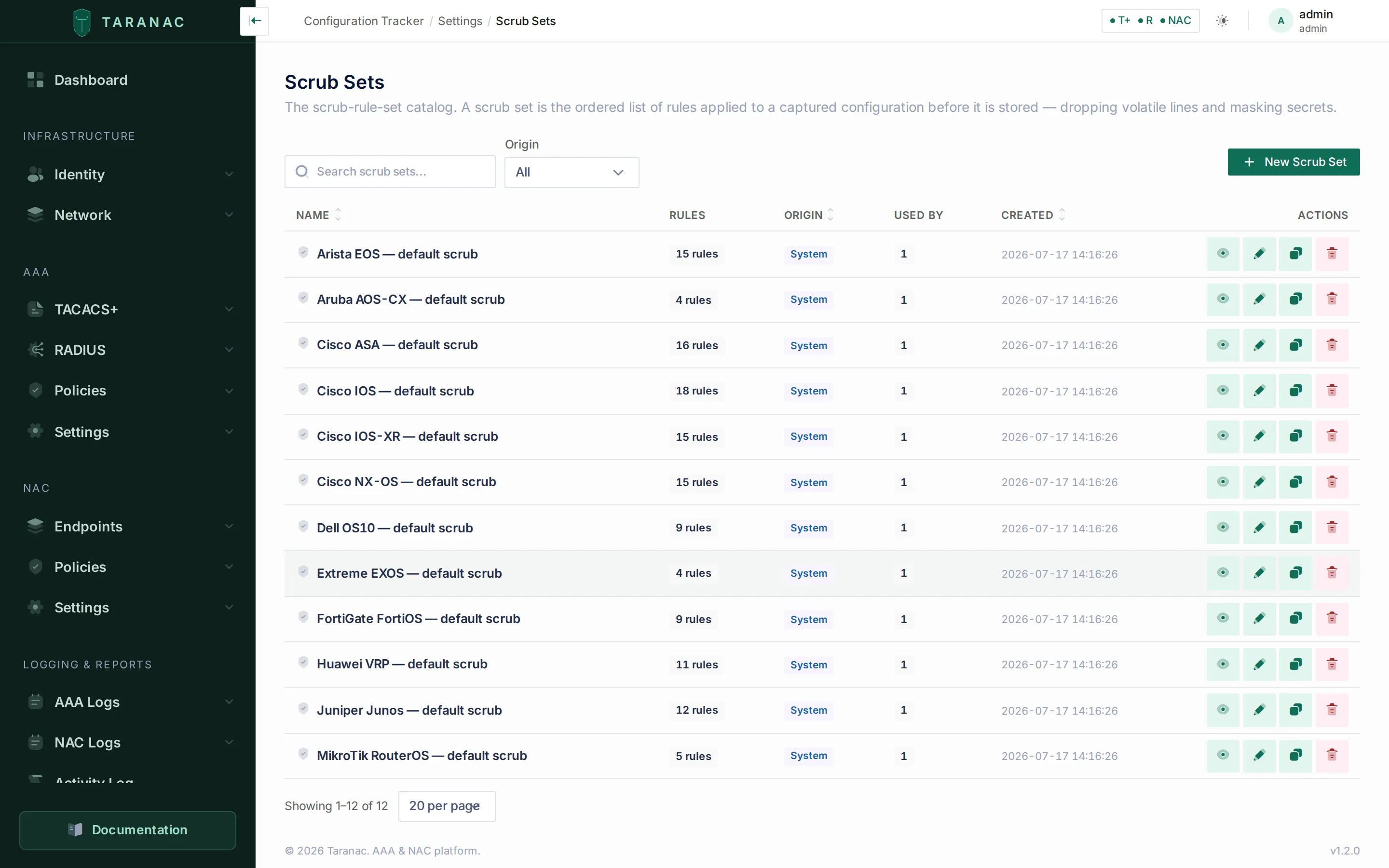 Per-vendor default scrub sets, each with its rule count — applied before a capture is stored.
When a plaintext secret can reach a snapshot
Section titled “When a plaintext secret can reach a snapshot”There are exactly two ways, both deliberate, and they differ in who can then read the secret.
1 — The stored body itself is unmasked. All of these must hold:
- the tracked config’s recipe points at a scrub set, and
- that set has Mask secrets automatically off, and
- the set’s own rules do not mask that value (with no rules, nothing is masked).
The secret is then in the ordinary snapshot body — visible to anyone who can view tracked configs, and to diffs, notifications and exports.
2 — The separate encrypted copy. All of these must hold:
- the recipe has Keep an unmasked copy of every capture on when the result is ingested, and
- the capture is text and under the store threshold (an oversized capture gets no copy), and
- the result actually carried it — for a standalone collector, that means it was delivered without going through the disk queue.
The copy is encrypted at rest, the normal body stays masked, and reading it needs the Reveal raw config permission plus an audit record per access.
Everything else stays masked. A recipe with no scrub set is masked. A preview stores nothing at all. And when a standalone collector reports a capture, the core re-scrubs it with that tracked config’s current rules before storing, so the core’s copy — and the hash the version history is built on — is authoritative.
Capture limits
Section titled “Capture limits”Before any trim, scrub or hash, NUL characters (U+0000) are removed from a text capture.
Some devices end their output in them (a D-Link DGS-3130 ends show running-config so),
and the database cannot store them. The stored body, its hash and the unmasked copy
therefore all describe the same text without them. A file capture with a NUL in it is
classed as binary and hashed as bytes, untouched.
Three system settings bound what a collector will buffer, download and store:
ncm.text_store_max_bytes (past it a text config is tracked by content hash only — the
version is recorded, the body is not), ncm.text_buffer_max_bytes (the most captured
text held in memory at once) and ncm.binary_max_bytes (the largest binary artefact a
collector will read). Their defaults, ranges and full descriptions are in
Settings reference → keys with no dedicated control.
A capture that exceeds the buffer or binary limit fails immediately and names the setting to raise. It is not treated as a transient network error, so it does not burn the retry budget on three extra device logins that would fetch the same oversized payload again.
Two more bounds protect the scrub rules themselves: ncm.scrub_max_lines (default 200,000)
and ncm.scrub_max_line_length (default 32,768 characters). A capture past either is not
failed: what is cut off is not stored, but it is hashed into the version, the viewer warns,
and an alert names the setting — see
a configuration longer than the collector processes.
Common scenarios
Section titled “Common scenarios”Track a new vendor. Clone the closest seeded recipe, set its netmiko driver and command, then clone a scrub set and adjust the volatile-line and secret patterns for that platform’s config syntax.
Kill noisy diffs. If a device stamps a timestamp or a byte-count into its config,
add a drop_volatile rule matching that line to the scrub set — the next capture that
differs only by that line will de-dup instead of cutting a spurious version.
Fetch a non-standard file over the API. Write an HTTP recipe with the exact
method/path for the export endpoint, put the auth token in a header via
{{cred.token}}, and point an https source at it.
Store one platform’s config exactly as the device returns it. Give that platform its own recipe and its own scrub set, clear Mask secrets automatically on the set, and leave every other recipe on its own set. The switch is per set, so the blast radius is whatever recipes point at it — check the Used by column before you flip it.
Let a named few read real passwords, without opening the config to everyone. Turn on Keep an unmasked copy of every capture on the recipe and grant Reveal raw config to those people only. The body everyone else sees stays masked, and every reveal is audited.
When to use what — recipe vs scrub set
Section titled “When to use what — recipe vs scrub set”| Job | Tool |
|---|---|
| Choose which commands / request / file to collect | Recipe |
| Pick the terminal driver for a CLI device | Recipe (netmiko driver) |
| Remove a command echo or trailing prompt | Recipe (trim) |
| Keep a second, encrypted unmasked copy of each capture | Recipe (Keep an unmasked copy) |
| Strip timestamps/counters that appear inside the config | Scrub set (drop_volatile) |
| Mask a password/community/key value | Scrub set (mask_secret) |
| Rescue a benign line the automatic masking would hit | Scrub set (keep) |
| Store the config with its real secrets in the ordinary body | Scrub set (Mask secrets automatically off) |
Reference
Section titled “Reference”Recipe fields:
| Field | Notes |
|---|---|
| Name | Required, unique, ≤128 characters. |
| Kind | cli · http · file. |
| Steps | CLI: ordered {command} list. HTTP: exactly one {method, path, headers, body_template}. File: one {remote_path} (≤512 chars). Never empty. |
| Trim | Per-step {skip_top, skip_bottom, keep[], reject[]}; merged into one pass at collect time. |
| Netmiko driver | CLI only, optional; validated against the installed netmiko drivers. Blank → napalm map, then cisco_ios. |
| Scrub set | Optional; blank means automatic masking only, with no rules. |
| Keep an unmasked copy | Off by default. Stores a second, encrypted copy of each capture; read requires ncm_tracked_configs.reveal_raw and is audited. |
| Origin | System (seeded) or Custom — provenance only. System recipes are editable, cloneable and deletable. |
Scrub-set fields:
| Field | Notes |
|---|---|
| Name | Required, unique, ≤128 characters. |
| Mask secrets automatically | On by default. Off = the set’s rules are the whole policy; with no rules the capture is stored verbatim. Audited, flagged in the list, carried by a clone. |
| Rules | Ordered (unique order); each has a stage (drop_volatile/mask_secret/keep), a regex pattern, and an optional replacement (blank → ••••••••). May be empty. |
| Origin | System (seeded) or Custom — provenance only. System sets are editable, cloneable and deletable. |
Permissions: recipes and scrub sets are their own RBAC sections (ncm_recipes,
ncm_scrub_sets) — authoring the collection catalog is a different capability from
defining sources. Reading an unmasked copy is ncm_tracked_configs.reveal_raw.
Related
Section titled “Related”- Tracked configs & transports — the source a recipe runs on.
- Snapshots, diff & drift — what the cleaned capture becomes.
- Credentials & the vault — the
{{cred.*}}values an HTTP recipe injects. - Settings reference — the three capture-size limits.