

Configuration tracker
The configuration tracker (also called NCM — network configuration management) backs up, versions and diffs the running configuration of every device you point it at. It captures a config over whatever the box speaks — SSH, Telnet, SCP/SFTP or HTTP(S) — stores each capture as a content-hashed snapshot, and flags drift the moment a capture stops matching the version you marked as the baseline.
Because Taranac is already your AAA server, the tracker does two things a standalone backup tool structurally cannot: it can log in with a just-in-time password nobody ever sees, and — for any change — it can tell you who typed it, resolved from TACACS+/RADIUS accounting.
How the pieces fit
Section titled “How the pieces fit”The tracker is a small set of objects that reference each other. You build the reusable parts once (sources, recipes, scrub sets, credentials, collectors) and then a tracked config ties them to one device.
| Object | What it is |
|---|---|
| Tracked config | The unit you watch: a name, one source, one recipe, and the device address(es) to collect from. It carries the version history and the baseline. |
| Source | The connection — a transport (SSH/Telnet/SCP/SFTP/HTTP/HTTPS), a target host, a port, a credential and the collector that reaches it. One source can feed many tracked configs. |
| Recipe | What to fetch — an ordered set of CLI commands, a single HTTP request, or a remote file path. Carries the netmiko driver and points at a scrub set. It can also keep a second, encrypted unmasked copy of every capture — off by default, and readable only with its own audited permission. |
| Scrub set | Ordered rules applied to a capture before it is stored: strip volatile lines and mask secrets. Underneath your rules Taranac runs an automatic secret backstop — anything that looks like a password, key or community string is masked whether a rule says so or not. A set can switch that backstop off, which is the only way to store a capture exactly as the device returned it. |
| Snapshot | One immutable, content-hashed capture. Identical captures are de-duplicated; a changed one cuts a new version (v1, v2, …). A text capture past ncm.text_store_max_bytes (8 MiB by default) is still versioned — by content hash alone, with the body not stored. |
| Baseline | The snapshot you declare “known-good.” When the latest capture’s content hash stops matching it, the config is drifted. |
| Credential | A vault entry the source authenticates with — a stored secret, or a just-in-time account Taranac mints and rotates itself. |
| Collector | The reachability domain that does the collecting: the built-in embedded collector for the single-site case, or a dial-out standalone collector for segmented and remote networks. A standalone collector has to stay in step with its core — if its configuration-collection contract no longer matches, the core gives it no configuration work until it is updated (SNMP and the Web Probe carry on). |
The collection loop
Section titled “The collection loop”- A collection run fires — either the scheduled sweep (the job interval is the cadence) or an operator’s Collect now.
- For each enabled tracked config, the collector opens the source connection, runs the recipe, and pulls the raw config.
- The scrub set strips volatile lines and masks secrets — with the automatic backstop underneath it, unless that set turns it off; Taranac hashes the result.
- If the hash matches the latest snapshot, nothing is stored (
unchanged). If it differs, a new version is cut (changed) and, where a device address is known, the change is correlated to who was logged in during that window. Any user groups subscribed to that config get a change notification — coalesced into a digest for a scheduled sweep, sent immediately for a Collect now. - If the config has a baseline and the new hash differs from it, the config’s status flips to drifted and a drift alert is raised in the operator alert inbox — a system alert, on a different channel from the per-config subscription above.
What makes it different
Section titled “What makes it different”- Just-in-time credentials. A tracked config can authenticate with a credential Taranac owns rather than one you store: at collection time it mints a strong, 32-character password on a managed local account, logs in with it, and rotates it away once the work drains. Nobody — no human, no log, no API response — ever sees it. See Credentials & the vault.
- Who typed what. Open any change and the AAA activity view shows who logged into that box, which commands they ran and the session accounting — scoped to the window between the two config versions. Per-command attribution needs TACACS+; a RADIUS-only device still gives you who-logged-in and session accounting. See Snapshots, diff & drift.
- Collect over anything. SSH/Telnet for CLI gear, SCP/SFTP for boxes that hand you a file, and HTTP(S) for API-driven platforms — where a custom recipe carries its own request (path, headers, body), so you can track essentially any endpoint a device exposes. See Tracked configs & transports.
Where it lives in the UI
Section titled “Where it lives in the UI”The tracker is the Configuration Tracker section of the admin console:
- Configs — the tracked configs, their status and version history.
- Collection Runs — a journal of scheduled sweeps and on-demand collects.
- Settings → Sources / Credentials / Recipes / Scrub Sets — the reusable building blocks.
Collectors live one level out, under Settings → System → Collectors, because a collector also polls SNMP, runs Web Probe, listens for DHCP and scans — it is shared with the rest of Taranac, not something specific to the tracker. See Collectors.
There is no separate overview page: the tracker’s health tiles and its recent-changes feed are two Dashboard widgets — Configuration Tracker and Collectors — both on by default.
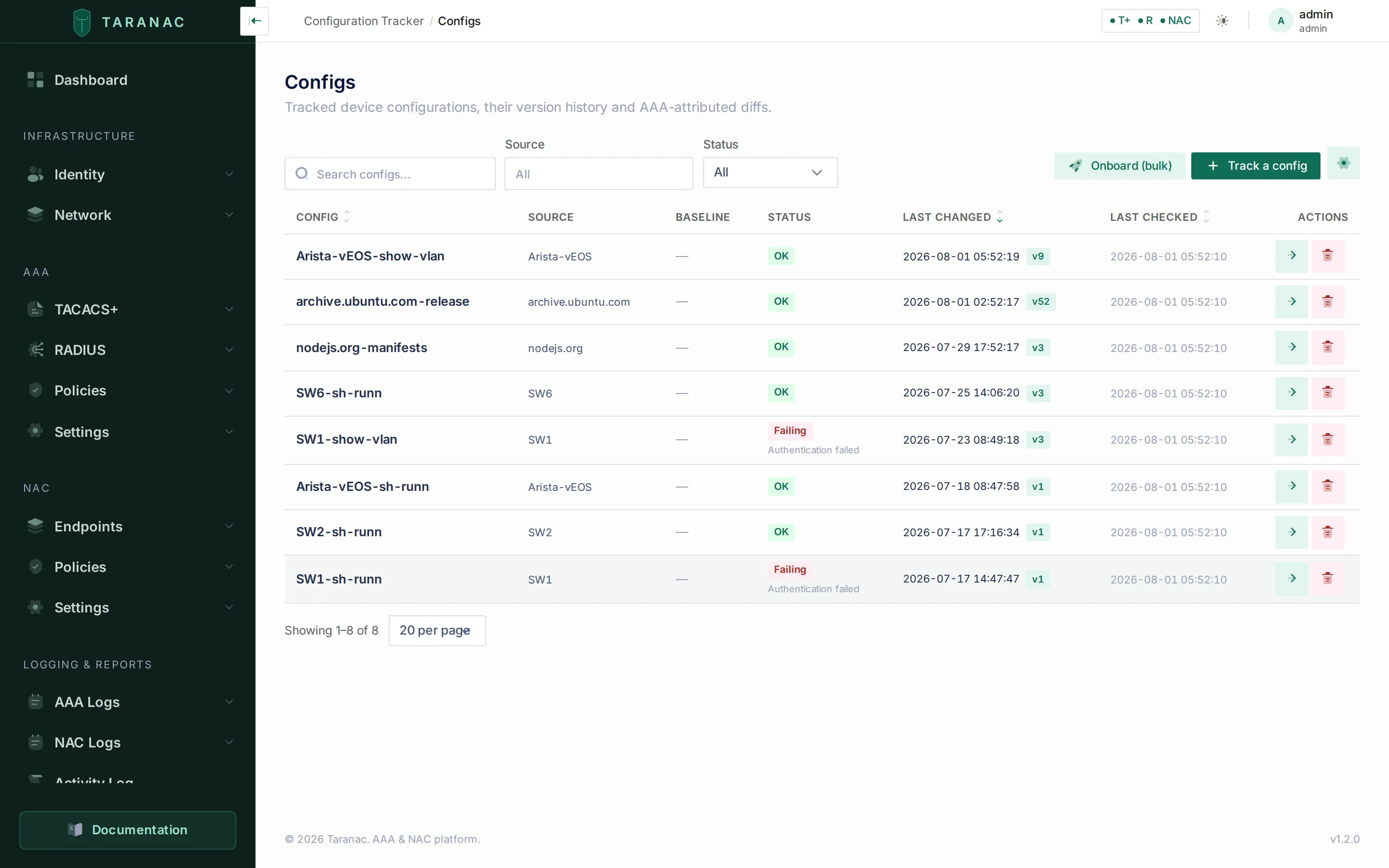 The Configs list: each tracked config with its source, baseline, derived status, last-changed version and last-checked time.
When to reach for the tracker
Section titled “When to reach for the tracker”| You want to… | Use |
|---|---|
| Keep a versioned backup of every switch/router config | A tracked config per device (or bulk-onboard a whole pool) |
| Know the instant a config drifts from a known-good state | A baseline + drift status |
| See who made a change, not just what changed | AAA activity on the diff |
| Never store a device password in a config file again | A just-in-time credential |
| Collect from a segmented or remote site the core can’t reach | A standalone collector |
| Track an API-driven platform with no CLI | An HTTP recipe |
| Store a capture with its real secrets, deliberately | An unmasked copy, or a scrub set with automatic masking off |
Related
Section titled “Related”- Tracked configs & transports — sources, transports and the config you watch.
- Recipes & scrub sets — what to fetch, and cleaning it before storage.
- Snapshots, diff & drift — versioning, the baseline, diffs and AAA activity.
- Credentials & the vault — the encrypted vault and just-in-time logins.
- Collectors in the tracker — which collector a configuration goes through, and what it does to a capture.
- Collectors and Deploy a standalone collector — the collector itself and the operator guide.
- Bulk onboarding — track a whole address pool at once.
- Change alerts & safe deletion — notifications, drift alerts and reference protection.