

Tracked configs & transports
A tracked config is the unit the tracker watches: one device, its version history and its baseline. It doesn’t hold connection details itself — those live on a reusable source. The split is deliberate: a source describes how to reach a device, the recipe describes what to fetch, and the tracked config binds them to a specific box.
Key concepts
Section titled “Key concepts”| Term | What it is |
|---|---|
| Source | A named connection: a transport, a target host, a port, an optional credential and the collector that reaches it. One source can serve many tracked configs. |
| Transport | How the collector talks to the device — one of ssh, telnet, scp, sftp, http, https. The transport fixes which connection settings the source carries. |
| Target | The device address, held as a network object of type host or fqdn. A subnet or range is rejected — a source points at exactly one host. |
| Tracked config | A name, one source, one required recipe, and — optionally — the device address(es) used to attribute changes to AAA logins. Carries the snapshots, the baseline and the drift status. |
| Collector | The reachability domain that runs the collection. Every source is bound to one; the built-in embedded collector is the default. |
Transports — collect over whatever the box speaks
Section titled “Transports — collect over whatever the box speaks”A source’s transport decides both the connection settings it carries and whether it needs a credential.
| Transport | Default port | Needs a credential? | Use it for |
|---|---|---|---|
ssh | 22 | Yes | CLI gear — run show/running commands and capture the output. |
telnet | 23 | Yes | Legacy CLI gear with no SSH. |
scp | 22 | Yes | Boxes that hand you the config as a file over SCP. |
sftp | 22 | Yes | Boxes that hand you the config as a file over SFTP. |
http | 80 | No | API-driven platforms (a token can ride in a header or the URL). |
https | 443 | No | API-driven platforms over TLS. |
- CLI transports (
ssh,telnet) run a CLI recipe — an ordered list of commands — and capture the output. The netmiko driver comes from the recipe, unless the source pins a device type of its own: that override is used verbatim and beats the recipe — the escape hatch for a box the recipe’s driver doesn’t fit, a plain Linux host, say. Both CLI transports also take an optional paging command, andtelneta prompt-regex override. - File transports (
scp,sftp) pull a config file straight off the device. The remote path lives on a file recipe, not on the source — the source is the connection, the recipe is what to fetch. - API transports (
http,https) run an HTTP recipe that carries its own request — method, path, headers and an optional body — so a custom recipe can fetch essentially any file or endpoint a device exposes.
SSH host-key trust (SSH / SCP / SFTP)
Section titled “SSH host-key trust (SSH / SCP / SFTP)”SSH-family sources pin the device’s host key in Taranac’s own store (not OpenSSH
known_hosts), keyed per (collector, address, port). A source picks a host-key
policy:
| Policy | Behaviour |
|---|---|
trust_on_first_use | Default. Pin the first key seen (only after a successful collect), then refuse any later key that doesn’t match — the change is recorded as a candidate for you to review. |
trust_always | Accept whatever key is presented and pin nothing. For lab or already-trusted paths only. |
strict | Require a key that is already pinned; an unknown or changed key is refused. |
When a pinned key changes, the connection is refused and the new key is stashed as
a candidate — Taranac never silently re-pins. An operator re-trusts it explicitly (or
resets the pin to re-learn from scratch); because the pin is keyed by
(collector, address, port), that re-trust is shared by every source reaching the same
host, not just the one you opened. Every pin, accept and reset is
audited.
The check runs wherever the session is opened. A standalone collector receives the source’s policy and its own pin with each job and checks the device’s key at the site, after key exchange and before the credential is sent, so whoever answers on a device’s address never receives its password. It reports the key it saw with the result, and the core pins it or records the candidate as it does for the built-in collector.
HTTP(S) request settings
Section titled “HTTP(S) request settings”An http/https source carries the connection half of the request; the
recipe carries the rest:
- Base path — a path-only prefix that must start with
/(no scheme, host, query or fragment). The host and port come from the source’s network object. - Method —
GET(default) orPOST. - Headers — static request headers.
- Body template — an optional request body.
- TLS verify (
httpsonly) — off by default, because device management APIs are commonly self-signed. Turn it on where the device presents a trusted certificate.
Base path, headers and body may reference credential fields with {{cred.*}}
placeholders so a token from the vault is injected at collection time rather than
written into the source.
Configuring a source and a tracked config
Section titled “Configuring a source and a tracked config”Sources live under Configuration Tracker → Settings → Sources; tracked configs under Configuration Tracker → Configs.
1. Create a source
Section titled “1. Create a source”Add a source and set:
- Name — required, unique across all sources.
- Transport — one of the six above; it decides the rest of the form.
- Target — the network object (host or fqdn) to reach.
- Port — optional; blank uses the transport’s default.
- Credential — the vault entry to authenticate with (required for ssh/telnet/scp/sftp).
- Collector — the reachability domain that will do the collecting.
- Transport settings — host-key policy for the SSH family (with a paging command and
a device-type override on
ssh/telnet), or base path / method / headers / body / TLS-verify for HTTP(S).
The Sources list shows each source’s transport, resolved address:port, collector,
whether a credential is attached, and a Used by count you can expand to see which
tracked configs depend on it.
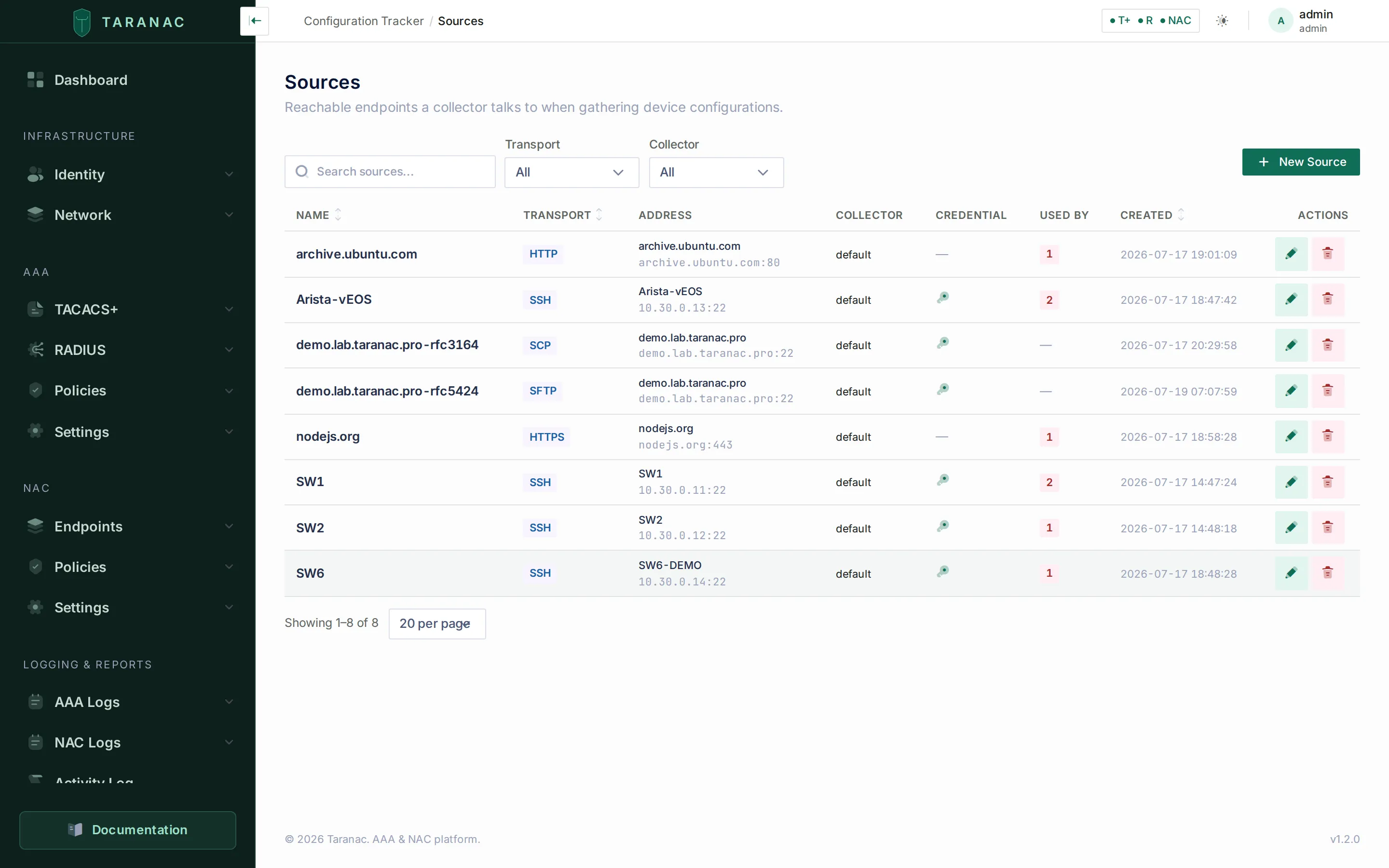 Sources across every transport — SSH, HTTP, SCP, SFTP and HTTPS — each with its target address, collector, credential and reference count.
2. Track a config
Section titled “2. Track a config”From Configs, choose Track a config for a single device (or Onboard (bulk) to import a whole pool). Set:
- Name — required. Names need not be globally unique; the real identity is the address + collector + recipe.
- Source — the connection to use.
- Recipe — required: it is what says what to fetch. There is no default to fall
back on. The recipe’s kind must also match the source’s transport — a file recipe
belongs to an
scp/sftpsource and nowhere else (it carries the remote path), and anscp/sftpsource is rejected with anything but a file recipe. - Addresses — optional, under Advanced options. These are not the collection address — that comes from the source — they are the device address(es) used to attribute a change to an AAA login. Each is a concrete host (a subnet is rejected), scoped to a collector; leave the collector blank and it binds to the default one. Creating a config seeds one address automatically from the source’s target (a host object’s IP, or an fqdn resolved by DNS); remove it if you don’t want the correlation.
Source and recipe are picked from a drawer that searches the server, so a large catalogue is fully reachable rather than truncated.
On save you land on the config’s detail page, where you can Preview a collection, Collect now, watch the version history build, and later pin a baseline.
The Configs list shows each config’s source, recipe, collectors and change-notification recipients, whether a baseline is set, the last-changed version and the last-checked time — plus a derived status, computed at read time in precedence order, the first that applies winning: Disabled › Collector offline › Failing › Drifted › Never collected › OK. A failing config also carries why it failed: authentication, device unreachable, partial capture, or capture too large. The status table spells each one out.
Capture size limits
Section titled “Capture size limits”Three settings bound a capture, on the built-in and on every standalone collector alike (each job carries them to the collector):
| Setting | Default | Past it |
|---|---|---|
ncm.text_store_max_bytes | 8 MiB | The text is tracked by hash alone; the config stays healthy. |
ncm.text_buffer_max_bytes | 64 MiB | The collection fails as too_large, naming the setting. |
ncm.binary_max_bytes | 2 GiB | The collection fails as too_large, naming the setting. |
A too_large failure is not retried: the device would return the same capture.
From a standalone collector, one result travels in one upload of at most 25 MiB (the
bundled proxies accept that much on the collector’s result and preview routes). A result
that would be larger is sent without its unmasked copy
and, if still too large, by hash and size alone, so the version history stays correct. A
preview that large reports too_large. If a proxy of your own in front of the core refuses a
result as too large, the collector records a too_large failure naming the size and the limit
to raise, instead of sending it again forever.
When a config won’t collect
Section titled “When a config won’t collect”Preview, on the config’s detail page, dry-runs the whole collection — the same plan, the same engine, the same scrub — and shows the would-be config beside a step-by-step trace of where a real collection would succeed or fail. It opens no run, writes no result and cuts no snapshot (its only trace is an activity-log entry), and it drives the engine exactly once, so a wrong credential costs one login rather than a lockout.
The trace tells the slow device from the unreachable one. A negotiation step that ran out of time reads SSH negotiation did not finish in time — the device is reachable but slow to complete the key exchange, distinct from a device that offers no algorithm in common; a login the device did not answer in time reads The device did not answer the login in time — the credential was not rejected; and a recipe step that never came back to the prompt is marked failed with its step number (see Steps that change the CLI prompt).
When that evidence has to travel — into a ticket, say — the same single collection can be run from the shell:
./taranac diagnose --protocol ncm --config "<name>"It writes one report to ./diagnostics: what was resolved before any network was touched
(transport, address, port, credential mode, recipe, and the CLI driver together with why
it was chosen), whether the port answered, what the SSH handshake agreed on, and the login
dialogue itself. It records nothing in Taranac — no run, no result, no snapshot, no version
— and logs in exactly once, never the retry loop.
Diagnostics covers the report’s anatomy and the
--full-transcript warning.
Common scenarios
Section titled “Common scenarios”A rack of identical switches. Create one source per switch (or bulk-onboard the pool), all pointing at the same SSH credential and the “Cisco IOS — running-config” recipe. Each becomes its own tracked config with its own history and baseline.
A firewall that only speaks its API. Use an https source with TLS-verify on (the
firewall presents a real cert), an HTTP recipe whose request pulls the config export
endpoint, and a token-type credential referenced from the header via {{cred.token}}.
A box that only hands you a file. Use an scp or sftp source plus a file
recipe carrying the remote path (e.g. /config/running). Taranac pulls the blob and
versions it like any other capture.
A remote site behind NAT. Point the source’s collector at a standalone collector deployed at that site; the source and recipe are otherwise identical to a local one.
When to use what — choosing a transport
Section titled “When to use what — choosing a transport”| The device… | Transport |
|---|---|
Exposes a CLI over SSH and you run show running-config | ssh |
| Only offers Telnet | telnet |
| Serves its config as a downloadable file | scp or sftp |
| Is driven entirely through a REST/HTTP API | http or https |
Prefer ssh over telnet and https over http wherever the device supports it.
For file transports, choose whichever of SCP/SFTP the device implements — the recipe
side is identical.
Reference
Section titled “Reference”Source fields:
| Field | Notes |
|---|---|
| Name | Required, unique. |
| Transport | ssh · telnet · scp · sftp · http · https. |
| Target (network object) | Host or fqdn only; no subnet/range. Supplies the address. |
| Port | Optional; blank → transport default (22/23/22/22/80/443). |
| Credential | Required for ssh/telnet/scp/sftp; not needed for http(s). Detaching a deleted credential leaves the source credential-less rather than erroring. |
| Collector | The reachability domain; blank binds the source to the default collector. |
| Transport settings | Per-transport: host-key policy (SSH family), plus a paging command and a netmiko device-type override on ssh/telnet (and a prompt regex on telnet); or base path/method/headers/body/TLS-verify (HTTP family). |
Tracked-config fields:
| Field | Notes |
|---|---|
| Name | Required; not globally unique. |
| Source | Required; deleting a source in use is blocked while configs reference it. |
| Recipe | Required; there is no default to resolve. Its kind must match the transport (a file recipe ⇄ an scp/sftp source). Deleting a recipe is not blocked — the configs using it are left with none and stop collecting. |
| Addresses | Optional, collector-scoped concrete host addresses used to attribute changes to AAA logins — not the collection address. One is seeded from the source’s target when the config is created. |
| Enabled | Only enabled configs are collected by the scheduled sweep. |
Related
Section titled “Related”- Recipes & scrub sets — what a source fetches, and cleaning it.
- Credentials & the vault — the credential a source authenticates with.
- Collectors — the reachability domain a source is bound to.
- Bulk onboarding — create many sources and configs at once.
- Snapshots, diff & drift — what a collection produces.
- Diagnostics — the per-config collection report, layer by layer.