

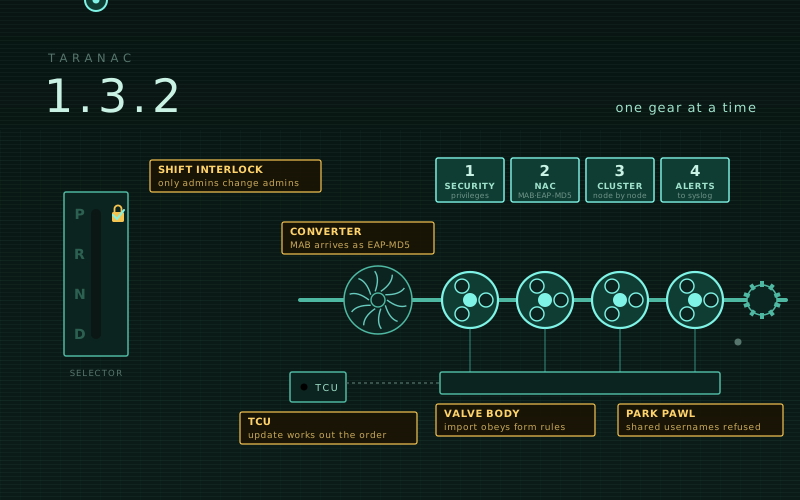
An automatic gearbox will not let you out of Park until the interlock is satisfied, and then it works through its gears one at a time, each one doing its own job. That is a fair picture of 1.3.2: one interlock, and four gears.
- Security — the interlock. A set of privilege escalations in user, group, role and directory administration is closed: an account can no longer reach more than it holds, and a username shared by two accounts is refused by every login.
- NAC — MAB carried as EAP-MD5 works on the switches that send it (TP-Link, Cisco
mab eap), the auth log says how MAB arrived, and EAP rejects read like sentences instead of looking like wrong passwords. - Cluster —
./taranac updateworks out the order and takes one member at a time, a new node takes writes at once, and commands that would split a cluster are refused before they act. - Operations — alerts to syslog, an import and export that obey the same rules as
the forms, a save that is confirmed only once it is written, and a
./taranac restorethat finally carries the keys.
Four of the changes ask something of you after updating; they come first.
What’s in 1.3.2
Before you update
Security: the interlock
- A user can only be changed by someone holding the same rights
- Groups, roles and directories cannot hand out more than their editor holds
- A username held by two accounts is refused everywhere
- Exports, masks and the Export permission
NAC
Clusters: one member at a time
- The update works out the order
- One member at a time, for certain
- A new node takes writes from everyone at once
- The witness: shown everywhere, removable when it is no longer needed
- Commands that would break a cluster are refused
- New cluster alerts
Operations
- A save is confirmed only once it is written
- Alerts to syslog, and an alert when alerts reach nobody
- Import and export through the same rules as the forms
./taranac restorecarries the keys- Smaller fixes
Four things to check after updating
Most of this release changes nothing you have to touch. Four things are different on purpose, and are worth a minute each:
- Administrator groups fed by a directory are detached. A directory sync used to adopt any local group with the same name, GUID or DN as a directory group — which is how a directory group named like your local administrators could rewrite who those administrators are. Groups adopted this way are converted on upgrade and keep following the directory, under the same id and in the same rules — except administrator groups, which are detached and stay local with the membership the last sync left. Look at who is in them.
- Two LDAP configurations over the same directory group get a group each. The second
is named
name (configuration). Add it to the AAA and NAC rules that referenced the shared one, or its members stop matching those rules. - Syslog messages name the node that sent them. The HOSTNAME field is now
TARANAC_NODE_NAMEfrom.env(installs default it totaranac-node-1) instead of the api container’s id, which changed on every recreate. Give a standalone server a distinctive name if it shares a SIEM, and update SIEM rules keyed on the old value. - On a cluster built before this release, a
max_connectionswarning appears right after updating. It is the shortfallcluster verifyalready reported, not a new fault. Raise the ceiling as the HA guide describes — replicas first, the leader last — and the alert clears within a minute of the last restart.
The NAC service also restarts once after the update rather than reloading, because its EAP module configuration changes (MAB over EAP-MD5).
A user can only be changed by someone holding the same rights
This is the most important fix in the release.
The edit permission on users was enough to change the email of an administrator — or of anyone with more rights — and then re-send the welcome email, which is a set-password link, to the new address. That is an account takeover with one non-administrative permission.
Every change to another user now needs every web permission that user holds. That covers editing any field, deleting, locking and unlocking, revealing the enable password, re-sending the welcome email, resetting or removing their second factor, regenerating backup codes, adding them to or removing them from a group, and updating them by import. An administrator holds everything, so only an administrator can change an administrator.
Two things stay as they were. Users whose groups give no web permissions — network-only accounts — are editable by anyone with the edit permission. And everyone can still edit their own account. Roles that used to manage richer accounts now get “forbidden”, which is the point.
Groups, roles and directories cannot hand out more than their editor holds
The same rule, followed into every other place permissions are handed out:
- Administrator groups can only be changed by an administrator — their enable password, MFA requirement, anything, and deleting them. Every administrator inherits what that group carries, so the groups permission was a back door. Whether someone is an administrator is read from the database on every such change, so a demoted administrator cannot use a still-valid session to put themselves back.
- Group membership cannot be used to gain permissions. Adding a user — your own account included — to a group needs every permission that group’s role grants, from the user form, the group’s member list or an import.
- A role editor cannot grant itself permissions. With
rbac.managea non-administrator could add anything to the role of its own group. It can now add only permissions it holds, and cannot touch a role assigned to an administrator group. - A directory configuration cannot hand out roles its editor does not hold. With permission to manage LDAP configurations, an operator could set the default role or the per-group mapping to any role, and the next sync created groups with it and filled them from the directory. A configuration’s roles must be ones its editor holds every permission of, and once a configuration feeds an administrator group, changing it is for administrators only.
- A sync no longer takes over groups it did not create. It uses only its own
directory groups and imports beside anything else as
name (configuration); the sync report says when it does. (This is the source of items 1 and 2 above.) - Updating records by import needs the edit permission. “Update existing” mode
needed only create, so a role that could create devices, users or groups could
overwrite their secrets and memberships. It now needs
<entity>.edit, membership columns needmanage_members, and device SNMP columns needsnmp.edit, as in the API. - MFA administration uses
mfa.manage. Resetting a user’s MFA, sending setup links and regenerating backup codes asked formfa.edit, which no role can be given — so in practice only administrators could do it. Roles withmfa.managecan now.
A username held by two accounts is refused everywhere
A local account and directory accounts from different LDAP domains could end up sharing a name — from older versions, a restored backup, or two directory syncs running at once. TACACS+, RADIUS and NAC then checked the name against whichever account they had read last, so a login could be verified against one account and given the groups of another.
Such a name is now refused by every login exactly like an unknown one. User creation and
import report a conflict; a directory sync skips the entry and lists it among the run’s
errors; reset-password, unlock and create-admin name the conflicting accounts and
change nothing; and an alert names the shared usernames until the extras are removed or
renamed.
Only enabled accounts count for signing in: an enabled account whose namesakes are all
disabled signs in as before, so a disabled directory account no longer locks out the
local one of the same name. A sign-in as user@domain or DOMAIN\user never falls back
to a local account. And directory syncs now run one at a time, so two syncs can no
longer create the same name at once.
Exports, masks and the Export permission
- Exports carry no live spreadsheet formulas. A value starting with
=,+,-or@— a username somebody tried at login, a field a NAS supplied, a device note — is written as text in every log export and in the bulk export. Log files are full of strings an attacker chose; opening one in a spreadsheet should not run them. A bulk export imported again still comes back unchanged. - The Export permission on AAA and audit logs is enforced, as it already was for NAC logs, the button is hidden without it, and every log export is audited with its filters and row count.
- The secret mask is never saved as a secret. An import cell holding the mask the UI
shows (
••••••••) keeps the stored key instead of becoming eight bullets.
MAB carried as EAP-MD5
Some switches run MAB as EAP-MD5, with the endpoint’s MAC as both identity and password —
TP-Link with EAP enabled globally, Cisco mab eap. Those requests were rejected, so MAB
did not work on these switches at all. They are now verified as MAB and matched by MAB
policy rules.
The setting Accept MAB over EAP-MD5 (NAC Settings → MAC Authentication Bypass) is on by default. While it is on, any supplicant that picks EAP-MD5 with its own MAC as identity reaches the MAB rules — also on ports meant for 802.1X only — so turn it off if you want EAP-MD5 closed. EAP-MD5 is always refused on wireless ports, where it derives no keys, and inside PEAP or EAP-TTLS.
The NAC Auth Log shows how MAB arrived — PAP, CHAP, EAP-MD5 or no credential at all — and EAP rejects read like sentences: “Client requested LEAP (17) — not offered by Taranac”. A client that turns down our EAP offer and asks for another method is no longer logged as a wrong PEAP password, so a phone reconnecting every few seconds does not raise a brute-force alert.
The update works out the order
On a cluster, the order is every replica, then the leader, then the witness — and until
now it was yours to get right. ./taranac update now works the order out from the
cluster’s live state on every run. Run it on any member: on the wrong machine it
refuses before changing anything and names the node to update next, and every run ends
with a table of the whole cluster — role, version, state, next.
- Each node records the version it reached in etcd, so the leader no longer refuses while an updated replica waits for the schema.
- Every “Next” or “Start here” command the updater prints — error paths included —
carries the target version, and a plain
./taranac updatein the middle of a rollout to a release candidate is refused with the rollout’s own command, instead of aiming the node at the older stable release. - A replica’s update returns in minutes instead of half an hour. The node starts its
api first; if the api has to wait for the leader’s schema, the update ends there and
says so, and a small helper container,
taranac-update-finisher, starts the rest of the stack once the api is healthy. No second run on the replica, and it survives a logout or a reboot. - The witness is updated last and applies its own compose changes, only on a healthy etcd ring; it refuses, naming the node, if a database node did not finish.
--allow-out-of-orderis for repairs only. The documented order never needs it; it asks for the wordOUT-OF-ORDER, is logged and shown in the cluster table, and never skips the lock below../taranac update -yonly answers the prompt. To re-apply the version a node already runs, use./taranac update --version <version> --repair.
One member at a time, for certain
A member takes the cluster’s single update lock in etcd, atomically, before it changes anything. Another update started meanwhile is refused straight away, nothing changed, with who is updating and the command to run once that run ends.
The topology commands — add-node, remove-node, remove-witness, ha-deconvert.sh —
take the same lock, so two of them at once, or one during an update, are refused with
the holder’s name. A run that dies frees the lock by itself within two minutes, and a
run that lost the lock while it waited (etcd without quorum for longer than that) stops
before it restarts anything.
A new node takes writes from everyone at once
Where to send writes is now read from the replicated node list rather than each
node’s DB_HOSTS — by the api, every ./taranac cluster command and the AAA, NAC and
MFA services. So after add-node nothing needs recreating, and a switchover to the new
node no longer stops writes on the older ones.
cluster switchover waits up to a minute for every member to route writes to the target
and refuses, naming the node, if one does not. cluster status lists any member that
would not follow a node. An alert reports a member whose PG_ALLOW_CIDR does not admit
another member, and a removed node that restarts no longer re-registers itself.
Every node also works from one cluster manifest: the topology commands publish their
change to config/cluster.yml before they make it, and a node whose copy differs takes
the cluster’s copy whole and keeps its own beside it as a timestamped .bak.
The witness: shown everywhere, removable when it is no longer needed
The witness is now a row in the node table wherever the cluster is shown — cluster status, cluster verify, the cluster page, the dashboard widget and the status API —
and the verdict speaks about machines: “Healthy — any one machine (node-1, node-2,
witness) can be lost and writes continue”, or “Degraded — witness is down. One more
loss stops writes.”
Once three database nodes carry a cluster, it no longer needs a witness, and there is
now a way to remove it: ./taranac cluster remove-witness on any database node. It
refuses while the cluster still needs the witness, takes it out of the ring without
restarting anything, and ends with the one command to run on the witness host —
./witness-join.sh --leave. A witness removed while its etcd was still running is
reported by the alert cluster:departed_witness_running until that command runs there.
Commands that would break a cluster are refused
The parking pawl: commands that would do real harm now stop before they act.
ha-deconvert.shcannot cause a split-brain. Run on the leader while a replica was merely stopped, it went ahead; the replica came back, won the old ring with the witness, and promoted — two writable databases. It now refuses while the live etcd ring or the node roster has any other database node, and lists theremove-nodecommand for each.- Decommissioning a live node — the leader included — is refused, in the UI and on the command line. Dropping the leader’s roster row sent every write of the cluster to replicas.
- A copied
.env, a cloned VM or a changed IP cannot start a second member under one identity../taranac uprefuses whenNODE_ADDRESSis not an address of the host, or another machine already runs under this node’s name. Nodes behind NAT keep starting. - A node joins on the cluster’s version — its scripts as well as its images — or is told the one command to run first.
./taranac down -vis refused on a cluster node and the witness (it deleted the database, etcd state, backups and master key). On a standalone install it needs--confirm=DELETE-ALL-DATA.install.shno longer re-runs on a cluster node or a witness, where it upgraded outside the cluster’s order and lock; it names./taranac update.
Plus a long tail of half-finished states — an interrupted cluster init, add-witness
or add-node, a container left under a temporary name by an interrupted docker compose — that now name the next command instead of stopping silently.
New cluster alerts
cluster:etcd_member_down— the leader asks every etcd member each minute whether it is alive, the witness included. Two failed checks in a row raise it: a warning while the ring tolerates another loss, an error when the next loss would stop writes, critical below a majority. One failed check is never reported, so an election or a quick restart stays silent. On two nodes with a witness, or three database nodes, any machine down for more than a minute or two is an error — planned reboots that take longer will raise it too.- Too few database connections — a node below 300
max_connectionswarns; a replica below the primary, which stops it replicating, is an error. - AAA logs and alert notifications are no longer sent by every node. Each node sends the logs of the requests it served and the alerts about itself; the leader sends the cluster-wide ones. A SIEM gets each record once.
A save is confirmed only once it is written
Every change made in the web interface or through the API was confirmed before it was written to the database. If the write then failed — a dropped connection, a cluster failover at that exact moment — the change was lost while the page said it had been saved, and the failure showed only in the server log.
A change is now written before it is confirmed, so such a failure comes back as an error you can see and retry. As a side effect, a page that reloads right after a save always shows the saved data, rather than now and then the old.
Alerts to syslog, and an alert when alerts reach nobody
Bind a syslog destination to the new alerts log type of the system module and it
receives alert notifications — firing, repeat and resolved — in RFC 5424, RFC 3164 or
CEF, under the same notification policy as email. A notice a TCP/TLS destination did not
accept is sent again on the next cycle.
And if neither email nor a syslog destination is set up, a warning “Alert delivery is not configured” appears on the Alerts page and the dashboard. An alerting system that alerts nobody is worse than none, because it looks like one.
Import and export through the same rules as the forms
Devices, device groups, network objects, users and groups are imported through the same services the UI uses, so a row gets the same validation, secret handling, audit events and side effects — the NT hash for PEAP, password history, the welcome email — as creating it by hand. And they carry every field the forms set, from a device’s SNMP profile and banners to a group’s web-login settings.
- A partial file changes only what it contains. A missing column leaves that field alone; an empty cell clears it. A file without the RADIUS, NAC, Enabled or MFA columns used to reset those on every row it updated.
- The preview runs the real import and rolls it back, so duplicates, addresses in use and password policy show up in the preview, and “Import now” runs exactly the previewed file.
- Files are read as people actually save them: the Data sheet of an XLSX whatever tab
was open, a CSV with
;separators, numbers in text columns, a device named1that stays1. A row the database refuses is that row’s error, not the whole import’s.
./taranac restore carries the keys
The restore looked for what it had extracted in the wrong place, so MASTER_KEY,
SECRET_KEY and config/ (TLS certificate, Firebase key, etcd CA) were never carried
over, and a restore onto a fresh install failed to load the database. It now restores the
keys and config/, writes --master-key into .env, and checks the key against the
archive before touching the stack — if it does not open it, nothing changes.
It also takes the archive’s path on the host directly, accepts the key as
TARANAC_MASTER_KEY so it stays out of the shell history and ps, and keeps the
previous .env as .env.pre-restore.<time>. Under HA it runs on the leader only. An
archive from 1.3.1 or earlier is restored on its own version with this release’s
taranac-restore.sh — see Backup & recovery in INSTALL.md.
Smaller fixes
- RADIUS and NAC no longer stay “Unreachable” on the dashboard after one slow health check — the process answering the checks crashed and never came back, while the services kept authenticating. TACACS+ had the same weakness.
- TACACS+ accounting keeps the whole command when a device sends it outside the
shellservice (Dell OS10), instead of only the first word. - Snap packages no longer raise “disk full” alerts — read-only images that always read 100% are not treated as disks.
./taranac versionno longer offers a downgrade from a pre-release or a version newer than the latest stable one.- Re-running an update on a node already on that version changes nothing — no backup, no file swap, no recreate.
- A certificate authority with a non-Latin name downloads.
- “Authentication Defaults” is gone from NAC settings — nothing ever read it.
To update a standalone server: ./taranac update. On a cluster, run the same command on
any member — it will tell you where to start, and the rest of the order from there.
Taranac stays free, self-hosted and artifact-only, with Docker images under the Elastic License 2.0. The bundle and the appliance images are on the download page, and the HA guide has the cluster procedures. If you find a way around one of the interlocks above, please report it privately through support rather than a public issue.