

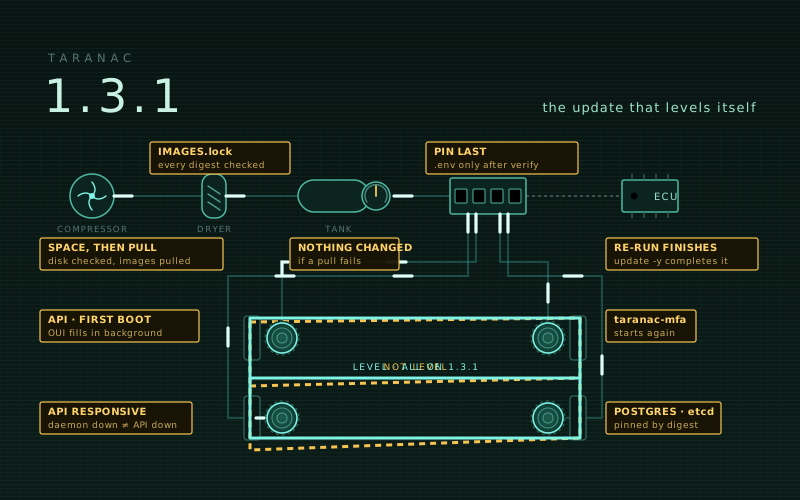
1.3.0 was the largest release the project has shipped. 1.3.1 is the smallest kind there is: nothing new to learn, only the path you take to get onto a version — installing it, updating to it, and coming back up afterwards — made to hold.
The picture on this post is an air suspension, because that is the right model for an update. Air is compressed, dried, stored and metered out through a valve block, and the car only sits level once every corner has been lifted. If the compressor fails half-way, you want the car exactly where it was, not with one corner on the ground and a dashboard that says level. That last case is what 1.3.0 could do to you, and it is what this release is about.
- The update checks everything before it changes anything
- Images named by digest
- A re-run finishes what a failed update started
- A fresh install starts on the first
up - The API stays up while a daemon is down
taranac-mfastarts again
The update checks everything before it changes anything
./taranac update now works in an order where every step that can fail comes before
every step that changes the installation:
- Record which image every running container uses, with its digest, into the update’s backup directory — so you know exactly what you were running.
- Check disk space for the images that are not on the host yet.
- Pull the new version’s images, while
.envstill pins the running one. - Compare every pulled image with the digest list the release ships.
- Only then swap the bundle files, pin
TARANAC_VERSIONin.env, and restart.
A pull that fails — an unreachable registry, a full disk, a digest that does not match
— leaves the bundle files, .env and the running stack exactly as they were. Images
from the previous version are still removed only once the stack is up on the new ones,
so the way back stays on the disk until you no longer need it.
--skip-space-check overrides the disk check when you know better than the estimate.
Images named by digest
A tag is a name somebody can move. A digest is the content itself.
Each release now carries IMAGES.lock — the content digest of every image in the
release — and that file is covered by the bundle’s own checksum. After the pull, an
image whose digest is not the release’s stops the update before the version is
pinned, and the message names the image. A bundle without the list is still
accepted, with a warning that its images were not verified.
If you pull through a registry mirror that re-pushes images (and so changes their
digests), --skip-image-verify accepts that deliberately.
The same reasoning reaches the two images we do not build. Postgres and etcd are
pinned by digest in the shipped compose files. They used to follow upstream tags —
postgres:16-alpine — so any update could quietly move your database to whatever
upstream had published that morning. Each release now fixes them to the digest that
was current when it was tested. On an HA node, the first update to 1.3.1 recreates
that node’s etcd member once, and the witness reports its compose file as changed once;
both are expected.
A re-run finishes what a failed update started
This is the one that could leave a node lying to you.
When the image pull or the restart failed after the version had already been pinned,
the node’s files and .env both said the new version while every container still ran
the old one. Running ./taranac update again answered “Already on X. Nothing to
do” — which was true of the files and false of the node.
“Nothing to do” now also requires the running containers to be on that version.
Otherwise the update proceeds and completes, no -y needed. ./taranac version
reports the same mismatch when it sees one, the failure message says what was and was
not changed at the step where it stopped, and the old hint to “use --version to
force” — which did not force anything — is replaced by ./taranac update -y.
With the new order above this state is much harder to reach in the first place. But a restart can still fail for reasons outside the updater, and when it does, the answer to “what do I do now” is the command you just ran.
A fresh install starts on the first up
On an empty database the API filled its manufacturer (OUI) table from IEEE before it
reported itself ready. That takes about three minutes on a slow link, and five with
IEEE unreachable. The other containers stopped waiting after two, and a brand-new
install ended with dependency api failed to start — the worst possible first
impression, on exactly the networks that are slow or closed.
The table is now filled after startup, in the background: from the snapshot inside the image first, then from IEEE. On a closed network the names simply come from the snapshot. The API’s health check also allows a first boot up to five minutes before a failure counts, so slow migrations on modest hardware no longer fail the dependency either.
The API stays up while a daemon is down
A configuration check waits up to 15 seconds for the TACACS+, RADIUS or NAC container to answer — and that wait held the whole API: web pages, the health check and the background jobs. With a daemon container down, the auto-reload repeated the wait every 30 seconds, so the console answered in 10–20 seconds and its own health check failed. One stopped daemon made the entire management plane look dead, which is the moment you most need it.
The wait, and the daemon status checks on the service pages and the monitoring page, no longer hold the API. One daemon is still checked by one caller at a time, so the checks do not pile up behind each other either.
taranac-mfa starts again
The 1.3.0 taranac-mfa image restarted in a loop with
database 'taranac_mfa' not available after 30s: No module named 'psycopg' — on every
installation, whether MFA was in use or not.
The image had been built with SQLAlchemy 2.1, which connects to a postgresql:// URL
through psycopg 3, while the image carries psycopg2. The service now names the psycopg2
driver itself, so TARANAC_MFA_DATABASE_URL stays exactly as it is. It also accepts
the URL with the driver spelled out (postgresql+psycopg2://), which in 1.3.0 broke
the migration step. And the image is now built from the dependency versions it was
tested with — which is the actual lesson here, and the same one as the digests above.
If you worked around this with an image of your own, you can go back to the official one.
To update: ./taranac update. If a previous update to 1.3.0 stopped half-way on one of
your nodes, the same command now finishes it.
The bundle and the appliance images are on the download page, and the upgrade notes have the full procedure. If an install or an update does not come up the way the documentation says it will, please file it — this release is what those reports turn into.