

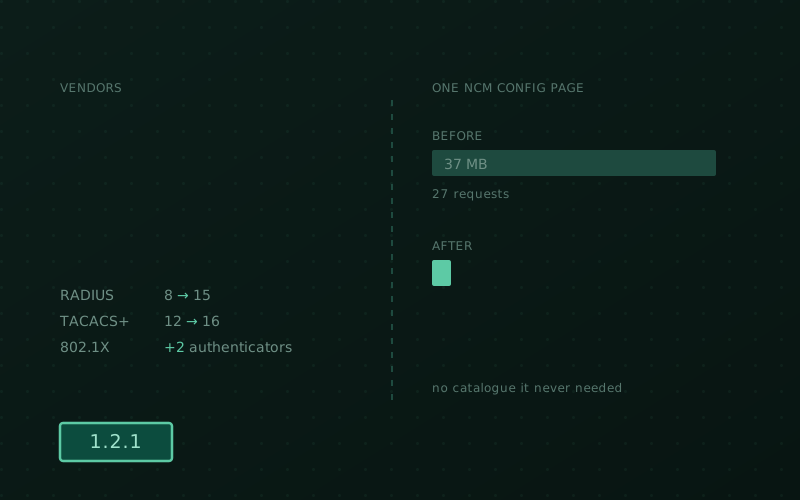
1.2.0 was a big release — a whole reporting domain — and the natural thing after a big release is to go back over what’s already there. That’s what 1.2.1 is. Three threads run through it: more gear speaks Taranac natively, the Configuration Tracker stops being surprised by very large configurations, and the UI got a lot lighter.
Seven more vendors for device administration
If your fleet is Cisco and Juniper, Taranac has always had you covered. Everyone else was doing more work than they should have.
RADIUS admin-auth templates go from 8 to 15 — MikroTik RouterOS, Arista EOS,
Aruba CX, Nokia SR OS, H3C/Comware, Ruckus/Brocade ICX and Extreme EXOS.
TACACS+ goes from 12 to 16, adding H3C/Comware 7 (roles AV-pair, RBAC), Nokia
SR OS, Ruckus/ICX and Extreme EXOS. Each one carries the right attribute for its
platform — Mikrotik-Group, Arista-AVPair, Aruba-Admin-Role, the Timetra
trio, H3C-Exec-Privilege, Foundry-Privilege-Level — including the ones with an
inverted privilege scale, where 0 is the most privileged and getting it
backwards means handing out full access by accident.
On the NAC side, the vendor dictionary gains Extreme EXOS and Ruckus ICX as 802.1X authenticators, both with CoA port bounce wired up. And the long-mislabelled “Aruba” entry is finally split: Aruba AOS-CX / Controllers and a distinct HP ProCurve, which is a different vendor with a different PEN and was never the same thing.
One upgrade detail worth stating plainly: new built-in vendors now reach an existing install. Seeding used to be all-or-nothing — if the dictionary had ever been seeded, later additions never arrived. It’s per-entry now, so you get the new vendors on boot and nothing you edited gets overwritten.
FortiGate command accounting that shows the command
A FortiGate doesn’t report the command it ran in the command field. It reports a
category — Config, Show, Diagnose, Execute — and puts the actual command
elsewhere. Which meant command accounting from a FortiGate technically worked and
told you nothing: page after page of Config.
Records from a FortiGate now carry the real command, in the log views and in the syslog export. If you have FortiGates and you’d written off their accounting, have another look.
Configurations too big to store are now tracked, not failed
The Configuration Tracker had a hard ceiling. Past it, a capture simply failed — and a device whose config is too large is exactly the device you most want to track.
A text configuration larger than a configurable threshold is now recorded as a version — the change is still detected, still dated, still in the timeline — without storing the body. The hash and size describe the full scrubbed text, so an oversized snapshot deduplicates exactly like a normal one: no phantom versions, no spurious “changed” when nothing did. The configuration page and the version timeline say so plainly rather than showing an empty diff.
The three ceilings are now settings, not constants:
ncm.text_store_max_bytes— 2 MiB by default; past this, text is tracked by hash only.ncm.text_buffer_max_bytes— 64 MiB; the largest text a capture will buffer.ncm.binary_max_bytes— 2 GiB; the largest binary it will download (0= unlimited).
The text buffer ceiling used to be 8 MiB, which made a 20 MB text config fail while a 2 GB firmware image sailed through. The defaults are what the product guarantees; the settings exist so an install that legitimately needs more can go further, knowingly.
And a too-large capture is no longer retried. It used to be classified as a transient error, which was wrong twice over: the retry re-fetches the same oversized payload, so every sweep burned the full retry budget — three extra device logins per configuration, for nothing — and the operator was told a threshold problem was a network problem. It now fails immediately and names the setting to raise.
Large configurations open instantly
Viewing the full text of a configuration with tens of thousands of lines used to freeze the tab. The view is windowed above 2,000 lines now and opens immediately at any size. While we were in there: the diff had a word-wrap toggle and the full-text view didn’t — it does now, and the preference carries across both views.
The UI stopped downloading catalogues it never needed
This is the change most people will feel every day, and it’s boring in the best way: forms and detail pages no longer fetch whole catalogues just to display the name of something you already picked.
Users, groups, TACACS+ and RADIUS profiles, NCM credentials, sources, recipes and configurations, LDAP RBAC assignments, the report builder — all of them now read those names straight from the payload they already received, and search the server through a drawer when you actually need to choose something.
Opening an NCM configuration went from about 27 requests and 37 MB to about 5 requests and 2.5 MB.
There’s a second, quieter win in there. Those catalogue fetches capped out at 100 entries — so past a hundred users, or groups, or profiles, the picker silently hid the rest and you had no way to know. Server-side search doesn’t have a hundredth entry.
Smaller things
- Taranac Push MFA is configurable again. The provider card is enrollable once more, marked Soon while the mobile app rolls out.
- LDAP configurations show up under an RBAC model’s “Used By”. A model referenced by an LDAP configuration’s default role or a group override was invisible to the where-used view and could be deleted, leaving a dangling reference. It’s listed now, and deletion is blocked until the reference is gone — matching how groups already behaved.
- Daemon configuration is re-checked at startup. The reload skip-gate added in 1.2.0 watches for data changes, so after an upgrade that changed how a configuration is generated, the new configuration wasn’t deployed until some unrelated edit or a manual Reload. Each daemon now reconciles its on-disk configuration once per boot. If you’re upgrading from 1.2.0, this is the one that matters.
- “Sources” highlights in the NCM sidebar. It was the one NCM settings page
routed outside
/ncm/settings, so the section never expanded for it on a page refresh. Old bookmarks redirect. - The PKI certificates page no longer loads twice. Selecting a CA fired two identical requests for the certificate list.
Vendor coverage is the kind of thing that’s never finished — there’s always one more box in someone’s rack. If yours isn’t in the list, tell us which platform and which attribute it wants; that’s a small, well-shaped change and it tends to land fast. Where the platform goes next is on the roadmap.
Self-hosted, artifact-only, Elastic License 2.0.