

1.2.1 was a pass over what already existed. 1.2.2 is the opposite: it closes the biggest hole in the product’s identity story, and a few more besides.
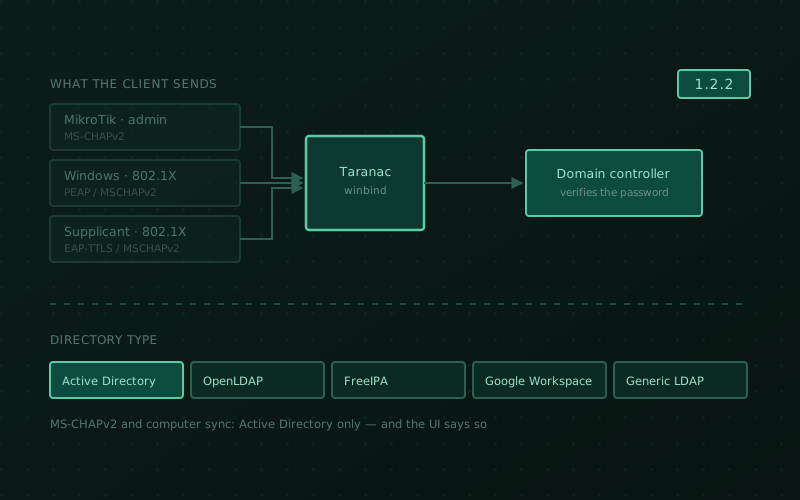
The hole was MS-CHAPv2. Plenty of gear will not authenticate an administrator any other way, and plenty of 802.1X supplicants will not put anything else inside the tunnel. Taranac could not do it. That is fixed — for local accounts, for Active Directory accounts, over RADIUS device administration and over 802.1X alike.
Underneath it sits a second change we did not plan on shipping in the same release: the LDAP integration stopped assuming every directory is Active Directory. And alongside both, certificate enrollment works end to end for the first time.
There is also a security section in this release, and it is not decorative. If you are running 1.2.1 or earlier, this is an upgrade worth scheduling.
MikroTik administrators can log in now
A MikroTik RouterOS box sends only MS-CHAPv2 for an administrator login. No PAP, no TACACS+ client at all. Which meant that until this release a RouterOS device could not authenticate against Taranac in any configuration — and that the RouterOS RADIUS template we shipped with a certain amount of fanfare in 1.2.1 was unreachable.
Device-administration RADIUS now speaks MS-CHAPv2. Local accounts are verified inside Taranac. An Active Directory account is verified by a domain controller, because its password hash is unreadable by design — that is what the domain-membership machinery below is for.
There is nothing to switch on. The branch is chosen by what the device actually sends, and a device that sends PAP never enters it.
Which is also why the RADIUS “authentication type” dropdown is gone. It offered PAP / CHAP / MS-CHAPv2 and nothing read the value — the handler authenticated with PAP regardless of what you picked. A control that advertises a capability the product does not have is worse than no control at all.
One RouterOS-specific fix that will show up in your numbers: a successful
MikroTik login no longer writes a phantom failure. RouterOS probes the SSH
“none” method by proving the empty password before it prompts the human, so every
successful administrator login produced a counted bad_password — halving the
brute-force threshold for exactly the devices that need MS-CHAPv2, and topping the
“top failed authentications” widget with the customer’s own admins.
And the same identity over 802.1X
A directory account now authenticates over PEAP/MSCHAPv2 and over EAP-TTLS/MSCHAPv2. Same mechanism, same domain controller, no separate switch.
While we were in there, native EAP-TTLS/MSCHAPv2 — what a supplicant sends when there is no EAP inside the tunnel — was broken for everyone, including a local account typing the correct password. All three EAP-TTLS inner methods work now.
Two things that used to send you looking in the wrong place:
- A rejected server certificate is named as such. An endpoint whose TLS
handshake dies — almost always because it does not trust the RADIUS server
certificate — was logged as PEAP with
auth_failed, which sends an operator after credentials for a certificate problem. The EAP method now comes from what the daemon reports, and an account that cannot use PEAP is told to use EAP-TTLS instead of being reported as a bad password. A missingntlm_authhelper is likewise named rather than surfacing as a wrong password. - A re-authentication no longer loses the session’s identity. An 802.1X
re-auth closes one session and opens the next milliseconds apart on the same
port, which is what made an active session read
LAB\anonymous.
And a correctness fix that is really a security fix: a domain-qualified name is
no longer an alias for a local account. Over 802.1X, ANYTHING\alice and
alice@whatever.invalid all authenticated as the local account alice, and the
log named the bare account either way. The name is now tried exactly as sent, and
a qualified name may only ever resolve to a directory account.
The node joins the domain by itself
Verifying a domain password means being a domain member, and domain membership is traditionally a ticket to somebody else’s team: create a computer object, delegate rights, wait.
Add an LDAP configuration with the MS-CHAPv2 settings and the installation becomes a domain member using the account it already binds with. A domain’s default machine-account quota is what makes this possible. The machine account name is derived so a node re-joins its own object rather than making a new one each time, and checked against the directory so two installations in one domain cannot overwrite each other. It happens once and never repeats.
Around it:
- An MS-CHAPv2 tab on the LDAP configuration — membership per node, the
feature switch, and a join dialog that asks the directory about the credentials
and the target OU before spending them. The two commonest failures — wrong
password, mis-ordered OU path — are named in under a second instead of coming
back as
net ads join’s own diagnostics. At most one LDAP configuration may own the domain, and the refusal names the one that already does. - A twelfth service,
winbind, ships with every installation. It owns the node’s machine account. With no domain configured it starts, reports “not joined” and does nothing — a service you must first install is a service nobody enables, and MS-CHAPv2 is needed precisely by the administrator who discovers the need at the moment their own login fails. - An alert when the domain trust breaks — narrowly: MS-CHAPv2 is on and this node can no longer verify a domain password. A member with the feature deliberately off never pages anyone, and “never joined” is reported as an incomplete setup, not a broken trust.
- Failures are diagnosed, not guessed. Twenty-four
NT_STATUScodes and nine join failures map to a cause and a next action — expired account, logon-hours policy, a dead controller, NTLM disabled by policy, clock skew, a broken machine trust — and each carries whether it counts as a credential attempt, so a rebooting domain controller no longer looks like password guessing.
A directory no longer has to be Active Directory
This one was not on the roadmap for 1.2.2; it fell out of the work above.
The LDAP integration was built for Active Directory and said so only in its code:
bind by UPN, look accounts up by sAMAccountName, track them by objectGUID,
filter on userAccountControl. Every one of those is false for OpenLDAP,
FreeIPA and Google Workspace Secure LDAP — which is why connecting one of
them could not be made to work by configuration alone, no matter how patiently you
edited the fields.
A directory now has a type: Active Directory, OpenLDAP, FreeIPA, Google Workspace, or generic. The type supplies two different things — what the protocol can do there (MS-CHAPv2 and computer sync are Active Directory only, and the UI says so rather than letting you configure something that cannot work), and the schema guesses you are free to overwrite: search filters, attribute maps, the example under each field.
The type is chosen once, when the configuration is created, and cannot be changed afterwards. Each directory imports accounts by its own login attribute and tracks them by its own identifier, so switching would mean converting users already synchronised — better refused than half-done.
Existing installations are untouched. A configuration with no type reads as Active Directory, and the Active Directory defaults are the previous literals character for character. The documentation covers each type, what it can and cannot do, and how OpenLDAP and FreeIPA connections are set up: LDAP directories.
Three long-standing LDAP annoyances went with it:
- An unreachable directory fails instead of hanging. The client read a boolean server pool as “retry forever”, sleeping between rounds — so a directory that did not answer never produced an error; the request simply hung, holding the worker that made it. Including Test connection, which is exactly where you go to find out what is wrong, and inside the RADIUS and TACACS+ daemons, where that loop sat in the thread serving the request.
- A wrong CA file is named instead of returning HTTP 500 on every operation.
- Computer synchronisation says which setting is missing rather than reporting “connection failure” and sending you to check the network, the controller and the certificates while the real cause sat in a container log.
Certificate enrollment works end to end
EST was in the product and unreachable by any supported route: the frontend
proxied only /api/, so /.well-known/est/ handed an enrolling client the web
UI’s HTML, and the only working path was the API’s bare port with an
internal-only certificate.
EST and the revocation lists are now published through the front door, on the installation’s own certificate, and the CRL distribution point fills itself in.
Approval is a queue now, not a wall. Turning on “require approval” used to
stop issuance rather than defer it: the request was stored as a certificate with
serial 0 and placeholder dates, no approval screen existed anywhere, and every
client poll appended another row. Requests are their own records, deduplicated by
the request fingerprint across polls, with a queue in the UI and an approval group
that says who gets notified. Deciding is still nac_pki.edit.
You can approve from the email. Members of the approval group get the request by mail with what is being issued and to whom. The link never acts on being opened — mail scanners, Safe Links and messenger previews follow links by themselves, so the GET only renders a page and the decision needs a deliberate confirmation.
A revoked certificate can no longer renew itself. A renewal is checked against the revocation list before it is granted.
One honest limit: renewal authenticated by the client’s own certificate needs a listener that verifies client certificates, and this release does not ship one. Until it does, a renewal authenticates the same way an enrollment does. The mTLS gateway is additive and lands in 1.2.3.
802.1X sessions stop lying about themselves
Filed as bug fixes; if you run 802.1X in production they are the reason to upgrade.
- A CoA “session not found” no longer kills a live session. A switch’s 503 answers “did I find a session matching your identifiers”, not “is anybody on the network” — it usually means the port re-authenticated in place. Taranac used to archive the session and report the disconnect as successful, with no way to bring it back.
- The orphaned-session probe no longer disconnects healthy sessions. It asked “are you still there?” with a real Disconnect-Request, so on hardware that sends no periodic interim accounting — the Cisco default — every healthy session eventually crossed the threshold and was torn down for being healthy. CoA also goes to the port configured for the device instead of a fixed one.
Reauthentication timerreaches the hardware. The value was carried everywhere — model, UI, reports, daemon cache — and serialized nowhere. You typed 3600, saw the “seconds” hint, and got nothing. It is rendered as Session-Timeout plus Termination-Action, per the vendor’s own mapping.- A session the NAS keeps reporting is no longer archived behind your back.
Security
Ten findings, several from adversarial review of our own diffs and several found on live hardware. Named plainly, because the alternative is you finding out some other way.
- Certificate enrollment could be reached with no credential at all. A request carrying two invented headers and nothing else got HTTP 200 and a signed certificate: the endpoint trusted client-identity headers that no proxy in the deployment ever set or stripped, so anyone who could reach it controlled them. Reproduced on a stand; now a 401.
- The token issued after the password but before the second factor was accepted as a session. Same key, same shape as a full access token, and nothing checked what it was for — so a stolen password alone was enough to enroll an attacker’s own second factor over the victim’s and then log in normally. Every token now declares its purpose and every endpoint accepts only the purposes it names, deny by default.
- The Telegram MFA webhook accepted unauthenticated requests. The secret check
began with “if a secret was sent”, so a request without the header passed it
entirely — and a forged one could make the bot disclose which Taranac accounts
are linked to a given Telegram account, into a chat of the caller’s choosing.
/mfa/verifyis now attempt-limited too. - Fetching a CRL was an internal port scanner. Only the URL prefix was checked: no loopback or private-range block, no re-check after a redirect, no size limit, TLS verification disabled outright, and the exception text handed back verbatim — on a schedule. It now validates the target, connects to the address it validated, verifies the certificate, caps the download, and reports failures without describing what it found.
- A TACACS+ rule whose device restriction resolved to nothing applied to every device. An emptied device group, or a device sitting on an FQDN object, turned a narrow rule into a fleet-wide one — and the generated ruleset is the only place that restriction is enforced. The same rule already failed closed in RADIUS, which means one rule had opposite meanings in the two protocols.
- A group’s RBAC model could be assigned by anyone who could edit groups, and the model behind a privileged group was visible to anyone who could view them — so an operator could grant their own group a privileged model and log in again. Assigning a model, and membership of administrative groups, now require administrator rights.
- Removing someone else’s second factor required nothing but the record’s UUID.
It requires
mfa.editnow. - A value containing a newline could append arbitrary directives to a generated daemon configuration. Escaping covered only quotes and backslashes, in all three generators. A mangled value breaks one device; a raw newline breaks the configuration of the whole fleet.
- A network object of type FQDN can no longer be attached to a device. Such an object carries no network, so the device silently dropped out of the RADIUS clients list — it was not authenticated at all — and its TACACS+ rules lost their device restriction entirely.
- Every container that runs nginx is rebuilt on a current one — 1.30.4 — and it
no longer announces its version. The listeners ran 1.27.5 (edge, frontend) and
1.26.3 (captive portal) — branches that ended in 2025 on tags frozen ever since,
so rebuilding those images never brought a single fix, however often we rebuilt
them. Nineteen and eighteen published advisories apply. None is reachable through
the shipped configuration, which uses only proxy, TLS, gzip and
return— but that list grows by itself, and an operator whose scanner flags it should not have to take our word for why it does not matter. All four listeners now suppress the version in theServerheader and on error pages; only the captive portal did before. Thanks to Andrew S, who raised it — this is exactly the kind of report that is easy to shrug off from the inside and obvious from the outside.
Keys and backups
The “Rotate Master Key” button destroyed installations. It re-encrypted the
system settings and nothing else — device keys, enable passwords, the internal
CA’s private keys, NCM credentials, TOTP secrets and the license stayed on the old
key while the new one was swapped in memory — and it answered 200. The endpoint
now refuses.
Rotation is a tool: ./taranac rotate-key, on a stopped system, in a single
transaction. You present the current key, name the new one, a backup is taken,
every encrypted column is re-encrypted, the system starts again. It can be
rehearsed on a dev stack, because a tool with nowhere to practise is a tool nobody
has practised.
A backup can now actually be restored. The archive carries .env, the compose
file and config/ — the database’s secrets are ciphertext whose key lives outside
it — and restoring asks for the five keys that matter. pg_dump gained a timeout,
so a hung dump no longer occupies the single scheduler slot forever while the
dashboard shows the last good archive. And an incomplete archive is no longer
reported as successful: the host-files part was never collected on any
deployment, and the only trace was a manifest field nobody reads — discovered at
restore time, the worst possible moment. It is loud now: audit entry, error log,
and a backup:incomplete alert that clears on the next complete archive.
Smaller things
- The username filter matches a substring, case-insensitively. Filtering the
NAC Auth Log for
ad_user1found nothing when the account had authenticated asad_user1@example.comorEXAMPLE\ad_user1. Applied to NAC Auth Log, NAC Sessions and the AAA logs, with trigram indexes on the seven journal tables so it stays fast on a large archive — 53 ms → 1.5 ms on a 60k-row partition. - A VLAN filter on authorization profiles. “Which profiles drop an endpoint into VLAN 40” no longer means paging through the list.
- The UI downloads only the languages it will show. All seven bundled languages — 3.58 MB of translations — were in the entry chunk, so an English-only installation fetched about 3.2 MB it would never display.
- Tables show an error instead of “no records”. On a failed request the log pages rendered their empty state, so an operator mid-incident read an empty authentication journal as “there were no authentications” — the worst kind of failure, silent and pointing the wrong way.
- Escape closes only the topmost drawer. Pressing it in a third-level form used to close all three and lose what you had typed.
- Syslog forwarding has a ceiling and reports what it drops. The forward window was unbounded, so after any downtime the whole missed range loaded at once and went out one message per record — on a large installation that is not a slowdown but an outage, at the moment the system comes back.
- Failed RADIUS MFA challenges say what actually arrived, so an expired code and a value that was never a code are no longer the same log line.
- The dashboard stops polling while its tab is hidden.
- Group matching on FortiGate. The seeded TACACS+ template named the AV-pair
member_of; a FortiGate asks formemberof, so it was silently dropped and group matching could never succeed. Migration 0019 renames it in existing templates and profiles too.
Upgrade notes
Three things worth reading before you pull:
- The RBAC list lost its Type column and System/Custom filter. No role in a
running system is ever a system role, so the column read “Custom” on every row
and one filter option returned everything while the other returned nothing. If
you built a custom report dataset on the
config_rbac_rolestemplate and picked theis_systemcolumn, it fails validation on its next run and needs its columns re-picked. No seeded dataset uses it. - The Security menu section is gone. Authentication & Sessions moved to System; the Crypto page went with it, since it existed for the one button described above.
- EAP-TEAP is gone from the log filter and the policy schema, having never been implemented — and EAP-TTLS, which is fully supported, is finally rendered and filterable in the log views and the session drawer.
1.2.2 ran 4149 passing, 0 failing on the dedicated runner — unit through
sustained-rate load under HA failover — at 81% backend line coverage, dated
2026-08-05 and commit-pinned. The breakdown ships in the bundle as TESTING.md,
including the eight cases tracked openly as expected-fail.
If you have MikroTik gear, or a directory that was never Active Directory, or 802.1X sessions that behaved strangely on re-authentication — this is your release. Where the platform goes next is on the roadmap.
Self-hosted, artifact-only, Elastic License 2.0.