

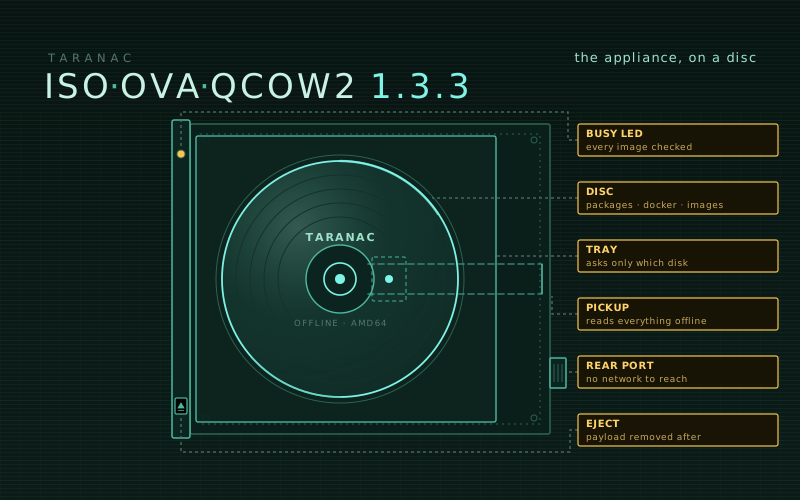
The oldest way to install software is still the one that works where nothing else does: a disc, a machine, and nobody asking it to reach the internet.
Our appliance has always installed offline — every container image is already on its disk. But it only got as far as the hypervisors that would take it. An OVA assumes a hypervisor that imports OVAs and an operator who is allowed to import a ready-made image. In the closed networks Taranac is built for, that is not a given: VMs come from the site’s own template, with its own controller and firmware, and “import this file we downloaded” is exactly the step that gets refused.
So the appliance now also comes on a disc.
Three artifacts, one appliance
The download page now offers 1.3.3 three ways:
- OVA — VMware ESXi, vSphere, Workstation, Fusion, VirtualBox;
- QCOW2 — Proxmox VE, libvirt / KVM, QEMU;
- Offline installer ISO — anything that boots an install disc, BIOS or UEFI.
They are not three products. The ISO ends exactly where the OVA begins: at the
same setup wizard, on the same system, with the same bundle in /opt/taranac.
What the ISO does
Boot it, choose Install Taranac 1.3.3 (offline), and Ubuntu’s own installer runs with every question answered in advance — except which disk. We left that one to you on purpose. An unattended install would be faster, but an ISO in someone’s hands will one day boot on the wrong machine.
The heavy half happens on the first boot, because only there is a running system with a Docker daemon to load images into. The console shows each step as it goes: the root grown to the whole disk, the base system patched, the appliance’s packages and Docker installed, and the container images loaded — all from what the ISO carries, with no route out. The ISO holds a small package repository resolved against its own Ubuntu, not against whatever machine built it, so what it installs is exactly what that system was missing.
Before it hands over, the preparation checks that every image the bundle names is present, by the exact reference the stack will ask for. An image that loaded under the wrong name is the kind of mistake that only shows up on the stack’s first start, when it reaches for a registry it cannot see. The installer refuses to finish instead — and if it stops, the console names the log and the one command that resumes it, rather than leaving a login prompt that “does nothing”.
Then the payload — several GB of packages and images — is removed from your disk, and the wizard opens. Our acceptance runs are done on an isolated port group with no DHCP and no gateway, on purpose: if anything in the chain reached for the network, that is where we would find out.
The offline installer guide walks through it with screenshots.
Ubuntu 26.04 underneath
The appliance is now built on Ubuntu 26.04 LTS, supported until 2031 — two years more than 24.04. An appliance deployed next year should not be on an OS with two years left to live.
This changes the appliance’s own base, not what the bundle supports: Taranac still
installs on Ubuntu 22.04, 24.04 and 26.04 hosts. And an appliance you already run
stays on the Ubuntu it was deployed with — ./taranac update moves Taranac forward,
not the operating system under it.
26.04 did not come over quietly. Its new initrd builder kept only the drivers of the machine the image was built on — a VM with a different disk controller would not have found its own disk — so it is now built generic, and checked. A kernel upgrade during the ISO install once left a boot menu without its initrd; the menu is rewritten after the upgrade now, and the build verifies it. Each of those was found by installing it, not by reading release notes.
The wizard asks for time servers
There is a new step after the timezone: time servers (NTP). Leave it empty and the appliance keeps Ubuntu’s public pool; in a closed network, enter your own.
On a NAC box a wrong clock is not cosmetic. MFA codes stop matching, certificate validity checks misfire, and accounting records stop lining up with the switches’ own logs. And on 26.04 it is not enough to add a server beside the defaults: the public pool is authenticated (NTS), and while it is configured chrony will not pick an unauthenticated server, reachable or not. On our test bench a clock 32 minutes off stayed 32 minutes off with the operator’s server answering every poll. So the servers you enter replace the pool, and the clock is stepped right away.
Also in this image
- The collector is 1.3.3. An appliance carries the collector image of the release it was cut from, and the previous image’s collector no longer matched a current core. Deploying a collector from this image against a 1.3.3 core works as it should.
- The previous release stays. 1.2.3 remains downloadable below the cards, for anyone mid-pilot on it. 1.1.1 is retired from the page.
Where to start
Download from the download page and check the SHA-256 printed beside each file — this image gets root on the box that authenticates your network. Then the appliance guide for the OVA and QCOW2, or the offline installer guide for the ISO.
Self-hosted, artifact-only, free — and now it fits on a disc.